DIGITAL
FLUENCY
Laboratory Activity
WHAT IS A COMPUTER?
◦A computer is an electronic
device that manipulates
information, or data. It has the
ability to store, retrieve,
and process data.
◦A computer a digital electronic
machine that can be
programmed to carry out
sequences of arithmetic or
COMPUTER CONFIGURATION
◦ Configuration is the manner in which components are
arranged to make up the computer system. Configuration
consists of both hardware and software components.
◦ Example for computer configuration are:-
◦ Processor – Intel(R) i9
◦ OS – Windows 10
◦ Storage - 512 GB internal Solid State Drive (SSD)
LAPTOP CONFIGURATION
◦ A configuration defines the computers, processes, and
devices that compose the system and its boundary. More
generally, the system configuration is the specific
definition of the elements that define and/or prescribe
what a system is composed of like
ram,cpu,chipset,proccesor,gpu, etc
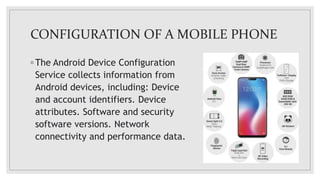
CONFIGURATION OF A MOBILE PHONE
◦ The Android Device Configuration
Service collects information from
Android devices, including: Device
and account identifiers. Device
attributes. Software and security
software versions. Network
connectivity and performance data.
WHAT IS OPERATING SYSTEM
◦ An Operating System (OS) is a software that acts as an
interface between computer hardware components and the
user. Every computer system must have at least one
operating system to run other programs. Applications like
Browsers, MS Office, Notepad Games, etc., need some
environment to run and perform its tasks.
◦ The OS helps you to communicate with the computer
without knowing how to speak the computer’s language. It
is not possible for the user to use any computer or mobile
device without having an operating system.
TYPES OF OPERATING SYSTEMS
• Batch Operating System
• Multitasking/Time Sharing OS
• Multiprocessing OS
• Real Time OS
• Distributed OS
• Network OS
• Mobile OS
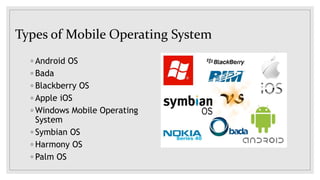
Types of Mobile Operating System
◦ Android OS
◦ Bada
◦ Blackberry OS
◦ Apple iOS
◦ Windows Mobile Operating
System
◦ Symbian OS
◦ Harmony OS
◦ Palm OS
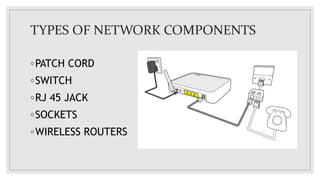
TYPES OF NETWORK COMPONENTS
◦PATCH CORD
◦SWITCH
◦RJ 45 JACK
◦SOCKETS
◦WIRELESS ROUTERS
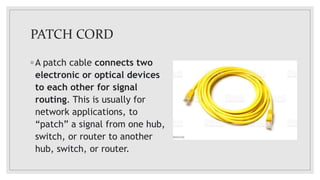
PATCH CORD
◦ A patch cable connects two
electronic or optical devices
to each other for signal
routing. This is usually for
network applications, to
“patch” a signal from one hub,
switch, or router to another
hub, switch, or router.
SWITCH
◦Switches are networking
devices operating at layer 2 or
a data link layer of the OSI
model. They connect devices in
a network and use packet
switching to send, receive or
forward data packets or data
frames over the network. A
switch has many ports, to which
RJ 45 JACK
◦ (Registered Jack-45) A common
data networking interface that
employs a cable of twisted wire
pairs and an 8-pin modular jack.
RJ-45 is used for Ethernet and
Type 3 Token Ring networks.
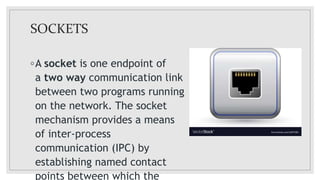
SOCKETS
◦A socket is one endpoint of
a two way communication link
between two programs running
on the network. The socket
mechanism provides a means
of inter-process
communication (IPC) by
establishing named contact
points between which the
WIRELESS ROUTERS
◦ Wireless routers are commonly
found in homes -- they're the
hardware devices that Internet
service providers use to
connect you to their cable or
xDSL Internet network. A
wireless router, also called a
Wi-Fi router, combines the
networking functions of a
wireless access point and a
router.
HOTSPOT
◦A hotspot is a public place
that offers wireless
internet.
A mobile or personal
hotspot lets a user go online
by connecting a device to
their smartphone.
CONNECTING OTHER PHONES TO YOUR
HOTSPOT
◦ 1.Open your phone’s Settings app.
2.Tap Network & internet
3.Hotspot & tethering
4.Wi-Fi hotspot.
5.Turn on Wi-Fi hotspot.
◦ 1.On the other device, open that device’s list of Wi-Fi options.
2.Pick your phone’s hotspot name.
3.Enter your phone’s hotspot password.
4.Click Connect
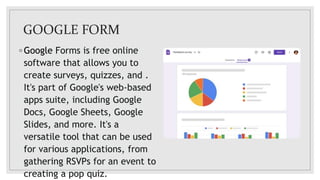
GOOGLE FORM
◦ Google Forms is free online
software that allows you to
create surveys, quizzes, and .
It's part of Google's web-based
apps suite, including Google
Docs, Google Sheets, Google
Slides, and more. It's a
versatile tool that can be used
for various applications, from
gathering RSVPs for an event to
creating a pop quiz.
STEPS TO CREATE A GOOGLE FORM
◦Create a Form
◦Title the Form
◦Type Your Question
◦Click on Send to
Share
◦View Responses
BLANK FORM EXAMPLE
HOW TO BOOK TRAIN TICKETS
1.Install IRCTC Rail Connect. Register yourself. Login using the newly created credentials.
2.Click on Plan My Bookings on the homepage. Enter departure station and designation
station information, the date on which you wish to travel, and click on Search Trains.
3.A list of trains, their timing of departure, and the available (or non-availability) of stocks
will be mentioned. The availability will also be segregated based on classes like Sleeper
class, A/C, and more.
4.Clicking on the class will reveal the price of the ticket. Once you've decided the train
and class, click on Passenger Details.
5.You can add a maximum of up to six adults and two infants in one booking. IRCTC asks
for the destination address as well. Fill in the details and accept the terms and
conditions by clicking on the check boxes. Click on Review Journey Details.
6.Scan through the train information, the class booked, and the passenger information. If
you're satisfied with all the details, click on Proceed to Pay after filing in the CAPTCHA
code at the bottom of the page.
MICROSOFT WORD
◦Microsoft Word or MS Word
(often called Word) is a
graphical word processing
program that users can type
with. It is made by the
computer company Microsoft.
Its purpose is to allow users to
type and save documents.
Similar to other word
processors, it has helpful tools
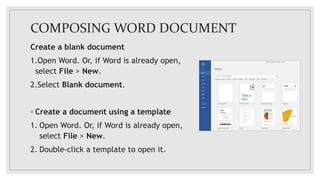
COMPOSING WORD DOCUMENT
Create a blank document
1.Open Word. Or, if Word is already open,
select File > New.
2.Select Blank document.
◦ Create a document using a template
1. Open Word. Or, if Word is already open,
select File > New.
2. Double-click a template to open it.
STEPS TO CREATE TABLES IN WORD
◦ To add a table in Word, you’ll
need first to open a blank or
existing Word document
◦ press the Insert tab on the
ribbon bar.
◦ From here, click
the Table button.
◦ This will display a drop-down
menu with various options. To
insert a table automatically,
select the size you want from
the grid.
◦ Once pressed, the table will
be inserted onto the page
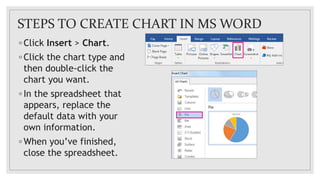
STEPS TO CREATE CHART IN MS WORD
◦ Click Insert > Chart.
◦ Click the chart type and
then double-click the
chart you want.
◦ In the spreadsheet that
appears, replace the
default data with your
own information.
◦ When you’ve finished,
close the spreadsheet.
SPREADSHEET
◦ A spreadsheet is a tool that is
used to store, manipulate and
analyze data. Data in a
spreadsheet is organized in a
series of rows and columns and
can be searched, sorted,
calculated and used in a variety
of charts and graphs.
◦ The true power of the
spreadsheet is its ability to
handle complex mathematical
calculations and automatically
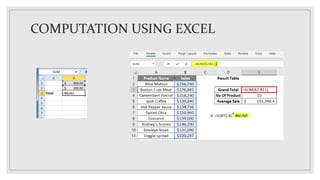
COMPUTATION USING EXCEL
DIGITAL FLUENCY.pptx

DIGITAL FLUENCY.pptx

  • 1.
  • 2.
    WHAT IS ACOMPUTER? ◦A computer is an electronic device that manipulates information, or data. It has the ability to store, retrieve, and process data. ◦A computer a digital electronic machine that can be programmed to carry out sequences of arithmetic or
  • 3.
    COMPUTER CONFIGURATION ◦ Configurationis the manner in which components are arranged to make up the computer system. Configuration consists of both hardware and software components. ◦ Example for computer configuration are:- ◦ Processor – Intel(R) i9 ◦ OS – Windows 10 ◦ Storage - 512 GB internal Solid State Drive (SSD)
  • 4.
    LAPTOP CONFIGURATION ◦ Aconfiguration defines the computers, processes, and devices that compose the system and its boundary. More generally, the system configuration is the specific definition of the elements that define and/or prescribe what a system is composed of like ram,cpu,chipset,proccesor,gpu, etc
  • 5.
    CONFIGURATION OF AMOBILE PHONE ◦ The Android Device Configuration Service collects information from Android devices, including: Device and account identifiers. Device attributes. Software and security software versions. Network connectivity and performance data.
  • 6.
    WHAT IS OPERATINGSYSTEM ◦ An Operating System (OS) is a software that acts as an interface between computer hardware components and the user. Every computer system must have at least one operating system to run other programs. Applications like Browsers, MS Office, Notepad Games, etc., need some environment to run and perform its tasks. ◦ The OS helps you to communicate with the computer without knowing how to speak the computer’s language. It is not possible for the user to use any computer or mobile device without having an operating system.
  • 7.
    TYPES OF OPERATINGSYSTEMS • Batch Operating System • Multitasking/Time Sharing OS • Multiprocessing OS • Real Time OS • Distributed OS • Network OS • Mobile OS
  • 8.
    Types of MobileOperating System ◦ Android OS ◦ Bada ◦ Blackberry OS ◦ Apple iOS ◦ Windows Mobile Operating System ◦ Symbian OS ◦ Harmony OS ◦ Palm OS
  • 9.
    TYPES OF NETWORKCOMPONENTS ◦PATCH CORD ◦SWITCH ◦RJ 45 JACK ◦SOCKETS ◦WIRELESS ROUTERS
  • 10.
    PATCH CORD ◦ Apatch cable connects two electronic or optical devices to each other for signal routing. This is usually for network applications, to “patch” a signal from one hub, switch, or router to another hub, switch, or router.
  • 11.
    SWITCH ◦Switches are networking devicesoperating at layer 2 or a data link layer of the OSI model. They connect devices in a network and use packet switching to send, receive or forward data packets or data frames over the network. A switch has many ports, to which
  • 12.
    RJ 45 JACK ◦(Registered Jack-45) A common data networking interface that employs a cable of twisted wire pairs and an 8-pin modular jack. RJ-45 is used for Ethernet and Type 3 Token Ring networks.
  • 13.
    SOCKETS ◦A socket isone endpoint of a two way communication link between two programs running on the network. The socket mechanism provides a means of inter-process communication (IPC) by establishing named contact points between which the
  • 14.
    WIRELESS ROUTERS ◦ Wirelessrouters are commonly found in homes -- they're the hardware devices that Internet service providers use to connect you to their cable or xDSL Internet network. A wireless router, also called a Wi-Fi router, combines the networking functions of a wireless access point and a router.
  • 15.
    HOTSPOT ◦A hotspot isa public place that offers wireless internet. A mobile or personal hotspot lets a user go online by connecting a device to their smartphone.
  • 16.
    CONNECTING OTHER PHONESTO YOUR HOTSPOT ◦ 1.Open your phone’s Settings app. 2.Tap Network & internet 3.Hotspot & tethering 4.Wi-Fi hotspot. 5.Turn on Wi-Fi hotspot. ◦ 1.On the other device, open that device’s list of Wi-Fi options. 2.Pick your phone’s hotspot name. 3.Enter your phone’s hotspot password. 4.Click Connect
  • 17.
    GOOGLE FORM ◦ GoogleForms is free online software that allows you to create surveys, quizzes, and . It's part of Google's web-based apps suite, including Google Docs, Google Sheets, Google Slides, and more. It's a versatile tool that can be used for various applications, from gathering RSVPs for an event to creating a pop quiz.
  • 18.
    STEPS TO CREATEA GOOGLE FORM ◦Create a Form ◦Title the Form ◦Type Your Question ◦Click on Send to Share ◦View Responses
  • 19.
  • 20.
    HOW TO BOOKTRAIN TICKETS 1.Install IRCTC Rail Connect. Register yourself. Login using the newly created credentials. 2.Click on Plan My Bookings on the homepage. Enter departure station and designation station information, the date on which you wish to travel, and click on Search Trains. 3.A list of trains, their timing of departure, and the available (or non-availability) of stocks will be mentioned. The availability will also be segregated based on classes like Sleeper class, A/C, and more. 4.Clicking on the class will reveal the price of the ticket. Once you've decided the train and class, click on Passenger Details. 5.You can add a maximum of up to six adults and two infants in one booking. IRCTC asks for the destination address as well. Fill in the details and accept the terms and conditions by clicking on the check boxes. Click on Review Journey Details. 6.Scan through the train information, the class booked, and the passenger information. If you're satisfied with all the details, click on Proceed to Pay after filing in the CAPTCHA code at the bottom of the page.
  • 22.
    MICROSOFT WORD ◦Microsoft Wordor MS Word (often called Word) is a graphical word processing program that users can type with. It is made by the computer company Microsoft. Its purpose is to allow users to type and save documents. Similar to other word processors, it has helpful tools
  • 23.
    COMPOSING WORD DOCUMENT Createa blank document 1.Open Word. Or, if Word is already open, select File > New. 2.Select Blank document. ◦ Create a document using a template 1. Open Word. Or, if Word is already open, select File > New. 2. Double-click a template to open it.
  • 24.
    STEPS TO CREATETABLES IN WORD ◦ To add a table in Word, you’ll need first to open a blank or existing Word document ◦ press the Insert tab on the ribbon bar. ◦ From here, click the Table button. ◦ This will display a drop-down menu with various options. To insert a table automatically, select the size you want from the grid. ◦ Once pressed, the table will be inserted onto the page
  • 25.
    STEPS TO CREATECHART IN MS WORD ◦ Click Insert > Chart. ◦ Click the chart type and then double-click the chart you want. ◦ In the spreadsheet that appears, replace the default data with your own information. ◦ When you’ve finished, close the spreadsheet.
  • 26.
    SPREADSHEET ◦ A spreadsheetis a tool that is used to store, manipulate and analyze data. Data in a spreadsheet is organized in a series of rows and columns and can be searched, sorted, calculated and used in a variety of charts and graphs. ◦ The true power of the spreadsheet is its ability to handle complex mathematical calculations and automatically
  • 27.