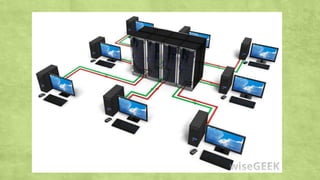
Different Types of Computer
Prepared by: Elrene M. Cruz
Computer
▪An electronic device that accepts
input, process data, stores data,
produces output, all according to a
series of stored instruction
Different Types of Computer
Prepared by: Elrene M. Cruz
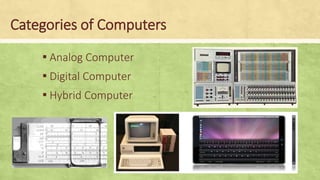
Categories of Computers
▪ Analog Computer
▪ Digital Computer
▪ Hybrid Computer
Analog Computer
▪ Analog computer works with continuous values.
▪ It has very limited memory.
▪ It has no state.
▪ It can perform certain types of calculations.
▪ It is difficult to use
Analog Computer
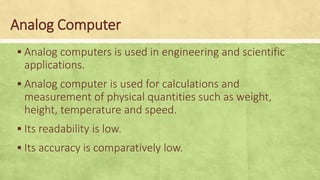
▪ Analog computers is used in engineering and scientific
applications.
▪ Analog computer is used for calculations and
measurement of physical quantities such as weight,
height, temperature and speed.
▪ Its readability is low.
▪ Its accuracy is comparatively low.
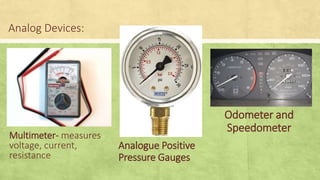
Analog Devices:
Multimeter- measures
voltage, current,
resistance
Analogue Positive
Pressure Gauges
Odometer and
Speedometer
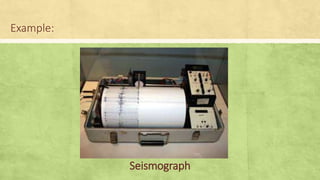
Example:
Seismograph
Digital Computer
▪Digital computers works with discrete value
(0,1). It can work only with digits
▪It can store large amount of data.
▪It has two states on and off
▪Its speed of calculation is very high.
▪It is easy to use.
Digital Computer
▪Digital computer is widely used in almost all
fields of life.
▪Digital computer is used to calculate
mathematical and logical operations.
▪Its accuracy is high.
▪Its readability is high.
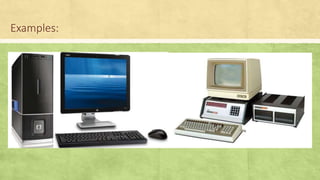
Examples:
Hybrid Computer
▪Hybrid computes are computers that exhibit
features of analog computers and digital
computers.
▪The digital component normally serves as the
controller and provides logical operations.
Examples:
Computers at the Hospital
Classification of Computers
▪ Supercomputers
▪ Mainframes
▪ Minicomputer (Midrange computers)
▪ Microcomputers
▪ Server
Supercomputers
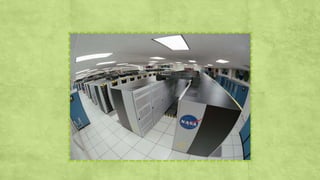
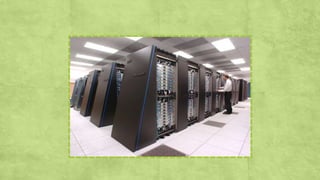
▪ Are the largest, fastest, most powerful and
most expensive computers made.
▪ Are fast because of multiprocessing—the
computer performs many tasks
simultaneously.
Mainframes
▪ These are used in banking, finance, government and
other public and private enterprises. They are large,
powerful computers designed to handle great
volumes of complex data and process bulk
information. This makes them ideal for the business
and national security environment.
▪ It has the capacities to host multiple operating
systems and opiate as a number of virtual machines
and can substitute for several small servers
Minicomputers or Midrange Computers
▪Are multi-user, multiprogramming
systems.
▪Minicomputers can perform the same
tasks as Mainframe computers but are a
little slower.
Microcomputers (Personal Computers)
▪Single-user computers.
▪Supports multitasking—allowing the user to
switch between tasks.
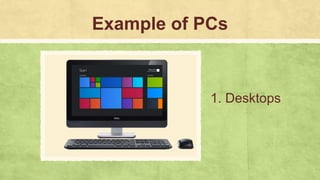
Example of PCs
1. Desktops
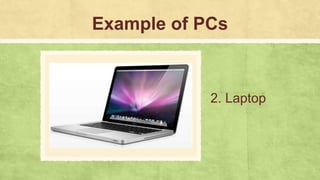
Example of PCs
2. Laptop
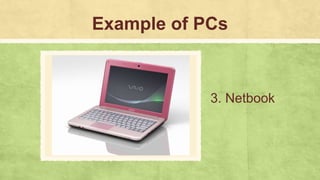
Example of PCs
3. Netbook
Example of PCs
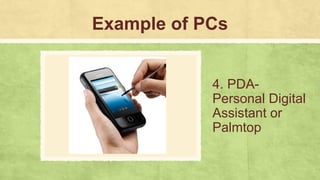
4. PDA-
Personal Digital
Assistant or
Palmtop
Example of PCs
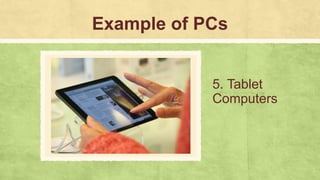
5. Tablet
Computers
Example of PCs
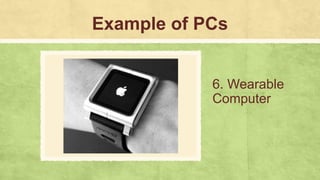
6. Wearable
Computer
Servers
▪These are computers designed to provide
services to client machines in a computer
network. They have large storage capacities
and powerful processor
Seatwork: Directions
▪Identify the type of computer being
described in the following sentences.
Write your answer on ¼ sheet of paper.
1. They are computers designed to provide
services to client machines in a computer
network
2. These are mobile computers that are very
handy to use.
3. They fall in the category of laptops, but are
inexpensive and relatively smaller in size.
4. They are also called mid-range system or
workstations
5. A type of computer which is intended be used
on a single location.
6. Computers that have the capacities to host
multiple operating systems and operate as a
number of virtual machines and can substitute for
several small servers.
7. A computer with a microprocessor and its
central processing unit.
8. They use digital circuits and are designed to
operate on two states, namely bits 0 and 1
9. These computers can be worn on the body
and are often used in the study of behavior
modeling and human health
10. It is a handheld computer and popularly
known as palmtop.
1. Tablet computers
2. Severs
3. Minicomputers
4. Microcomputers
5. Netbook
6. Desktop
7. Digital Computers
8. Mainframes
9. PDA-Personal Digital Assistant
10. Wearable computer
Assignment
▪Give 5 peripheral devices of the
computer system (with pictures
and descriptions)

Different Types of Computer.pptx

  • 1.
    Different Types ofComputer Prepared by: Elrene M. Cruz
  • 3.
    Computer ▪An electronic devicethat accepts input, process data, stores data, produces output, all according to a series of stored instruction
  • 6.
    Different Types ofComputer Prepared by: Elrene M. Cruz
  • 7.
    Categories of Computers ▪Analog Computer ▪ Digital Computer ▪ Hybrid Computer
  • 8.
    Analog Computer ▪ Analogcomputer works with continuous values. ▪ It has very limited memory. ▪ It has no state. ▪ It can perform certain types of calculations. ▪ It is difficult to use
  • 9.
    Analog Computer ▪ Analogcomputers is used in engineering and scientific applications. ▪ Analog computer is used for calculations and measurement of physical quantities such as weight, height, temperature and speed. ▪ Its readability is low. ▪ Its accuracy is comparatively low.
  • 10.
    Analog Devices: Multimeter- measures voltage,current, resistance Analogue Positive Pressure Gauges Odometer and Speedometer
  • 11.
  • 12.
    Digital Computer ▪Digital computersworks with discrete value (0,1). It can work only with digits ▪It can store large amount of data. ▪It has two states on and off ▪Its speed of calculation is very high. ▪It is easy to use.
  • 13.
    Digital Computer ▪Digital computeris widely used in almost all fields of life. ▪Digital computer is used to calculate mathematical and logical operations. ▪Its accuracy is high. ▪Its readability is high.
  • 14.
  • 15.
    Hybrid Computer ▪Hybrid computesare computers that exhibit features of analog computers and digital computers. ▪The digital component normally serves as the controller and provides logical operations.
  • 16.
  • 17.
    Classification of Computers ▪Supercomputers ▪ Mainframes ▪ Minicomputer (Midrange computers) ▪ Microcomputers ▪ Server
  • 19.
    Supercomputers ▪ Are thelargest, fastest, most powerful and most expensive computers made. ▪ Are fast because of multiprocessing—the computer performs many tasks simultaneously.
  • 21.
    Mainframes ▪ These areused in banking, finance, government and other public and private enterprises. They are large, powerful computers designed to handle great volumes of complex data and process bulk information. This makes them ideal for the business and national security environment. ▪ It has the capacities to host multiple operating systems and opiate as a number of virtual machines and can substitute for several small servers
  • 23.
    Minicomputers or MidrangeComputers ▪Are multi-user, multiprogramming systems. ▪Minicomputers can perform the same tasks as Mainframe computers but are a little slower.
  • 25.
    Microcomputers (Personal Computers) ▪Single-usercomputers. ▪Supports multitasking—allowing the user to switch between tasks.
  • 26.
  • 27.
  • 28.
  • 29.
    Example of PCs 4.PDA- Personal Digital Assistant or Palmtop
  • 30.
    Example of PCs 5.Tablet Computers
  • 31.
    Example of PCs 6.Wearable Computer
  • 32.
    Servers ▪These are computersdesigned to provide services to client machines in a computer network. They have large storage capacities and powerful processor
  • 36.
    Seatwork: Directions ▪Identify thetype of computer being described in the following sentences. Write your answer on ¼ sheet of paper.
  • 37.
    1. They arecomputers designed to provide services to client machines in a computer network 2. These are mobile computers that are very handy to use. 3. They fall in the category of laptops, but are inexpensive and relatively smaller in size. 4. They are also called mid-range system or workstations
  • 38.
    5. A typeof computer which is intended be used on a single location. 6. Computers that have the capacities to host multiple operating systems and operate as a number of virtual machines and can substitute for several small servers. 7. A computer with a microprocessor and its central processing unit. 8. They use digital circuits and are designed to operate on two states, namely bits 0 and 1
  • 39.
    9. These computerscan be worn on the body and are often used in the study of behavior modeling and human health 10. It is a handheld computer and popularly known as palmtop.
  • 42.
    1. Tablet computers 2.Severs 3. Minicomputers 4. Microcomputers 5. Netbook 6. Desktop 7. Digital Computers 8. Mainframes 9. PDA-Personal Digital Assistant 10. Wearable computer
  • 43.
    Assignment ▪Give 5 peripheraldevices of the computer system (with pictures and descriptions)

Editor's Notes

  • #20 *Most of the people commonly use super computer are physicist, scientist, meteorologist, global warming people etc. Even engineers are using this kind of computer
  • #22 *Mainframes are commonly use by corporate and government organizations for critical applications.
  • #24 *These computers are smaller than mainframes
  • #26 *It became popular in the 1970s and 1980s *It has CPU (microprocessor) *It has input and output devices already
  • #27 A type of computer which is intended to be used on a single location
  • #28 *It became popular in the 1970s and 1980s *It has CPU (microprocessor) *It has input and output devices already
  • #29 They fall in the category of laptops, but are inexpensive and relatively smaller in size
  • #30 *It became popular in the 1970s and 1980s *It has CPU (microprocessor) *It has input and output devices already
  • #31 These are mobile computers that are very handy to use.
  • #32 *It became popular in the 1970s and 1980s *It has CPU (microprocessor) *It has input and output devices already
  • #33 *It became popular in the 1970s and 1980s *It has CPU (microprocessor) *It has input and output devices already
  • #37 *It became popular in the 1970s and 1980s *It has CPU (microprocessor) *It has input and output devices already
  • #38 *It became popular in the 1970s and 1980s *It has CPU (microprocessor) *It has input and output devices already
  • #39 *It became popular in the 1970s and 1980s *It has CPU (microprocessor) *It has input and output devices already
  • #40 *It became popular in the 1970s and 1980s *It has CPU (microprocessor) *It has input and output devices already
  • #43 *It became popular in the 1970s and 1980s *It has CPU (microprocessor) *It has input and output devices already
  • #44 *It became popular in the 1970s and 1980s *It has CPU (microprocessor) *It has input and output devices already