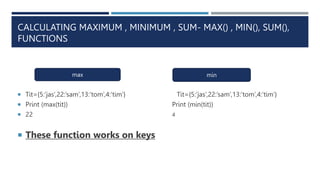
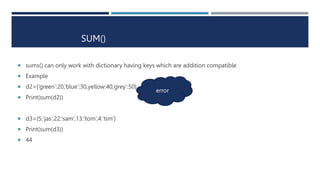
This document discusses various dictionary functions and methods in Python. It explains how to get the length of a dictionary using len(), access items and values using .items() and .values(), create dictionaries from keys using .fromkeys(), shallow copy a dictionary using .copy(), get a sorted list of keys using sorted(), and calculate the maximum, minimum and sum of dictionary keys using max(), min() and sum(). Functions like .get(), .keys(), .update() are also covered.

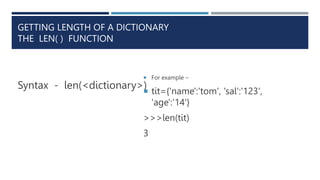
![ACCESSING ITEMS, KEYS AND VALUES
Syntax- <dictionary>.get( key )
To get the value of a key
For example:
tit={'name':'tom', 'sal':'123', 'age':'14'}
>>>tit.get(‘age’)
‘14’
It returns all the items in the dictionary as a
sequence of key,value pair
It returns them as tuples
For example:
tit={'name':'tom', 'sal':'123', 'age':'14'}
>>>tit.items()
([ ('name':'tom‘), ('sal':'123‘),( 'age':'14‘)
])
The item( ) method
The get( ) method](https://image.slidesharecdn.com/dictionaryfunctionsandmethods-240315180025-a2af61bd/85/Dictionary-functions-and-methods-ppt-3-320.jpg)
![ It returns all the keys in a dictionary
It returns them in list form
Syntax- <dictionary>.keys( )
For example:
tit={'name':'tom', 'sal':'123',
'age':'14'}
>>>tit.keys( )
['name‘, 'sal’, 'age']
It returns all the values of a
dictionary
It returns in list form
Syntax - <dictionary>. values()
For example:
tit={'name':'tom', 'sal':'123', 'age':'14'}
>>>tit.values( )
[‘tom’, ‘123’, ‘14’]
The keys() method The values( ) method](https://image.slidesharecdn.com/dictionaryfunctionsandmethods-240315180025-a2af61bd/85/Dictionary-functions-and-methods-ppt-4-320.jpg)
![CREATING DICTIONARIES FROM KEYS
It contains sequence of keys of the new
dictionary
The key can be in form of list or tuple
It has one common value
If no value given , value None ,is
assigned to value
SYNTAX-
dict.fromkeys(<keys sequence>,
The fromkeys( ) method
nd=dict.fromkeys([2,3,4,5,], 100)
>>>nd
{2:100, 3:100 , 4:100, 5:100}
nd=dict.fromkeys((2,3,4,5,))………..ex-2
>>>nd
{2:None,3:None,4:None,5:None}](https://image.slidesharecdn.com/dictionaryfunctionsandmethods-240315180025-a2af61bd/85/Dictionary-functions-and-methods-ppt-5-320.jpg)
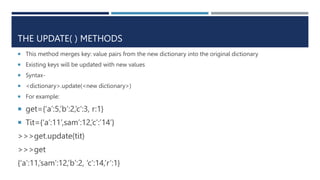
![SHALLOW COPY
Syntax-<dict>.copy
For example:
tit={'name':'tom', 'sal':'123', 'age':'14'}
tit2=tit.copy( )
print(tit2)
tit={'name':'tom', 'sal':'123', 'age':'14'}
tit2[ham]=‘food’ ….
tit2={'name':'tom', 'sal':'123', 'age':'14‘,’ham’:’food’}
tit={'name':'tom', 'sal':'123', 'age':'14'}
Updating](https://image.slidesharecdn.com/dictionaryfunctionsandmethods-240315180025-a2af61bd/85/Dictionary-functions-and-methods-ppt-7-320.jpg)
![GET SORTED LIST OF KEYS – THE SORTED( ) FUNCTION
Here keys are sorted sorted(<dict>) for ascending order
It returns in form of list sorted(<dict>,[reverse=True])
tit={5:’jas’,22:’sam’,13:’tom’,4:’tim’}
tit2=sorted(tit)
print(tit2)
[4,5,14,22]
ascending order
tit={5:’jas’,22:’sam’,13:’tom’,4:’tim’}
tit2=sorted(tit2,[reverse=true])
print(tit2)
[22,13,5,4]
Descending order](https://image.slidesharecdn.com/dictionaryfunctionsandmethods-240315180025-a2af61bd/85/Dictionary-functions-and-methods-ppt-8-320.jpg)