Dial Tone Recovery
   Dial tone portability is a feature of Microsoft
    Exchange Server 2010 that provides a solution for
    failures that affect a mailbox database, a server, or
    an entire site.
   Dial tone portability enables users to have a
    temporary mailbox for sending and receiving e-
    mail while their original mailbox is being restored
    or repaired.
   After the user's original mailbox data has been
    restored, an administrator can merge a user's
    recovered mailbox and the user's dial tone mailbox
    into a single, up-to-date mailbox.
   The process for using dial tone portability is called
    a dial tone recovery.
   Dial tone database :-allows users to send and receive
    e-mail messages while the failed database is
    recovered.
   There are three options for performing a dial tone
    recovery:-
      Dial tone recovery on the server with the
    failed database
       Dial tone recovery using an alternate server
    for the dial tone database
        Dial tone recovery using and staying on an
    alternate server for the dial tone database
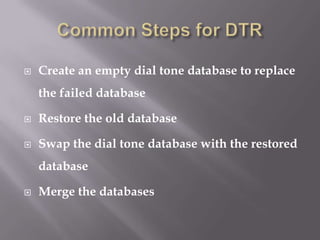
   Create an empty dial tone database to replace
    the failed database

   Restore the old database

   Swap the dial tone database with the restored
    database

   Merge the databases
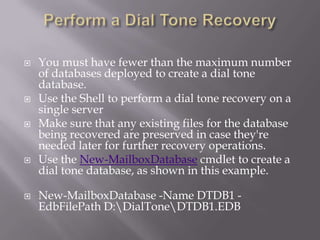
   You must have fewer than the maximum number
    of databases deployed to create a dial tone
    database.
   Use the Shell to perform a dial tone recovery on a
    single server
   Make sure that any existing files for the database
    being recovered are preserved in case they're
    needed later for further recovery operations.
   Use the New-MailboxDatabase cmdlet to create a
    dial tone database, as shown in this example.

   New-MailboxDatabase -Name DTDB1 -
    EdbFilePath D:DialToneDTDB1.EDB
   Use the Set-Mailbox cmdlet to rehome the user
    mailboxes hosted on the database being recovered,
    as shown in this example.
    Get-Mailbox -Database DB1 | Set-Mailbox -
    Database DTDB1
   Use the Mount-Database cmdlet to mount the
    database so client computers can access the
    database and send and receive messages, as shown
    in this example.
    Mount-Database -Identity DTDB1
   Create a Recovery Database.
   Mount the RDB, and then use the Dismount-
    Database cmdlet to dismount it, as shown in this
    example.

   Mount-Database -Identity RDB1 Dismount-
    Database -Identity RDB1
   After the RDB is dismounted, move the current
    database and log files within the RDB folder to
    a safe location. This is done in preparation for
    swapping the recovered database with the dial
    tone database.
   Dismount the dial tone database:-Dismount-
    Database -Identity DTDB1
   Move the database and log files from the dial
    tone database folder into the RDB folder.
   Move the database and log files from the safe
    location containing the recovered database into
    the dial tone database folder, and then mount
    the database, as shown in this example.
    Mount-Database -Identity DTDB1
   Mount the RDB, as shown in this example.
    Mount-Database -Identity RDB1
   Use the Get-Mailbox and Restore-Mailbox
    cmdlets to export the data from the RDB and
    import it into the recovered database:-Get-
    Mailbox -Database DTDB1 | Restore-Mailbox -
    Recovery Database RDB1
   After the restore operation is complete, you can
    dismount and remove the RDB, as shown in
    this example:-Dismount-Database -Identity
    RDB1 Remove-Mailbox Database -Identity
    RDB1
   PROS
   The amount of data that must be merged is
    minimized.
   The final database size will be less than if you
    merged the original data.
   The original mailbox rules, forms, and other
    ancillary data will be preserved in the state they
    were in before the disaster.
   By using the recovery storage group, you can
    avoid building an extra server and, if you keep all
    databases on the same drive, eliminate the time
    needed to copy large files between disks and
    servers.
   CONS
   The administrator must have cleared all the
    Mailbox box prerequisites cleared in order to
    proceed.
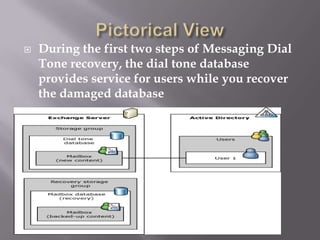
   During the first two steps of Messaging Dial
    Tone recovery, the dial tone database
    provides service for users while you recover
    the damaged database
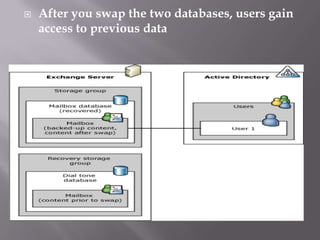
   After you swap the two databases, users gain
    access to previous data
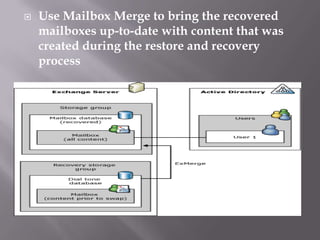
   Use Mailbox Merge to bring the recovered
    mailboxes up-to-date with content that was
    created during the restore and recovery
    process

Dial Tone Portability

  • 1.
  • 2.
    Dial tone portability is a feature of Microsoft Exchange Server 2010 that provides a solution for failures that affect a mailbox database, a server, or an entire site.  Dial tone portability enables users to have a temporary mailbox for sending and receiving e- mail while their original mailbox is being restored or repaired.  After the user's original mailbox data has been restored, an administrator can merge a user's recovered mailbox and the user's dial tone mailbox into a single, up-to-date mailbox.
  • 3.
    The process for using dial tone portability is called a dial tone recovery.  Dial tone database :-allows users to send and receive e-mail messages while the failed database is recovered.  There are three options for performing a dial tone recovery:-  Dial tone recovery on the server with the failed database  Dial tone recovery using an alternate server for the dial tone database  Dial tone recovery using and staying on an alternate server for the dial tone database
  • 4.
    Create an empty dial tone database to replace the failed database  Restore the old database  Swap the dial tone database with the restored database  Merge the databases
  • 5.
    You must have fewer than the maximum number of databases deployed to create a dial tone database.  Use the Shell to perform a dial tone recovery on a single server  Make sure that any existing files for the database being recovered are preserved in case they're needed later for further recovery operations.  Use the New-MailboxDatabase cmdlet to create a dial tone database, as shown in this example.  New-MailboxDatabase -Name DTDB1 - EdbFilePath D:DialToneDTDB1.EDB
  • 6.
    Use the Set-Mailbox cmdlet to rehome the user mailboxes hosted on the database being recovered, as shown in this example. Get-Mailbox -Database DB1 | Set-Mailbox - Database DTDB1  Use the Mount-Database cmdlet to mount the database so client computers can access the database and send and receive messages, as shown in this example. Mount-Database -Identity DTDB1  Create a Recovery Database.  Mount the RDB, and then use the Dismount- Database cmdlet to dismount it, as shown in this example.  Mount-Database -Identity RDB1 Dismount- Database -Identity RDB1
  • 7.
    After the RDB is dismounted, move the current database and log files within the RDB folder to a safe location. This is done in preparation for swapping the recovered database with the dial tone database.  Dismount the dial tone database:-Dismount- Database -Identity DTDB1  Move the database and log files from the dial tone database folder into the RDB folder.  Move the database and log files from the safe location containing the recovered database into the dial tone database folder, and then mount the database, as shown in this example. Mount-Database -Identity DTDB1
  • 8.
    Mount the RDB, as shown in this example. Mount-Database -Identity RDB1  Use the Get-Mailbox and Restore-Mailbox cmdlets to export the data from the RDB and import it into the recovered database:-Get- Mailbox -Database DTDB1 | Restore-Mailbox - Recovery Database RDB1  After the restore operation is complete, you can dismount and remove the RDB, as shown in this example:-Dismount-Database -Identity RDB1 Remove-Mailbox Database -Identity RDB1
  • 9.
    PROS  The amount of data that must be merged is minimized.  The final database size will be less than if you merged the original data.  The original mailbox rules, forms, and other ancillary data will be preserved in the state they were in before the disaster.  By using the recovery storage group, you can avoid building an extra server and, if you keep all databases on the same drive, eliminate the time needed to copy large files between disks and servers.
  • 10.
    CONS  The administrator must have cleared all the Mailbox box prerequisites cleared in order to proceed.
  • 11.
    During the first two steps of Messaging Dial Tone recovery, the dial tone database provides service for users while you recover the damaged database
  • 12.
    After you swap the two databases, users gain access to previous data
  • 13.
    Use Mailbox Merge to bring the recovered mailboxes up-to-date with content that was created during the restore and recovery process