DevOps
1
DevOps
The DevOps
Development Operations
Applications
•DevOps basics and provide depth knowledge of
various DevOps tools such as
• Git, Ansible,
• Docker, Puppet,
• Jenkins, Chef,
• Nagios, and Kubernetes
What is DevOps?
• The DevOps is a combination of two words, one is software
Development, and second is Operations.
• This allows a single team to handle the entire application lifecycle,
from development to testing, deployment, and operations.
• DevOps helps you to reduce the disconnection between software
developers, quality assurance (QA) engineers, and system
administrators.
Why is DevOps is Needed?
• Before DevOps, the development and operation team worked in
complete isolation.
• Testing and Deployment were isolated activities done after design-
build. Hence they consumed more time than actual build cycles.
• Without using DevOps, team members are spending a large amount of
their time in testing, deploying, and designing instead of building the
project.
• Manual code deployment leads to human errors in production
• Coding & operation teams have their separate timelines and are not in
synch causing further delays.
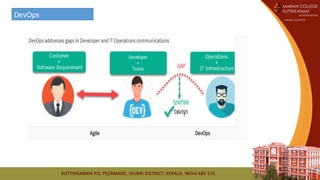
Classical Software Development
Agile Development
DevOps
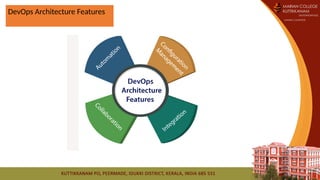
DevOps Architecture Features
DevOps Principles
1. Customer-Centric Action: DevOps team must take customer-centric action for that they should
constantly invest in products and services.
2. End-To-End Responsibility: The DevOps team need to provide performance support until they
become end-of-life. This enhances the level of responsibility and the quality of the products
engineered.
3. Continuous Improvement: DevOps culture focuses on continuous improvement to minimize
waste. It continuously speeds up the improvement of product or services offered.
4. Automate everything: Automation is a vital principle of DevOps process. This is not only for
the software development but also for the entire infrastructure landscape.
5. Work as one team: In the DevOps culture role of the designer, developer, and tester are
already defined. All they needed to do is work as one team with complete collaboration.
6. Monitor and test everything: It is very important for DevOps team to have a robust
monitoring and testing procedures.
the usage
of cloud,
sharing of
resources
Git enables the
code to be
used
automated,
which
decreases the
time for
testing
Agile
methodology
• to identify any risk of
failure
• third-party tools such
as Splunk.
automated
deployment
developing and
testing
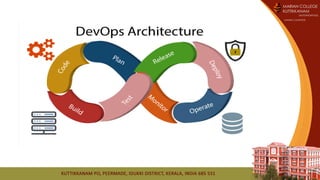
• Code: The first step in the DevOps life cycle is coding, where developers build the code on
any platform
• Build: Developers build the version of their program in any extension depending upon the
language they are using
• Test: For DevOps to be successful, the testing process must be automated using any
automation tool like Selenium
• Release: A process for managing, planning, scheduling, and controlling the build in different
environments after testing and before deployment
• Deploy: This phase gets all artifacts/code files of the application ready and
deploys/executes them on the server
• Operate: The application is run after its deployment, where clients use it in real-world
scenarios.
• Monitor: This phase helps in providing crucial information that basically helps ensure
service uptime and optimal performance
• Plan: The planning stage gathers information from the monitoring stage and, as per
feedback, implements the changes for better performance
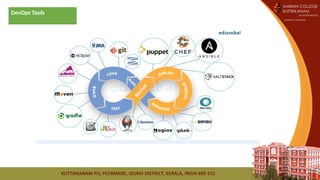
DevOps Tools
DevOps Tools
• Puppet: Puppet is one of the widely-used DevOps tools. It allows delivering and releasing
technology changes quickly and frequently. It has features of versioning, automated testing,
and continuous delivery.
• Docker: Docker is a high-end DevOps tool that allows building, shipping, and running
distributed applications on multiple systems. It helps assemble the applications quickly and is
typically suitable for container management.
• Jenkins: Jenkins is one of the most popular DevOps tools that allow monitoring of the
execution of repeated jobs. Apart from this, Jenkins lets us integrate the changes and access
the results easily and quickly.
• Ansible: This tool helps automate the entire life cycle of an application, and it manages
complicated deployments and enhances productivity.
• Nagios: This DevOps tool helps monitor the IT infrastructure. It is capable of determining errors
and rectifying them with the help of the standard network, server, and log monitoring systems.
DevOps Advantages
• DevOps is an excellent approach for quick development and deployment of applications.
• It responds faster to the market changes to improve business growth.
• DevOps escalate business profit by decreasing software delivery time and transportation
costs.
• DevOps clears the descriptive process, which gives clarity on product development and
delivery.
• It improves customer experience and satisfaction.
• DevOps simplifies collaboration and places all tools in the cloud for customers to access.
• DevOps means collective responsibility, which leads to better team engagement and
productivity.
DevOps Disadvantages
• DevOps professional or expert's developers are less available.
• Developing with DevOps is so expensive.
• Adopting new DevOps technology into the industries is hard to
manage in short time.
• Lack of DevOps knowledge can be a problem in the continuous
integration of automation projects.
Continuous Development :
• This phase involves the planning and coding of the software.
• The vision of the project is decided during the planning phase.
• And the developers begin developing the code for the application.
• There are no DevOps tools that are required for planning, but there
are several tools for maintaining the code.
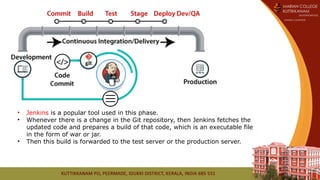
Continuous Integration
• This stage is the heart of the entire DevOps lifecycle.
• Building code is not only involved compilation, but it also includes unit
testing, integration testing, code review, and packaging.
• The code supporting new functionality is continuously integrated with the
existing code.
• Therefore, there is continuous development of software.
• The updated code needs to be integrated continuously and smoothly with
the systems to reflect changes to the end-users.
• Jenkins is a popular tool used in this phase.
• Whenever there is a change in the Git repository, then Jenkins fetches the
updated code and prepares a build of that code, which is an executable file
in the form of war or jar.
• Then this build is forwarded to the test server or the production server.
Continuous Testing
• This phase, where the developed software is continuously testing for
bugs.
• For constant testing, automation testing tools such as TestNG, JUnit,
Selenium, etc are used.
• These tools allow QAs to test multiple code-bases thoroughly in
parallel to ensure that there is no flaw in the functionality.
• In this phase, Docker Containers can be used for simulating the test
environment.
• Selenium does the automation testing, and TestNG generates the reports.
• This entire testing phase can automate with the help of a Continuous
Integration tool called Jenkins.
Continuous Monitoring
• Monitoring is a phase that involves all the operational factors of the
entire DevOps process, where important information about the use of
the software is recorded and carefully processed to find out trends
and identify problem areas.
• It may occur in the form of documentation files or maybe produce
large-scale data about the application parameters when it is in a
continuous use position.
• The system errors such as server not reachable, low memory, etc are
resolved in this phase.
• It maintains the security and availability of the service.
Continuous Feedback
• The application development is consistently improved by analyzing
the results from the operations of the software.
• This is carried out by placing the critical phase of constant feedback
between the operations and the development of the next version of
the current software application.
Continuous Deployment
• In this phase, the code is deployed to the production servers.
• Also, it is essential to ensure that the code is correctly used on all the
servers.
• some popular tools which are used in this phase, such as Chef,
Puppet, Ansible, and SaltStack.
• Containerization tools like
Vagrant and Docker are used for
deployment phase.
Continuous Operations
• All DevOps operations are based on the continuity with complete
automation of the release process and allow the organization to
accelerate the overall time to market continuingly.
• With DevOps, we can make any software product more efficient and
increase the overall count of interested customers in your product.
DevOps Automation Tools
• Infrastructure Automation :Amazon Web Services (AWS): Being a cloud service, you don't need to be
physically present in the data center, they are easy to scale on-demand, and there are no up-front
hardware costs. It can be configured to provide more servers based on traffic automatically.
• Configuration Management :Chef: Chef is a handy DevOps tool for achieving speed, scale, and
consistency. It can be used to ease out of complex tasks and perform configuration management.
With the help of this tool, the DevOps team can avoid making changes across ten thousand servers.
Rather, they need to make changes in one place, which is automatically reflected in other servers.
• Deployment Automation :Jenkins: It facilitates continuous integration and testing. It helps to
integrate project changes more efficiently by quickly finding issues as soon as built is deployed.
• Performance Management :App Dynamic: It offers real-time performance monitoring. The data
collected by this tool help developers to debug when issues occur.
• Log Management :Splunk: This DevOps tool solves issues such as storing, aggregating, and analyzing
all logs in one place.
• Monitoring :Nagios: It notified people when infrastructure and related service go down. Nagios is a
tool for this purpose, which helps the DevOps team to find and correct problems.
Home work
Prepare a power point presentation based on the following:
1. Difference between agile and DevOps
2. Advantages and disadvantages of DevOps
3. Who is a DevOps Engineer?
4. Life cycle of DevOps
Reference
• https://intellipaat.com/blog/tutorial/devops-tutorial/
• https://www.edureka.co/blog/devops-tutorial
• https://www.guru99.com/devops-tutorial.html
• https://www.javatpoint.com/devops

DevOps model in software engineering.pptx

  • 1.
  • 2.
  • 3.
    Applications •DevOps basics andprovide depth knowledge of various DevOps tools such as • Git, Ansible, • Docker, Puppet, • Jenkins, Chef, • Nagios, and Kubernetes
  • 4.
    What is DevOps? •The DevOps is a combination of two words, one is software Development, and second is Operations. • This allows a single team to handle the entire application lifecycle, from development to testing, deployment, and operations. • DevOps helps you to reduce the disconnection between software developers, quality assurance (QA) engineers, and system administrators.
  • 6.
    Why is DevOpsis Needed? • Before DevOps, the development and operation team worked in complete isolation. • Testing and Deployment were isolated activities done after design- build. Hence they consumed more time than actual build cycles. • Without using DevOps, team members are spending a large amount of their time in testing, deploying, and designing instead of building the project. • Manual code deployment leads to human errors in production • Coding & operation teams have their separate timelines and are not in synch causing further delays.
  • 7.
  • 8.
  • 9.
  • 10.
  • 11.
    DevOps Principles 1. Customer-CentricAction: DevOps team must take customer-centric action for that they should constantly invest in products and services. 2. End-To-End Responsibility: The DevOps team need to provide performance support until they become end-of-life. This enhances the level of responsibility and the quality of the products engineered. 3. Continuous Improvement: DevOps culture focuses on continuous improvement to minimize waste. It continuously speeds up the improvement of product or services offered. 4. Automate everything: Automation is a vital principle of DevOps process. This is not only for the software development but also for the entire infrastructure landscape. 5. Work as one team: In the DevOps culture role of the designer, developer, and tester are already defined. All they needed to do is work as one team with complete collaboration. 6. Monitor and test everything: It is very important for DevOps team to have a robust monitoring and testing procedures.
  • 13.
    the usage of cloud, sharingof resources Git enables the code to be used automated, which decreases the time for testing Agile methodology • to identify any risk of failure • third-party tools such as Splunk. automated deployment developing and testing
  • 14.
    • Code: Thefirst step in the DevOps life cycle is coding, where developers build the code on any platform • Build: Developers build the version of their program in any extension depending upon the language they are using • Test: For DevOps to be successful, the testing process must be automated using any automation tool like Selenium • Release: A process for managing, planning, scheduling, and controlling the build in different environments after testing and before deployment • Deploy: This phase gets all artifacts/code files of the application ready and deploys/executes them on the server • Operate: The application is run after its deployment, where clients use it in real-world scenarios. • Monitor: This phase helps in providing crucial information that basically helps ensure service uptime and optimal performance • Plan: The planning stage gathers information from the monitoring stage and, as per feedback, implements the changes for better performance
  • 15.
  • 16.
    DevOps Tools • Puppet:Puppet is one of the widely-used DevOps tools. It allows delivering and releasing technology changes quickly and frequently. It has features of versioning, automated testing, and continuous delivery. • Docker: Docker is a high-end DevOps tool that allows building, shipping, and running distributed applications on multiple systems. It helps assemble the applications quickly and is typically suitable for container management. • Jenkins: Jenkins is one of the most popular DevOps tools that allow monitoring of the execution of repeated jobs. Apart from this, Jenkins lets us integrate the changes and access the results easily and quickly. • Ansible: This tool helps automate the entire life cycle of an application, and it manages complicated deployments and enhances productivity. • Nagios: This DevOps tool helps monitor the IT infrastructure. It is capable of determining errors and rectifying them with the help of the standard network, server, and log monitoring systems.
  • 17.
    DevOps Advantages • DevOpsis an excellent approach for quick development and deployment of applications. • It responds faster to the market changes to improve business growth. • DevOps escalate business profit by decreasing software delivery time and transportation costs. • DevOps clears the descriptive process, which gives clarity on product development and delivery. • It improves customer experience and satisfaction. • DevOps simplifies collaboration and places all tools in the cloud for customers to access. • DevOps means collective responsibility, which leads to better team engagement and productivity.
  • 18.
    DevOps Disadvantages • DevOpsprofessional or expert's developers are less available. • Developing with DevOps is so expensive. • Adopting new DevOps technology into the industries is hard to manage in short time. • Lack of DevOps knowledge can be a problem in the continuous integration of automation projects.
  • 20.
    Continuous Development : •This phase involves the planning and coding of the software. • The vision of the project is decided during the planning phase. • And the developers begin developing the code for the application. • There are no DevOps tools that are required for planning, but there are several tools for maintaining the code.
  • 21.
    Continuous Integration • Thisstage is the heart of the entire DevOps lifecycle. • Building code is not only involved compilation, but it also includes unit testing, integration testing, code review, and packaging. • The code supporting new functionality is continuously integrated with the existing code. • Therefore, there is continuous development of software. • The updated code needs to be integrated continuously and smoothly with the systems to reflect changes to the end-users.
  • 22.
    • Jenkins isa popular tool used in this phase. • Whenever there is a change in the Git repository, then Jenkins fetches the updated code and prepares a build of that code, which is an executable file in the form of war or jar. • Then this build is forwarded to the test server or the production server.
  • 23.
    Continuous Testing • Thisphase, where the developed software is continuously testing for bugs. • For constant testing, automation testing tools such as TestNG, JUnit, Selenium, etc are used. • These tools allow QAs to test multiple code-bases thoroughly in parallel to ensure that there is no flaw in the functionality. • In this phase, Docker Containers can be used for simulating the test environment.
  • 24.
    • Selenium doesthe automation testing, and TestNG generates the reports. • This entire testing phase can automate with the help of a Continuous Integration tool called Jenkins.
  • 25.
    Continuous Monitoring • Monitoringis a phase that involves all the operational factors of the entire DevOps process, where important information about the use of the software is recorded and carefully processed to find out trends and identify problem areas. • It may occur in the form of documentation files or maybe produce large-scale data about the application parameters when it is in a continuous use position. • The system errors such as server not reachable, low memory, etc are resolved in this phase. • It maintains the security and availability of the service.
  • 26.
    Continuous Feedback • Theapplication development is consistently improved by analyzing the results from the operations of the software. • This is carried out by placing the critical phase of constant feedback between the operations and the development of the next version of the current software application.
  • 27.
    Continuous Deployment • Inthis phase, the code is deployed to the production servers. • Also, it is essential to ensure that the code is correctly used on all the servers. • some popular tools which are used in this phase, such as Chef, Puppet, Ansible, and SaltStack. • Containerization tools like Vagrant and Docker are used for deployment phase.
  • 28.
    Continuous Operations • AllDevOps operations are based on the continuity with complete automation of the release process and allow the organization to accelerate the overall time to market continuingly. • With DevOps, we can make any software product more efficient and increase the overall count of interested customers in your product.
  • 29.
    DevOps Automation Tools •Infrastructure Automation :Amazon Web Services (AWS): Being a cloud service, you don't need to be physically present in the data center, they are easy to scale on-demand, and there are no up-front hardware costs. It can be configured to provide more servers based on traffic automatically. • Configuration Management :Chef: Chef is a handy DevOps tool for achieving speed, scale, and consistency. It can be used to ease out of complex tasks and perform configuration management. With the help of this tool, the DevOps team can avoid making changes across ten thousand servers. Rather, they need to make changes in one place, which is automatically reflected in other servers. • Deployment Automation :Jenkins: It facilitates continuous integration and testing. It helps to integrate project changes more efficiently by quickly finding issues as soon as built is deployed. • Performance Management :App Dynamic: It offers real-time performance monitoring. The data collected by this tool help developers to debug when issues occur. • Log Management :Splunk: This DevOps tool solves issues such as storing, aggregating, and analyzing all logs in one place. • Monitoring :Nagios: It notified people when infrastructure and related service go down. Nagios is a tool for this purpose, which helps the DevOps team to find and correct problems.
  • 30.
    Home work Prepare apower point presentation based on the following: 1. Difference between agile and DevOps 2. Advantages and disadvantages of DevOps 3. Who is a DevOps Engineer? 4. Life cycle of DevOps
  • 31.
    Reference • https://intellipaat.com/blog/tutorial/devops-tutorial/ • https://www.edureka.co/blog/devops-tutorial •https://www.guru99.com/devops-tutorial.html • https://www.javatpoint.com/devops