DevelopingSocial MediaHow-To Guide for School Districts
What is Social Media?Social media includes the various online technology tools that enable people to communicate easily via the internet to share information and resources. Social media can include text, audio, video, images, podcasts, and other multimedia communications.
Social Media PolicyYou must have a policy in your handbook to protect your district!See examples in the handout.Image Source: http://www.insightmrktg.com/wp-content/uploads/social-media21.png
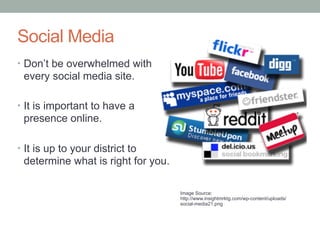
Social MediaDon’t be overwhelmed with every social media site.It is important to have a presence online. It is up to your district to determine what is right for you.Image Source: http://www.insightmrktg.com/wp-content/uploads/social-media21.png
What is twitter?It is a social networking and microbloggingservice that allows you answer the question, "What are you doing?" You sending short messages, 140 characters in length, called "tweets", to your "followers.”These “tweets” can be seen on the twitter website, mobile devices, or through 3rd party applications.
Twitter Statistics460,000 New Accounts each day. (Ave. for March)
182% increase in mobile users in the last year.Source:http://blog.twitter.com/2011/03/numbers.html
What is facebook?Facebook is a website intended to connect friends, family, and business associates. It is the largest of the networking sites.There are 2 page typesPersonal Profiles- Human BeingsBusiness/Fan Pages- Business/Orgainzation
Facebook StatisticsMore than 500 million active users.
50% of active users log-on to Facebook in a given day.
More than 200 million active users currently accessing Facebook through their mobile devices.
Users spend over 700 billion minutes per month on Facebook.
Average user is connected to 80 community pages, groups and events.Source: http://www.facebook.com/press/info.php?statistics#!/press/info.php?statistics
Benefit of District Fan PageAnyone can see your page, even if they are nota facebook user.
Increase your ranking in searches.
Insights to see user interaction and demographics
Build a sense of community and school pride
Inform and raise awareness of events
Reach the families with a medium they use regularly!Facebook Basics
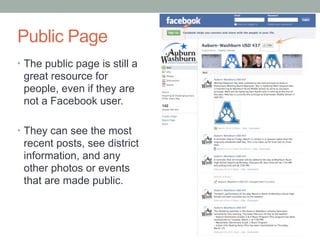
Public PageThe public page is still a great resource for people, even if they are not a facebook user. They can see the most recent posts, see district information, and any other photos or events that are made public.
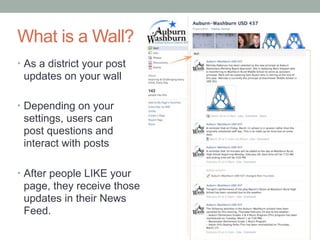
What is a Wall?As a district your post updates on your wallDepending on your settings, users can post questions and interact with postsAfter people LIKE your page, they receive those updates in their News Feed.
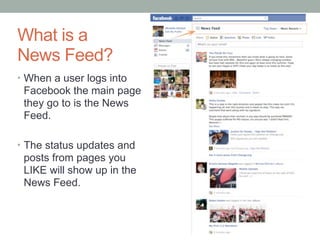
What is a News Feed?When a user logs into facebook the main page they go to is the News Feed.The status updates and posts from pages you LIKE will show up in the News Feed.
Starting with A PlanThings To Consider Before Setting Up Your Page
Questions to AskWhat are our goals for the page? Why do we want a page?Will this be district wide or by building?Who is the primary audience of the page?What are some ways we’ll identify our page has met our goals?Investment- Action- Reaction- Non-Financial Impact- Financial Impact
Questions to AskWhat is the manpower or resources needed?Who will set up our page?Who will monitor the page?How often will be make posts?What type of information will we post?Plan your first 10 posts?
Protect Your District in FacebookDistrict Facebook PageComment Policy on your Facebook Page	What if someone writes something bad? 	How do you determine what posts to remove?District Employee Facebook PageVery important to have a policy for online conduct in the district handbook.
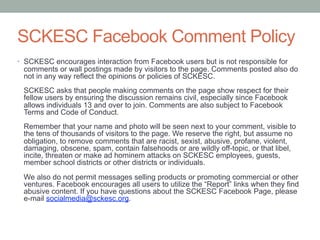
SCKESC Facebook Comment PolicySCKESC encourages interaction from Facebook users but is not responsible for comments or wall postings made by visitors to the page. Comments posted also do not in any way reflect the opinions or policies of SCKESC. SCKESC asks that people making comments on the page show respect for their fellow users by ensuring the discussion remains civil, especially since Facebook allows individuals 13 and over to join. Comments are also subject to Facebook Terms and Code of Conduct. Remember that your name and photo will be seen next to your comment, visible to the tens of thousands of visitors to the page. We reserve the right, but assume no obligation, to remove comments that are racist, sexist, abusive, profane, violent, damaging, obscene, spam, contain falsehoods or are wildly off-topic, or that libel, incite, threaten or make ad hominem attacks on SCKESC employees, guests, member school districts or other districts or individuals. We also do not permit messages selling products or promoting commercial or other ventures. Facebook encourages all users to utilize the “Report” links when they find abusive content. If you have questions about the SCKESC Facebook Page, please e-mail socialmedia@sckesc.org.
O.K., Now what?A Step-By-Step Guide to Setting Up Your Page
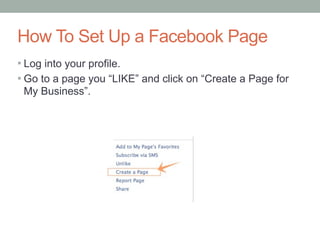
How To Set Up a Facebook PageLog into your profile.
Go to a page you “LIKE” and click on “Create a Page for My Business”.How To Set Up a Facebook Page
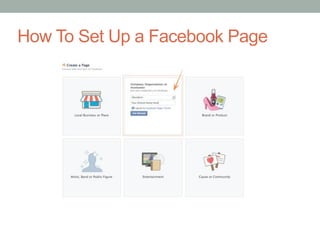
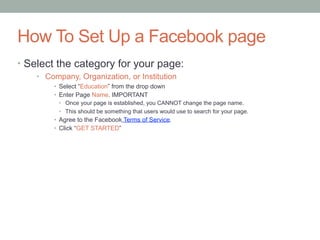
How To Set Up a Facebook pageSelect the category for your page:  Company, Organization, or InstitutionSelect “Education” from the drop downEnter Page Name. IMPORTANT Once your page is established, you CANNOT change the page name.  This should be something that users would use to search for your page.Agree to the Facebook Terms of Service.Click “GET STARTED”
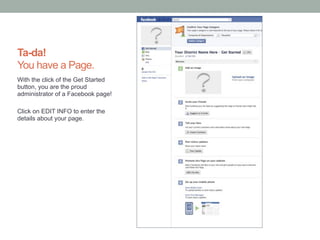
Ta-da!You have a Page.With the click of the Get Started button, you are the proud administrator of a facebook page!Click on EDIT INFO to enter the details about your page.
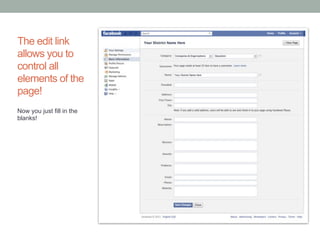
The edit link allows you to control all elements of the page!Now you just fill in the blanks!
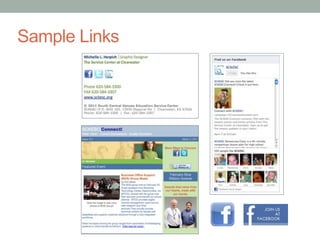
Promote Your Facebook PageLink on your district website.
Link on your e-newsletters
Link on your email Signatures
Mention in district newsletters/correspondence
Fanbadge on websites
Recruitment Information
Teacher to parent/guardian communication

Developing Social Media

  • 1.
  • 2.
    What is SocialMedia?Social media includes the various online technology tools that enable people to communicate easily via the internet to share information and resources. Social media can include text, audio, video, images, podcasts, and other multimedia communications.
  • 3.
    Social Media PolicyYoumust have a policy in your handbook to protect your district!See examples in the handout.Image Source: http://www.insightmrktg.com/wp-content/uploads/social-media21.png
  • 4.
    Social MediaDon’t beoverwhelmed with every social media site.It is important to have a presence online. It is up to your district to determine what is right for you.Image Source: http://www.insightmrktg.com/wp-content/uploads/social-media21.png
  • 5.
    What is twitter?Itis a social networking and microbloggingservice that allows you answer the question, "What are you doing?" You sending short messages, 140 characters in length, called "tweets", to your "followers.”These “tweets” can be seen on the twitter website, mobile devices, or through 3rd party applications.
  • 6.
    Twitter Statistics460,000 NewAccounts each day. (Ave. for March)
  • 7.
    182% increase inmobile users in the last year.Source:http://blog.twitter.com/2011/03/numbers.html
  • 8.
    What is facebook?Facebookis a website intended to connect friends, family, and business associates. It is the largest of the networking sites.There are 2 page typesPersonal Profiles- Human BeingsBusiness/Fan Pages- Business/Orgainzation
  • 9.
    Facebook StatisticsMore than500 million active users.
  • 10.
    50% of activeusers log-on to Facebook in a given day.
  • 11.
    More than 200million active users currently accessing Facebook through their mobile devices.
  • 12.
    Users spend over700 billion minutes per month on Facebook.
  • 13.
    Average user isconnected to 80 community pages, groups and events.Source: http://www.facebook.com/press/info.php?statistics#!/press/info.php?statistics
  • 14.
    Benefit of DistrictFan PageAnyone can see your page, even if they are nota facebook user.
  • 15.
  • 16.
    Insights to seeuser interaction and demographics
  • 17.
    Build a senseof community and school pride
  • 18.
    Inform and raiseawareness of events
  • 19.
    Reach the familieswith a medium they use regularly!Facebook Basics
  • 20.
    Public PageThe publicpage is still a great resource for people, even if they are not a facebook user. They can see the most recent posts, see district information, and any other photos or events that are made public.
  • 21.
    What is aWall?As a district your post updates on your wallDepending on your settings, users can post questions and interact with postsAfter people LIKE your page, they receive those updates in their News Feed.
  • 22.
    What is aNews Feed?When a user logs into facebook the main page they go to is the News Feed.The status updates and posts from pages you LIKE will show up in the News Feed.
  • 23.
    Starting with APlanThings To Consider Before Setting Up Your Page
  • 24.
    Questions to AskWhatare our goals for the page? Why do we want a page?Will this be district wide or by building?Who is the primary audience of the page?What are some ways we’ll identify our page has met our goals?Investment- Action- Reaction- Non-Financial Impact- Financial Impact
  • 25.
    Questions to AskWhatis the manpower or resources needed?Who will set up our page?Who will monitor the page?How often will be make posts?What type of information will we post?Plan your first 10 posts?
  • 26.
    Protect Your Districtin FacebookDistrict Facebook PageComment Policy on your Facebook Page What if someone writes something bad? How do you determine what posts to remove?District Employee Facebook PageVery important to have a policy for online conduct in the district handbook.
  • 27.
    SCKESC Facebook CommentPolicySCKESC encourages interaction from Facebook users but is not responsible for comments or wall postings made by visitors to the page. Comments posted also do not in any way reflect the opinions or policies of SCKESC. SCKESC asks that people making comments on the page show respect for their fellow users by ensuring the discussion remains civil, especially since Facebook allows individuals 13 and over to join. Comments are also subject to Facebook Terms and Code of Conduct. Remember that your name and photo will be seen next to your comment, visible to the tens of thousands of visitors to the page. We reserve the right, but assume no obligation, to remove comments that are racist, sexist, abusive, profane, violent, damaging, obscene, spam, contain falsehoods or are wildly off-topic, or that libel, incite, threaten or make ad hominem attacks on SCKESC employees, guests, member school districts or other districts or individuals. We also do not permit messages selling products or promoting commercial or other ventures. Facebook encourages all users to utilize the “Report” links when they find abusive content. If you have questions about the SCKESC Facebook Page, please e-mail socialmedia@sckesc.org.
  • 28.
    O.K., Now what?AStep-By-Step Guide to Setting Up Your Page
  • 29.
    How To SetUp a Facebook PageLog into your profile.
  • 30.
    Go to apage you “LIKE” and click on “Create a Page for My Business”.How To Set Up a Facebook Page
  • 31.
    How To SetUp a Facebook pageSelect the category for your page: Company, Organization, or InstitutionSelect “Education” from the drop downEnter Page Name. IMPORTANT Once your page is established, you CANNOT change the page name. This should be something that users would use to search for your page.Agree to the Facebook Terms of Service.Click “GET STARTED”
  • 32.
    Ta-da!You have aPage.With the click of the Get Started button, you are the proud administrator of a facebook page!Click on EDIT INFO to enter the details about your page.
  • 33.
    The edit linkallows you to control all elements of the page!Now you just fill in the blanks!
  • 34.
    Promote Your FacebookPageLink on your district website.
  • 35.
    Link on youre-newsletters
  • 36.
    Link on youremail Signatures
  • 37.
    Mention in districtnewsletters/correspondence
  • 38.
  • 39.
  • 40.