© Copyright IBM Corporation 2013 Trademarks
Integrating WebSphere Service Registry and Repository V8 with
Process Server
Page 1 of 19
Integrating WebSphere Service Registry and
Repository V8 with Process Server
Ganesh Nagalingam (ganesh.nagalingam@in.ibm.com)
Technical Leader, IBM Global Business Services
IBM
26 June 2013
This article shows you how to perform dynamic endpoint lookup by integrating WebSphere
Service Registry and Repository V8 (WSRR) with Process Server, using the Endpoint Lookup
and Custom Mediation primitives. This integration solution has important advantages over hard-
coded endpoint URLs.
Introduction
This article shows you how to integrate IBM® WebSphere® Service Registry and Repository V8
(WSRR) with Process Server, including how to configure SSL and WSRR definitions and perform
dynamic endpoint lookup to WSRR. The advantage of this approach is that when web service
URLs change, they can be directly updated in WSRR, and you do not need to modify or redeploy
the mediation module.
More about Process Server
In April 2011, IBM announced IBM Business Process Manager, a single unified BPM platform
to support the entire range of business process improvement projects. IBM Business
Process Manager incorporates the capabilities of, and replaces, WebSphere Process Server,
WebSphere Lombardi Edition, and other IBM products. IBM Business Process Manager is
backwards compatible with WebSphere Process Server V6 and V7. In this article, Process
Server refers to the Process Server component of IBM Business Process Manager Advanced
V8.
WSRR
WSRR provides a system for storing, accessing, and managing information (commonly called
service metadata) that is used in the selection, invocation, management, governance, and reuse
of services in an SOA. In other words, it is where you store information about services used in your
systems or in other organizations' systems that you already use, plan to use, or want to be aware
of for the future. For example, an application can check WSRR just before invoking a service to
locate the service instance best satisfying its functionality and performance needs.
developerWorks® ibm.com/developerWorks/
Integrating WebSphere Service Registry and Repository V8 with
Process Server
Page 2 of 19
WSRR enables you to publish web service artifacts, including XML Schema Definitions (XSD),
Web Services Description Language (WSDL), and service component architecture (SCA) modules.
WSRR enables better management and governance of your services. Through its registry and
repository capabilities and its integration with the IBM SOA Foundation, WSRR is an essential
foundational component of an SOA implementation. WSRR enables you to store, access,
and manage information about services and service interaction endpoint descriptions (service
metadata) in an SOA. You can use this information to select, invoke, govern, and reuse services
in your SOA. This service information can include traditional web services that implement WSDL
interfaces with SOAP/HTTP bindings, as well as a broad range of SOA services that can be
described using WSDL, XSD, and policy declarations, but might use a range of protocols and be
implemented according to a variety of programming models.
WebSphere ESB
WebSphere ESB decouples service provider from service consumer, so that instead of a direct
point-to-point connection, they both connect to WebSphere ESB. It takes care of routing requests,
enriching messages, mapping interfaces between service provider and service consumer, and
transforming them to the interface format of the service consumer.
WebSphere ESB can perform dynamic endpoint lookup using an endpoint lookup primitive to
look for a published service URL in WSRR, and then apply a target address on the fly to invoke
the service implementation. WebSphere ESB manages the flow of messages between service
providers and service consumers. Mediation modules in WebSphere ESB handle mismatches
between service providers and service consumers, including mismatches of protocol, interaction
style interface, and quality of service (QoS). In an SCA solution, mediation modules are a type of
SCA module that perform a special role, and have different characteristics from other business-
level components. Mediation components operate on messages exchanged between service
endpoints. In contrast to regular business application components, they are concerned with the
flow of the messages through the infrastructure and not just with the business content of the
messages. Rather than performing business functions, they perform routing, transformation, and
logging operations on the messages.
Process Server
Process Server is at the heart of many business process management solutions. It ensures that
processes you design in IBM Integration Designer are executed consistently, reliably, securely,
and with transactional integrity. Built on open standards, it deploys and executes processes that
orchestrate services (people, information, systems, and trading partners) within your SOA or non-
SOA infrastructure. Process Server is built upon, and contains the ESB functionality. Process
Server provides a standards-based business process engine, using the power of WebSphere
Application Server. It also includes the same technology as WebSphere ESB, providing the same
ESB capabilities. Process Server is a high-performance business engine that enables processes
to meet business goals by providing a managed runtime environment for business process
applications. It enables you to deploy standards-based business integration applications in an
SOA, which takes everyday business applications and breaks them down into individual business
functions and processes, rendering them as services. Process Server enables the deployment
ibm.com/developerWorks/ developerWorks®
Integrating WebSphere Service Registry and Repository V8 with
Process Server
Page 3 of 19
of processes that span people, systems, applications, tasks, rules, and the interactions among
them. It supports both long-running and short-running business processes, providing transaction
rollback-like functionality for loosely coupled business processes.
Business value
The approach described in this article provides the flexibility of changing web service URLs
in WSRR without modifying or redeploying mediation module. Successfully implementing an
SOA requires applications and an infrastructure that support SOA principles. Applications can
be enabled by creating service interfaces to new or existing functions that are hosted by the
applications. The service interfaces should be accessed using an infrastructure that can route and
transport service requests to the correct service provider. As organizations expose more functions
as services, they must ensure that this infrastructure supports enterprise-scale management of
the SOA. ESB is a middleware infrastructure component that supports SOA implementation in the
following ways:
• Decoupling the consumer's view of a service from the actual implementation of the service
• Decoupling technical aspects of service interactions
• Integrating and managing services in the enterprise
The ESB is more than just a transport layer. It must provide mediation support to facilitate service
interactions (for example, finding services that provide capabilities for which a consumer is asking
or to take care of interface mismatches between consumers and providers that are compatible in
terms of their capabilities). It must support a variety of ways to get on and off the ESB, such as
adapter support for existing applications or business connections that enable external partners in
B2B interactions. To support these different ways to get on and off the ESB, it must support service
interaction with a wide variety of service endpoints. Each endpoint may have its own integration
techniques, protocols, security models, and so on. This level of complexity should be hidden from
service consumers, so that they are offered a simpler model. In order to hide the complexity from
the consumers, the ESB must mediate between the multiple interaction models understood by
service providers and the simplified view provided to consumers. During runtime, WSRR can be
dynamically accessed to select a service provider, or to dynamically enforce an invocation policy. It
manages information that enables dynamic binding of service consumers to service providers and
enables the infrastructure to enforce registered policies.
developerWorks® ibm.com/developerWorks/
Integrating WebSphere Service Registry and Repository V8 with
Process Server
Page 4 of 19
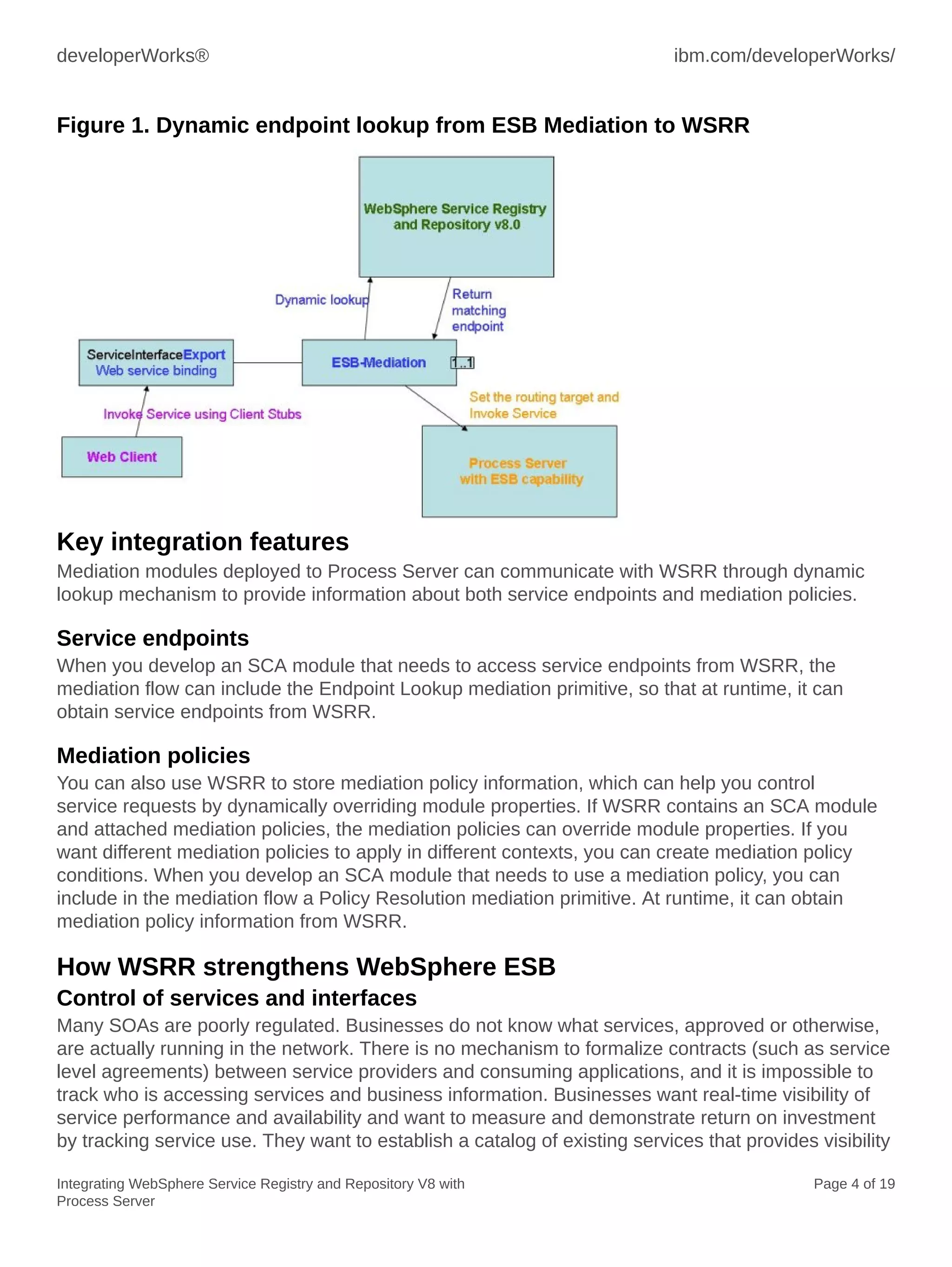
Figure 1. Dynamic endpoint lookup from ESB Mediation to WSRR
Key integration features
Mediation modules deployed to Process Server can communicate with WSRR through dynamic
lookup mechanism to provide information about both service endpoints and mediation policies.
Service endpoints
When you develop an SCA module that needs to access service endpoints from WSRR, the
mediation flow can include the Endpoint Lookup mediation primitive, so that at runtime, it can
obtain service endpoints from WSRR.
Mediation policies
You can also use WSRR to store mediation policy information, which can help you control
service requests by dynamically overriding module properties. If WSRR contains an SCA module
and attached mediation policies, the mediation policies can override module properties. If you
want different mediation policies to apply in different contexts, you can create mediation policy
conditions. When you develop an SCA module that needs to use a mediation policy, you can
include in the mediation flow a Policy Resolution mediation primitive. At runtime, it can obtain
mediation policy information from WSRR.
How WSRR strengthens WebSphere ESB
Control of services and interfaces
Many SOAs are poorly regulated. Businesses do not know what services, approved or otherwise,
are actually running in the network. There is no mechanism to formalize contracts (such as service
level agreements) between service providers and consuming applications, and it is impossible to
track who is accessing services and business information. Businesses want real-time visibility of
service performance and availability and want to measure and demonstrate return on investment
by tracking service use. They want to establish a catalog of existing services that provides visibility
ibm.com/developerWorks/ developerWorks®
Integrating WebSphere Service Registry and Repository V8 with
Process Server
Page 5 of 19
into capabilities and that helps reduce redundancy. This catalog can help businesses understand
the impact of changes to existing services and enable them to control service consumers and
providers through policies. WSRR provides service discovery features to help take inventory
of services that are deployed in runtime environments. On a scheduled basis, WSRR can also
be configured to discover services on the runtime environment to check for rogue services.
The Governance Enablement Profile (GEP) of WSRR gives a prescriptive approach to both
service consumer and service provider governance. It manages subscriptions, documents of
understanding, and service level agreements between the consumer and provider, enabling the
ability to track who is using a given service.
Greater ESB flexibility
An ESB provides a connectivity layer that enables flexible and simple integration of services,
decoupling integration logic from applications. However, it can be difficult to change mediation
code quickly in response to changing business requirements, with additional development and
testing required. It can also be complex to synchronize mediations with the runtime status of
services they invoke. ESB development inherently involves invoking numerous endpoints, and
when the endpoints are not decoupled from the mediation code, promotion to other development
environments requires significant changes to the ESB configuration. Enabling dynamic and
efficient access to services, policies, and metadata enables mediations to dynamically choose
service providers and endpoints, and to adapt quickly to the status of critical services, greatly
increasing ESB flexibility. Storing and defining some application and translation logic outside the
ESB means that you can update the logic without needing to change and redeploy the mediations.
Similarly, storing and managing policies outside the ESB means that you can define and manage
the policies separately from the mediations. The ESB can then query WSRR at runtime to
determine the policies that are required for the service, and can then enforce them. WSRR
increases the agility of WebSphere ESB through the Endpoint Lookup, SLA Check, and Policy
Resolution mediation primitives, and these primitives are key to accelerating robust and flexible
mediations that you can quickly change without redeploying the mediation.
Delivering services that the business needs
Many businesses find that despite adopting SOA principles, they are unable to respond quickly to
new business requests to deliver new and updated services quickly, or to address new business
opportunities. The service development cycle is too long, with no standardization, and there is a
lack of service information and dynamic discovery of existing capabilities. These issues often lead
to service duplication and a disconnect between business analysts and IT. For a successful SOA,
you need to create open standardized services and reusable assets that can be used by multiple
lines of business, and you need to increase productivity by reusing service assets through multiple
service implementations. To achieve this standardization and reuse, you need to store, catalog,
and flexibly organize assets and services, and then enforce guidelines to prevent uncoordinated
or unapproved changes. WSRR provides a prescriptive approach to the service life cycle, enabling
top-down development with perspectives for business users to propose and approve services. This
solution ships with example life cycles and governance policies that enforce standardized services
and reusable assets, as well as policy analytics to help refine the governance processes and to
optimize the service development life cycle.
developerWorks® ibm.com/developerWorks/
Integrating WebSphere Service Registry and Repository V8 with
Process Server
Page 6 of 19
Integrating Process Server with WSRR: Admin Console and SSL
configurations
This section shows you how to perform integration with security enabled on both servers and how
to import the WSRR signer certificate into Process Server trust store.
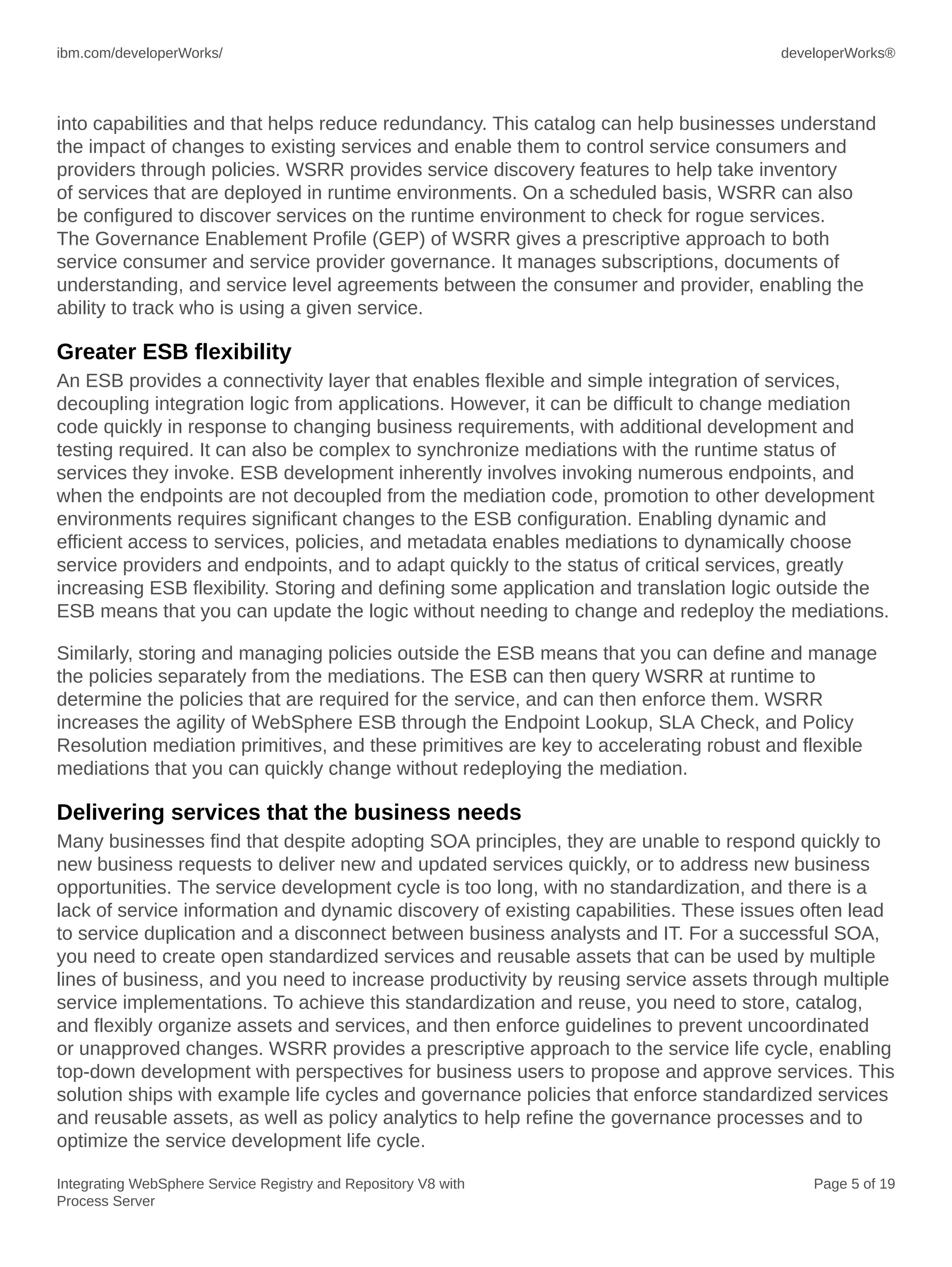
1. In Process Server Admin Console, select Service Integration => WSRR definitions:
Figure 2. WSRR definition
2. Click Connection properties.
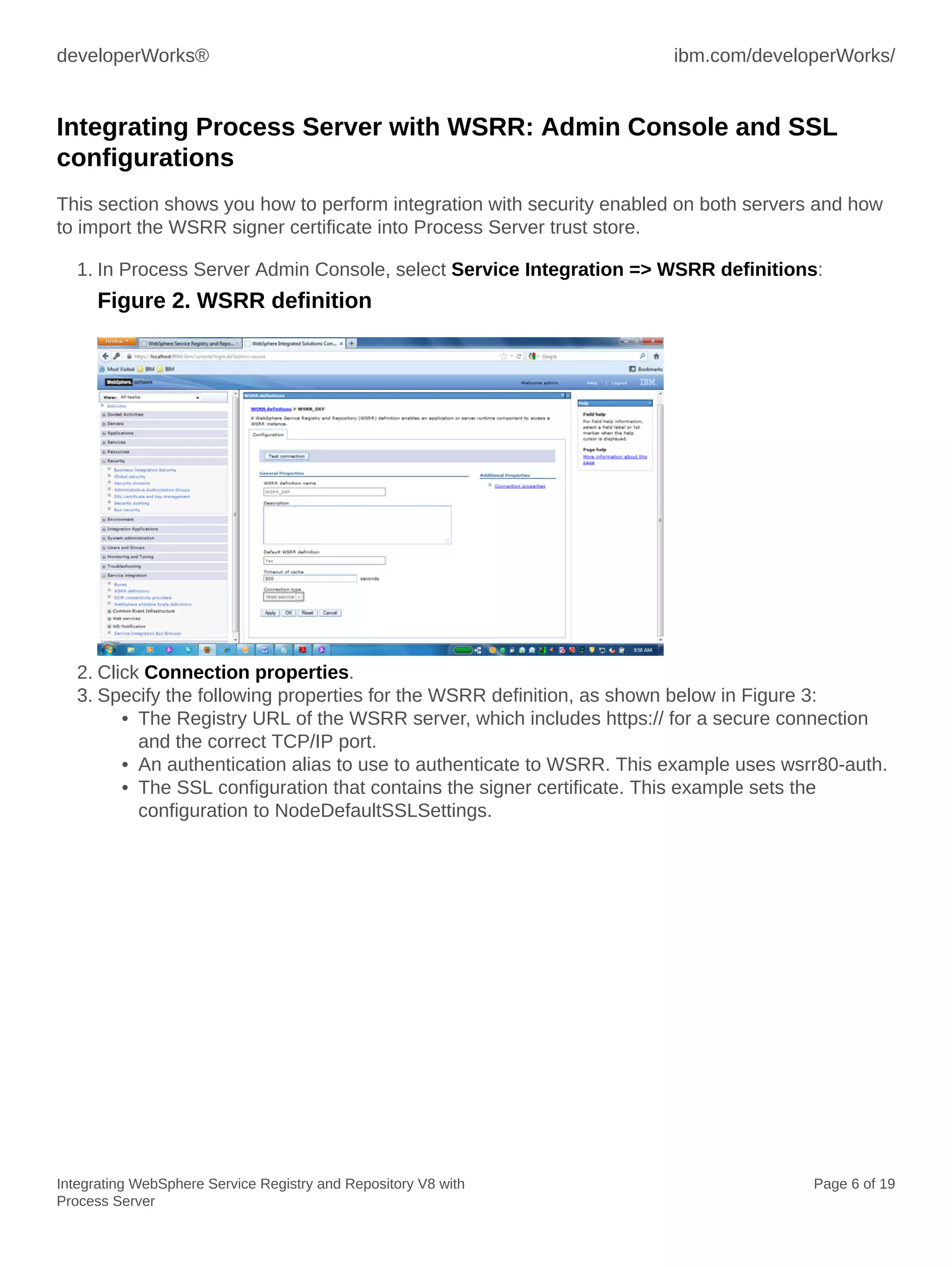
3. Specify the following properties for the WSRR definition, as shown below in Figure 3:
• The Registry URL of the WSRR server, which includes https:// for a secure connection
and the correct TCP/IP port.
• An authentication alias to use to authenticate to WSRR. This example uses wsrr80-auth.
• The SSL configuration that contains the signer certificate. This example sets the
configuration to NodeDefaultSSLSettings.
ibm.com/developerWorks/ developerWorks®
Integrating WebSphere Service Registry and Repository V8 with
Process Server
Page 7 of 19
Figure 3. Connection properties
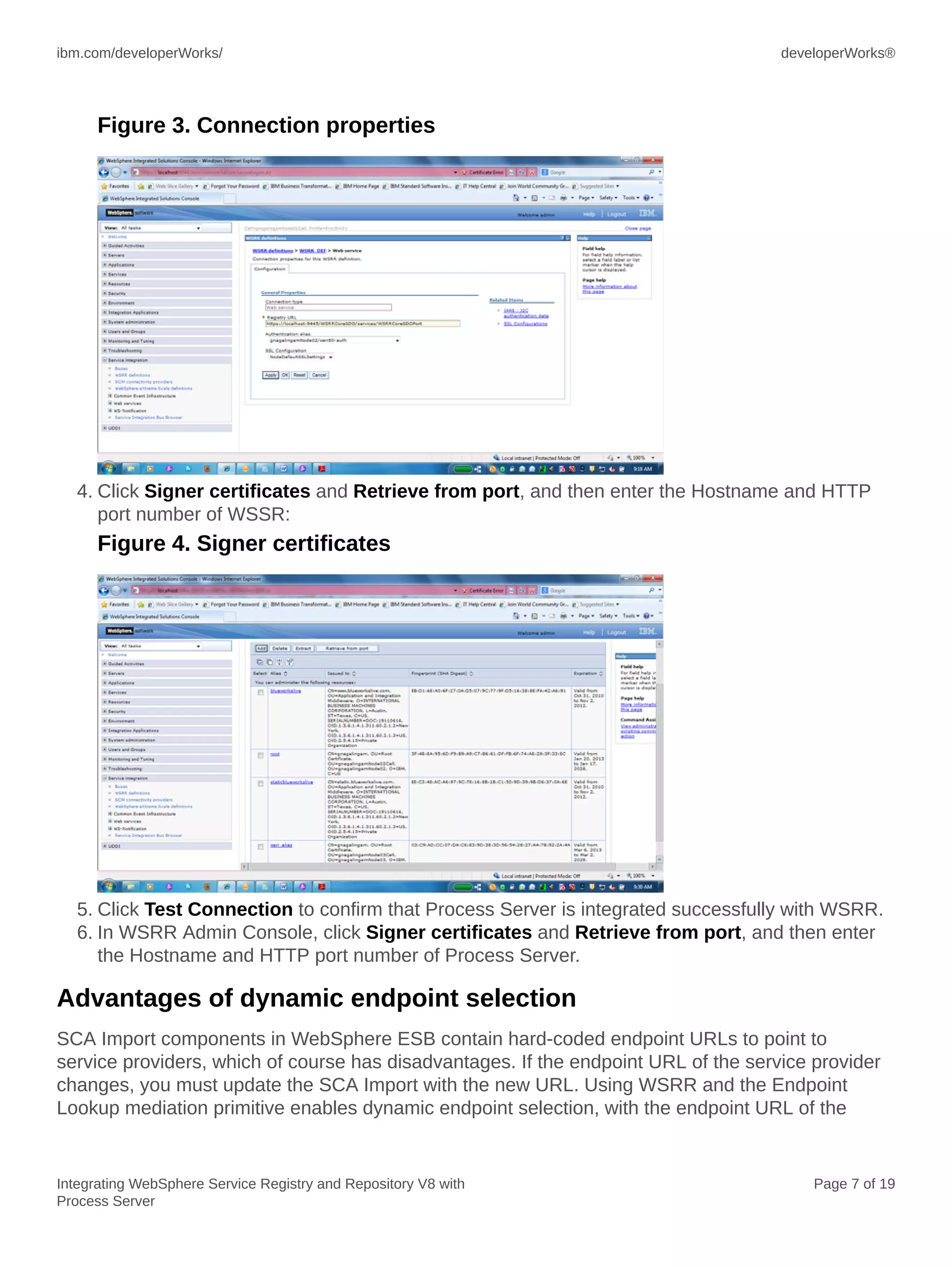
4. Click Signer certificates and Retrieve from port, and then enter the Hostname and HTTP
port number of WSSR:
Figure 4. Signer certificates
5. Click Test Connection to confirm that Process Server is integrated successfully with WSRR.
6. In WSRR Admin Console, click Signer certificates and Retrieve from port, and then enter
the Hostname and HTTP port number of Process Server.
Advantages of dynamic endpoint selection
SCA Import components in WebSphere ESB contain hard-coded endpoint URLs to point to
service providers, which of course has disadvantages. If the endpoint URL of the service provider
changes, you must update the SCA Import with the new URL. Using WSRR and the Endpoint
Lookup mediation primitive enables dynamic endpoint selection, with the endpoint URL of the
developerWorks® ibm.com/developerWorks/
Integrating WebSphere Service Registry and Repository V8 with
Process Server
Page 8 of 19
service provider retrieved at runtime by querying WSRR and you can make any future changes to
the endpoint URL in WSRR.
WSDL files for each service provider are loaded into WSRR, and you can add custom properties
or classifications to these WSDL files. The Endpoint Lookup mediation primitive in WebSphere
ESB queries WSRR, specifying the service port type to retrieve, and WSRR returns endpoint
URLs for matching services that it finds in its registry. The Endpoint Lookup mediation primitive
can retrieve endpoint information related to a variety of protocol bindings, including SOAP/HTTP.
The Endpoint Lookup primitive query can go beyond just looking for a particular port type, since
it supports other attributes such as namespace and version, as well as custom properties and
classifications. The Endpoint Lookup primitive also specifies a match policy, which tells WSRR how
many matching endpoint URLs to return, and tells WebSphere ESB where those endpoint URLs
should be stored in the SMO message.
The Endpoint Lookup primitive supports the following match policies:
• Return first matching endpoint and set routing target
• Return all matching endpoints
• Return all matching endpoints and set alternate routing targets
• Return endpoint matching latest compatible service version
Here are examples where dynamic endpoint selection has its advantage:
• It is easier to move code between environments if endpoints are not hard-coded in a
mediation, for example when moving between development, test, and production endpoints.
If the endpoint is moved outside of the mediation code, you do not need to change the
mediation to promote it to a different environment.
• If the endpoint of a service that is being invoked changes, for example it is moved to a
different server, then you can update WSRR, and there is no need to update the mediation
code.
Endpoints can be updated in WSRR based on service availability. For example, if an endpoint is
unavailable, then WSRR can change to point at an available endpoint instead. You can select the
appropriate service based on input data.
Building the mediation flow: Return all matching endpoints
A mediation module contains an SCA Import that points to the endpoint URL of the service
provider. This endpoint URL is hard coded into the SCA Import component. The service provider
occasionally changes its location, and currently, the mediation module must be modified manually
to reflect this new URL, and the mediation module must be redeployed. Using dynamic endpoint
lookup, the endpoint URL is retrieved at runtime from WSRR. Any changes to the endpoint URL
require changes only to the service definition in WSRR, and the mediation module does not need
to be modified or redeployed.
ibm.com/developerWorks/ developerWorks®
Integrating WebSphere Service Registry and Repository V8 with
Process Server
Page 9 of 19
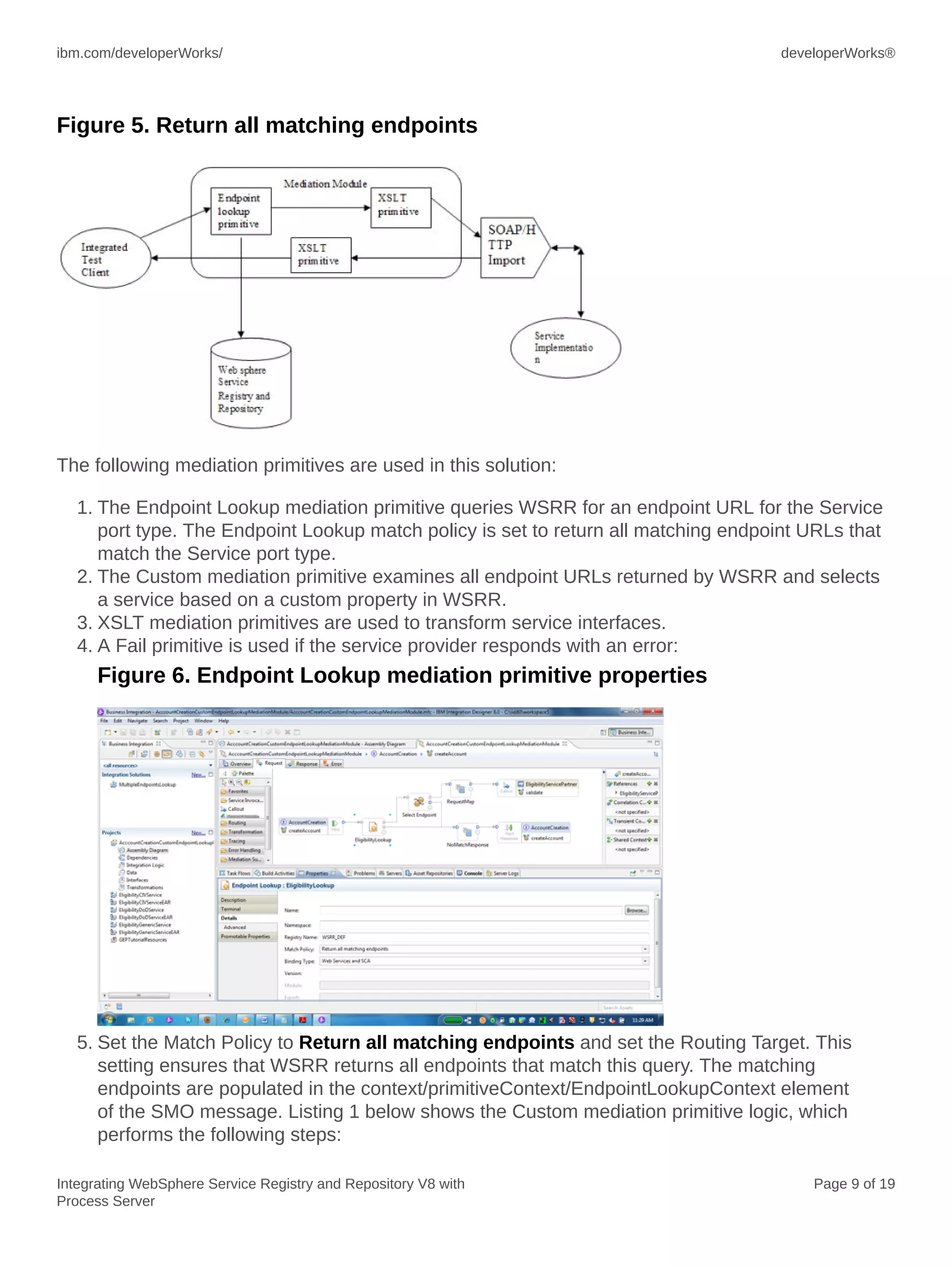
Figure 5. Return all matching endpoints
The following mediation primitives are used in this solution:
1. The Endpoint Lookup mediation primitive queries WSRR for an endpoint URL for the Service
port type. The Endpoint Lookup match policy is set to return all matching endpoint URLs that
match the Service port type.
2. The Custom mediation primitive examines all endpoint URLs returned by WSRR and selects
a service based on a custom property in WSRR.
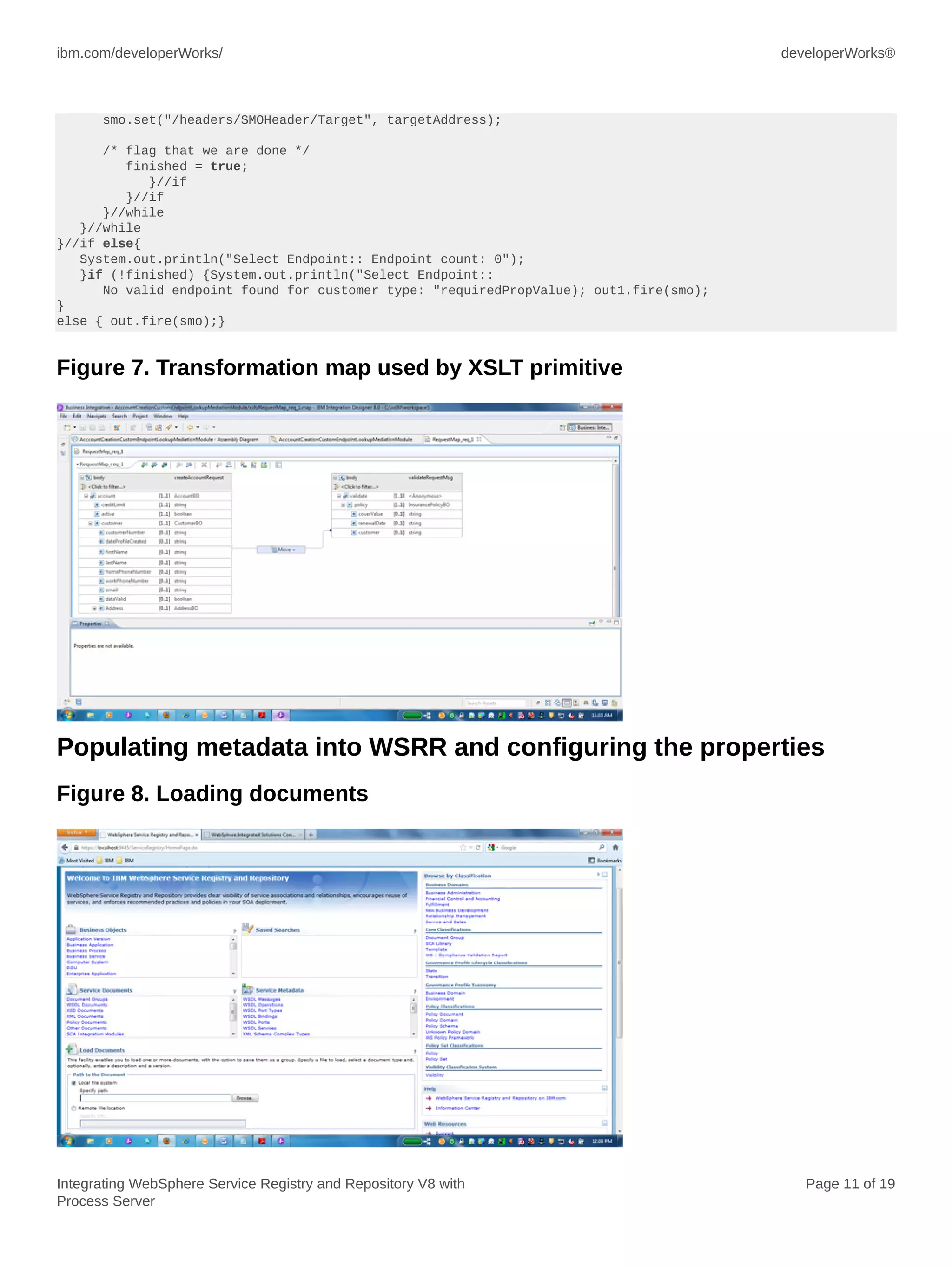
3. XSLT mediation primitives are used to transform service interfaces.
4. A Fail primitive is used if the service provider responds with an error:
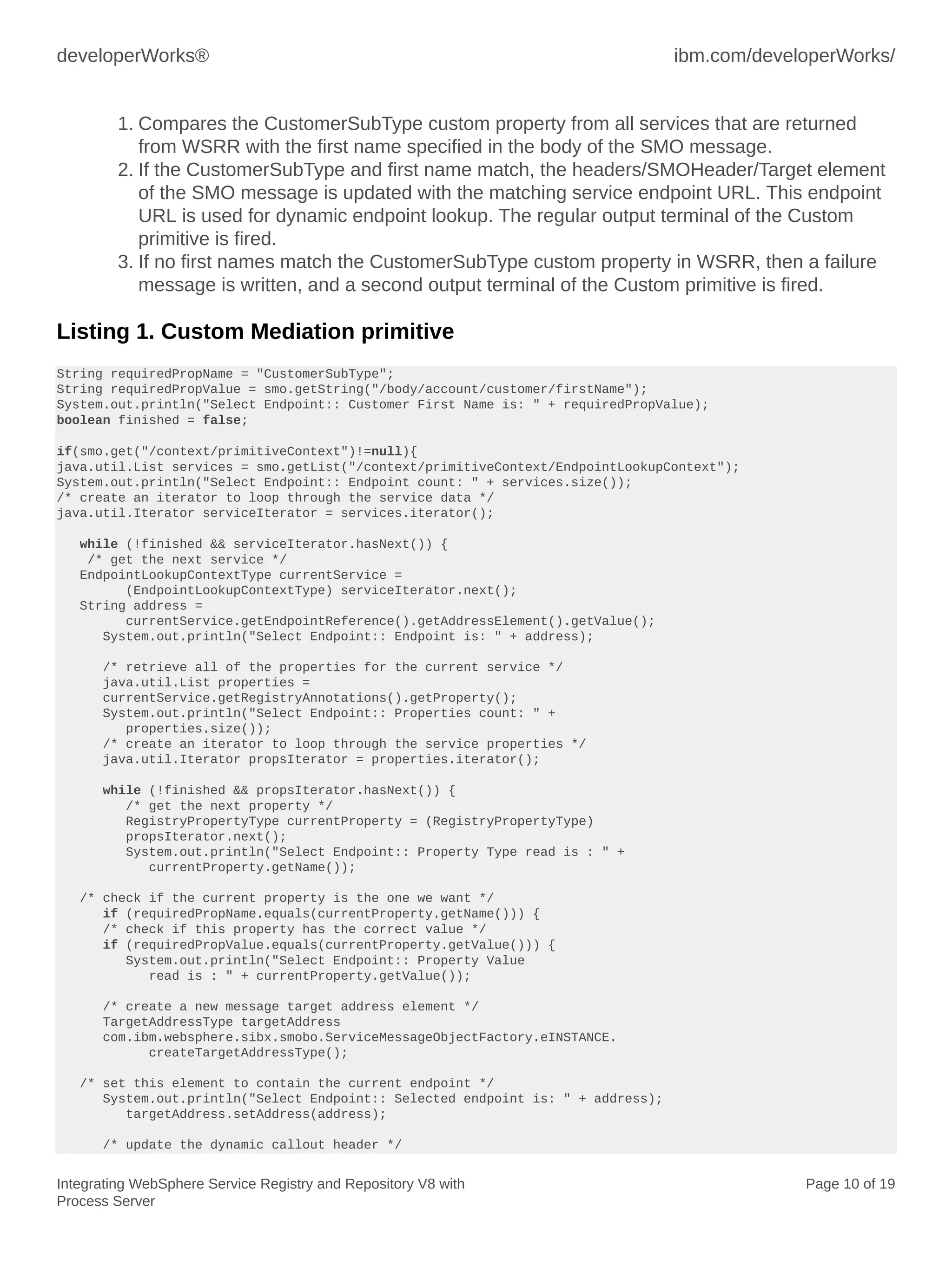
Figure 6. Endpoint Lookup mediation primitive properties
5. Set the Match Policy to Return all matching endpoints and set the Routing Target. This
setting ensures that WSRR returns all endpoints that match this query. The matching
endpoints are populated in the context/primitiveContext/EndpointLookupContext element
of the SMO message. Listing 1 below shows the Custom mediation primitive logic, which
performs the following steps:
developerWorks® ibm.com/developerWorks/
Integrating WebSphere Service Registry and Repository V8 with
Process Server
Page 10 of 19
1. Compares the CustomerSubType custom property from all services that are returned
from WSRR with the first name specified in the body of the SMO message.
2. If the CustomerSubType and first name match, the headers/SMOHeader/Target element
of the SMO message is updated with the matching service endpoint URL. This endpoint
URL is used for dynamic endpoint lookup. The regular output terminal of the Custom
primitive is fired.
3. If no first names match the CustomerSubType custom property in WSRR, then a failure
message is written, and a second output terminal of the Custom primitive is fired.
Listing 1. Custom Mediation primitive
String requiredPropName = "CustomerSubType";
String requiredPropValue = smo.getString("/body/account/customer/firstName");
System.out.println("Select Endpoint:: Customer First Name is: " + requiredPropValue);
boolean finished = false;
if(smo.get("/context/primitiveContext")!=null){
java.util.List services = smo.getList("/context/primitiveContext/EndpointLookupContext");
System.out.println("Select Endpoint:: Endpoint count: " + services.size());
/* create an iterator to loop through the service data */
java.util.Iterator serviceIterator = services.iterator();
while (!finished && serviceIterator.hasNext()) {
/* get the next service */
EndpointLookupContextType currentService =
(EndpointLookupContextType) serviceIterator.next();
String address =
currentService.getEndpointReference().getAddressElement().getValue();
System.out.println("Select Endpoint:: Endpoint is: " + address);
/* retrieve all of the properties for the current service */
java.util.List properties =
currentService.getRegistryAnnotations().getProperty();
System.out.println("Select Endpoint:: Properties count: " +
properties.size());
/* create an iterator to loop through the service properties */
java.util.Iterator propsIterator = properties.iterator();
while (!finished && propsIterator.hasNext()) {
/* get the next property */
RegistryPropertyType currentProperty = (RegistryPropertyType)
propsIterator.next();
System.out.println("Select Endpoint:: Property Type read is : " +
currentProperty.getName());
/* check if the current property is the one we want */
if (requiredPropName.equals(currentProperty.getName())) {
/* check if this property has the correct value */
if (requiredPropValue.equals(currentProperty.getValue())) {
System.out.println("Select Endpoint:: Property Value
read is : " + currentProperty.getValue());
/* create a new message target address element */
TargetAddressType targetAddress
com.ibm.websphere.sibx.smobo.ServiceMessageObjectFactory.eINSTANCE.
createTargetAddressType();
/* set this element to contain the current endpoint */
System.out.println("Select Endpoint:: Selected endpoint is: " + address);
targetAddress.setAddress(address);
/* update the dynamic callout header */
ibm.com/developerWorks/ developerWorks®
Integrating WebSphere Service Registry and Repository V8 with
Process Server
Page 11 of 19
smo.set("/headers/SMOHeader/Target", targetAddress);
/* flag that we are done */
finished = true;
}//if
}//if
}//while
}//while
}//if else{
System.out.println("Select Endpoint:: Endpoint count: 0");
}if (!finished) {System.out.println("Select Endpoint::
No valid endpoint found for customer type: "requiredPropValue); out1.fire(smo);
}
else { out.fire(smo);}
Figure 7. Transformation map used by XSLT primitive
Populating metadata into WSRR and configuring the properties
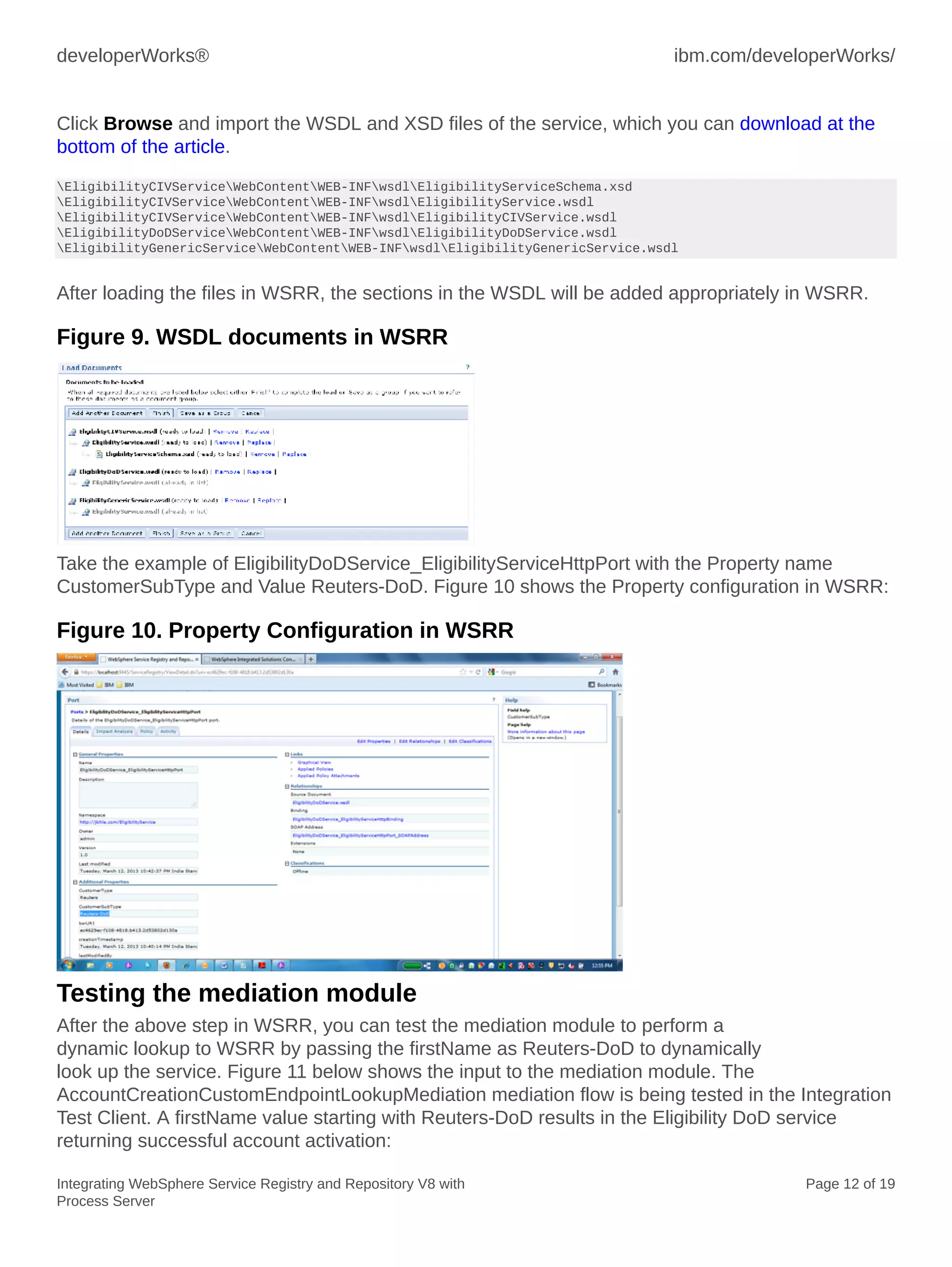
Figure 8. Loading documents
developerWorks® ibm.com/developerWorks/
Integrating WebSphere Service Registry and Repository V8 with
Process Server
Page 12 of 19
Click Browse and import the WSDL and XSD files of the service, which you can download at the
bottom of the article.
EligibilityCIVServiceWebContentWEB-INFwsdlEligibilityServiceSchema.xsd
EligibilityCIVServiceWebContentWEB-INFwsdlEligibilityService.wsdl
EligibilityCIVServiceWebContentWEB-INFwsdlEligibilityCIVService.wsdl
EligibilityDoDServiceWebContentWEB-INFwsdlEligibilityDoDService.wsdl
EligibilityGenericServiceWebContentWEB-INFwsdlEligibilityGenericService.wsdl
After loading the files in WSRR, the sections in the WSDL will be added appropriately in WSRR.
Figure 9. WSDL documents in WSRR
Take the example of EligibilityDoDService_EligibilityServiceHttpPort with the Property name
CustomerSubType and Value Reuters-DoD. Figure 10 shows the Property configuration in WSRR:
Figure 10. Property Configuration in WSRR
Testing the mediation module
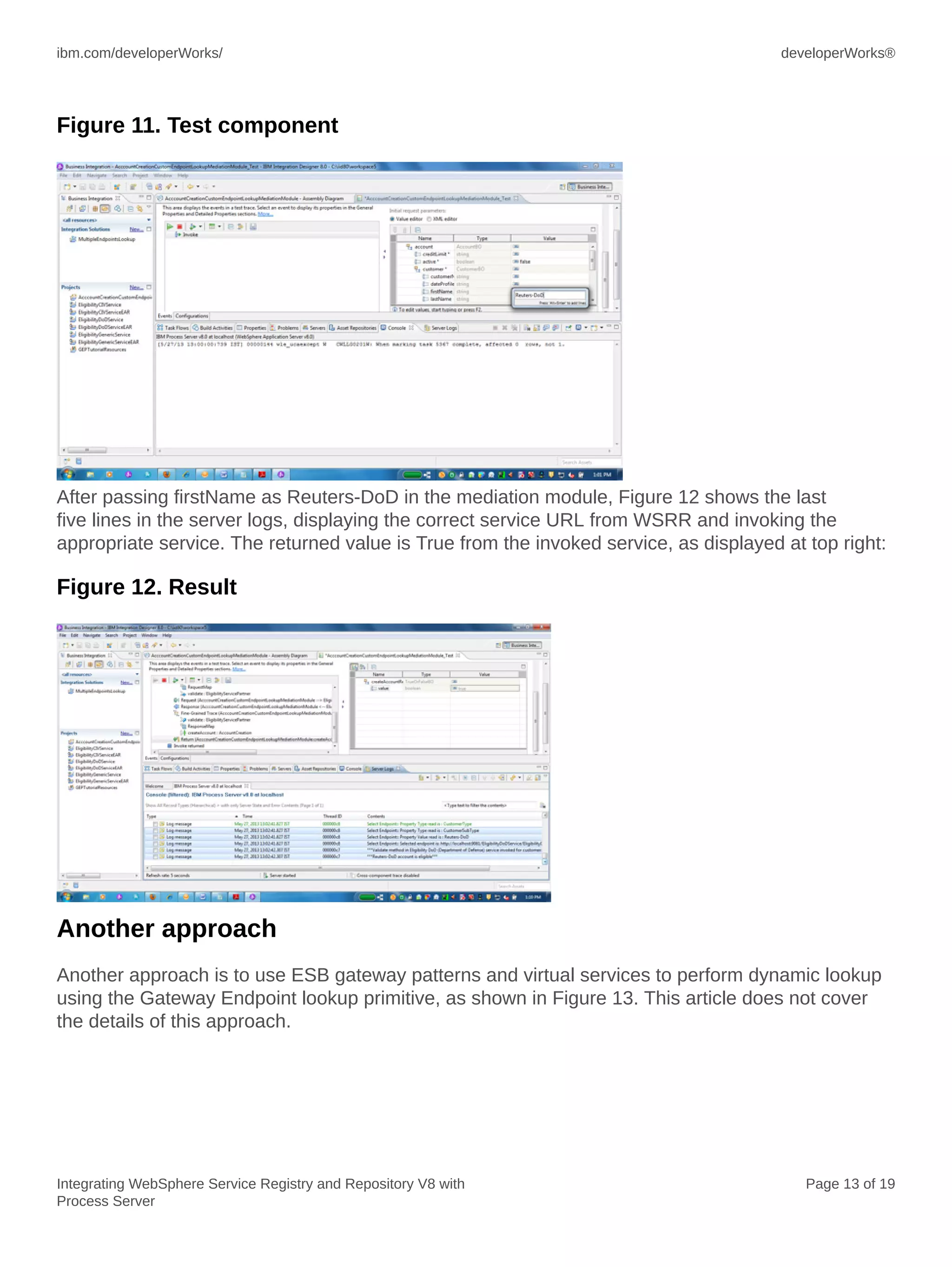
After the above step in WSRR, you can test the mediation module to perform a
dynamic lookup to WSRR by passing the firstName as Reuters-DoD to dynamically
look up the service. Figure 11 below shows the input to the mediation module. The
AccountCreationCustomEndpointLookupMediation mediation flow is being tested in the Integration
Test Client. A firstName value starting with Reuters-DoD results in the Eligibility DoD service
returning successful account activation:
ibm.com/developerWorks/ developerWorks®
Integrating WebSphere Service Registry and Repository V8 with
Process Server
Page 13 of 19
Figure 11. Test component
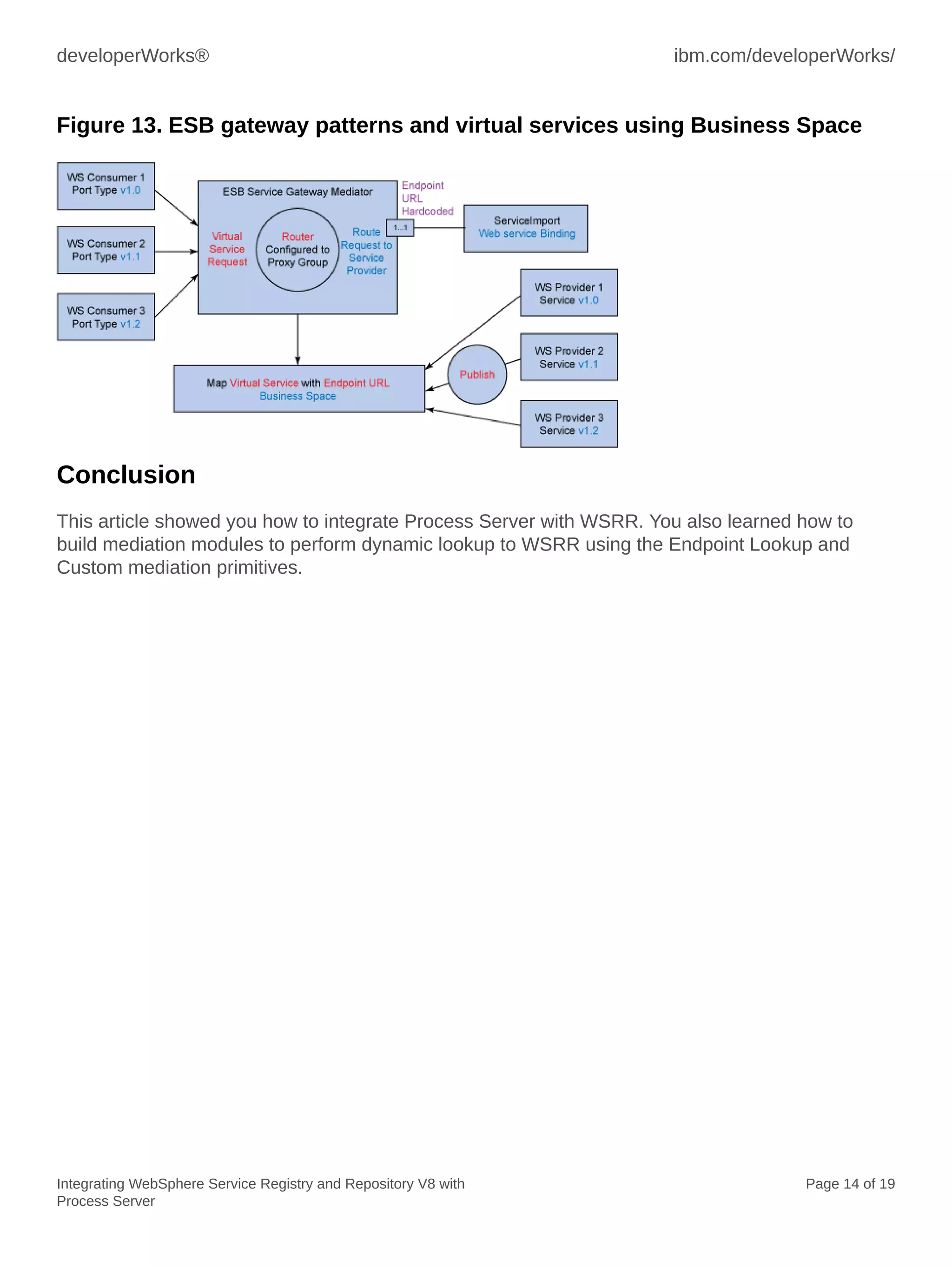
After passing firstName as Reuters-DoD in the mediation module, Figure 12 shows the last
five lines in the server logs, displaying the correct service URL from WSRR and invoking the
appropriate service. The returned value is True from the invoked service, as displayed at top right:
Figure 12. Result
Another approach
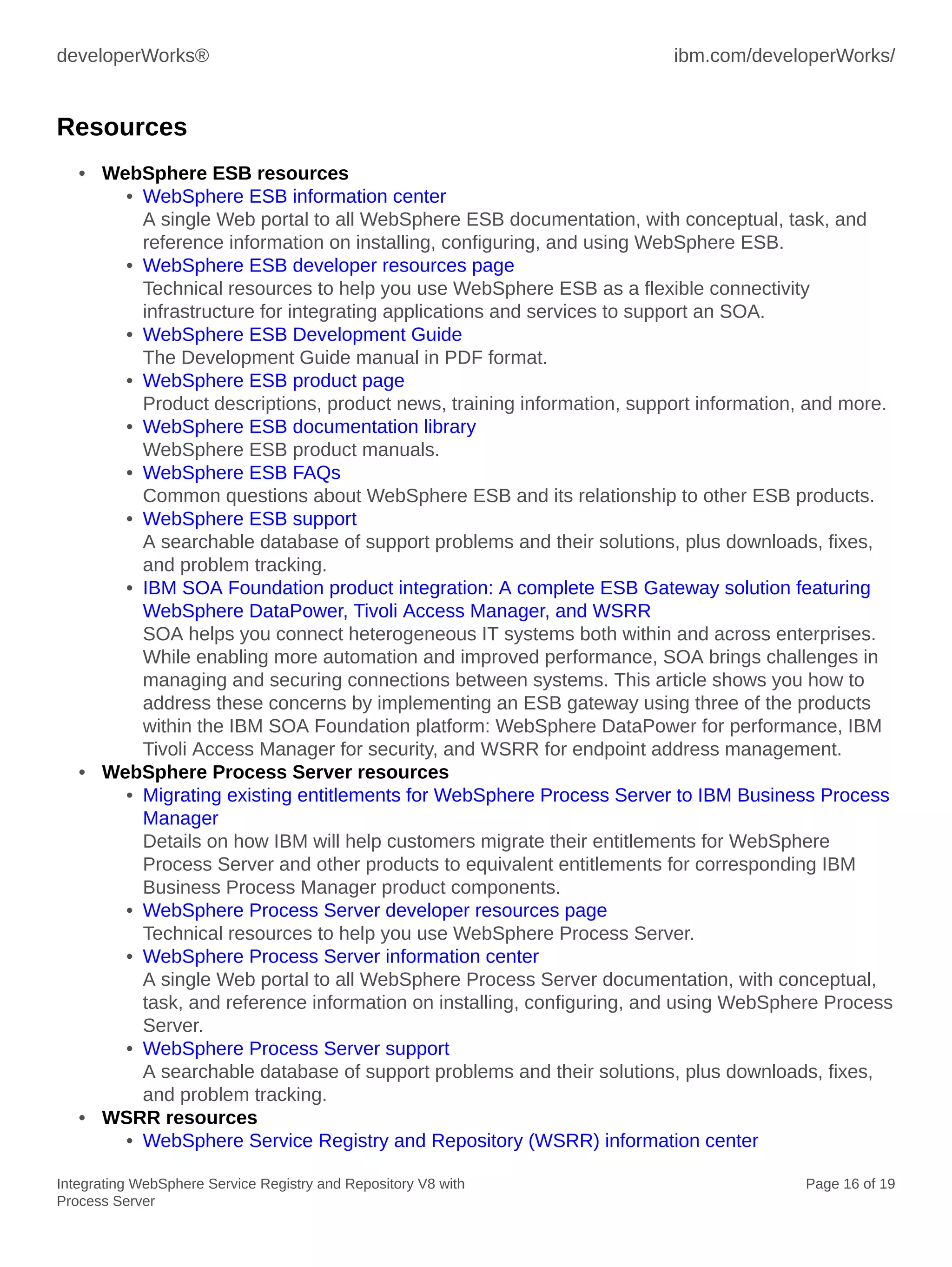
Another approach is to use ESB gateway patterns and virtual services to perform dynamic lookup
using the Gateway Endpoint lookup primitive, as shown in Figure 13. This article does not cover
the details of this approach.
developerWorks® ibm.com/developerWorks/
Integrating WebSphere Service Registry and Repository V8 with
Process Server
Page 14 of 19
Figure 13. ESB gateway patterns and virtual services using Business Space
Conclusion
This article showed you how to integrate Process Server with WSRR. You also learned how to
build mediation modules to perform dynamic lookup to WSRR using the Endpoint Lookup and
Custom mediation primitives.
ibm.com/developerWorks/ developerWorks®
Integrating WebSphere Service Registry and Repository V8 with
Process Server
Page 15 of 19
Downloads
Description Name Size
Code sample MultipleEndpointLookup.zip 102 KB
developerWorks® ibm.com/developerWorks/
Integrating WebSphere Service Registry and Repository V8 with
Process Server
Page 16 of 19
Resources
• WebSphere ESB resources
• WebSphere ESB information center
A single Web portal to all WebSphere ESB documentation, with conceptual, task, and
reference information on installing, configuring, and using WebSphere ESB.
• WebSphere ESB developer resources page
Technical resources to help you use WebSphere ESB as a flexible connectivity
infrastructure for integrating applications and services to support an SOA.
• WebSphere ESB Development Guide
The Development Guide manual in PDF format.
• WebSphere ESB product page
Product descriptions, product news, training information, support information, and more.
• WebSphere ESB documentation library
WebSphere ESB product manuals.
• WebSphere ESB FAQs
Common questions about WebSphere ESB and its relationship to other ESB products.
• WebSphere ESB support
A searchable database of support problems and their solutions, plus downloads, fixes,
and problem tracking.
• IBM SOA Foundation product integration: A complete ESB Gateway solution featuring
WebSphere DataPower, Tivoli Access Manager, and WSRR
SOA helps you connect heterogeneous IT systems both within and across enterprises.
While enabling more automation and improved performance, SOA brings challenges in
managing and securing connections between systems. This article shows you how to
address these concerns by implementing an ESB gateway using three of the products
within the IBM SOA Foundation platform: WebSphere DataPower for performance, IBM
Tivoli Access Manager for security, and WSRR for endpoint address management.
• WebSphere Process Server resources
• Migrating existing entitlements for WebSphere Process Server to IBM Business Process
Manager
Details on how IBM will help customers migrate their entitlements for WebSphere
Process Server and other products to equivalent entitlements for corresponding IBM
Business Process Manager product components.
• WebSphere Process Server developer resources page
Technical resources to help you use WebSphere Process Server.
• WebSphere Process Server information center
A single Web portal to all WebSphere Process Server documentation, with conceptual,
task, and reference information on installing, configuring, and using WebSphere Process
Server.
• WebSphere Process Server support
A searchable database of support problems and their solutions, plus downloads, fixes,
and problem tracking.
• WSRR resources
• WebSphere Service Registry and Repository (WSRR) information center
ibm.com/developerWorks/ developerWorks®
Integrating WebSphere Service Registry and Repository V8 with
Process Server
Page 17 of 19
A single Web portal to all WSRR documentation, with conceptual, task, and reference
information to help you install, configure, and use the product.
• WSRR developer resources page
Technical resources to help you use WSRR.
• WSRR product page
Product descriptions, product news, training information, support information, and more.
• WSRR requirements
Hardware and software requirements.
• Getting started with WSSR
This developerWorks article shows you how to populate WSRR with existing Web
services information.
• YouTube channel: WSRR demos
These short video demos show you how to complete several key service governance
tasks using WSRR.
• WSRR Information Portal
This wiki provides an alternative portal for quick access to a wide variety of WSRR
resources, and also makes it easy for you to give feedback on the product.
• Service Lifecycle Governance with WSRR
This IBM Redbooks® publication uses business scenarios to illustrate SOA governance
using WSRR as the authoritative registry and repository.
• WSRR handbook
This IBM Redbooks publication discusses the architecture and functions of WSRR,
along with sample integration scenarios that you can use to implement the product in an
SOA.
• WebSphere resources
• developerWorks WebSphere
Technical information and resources for developers who use WebSphere products.
developerWorks WebSphere provides product downloads, how-to information, support
resources, and a free technical library of more than 2000 technical articles, tutorials,
best practices, IBM Redbooks, and online product manuals.
• developerWorks WebSphere application integration developer resources
How-to articles, downloads, tutorials, education, product info, and other resources to
help you build WebSphere application integration and business integration solutions.
• Most popular WebSphere trial downloads
No-charge trial downloads for key WebSphere products.
• WebSphere forums
Product-specific forums where you can get answers to your technical questions and
share your expertise with other WebSphere users.
• WebSphere demos
Download and watch these self-running demos, and learn how WebSphere products can
provide business advantage for your company.
• WebSphere-related articles on developerWorks
Over 3000 edited and categorized articles on WebSphere and related technologies by
top practitioners and consultants inside and outside IBM. Search for what you need.
• developerWorks WebSphere weekly newsletter
developerWorks® ibm.com/developerWorks/
Integrating WebSphere Service Registry and Repository V8 with
Process Server
Page 18 of 19
The developerWorks newsletter gives you the latest articles and information only on
those topics that interest you. In addition to WebSphere, you can select from Java,
Linux, Open source, Rational, SOA, Web services, and other topics. Subscribe now and
design your custom mailing.
• WebSphere-related books from IBM Press
Convenient online ordering through Barnes & Noble.
• WebSphere-related events
Conferences, trade shows, Webcasts, and other events around the world of interest to
WebSphere developers.
• developerWorks resources
• Trial downloads for IBM software products
No-charge trial downloads for selected IBM® DB2®, Lotus®, Rational®, Tivoli®, and
WebSphere® products.
• developerWorks business process management developer resources
BPM how-to articles, downloads, tutorials, education, product info, and other resources
to help you model, assemble, deploy, and manage business processes.
• developerWorks blogs
Join a conversation with developerWorks users and authors, and IBM editors and
developers.
• developerWorks tech briefings
Free technical sessions by IBM experts to accelerate your learning curve and help you
succeed in your most challenging software projects. Sessions range from one-hour
virtual briefings to half-day and full-day live sessions in cities worldwide.
• developerWorks podcasts
Listen to interesting and offbeat interviews and discussions with software innovators.
• developerWorks on Twitter
Check out recent Twitter messages and URLs.
• IBM Education Assistant
A collection of multimedia educational modules that will help you better understand IBM
software products and use them more effectively to meet your business requirements.
ibm.com/developerWorks/ developerWorks®
Integrating WebSphere Service Registry and Repository V8 with
Process Server
Page 19 of 19
About the author
Ganesh Nagalingam
Ganesh Nagalingam is a Technical Leader with IBM Global Business Services in
Chennai, India. He helps create proofs-of-concept and integration solutions involving
WebSphere ESB, WebSphere Integration Designer, WebSphere MQ, WebSphere
Process Server, and WebSphere Service Registry and Repository. You can contact
Ganesh at ganesh.nagalingam@in.ibm.com.
© Copyright IBM Corporation 2013
(www.ibm.com/legal/copytrade.shtml)
Trademarks
(www.ibm.com/developerworks/ibm/trademarks/)

Integrating WebSphere Service Registry and Repository V8 with Process Server

  • 1.
    © Copyright IBMCorporation 2013 Trademarks Integrating WebSphere Service Registry and Repository V8 with Process Server Page 1 of 19 Integrating WebSphere Service Registry and Repository V8 with Process Server Ganesh Nagalingam (ganesh.nagalingam@in.ibm.com) Technical Leader, IBM Global Business Services IBM 26 June 2013 This article shows you how to perform dynamic endpoint lookup by integrating WebSphere Service Registry and Repository V8 (WSRR) with Process Server, using the Endpoint Lookup and Custom Mediation primitives. This integration solution has important advantages over hard- coded endpoint URLs. Introduction This article shows you how to integrate IBM® WebSphere® Service Registry and Repository V8 (WSRR) with Process Server, including how to configure SSL and WSRR definitions and perform dynamic endpoint lookup to WSRR. The advantage of this approach is that when web service URLs change, they can be directly updated in WSRR, and you do not need to modify or redeploy the mediation module. More about Process Server In April 2011, IBM announced IBM Business Process Manager, a single unified BPM platform to support the entire range of business process improvement projects. IBM Business Process Manager incorporates the capabilities of, and replaces, WebSphere Process Server, WebSphere Lombardi Edition, and other IBM products. IBM Business Process Manager is backwards compatible with WebSphere Process Server V6 and V7. In this article, Process Server refers to the Process Server component of IBM Business Process Manager Advanced V8. WSRR WSRR provides a system for storing, accessing, and managing information (commonly called service metadata) that is used in the selection, invocation, management, governance, and reuse of services in an SOA. In other words, it is where you store information about services used in your systems or in other organizations' systems that you already use, plan to use, or want to be aware of for the future. For example, an application can check WSRR just before invoking a service to locate the service instance best satisfying its functionality and performance needs.
  • 2.
    developerWorks® ibm.com/developerWorks/ Integrating WebSphereService Registry and Repository V8 with Process Server Page 2 of 19 WSRR enables you to publish web service artifacts, including XML Schema Definitions (XSD), Web Services Description Language (WSDL), and service component architecture (SCA) modules. WSRR enables better management and governance of your services. Through its registry and repository capabilities and its integration with the IBM SOA Foundation, WSRR is an essential foundational component of an SOA implementation. WSRR enables you to store, access, and manage information about services and service interaction endpoint descriptions (service metadata) in an SOA. You can use this information to select, invoke, govern, and reuse services in your SOA. This service information can include traditional web services that implement WSDL interfaces with SOAP/HTTP bindings, as well as a broad range of SOA services that can be described using WSDL, XSD, and policy declarations, but might use a range of protocols and be implemented according to a variety of programming models. WebSphere ESB WebSphere ESB decouples service provider from service consumer, so that instead of a direct point-to-point connection, they both connect to WebSphere ESB. It takes care of routing requests, enriching messages, mapping interfaces between service provider and service consumer, and transforming them to the interface format of the service consumer. WebSphere ESB can perform dynamic endpoint lookup using an endpoint lookup primitive to look for a published service URL in WSRR, and then apply a target address on the fly to invoke the service implementation. WebSphere ESB manages the flow of messages between service providers and service consumers. Mediation modules in WebSphere ESB handle mismatches between service providers and service consumers, including mismatches of protocol, interaction style interface, and quality of service (QoS). In an SCA solution, mediation modules are a type of SCA module that perform a special role, and have different characteristics from other business- level components. Mediation components operate on messages exchanged between service endpoints. In contrast to regular business application components, they are concerned with the flow of the messages through the infrastructure and not just with the business content of the messages. Rather than performing business functions, they perform routing, transformation, and logging operations on the messages. Process Server Process Server is at the heart of many business process management solutions. It ensures that processes you design in IBM Integration Designer are executed consistently, reliably, securely, and with transactional integrity. Built on open standards, it deploys and executes processes that orchestrate services (people, information, systems, and trading partners) within your SOA or non- SOA infrastructure. Process Server is built upon, and contains the ESB functionality. Process Server provides a standards-based business process engine, using the power of WebSphere Application Server. It also includes the same technology as WebSphere ESB, providing the same ESB capabilities. Process Server is a high-performance business engine that enables processes to meet business goals by providing a managed runtime environment for business process applications. It enables you to deploy standards-based business integration applications in an SOA, which takes everyday business applications and breaks them down into individual business functions and processes, rendering them as services. Process Server enables the deployment
  • 3.
    ibm.com/developerWorks/ developerWorks® Integrating WebSphereService Registry and Repository V8 with Process Server Page 3 of 19 of processes that span people, systems, applications, tasks, rules, and the interactions among them. It supports both long-running and short-running business processes, providing transaction rollback-like functionality for loosely coupled business processes. Business value The approach described in this article provides the flexibility of changing web service URLs in WSRR without modifying or redeploying mediation module. Successfully implementing an SOA requires applications and an infrastructure that support SOA principles. Applications can be enabled by creating service interfaces to new or existing functions that are hosted by the applications. The service interfaces should be accessed using an infrastructure that can route and transport service requests to the correct service provider. As organizations expose more functions as services, they must ensure that this infrastructure supports enterprise-scale management of the SOA. ESB is a middleware infrastructure component that supports SOA implementation in the following ways: • Decoupling the consumer's view of a service from the actual implementation of the service • Decoupling technical aspects of service interactions • Integrating and managing services in the enterprise The ESB is more than just a transport layer. It must provide mediation support to facilitate service interactions (for example, finding services that provide capabilities for which a consumer is asking or to take care of interface mismatches between consumers and providers that are compatible in terms of their capabilities). It must support a variety of ways to get on and off the ESB, such as adapter support for existing applications or business connections that enable external partners in B2B interactions. To support these different ways to get on and off the ESB, it must support service interaction with a wide variety of service endpoints. Each endpoint may have its own integration techniques, protocols, security models, and so on. This level of complexity should be hidden from service consumers, so that they are offered a simpler model. In order to hide the complexity from the consumers, the ESB must mediate between the multiple interaction models understood by service providers and the simplified view provided to consumers. During runtime, WSRR can be dynamically accessed to select a service provider, or to dynamically enforce an invocation policy. It manages information that enables dynamic binding of service consumers to service providers and enables the infrastructure to enforce registered policies.
  • 4.
    developerWorks® ibm.com/developerWorks/ Integrating WebSphereService Registry and Repository V8 with Process Server Page 4 of 19 Figure 1. Dynamic endpoint lookup from ESB Mediation to WSRR Key integration features Mediation modules deployed to Process Server can communicate with WSRR through dynamic lookup mechanism to provide information about both service endpoints and mediation policies. Service endpoints When you develop an SCA module that needs to access service endpoints from WSRR, the mediation flow can include the Endpoint Lookup mediation primitive, so that at runtime, it can obtain service endpoints from WSRR. Mediation policies You can also use WSRR to store mediation policy information, which can help you control service requests by dynamically overriding module properties. If WSRR contains an SCA module and attached mediation policies, the mediation policies can override module properties. If you want different mediation policies to apply in different contexts, you can create mediation policy conditions. When you develop an SCA module that needs to use a mediation policy, you can include in the mediation flow a Policy Resolution mediation primitive. At runtime, it can obtain mediation policy information from WSRR. How WSRR strengthens WebSphere ESB Control of services and interfaces Many SOAs are poorly regulated. Businesses do not know what services, approved or otherwise, are actually running in the network. There is no mechanism to formalize contracts (such as service level agreements) between service providers and consuming applications, and it is impossible to track who is accessing services and business information. Businesses want real-time visibility of service performance and availability and want to measure and demonstrate return on investment by tracking service use. They want to establish a catalog of existing services that provides visibility
  • 5.
    ibm.com/developerWorks/ developerWorks® Integrating WebSphereService Registry and Repository V8 with Process Server Page 5 of 19 into capabilities and that helps reduce redundancy. This catalog can help businesses understand the impact of changes to existing services and enable them to control service consumers and providers through policies. WSRR provides service discovery features to help take inventory of services that are deployed in runtime environments. On a scheduled basis, WSRR can also be configured to discover services on the runtime environment to check for rogue services. The Governance Enablement Profile (GEP) of WSRR gives a prescriptive approach to both service consumer and service provider governance. It manages subscriptions, documents of understanding, and service level agreements between the consumer and provider, enabling the ability to track who is using a given service. Greater ESB flexibility An ESB provides a connectivity layer that enables flexible and simple integration of services, decoupling integration logic from applications. However, it can be difficult to change mediation code quickly in response to changing business requirements, with additional development and testing required. It can also be complex to synchronize mediations with the runtime status of services they invoke. ESB development inherently involves invoking numerous endpoints, and when the endpoints are not decoupled from the mediation code, promotion to other development environments requires significant changes to the ESB configuration. Enabling dynamic and efficient access to services, policies, and metadata enables mediations to dynamically choose service providers and endpoints, and to adapt quickly to the status of critical services, greatly increasing ESB flexibility. Storing and defining some application and translation logic outside the ESB means that you can update the logic without needing to change and redeploy the mediations. Similarly, storing and managing policies outside the ESB means that you can define and manage the policies separately from the mediations. The ESB can then query WSRR at runtime to determine the policies that are required for the service, and can then enforce them. WSRR increases the agility of WebSphere ESB through the Endpoint Lookup, SLA Check, and Policy Resolution mediation primitives, and these primitives are key to accelerating robust and flexible mediations that you can quickly change without redeploying the mediation. Delivering services that the business needs Many businesses find that despite adopting SOA principles, they are unable to respond quickly to new business requests to deliver new and updated services quickly, or to address new business opportunities. The service development cycle is too long, with no standardization, and there is a lack of service information and dynamic discovery of existing capabilities. These issues often lead to service duplication and a disconnect between business analysts and IT. For a successful SOA, you need to create open standardized services and reusable assets that can be used by multiple lines of business, and you need to increase productivity by reusing service assets through multiple service implementations. To achieve this standardization and reuse, you need to store, catalog, and flexibly organize assets and services, and then enforce guidelines to prevent uncoordinated or unapproved changes. WSRR provides a prescriptive approach to the service life cycle, enabling top-down development with perspectives for business users to propose and approve services. This solution ships with example life cycles and governance policies that enforce standardized services and reusable assets, as well as policy analytics to help refine the governance processes and to optimize the service development life cycle.
  • 6.
    developerWorks® ibm.com/developerWorks/ Integrating WebSphereService Registry and Repository V8 with Process Server Page 6 of 19 Integrating Process Server with WSRR: Admin Console and SSL configurations This section shows you how to perform integration with security enabled on both servers and how to import the WSRR signer certificate into Process Server trust store. 1. In Process Server Admin Console, select Service Integration => WSRR definitions: Figure 2. WSRR definition 2. Click Connection properties. 3. Specify the following properties for the WSRR definition, as shown below in Figure 3: • The Registry URL of the WSRR server, which includes https:// for a secure connection and the correct TCP/IP port. • An authentication alias to use to authenticate to WSRR. This example uses wsrr80-auth. • The SSL configuration that contains the signer certificate. This example sets the configuration to NodeDefaultSSLSettings.
  • 7.
    ibm.com/developerWorks/ developerWorks® Integrating WebSphereService Registry and Repository V8 with Process Server Page 7 of 19 Figure 3. Connection properties 4. Click Signer certificates and Retrieve from port, and then enter the Hostname and HTTP port number of WSSR: Figure 4. Signer certificates 5. Click Test Connection to confirm that Process Server is integrated successfully with WSRR. 6. In WSRR Admin Console, click Signer certificates and Retrieve from port, and then enter the Hostname and HTTP port number of Process Server. Advantages of dynamic endpoint selection SCA Import components in WebSphere ESB contain hard-coded endpoint URLs to point to service providers, which of course has disadvantages. If the endpoint URL of the service provider changes, you must update the SCA Import with the new URL. Using WSRR and the Endpoint Lookup mediation primitive enables dynamic endpoint selection, with the endpoint URL of the
  • 8.
    developerWorks® ibm.com/developerWorks/ Integrating WebSphereService Registry and Repository V8 with Process Server Page 8 of 19 service provider retrieved at runtime by querying WSRR and you can make any future changes to the endpoint URL in WSRR. WSDL files for each service provider are loaded into WSRR, and you can add custom properties or classifications to these WSDL files. The Endpoint Lookup mediation primitive in WebSphere ESB queries WSRR, specifying the service port type to retrieve, and WSRR returns endpoint URLs for matching services that it finds in its registry. The Endpoint Lookup mediation primitive can retrieve endpoint information related to a variety of protocol bindings, including SOAP/HTTP. The Endpoint Lookup primitive query can go beyond just looking for a particular port type, since it supports other attributes such as namespace and version, as well as custom properties and classifications. The Endpoint Lookup primitive also specifies a match policy, which tells WSRR how many matching endpoint URLs to return, and tells WebSphere ESB where those endpoint URLs should be stored in the SMO message. The Endpoint Lookup primitive supports the following match policies: • Return first matching endpoint and set routing target • Return all matching endpoints • Return all matching endpoints and set alternate routing targets • Return endpoint matching latest compatible service version Here are examples where dynamic endpoint selection has its advantage: • It is easier to move code between environments if endpoints are not hard-coded in a mediation, for example when moving between development, test, and production endpoints. If the endpoint is moved outside of the mediation code, you do not need to change the mediation to promote it to a different environment. • If the endpoint of a service that is being invoked changes, for example it is moved to a different server, then you can update WSRR, and there is no need to update the mediation code. Endpoints can be updated in WSRR based on service availability. For example, if an endpoint is unavailable, then WSRR can change to point at an available endpoint instead. You can select the appropriate service based on input data. Building the mediation flow: Return all matching endpoints A mediation module contains an SCA Import that points to the endpoint URL of the service provider. This endpoint URL is hard coded into the SCA Import component. The service provider occasionally changes its location, and currently, the mediation module must be modified manually to reflect this new URL, and the mediation module must be redeployed. Using dynamic endpoint lookup, the endpoint URL is retrieved at runtime from WSRR. Any changes to the endpoint URL require changes only to the service definition in WSRR, and the mediation module does not need to be modified or redeployed.
  • 9.
    ibm.com/developerWorks/ developerWorks® Integrating WebSphereService Registry and Repository V8 with Process Server Page 9 of 19 Figure 5. Return all matching endpoints The following mediation primitives are used in this solution: 1. The Endpoint Lookup mediation primitive queries WSRR for an endpoint URL for the Service port type. The Endpoint Lookup match policy is set to return all matching endpoint URLs that match the Service port type. 2. The Custom mediation primitive examines all endpoint URLs returned by WSRR and selects a service based on a custom property in WSRR. 3. XSLT mediation primitives are used to transform service interfaces. 4. A Fail primitive is used if the service provider responds with an error: Figure 6. Endpoint Lookup mediation primitive properties 5. Set the Match Policy to Return all matching endpoints and set the Routing Target. This setting ensures that WSRR returns all endpoints that match this query. The matching endpoints are populated in the context/primitiveContext/EndpointLookupContext element of the SMO message. Listing 1 below shows the Custom mediation primitive logic, which performs the following steps:
  • 10.
    developerWorks® ibm.com/developerWorks/ Integrating WebSphereService Registry and Repository V8 with Process Server Page 10 of 19 1. Compares the CustomerSubType custom property from all services that are returned from WSRR with the first name specified in the body of the SMO message. 2. If the CustomerSubType and first name match, the headers/SMOHeader/Target element of the SMO message is updated with the matching service endpoint URL. This endpoint URL is used for dynamic endpoint lookup. The regular output terminal of the Custom primitive is fired. 3. If no first names match the CustomerSubType custom property in WSRR, then a failure message is written, and a second output terminal of the Custom primitive is fired. Listing 1. Custom Mediation primitive String requiredPropName = "CustomerSubType"; String requiredPropValue = smo.getString("/body/account/customer/firstName"); System.out.println("Select Endpoint:: Customer First Name is: " + requiredPropValue); boolean finished = false; if(smo.get("/context/primitiveContext")!=null){ java.util.List services = smo.getList("/context/primitiveContext/EndpointLookupContext"); System.out.println("Select Endpoint:: Endpoint count: " + services.size()); /* create an iterator to loop through the service data */ java.util.Iterator serviceIterator = services.iterator(); while (!finished && serviceIterator.hasNext()) { /* get the next service */ EndpointLookupContextType currentService = (EndpointLookupContextType) serviceIterator.next(); String address = currentService.getEndpointReference().getAddressElement().getValue(); System.out.println("Select Endpoint:: Endpoint is: " + address); /* retrieve all of the properties for the current service */ java.util.List properties = currentService.getRegistryAnnotations().getProperty(); System.out.println("Select Endpoint:: Properties count: " + properties.size()); /* create an iterator to loop through the service properties */ java.util.Iterator propsIterator = properties.iterator(); while (!finished && propsIterator.hasNext()) { /* get the next property */ RegistryPropertyType currentProperty = (RegistryPropertyType) propsIterator.next(); System.out.println("Select Endpoint:: Property Type read is : " + currentProperty.getName()); /* check if the current property is the one we want */ if (requiredPropName.equals(currentProperty.getName())) { /* check if this property has the correct value */ if (requiredPropValue.equals(currentProperty.getValue())) { System.out.println("Select Endpoint:: Property Value read is : " + currentProperty.getValue()); /* create a new message target address element */ TargetAddressType targetAddress com.ibm.websphere.sibx.smobo.ServiceMessageObjectFactory.eINSTANCE. createTargetAddressType(); /* set this element to contain the current endpoint */ System.out.println("Select Endpoint:: Selected endpoint is: " + address); targetAddress.setAddress(address); /* update the dynamic callout header */
  • 11.
    ibm.com/developerWorks/ developerWorks® Integrating WebSphereService Registry and Repository V8 with Process Server Page 11 of 19 smo.set("/headers/SMOHeader/Target", targetAddress); /* flag that we are done */ finished = true; }//if }//if }//while }//while }//if else{ System.out.println("Select Endpoint:: Endpoint count: 0"); }if (!finished) {System.out.println("Select Endpoint:: No valid endpoint found for customer type: "requiredPropValue); out1.fire(smo); } else { out.fire(smo);} Figure 7. Transformation map used by XSLT primitive Populating metadata into WSRR and configuring the properties Figure 8. Loading documents
  • 12.
    developerWorks® ibm.com/developerWorks/ Integrating WebSphereService Registry and Repository V8 with Process Server Page 12 of 19 Click Browse and import the WSDL and XSD files of the service, which you can download at the bottom of the article. EligibilityCIVServiceWebContentWEB-INFwsdlEligibilityServiceSchema.xsd EligibilityCIVServiceWebContentWEB-INFwsdlEligibilityService.wsdl EligibilityCIVServiceWebContentWEB-INFwsdlEligibilityCIVService.wsdl EligibilityDoDServiceWebContentWEB-INFwsdlEligibilityDoDService.wsdl EligibilityGenericServiceWebContentWEB-INFwsdlEligibilityGenericService.wsdl After loading the files in WSRR, the sections in the WSDL will be added appropriately in WSRR. Figure 9. WSDL documents in WSRR Take the example of EligibilityDoDService_EligibilityServiceHttpPort with the Property name CustomerSubType and Value Reuters-DoD. Figure 10 shows the Property configuration in WSRR: Figure 10. Property Configuration in WSRR Testing the mediation module After the above step in WSRR, you can test the mediation module to perform a dynamic lookup to WSRR by passing the firstName as Reuters-DoD to dynamically look up the service. Figure 11 below shows the input to the mediation module. The AccountCreationCustomEndpointLookupMediation mediation flow is being tested in the Integration Test Client. A firstName value starting with Reuters-DoD results in the Eligibility DoD service returning successful account activation:
  • 13.
    ibm.com/developerWorks/ developerWorks® Integrating WebSphereService Registry and Repository V8 with Process Server Page 13 of 19 Figure 11. Test component After passing firstName as Reuters-DoD in the mediation module, Figure 12 shows the last five lines in the server logs, displaying the correct service URL from WSRR and invoking the appropriate service. The returned value is True from the invoked service, as displayed at top right: Figure 12. Result Another approach Another approach is to use ESB gateway patterns and virtual services to perform dynamic lookup using the Gateway Endpoint lookup primitive, as shown in Figure 13. This article does not cover the details of this approach.
  • 14.
    developerWorks® ibm.com/developerWorks/ Integrating WebSphereService Registry and Repository V8 with Process Server Page 14 of 19 Figure 13. ESB gateway patterns and virtual services using Business Space Conclusion This article showed you how to integrate Process Server with WSRR. You also learned how to build mediation modules to perform dynamic lookup to WSRR using the Endpoint Lookup and Custom mediation primitives.
  • 15.
    ibm.com/developerWorks/ developerWorks® Integrating WebSphereService Registry and Repository V8 with Process Server Page 15 of 19 Downloads Description Name Size Code sample MultipleEndpointLookup.zip 102 KB
  • 16.
    developerWorks® ibm.com/developerWorks/ Integrating WebSphereService Registry and Repository V8 with Process Server Page 16 of 19 Resources • WebSphere ESB resources • WebSphere ESB information center A single Web portal to all WebSphere ESB documentation, with conceptual, task, and reference information on installing, configuring, and using WebSphere ESB. • WebSphere ESB developer resources page Technical resources to help you use WebSphere ESB as a flexible connectivity infrastructure for integrating applications and services to support an SOA. • WebSphere ESB Development Guide The Development Guide manual in PDF format. • WebSphere ESB product page Product descriptions, product news, training information, support information, and more. • WebSphere ESB documentation library WebSphere ESB product manuals. • WebSphere ESB FAQs Common questions about WebSphere ESB and its relationship to other ESB products. • WebSphere ESB support A searchable database of support problems and their solutions, plus downloads, fixes, and problem tracking. • IBM SOA Foundation product integration: A complete ESB Gateway solution featuring WebSphere DataPower, Tivoli Access Manager, and WSRR SOA helps you connect heterogeneous IT systems both within and across enterprises. While enabling more automation and improved performance, SOA brings challenges in managing and securing connections between systems. This article shows you how to address these concerns by implementing an ESB gateway using three of the products within the IBM SOA Foundation platform: WebSphere DataPower for performance, IBM Tivoli Access Manager for security, and WSRR for endpoint address management. • WebSphere Process Server resources • Migrating existing entitlements for WebSphere Process Server to IBM Business Process Manager Details on how IBM will help customers migrate their entitlements for WebSphere Process Server and other products to equivalent entitlements for corresponding IBM Business Process Manager product components. • WebSphere Process Server developer resources page Technical resources to help you use WebSphere Process Server. • WebSphere Process Server information center A single Web portal to all WebSphere Process Server documentation, with conceptual, task, and reference information on installing, configuring, and using WebSphere Process Server. • WebSphere Process Server support A searchable database of support problems and their solutions, plus downloads, fixes, and problem tracking. • WSRR resources • WebSphere Service Registry and Repository (WSRR) information center
  • 17.
    ibm.com/developerWorks/ developerWorks® Integrating WebSphereService Registry and Repository V8 with Process Server Page 17 of 19 A single Web portal to all WSRR documentation, with conceptual, task, and reference information to help you install, configure, and use the product. • WSRR developer resources page Technical resources to help you use WSRR. • WSRR product page Product descriptions, product news, training information, support information, and more. • WSRR requirements Hardware and software requirements. • Getting started with WSSR This developerWorks article shows you how to populate WSRR with existing Web services information. • YouTube channel: WSRR demos These short video demos show you how to complete several key service governance tasks using WSRR. • WSRR Information Portal This wiki provides an alternative portal for quick access to a wide variety of WSRR resources, and also makes it easy for you to give feedback on the product. • Service Lifecycle Governance with WSRR This IBM Redbooks® publication uses business scenarios to illustrate SOA governance using WSRR as the authoritative registry and repository. • WSRR handbook This IBM Redbooks publication discusses the architecture and functions of WSRR, along with sample integration scenarios that you can use to implement the product in an SOA. • WebSphere resources • developerWorks WebSphere Technical information and resources for developers who use WebSphere products. developerWorks WebSphere provides product downloads, how-to information, support resources, and a free technical library of more than 2000 technical articles, tutorials, best practices, IBM Redbooks, and online product manuals. • developerWorks WebSphere application integration developer resources How-to articles, downloads, tutorials, education, product info, and other resources to help you build WebSphere application integration and business integration solutions. • Most popular WebSphere trial downloads No-charge trial downloads for key WebSphere products. • WebSphere forums Product-specific forums where you can get answers to your technical questions and share your expertise with other WebSphere users. • WebSphere demos Download and watch these self-running demos, and learn how WebSphere products can provide business advantage for your company. • WebSphere-related articles on developerWorks Over 3000 edited and categorized articles on WebSphere and related technologies by top practitioners and consultants inside and outside IBM. Search for what you need. • developerWorks WebSphere weekly newsletter
  • 18.
    developerWorks® ibm.com/developerWorks/ Integrating WebSphereService Registry and Repository V8 with Process Server Page 18 of 19 The developerWorks newsletter gives you the latest articles and information only on those topics that interest you. In addition to WebSphere, you can select from Java, Linux, Open source, Rational, SOA, Web services, and other topics. Subscribe now and design your custom mailing. • WebSphere-related books from IBM Press Convenient online ordering through Barnes & Noble. • WebSphere-related events Conferences, trade shows, Webcasts, and other events around the world of interest to WebSphere developers. • developerWorks resources • Trial downloads for IBM software products No-charge trial downloads for selected IBM® DB2®, Lotus®, Rational®, Tivoli®, and WebSphere® products. • developerWorks business process management developer resources BPM how-to articles, downloads, tutorials, education, product info, and other resources to help you model, assemble, deploy, and manage business processes. • developerWorks blogs Join a conversation with developerWorks users and authors, and IBM editors and developers. • developerWorks tech briefings Free technical sessions by IBM experts to accelerate your learning curve and help you succeed in your most challenging software projects. Sessions range from one-hour virtual briefings to half-day and full-day live sessions in cities worldwide. • developerWorks podcasts Listen to interesting and offbeat interviews and discussions with software innovators. • developerWorks on Twitter Check out recent Twitter messages and URLs. • IBM Education Assistant A collection of multimedia educational modules that will help you better understand IBM software products and use them more effectively to meet your business requirements.
  • 19.
    ibm.com/developerWorks/ developerWorks® Integrating WebSphereService Registry and Repository V8 with Process Server Page 19 of 19 About the author Ganesh Nagalingam Ganesh Nagalingam is a Technical Leader with IBM Global Business Services in Chennai, India. He helps create proofs-of-concept and integration solutions involving WebSphere ESB, WebSphere Integration Designer, WebSphere MQ, WebSphere Process Server, and WebSphere Service Registry and Repository. You can contact Ganesh at ganesh.nagalingam@in.ibm.com. © Copyright IBM Corporation 2013 (www.ibm.com/legal/copytrade.shtml) Trademarks (www.ibm.com/developerworks/ibm/trademarks/)