Developing Mobile
Application
(Android/IOS/Windows)
using Phonegap
Building Apps with HTML,CSS & JavaScript
fahim000bd@gmail.com
1
Agenda:
What is PhoneGap?
 PhoneGap Architecture .
Pre-requisite of using PhoneGap
 Building an App.
Upload apk/ipa into Play Store/itunes.
 Summary .
fahim000bd@gmail.com
2
PhoneGap..
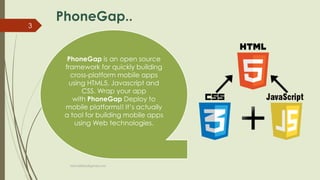
PhoneGap is an open source
framework for quickly building
cross-platform mobile apps
using HTML5, Javascript and
CSS. Wrap your app
with PhoneGap Deploy to
mobile platforms!! It’s actually
a tool for building mobile apps
using Web technologies.
fahim000bd@gmail.com
3
Why Phonegap?
If you think of adopting different
platforms while building an app
and PhoneGap is just one of them. It is
widely preferred by mobile development
agencies to build mobile apps because it
has rich features and an open source
technology.
It combines HTML5, CSS3 and
JavaScript to create mobile apps with
great innovative features. A mobile
development agency offering mobile
apps development services include
this technology to build mobile apps for
numerous platform.
fahim000bd@gmail.com
4
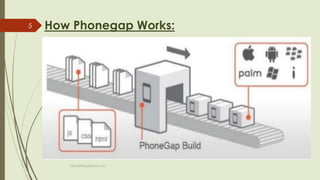
How Phonegap Works:
fahim000bd@gmail.com
5
Cont…
 Build App with Web standards: Developers already know how
to make a web technologies using html5,css & javascript.
 Wrap that with Phonegap: Using this phonegap build,one can
get access to native API’s
 Deploy to Multiple platforms: Phonegap actually uses standard
based web technologies to bridges web application & mobile
devices.
fahim000bd@gmail.com
6
Before PhoneGap Build
 Creating config.xml file on the project for configuring Phonegap.
Example:
 Create a resource folder in www directory & resize the icon as well as
the screen banner manually.
 The Icon image must have been resizing as six generalized densities.
Such as ldpi , mdpi , hdpi , xhdpi , xxhdpi , xxxhdpi . That will be
mentioned at config.xml file as the previous example.
fahim000bd@gmail.com
7
Cont…
Freshers needs to Create Phonegap & Github account before
using phonegap:
 Github Account: Freshers needs to sign up a account in github.
https://github.com/
 Phonegap Build: Account is mendatory for Phonegap Building.
https://build.phonegap.com
After Creating two of that account,One can get easily access in
Phonegap.
fahim000bd@gmail.com
8
PhoneGap Build
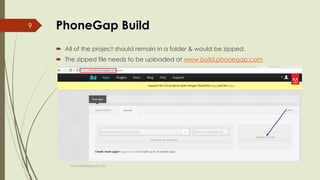
 All of the project should remain in a folder & would be zipped.
 The zipped file needs to be uploaded at www.build.phonegap.com
fahim000bd@gmail.com
9
Cont…
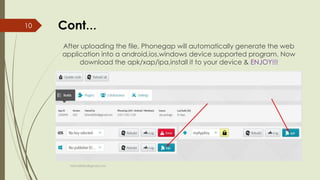
After uploading the file, Phonegap will automatically generate the web
application into a android,ios,windows device supported program. Now
download the apk/xap/ipa,install it to your device & ENJOY!!!
fahim000bd@gmail.com
10
Upload APP in store:
For Android Application if u want to upload your app for rest
of the user of the world,you have to upload the apk in play
store.To know how you have to upload the apk in play store
you can watch this vedio
One can easily upload his app at play store.But for Phonegap
apk,there has some bindings. Playstore looks for signed apk,but
apk collected from phonegap is not realesed.
fahim000bd@gmail.com
11
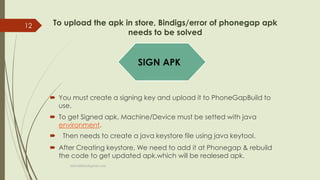
To upload the apk in store, Bindigs/error of phonegap apk
needs to be solved
 You must create a signing key and upload it to PhoneGapBuild to
use.
 To get Signed apk, Machine/Device must be setted with java
environment.
 Then needs to create a java keystore file using java keytool.
 After Creating keystore, We need to add it at Phonegap & rebuild
the code to get updated apk,which will be realesed apk.
SIGN APK
fahim000bd@gmail.com
12
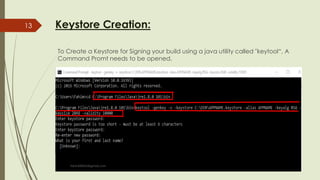
Keystore Creation:
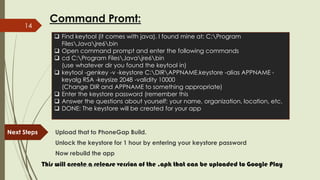
To Create a Keystore for Signing your build using a java utility called "keytool“, A
Command Promt needs to be opened.
fahim000bd@gmail.com
13
Command Promt:
Next Steps Upload that to PhoneGap Build.
Unlock the keystore for 1 hour by entering your keystore password
Now rebuild the app
This will create a release version of the .apk that can be uploaded to Google Play
 Find keytool (it comes with java). I found mine at: C:Program
FilesJavajre6bin
 Open command prompt and enter the following commands
 cd C:Program FilesJavajre6bin
(use whatever dir you found the keytool in)
 keytool -genkey -v -keystore C:DIRAPPNAME.keystore -alias APPNAME -
keyalg RSA -keysize 2048 -validity 10000
(Change DIR and APPNAME to something appropriate)
 Enter the keystore password (remember this
 Answer the questions about yourself: your name, organization, location, etc.
 DONE: The keystore will be created for your app
fahim000bd@gmail.com
14
Upload APP in store:
 Now This signed apk is ready to publish in play store.
 Create a playstore account (Which will cost 25$) or if you have a playstore
account ,can upload the apk.
 This Vedio will help one how to upload apk in Playstore.
fahim000bd@gmail.com
15
Resources
 Configering: http://docs.phonegap.com/phonegap-build/configuring/
 Phonegap Build: https://www.youtube.com/watch?v=Sq2EDVJr_v8
 Keystore Creating: https://www.youtube.com/watch?v=I5ilyZMO33o
 Upload in Playstore: https://www.youtube.com/watch?v=-f3PM04J6uc
fahim000bd@gmail.com
16
Lets Try..
Thank You..!.
fahim000bd@gmail.com
17

Developing Mobile Application using Phonegap

  • 1.
    Developing Mobile Application (Android/IOS/Windows) using Phonegap BuildingApps with HTML,CSS & JavaScript fahim000bd@gmail.com 1
  • 2.
    Agenda: What is PhoneGap? PhoneGap Architecture . Pre-requisite of using PhoneGap  Building an App. Upload apk/ipa into Play Store/itunes.  Summary . fahim000bd@gmail.com 2
  • 3.
    PhoneGap.. PhoneGap is anopen source framework for quickly building cross-platform mobile apps using HTML5, Javascript and CSS. Wrap your app with PhoneGap Deploy to mobile platforms!! It’s actually a tool for building mobile apps using Web technologies. fahim000bd@gmail.com 3
  • 4.
    Why Phonegap? If youthink of adopting different platforms while building an app and PhoneGap is just one of them. It is widely preferred by mobile development agencies to build mobile apps because it has rich features and an open source technology. It combines HTML5, CSS3 and JavaScript to create mobile apps with great innovative features. A mobile development agency offering mobile apps development services include this technology to build mobile apps for numerous platform. fahim000bd@gmail.com 4
  • 5.
  • 6.
    Cont…  Build Appwith Web standards: Developers already know how to make a web technologies using html5,css & javascript.  Wrap that with Phonegap: Using this phonegap build,one can get access to native API’s  Deploy to Multiple platforms: Phonegap actually uses standard based web technologies to bridges web application & mobile devices. fahim000bd@gmail.com 6
  • 7.
    Before PhoneGap Build Creating config.xml file on the project for configuring Phonegap. Example:  Create a resource folder in www directory & resize the icon as well as the screen banner manually.  The Icon image must have been resizing as six generalized densities. Such as ldpi , mdpi , hdpi , xhdpi , xxhdpi , xxxhdpi . That will be mentioned at config.xml file as the previous example. fahim000bd@gmail.com 7
  • 8.
    Cont… Freshers needs toCreate Phonegap & Github account before using phonegap:  Github Account: Freshers needs to sign up a account in github. https://github.com/  Phonegap Build: Account is mendatory for Phonegap Building. https://build.phonegap.com After Creating two of that account,One can get easily access in Phonegap. fahim000bd@gmail.com 8
  • 9.
    PhoneGap Build  Allof the project should remain in a folder & would be zipped.  The zipped file needs to be uploaded at www.build.phonegap.com fahim000bd@gmail.com 9
  • 10.
    Cont… After uploading thefile, Phonegap will automatically generate the web application into a android,ios,windows device supported program. Now download the apk/xap/ipa,install it to your device & ENJOY!!! fahim000bd@gmail.com 10
  • 11.
    Upload APP instore: For Android Application if u want to upload your app for rest of the user of the world,you have to upload the apk in play store.To know how you have to upload the apk in play store you can watch this vedio One can easily upload his app at play store.But for Phonegap apk,there has some bindings. Playstore looks for signed apk,but apk collected from phonegap is not realesed. fahim000bd@gmail.com 11
  • 12.
    To upload theapk in store, Bindigs/error of phonegap apk needs to be solved  You must create a signing key and upload it to PhoneGapBuild to use.  To get Signed apk, Machine/Device must be setted with java environment.  Then needs to create a java keystore file using java keytool.  After Creating keystore, We need to add it at Phonegap & rebuild the code to get updated apk,which will be realesed apk. SIGN APK fahim000bd@gmail.com 12
  • 13.
    Keystore Creation: To Createa Keystore for Signing your build using a java utility called "keytool“, A Command Promt needs to be opened. fahim000bd@gmail.com 13
  • 14.
    Command Promt: Next StepsUpload that to PhoneGap Build. Unlock the keystore for 1 hour by entering your keystore password Now rebuild the app This will create a release version of the .apk that can be uploaded to Google Play  Find keytool (it comes with java). I found mine at: C:Program FilesJavajre6bin  Open command prompt and enter the following commands  cd C:Program FilesJavajre6bin (use whatever dir you found the keytool in)  keytool -genkey -v -keystore C:DIRAPPNAME.keystore -alias APPNAME - keyalg RSA -keysize 2048 -validity 10000 (Change DIR and APPNAME to something appropriate)  Enter the keystore password (remember this  Answer the questions about yourself: your name, organization, location, etc.  DONE: The keystore will be created for your app fahim000bd@gmail.com 14
  • 15.
    Upload APP instore:  Now This signed apk is ready to publish in play store.  Create a playstore account (Which will cost 25$) or if you have a playstore account ,can upload the apk.  This Vedio will help one how to upload apk in Playstore. fahim000bd@gmail.com 15
  • 16.
    Resources  Configering: http://docs.phonegap.com/phonegap-build/configuring/ Phonegap Build: https://www.youtube.com/watch?v=Sq2EDVJr_v8  Keystore Creating: https://www.youtube.com/watch?v=I5ilyZMO33o  Upload in Playstore: https://www.youtube.com/watch?v=-f3PM04J6uc fahim000bd@gmail.com 16
  • 17.