Developing Custom Controls
with UI5Michael Graf, UI5 Developer
© 2014 SAP AG. All rights reserved. 2
Overview
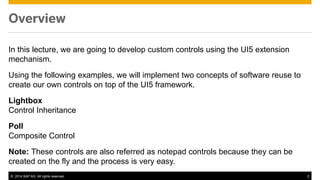
In this lecture, we are going to develop custom controls using the UI5 extension
mechanism.
Using the following examples, we will implement two concepts of software reuse to
create our own controls on top of the UI5 framework.
Lightbox
Control Inheritance
Poll
Composite Control
Note: These controls are also referred as notepad controls because they can be
created on the fly and the process is very easy.
© 2014 SAP AG. All rights reserved. 3
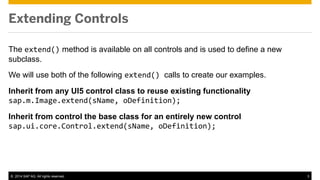
The extend() method is available on all controls and is used to define a new
subclass.
We will use both of the following extend() calls to create our examples.
Inherit from any UI5 control class to reuse existing functionality
sap.m.Image.extend(sName, oDefinition);
Inherit from control the base class for an entirely new control
sap.ui.core.Control.extend(sName, oDefinition);
Extending Controls
© 2014 SAP AG. All rights reserved. 4
sap.ui.core.Control.extend(“MyControl", {
metadata: {
},
Properties: Represent the state of the control as simple types
Events: Allow for registering by the application and other controls
Aggregations: Hold a list of data or controls to be used in this control
Methods: Define the control‘s behavior
Renderer: Creates the HTML for the control
});
Control Structure (Schematic)
© 2014 SAP AG. All rights reserved. 5
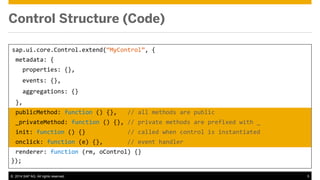
sap.ui.core.Control.extend(“MyControl”, {
metadata: {
properties: {},
events: {},
aggregations: {}
},
publicMethod: function () {}, // all methods are public
_privateMethod: function () {}, // private methods are prefixed with _
init: function () {} // called when control is instantiated
onclick: function (e) {}, // event handler
renderer: function (rm, oControl) {}
});
Control Structure (Code)
© 2014 SAP AG. All rights reserved. 6
Example 1: Lightbox – Concepts I
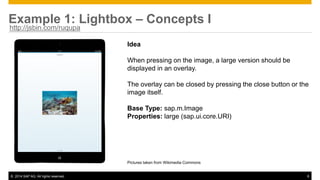
Idea
When pressing on the image, a large version should be
displayed in an overlay.
The overlay can be closed by pressing the close button or the
image itself.
Base Type: sap.m.Image
Properties: large (sap.ui.core.URI)
Pictures taken from Wikimedia Commons
http://jsbin.com/ruqupa
© 2014 SAP AG. All rights reserved. 7
Example 1: Lightbox – Concepts II
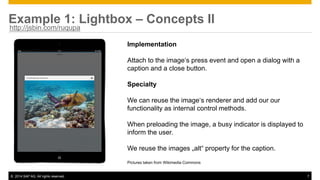
Implementation
Attach to the image‘s press event and open a dialog with a
caption and a close button.
Specialty
We can reuse the image‘s renderer and add our our
functionality as internal control methods.
When preloading the image, a busy indicator is displayed to
inform the user.
We reuse the images „alt“ property for the caption.
Pictures taken from Wikimedia Commons
http://jsbin.com/ruqupa
© 2014 SAP AG. All rights reserved. 8
Example 1: Lightbox – Coding (simplified)
sap.m.Image.extend(“Lightbox”, {
metadata: {
properties: {
large: "sap.ui.core.URI
},
},
init: function () {
var that = this;
function () {
that._open();
});
},
[…]
renderer: sap.m.ImageRenderer.render
});
The large image is
modeled as a control
property
This internal method will
open the lightbox dialog
We simply reuse the
image renderer for this
control
http://jsbin.com/ruqupa/edit
© 2014 SAP AG. All rights reserved. 9
Example 1: Lightbox – What is missing?
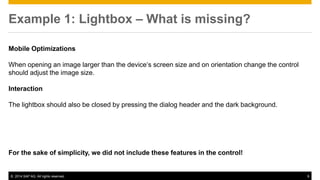
Mobile Optimizations
When opening an image larger than the device‘s screen size and on orientation change the control
should adjust the image size.
Interaction
The lightbox should also be closed by pressing the dialog header and the dark background.
For the sake of simplicity, we did not include these features in the control!
© 2014 SAP AG. All rights reserved. 10
Example 2: Poll – Concepts I
Idea
Ask the user a question.
Allow rating a value between 1-5.
Show the results of the poll after the voting.
Base Type: sap.ui.core.Control
Properties: question (string)
Events: vote()
Aggregations:
_title (sap.m.Label)
_rating (sap.m.RatingIndicator)
_meta: (sap.m.Label)
http://jsbin.com/jesox
© 2014 SAP AG. All rights reserved. 11
Example 2: Poll – Concepts II
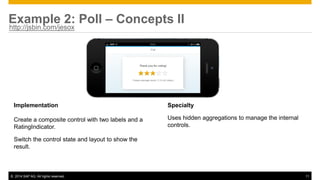
Implementation
Create a composite control with two labels and a
RatingIndicator.
Switch the control state and layout to show the
result.
Specialty
Uses hidden aggregations to manage the internal
controls.
http://jsbin.com/jesox
© 2014 SAP AG. All rights reserved. 12
Example 2: Poll – Coding (simplified)
sap.ui.core.Control.extend(“Poll”, {
metadata: {
[question, vote event, internal aggregations]
},
[…]
renderer: function (oRm, oControl) {
oRm.write("<div ");
oRm.writeControlData(oControl);
oRm.write("class="poll">");
oRm.renderControl(oControl.getAggregation("_title");
oRm.renderControl(oControl.getAggregation("_rating"));
oRm.renderControl(oControl.getAggregation("_meta"));
oRm.write("</div>");
}
};
The inner controls are
defined as aggregations
http://jsbin.com/jesox/edit
The inner controls are
rendered inside the
wrapper
The Poll control renders a
wrapper div HTML
element
© 2014 SAP AG. All rights reserved. 13
Example 2: Poll – What is missing?
Poll Data
The data displayed on the result page should be dynamic.
Translation
Texts should be loaded from a resource bundle to facilitate translation.
For the sake of simplicity, we did not include these features in the control!
© 2014 SAP AG. All rights reserved. 14
Further Information
How to Develop UI5 Controls Within JavaScript
https://sapui5.hana.ondemand.com/sdk/#docs/guide/OnTheFlyControlDefinition.html
Control API Documentation
https://sapui5.hana.ondemand.com/sdk/#docs/api/symbols/sap.ui.core.Control.html
Lightbox Example
JS Bin
Poll Example
JS Bin
© 2014 SAP AG. All rights reserved. 15
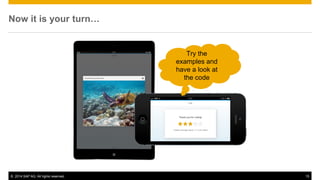
Now it is your turn…
Try the
examples and
have a look at
the code
© 2014 SAP AG. All rights reserved. 16
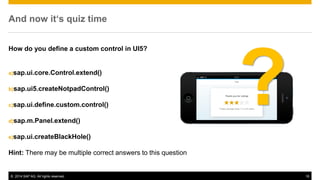
And now it‘s quiz time
How do you define a custom control in UI5?
a)sap.ui.core.Control.extend()
b)sap.ui5.createNotpadControl()
c)sap.ui.define.custom.control()
d)sap.m.Panel.extend()
e)sap.ui.createBlackHole()
Hint: There may be multiple correct answers to this question

Developing Custom Controls with UI5 (OpenUI5 video lecture)

  • 1.
    Developing Custom Controls withUI5Michael Graf, UI5 Developer
  • 2.
    © 2014 SAPAG. All rights reserved. 2 Overview In this lecture, we are going to develop custom controls using the UI5 extension mechanism. Using the following examples, we will implement two concepts of software reuse to create our own controls on top of the UI5 framework. Lightbox Control Inheritance Poll Composite Control Note: These controls are also referred as notepad controls because they can be created on the fly and the process is very easy.
  • 3.
    © 2014 SAPAG. All rights reserved. 3 The extend() method is available on all controls and is used to define a new subclass. We will use both of the following extend() calls to create our examples. Inherit from any UI5 control class to reuse existing functionality sap.m.Image.extend(sName, oDefinition); Inherit from control the base class for an entirely new control sap.ui.core.Control.extend(sName, oDefinition); Extending Controls
  • 4.
    © 2014 SAPAG. All rights reserved. 4 sap.ui.core.Control.extend(“MyControl", { metadata: { }, Properties: Represent the state of the control as simple types Events: Allow for registering by the application and other controls Aggregations: Hold a list of data or controls to be used in this control Methods: Define the control‘s behavior Renderer: Creates the HTML for the control }); Control Structure (Schematic)
  • 5.
    © 2014 SAPAG. All rights reserved. 5 sap.ui.core.Control.extend(“MyControl”, { metadata: { properties: {}, events: {}, aggregations: {} }, publicMethod: function () {}, // all methods are public _privateMethod: function () {}, // private methods are prefixed with _ init: function () {} // called when control is instantiated onclick: function (e) {}, // event handler renderer: function (rm, oControl) {} }); Control Structure (Code)
  • 6.
    © 2014 SAPAG. All rights reserved. 6 Example 1: Lightbox – Concepts I Idea When pressing on the image, a large version should be displayed in an overlay. The overlay can be closed by pressing the close button or the image itself. Base Type: sap.m.Image Properties: large (sap.ui.core.URI) Pictures taken from Wikimedia Commons http://jsbin.com/ruqupa
  • 7.
    © 2014 SAPAG. All rights reserved. 7 Example 1: Lightbox – Concepts II Implementation Attach to the image‘s press event and open a dialog with a caption and a close button. Specialty We can reuse the image‘s renderer and add our our functionality as internal control methods. When preloading the image, a busy indicator is displayed to inform the user. We reuse the images „alt“ property for the caption. Pictures taken from Wikimedia Commons http://jsbin.com/ruqupa
  • 8.
    © 2014 SAPAG. All rights reserved. 8 Example 1: Lightbox – Coding (simplified) sap.m.Image.extend(“Lightbox”, { metadata: { properties: { large: "sap.ui.core.URI }, }, init: function () { var that = this; function () { that._open(); }); }, […] renderer: sap.m.ImageRenderer.render }); The large image is modeled as a control property This internal method will open the lightbox dialog We simply reuse the image renderer for this control http://jsbin.com/ruqupa/edit
  • 9.
    © 2014 SAPAG. All rights reserved. 9 Example 1: Lightbox – What is missing? Mobile Optimizations When opening an image larger than the device‘s screen size and on orientation change the control should adjust the image size. Interaction The lightbox should also be closed by pressing the dialog header and the dark background. For the sake of simplicity, we did not include these features in the control!
  • 10.
    © 2014 SAPAG. All rights reserved. 10 Example 2: Poll – Concepts I Idea Ask the user a question. Allow rating a value between 1-5. Show the results of the poll after the voting. Base Type: sap.ui.core.Control Properties: question (string) Events: vote() Aggregations: _title (sap.m.Label) _rating (sap.m.RatingIndicator) _meta: (sap.m.Label) http://jsbin.com/jesox
  • 11.
    © 2014 SAPAG. All rights reserved. 11 Example 2: Poll – Concepts II Implementation Create a composite control with two labels and a RatingIndicator. Switch the control state and layout to show the result. Specialty Uses hidden aggregations to manage the internal controls. http://jsbin.com/jesox
  • 12.
    © 2014 SAPAG. All rights reserved. 12 Example 2: Poll – Coding (simplified) sap.ui.core.Control.extend(“Poll”, { metadata: { [question, vote event, internal aggregations] }, […] renderer: function (oRm, oControl) { oRm.write("<div "); oRm.writeControlData(oControl); oRm.write("class="poll">"); oRm.renderControl(oControl.getAggregation("_title"); oRm.renderControl(oControl.getAggregation("_rating")); oRm.renderControl(oControl.getAggregation("_meta")); oRm.write("</div>"); } }; The inner controls are defined as aggregations http://jsbin.com/jesox/edit The inner controls are rendered inside the wrapper The Poll control renders a wrapper div HTML element
  • 13.
    © 2014 SAPAG. All rights reserved. 13 Example 2: Poll – What is missing? Poll Data The data displayed on the result page should be dynamic. Translation Texts should be loaded from a resource bundle to facilitate translation. For the sake of simplicity, we did not include these features in the control!
  • 14.
    © 2014 SAPAG. All rights reserved. 14 Further Information How to Develop UI5 Controls Within JavaScript https://sapui5.hana.ondemand.com/sdk/#docs/guide/OnTheFlyControlDefinition.html Control API Documentation https://sapui5.hana.ondemand.com/sdk/#docs/api/symbols/sap.ui.core.Control.html Lightbox Example JS Bin Poll Example JS Bin
  • 15.
    © 2014 SAPAG. All rights reserved. 15 Now it is your turn… Try the examples and have a look at the code
  • 16.
    © 2014 SAPAG. All rights reserved. 16 And now it‘s quiz time How do you define a custom control in UI5? a)sap.ui.core.Control.extend() b)sap.ui5.createNotpadControl() c)sap.ui.define.custom.control() d)sap.m.Panel.extend() e)sap.ui.createBlackHole() Hint: There may be multiple correct answers to this question