Week 1: Understanding SAP Fiori Launchpad
Unit 1: SAP Fiori Launchpad Architecture
2
PUBLIC
© 2017 SAP SE or an SAP affiliate company. All rights reserved. ǀ
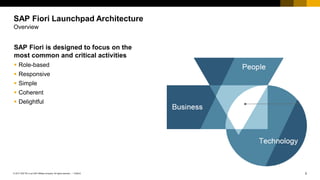
SAP Fiori is designed to focus on the
most common and critical activities
▪ Role-based
▪ Responsive
▪ Simple
▪ Coherent
▪ Delightful
SAP Fiori Launchpad Architecture
Overview
3
PUBLIC
© 2017 SAP SE or an SAP affiliate company. All rights reserved. ǀ
SAP Fiori launchpad architecture high level
▪ Client/browser or mobile devices
▪ Reverse proxy – SAP Mobile Platform
▪ ABAP servers
▪ Back-end server
Note: It is also possible for FES from the cloud to
connect to an existing on-premise landscape.
SAP Fiori Launchpad Architecture
On-premise architecture
On-Premise
SAP S/4HANA
SAP Business Suite
(ERP, SRM,…)
…
Front-End Server
SAP Fiori Applications OData Services
SAP Mobile Platform
for Mobile Devices
4
PUBLIC
© 2017 SAP SE or an SAP affiliate company. All rights reserved. ǀ
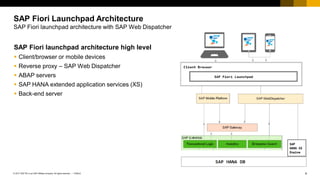
SAP Fiori launchpad architecture high level
▪ Client/browser or mobile devices
▪ Reverse proxy – SAP Web Dispatcher
▪ ABAP servers
▪ SAP HANA extended application services (XS)
▪ Back-end server
SAP Fiori Launchpad Architecture
SAP Fiori launchpad architecture with SAP Web Dispatcher
5
PUBLIC
© 2017 SAP SE or an SAP affiliate company. All rights reserved. ǀ
SAP Fiori Launchpad Architecture
Deployment options
Gateway Central Hub Deployment
▪ Support for multiple system routing
▪ Deploying content without touching
the back end
▪ Single point of access to the back end
Development Gateway Central Hub
▪ Similar advantages to Central Hub
▪ The only difference between Central
Hub and Development hub is the
services development does not need to
be deployed in the back end
Embedded System
▪ Less runtime overhead
▪ One less system to maintain
6
PUBLIC
© 2017 SAP SE or an SAP affiliate company. All rights reserved. ǀ
SAP Fiori Launchpad Architecture
Components – Central hub system
SAP NetWeaver <
7.40
SAP NetWeaver >=
7.40
NW Gateway ▪ GW_CORE
▪ IW_FND
SAP_GWFND
(Comes with it)
SAP Back End IW_BEP SAP_GWFND
(Comes with it)
SAPUI5 1.28 or Higher 1.28 or Higher
Components required for central hub deployment
7
PUBLIC
© 2017 SAP SE or an SAP affiliate company. All rights reserved. ǀ
SAP Fiori Launchpad Architecture
Components – Embedded system
SAP NetWeaver <
7.40
SAP NetWeaver >=
7.40
SAP Back End ▪ GW_CORE
▪ IW_BEP
▪ IW_FND
SAP_GWFND
(Comes with it)
SAPUI5 1.28 or Higher 1.28 or Higher
Components required for embedded deployment
8
PUBLIC
© 2017 SAP SE or an SAP affiliate company. All rights reserved. ǀ
SAP Fiori Launchpad Architecture
SAP Fiori launchpad building blocks
SAP Fiori launchpad –
Building blocks
▪ Based on the unified shell
architecture
▪ Client-side runtime
environment, which can be
hosted on different server
platforms
▪ Shell offers unified services
with platform-independent
interfaces to the hosted apps
and shell components
9
PUBLIC
© 2017 SAP SE or an SAP affiliate company. All rights reserved. ǀ
SAP Fiori Launchpad Architecture
SAP Fiori launchpad – Building blocks architecture
SAP Fiori launchpad – Building blocks
▪ Apps are embedded in application container
▪ Shell services and renderer are managed by
the central shell container
▪ Runtime configuration is fed by the following
settings:
– Static configuration settings in the hosting
HTML page
– Dynamic configuration data read from the
front-end server during startup
– Dynamic settings are passed as query
parameters in the URL
▪ FioriLaunchpad.html contains all JavaScript
components
Web Browser
Shell Container
Shell Renderer Shell Services
Application Container
Runtime
Configuration
Home Page
Application
CustomLaunchpad.html
FioriLaunchpad.html
Platform-
Independent
Service
Platform-
Specific
Service
Service
Adapter
10
PUBLIC
© 2017 SAP SE or an SAP affiliate company. All rights reserved. ǀ
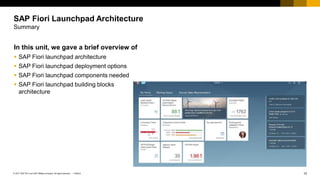
In this unit, we gave a brief overview of
▪ SAP Fiori launchpad architecture
▪ SAP Fiori launchpad deployment options
▪ SAP Fiori launchpad components needed
▪ SAP Fiori launchpad building blocks
architecture
SAP Fiori Launchpad Architecture
Summary
Contact information:
open@sap.com
Thank you.
No part of this publication may be reproduced or transmitted in any form or for any purpose without the express permission of SAP SE or an SAP affiliate company.
The information contained herein may be changed without prior notice. Some software products marketed by SAP SE and its distributors contain proprietary software components
of other software vendors. National product specifications may vary.
These materials are provided by SAP SE or an SAP affiliate company for informational purposes only, without representation or warranty of any kind, and SAP or its affiliated
companies shall not be liable for errors or omissions with respect to the materials. The only warranties for SAP or SAP affiliate company products and services are those that are
set forth in the express warranty statements accompanying such products and services, if any. Nothing herein should be construed as constituting an additional warranty.
In particular, SAP SE or its affiliated companies have no obligation to pursue any course of business outlined in this document or any related presentation, or to develop or release
any functionality mentioned therein. This document, or any related presentation, and SAP SE’s or its affiliated companies’ strategy and possible future developments, products,
and/or platform directions and functionality are all subject to change and may be changed by SAP SE or its affiliated companies at any time for any reason without notice. The
information in this document is not a commitment, promise, or legal obligation to deliver any material, code, or functionality. All forward-looking statements are subject to various
risks and uncertainties that could cause actual results to differ materially from expectations. Readers are cautioned not to place undue reliance on these forward-looking statements,
and they should not be relied upon in making purchasing decisions.
SAP and other SAP products and services mentioned herein as well as their respective logos are trademarks or registered trademarks of SAP SE (or an SAP affiliate company)
in Germany and other countries. All other product and service names mentioned are the trademarks of their respective companies.
See http://global.sap.com/corporate-en/legal/copyright/index.epx for additional trademark information and notices.
© 2017 SAP SE or an SAP affiliate company. All rights reserved.
Week 1: Understanding SAP Fiori Launchpad
Unit 2: SAP Fiori Launchpad Troubleshooting
Tools
2
PUBLIC
© 2017 SAP SE or an SAP affiliate company. All rights reserved. ǀ
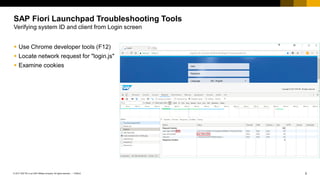
▪ Use Chrome developer tools (F12)
▪ Locate network request for "login.js"
▪ Examine cookies
SAP Fiori Launchpad Troubleshooting Tools
Verifying system ID and client from Login screen
3
PUBLIC
© 2017 SAP SE or an SAP affiliate company. All rights reserved. ǀ
▪ Use "Sources" tab in Chrome
▪ Locate "oServerSideConfig" in
FioriLaunchpad.html
▪ Use breakpoints to pause processing
▪ From Console tab, evaluate
"console.table(oServerSideConfig)"
SAP Fiori Launchpad Troubleshooting Tools
Verifying system ID and client from the launchpad home
4
PUBLIC
© 2017 SAP SE or an SAP affiliate company. All rights reserved. ǀ
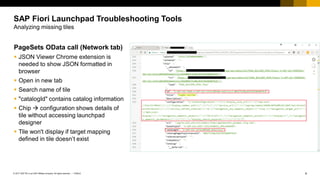
PageSets OData call (Network tab)
▪ JSON Viewer Chrome extension is
needed to show JSON formatted in
browser
▪ Open in new tab
▪ Search name of tile
▪ "catalogId" contains catalog information
▪ Chip  configuration shows details of
tile without accessing launchpad
designer
▪ Tile won't display if target mapping
defined in tile doesn’t exist
SAP Fiori Launchpad Troubleshooting Tools
Analyzing missing tiles
5
PUBLIC
© 2017 SAP SE or an SAP affiliate company. All rights reserved. ǀ
Use the extended "start_up" call ("*")
▪ Search for intents (semobj-action) to find
all assigned target mappings / details
▪ Duplicate intents with different
configurations can cause unexpected
results
▪ Intents are case-sensitive
SAP Fiori Launchpad Troubleshooting Tools
Analyzing missing tiles (cont.)
6
PUBLIC
© 2017 SAP SE or an SAP affiliate company. All rights reserved. ǀ
Invalid or missing system alias
results in app opening on SAP
Gateway system
Use extended start_up call again
▪ Copy JSON content of response
▪ "var startupobj = <paste content of JSON
response>" in Chrome console
▪ "console.table(startupobj.systemAliases)"
in Chrome console to display a table of the
system aliases
▪ "console.table(startupobj.targetMappings)"
available for target mappings
SAP Fiori Launchpad Troubleshooting Tools
Examining system aliases
7
PUBLIC
© 2017 SAP SE or an SAP affiliate company. All rights reserved. ǀ
SE24 to resolve the alias using the
standard class (KBA 2423115)
▪ /UI2/CL_SYS_ALIAS_MANAGER class, display
▪ Execute in Test Environment (F8)
▪ Continue on "Replace Generic Parameter
Types" screen, no changes
▪ Execute RESOLVE method
▪ Provide IV_ALIAS as derived from the start_up
request
▪ Review details of results using "Single Entry"
icon (Shift+F7)
SAP Fiori Launchpad Troubleshooting Tools
Examining system aliases (cont.)
8
PUBLIC
© 2017 SAP SE or an SAP affiliate company. All rights reserved. ǀ
Business Catalogs
▪ Collection built for specific business roles
– Comprised of references from technical catalogs
– Can be assigned directly to end users
Technical Catalogs
▪ Collection of tiles and target mappings from related
technical areas and development teams
– Comprised of mostly original tiles/mappings
– Should not typically be assigned directly to end
users
SAP Fiori Launchpad Troubleshooting Tools
Differences in business and technical catalogs
9
PUBLIC
© 2017 SAP SE or an SAP affiliate company. All rights reserved. ǀ
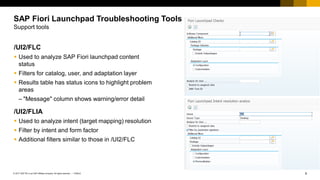
/UI2/FLC
▪ Used to analyze SAP Fiori launchpad content
status
▪ Filters for catalog, user, and adaptation layer
▪ Results table has status icons to highlight problem
areas
– "Message" column shows warning/error detail
/UI2/FLIA
▪ Used to analyze intent (target mapping) resolution
▪ Filter by intent and form factor
▪ Additional filters similar to those in /UI2/FLC
SAP Fiori Launchpad Troubleshooting Tools
Support tools
10
PUBLIC
© 2017 SAP SE or an SAP affiliate company. All rights reserved. ǀ
SAP Fiori content affected by multiple caches
▪ Browser cache
▪ Web Dispatcher cache (opt.)
▪ ICM cache
▪ UI2 cache
▪ UI5 index
▪ SAP Gateway OData caches
– IWFND
– IWBEP
Useful KBAs
▪ 2319491 – How to clean up the cache after applying changes that affect SAP Fiori apps
▪ 2116090 – UI Addon, SAP UI: Information for customers for efficient incident analysis
SAP Fiori Launchpad Troubleshooting Tools
Caches
11
PUBLIC
© 2017 SAP SE or an SAP affiliate company. All rights reserved. ǀ
In this unit we discussed the following
▪ How to use Chrome development tools
▪ How to locate system ID of Fiori system
▪ How to debug PageSet
▪ How to debug target mapping using start_up
extended call
▪ We learned how to debug system aliases used by a
target mapping
▪ We introduced to you the troubleshooting tools that
are available to you to troubleshoot Fiori Launchpad
▪ Lastly we talked about how caching could impact
your content
SAP Fiori Launchpad Troubleshooting Tools
Summary
Contact information:
open@sap.com
Thank you.
No part of this publication may be reproduced or transmitted in any form or for any purpose without the express permission of SAP SE or an SAP affiliate company.
The information contained herein may be changed without prior notice. Some software products marketed by SAP SE and its distributors contain proprietary software components
of other software vendors. National product specifications may vary.
These materials are provided by SAP SE or an SAP affiliate company for informational purposes only, without representation or warranty of any kind, and SAP or its affiliated
companies shall not be liable for errors or omissions with respect to the materials. The only warranties for SAP or SAP affiliate company products and services are those that are
set forth in the express warranty statements accompanying such products and services, if any. Nothing herein should be construed as constituting an additional warranty.
In particular, SAP SE or its affiliated companies have no obligation to pursue any course of business outlined in this document or any related presentation, or to develop or release
any functionality mentioned therein. This document, or any related presentation, and SAP SE’s or its affiliated companies’ strategy and possible future developments, products,
and/or platform directions and functionality are all subject to change and may be changed by SAP SE or its affiliated companies at any time for any reason without notice. The
information in this document is not a commitment, promise, or legal obligation to deliver any material, code, or functionality. All forward-looking statements are subject to various
risks and uncertainties that could cause actual results to differ materially from expectations. Readers are cautioned not to place undue reliance on these forward-looking statements,
and they should not be relied upon in making purchasing decisions.
SAP and other SAP products and services mentioned herein as well as their respective logos are trademarks or registered trademarks of SAP SE (or an SAP affiliate company)
in Germany and other countries. All other product and service names mentioned are the trademarks of their respective companies.
See http://global.sap.com/corporate-en/legal/copyright/index.epx for additional trademark information and notices.
© 2017 SAP SE or an SAP affiliate company. All rights reserved.
Week 1: Understanding SAP Fiori Launchpad
Unit 3: SAP Fiori Applications and Maintenance
2
PUBLIC
© 2017 SAP SE or an SAP affiliate company. All rights reserved. ǀ
SAP Fiori Applications and Maintenance
Overview
▪ The SAP Fiori apps reference library enables you to
explore, plan and implement SAP Fiori.
▪ Discover all the SAP Fiori apps available today.
▪ Find key information for each app, including all the
technical data you need for installation and
configuration.
▪ View the data for previous app versions.
▪ Navigate directly to related resources, such as app
documentation, Product Availability Matrix, and
Maintenance Planner.
3
PUBLIC
© 2017 SAP SE or an SAP affiliate company. All rights reserved. ǀ
To install an SAP Fiori app, the
recommended process is:
▪ Select the app in the SAP Fiori apps
reference library
▪ Plan installation in Maintenance Planner
▪ Install and update the system
SAP Fiori Applications and Maintenance
Overview
Select App(s) in SAP
Fiori Apps Reference
Library
Install and Update
System
Plan Installation in
Maintenance Planner
1 Choose SAP Fiori Apps 1 In Maintenance Planner,
select existing system or
plan installation of new
system
1 In case of new installation
start software provisioning
manager with stack.xml
2 View product version
requirements and navigate
to Maintenance Planner
2 Choose target product
version and support
package stack for all
involved systems in a
single planning step
2 Start SUM with stack.xml
to update the system to
the target support package
stack
3 Generate and download
consolidated stack.xml and
archives for front-end,
back-end, and SAP HANA
components (if needed)
4
PUBLIC
© 2017 SAP SE or an SAP affiliate company. All rights reserved. ǀ
Installation process with Maintenance Planner offers following advantages:
▪ Consolidated planning allows users to generate consolidated stack XML for all planned landscape changes
▪ Installation of new systems supported
▪ Required files for all involved systems can be pushed to download basket in a single planning step
▪ Multiple deployment options to choose from
SAP Fiori Applications and Maintenance
Maintenance Planner
5
PUBLIC
© 2017 SAP SE or an SAP affiliate company. All rights reserved. ǀ
▪ In SAP Fiori apps reference library, select
SAP Fiori apps to view product features
and implementation details
▪ Switching on the aggregate mode will let
you install multiple SAP Fiori apps with a
single transaction
SAP Fiori Applications and Maintenance
Planning SAP Fiori apps installation with Maintenance Planner
6
PUBLIC
© 2017 SAP SE or an SAP affiliate company. All rights reserved. ǀ
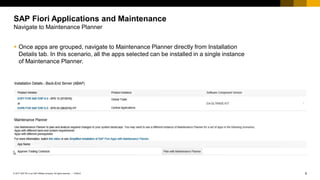
▪ Once apps are grouped, navigate to Maintenance Planner directly from Installation
Details tab. In this scenario, all the apps selected can be installed in a single instance
of Maintenance Planner.
SAP Fiori Applications and Maintenance
Navigate to Maintenance Planner
7
PUBLIC
© 2017 SAP SE or an SAP affiliate company. All rights reserved. ǀ
Maintenance Planner offers the installation
of an SAP Fiori app in three simple steps:
▪ Overview of available apps
▪ System selection
▪ Details of impacted systems
SAP Fiori Applications and Maintenance
Maintenance Planner – Three step procedure
8
PUBLIC
© 2017 SAP SE or an SAP affiliate company. All rights reserved. ǀ
▪ Check details about technical prerequisites for front-end, back-end, and SAP HANA servers.
SAP Fiori Applications and Maintenance
Maintenance Planner – Overview of Available Apps
9
PUBLIC
© 2017 SAP SE or an SAP affiliate company. All rights reserved. ǀ
Maintenance Planner provides
following details for back-end
server:
▪ Current software version
▪ Minimal required release
• Maintenance Planner provides options
to select existing system, install a new
system for front-end and SAP HANA
XS server.
• New installation of front-end and SAP
HANA system is supported. For
existing systems, current software state
is displayed and target version can be
selected.
SAP Fiori Applications and Maintenance
Maintenance Planner – System Selection
10
PUBLIC
© 2017 SAP SE or an SAP affiliate company. All rights reserved. ǀ
• Once you have made the system selection,
click Next to view the snapshot of all the
impacted systems.
• At this stage, you can proceed to select files
and download installation archives, or chose
Install Additional Software to iteratively install
additional software.
SAP Fiori Applications and Maintenance
Maintenance Planner – Details of Impacted systems
11
PUBLIC
© 2017 SAP SE or an SAP affiliate company. All rights reserved. ǀ
▪ To select and download installation media, select OS/DB files, select stack-dependent and independent files
▪ Select OS/DB files for back-end and front-end systems
▪ Select OS/DB files for both systems and click Confirm Selection
▪ Click Next and move to the next step
▪ Download all the relevant files by clicking Download Stack XML and click Push to Download Basket to
download the archives to download basket
SAP Fiori Applications and Maintenance
Maintenance Planner – Select and download
12
PUBLIC
© 2017 SAP SE or an SAP affiliate company. All rights reserved. ǀ
SAP Fiori Launchpad Content Transport
Demo
DEMO
13
PUBLIC
© 2017 SAP SE or an SAP affiliate company. All rights reserved. ǀ
To install an SAP Fiori app, the recommended
process is:
▪ Select the app in the SAP Fiori apps reference library
▪ Plan installation in Maintenance Planner
▪ Install and update the system
SAP Fiori Applications and Maintenance
Summary
Contact information:
open@sap.com
Thank you.
No part of this publication may be reproduced or transmitted in any form or for any purpose without the express permission of SAP SE or an SAP affiliate company.
The information contained herein may be changed without prior notice. Some software products marketed by SAP SE and its distributors contain proprietary software components
of other software vendors. National product specifications may vary.
These materials are provided by SAP SE or an SAP affiliate company for informational purposes only, without representation or warranty of any kind, and SAP or its affiliated
companies shall not be liable for errors or omissions with respect to the materials. The only warranties for SAP or SAP affiliate company products and services are those that are
set forth in the express warranty statements accompanying such products and services, if any. Nothing herein should be construed as constituting an additional warranty.
In particular, SAP SE or its affiliated companies have no obligation to pursue any course of business outlined in this document or any related presentation, or to develop or release
any functionality mentioned therein. This document, or any related presentation, and SAP SE’s or its affiliated companies’ strategy and possible future developments, products,
and/or platform directions and functionality are all subject to change and may be changed by SAP SE or its affiliated companies at any time for any reason without notice. The
information in this document is not a commitment, promise, or legal obligation to deliver any material, code, or functionality. All forward-looking statements are subject to various
risks and uncertainties that could cause actual results to differ materially from expectations. Readers are cautioned not to place undue reliance on these forward-looking statements,
and they should not be relied upon in making purchasing decisions.
SAP and other SAP products and services mentioned herein as well as their respective logos are trademarks or registered trademarks of SAP SE (or an SAP affiliate company)
in Germany and other countries. All other product and service names mentioned are the trademarks of their respective companies.
See http://global.sap.com/corporate-en/legal/copyright/index.epx for additional trademark information and notices.
© 2017 SAP SE or an SAP affiliate company. All rights reserved.
Week 1: Understanding SAP Fiori Launchpad
Unit 4: Translation
2
PUBLIC
© 2017 SAP SE or an SAP affiliate company. All rights reserved. ǀ
The launchpad itself
▪ Search bar
▪ Menu
Tile text elements
▪ Title
▪ Subtitle
▪ Catalog title
▪ Group title
Application labels
▪ Fields
Application messages
▪ Notifications
Back-end OData responses
▪ Metadata
Translation
Translatable areas
3
PUBLIC
© 2017 SAP SE or an SAP affiliate company. All rights reserved. ǀ
Includes:
▪ Logon language selector
▪ Search
▪ Menus
Translation
The launchpad itself
4
PUBLIC
© 2017 SAP SE or an SAP affiliate company. All rights reserved. ǀ
▪ Make sure that the required language pack is installed
via transaction SMLT
▪ To enable language selection at logon:
1. In transaction SICF, open and select service name “FLP” (path: /sap/bc/ui2/)
2. Enter Edit mode by choosing Display ↔ Change button
3. Choose Error Pages → Logon Errors → Configuration
4. Make sure that Language is selected under System Logon Settings → Select Display → Language
5. Select Input/green checkmark
6. Save the data by choosing Display ↔ Change button again and hitting Yes to save
Translation
How to translate the launchpad itself
5
PUBLIC
© 2017 SAP SE or an SAP affiliate company. All rights reserved. ǀ
▪ Catalog and group titles are defined in the
launchpad designer.
▪ The tile title and subtitles are defined in the tile
catalog in the launchpad designer as well.
▪ Translations are defined through transaction
SE63 on SAP Gateway.
Translation
Tile text elements
6
PUBLIC
© 2017 SAP SE or an SAP affiliate company. All rights reserved. ǀ
1. Open transaction SE63 in the SAP
Gateway system hosting the launchpad
2. Choose Short Texts button or Translation
→ ABAP Objects → Short Texts
3. Expand 00 Meta Objects and select TABL
Tables (Meta)
4. Enter object name
*WDY_CONF_USERT2*
5. Set the source and target (translation)
languages and choose Edit
Translation
How to translate tile/group/catalog titles
7
PUBLIC
© 2017 SAP SE or an SAP affiliate company. All rights reserved. ǀ
6. Set User Scope to A and use the search help
(F4) on Configuration ID
7. Select configuration ID for desired catalog
and execute
8. Enter the translations for relevant texts and
save
9. Repeat for the other configuration ID for the
desired catalog and for the group
10. It may be necessary to run report
/UI2/INVALIDATE_GLOBAL_CACHES
Translation
How to translate tile/group/catalog titles
8
PUBLIC
© 2017 SAP SE or an SAP affiliate company. All rights reserved. ǀ
▪ Translated via i18n files
▪ Editable through SE80
▪ Standard applications may
be extended to include other
i18n files from Web IDE
Translation
Application labels
9
PUBLIC
© 2017 SAP SE or an SAP affiliate company. All rights reserved. ǀ
1. Start transaction SE80 in your SAP Gateway system
2. Copy existing properties file to a new file for your
own language
▪ Enter the new name under Page. The format is:
i18n/i18n_<iso code for your language>.properties
▪ The system will now ask for an object key. Request
this via SSCR keys
Note: The following caches must be invalidated after
adding i18n file:
▪ /UI2/INVALIDATE_GLOBAL_CACHES
▪ Global ICM cache (SMICM → Invalidate Globally)
▪ Browser cache
Translation
How to translate application labels
10
PUBLIC
© 2017 SAP SE or an SAP affiliate company. All rights reserved. ǀ
▪ These messages are located in a
message class on your back-end
system.
▪ These messages are the ones that pop
up automatically.
Translation
Application messages
11
PUBLIC
© 2017 SAP SE or an SAP affiliate company. All rights reserved. ǀ
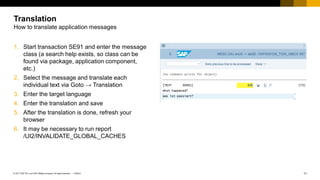
1. Start transaction SE91 and enter the message
class (a search help exists, so class can be
found via package, application component,
etc.)
2. Select the message and translate each
individual text via Goto → Translation
3. Enter the target language
4. Enter the translation and save
5. After the translation is done, refresh your
browser
6. It may be necessary to run report
/UI2/INVALIDATE_GLOBAL_CACHES
Translation
How to translate application messages
12
PUBLIC
© 2017 SAP SE or an SAP affiliate company. All rights reserved. ǀ
▪ Information from certain OData sources may be
translated to reflect the local language settings
▪ Since OData sources rely on RFC destinations,
a unique RFC destination is required for each
supported language
▪ Example: Value Help values in apps
Translation
Back-end OData
13
PUBLIC
© 2017 SAP SE or an SAP affiliate company. All rights reserved. ǀ
1. Go to transaction /n/iwfnd/maint_services in your
SAP Gateway system
2. Select the OData service your app is using and
double-click in the system alias
3. Choose the Edit button and click the Logon &
Security tab
4. Enter the desired language (If you leave it empty,
the language will be the one specified in the login).
Save the changes
5. Now you can see the back-end information in the
selected language despite the logon language
Translation
Setting the language for back-end OData
14
PUBLIC
© 2017 SAP SE or an SAP affiliate company. All rights reserved. ǀ
▪ The logon language is determined by the following
mechanisms (higher priority first):
1. URL parameter (sap-language), if maintained
2. HTTP request accept-language header, which is
defined by the browser and provides a list of
languages with probabilities
3. The value maintained in SU01 for a particular
user
▪ More information available in KBA 2420212 and
KBA 2422021
Translation
Logon language priority
15
PUBLIC
© 2017 SAP SE or an SAP affiliate company. All rights reserved. ǀ
The launchpad itself
▪ Search bar
▪ Menu
Tile text elements
▪ Title
▪ Subtitle
▪ Catalog title
▪ Group title
Application labels
▪ Fields
Application messages
▪ Notifications
Back-end OData responses
▪ Metadata
▪ Logon language priorities
Translation
Summary
Contact information:
open@sap.com
Thank you.
No part of this publication may be reproduced or transmitted in any form or for any purpose without the express permission of SAP SE or an SAP affiliate company.
The information contained herein may be changed without prior notice. Some software products marketed by SAP SE and its distributors contain proprietary software components
of other software vendors. National product specifications may vary.
These materials are provided by SAP SE or an SAP affiliate company for informational purposes only, without representation or warranty of any kind, and SAP or its affiliated
companies shall not be liable for errors or omissions with respect to the materials. The only warranties for SAP or SAP affiliate company products and services are those that are
set forth in the express warranty statements accompanying such products and services, if any. Nothing herein should be construed as constituting an additional warranty.
In particular, SAP SE or its affiliated companies have no obligation to pursue any course of business outlined in this document or any related presentation, or to develop or release
any functionality mentioned therein. This document, or any related presentation, and SAP SE’s or its affiliated companies’ strategy and possible future developments, products,
and/or platform directions and functionality are all subject to change and may be changed by SAP SE or its affiliated companies at any time for any reason without notice. The
information in this document is not a commitment, promise, or legal obligation to deliver any material, code, or functionality. All forward-looking statements are subject to various
risks and uncertainties that could cause actual results to differ materially from expectations. Readers are cautioned not to place undue reliance on these forward-looking statements,
and they should not be relied upon in making purchasing decisions.
SAP and other SAP products and services mentioned herein as well as their respective logos are trademarks or registered trademarks of SAP SE (or an SAP affiliate company)
in Germany and other countries. All other product and service names mentioned are the trademarks of their respective companies.
See http://global.sap.com/corporate-en/legal/copyright/index.epx for additional trademark information and notices.
© 2017 SAP SE or an SAP affiliate company. All rights reserved.
Week 1: Understanding SAP Fiori Launchpad
Unit 5: Replication of Catalogs
2
PUBLIC
© 2017 SAP SE or an SAP affiliate company. All rights reserved. ǀ
Replication of Catalogs
Scenario
Newer SAP Fiori ships “legacy app” content
(e.g. Web Dynpro, Web GUI transactions) via
so-called “back-end catalogs”. (Typical naming
convention *_TC_*_BE_* Technical Catalog
BackEnd).
These are delivered in the back-end system.
On the front-end server (FES) “dangling
references” to these applications are delivered
in business catalogs *_BC_* , which are only
satisfied once the technical catalogs have been
*replicated* to the front-end server.
FRONT-END SYSTEM
BACK-END SYSTEM
Web Dynpro
Web GUI Transactions
BACK-END CATALOGS
(Table SUI_TM_MM_APP)
BUSINESS CATALOGS
3
PUBLIC
© 2017 SAP SE or an SAP affiliate company. All rights reserved. ǀ
▪ Technical catalogs, naming convention *_TC_ *
▪ Business catalogs, naming convention *_BC_*
▪ Business group, naming convention *_BCG_*
▪ Catalogs can be found in launchpad designer
▪ For a particular app, you can find the
corresponding catalogs in the SAP Fiori apps
reference library
Replication of Catalogs
Technical catalogs, business catalogs and groups
4
PUBLIC
© 2017 SAP SE or an SAP affiliate company. All rights reserved. ǀ
When installing the SAP Fiori
launchpad, catalogs must be
retrieved from the back end.
SAP delivers some content to allow
this replication, but consultants must
perform some manual tasks after
installation.
Replication of Catalogs
Overview
FRONT-END SERVER BACK-END SERVER
/UI2/V_ALIASCAT
Delivered mapping or
name of _TC_BE_ to
SYSTEMALIAS
1) Configure view
/UI2/SYSALIASMAP
create entry to map
Alias above
Create <alias>_RFC
destination in
transaction SM59
2) Run transaction
/UI2/APPDESC_GET
Table SUI_TM_MM_APPS
*_TC_*_BE* definition list of
Web Dynpro or Web GUI
apps and mappings to
intents
SAP-delivered Fiori
business catalog *_BC_*
shipping dangling
references to content in
*_TC_*_BE_*
APPDESC_GET creates
_TC_*_BE_* as read-
only SAP Fiori catalogs
5
PUBLIC
© 2017 SAP SE or an SAP affiliate company. All rights reserved. ǀ
The system aliases are stored in table
/UI2/SYSTEMALIAS. It can be maintained using
the maintenance view /UI2/V_SYSALIAS in
transaction SM30.
The front-end system needs to connect to the
back-end server during:
▪ SAP Fiori launchpad design time, when replicating
back-end catalogs to the front-end server: here we
need an RFC connection. Naming convention:
<sysalias>_RFC, e.g. FIORI_BE_RFC
▪ SAP Fiori launchpad runtime, when navigating to the
application: here we need an HTTP or an HTTPS
connection. Naming convention:
<sysalias>_HTTP or <sysalias>_HTTPS, e.g.
FIORI_BE_HTTP
Replication of Catalogs
UI2 system alias (SAP-delivered)
6
PUBLIC
© 2017 SAP SE or an SAP affiliate company. All rights reserved. ǀ
▪ Map custom back-end catalog to front-end
system alias modifying the entries in table
/UI2/V_ALIASCAT using transaction SM30
▪ Make sure you enter the catalog name defined
in the back-end mass maintenance tool for app
descriptors
▪ You can define your own system alias and
assign it to your custom technical catalog
Replication of Catalogs
Mapping catalogs and system alias (SAP-delivered)
7
PUBLIC
© 2017 SAP SE or an SAP affiliate company. All rights reserved. ǀ
▪ In the next step, each customer must fill view
/UI2/V_ALIASMAP
▪ In this view, you map the system alias with your
own system aliases
▪ Alternatively, you can directly create SM59
destination called NW_RFC, S4CMD_RFC etc.
and skip this step
Replication of Catalogs
Mapping sources and system alias
8
PUBLIC
© 2017 SAP SE or an SAP affiliate company. All rights reserved. ǀ
▪ For SAP content replication via business catalog,
transaction /UI2/APPDESC_GET is strongly
recommended, which will attempt to replicate all
catalogs contained in /UI2/V_ALIASCAT
▪ Select the system alias and catalog ID you defined
in the previous step
▪ Report must be run in test mode prior to importing
the catalogs
▪ To perform the catalog replication, follow the
procedure explained in SAP Note 2269272
Replication of Catalogs
Transaction /UI2/APPDESC_GET
9
PUBLIC
© 2017 SAP SE or an SAP affiliate company. All rights reserved. ǀ
Additionally, the following reports are available
with more options for catalog replication:
▪ /UI2/DELETE_APP_DESCR_CATS Delete replicated
catalogs for a remote system alias
▪ /UI2/GET_APP_DESCR_REMOTE_ALL Replicate
back-end catalogs for all system aliases
▪ /UI2/GET_APP_DESCR_REMOTE_DEV Replicate
back-end technical catalog from remote system (DEV)
▪ These report are enclosed in package
/UI2/SERVICES_PB_CAT_PROV_703
Replication of Catalogs
Further reports available
10
PUBLIC
© 2017 SAP SE or an SAP affiliate company. All rights reserved. ǀ
▪ To copy a catalog with a reference, just drag and
drop it to “New Catalog with References”
▪ To delete a catalog, drag and drop it to “Delete”
Replication of Catalogs
Copying business catalogs and groups
11
PUBLIC
© 2017 SAP SE or an SAP affiliate company. All rights reserved. ǀ
▪ The last step is assigning your created catalog to your
user. This assignment can be done in transaction PFCG
by choosing “SAP Fiori Tile Catalog”
Replication of Catalogs
Assigning catalogs to users
12
PUBLIC
© 2017 SAP SE or an SAP affiliate company. All rights reserved. ǀ
▪ SAP provides Web Dynpros and HTML GUI catalogs
in SAP S/4HANA that must be replicated to the SAP
Gateway system
▪ To do so, SAP provides some system aliases
mapped with the catalogs
▪ Customers must map these system aliases with their
own RFCs
▪ A replication report must be executed in the SAP
Gateway system in order to perform the replication
▪ The replicated catalogs have to be copied in
launchpad designer so modifications can be carried
out
Replication of Catalogs
Unit summary
Contact information:
open@sap.com
Thank you.
No part of this publication may be reproduced or transmitted in any form or for any purpose without the express permission of SAP SE or an SAP affiliate company.
The information contained herein may be changed without prior notice. Some software products marketed by SAP SE and its distributors contain proprietary software components
of other software vendors. National product specifications may vary.
These materials are provided by SAP SE or an SAP affiliate company for informational purposes only, without representation or warranty of any kind, and SAP or its affiliated
companies shall not be liable for errors or omissions with respect to the materials. The only warranties for SAP or SAP affiliate company products and services are those that are
set forth in the express warranty statements accompanying such products and services, if any. Nothing herein should be construed as constituting an additional warranty.
In particular, SAP SE or its affiliated companies have no obligation to pursue any course of business outlined in this document or any related presentation, or to develop or release
any functionality mentioned therein. This document, or any related presentation, and SAP SE’s or its affiliated companies’ strategy and possible future developments, products,
and/or platform directions and functionality are all subject to change and may be changed by SAP SE or its affiliated companies at any time for any reason without notice. The
information in this document is not a commitment, promise, or legal obligation to deliver any material, code, or functionality. All forward-looking statements are subject to various
risks and uncertainties that could cause actual results to differ materially from expectations. Readers are cautioned not to place undue reliance on these forward-looking statements,
and they should not be relied upon in making purchasing decisions.
SAP and other SAP products and services mentioned herein as well as their respective logos are trademarks or registered trademarks of SAP SE (or an SAP affiliate company)
in Germany and other countries. All other product and service names mentioned are the trademarks of their respective companies.
See http://global.sap.com/corporate-en/legal/copyright/index.epx for additional trademark information and notices.
© 2017 SAP SE or an SAP affiliate company. All rights reserved.
Week 1: Understanding SAP Fiori Launchpad
Unit 6: SAP Fiori Launchpad Content Transport
2
PUBLIC
© 2017 SAP SE or an SAP affiliate company. All rights reserved. ǀ
Transport Management System
▪ Transport Management System (TMS) is used to
model and manage your system landscape
▪ Provides tools for configuring your system landscape,
as well as for organizing, carrying out, and monitoring
transports
▪ Enables SAP Fiori launchpad applications and
customizations to be transported throughout the
SAP ecosystem
SAP Fiori Launchpad Content Transport
Overview
3
PUBLIC
© 2017 SAP SE or an SAP affiliate company. All rights reserved. ǀ
SAP Cloud Platform On-Premise
SAP S/4HANA Cloud
SAP Fiori Launchpad Content Transport
Architecture: high-level overview – Cloud and on-premise options
SAP S/4HANA
SAP S/4HANA Business Logic SAP Business Suite
(ERP, SRM, …)
SAP S/4HANA …
SAP Fiori Apps OData Services
Front-End Server
SAP Mobile Platform
for Mobile Devices
Tools
SAP Web IDE
SAP Fiori User
Interfaces
ABAP in Eclipse
Back-End Services
Front-End Services
SAP Fiori
Apps
OData
Services
Mobile
Services
Web
4
PUBLIC
© 2017 SAP SE or an SAP affiliate company. All rights reserved. ǀ
SAP Fiori Launchpad Content Transport
SAP Fiori transport
Quality Gate Management (QGM)
Development Quality
Assurance
Production
Gateway
Server
Gateway
Server
Gateway
Server
Gateway
Back End
Gateway
Back End
Gateway
Back End
Repository objects
▪ Gateway Service
▪ SAPUI5 app
Customizing
▪ System aliases
Customizing Requests
Repository objects
▪ Service implementation
5
PUBLIC
© 2017 SAP SE or an SAP affiliate company. All rights reserved. ǀ
SAP Fiori Launchpad Content Transport
SAP Fiori scopes for adapting content
Adapting Content
▪ Administrator can adapt the content delivered by
SAP within SAP Fiori launchpad for the roles within
the company using the SAP Fiori launchpad
designer.
▪ SAP delivers predefined content like catalogs and
groups for the SAP Fiori launchpad.
▪ Administrators can use the launchpad designer to
copy and adapt the content in the configuration and
customizing scopes.
▪ The predefined SAP Fiori launchpad content uses
the Web Dynpro configuration as a persistence tool.
The content is stored in the following scopes:
Configuration, Customizing, and Personalization.
6
PUBLIC
© 2017 SAP SE or an SAP affiliate company. All rights reserved. ǀ
SAP Fiori Launchpad Content Transport
SAP Fiori Launchpad Designer Scope
Configuration Scope
▪ System-wide settings
▪ Content delivered by SAP is stored in configuration scope
▪ Administrators can copy a catalog and adapt the copy in
Customization scope
▪ Access launchpad designer using scope=CONF
https://<server>:<port>/sap/bc/ui5_ui5/sap/arsrvc_upb_admn/main.html ?sap-client=<client>&scope=CONF
7
PUBLIC
© 2017 SAP SE or an SAP affiliate company. All rights reserved. ǀ
SAP Fiori Launchpad Content Transport
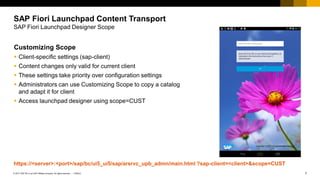
SAP Fiori Launchpad Designer Scope
Customizing Scope
▪ Client-specific settings (sap-client)
▪ Content changes only valid for current client
▪ These settings take priority over configuration settings
▪ Administrators can use Customizing Scope to copy a catalog
and adapt it for client
▪ Access launchpad designer using scope=CUST
https://<server>:<port>/sap/bc/ui5_ui5/sap/arsrvc_upb_admn/main.html ?sap-client=<client>&scope=CUST
8
PUBLIC
© 2017 SAP SE or an SAP affiliate company. All rights reserved. ǀ
SAP Fiori Launchpad Content Transport
SAP Fiori Launchpad Designer Scope
Personalization Scope
▪ User-specific settings
▪ End users can adapt a group that contains
predefined content and has been assigned to their
user role
▪ Users can do actions like rearrange their tiles and
save these preferences
▪ These settings take priority over customizing and
configuration settings
9
PUBLIC
© 2017 SAP SE or an SAP affiliate company. All rights reserved. ǀ
SAP Fiori Launchpad Content Transport
Creating a transport – Configuration scope
▪ You have to create a workbench request
▪ The user actions such as creating or deleting catalogs or groups, adding tiles to or removing tiles from
catalogs or groups are captured under the workbench request
▪ Using scope=conf, you see the client information in red on the header
10
PUBLIC
© 2017 SAP SE or an SAP affiliate company. All rights reserved. ǀ
SAP Fiori Launchpad Content Transport
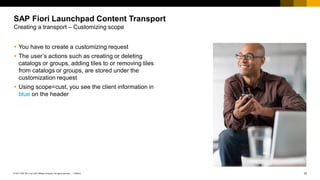
Creating a transport – Customizing scope
▪ You have to create a customizing request
▪ The user’s actions such as creating or deleting
catalogs or groups, adding tiles to or removing tiles
from catalogs or groups, are stored under the
customization request
▪ Using scope=cust, you see the client information in
blue on the header
11
PUBLIC
© 2017 SAP SE or an SAP affiliate company. All rights reserved. ǀ
SAP Fiori Launchpad Content Transport
Creating a transport – SE01, SE09, SE10
Transactions
▪ SE01 is the main screen of the Transport Organizer.
▪ SE09 is the workbench transport requests transaction.
▪ SE10 is the customizing request display transaction.
12
PUBLIC
© 2017 SAP SE or an SAP affiliate company. All rights reserved. ǀ
SAP Fiori Launchpad Content Transport
Creating a transport – Prerequisites
Create Transport Requests Procedure
1. Transaction SE01.
2. Choose Request from the Menu tab.
3. Choose Create from the submenu.
4. Choose OK.
13
PUBLIC
© 2017 SAP SE or an SAP affiliate company. All rights reserved. ǀ
SAP Fiori Launchpad Content Transport
Creating a transport – Setting default transport
Configuration Scope in Launchpad Designer
1. Launch the launchpad designer in configuration scope.
2. Choose the Settings button.
3. Select the workbench request.
4. Enter the default package name.
5. Choose OK.
You can create a local object in configuration scope by starting the name with Z, for example, ZServiceCatalog.
In that case, setting the workbench request and the package is not required.
14
PUBLIC
© 2017 SAP SE or an SAP affiliate company. All rights reserved. ǀ
SAP Fiori Launchpad Content Transport
Creating a transport – Setting default transport
Customization Scope in Launchpad Designer
1. Launch the launchpad designer in customization
scope.
2. Choose the Settings button.
3. You can choose either the Local Object or any
customizing request from the Customizing
Request dropdown list
4. If you choose customizing request, all the user
actions are saved under the selected request.
5. Choose OK.
6. You have saved the selected customizing request in
the target parameters as your default values.
The settings made in the launchpad designer are visible in the back-end user parameters.
15
PUBLIC
© 2017 SAP SE or an SAP affiliate company. All rights reserved. ǀ
SAP Fiori Launchpad Content Transport
Creating a transport – Setting default transport back end
Parameters Description
/UI2/WDC_DEVCLASS Package name, which contains the page
/UI2/WD_TRKORR_CONF Workbench request to which the workbench transport for the page has to be submitted
/UI2/WD_TRKORR_CUST Customizing request to which the customizing transport for the page has to be submitted
1. Go to transaction SU02.
2. Choose the Parameters tab on the Maintain User
Profile screen.
3. Maintain the parameters below.
4. You have saved the selected customizing request
in the target parameters as your default values.
The transport request and package set in the user parameters are visible in the launchpad designer settings.
16
PUBLIC
© 2017 SAP SE or an SAP affiliate company. All rights reserved. ǀ
SAP Fiori Launchpad Content Transport
Transport in action
DEMO
17
PUBLIC
© 2017 SAP SE or an SAP affiliate company. All rights reserved. ǀ
SAP Fiori Launchpad Content Transport
Transport – Common issues
Common Issues
▪ You make some changes on a catalog/group in SAP Fiori launchpad designer and they are captured in a
transport request. After transporting the changes to another system, you find the entire catalog/group has
been transported instead of a single tile/target mapping you just modified.
 Every time you make any change in a catalog/group it will record all the information of this catalog/group
in the transport request, which means the transport unit is a catalog/group, not a tile/target mapping. KBA
2498051.
▪ SAP Fiori catalogs and groups cannot be transported to other systems.
 No transport request was assigned in the launchpad designer when the catalogs and groups were
created. KBA 2406055.
▪ During the Hub registration of a Gateway service the ICF node is not captured to a transport request,
although according to the package assignment, it should be assigned to a corresponding transport request.
 The ICF node of the namespace part (for example /UI2/) is registered to the $TMP package (for example
SICF node "ui2" under /default_host/sap/opu/odata/). KBA 2430348.
18
PUBLIC
© 2017 SAP SE or an SAP affiliate company. All rights reserved. ǀ
SAP Fiori Launchpad Content Transport
Transport – Common issues
Common Issues
▪ No transport requests to select in launchpad designer.
 The /UI2/TRANSPORT OData service is not using the LOCAL system alias. KBA 2401506.
▪ Catalog changes update via transport copy takes a very long time before it is available in the system client.
 This is expected behavior since the cache is not invalidated. KBA 2463351.
▪ After transporting catalog/group changes for a new tile, the new tile does not appear for existing users in the
SAP Fiori launchpad of the target system for a while.
 The global cache is outdated, or there is a stored variant of the group in the personalization layer.
KBA 2476801.
19
PUBLIC
© 2017 SAP SE or an SAP affiliate company. All rights reserved. ǀ
Transport Management System
▪ Transport Management System (TMS) is used to
model and manage your system landscape.
▪ Provides tools for configuring your system
landscape, as well as for organizing, carrying out,
and monitoring transports.
▪ Enables SAP Fiori launchpad applications and
customizations to be transported throughout the
SAP ecosystem.
SAP Fiori Launchpad Content Transport
Summary
Contact information:
open@sap.com
Thank you.
No part of this publication may be reproduced or transmitted in any form or for any purpose without the express permission of SAP SE or an SAP affiliate company.
The information contained herein may be changed without prior notice. Some software products marketed by SAP SE and its distributors contain proprietary software components
of other software vendors. National product specifications may vary.
These materials are provided by SAP SE or an SAP affiliate company for informational purposes only, without representation or warranty of any kind, and SAP or its affiliated
companies shall not be liable for errors or omissions with respect to the materials. The only warranties for SAP or SAP affiliate company products and services are those that are
set forth in the express warranty statements accompanying such products and services, if any. Nothing herein should be construed as constituting an additional warranty.
In particular, SAP SE or its affiliated companies have no obligation to pursue any course of business outlined in this document or any related presentation, or to develop or release
any functionality mentioned therein. This document, or any related presentation, and SAP SE’s or its affiliated companies’ strategy and possible future developments, products,
and/or platform directions and functionality are all subject to change and may be changed by SAP SE or its affiliated companies at any time for any reason without notice. The
information in this document is not a commitment, promise, or legal obligation to deliver any material, code, or functionality. All forward-looking statements are subject to various
risks and uncertainties that could cause actual results to differ materially from expectations. Readers are cautioned not to place undue reliance on these forward-looking statements,
and they should not be relied upon in making purchasing decisions.
SAP and other SAP products and services mentioned herein as well as their respective logos are trademarks or registered trademarks of SAP SE (or an SAP affiliate company)
in Germany and other countries. All other product and service names mentioned are the trademarks of their respective companies.
See http://global.sap.com/corporate-en/legal/copyright/index.epx for additional trademark information and notices.
© 2017 SAP SE or an SAP affiliate company. All rights reserved.
Week 1: Understanding SAP Fiori Launchpad
Unit 7: SAP Fiori Launchpad Cache
2
PUBLIC
© 2017 SAP SE or an SAP affiliate company. All rights reserved. ǀ
▪ Versioned URLs for all resources which are
cached in the browser (injecting tokens)
▪ Cache-buster tokens returned by the server
▪ Software updates generate new cache-buster
tokens
▪ New generated URLs are not found in the
browser´s cache and resources are reloaded
from the server
SAP Fiori Launchpad Cache
Principle
3
PUBLIC
© 2017 SAP SE or an SAP affiliate company. All rights reserved. ǀ
▪ By HTTP handler /UI2/CL_FLP_HTTP_HANDLER
 Before SAP_UI 750 SP03/UI add-on 2.0 SP03: only ICF service /sap/bc/ui2/flp
SAP Fiori Launchpad Cache
Implementation
<<Browser>>
https://<host>:<port>/sap
/bc/ui2/flp/Index.html
<<ICF Node>>
/sap/bc/ui2/flp
<<ABAP Class>
/UI2/CL_FLP_HTTP_HANDLER
<<Browser>>
https://<host>:<port>/sap/bc/ui5_ui5/ui2
/ushell/shells/abap/FioriLaunchpad.html
<<ICF Node>>
/sap/bc/ui5_ui5/
ui2/ushell
<<ABAP Class>
/UI5/
CL_FLP_HTTP_HANDLER
BSP Repository
/UI2/USHELL
Before SP03
4
PUBLIC
© 2017 SAP SE or an SAP affiliate company. All rights reserved. ǀ
▪ By HTTP handler /UI2/CL_FLP_HTTP_HANDLER
 As of SAP_UI 750 SP03/UI add-on 2.0 SP03: also ICF service /sap/bc/ui5_ui5/ui2/ushell
SAP Fiori Launchpad Cache
Implementation
As of SP03
<<Browser>>
https://<host>:<port>/sap/bc/ui2/flp/Index.html
<<ICF Node>>
/sap/bc/ui2/flp
<<ABAP Class>
/UI2/CL_FLP_HTTP_HANDLER
<<Browser>>
https://<host>:<port>/sap/bc/ui5_ui5/ui2
/ushell/shells/abap/FioriLaunchpad.html
<<ICF Node>>
/sap/bc/ui5_ui5/
ui2/ushell
<<ABAP Class>
/UI5/
CL_FLP_HTTP_HANDLER
BSP Repository
/UI2/USHELL
5
PUBLIC
© 2017 SAP SE or an SAP affiliate company. All rights reserved. ǀ
Four types
▪ For SAPUI5 library resources: /~20161108153600~/
▪ For SAPUI5 applications resources (fine-grained): /~7E0DB5259167BE2983A36342A1766544~5/
▪ For SAP Fiori application resources (single): /~BC4721AE212118A9F76BAD97A4A9C9B1~C/
▪ For UI2 services (SAP Fiori launchpad content): sap-cache-id=C0191EB9D99097171E78C8C86E6A5C4C
SAP Fiori Launchpad Cache
Types of cache-buster tokens
6
PUBLIC
© 2017 SAP SE or an SAP affiliate company. All rights reserved. ǀ
▪ Used for SAPUI5 library resources located in the MIME repository
▪ Token: timestamp of the latest SAPUI5 library deployed in the MIME repository
▪ Sent as part of ServerSideConfig in FioriLaunchpad.html
▪ Invalidated automatically when SAPUI5 library is deployed in the MIME repository
▪ Resource types:
– ushell_abap
– core
– ushell lib
– standard UI5 themes
SAP Fiori Launchpad Cache
SAPUI5 resources token
7
PUBLIC
© 2017 SAP SE or an SAP affiliate company. All rights reserved. ǀ
▪ Used for SAPUI5 applications
▪ Token: Ends with suffix (~5). Different for each SAPUI5 application (fine-grained)
▪ Sent as part of the start_up request
▪ Invalidated manually with report /UI5/APP_INDEX_CALCULATE
▪ Resource types:
– SAPUI5 application 1
– SAPUI5 application 2
– …
SAP Fiori Launchpad Cache
SAPUI5 applications resources (fine-grained) token
8
PUBLIC
© 2017 SAP SE or an SAP affiliate company. All rights reserved. ǀ
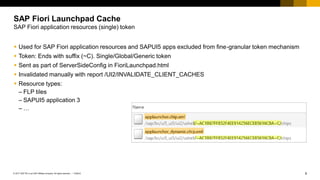
▪ Used for SAP Fiori application resources and SAPUI5 apps excluded from fine-granular token mechanism
▪ Token: Ends with suffix (~C). Single/Global/Generic token
▪ Sent as part of ServerSideConfig in FioriLaunchpad.html
▪ Invalidated manually with report /UI2/INVALIDATE_CLIENT_CACHES
▪ Resource types:
– FLP tiles
– SAPUI5 application 3
– …
SAP Fiori Launchpad Cache
SAP Fiori application resources (single) token
9
PUBLIC
© 2017 SAP SE or an SAP affiliate company. All rights reserved. ǀ
▪ Used for UI2 OData and REST services
▪ Token: URL parameter sap-cache-id. Different for each UI2 service
▪ Sent as part of ServerSideConfig in FioriLaunchpad.html
▪ Invalidated when UI2 cache is invalidated (Note 2362875)
▪ Resource types:
– OData service /UI2/PAGE_BUIDER_PERS
– OData service /UI2/INTEROP
– REST service start_up
SAP Fiori Launchpad Cache
UI2 services token
10
PUBLIC
© 2017 SAP SE or an SAP affiliate company. All rights reserved. ǀ
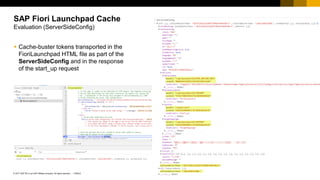
▪ Cache-buster tokens transported in the
FioriLaunchpad HTML file as part of the
ServerSideConfig and in the response
of the start_up request
SAP Fiori Launchpad Cache
Evaluation (ServerSideConfig)
11
PUBLIC
© 2017 SAP SE or an SAP affiliate company. All rights reserved. ǀ
▪ Cache-buster tokens transported in the
FioriLaunchpad HTML file as part of the
ServerSideConfig and in the response
of the start_up request
SAP Fiori Launchpad Cache
Evaluation (start_up)
12
PUBLIC
© 2017 SAP SE or an SAP affiliate company. All rights reserved. ǀ
SAP Fiori Launchpad Cache
Summary
In this unit we gave a brief overview of:
▪ Cachebusting principle
▪ Cache-buster implementation in the SAP Fiori
launchpad
▪ Types of cache-buster tokens
▪ Evaluation of the cache-buster token in the SAP Fiori
launchpad application
Contact information:
open@sap.com
Thank you.
No part of this publication may be reproduced or transmitted in any form or for any purpose without the express permission of SAP SE or an SAP affiliate company.
The information contained herein may be changed without prior notice. Some software products marketed by SAP SE and its distributors contain proprietary software components
of other software vendors. National product specifications may vary.
These materials are provided by SAP SE or an SAP affiliate company for informational purposes only, without representation or warranty of any kind, and SAP or its affiliated
companies shall not be liable for errors or omissions with respect to the materials. The only warranties for SAP or SAP affiliate company products and services are those that are
set forth in the express warranty statements accompanying such products and services, if any. Nothing herein should be construed as constituting an additional warranty.
In particular, SAP SE or its affiliated companies have no obligation to pursue any course of business outlined in this document or any related presentation, or to develop or release
any functionality mentioned therein. This document, or any related presentation, and SAP SE’s or its affiliated companies’ strategy and possible future developments, products,
and/or platform directions and functionality are all subject to change and may be changed by SAP SE or its affiliated companies at any time for any reason without notice. The
information in this document is not a commitment, promise, or legal obligation to deliver any material, code, or functionality. All forward-looking statements are subject to various
risks and uncertainties that could cause actual results to differ materially from expectations. Readers are cautioned not to place undue reliance on these forward-looking statements,
and they should not be relied upon in making purchasing decisions.
SAP and other SAP products and services mentioned herein as well as their respective logos are trademarks or registered trademarks of SAP SE (or an SAP affiliate company)
in Germany and other countries. All other product and service names mentioned are the trademarks of their respective companies.
See http://global.sap.com/corporate-en/legal/copyright/index.epx for additional trademark information and notices.
© 2017 SAP SE or an SAP affiliate company. All rights reserved.

openSAP_fiops1_Week_1_All_Slides.pdf

  • 1.
    Week 1: UnderstandingSAP Fiori Launchpad Unit 1: SAP Fiori Launchpad Architecture
  • 2.
    2 PUBLIC © 2017 SAPSE or an SAP affiliate company. All rights reserved. ǀ SAP Fiori is designed to focus on the most common and critical activities ▪ Role-based ▪ Responsive ▪ Simple ▪ Coherent ▪ Delightful SAP Fiori Launchpad Architecture Overview
  • 3.
    3 PUBLIC © 2017 SAPSE or an SAP affiliate company. All rights reserved. ǀ SAP Fiori launchpad architecture high level ▪ Client/browser or mobile devices ▪ Reverse proxy – SAP Mobile Platform ▪ ABAP servers ▪ Back-end server Note: It is also possible for FES from the cloud to connect to an existing on-premise landscape. SAP Fiori Launchpad Architecture On-premise architecture On-Premise SAP S/4HANA SAP Business Suite (ERP, SRM,…) … Front-End Server SAP Fiori Applications OData Services SAP Mobile Platform for Mobile Devices
  • 4.
    4 PUBLIC © 2017 SAPSE or an SAP affiliate company. All rights reserved. ǀ SAP Fiori launchpad architecture high level ▪ Client/browser or mobile devices ▪ Reverse proxy – SAP Web Dispatcher ▪ ABAP servers ▪ SAP HANA extended application services (XS) ▪ Back-end server SAP Fiori Launchpad Architecture SAP Fiori launchpad architecture with SAP Web Dispatcher
  • 5.
    5 PUBLIC © 2017 SAPSE or an SAP affiliate company. All rights reserved. ǀ SAP Fiori Launchpad Architecture Deployment options Gateway Central Hub Deployment ▪ Support for multiple system routing ▪ Deploying content without touching the back end ▪ Single point of access to the back end Development Gateway Central Hub ▪ Similar advantages to Central Hub ▪ The only difference between Central Hub and Development hub is the services development does not need to be deployed in the back end Embedded System ▪ Less runtime overhead ▪ One less system to maintain
  • 6.
    6 PUBLIC © 2017 SAPSE or an SAP affiliate company. All rights reserved. ǀ SAP Fiori Launchpad Architecture Components – Central hub system SAP NetWeaver < 7.40 SAP NetWeaver >= 7.40 NW Gateway ▪ GW_CORE ▪ IW_FND SAP_GWFND (Comes with it) SAP Back End IW_BEP SAP_GWFND (Comes with it) SAPUI5 1.28 or Higher 1.28 or Higher Components required for central hub deployment
  • 7.
    7 PUBLIC © 2017 SAPSE or an SAP affiliate company. All rights reserved. ǀ SAP Fiori Launchpad Architecture Components – Embedded system SAP NetWeaver < 7.40 SAP NetWeaver >= 7.40 SAP Back End ▪ GW_CORE ▪ IW_BEP ▪ IW_FND SAP_GWFND (Comes with it) SAPUI5 1.28 or Higher 1.28 or Higher Components required for embedded deployment
  • 8.
    8 PUBLIC © 2017 SAPSE or an SAP affiliate company. All rights reserved. ǀ SAP Fiori Launchpad Architecture SAP Fiori launchpad building blocks SAP Fiori launchpad – Building blocks ▪ Based on the unified shell architecture ▪ Client-side runtime environment, which can be hosted on different server platforms ▪ Shell offers unified services with platform-independent interfaces to the hosted apps and shell components
  • 9.
    9 PUBLIC © 2017 SAPSE or an SAP affiliate company. All rights reserved. ǀ SAP Fiori Launchpad Architecture SAP Fiori launchpad – Building blocks architecture SAP Fiori launchpad – Building blocks ▪ Apps are embedded in application container ▪ Shell services and renderer are managed by the central shell container ▪ Runtime configuration is fed by the following settings: – Static configuration settings in the hosting HTML page – Dynamic configuration data read from the front-end server during startup – Dynamic settings are passed as query parameters in the URL ▪ FioriLaunchpad.html contains all JavaScript components Web Browser Shell Container Shell Renderer Shell Services Application Container Runtime Configuration Home Page Application CustomLaunchpad.html FioriLaunchpad.html Platform- Independent Service Platform- Specific Service Service Adapter
  • 10.
    10 PUBLIC © 2017 SAPSE or an SAP affiliate company. All rights reserved. ǀ In this unit, we gave a brief overview of ▪ SAP Fiori launchpad architecture ▪ SAP Fiori launchpad deployment options ▪ SAP Fiori launchpad components needed ▪ SAP Fiori launchpad building blocks architecture SAP Fiori Launchpad Architecture Summary
  • 11.
  • 12.
    No part ofthis publication may be reproduced or transmitted in any form or for any purpose without the express permission of SAP SE or an SAP affiliate company. The information contained herein may be changed without prior notice. Some software products marketed by SAP SE and its distributors contain proprietary software components of other software vendors. National product specifications may vary. These materials are provided by SAP SE or an SAP affiliate company for informational purposes only, without representation or warranty of any kind, and SAP or its affiliated companies shall not be liable for errors or omissions with respect to the materials. The only warranties for SAP or SAP affiliate company products and services are those that are set forth in the express warranty statements accompanying such products and services, if any. Nothing herein should be construed as constituting an additional warranty. In particular, SAP SE or its affiliated companies have no obligation to pursue any course of business outlined in this document or any related presentation, or to develop or release any functionality mentioned therein. This document, or any related presentation, and SAP SE’s or its affiliated companies’ strategy and possible future developments, products, and/or platform directions and functionality are all subject to change and may be changed by SAP SE or its affiliated companies at any time for any reason without notice. The information in this document is not a commitment, promise, or legal obligation to deliver any material, code, or functionality. All forward-looking statements are subject to various risks and uncertainties that could cause actual results to differ materially from expectations. Readers are cautioned not to place undue reliance on these forward-looking statements, and they should not be relied upon in making purchasing decisions. SAP and other SAP products and services mentioned herein as well as their respective logos are trademarks or registered trademarks of SAP SE (or an SAP affiliate company) in Germany and other countries. All other product and service names mentioned are the trademarks of their respective companies. See http://global.sap.com/corporate-en/legal/copyright/index.epx for additional trademark information and notices. © 2017 SAP SE or an SAP affiliate company. All rights reserved.
  • 13.
    Week 1: UnderstandingSAP Fiori Launchpad Unit 2: SAP Fiori Launchpad Troubleshooting Tools
  • 14.
    2 PUBLIC © 2017 SAPSE or an SAP affiliate company. All rights reserved. ǀ ▪ Use Chrome developer tools (F12) ▪ Locate network request for "login.js" ▪ Examine cookies SAP Fiori Launchpad Troubleshooting Tools Verifying system ID and client from Login screen
  • 15.
    3 PUBLIC © 2017 SAPSE or an SAP affiliate company. All rights reserved. ǀ ▪ Use "Sources" tab in Chrome ▪ Locate "oServerSideConfig" in FioriLaunchpad.html ▪ Use breakpoints to pause processing ▪ From Console tab, evaluate "console.table(oServerSideConfig)" SAP Fiori Launchpad Troubleshooting Tools Verifying system ID and client from the launchpad home
  • 16.
    4 PUBLIC © 2017 SAPSE or an SAP affiliate company. All rights reserved. ǀ PageSets OData call (Network tab) ▪ JSON Viewer Chrome extension is needed to show JSON formatted in browser ▪ Open in new tab ▪ Search name of tile ▪ "catalogId" contains catalog information ▪ Chip  configuration shows details of tile without accessing launchpad designer ▪ Tile won't display if target mapping defined in tile doesn’t exist SAP Fiori Launchpad Troubleshooting Tools Analyzing missing tiles
  • 17.
    5 PUBLIC © 2017 SAPSE or an SAP affiliate company. All rights reserved. ǀ Use the extended "start_up" call ("*") ▪ Search for intents (semobj-action) to find all assigned target mappings / details ▪ Duplicate intents with different configurations can cause unexpected results ▪ Intents are case-sensitive SAP Fiori Launchpad Troubleshooting Tools Analyzing missing tiles (cont.)
  • 18.
    6 PUBLIC © 2017 SAPSE or an SAP affiliate company. All rights reserved. ǀ Invalid or missing system alias results in app opening on SAP Gateway system Use extended start_up call again ▪ Copy JSON content of response ▪ "var startupobj = <paste content of JSON response>" in Chrome console ▪ "console.table(startupobj.systemAliases)" in Chrome console to display a table of the system aliases ▪ "console.table(startupobj.targetMappings)" available for target mappings SAP Fiori Launchpad Troubleshooting Tools Examining system aliases
  • 19.
    7 PUBLIC © 2017 SAPSE or an SAP affiliate company. All rights reserved. ǀ SE24 to resolve the alias using the standard class (KBA 2423115) ▪ /UI2/CL_SYS_ALIAS_MANAGER class, display ▪ Execute in Test Environment (F8) ▪ Continue on "Replace Generic Parameter Types" screen, no changes ▪ Execute RESOLVE method ▪ Provide IV_ALIAS as derived from the start_up request ▪ Review details of results using "Single Entry" icon (Shift+F7) SAP Fiori Launchpad Troubleshooting Tools Examining system aliases (cont.)
  • 20.
    8 PUBLIC © 2017 SAPSE or an SAP affiliate company. All rights reserved. ǀ Business Catalogs ▪ Collection built for specific business roles – Comprised of references from technical catalogs – Can be assigned directly to end users Technical Catalogs ▪ Collection of tiles and target mappings from related technical areas and development teams – Comprised of mostly original tiles/mappings – Should not typically be assigned directly to end users SAP Fiori Launchpad Troubleshooting Tools Differences in business and technical catalogs
  • 21.
    9 PUBLIC © 2017 SAPSE or an SAP affiliate company. All rights reserved. ǀ /UI2/FLC ▪ Used to analyze SAP Fiori launchpad content status ▪ Filters for catalog, user, and adaptation layer ▪ Results table has status icons to highlight problem areas – "Message" column shows warning/error detail /UI2/FLIA ▪ Used to analyze intent (target mapping) resolution ▪ Filter by intent and form factor ▪ Additional filters similar to those in /UI2/FLC SAP Fiori Launchpad Troubleshooting Tools Support tools
  • 22.
    10 PUBLIC © 2017 SAPSE or an SAP affiliate company. All rights reserved. ǀ SAP Fiori content affected by multiple caches ▪ Browser cache ▪ Web Dispatcher cache (opt.) ▪ ICM cache ▪ UI2 cache ▪ UI5 index ▪ SAP Gateway OData caches – IWFND – IWBEP Useful KBAs ▪ 2319491 – How to clean up the cache after applying changes that affect SAP Fiori apps ▪ 2116090 – UI Addon, SAP UI: Information for customers for efficient incident analysis SAP Fiori Launchpad Troubleshooting Tools Caches
  • 23.
    11 PUBLIC © 2017 SAPSE or an SAP affiliate company. All rights reserved. ǀ In this unit we discussed the following ▪ How to use Chrome development tools ▪ How to locate system ID of Fiori system ▪ How to debug PageSet ▪ How to debug target mapping using start_up extended call ▪ We learned how to debug system aliases used by a target mapping ▪ We introduced to you the troubleshooting tools that are available to you to troubleshoot Fiori Launchpad ▪ Lastly we talked about how caching could impact your content SAP Fiori Launchpad Troubleshooting Tools Summary
  • 24.
  • 25.
    No part ofthis publication may be reproduced or transmitted in any form or for any purpose without the express permission of SAP SE or an SAP affiliate company. The information contained herein may be changed without prior notice. Some software products marketed by SAP SE and its distributors contain proprietary software components of other software vendors. National product specifications may vary. These materials are provided by SAP SE or an SAP affiliate company for informational purposes only, without representation or warranty of any kind, and SAP or its affiliated companies shall not be liable for errors or omissions with respect to the materials. The only warranties for SAP or SAP affiliate company products and services are those that are set forth in the express warranty statements accompanying such products and services, if any. Nothing herein should be construed as constituting an additional warranty. In particular, SAP SE or its affiliated companies have no obligation to pursue any course of business outlined in this document or any related presentation, or to develop or release any functionality mentioned therein. This document, or any related presentation, and SAP SE’s or its affiliated companies’ strategy and possible future developments, products, and/or platform directions and functionality are all subject to change and may be changed by SAP SE or its affiliated companies at any time for any reason without notice. The information in this document is not a commitment, promise, or legal obligation to deliver any material, code, or functionality. All forward-looking statements are subject to various risks and uncertainties that could cause actual results to differ materially from expectations. Readers are cautioned not to place undue reliance on these forward-looking statements, and they should not be relied upon in making purchasing decisions. SAP and other SAP products and services mentioned herein as well as their respective logos are trademarks or registered trademarks of SAP SE (or an SAP affiliate company) in Germany and other countries. All other product and service names mentioned are the trademarks of their respective companies. See http://global.sap.com/corporate-en/legal/copyright/index.epx for additional trademark information and notices. © 2017 SAP SE or an SAP affiliate company. All rights reserved.
  • 26.
    Week 1: UnderstandingSAP Fiori Launchpad Unit 3: SAP Fiori Applications and Maintenance
  • 27.
    2 PUBLIC © 2017 SAPSE or an SAP affiliate company. All rights reserved. ǀ SAP Fiori Applications and Maintenance Overview ▪ The SAP Fiori apps reference library enables you to explore, plan and implement SAP Fiori. ▪ Discover all the SAP Fiori apps available today. ▪ Find key information for each app, including all the technical data you need for installation and configuration. ▪ View the data for previous app versions. ▪ Navigate directly to related resources, such as app documentation, Product Availability Matrix, and Maintenance Planner.
  • 28.
    3 PUBLIC © 2017 SAPSE or an SAP affiliate company. All rights reserved. ǀ To install an SAP Fiori app, the recommended process is: ▪ Select the app in the SAP Fiori apps reference library ▪ Plan installation in Maintenance Planner ▪ Install and update the system SAP Fiori Applications and Maintenance Overview Select App(s) in SAP Fiori Apps Reference Library Install and Update System Plan Installation in Maintenance Planner 1 Choose SAP Fiori Apps 1 In Maintenance Planner, select existing system or plan installation of new system 1 In case of new installation start software provisioning manager with stack.xml 2 View product version requirements and navigate to Maintenance Planner 2 Choose target product version and support package stack for all involved systems in a single planning step 2 Start SUM with stack.xml to update the system to the target support package stack 3 Generate and download consolidated stack.xml and archives for front-end, back-end, and SAP HANA components (if needed)
  • 29.
    4 PUBLIC © 2017 SAPSE or an SAP affiliate company. All rights reserved. ǀ Installation process with Maintenance Planner offers following advantages: ▪ Consolidated planning allows users to generate consolidated stack XML for all planned landscape changes ▪ Installation of new systems supported ▪ Required files for all involved systems can be pushed to download basket in a single planning step ▪ Multiple deployment options to choose from SAP Fiori Applications and Maintenance Maintenance Planner
  • 30.
    5 PUBLIC © 2017 SAPSE or an SAP affiliate company. All rights reserved. ǀ ▪ In SAP Fiori apps reference library, select SAP Fiori apps to view product features and implementation details ▪ Switching on the aggregate mode will let you install multiple SAP Fiori apps with a single transaction SAP Fiori Applications and Maintenance Planning SAP Fiori apps installation with Maintenance Planner
  • 31.
    6 PUBLIC © 2017 SAPSE or an SAP affiliate company. All rights reserved. ǀ ▪ Once apps are grouped, navigate to Maintenance Planner directly from Installation Details tab. In this scenario, all the apps selected can be installed in a single instance of Maintenance Planner. SAP Fiori Applications and Maintenance Navigate to Maintenance Planner
  • 32.
    7 PUBLIC © 2017 SAPSE or an SAP affiliate company. All rights reserved. ǀ Maintenance Planner offers the installation of an SAP Fiori app in three simple steps: ▪ Overview of available apps ▪ System selection ▪ Details of impacted systems SAP Fiori Applications and Maintenance Maintenance Planner – Three step procedure
  • 33.
    8 PUBLIC © 2017 SAPSE or an SAP affiliate company. All rights reserved. ǀ ▪ Check details about technical prerequisites for front-end, back-end, and SAP HANA servers. SAP Fiori Applications and Maintenance Maintenance Planner – Overview of Available Apps
  • 34.
    9 PUBLIC © 2017 SAPSE or an SAP affiliate company. All rights reserved. ǀ Maintenance Planner provides following details for back-end server: ▪ Current software version ▪ Minimal required release • Maintenance Planner provides options to select existing system, install a new system for front-end and SAP HANA XS server. • New installation of front-end and SAP HANA system is supported. For existing systems, current software state is displayed and target version can be selected. SAP Fiori Applications and Maintenance Maintenance Planner – System Selection
  • 35.
    10 PUBLIC © 2017 SAPSE or an SAP affiliate company. All rights reserved. ǀ • Once you have made the system selection, click Next to view the snapshot of all the impacted systems. • At this stage, you can proceed to select files and download installation archives, or chose Install Additional Software to iteratively install additional software. SAP Fiori Applications and Maintenance Maintenance Planner – Details of Impacted systems
  • 36.
    11 PUBLIC © 2017 SAPSE or an SAP affiliate company. All rights reserved. ǀ ▪ To select and download installation media, select OS/DB files, select stack-dependent and independent files ▪ Select OS/DB files for back-end and front-end systems ▪ Select OS/DB files for both systems and click Confirm Selection ▪ Click Next and move to the next step ▪ Download all the relevant files by clicking Download Stack XML and click Push to Download Basket to download the archives to download basket SAP Fiori Applications and Maintenance Maintenance Planner – Select and download
  • 37.
    12 PUBLIC © 2017 SAPSE or an SAP affiliate company. All rights reserved. ǀ SAP Fiori Launchpad Content Transport Demo DEMO
  • 38.
    13 PUBLIC © 2017 SAPSE or an SAP affiliate company. All rights reserved. ǀ To install an SAP Fiori app, the recommended process is: ▪ Select the app in the SAP Fiori apps reference library ▪ Plan installation in Maintenance Planner ▪ Install and update the system SAP Fiori Applications and Maintenance Summary
  • 39.
  • 40.
    No part ofthis publication may be reproduced or transmitted in any form or for any purpose without the express permission of SAP SE or an SAP affiliate company. The information contained herein may be changed without prior notice. Some software products marketed by SAP SE and its distributors contain proprietary software components of other software vendors. National product specifications may vary. These materials are provided by SAP SE or an SAP affiliate company for informational purposes only, without representation or warranty of any kind, and SAP or its affiliated companies shall not be liable for errors or omissions with respect to the materials. The only warranties for SAP or SAP affiliate company products and services are those that are set forth in the express warranty statements accompanying such products and services, if any. Nothing herein should be construed as constituting an additional warranty. In particular, SAP SE or its affiliated companies have no obligation to pursue any course of business outlined in this document or any related presentation, or to develop or release any functionality mentioned therein. This document, or any related presentation, and SAP SE’s or its affiliated companies’ strategy and possible future developments, products, and/or platform directions and functionality are all subject to change and may be changed by SAP SE or its affiliated companies at any time for any reason without notice. The information in this document is not a commitment, promise, or legal obligation to deliver any material, code, or functionality. All forward-looking statements are subject to various risks and uncertainties that could cause actual results to differ materially from expectations. Readers are cautioned not to place undue reliance on these forward-looking statements, and they should not be relied upon in making purchasing decisions. SAP and other SAP products and services mentioned herein as well as their respective logos are trademarks or registered trademarks of SAP SE (or an SAP affiliate company) in Germany and other countries. All other product and service names mentioned are the trademarks of their respective companies. See http://global.sap.com/corporate-en/legal/copyright/index.epx for additional trademark information and notices. © 2017 SAP SE or an SAP affiliate company. All rights reserved.
  • 41.
    Week 1: UnderstandingSAP Fiori Launchpad Unit 4: Translation
  • 42.
    2 PUBLIC © 2017 SAPSE or an SAP affiliate company. All rights reserved. ǀ The launchpad itself ▪ Search bar ▪ Menu Tile text elements ▪ Title ▪ Subtitle ▪ Catalog title ▪ Group title Application labels ▪ Fields Application messages ▪ Notifications Back-end OData responses ▪ Metadata Translation Translatable areas
  • 43.
    3 PUBLIC © 2017 SAPSE or an SAP affiliate company. All rights reserved. ǀ Includes: ▪ Logon language selector ▪ Search ▪ Menus Translation The launchpad itself
  • 44.
    4 PUBLIC © 2017 SAPSE or an SAP affiliate company. All rights reserved. ǀ ▪ Make sure that the required language pack is installed via transaction SMLT ▪ To enable language selection at logon: 1. In transaction SICF, open and select service name “FLP” (path: /sap/bc/ui2/) 2. Enter Edit mode by choosing Display ↔ Change button 3. Choose Error Pages → Logon Errors → Configuration 4. Make sure that Language is selected under System Logon Settings → Select Display → Language 5. Select Input/green checkmark 6. Save the data by choosing Display ↔ Change button again and hitting Yes to save Translation How to translate the launchpad itself
  • 45.
    5 PUBLIC © 2017 SAPSE or an SAP affiliate company. All rights reserved. ǀ ▪ Catalog and group titles are defined in the launchpad designer. ▪ The tile title and subtitles are defined in the tile catalog in the launchpad designer as well. ▪ Translations are defined through transaction SE63 on SAP Gateway. Translation Tile text elements
  • 46.
    6 PUBLIC © 2017 SAPSE or an SAP affiliate company. All rights reserved. ǀ 1. Open transaction SE63 in the SAP Gateway system hosting the launchpad 2. Choose Short Texts button or Translation → ABAP Objects → Short Texts 3. Expand 00 Meta Objects and select TABL Tables (Meta) 4. Enter object name *WDY_CONF_USERT2* 5. Set the source and target (translation) languages and choose Edit Translation How to translate tile/group/catalog titles
  • 47.
    7 PUBLIC © 2017 SAPSE or an SAP affiliate company. All rights reserved. ǀ 6. Set User Scope to A and use the search help (F4) on Configuration ID 7. Select configuration ID for desired catalog and execute 8. Enter the translations for relevant texts and save 9. Repeat for the other configuration ID for the desired catalog and for the group 10. It may be necessary to run report /UI2/INVALIDATE_GLOBAL_CACHES Translation How to translate tile/group/catalog titles
  • 48.
    8 PUBLIC © 2017 SAPSE or an SAP affiliate company. All rights reserved. ǀ ▪ Translated via i18n files ▪ Editable through SE80 ▪ Standard applications may be extended to include other i18n files from Web IDE Translation Application labels
  • 49.
    9 PUBLIC © 2017 SAPSE or an SAP affiliate company. All rights reserved. ǀ 1. Start transaction SE80 in your SAP Gateway system 2. Copy existing properties file to a new file for your own language ▪ Enter the new name under Page. The format is: i18n/i18n_<iso code for your language>.properties ▪ The system will now ask for an object key. Request this via SSCR keys Note: The following caches must be invalidated after adding i18n file: ▪ /UI2/INVALIDATE_GLOBAL_CACHES ▪ Global ICM cache (SMICM → Invalidate Globally) ▪ Browser cache Translation How to translate application labels
  • 50.
    10 PUBLIC © 2017 SAPSE or an SAP affiliate company. All rights reserved. ǀ ▪ These messages are located in a message class on your back-end system. ▪ These messages are the ones that pop up automatically. Translation Application messages
  • 51.
    11 PUBLIC © 2017 SAPSE or an SAP affiliate company. All rights reserved. ǀ 1. Start transaction SE91 and enter the message class (a search help exists, so class can be found via package, application component, etc.) 2. Select the message and translate each individual text via Goto → Translation 3. Enter the target language 4. Enter the translation and save 5. After the translation is done, refresh your browser 6. It may be necessary to run report /UI2/INVALIDATE_GLOBAL_CACHES Translation How to translate application messages
  • 52.
    12 PUBLIC © 2017 SAPSE or an SAP affiliate company. All rights reserved. ǀ ▪ Information from certain OData sources may be translated to reflect the local language settings ▪ Since OData sources rely on RFC destinations, a unique RFC destination is required for each supported language ▪ Example: Value Help values in apps Translation Back-end OData
  • 53.
    13 PUBLIC © 2017 SAPSE or an SAP affiliate company. All rights reserved. ǀ 1. Go to transaction /n/iwfnd/maint_services in your SAP Gateway system 2. Select the OData service your app is using and double-click in the system alias 3. Choose the Edit button and click the Logon & Security tab 4. Enter the desired language (If you leave it empty, the language will be the one specified in the login). Save the changes 5. Now you can see the back-end information in the selected language despite the logon language Translation Setting the language for back-end OData
  • 54.
    14 PUBLIC © 2017 SAPSE or an SAP affiliate company. All rights reserved. ǀ ▪ The logon language is determined by the following mechanisms (higher priority first): 1. URL parameter (sap-language), if maintained 2. HTTP request accept-language header, which is defined by the browser and provides a list of languages with probabilities 3. The value maintained in SU01 for a particular user ▪ More information available in KBA 2420212 and KBA 2422021 Translation Logon language priority
  • 55.
    15 PUBLIC © 2017 SAPSE or an SAP affiliate company. All rights reserved. ǀ The launchpad itself ▪ Search bar ▪ Menu Tile text elements ▪ Title ▪ Subtitle ▪ Catalog title ▪ Group title Application labels ▪ Fields Application messages ▪ Notifications Back-end OData responses ▪ Metadata ▪ Logon language priorities Translation Summary
  • 56.
  • 57.
    No part ofthis publication may be reproduced or transmitted in any form or for any purpose without the express permission of SAP SE or an SAP affiliate company. The information contained herein may be changed without prior notice. Some software products marketed by SAP SE and its distributors contain proprietary software components of other software vendors. National product specifications may vary. These materials are provided by SAP SE or an SAP affiliate company for informational purposes only, without representation or warranty of any kind, and SAP or its affiliated companies shall not be liable for errors or omissions with respect to the materials. The only warranties for SAP or SAP affiliate company products and services are those that are set forth in the express warranty statements accompanying such products and services, if any. Nothing herein should be construed as constituting an additional warranty. In particular, SAP SE or its affiliated companies have no obligation to pursue any course of business outlined in this document or any related presentation, or to develop or release any functionality mentioned therein. This document, or any related presentation, and SAP SE’s or its affiliated companies’ strategy and possible future developments, products, and/or platform directions and functionality are all subject to change and may be changed by SAP SE or its affiliated companies at any time for any reason without notice. The information in this document is not a commitment, promise, or legal obligation to deliver any material, code, or functionality. All forward-looking statements are subject to various risks and uncertainties that could cause actual results to differ materially from expectations. Readers are cautioned not to place undue reliance on these forward-looking statements, and they should not be relied upon in making purchasing decisions. SAP and other SAP products and services mentioned herein as well as their respective logos are trademarks or registered trademarks of SAP SE (or an SAP affiliate company) in Germany and other countries. All other product and service names mentioned are the trademarks of their respective companies. See http://global.sap.com/corporate-en/legal/copyright/index.epx for additional trademark information and notices. © 2017 SAP SE or an SAP affiliate company. All rights reserved.
  • 58.
    Week 1: UnderstandingSAP Fiori Launchpad Unit 5: Replication of Catalogs
  • 59.
    2 PUBLIC © 2017 SAPSE or an SAP affiliate company. All rights reserved. ǀ Replication of Catalogs Scenario Newer SAP Fiori ships “legacy app” content (e.g. Web Dynpro, Web GUI transactions) via so-called “back-end catalogs”. (Typical naming convention *_TC_*_BE_* Technical Catalog BackEnd). These are delivered in the back-end system. On the front-end server (FES) “dangling references” to these applications are delivered in business catalogs *_BC_* , which are only satisfied once the technical catalogs have been *replicated* to the front-end server. FRONT-END SYSTEM BACK-END SYSTEM Web Dynpro Web GUI Transactions BACK-END CATALOGS (Table SUI_TM_MM_APP) BUSINESS CATALOGS
  • 60.
    3 PUBLIC © 2017 SAPSE or an SAP affiliate company. All rights reserved. ǀ ▪ Technical catalogs, naming convention *_TC_ * ▪ Business catalogs, naming convention *_BC_* ▪ Business group, naming convention *_BCG_* ▪ Catalogs can be found in launchpad designer ▪ For a particular app, you can find the corresponding catalogs in the SAP Fiori apps reference library Replication of Catalogs Technical catalogs, business catalogs and groups
  • 61.
    4 PUBLIC © 2017 SAPSE or an SAP affiliate company. All rights reserved. ǀ When installing the SAP Fiori launchpad, catalogs must be retrieved from the back end. SAP delivers some content to allow this replication, but consultants must perform some manual tasks after installation. Replication of Catalogs Overview FRONT-END SERVER BACK-END SERVER /UI2/V_ALIASCAT Delivered mapping or name of _TC_BE_ to SYSTEMALIAS 1) Configure view /UI2/SYSALIASMAP create entry to map Alias above Create <alias>_RFC destination in transaction SM59 2) Run transaction /UI2/APPDESC_GET Table SUI_TM_MM_APPS *_TC_*_BE* definition list of Web Dynpro or Web GUI apps and mappings to intents SAP-delivered Fiori business catalog *_BC_* shipping dangling references to content in *_TC_*_BE_* APPDESC_GET creates _TC_*_BE_* as read- only SAP Fiori catalogs
  • 62.
    5 PUBLIC © 2017 SAPSE or an SAP affiliate company. All rights reserved. ǀ The system aliases are stored in table /UI2/SYSTEMALIAS. It can be maintained using the maintenance view /UI2/V_SYSALIAS in transaction SM30. The front-end system needs to connect to the back-end server during: ▪ SAP Fiori launchpad design time, when replicating back-end catalogs to the front-end server: here we need an RFC connection. Naming convention: <sysalias>_RFC, e.g. FIORI_BE_RFC ▪ SAP Fiori launchpad runtime, when navigating to the application: here we need an HTTP or an HTTPS connection. Naming convention: <sysalias>_HTTP or <sysalias>_HTTPS, e.g. FIORI_BE_HTTP Replication of Catalogs UI2 system alias (SAP-delivered)
  • 63.
    6 PUBLIC © 2017 SAPSE or an SAP affiliate company. All rights reserved. ǀ ▪ Map custom back-end catalog to front-end system alias modifying the entries in table /UI2/V_ALIASCAT using transaction SM30 ▪ Make sure you enter the catalog name defined in the back-end mass maintenance tool for app descriptors ▪ You can define your own system alias and assign it to your custom technical catalog Replication of Catalogs Mapping catalogs and system alias (SAP-delivered)
  • 64.
    7 PUBLIC © 2017 SAPSE or an SAP affiliate company. All rights reserved. ǀ ▪ In the next step, each customer must fill view /UI2/V_ALIASMAP ▪ In this view, you map the system alias with your own system aliases ▪ Alternatively, you can directly create SM59 destination called NW_RFC, S4CMD_RFC etc. and skip this step Replication of Catalogs Mapping sources and system alias
  • 65.
    8 PUBLIC © 2017 SAPSE or an SAP affiliate company. All rights reserved. ǀ ▪ For SAP content replication via business catalog, transaction /UI2/APPDESC_GET is strongly recommended, which will attempt to replicate all catalogs contained in /UI2/V_ALIASCAT ▪ Select the system alias and catalog ID you defined in the previous step ▪ Report must be run in test mode prior to importing the catalogs ▪ To perform the catalog replication, follow the procedure explained in SAP Note 2269272 Replication of Catalogs Transaction /UI2/APPDESC_GET
  • 66.
    9 PUBLIC © 2017 SAPSE or an SAP affiliate company. All rights reserved. ǀ Additionally, the following reports are available with more options for catalog replication: ▪ /UI2/DELETE_APP_DESCR_CATS Delete replicated catalogs for a remote system alias ▪ /UI2/GET_APP_DESCR_REMOTE_ALL Replicate back-end catalogs for all system aliases ▪ /UI2/GET_APP_DESCR_REMOTE_DEV Replicate back-end technical catalog from remote system (DEV) ▪ These report are enclosed in package /UI2/SERVICES_PB_CAT_PROV_703 Replication of Catalogs Further reports available
  • 67.
    10 PUBLIC © 2017 SAPSE or an SAP affiliate company. All rights reserved. ǀ ▪ To copy a catalog with a reference, just drag and drop it to “New Catalog with References” ▪ To delete a catalog, drag and drop it to “Delete” Replication of Catalogs Copying business catalogs and groups
  • 68.
    11 PUBLIC © 2017 SAPSE or an SAP affiliate company. All rights reserved. ǀ ▪ The last step is assigning your created catalog to your user. This assignment can be done in transaction PFCG by choosing “SAP Fiori Tile Catalog” Replication of Catalogs Assigning catalogs to users
  • 69.
    12 PUBLIC © 2017 SAPSE or an SAP affiliate company. All rights reserved. ǀ ▪ SAP provides Web Dynpros and HTML GUI catalogs in SAP S/4HANA that must be replicated to the SAP Gateway system ▪ To do so, SAP provides some system aliases mapped with the catalogs ▪ Customers must map these system aliases with their own RFCs ▪ A replication report must be executed in the SAP Gateway system in order to perform the replication ▪ The replicated catalogs have to be copied in launchpad designer so modifications can be carried out Replication of Catalogs Unit summary
  • 70.
  • 71.
    No part ofthis publication may be reproduced or transmitted in any form or for any purpose without the express permission of SAP SE or an SAP affiliate company. The information contained herein may be changed without prior notice. Some software products marketed by SAP SE and its distributors contain proprietary software components of other software vendors. National product specifications may vary. These materials are provided by SAP SE or an SAP affiliate company for informational purposes only, without representation or warranty of any kind, and SAP or its affiliated companies shall not be liable for errors or omissions with respect to the materials. The only warranties for SAP or SAP affiliate company products and services are those that are set forth in the express warranty statements accompanying such products and services, if any. Nothing herein should be construed as constituting an additional warranty. In particular, SAP SE or its affiliated companies have no obligation to pursue any course of business outlined in this document or any related presentation, or to develop or release any functionality mentioned therein. This document, or any related presentation, and SAP SE’s or its affiliated companies’ strategy and possible future developments, products, and/or platform directions and functionality are all subject to change and may be changed by SAP SE or its affiliated companies at any time for any reason without notice. The information in this document is not a commitment, promise, or legal obligation to deliver any material, code, or functionality. All forward-looking statements are subject to various risks and uncertainties that could cause actual results to differ materially from expectations. Readers are cautioned not to place undue reliance on these forward-looking statements, and they should not be relied upon in making purchasing decisions. SAP and other SAP products and services mentioned herein as well as their respective logos are trademarks or registered trademarks of SAP SE (or an SAP affiliate company) in Germany and other countries. All other product and service names mentioned are the trademarks of their respective companies. See http://global.sap.com/corporate-en/legal/copyright/index.epx for additional trademark information and notices. © 2017 SAP SE or an SAP affiliate company. All rights reserved.
  • 72.
    Week 1: UnderstandingSAP Fiori Launchpad Unit 6: SAP Fiori Launchpad Content Transport
  • 73.
    2 PUBLIC © 2017 SAPSE or an SAP affiliate company. All rights reserved. ǀ Transport Management System ▪ Transport Management System (TMS) is used to model and manage your system landscape ▪ Provides tools for configuring your system landscape, as well as for organizing, carrying out, and monitoring transports ▪ Enables SAP Fiori launchpad applications and customizations to be transported throughout the SAP ecosystem SAP Fiori Launchpad Content Transport Overview
  • 74.
    3 PUBLIC © 2017 SAPSE or an SAP affiliate company. All rights reserved. ǀ SAP Cloud Platform On-Premise SAP S/4HANA Cloud SAP Fiori Launchpad Content Transport Architecture: high-level overview – Cloud and on-premise options SAP S/4HANA SAP S/4HANA Business Logic SAP Business Suite (ERP, SRM, …) SAP S/4HANA … SAP Fiori Apps OData Services Front-End Server SAP Mobile Platform for Mobile Devices Tools SAP Web IDE SAP Fiori User Interfaces ABAP in Eclipse Back-End Services Front-End Services SAP Fiori Apps OData Services Mobile Services Web
  • 75.
    4 PUBLIC © 2017 SAPSE or an SAP affiliate company. All rights reserved. ǀ SAP Fiori Launchpad Content Transport SAP Fiori transport Quality Gate Management (QGM) Development Quality Assurance Production Gateway Server Gateway Server Gateway Server Gateway Back End Gateway Back End Gateway Back End Repository objects ▪ Gateway Service ▪ SAPUI5 app Customizing ▪ System aliases Customizing Requests Repository objects ▪ Service implementation
  • 76.
    5 PUBLIC © 2017 SAPSE or an SAP affiliate company. All rights reserved. ǀ SAP Fiori Launchpad Content Transport SAP Fiori scopes for adapting content Adapting Content ▪ Administrator can adapt the content delivered by SAP within SAP Fiori launchpad for the roles within the company using the SAP Fiori launchpad designer. ▪ SAP delivers predefined content like catalogs and groups for the SAP Fiori launchpad. ▪ Administrators can use the launchpad designer to copy and adapt the content in the configuration and customizing scopes. ▪ The predefined SAP Fiori launchpad content uses the Web Dynpro configuration as a persistence tool. The content is stored in the following scopes: Configuration, Customizing, and Personalization.
  • 77.
    6 PUBLIC © 2017 SAPSE or an SAP affiliate company. All rights reserved. ǀ SAP Fiori Launchpad Content Transport SAP Fiori Launchpad Designer Scope Configuration Scope ▪ System-wide settings ▪ Content delivered by SAP is stored in configuration scope ▪ Administrators can copy a catalog and adapt the copy in Customization scope ▪ Access launchpad designer using scope=CONF https://<server>:<port>/sap/bc/ui5_ui5/sap/arsrvc_upb_admn/main.html ?sap-client=<client>&scope=CONF
  • 78.
    7 PUBLIC © 2017 SAPSE or an SAP affiliate company. All rights reserved. ǀ SAP Fiori Launchpad Content Transport SAP Fiori Launchpad Designer Scope Customizing Scope ▪ Client-specific settings (sap-client) ▪ Content changes only valid for current client ▪ These settings take priority over configuration settings ▪ Administrators can use Customizing Scope to copy a catalog and adapt it for client ▪ Access launchpad designer using scope=CUST https://<server>:<port>/sap/bc/ui5_ui5/sap/arsrvc_upb_admn/main.html ?sap-client=<client>&scope=CUST
  • 79.
    8 PUBLIC © 2017 SAPSE or an SAP affiliate company. All rights reserved. ǀ SAP Fiori Launchpad Content Transport SAP Fiori Launchpad Designer Scope Personalization Scope ▪ User-specific settings ▪ End users can adapt a group that contains predefined content and has been assigned to their user role ▪ Users can do actions like rearrange their tiles and save these preferences ▪ These settings take priority over customizing and configuration settings
  • 80.
    9 PUBLIC © 2017 SAPSE or an SAP affiliate company. All rights reserved. ǀ SAP Fiori Launchpad Content Transport Creating a transport – Configuration scope ▪ You have to create a workbench request ▪ The user actions such as creating or deleting catalogs or groups, adding tiles to or removing tiles from catalogs or groups are captured under the workbench request ▪ Using scope=conf, you see the client information in red on the header
  • 81.
    10 PUBLIC © 2017 SAPSE or an SAP affiliate company. All rights reserved. ǀ SAP Fiori Launchpad Content Transport Creating a transport – Customizing scope ▪ You have to create a customizing request ▪ The user’s actions such as creating or deleting catalogs or groups, adding tiles to or removing tiles from catalogs or groups, are stored under the customization request ▪ Using scope=cust, you see the client information in blue on the header
  • 82.
    11 PUBLIC © 2017 SAPSE or an SAP affiliate company. All rights reserved. ǀ SAP Fiori Launchpad Content Transport Creating a transport – SE01, SE09, SE10 Transactions ▪ SE01 is the main screen of the Transport Organizer. ▪ SE09 is the workbench transport requests transaction. ▪ SE10 is the customizing request display transaction.
  • 83.
    12 PUBLIC © 2017 SAPSE or an SAP affiliate company. All rights reserved. ǀ SAP Fiori Launchpad Content Transport Creating a transport – Prerequisites Create Transport Requests Procedure 1. Transaction SE01. 2. Choose Request from the Menu tab. 3. Choose Create from the submenu. 4. Choose OK.
  • 84.
    13 PUBLIC © 2017 SAPSE or an SAP affiliate company. All rights reserved. ǀ SAP Fiori Launchpad Content Transport Creating a transport – Setting default transport Configuration Scope in Launchpad Designer 1. Launch the launchpad designer in configuration scope. 2. Choose the Settings button. 3. Select the workbench request. 4. Enter the default package name. 5. Choose OK. You can create a local object in configuration scope by starting the name with Z, for example, ZServiceCatalog. In that case, setting the workbench request and the package is not required.
  • 85.
    14 PUBLIC © 2017 SAPSE or an SAP affiliate company. All rights reserved. ǀ SAP Fiori Launchpad Content Transport Creating a transport – Setting default transport Customization Scope in Launchpad Designer 1. Launch the launchpad designer in customization scope. 2. Choose the Settings button. 3. You can choose either the Local Object or any customizing request from the Customizing Request dropdown list 4. If you choose customizing request, all the user actions are saved under the selected request. 5. Choose OK. 6. You have saved the selected customizing request in the target parameters as your default values. The settings made in the launchpad designer are visible in the back-end user parameters.
  • 86.
    15 PUBLIC © 2017 SAPSE or an SAP affiliate company. All rights reserved. ǀ SAP Fiori Launchpad Content Transport Creating a transport – Setting default transport back end Parameters Description /UI2/WDC_DEVCLASS Package name, which contains the page /UI2/WD_TRKORR_CONF Workbench request to which the workbench transport for the page has to be submitted /UI2/WD_TRKORR_CUST Customizing request to which the customizing transport for the page has to be submitted 1. Go to transaction SU02. 2. Choose the Parameters tab on the Maintain User Profile screen. 3. Maintain the parameters below. 4. You have saved the selected customizing request in the target parameters as your default values. The transport request and package set in the user parameters are visible in the launchpad designer settings.
  • 87.
    16 PUBLIC © 2017 SAPSE or an SAP affiliate company. All rights reserved. ǀ SAP Fiori Launchpad Content Transport Transport in action DEMO
  • 88.
    17 PUBLIC © 2017 SAPSE or an SAP affiliate company. All rights reserved. ǀ SAP Fiori Launchpad Content Transport Transport – Common issues Common Issues ▪ You make some changes on a catalog/group in SAP Fiori launchpad designer and they are captured in a transport request. After transporting the changes to another system, you find the entire catalog/group has been transported instead of a single tile/target mapping you just modified.  Every time you make any change in a catalog/group it will record all the information of this catalog/group in the transport request, which means the transport unit is a catalog/group, not a tile/target mapping. KBA 2498051. ▪ SAP Fiori catalogs and groups cannot be transported to other systems.  No transport request was assigned in the launchpad designer when the catalogs and groups were created. KBA 2406055. ▪ During the Hub registration of a Gateway service the ICF node is not captured to a transport request, although according to the package assignment, it should be assigned to a corresponding transport request.  The ICF node of the namespace part (for example /UI2/) is registered to the $TMP package (for example SICF node "ui2" under /default_host/sap/opu/odata/). KBA 2430348.
  • 89.
    18 PUBLIC © 2017 SAPSE or an SAP affiliate company. All rights reserved. ǀ SAP Fiori Launchpad Content Transport Transport – Common issues Common Issues ▪ No transport requests to select in launchpad designer.  The /UI2/TRANSPORT OData service is not using the LOCAL system alias. KBA 2401506. ▪ Catalog changes update via transport copy takes a very long time before it is available in the system client.  This is expected behavior since the cache is not invalidated. KBA 2463351. ▪ After transporting catalog/group changes for a new tile, the new tile does not appear for existing users in the SAP Fiori launchpad of the target system for a while.  The global cache is outdated, or there is a stored variant of the group in the personalization layer. KBA 2476801.
  • 90.
    19 PUBLIC © 2017 SAPSE or an SAP affiliate company. All rights reserved. ǀ Transport Management System ▪ Transport Management System (TMS) is used to model and manage your system landscape. ▪ Provides tools for configuring your system landscape, as well as for organizing, carrying out, and monitoring transports. ▪ Enables SAP Fiori launchpad applications and customizations to be transported throughout the SAP ecosystem. SAP Fiori Launchpad Content Transport Summary
  • 91.
  • 92.
    No part ofthis publication may be reproduced or transmitted in any form or for any purpose without the express permission of SAP SE or an SAP affiliate company. The information contained herein may be changed without prior notice. Some software products marketed by SAP SE and its distributors contain proprietary software components of other software vendors. National product specifications may vary. These materials are provided by SAP SE or an SAP affiliate company for informational purposes only, without representation or warranty of any kind, and SAP or its affiliated companies shall not be liable for errors or omissions with respect to the materials. The only warranties for SAP or SAP affiliate company products and services are those that are set forth in the express warranty statements accompanying such products and services, if any. Nothing herein should be construed as constituting an additional warranty. In particular, SAP SE or its affiliated companies have no obligation to pursue any course of business outlined in this document or any related presentation, or to develop or release any functionality mentioned therein. This document, or any related presentation, and SAP SE’s or its affiliated companies’ strategy and possible future developments, products, and/or platform directions and functionality are all subject to change and may be changed by SAP SE or its affiliated companies at any time for any reason without notice. The information in this document is not a commitment, promise, or legal obligation to deliver any material, code, or functionality. All forward-looking statements are subject to various risks and uncertainties that could cause actual results to differ materially from expectations. Readers are cautioned not to place undue reliance on these forward-looking statements, and they should not be relied upon in making purchasing decisions. SAP and other SAP products and services mentioned herein as well as their respective logos are trademarks or registered trademarks of SAP SE (or an SAP affiliate company) in Germany and other countries. All other product and service names mentioned are the trademarks of their respective companies. See http://global.sap.com/corporate-en/legal/copyright/index.epx for additional trademark information and notices. © 2017 SAP SE or an SAP affiliate company. All rights reserved.
  • 93.
    Week 1: UnderstandingSAP Fiori Launchpad Unit 7: SAP Fiori Launchpad Cache
  • 94.
    2 PUBLIC © 2017 SAPSE or an SAP affiliate company. All rights reserved. ǀ ▪ Versioned URLs for all resources which are cached in the browser (injecting tokens) ▪ Cache-buster tokens returned by the server ▪ Software updates generate new cache-buster tokens ▪ New generated URLs are not found in the browser´s cache and resources are reloaded from the server SAP Fiori Launchpad Cache Principle
  • 95.
    3 PUBLIC © 2017 SAPSE or an SAP affiliate company. All rights reserved. ǀ ▪ By HTTP handler /UI2/CL_FLP_HTTP_HANDLER  Before SAP_UI 750 SP03/UI add-on 2.0 SP03: only ICF service /sap/bc/ui2/flp SAP Fiori Launchpad Cache Implementation <<Browser>> https://<host>:<port>/sap /bc/ui2/flp/Index.html <<ICF Node>> /sap/bc/ui2/flp <<ABAP Class> /UI2/CL_FLP_HTTP_HANDLER <<Browser>> https://<host>:<port>/sap/bc/ui5_ui5/ui2 /ushell/shells/abap/FioriLaunchpad.html <<ICF Node>> /sap/bc/ui5_ui5/ ui2/ushell <<ABAP Class> /UI5/ CL_FLP_HTTP_HANDLER BSP Repository /UI2/USHELL Before SP03
  • 96.
    4 PUBLIC © 2017 SAPSE or an SAP affiliate company. All rights reserved. ǀ ▪ By HTTP handler /UI2/CL_FLP_HTTP_HANDLER  As of SAP_UI 750 SP03/UI add-on 2.0 SP03: also ICF service /sap/bc/ui5_ui5/ui2/ushell SAP Fiori Launchpad Cache Implementation As of SP03 <<Browser>> https://<host>:<port>/sap/bc/ui2/flp/Index.html <<ICF Node>> /sap/bc/ui2/flp <<ABAP Class> /UI2/CL_FLP_HTTP_HANDLER <<Browser>> https://<host>:<port>/sap/bc/ui5_ui5/ui2 /ushell/shells/abap/FioriLaunchpad.html <<ICF Node>> /sap/bc/ui5_ui5/ ui2/ushell <<ABAP Class> /UI5/ CL_FLP_HTTP_HANDLER BSP Repository /UI2/USHELL
  • 97.
    5 PUBLIC © 2017 SAPSE or an SAP affiliate company. All rights reserved. ǀ Four types ▪ For SAPUI5 library resources: /~20161108153600~/ ▪ For SAPUI5 applications resources (fine-grained): /~7E0DB5259167BE2983A36342A1766544~5/ ▪ For SAP Fiori application resources (single): /~BC4721AE212118A9F76BAD97A4A9C9B1~C/ ▪ For UI2 services (SAP Fiori launchpad content): sap-cache-id=C0191EB9D99097171E78C8C86E6A5C4C SAP Fiori Launchpad Cache Types of cache-buster tokens
  • 98.
    6 PUBLIC © 2017 SAPSE or an SAP affiliate company. All rights reserved. ǀ ▪ Used for SAPUI5 library resources located in the MIME repository ▪ Token: timestamp of the latest SAPUI5 library deployed in the MIME repository ▪ Sent as part of ServerSideConfig in FioriLaunchpad.html ▪ Invalidated automatically when SAPUI5 library is deployed in the MIME repository ▪ Resource types: – ushell_abap – core – ushell lib – standard UI5 themes SAP Fiori Launchpad Cache SAPUI5 resources token
  • 99.
    7 PUBLIC © 2017 SAPSE or an SAP affiliate company. All rights reserved. ǀ ▪ Used for SAPUI5 applications ▪ Token: Ends with suffix (~5). Different for each SAPUI5 application (fine-grained) ▪ Sent as part of the start_up request ▪ Invalidated manually with report /UI5/APP_INDEX_CALCULATE ▪ Resource types: – SAPUI5 application 1 – SAPUI5 application 2 – … SAP Fiori Launchpad Cache SAPUI5 applications resources (fine-grained) token
  • 100.
    8 PUBLIC © 2017 SAPSE or an SAP affiliate company. All rights reserved. ǀ ▪ Used for SAP Fiori application resources and SAPUI5 apps excluded from fine-granular token mechanism ▪ Token: Ends with suffix (~C). Single/Global/Generic token ▪ Sent as part of ServerSideConfig in FioriLaunchpad.html ▪ Invalidated manually with report /UI2/INVALIDATE_CLIENT_CACHES ▪ Resource types: – FLP tiles – SAPUI5 application 3 – … SAP Fiori Launchpad Cache SAP Fiori application resources (single) token
  • 101.
    9 PUBLIC © 2017 SAPSE or an SAP affiliate company. All rights reserved. ǀ ▪ Used for UI2 OData and REST services ▪ Token: URL parameter sap-cache-id. Different for each UI2 service ▪ Sent as part of ServerSideConfig in FioriLaunchpad.html ▪ Invalidated when UI2 cache is invalidated (Note 2362875) ▪ Resource types: – OData service /UI2/PAGE_BUIDER_PERS – OData service /UI2/INTEROP – REST service start_up SAP Fiori Launchpad Cache UI2 services token
  • 102.
    10 PUBLIC © 2017 SAPSE or an SAP affiliate company. All rights reserved. ǀ ▪ Cache-buster tokens transported in the FioriLaunchpad HTML file as part of the ServerSideConfig and in the response of the start_up request SAP Fiori Launchpad Cache Evaluation (ServerSideConfig)
  • 103.
    11 PUBLIC © 2017 SAPSE or an SAP affiliate company. All rights reserved. ǀ ▪ Cache-buster tokens transported in the FioriLaunchpad HTML file as part of the ServerSideConfig and in the response of the start_up request SAP Fiori Launchpad Cache Evaluation (start_up)
  • 104.
    12 PUBLIC © 2017 SAPSE or an SAP affiliate company. All rights reserved. ǀ SAP Fiori Launchpad Cache Summary In this unit we gave a brief overview of: ▪ Cachebusting principle ▪ Cache-buster implementation in the SAP Fiori launchpad ▪ Types of cache-buster tokens ▪ Evaluation of the cache-buster token in the SAP Fiori launchpad application
  • 105.
  • 106.
    No part ofthis publication may be reproduced or transmitted in any form or for any purpose without the express permission of SAP SE or an SAP affiliate company. The information contained herein may be changed without prior notice. Some software products marketed by SAP SE and its distributors contain proprietary software components of other software vendors. National product specifications may vary. These materials are provided by SAP SE or an SAP affiliate company for informational purposes only, without representation or warranty of any kind, and SAP or its affiliated companies shall not be liable for errors or omissions with respect to the materials. The only warranties for SAP or SAP affiliate company products and services are those that are set forth in the express warranty statements accompanying such products and services, if any. Nothing herein should be construed as constituting an additional warranty. In particular, SAP SE or its affiliated companies have no obligation to pursue any course of business outlined in this document or any related presentation, or to develop or release any functionality mentioned therein. This document, or any related presentation, and SAP SE’s or its affiliated companies’ strategy and possible future developments, products, and/or platform directions and functionality are all subject to change and may be changed by SAP SE or its affiliated companies at any time for any reason without notice. The information in this document is not a commitment, promise, or legal obligation to deliver any material, code, or functionality. All forward-looking statements are subject to various risks and uncertainties that could cause actual results to differ materially from expectations. Readers are cautioned not to place undue reliance on these forward-looking statements, and they should not be relied upon in making purchasing decisions. SAP and other SAP products and services mentioned herein as well as their respective logos are trademarks or registered trademarks of SAP SE (or an SAP affiliate company) in Germany and other countries. All other product and service names mentioned are the trademarks of their respective companies. See http://global.sap.com/corporate-en/legal/copyright/index.epx for additional trademark information and notices. © 2017 SAP SE or an SAP affiliate company. All rights reserved.