© nabisoft. All rights reserved. Proprietary and confidential.
Hacking the Explored App by Adding Custom Code
A smart way to share (Open|SAP) UI5 code snippets with others
www.nabisoft.com
Nabi Zamani, CEO & Software Engineer3/11/16
www.nabisoft.com 2
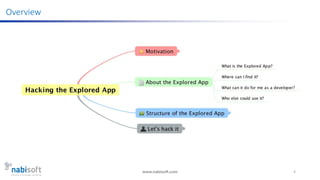
Overview
www.nabisoft.com 3
Motivation
www.nabisoft.com 4
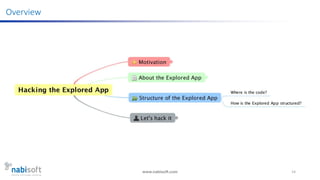
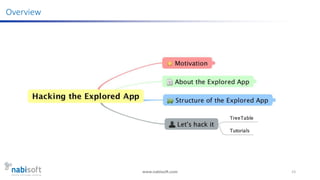
Overview
www.nabisoft.com 5
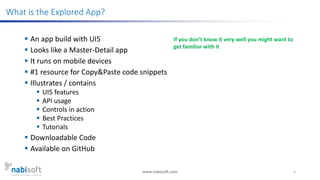
What is the Explored App?
 An app build with UI5
 Looks like a Master-Detail app
 It runs on mobile devices
 #1 resource for Copy&Paste code snippets
 Illustrates / contains
 UI5 features
 API usage
 Controls in action
 Best Practices
 Tutorials
 Downloadable Code
 Available on GitHub
If you don’t know it very well you might want to
get familiar with it
www.nabisoft.com 6
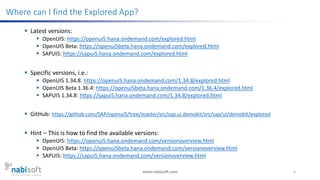
Where can I find the Explored App?
 Latest versions:
 OpenUI5: https://openui5.hana.ondemand.com/explored.html
 OpenUI5 Beta: https://openui5beta.hana.ondemand.com/explored.html
 SAPUI5: https://sapui5.hana.ondemand.com/explored.html
 Specific versions, i.e.:
 OpenUI5 1.34.8: https://openui5.hana.ondemand.com/1.34.8/explored.html
 OpenUI5 Beta 1.36.4: https://openui5beta.hana.ondemand.com/1.36.4/explored.html
 SAPUI5 1.34.8: https://sapui5.hana.ondemand.com/1.34.8/explored.html
 GitHub: https://github.com/SAP/openui5/tree/master/src/sap.ui.demokit/src/sap/ui/demokit/explored
 Hint – This is how to find the available versions:
 OpenUI5: https://openui5.hana.ondemand.com/versionoverview.html
 OpenUI5 Beta: https://openui5beta.hana.ondemand.com/versionoverview.html
 SAPUI5: https://sapui5.hana.ondemand.com/versionoverview.html
www.nabisoft.com 7
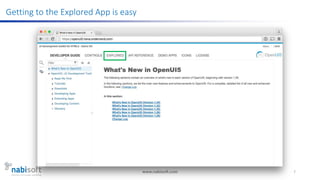
Getting to the Explored App is easy
www.nabisoft.com 8
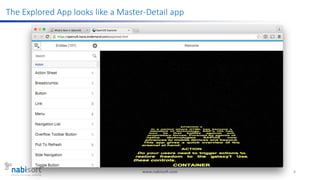
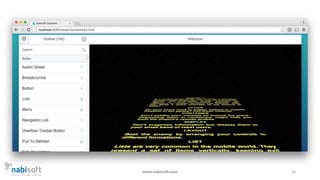
The Explored App looks like a Master-Detail app
www.nabisoft.com 9
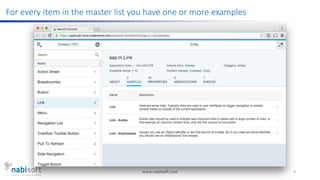
For every item in the master list you have one or more examples
www.nabisoft.com 10
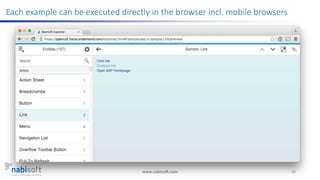
Each example can be executed directly in the browser incl. mobile browsers
www.nabisoft.com 11
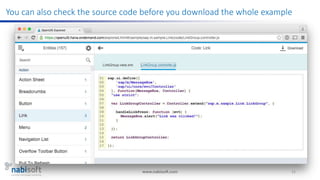
You can also check the source code before you download the whole example
www.nabisoft.com 12
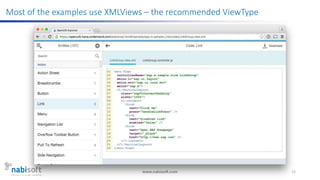
Most of the examples use XMLViews – the recommended ViewType
www.nabisoft.com 13
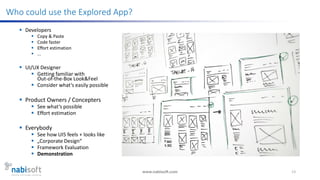
Who could use the Explored App?
 Developers
 Copy & Paste
 Code faster
 Effort estimation
 ...
 UI/UX Designer
 Getting familiar with
Out-of-the-Box Look&Feel
 Consider what‘s easily possible
 Product Owners / Concepters
 See what‘s possible
 Effort estimation
 Everybody
 See how UI5 feels + looks like
 „Corporate Design“
 Framework Evaluation
 Demonstration
www.nabisoft.com 14
Overview
www.nabisoft.com 15
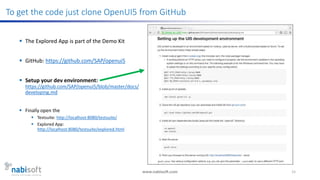
To get the code just clone OpenUI5 from GitHub
 The Explored App is part of the Demo Kit
 GitHub: https://github.com/SAP/openui5
 Setup your dev environment:
https://github.com/SAP/openui5/blob/master/docs/
developing.md
 Finally open the
 Testsuite: http://localhost:8080/testsuite/
 Explored App:
http://localhost:8080/testsuite/explored.html
www.nabisoft.com 16
www.nabisoft.com 17
Disclaimer - What you will see from now on is subject to change
 No public API published for „intrusion“ of own
examples to the Explored App
 But sometimes you have to break the rules
 Let‘s break the rules and ask for forgiveness later 
www.nabisoft.com 18
www.nabisoft.com 19
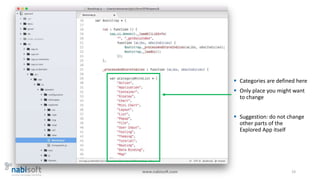
 Categories are defined here
 Only place you might want
to change
 Suggestion: do not change
other parts of the
Explored App itself
www.nabisoft.com 20
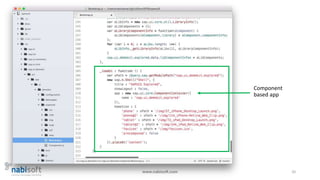
Component
based app
www.nabisoft.com 21
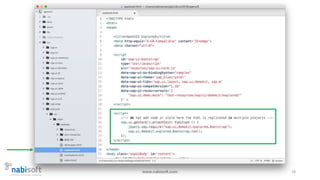
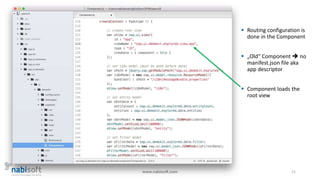
 Routing configuration is
done in the Component
 „Old“ Component  no
manifest.json file aka
app descriptor
 Component loads the
root view
www.nabisoft.com 22
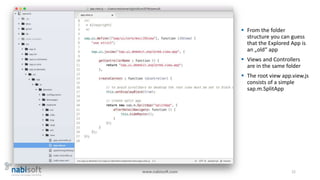
 From the folder
structure you can guess
that the Explored App is
an „old“ app
 Views and Controllers
are in the same folder
 The root view app.view.js
consists of a simple
sap.m.SplitApp
www.nabisoft.com 23
Overview
www.nabisoft.com 24
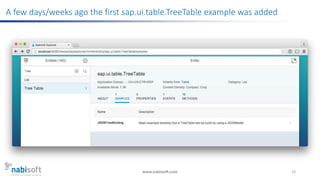
A few days/weeks ago the first sap.ui.table.TreeTable example was added
www.nabisoft.com 25
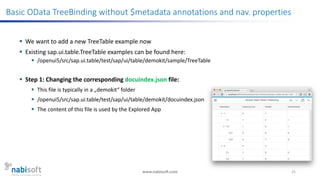
Basic OData TreeBinding without $metadata annotations and nav. properties
 We want to add a new TreeTable example now
 Existing sap.ui.table.TreeTable examples can be found here:
 /openui5/src/sap.ui.table/test/sap/ui/table/demokit/sample/TreeTable
 Step 1: Changing the corresponding docuindex.json file:
 This file is typically in a „demokit“ folder
 /openui5/src/sap.ui.table/test/sap/ui/table/demokit/docuindex.json
 The content of this file is used by the Explored App
www.nabisoft.com 26
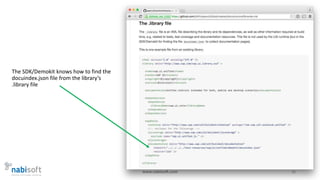
The SDK/Demokit knows how to find the
docuindex.json file from the library‘s
.library file
www.nabisoft.com 27
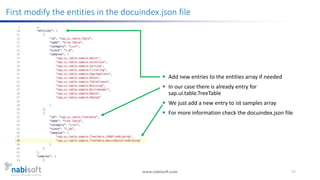
First modify the entities in the docuindex.json file
 Add new entries to the entities array if needed
 In our case there is already entry for
sap.ui.table.TreeTable
 We just add a new entry to ist samples array
 For more information check the docuindex.json file
www.nabisoft.com 28
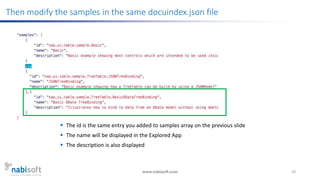
Then modify the samples in the same docuindex.json file
 The id is the same entry you added to samples array on the previous slide
 The name will be displayed in the Explored App
 The description is also displayed
www.nabisoft.com 29
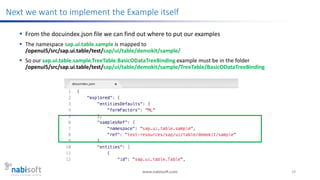
Next we want to implement the Example itself
 From the docuindex.json file we can find out where to put our examples
 The namespace sap.ui.table.sample is mapped to
/openui5/src/sap.ui.table/test/sap/ui/table/demokit/sample/
 So our sap.ui.table.sample.TreeTable.BasicODataTreeBinding example must be in the folder
/openui5/src/sap.ui.table/test/sap/ui/table/demokit/sample/TreeTable/BasicODataTreeBinding
www.nabisoft.com 30
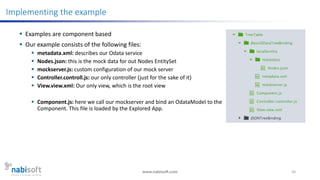
Implementing the example
 Examples are component based
 Our example consists of the following files:
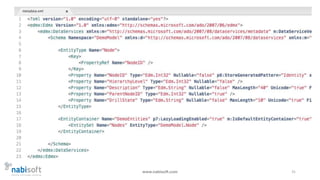
 metadata.xml: describes our Odata service
 Nodes.json: this is the mock data for out Nodes EntitySet
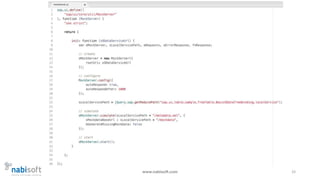
 mockserver.js: custom configuration of our mock server
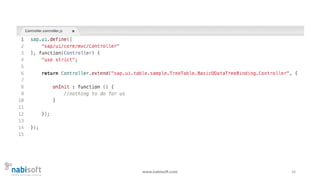
 Controller.controll.js: our only controller (just for the sake of it)
 View.view.xml: Our only view, which is the root view
 Component.js: here we call our mockserver and bind an OdataModel to the
Component. This file is loaded by the Explored App.
www.nabisoft.com 31
www.nabisoft.com 32
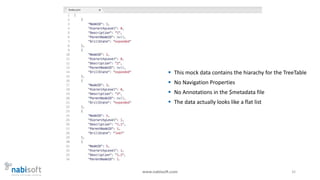
 This mock data contains the hiarachy for the TreeTable
 No Navigation Properties
 No Annotations in the $metadata file
 The data actually looks like a flat list
www.nabisoft.com 33
www.nabisoft.com 34
www.nabisoft.com 35
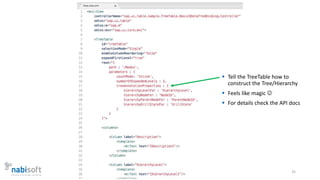
 Tell the TreeTable how to
construct the Tree/Hierarchy
 Feels like magic 
 For details check the API docs
www.nabisoft.com 36
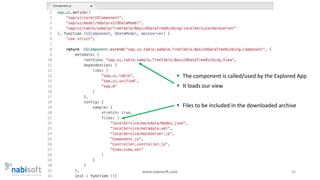
 The component is called/used by the Explored App
 It loads our view
 Files to be included in the downloaded archive
www.nabisoft.com 37
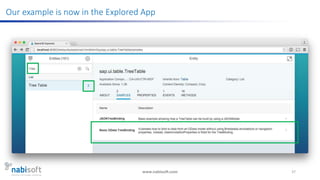
Our example is now in the Explored App
www.nabisoft.com 38
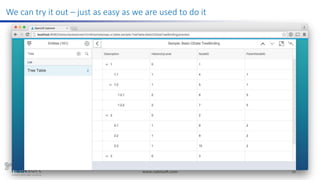
We can try it out – just as easy as we are used to do it
www.nabisoft.com 39
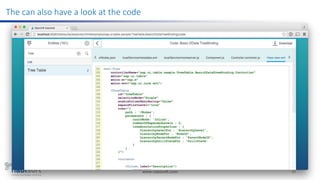
The can also have a look at the code
www.nabisoft.com 40
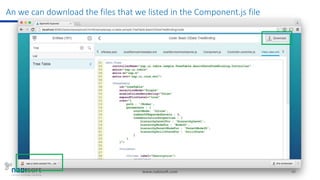
An we can download the files that we listed in the Component.js file
www.nabisoft.com 41
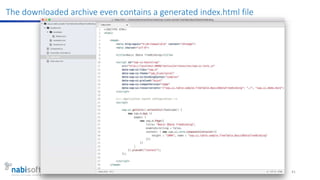
The downloaded archive even contains a generated index.html file
www.nabisoft.com 42
Get the code of the TreeTable example we saw on the previous slides
 TreeTable with Basic OData TreeBinding + additional OData TreeBinding example:
 Change (own fork):
https://github.com/nzamani/openui5/tree/ui5con2016-treetable-explored-samples
 I will create a pull request for this
www.nabisoft.com 43
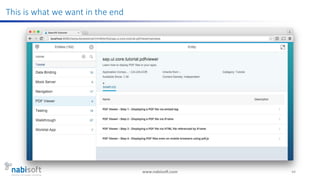
Next Example: Tutorials inside the Explored App
 Did you every think about displaying a PDF inside you UI5 app?
 Let’s create a tutorial that has four steps:
 Displaying PDF files via <embed>
 Displaying PDF files via iFrame
 Displaying PDF files via iFrame that loads HTML wrapper for object/embed
 Displaying PDF files using pdf.js (https://mozilla.github.io/pdf.js/)
 In all steps we will use sap.ui.core.HTML
 Therefore we want the tutorial to be part of sap.ui.core
 Let’s do it…
www.nabisoft.com 44
This is what we want in the end
www.nabisoft.com 45
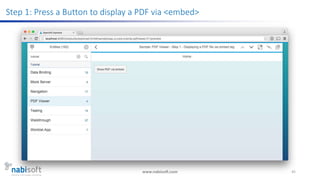
Step 1: Press a Button to display a PDF via <embed>
www.nabisoft.com 46
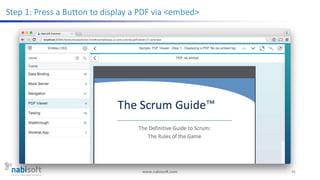
Step 1: Press a Button to display a PDF via <embed>
www.nabisoft.com 47
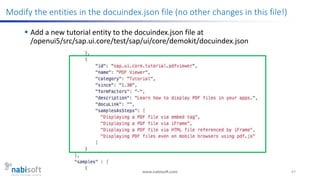
Modify the entities in the docuindex.json file (no other changes in this file!)
 Add a new tutorial entity to the docuindex.json file at
/openui5/src/sap.ui.core/test/sap/ui/core/demokit/docuindex.json
www.nabisoft.com 48
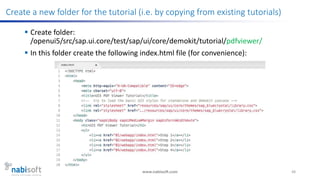
Create a new folder for the tutorial (i.e. by copying from existing tutorials)
 Create folder:
/openui5/src/sap.ui.core/test/sap/ui/core/demokit/tutorial/pdfviewer/
 In this folder create the following index.html file (for convenience):
www.nabisoft.com 49
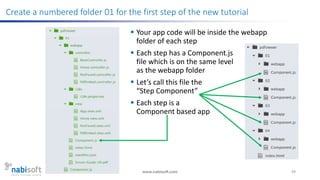
Create a numbered folder 01 for the first step of the new tutorial
 Your app code will be inside the webapp
folder of each step
 Each step has a Component.js
file which is on the same level
as the webapp folder
 Let’s call this file the
“Step Component”
 Each step is a
Component based app
www.nabisoft.com 50
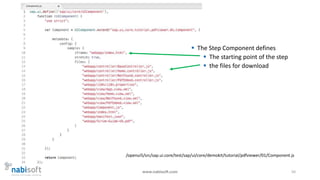
 The Step Component defines
 The starting point of the step
 the files for download
/openui5/src/sap.ui.core/test/sap/ui/core/demokit/tutorial/pdfviewer/01/Component.js
www.nabisoft.com 51
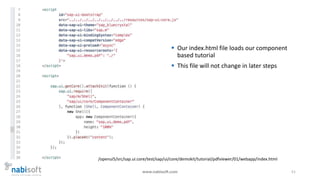
 Our index.html file loads our component
based tutorial
 This file will not change in later steps
/openui5/src/sap.ui.core/test/sap/ui/core/demokit/tutorial/pdfviewer/01/webapp/index.html
www.nabisoft.com 52
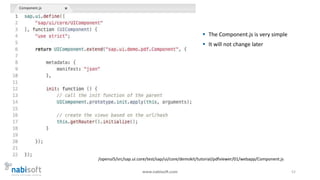
 The Component.js is very simple
 It will not change later
/openui5/src/sap.ui.core/test/sap/ui/core/demokit/tutorial/pdfviewer/01/webapp/Component.js
www.nabisoft.com 53
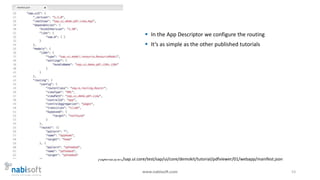
 In the App Descriptor we configure the routing
 It‘s as simple as the other published tutorials
/openui5/src/sap.ui.core/test/sap/ui/core/demokit/tutorial/pdfviewer/01/webapp/manifest.json
www.nabisoft.com 54
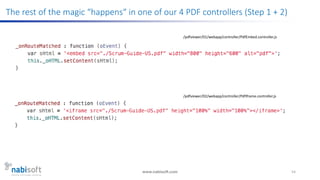
The rest of the magic “happens“ in one of our 4 PDF controllers (Step 1 + 2)
/pdfviewer/01/webapp/controller/PdfEmbed.controller.js
/pdfviewer/02/webapp/controller/PdfIframe.controller.js
www.nabisoft.com 55
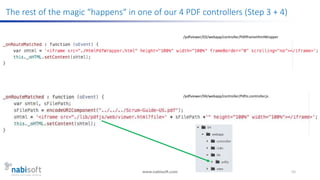
The rest of the magic “happens“ in one of our 4 PDF controllers (Step 3 + 4)
/pdfviewer/03/webapp/controller/PdfIframeHtmlWrapper
/pdfviewer/04/webapp/controller/PdfJs.controller.js
www.nabisoft.com 56
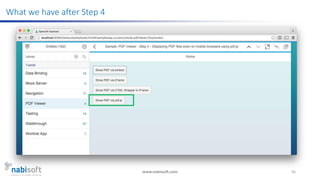
What we have after Step 4
www.nabisoft.com 57
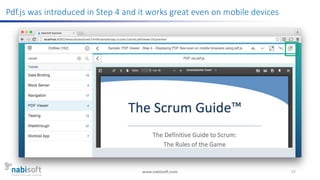
Pdf.js was introduced in Step 4 and it works great even on mobile devices
www.nabisoft.com 58
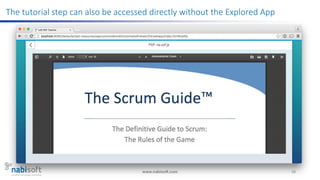
The tutorial step can also be accessed directly without the Explored App
www.nabisoft.com 59
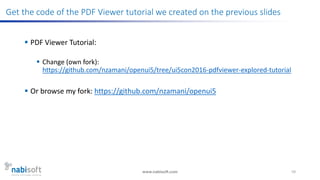
Get the code of the PDF Viewer tutorial we created on the previous slides
 PDF Viewer Tutorial:
 Change (own fork):
https://github.com/nzamani/openui5/tree/ui5con2016-pdfviewer-explored-tutorial
 Or browse my fork: https://github.com/nzamani/openui5
www.nabisoft.com 60
Thank You
 Check our UI5 tutorials:
https://www.nabisoft.com/tutorials/sapui5/
 Contact us:
https://www.nabisoft.com/contact
 Share your experience & create Pull Requests on GitHub 

Hacking the Explored App by Adding Custom Code (UI5con 2016)

  • 1.
    © nabisoft. Allrights reserved. Proprietary and confidential. Hacking the Explored App by Adding Custom Code A smart way to share (Open|SAP) UI5 code snippets with others www.nabisoft.com Nabi Zamani, CEO & Software Engineer3/11/16
  • 2.
  • 3.
  • 4.
  • 5.
    www.nabisoft.com 5 What isthe Explored App?  An app build with UI5  Looks like a Master-Detail app  It runs on mobile devices  #1 resource for Copy&Paste code snippets  Illustrates / contains  UI5 features  API usage  Controls in action  Best Practices  Tutorials  Downloadable Code  Available on GitHub If you don’t know it very well you might want to get familiar with it
  • 6.
    www.nabisoft.com 6 Where canI find the Explored App?  Latest versions:  OpenUI5: https://openui5.hana.ondemand.com/explored.html  OpenUI5 Beta: https://openui5beta.hana.ondemand.com/explored.html  SAPUI5: https://sapui5.hana.ondemand.com/explored.html  Specific versions, i.e.:  OpenUI5 1.34.8: https://openui5.hana.ondemand.com/1.34.8/explored.html  OpenUI5 Beta 1.36.4: https://openui5beta.hana.ondemand.com/1.36.4/explored.html  SAPUI5 1.34.8: https://sapui5.hana.ondemand.com/1.34.8/explored.html  GitHub: https://github.com/SAP/openui5/tree/master/src/sap.ui.demokit/src/sap/ui/demokit/explored  Hint – This is how to find the available versions:  OpenUI5: https://openui5.hana.ondemand.com/versionoverview.html  OpenUI5 Beta: https://openui5beta.hana.ondemand.com/versionoverview.html  SAPUI5: https://sapui5.hana.ondemand.com/versionoverview.html
  • 7.
    www.nabisoft.com 7 Getting tothe Explored App is easy
  • 8.
    www.nabisoft.com 8 The ExploredApp looks like a Master-Detail app
  • 9.
    www.nabisoft.com 9 For everyitem in the master list you have one or more examples
  • 10.
    www.nabisoft.com 10 Each examplecan be executed directly in the browser incl. mobile browsers
  • 11.
    www.nabisoft.com 11 You canalso check the source code before you download the whole example
  • 12.
    www.nabisoft.com 12 Most ofthe examples use XMLViews – the recommended ViewType
  • 13.
    www.nabisoft.com 13 Who coulduse the Explored App?  Developers  Copy & Paste  Code faster  Effort estimation  ...  UI/UX Designer  Getting familiar with Out-of-the-Box Look&Feel  Consider what‘s easily possible  Product Owners / Concepters  See what‘s possible  Effort estimation  Everybody  See how UI5 feels + looks like  „Corporate Design“  Framework Evaluation  Demonstration
  • 14.
  • 15.
    www.nabisoft.com 15 To getthe code just clone OpenUI5 from GitHub  The Explored App is part of the Demo Kit  GitHub: https://github.com/SAP/openui5  Setup your dev environment: https://github.com/SAP/openui5/blob/master/docs/ developing.md  Finally open the  Testsuite: http://localhost:8080/testsuite/  Explored App: http://localhost:8080/testsuite/explored.html
  • 16.
  • 17.
    www.nabisoft.com 17 Disclaimer -What you will see from now on is subject to change  No public API published for „intrusion“ of own examples to the Explored App  But sometimes you have to break the rules  Let‘s break the rules and ask for forgiveness later 
  • 18.
  • 19.
    www.nabisoft.com 19  Categoriesare defined here  Only place you might want to change  Suggestion: do not change other parts of the Explored App itself
  • 20.
  • 21.
    www.nabisoft.com 21  Routingconfiguration is done in the Component  „Old“ Component  no manifest.json file aka app descriptor  Component loads the root view
  • 22.
    www.nabisoft.com 22  Fromthe folder structure you can guess that the Explored App is an „old“ app  Views and Controllers are in the same folder  The root view app.view.js consists of a simple sap.m.SplitApp
  • 23.
  • 24.
    www.nabisoft.com 24 A fewdays/weeks ago the first sap.ui.table.TreeTable example was added
  • 25.
    www.nabisoft.com 25 Basic ODataTreeBinding without $metadata annotations and nav. properties  We want to add a new TreeTable example now  Existing sap.ui.table.TreeTable examples can be found here:  /openui5/src/sap.ui.table/test/sap/ui/table/demokit/sample/TreeTable  Step 1: Changing the corresponding docuindex.json file:  This file is typically in a „demokit“ folder  /openui5/src/sap.ui.table/test/sap/ui/table/demokit/docuindex.json  The content of this file is used by the Explored App
  • 26.
    www.nabisoft.com 26 The SDK/Demokitknows how to find the docuindex.json file from the library‘s .library file
  • 27.
    www.nabisoft.com 27 First modifythe entities in the docuindex.json file  Add new entries to the entities array if needed  In our case there is already entry for sap.ui.table.TreeTable  We just add a new entry to ist samples array  For more information check the docuindex.json file
  • 28.
    www.nabisoft.com 28 Then modifythe samples in the same docuindex.json file  The id is the same entry you added to samples array on the previous slide  The name will be displayed in the Explored App  The description is also displayed
  • 29.
    www.nabisoft.com 29 Next wewant to implement the Example itself  From the docuindex.json file we can find out where to put our examples  The namespace sap.ui.table.sample is mapped to /openui5/src/sap.ui.table/test/sap/ui/table/demokit/sample/  So our sap.ui.table.sample.TreeTable.BasicODataTreeBinding example must be in the folder /openui5/src/sap.ui.table/test/sap/ui/table/demokit/sample/TreeTable/BasicODataTreeBinding
  • 30.
    www.nabisoft.com 30 Implementing theexample  Examples are component based  Our example consists of the following files:  metadata.xml: describes our Odata service  Nodes.json: this is the mock data for out Nodes EntitySet  mockserver.js: custom configuration of our mock server  Controller.controll.js: our only controller (just for the sake of it)  View.view.xml: Our only view, which is the root view  Component.js: here we call our mockserver and bind an OdataModel to the Component. This file is loaded by the Explored App.
  • 31.
  • 32.
    www.nabisoft.com 32  Thismock data contains the hiarachy for the TreeTable  No Navigation Properties  No Annotations in the $metadata file  The data actually looks like a flat list
  • 33.
  • 34.
  • 35.
    www.nabisoft.com 35  Tellthe TreeTable how to construct the Tree/Hierarchy  Feels like magic   For details check the API docs
  • 36.
    www.nabisoft.com 36  Thecomponent is called/used by the Explored App  It loads our view  Files to be included in the downloaded archive
  • 37.
    www.nabisoft.com 37 Our exampleis now in the Explored App
  • 38.
    www.nabisoft.com 38 We cantry it out – just as easy as we are used to do it
  • 39.
    www.nabisoft.com 39 The canalso have a look at the code
  • 40.
    www.nabisoft.com 40 An wecan download the files that we listed in the Component.js file
  • 41.
    www.nabisoft.com 41 The downloadedarchive even contains a generated index.html file
  • 42.
    www.nabisoft.com 42 Get thecode of the TreeTable example we saw on the previous slides  TreeTable with Basic OData TreeBinding + additional OData TreeBinding example:  Change (own fork): https://github.com/nzamani/openui5/tree/ui5con2016-treetable-explored-samples  I will create a pull request for this
  • 43.
    www.nabisoft.com 43 Next Example:Tutorials inside the Explored App  Did you every think about displaying a PDF inside you UI5 app?  Let’s create a tutorial that has four steps:  Displaying PDF files via <embed>  Displaying PDF files via iFrame  Displaying PDF files via iFrame that loads HTML wrapper for object/embed  Displaying PDF files using pdf.js (https://mozilla.github.io/pdf.js/)  In all steps we will use sap.ui.core.HTML  Therefore we want the tutorial to be part of sap.ui.core  Let’s do it…
  • 44.
    www.nabisoft.com 44 This iswhat we want in the end
  • 45.
    www.nabisoft.com 45 Step 1:Press a Button to display a PDF via <embed>
  • 46.
    www.nabisoft.com 46 Step 1:Press a Button to display a PDF via <embed>
  • 47.
    www.nabisoft.com 47 Modify theentities in the docuindex.json file (no other changes in this file!)  Add a new tutorial entity to the docuindex.json file at /openui5/src/sap.ui.core/test/sap/ui/core/demokit/docuindex.json
  • 48.
    www.nabisoft.com 48 Create anew folder for the tutorial (i.e. by copying from existing tutorials)  Create folder: /openui5/src/sap.ui.core/test/sap/ui/core/demokit/tutorial/pdfviewer/  In this folder create the following index.html file (for convenience):
  • 49.
    www.nabisoft.com 49 Create anumbered folder 01 for the first step of the new tutorial  Your app code will be inside the webapp folder of each step  Each step has a Component.js file which is on the same level as the webapp folder  Let’s call this file the “Step Component”  Each step is a Component based app
  • 50.
    www.nabisoft.com 50  TheStep Component defines  The starting point of the step  the files for download /openui5/src/sap.ui.core/test/sap/ui/core/demokit/tutorial/pdfviewer/01/Component.js
  • 51.
    www.nabisoft.com 51  Ourindex.html file loads our component based tutorial  This file will not change in later steps /openui5/src/sap.ui.core/test/sap/ui/core/demokit/tutorial/pdfviewer/01/webapp/index.html
  • 52.
    www.nabisoft.com 52  TheComponent.js is very simple  It will not change later /openui5/src/sap.ui.core/test/sap/ui/core/demokit/tutorial/pdfviewer/01/webapp/Component.js
  • 53.
    www.nabisoft.com 53  Inthe App Descriptor we configure the routing  It‘s as simple as the other published tutorials /openui5/src/sap.ui.core/test/sap/ui/core/demokit/tutorial/pdfviewer/01/webapp/manifest.json
  • 54.
    www.nabisoft.com 54 The restof the magic “happens“ in one of our 4 PDF controllers (Step 1 + 2) /pdfviewer/01/webapp/controller/PdfEmbed.controller.js /pdfviewer/02/webapp/controller/PdfIframe.controller.js
  • 55.
    www.nabisoft.com 55 The restof the magic “happens“ in one of our 4 PDF controllers (Step 3 + 4) /pdfviewer/03/webapp/controller/PdfIframeHtmlWrapper /pdfviewer/04/webapp/controller/PdfJs.controller.js
  • 56.
    www.nabisoft.com 56 What wehave after Step 4
  • 57.
    www.nabisoft.com 57 Pdf.js wasintroduced in Step 4 and it works great even on mobile devices
  • 58.
    www.nabisoft.com 58 The tutorialstep can also be accessed directly without the Explored App
  • 59.
    www.nabisoft.com 59 Get thecode of the PDF Viewer tutorial we created on the previous slides  PDF Viewer Tutorial:  Change (own fork): https://github.com/nzamani/openui5/tree/ui5con2016-pdfviewer-explored-tutorial  Or browse my fork: https://github.com/nzamani/openui5
  • 60.
    www.nabisoft.com 60 Thank You Check our UI5 tutorials: https://www.nabisoft.com/tutorials/sapui5/  Contact us: https://www.nabisoft.com/contact  Share your experience & create Pull Requests on GitHub 