MONOLITHS TO MICROSERVICES: APP
TRANSFORMATION
Hands-on Technical Workshop
Ram Maddali
Senior Architect
@RamMaddali
rmaddali@redhat.com
Anand Akella
Senior Architect
aakella@redhat.com
A DEVELOPER INTRODUCTION TO
OPENSHIFT
CONTAINERS & CLOUD-NATIVE ROADSHOW4
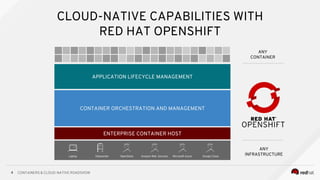
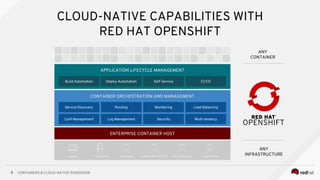
CLOUD-NATIVE CAPABILITIES WITH
RED HAT OPENSHIFT
ANY
CONTAINER
Amazon Web Services Microsoft Azure Google CloudOpenStackDatacenterLaptop
ANY
INFRASTRUCTURE
APPLICATION LIFECYCLE MANAGEMENT
CONTAINER ORCHESTRATION AND MANAGEMENT
ENTERPRISE CONTAINER HOST
CONTAINERS & CLOUD-NATIVE ROADSHOW5
CLOUD-NATIVE CAPABILITIES WITH
RED HAT OPENSHIFT
APPLICATION LIFECYCLE MANAGEMENT
CONTAINER ORCHESTRATION AND MANAGEMENT
ENTERPRISE CONTAINER HOST
Service Discovery Routing Load Balancing
Security
Monitoring
Conf Management Log Management Multi-tenancy
Self-ServiceBuild Automation Deploy Automation CI/CD
ANY
CONTAINER
Amazon Web Services Microsoft Azure Google CloudOpenStackDatacenterLaptop
ANY
INFRASTRUCTURE
A container is the smallest compute unit
CONTAINER
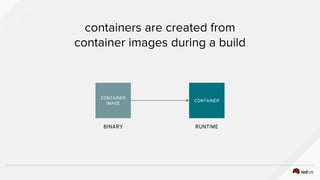
containers are created from
container images during a build
CONTAINER
CONTAINER
IMAGE
BINARY RUNTIME
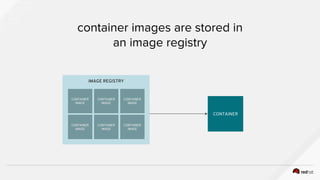
IMAGE REGISTRY
container images are stored in
an image registry
CONTAINER
CONTAINER
IMAGE
CONTAINER
IMAGE
CONTAINER
IMAGE
CONTAINER
IMAGE
CONTAINER
IMAGE
CONTAINER
IMAGE
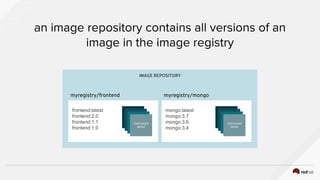
an image repository contains all versions of an
image in the image registry
IMAGE REPOSITORY
frontend:latest
frontend:2.0
frontend:1.1
frontend:1.0
CONTAINER
IMAGE
mongo:latest
mongo:3.7
mongo:3.6
mongo:3.4
CONTAINER
IMAGE
myregistry/frontend myregistry/mongo
PODPOD
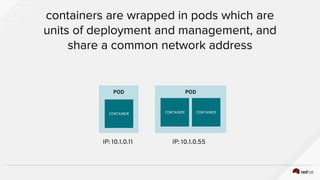
containers are wrapped in pods which are
units of deployment and management, and
share a common network address
CONTAINER CONTAINERCONTAINER
IP: 10.1.0.11 IP: 10.1.0.55
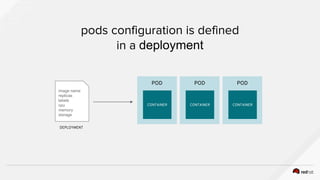
pods configuration is defined
in a deployment
image name
replicas
labels
cpu
memory
storage
POD
CONTAINER
POD
CONTAINER
POD
CONTAINER
DEPLOYMENT
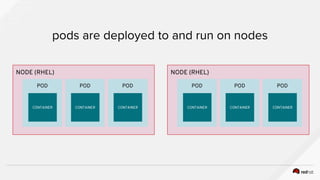
NODE (RHEL)
pods are deployed to and run on nodes
POD
CONTAINER
POD
CONTAINER
POD
CONTAINER
NODE (RHEL)
POD
CONTAINER
POD
CONTAINER
POD
CONTAINER
POD
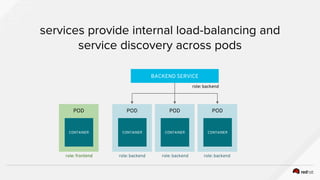
services provide internal load-balancing and
service discovery across pods
CONTAINER
POD
CONTAINER
POD
CONTAINER
BACKEND SERVICE
POD
CONTAINER
role: backend
role: backendrole: backendrole: backendrole: frontend
POD
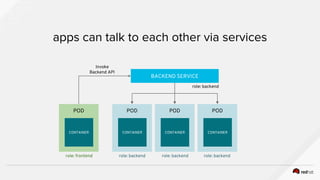
apps can talk to each other via services
CONTAINER
POD
CONTAINER
POD
CONTAINER
BACKEND SERVICE
POD
CONTAINER
role: backend
role: backendrole: backendrole: backendrole: frontend
Invoke
Backend API
POD
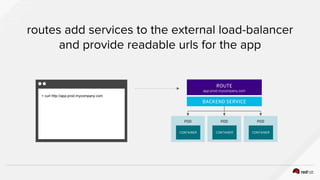
routes add services to the external load-balancer
and provide readable urls for the app
CONTAINER
POD
CONTAINER
POD
CONTAINER
BACKEND SERVICE
ROUTE
app-prod.mycompany.com
> curl http://app-prod.mycompany.com
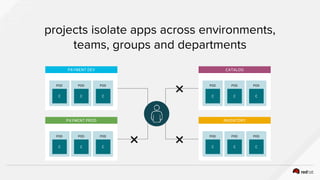
projects isolate apps across environments,
teams, groups and departments
POD
C
POD
C
POD
C
PAYMENT DEV
POD
C
POD
C
POD
C
PAYMENT PROD
POD
C
POD
C
POD
C
CATALOG
POD
C
POD
C
POD
C
INVENTORY
❌
❌❌
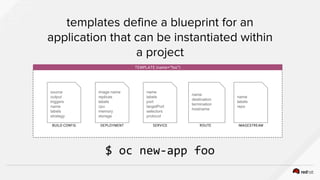
templates define a blueprint for an
application that can be instantiated within
a project
TEMPLATE (name=”foo”)
source
output
triggers
name
labels
strategy
BUILD CONFIG
image name
replicas
labels
cpu
memory
storage
DEPLOYMENT
name
labels
port
targetPort
selectors
protocol
SERVICE
name
destination
termination
hostname
ROUTE
name
labels
repo
IMAGESTREAM
$ oc new-app foo
LAB: DEVELOPER INTRODUCTION TO
OPENSHIFT
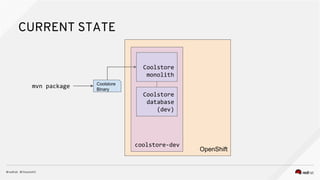
CURRENT STATE
OpenShift
coolstore-dev
Coolstore
monolith
Coolstore
database
(dev)
Coolstore
Binary
mvn package
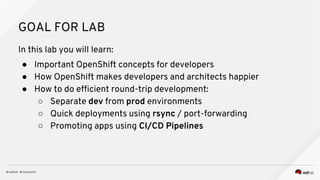
GOAL FOR LAB
In this lab you will learn:
● Important OpenShift concepts for developers
● How OpenShift makes developers and architects happier
● How to do efficient round-trip development:
○ Separate dev from prod environments
○ Quick deployments using rsync / port-forwarding
○ Promoting apps using CI/CD Pipelines
LAB: DEVELOPER INTRO TO OPENSHIFT
SCENARIO 3 A DEVELOPER INTRODUCTION TO OPENSHIFT
WEB: openshift-modernize-apps.katacoda.com
WRAP-UP AND DISCUSSION
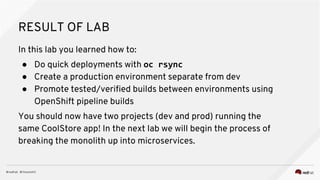
RESULT OF LAB
In this lab you learned how to:
● Do quick deployments with oc rsync
● Create a production environment separate from dev
● Promote tested/verified builds between environments using
OpenShift pipeline builds
You should now have two projects (dev and prod) running the
same CoolStore app! In the next lab we will begin the process of
breaking the monolith up into microservices.
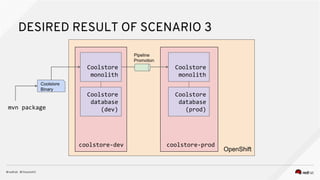
DESIRED RESULT OF SCENARIO 3
OpenShift
coolstore-dev
Coolstore
monolith
Coolstore
database
(dev)
Coolstore
Binary
coolstore-prod
Coolstore
monolith
Coolstore
database
(prod)
Pipeline
Promotion
mvn package
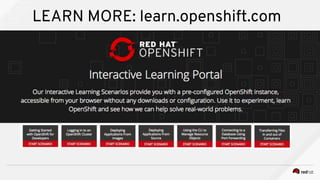
LEARN MORE: learn.openshift.com
THANK YOU
plus.google.com/+RedHat
linkedin.com/company/red-hat
youtube.com/user/RedHatVideos
facebook.com/redhatinc
twitter.com/RedHatNews

Developer Intro to OpenShift

  • 1.
    MONOLITHS TO MICROSERVICES:APP TRANSFORMATION Hands-on Technical Workshop Ram Maddali Senior Architect @RamMaddali rmaddali@redhat.com Anand Akella Senior Architect aakella@redhat.com
  • 2.
  • 3.
    CONTAINERS & CLOUD-NATIVEROADSHOW4 CLOUD-NATIVE CAPABILITIES WITH RED HAT OPENSHIFT ANY CONTAINER Amazon Web Services Microsoft Azure Google CloudOpenStackDatacenterLaptop ANY INFRASTRUCTURE APPLICATION LIFECYCLE MANAGEMENT CONTAINER ORCHESTRATION AND MANAGEMENT ENTERPRISE CONTAINER HOST
  • 4.
    CONTAINERS & CLOUD-NATIVEROADSHOW5 CLOUD-NATIVE CAPABILITIES WITH RED HAT OPENSHIFT APPLICATION LIFECYCLE MANAGEMENT CONTAINER ORCHESTRATION AND MANAGEMENT ENTERPRISE CONTAINER HOST Service Discovery Routing Load Balancing Security Monitoring Conf Management Log Management Multi-tenancy Self-ServiceBuild Automation Deploy Automation CI/CD ANY CONTAINER Amazon Web Services Microsoft Azure Google CloudOpenStackDatacenterLaptop ANY INFRASTRUCTURE
  • 5.
    A container isthe smallest compute unit CONTAINER
  • 6.
    containers are createdfrom container images during a build CONTAINER CONTAINER IMAGE BINARY RUNTIME
  • 7.
    IMAGE REGISTRY container imagesare stored in an image registry CONTAINER CONTAINER IMAGE CONTAINER IMAGE CONTAINER IMAGE CONTAINER IMAGE CONTAINER IMAGE CONTAINER IMAGE
  • 8.
    an image repositorycontains all versions of an image in the image registry IMAGE REPOSITORY frontend:latest frontend:2.0 frontend:1.1 frontend:1.0 CONTAINER IMAGE mongo:latest mongo:3.7 mongo:3.6 mongo:3.4 CONTAINER IMAGE myregistry/frontend myregistry/mongo
  • 9.
    PODPOD containers are wrappedin pods which are units of deployment and management, and share a common network address CONTAINER CONTAINERCONTAINER IP: 10.1.0.11 IP: 10.1.0.55
  • 10.
    pods configuration isdefined in a deployment image name replicas labels cpu memory storage POD CONTAINER POD CONTAINER POD CONTAINER DEPLOYMENT
  • 11.
    NODE (RHEL) pods aredeployed to and run on nodes POD CONTAINER POD CONTAINER POD CONTAINER NODE (RHEL) POD CONTAINER POD CONTAINER POD CONTAINER
  • 12.
    POD services provide internalload-balancing and service discovery across pods CONTAINER POD CONTAINER POD CONTAINER BACKEND SERVICE POD CONTAINER role: backend role: backendrole: backendrole: backendrole: frontend
  • 13.
    POD apps can talkto each other via services CONTAINER POD CONTAINER POD CONTAINER BACKEND SERVICE POD CONTAINER role: backend role: backendrole: backendrole: backendrole: frontend Invoke Backend API
  • 14.
    POD routes add servicesto the external load-balancer and provide readable urls for the app CONTAINER POD CONTAINER POD CONTAINER BACKEND SERVICE ROUTE app-prod.mycompany.com > curl http://app-prod.mycompany.com
  • 15.
    projects isolate appsacross environments, teams, groups and departments POD C POD C POD C PAYMENT DEV POD C POD C POD C PAYMENT PROD POD C POD C POD C CATALOG POD C POD C POD C INVENTORY ❌ ❌❌
  • 16.
    templates define ablueprint for an application that can be instantiated within a project TEMPLATE (name=”foo”) source output triggers name labels strategy BUILD CONFIG image name replicas labels cpu memory storage DEPLOYMENT name labels port targetPort selectors protocol SERVICE name destination termination hostname ROUTE name labels repo IMAGESTREAM $ oc new-app foo
  • 17.
  • 18.
  • 19.
    GOAL FOR LAB Inthis lab you will learn: ● Important OpenShift concepts for developers ● How OpenShift makes developers and architects happier ● How to do efficient round-trip development: ○ Separate dev from prod environments ○ Quick deployments using rsync / port-forwarding ○ Promoting apps using CI/CD Pipelines
  • 20.
    LAB: DEVELOPER INTROTO OPENSHIFT SCENARIO 3 A DEVELOPER INTRODUCTION TO OPENSHIFT WEB: openshift-modernize-apps.katacoda.com
  • 21.
  • 22.
    RESULT OF LAB Inthis lab you learned how to: ● Do quick deployments with oc rsync ● Create a production environment separate from dev ● Promote tested/verified builds between environments using OpenShift pipeline builds You should now have two projects (dev and prod) running the same CoolStore app! In the next lab we will begin the process of breaking the monolith up into microservices.
  • 23.
    DESIRED RESULT OFSCENARIO 3 OpenShift coolstore-dev Coolstore monolith Coolstore database (dev) Coolstore Binary coolstore-prod Coolstore monolith Coolstore database (prod) Pipeline Promotion mvn package
  • 24.
  • 25.

Editor's Notes

  • #5 Red Hat OpenShift is a complete container application platform that natively integrates technologies like docker and Kubernetes to provide a common platform for developers to build and manage containerized applications in a self-service fashion. It builds on top of Red Hat Enterprise Linux or Atomic Host, the trusted enterprise operating system which is used by 90% of Fortune 500 companies, and provides tools and services for building container images from source code and application binaries and managing their lifecycle in production at scale. Red Hat is a leader in both Kubernetes and docker community and is a top contributor to both communities to make sure these technologies fit smoothly to the needs of customers and users for building microservices on OpenShift.
  • #6 Specifically for microservices, OpenShift provides a large set of capabilities to take the complexity out of building and running distributed systems at scale. It provides Service discovery for services find each other despite other services popping up and down as they scale or get deployed and undeployed. Routing and load balancing to be able to send traffic to the microservices and control how the traffic is distributed between multiple instances of the application enabling patterns like A/B testing Metrics and monitoring to make sure you can identify anomalies as a microservice starts to misbehave to consume too much resources Configuration and secret management to decouple environment specific data from the microservices and be able to provide both configuration and also sensitive data in a secure manner to them from environment to environment without the need to change the microservice itself. Central log management so that when microservices get undeployed or issues occur, the historic logs are kept and inventories in a central place for further investigation. Service isolation and granular access control to make sure microservices are only allowed to access and do what they are allowed to. Besides, it encourages collaboration by allowing for example developers to look into production without having access to make a change if that’s how your organization operates. OpenShift is the only platform in the market that provides multi-tenancy on top of Kubernetes and allows all teams and developers to work and collaborate on the same platform without the risk of interfering with each other projects or services.
  • #7 Developers will want to access learn.openshift.com where we have set up a number of self-paced hands-on scenarios that don’t require installation of any software, and completely runs in your browser. You’ll find scenarios for the runtimes I discussed today, as well as scenarios to learn more about how OpenShift itself works.
  • #8 Developers will want to access learn.openshift.com where we have set up a number of self-paced hands-on scenarios that don’t require installation of any software, and completely runs in your browser. You’ll find scenarios for the runtimes I discussed today, as well as scenarios to learn more about how OpenShift itself works.
  • #9 Developers will want to access learn.openshift.com where we have set up a number of self-paced hands-on scenarios that don’t require installation of any software, and completely runs in your browser. You’ll find scenarios for the runtimes I discussed today, as well as scenarios to learn more about how OpenShift itself works.
  • #10 Developers will want to access learn.openshift.com where we have set up a number of self-paced hands-on scenarios that don’t require installation of any software, and completely runs in your browser. You’ll find scenarios for the runtimes I discussed today, as well as scenarios to learn more about how OpenShift itself works.
  • #11 Developers will want to access learn.openshift.com where we have set up a number of self-paced hands-on scenarios that don’t require installation of any software, and completely runs in your browser. You’ll find scenarios for the runtimes I discussed today, as well as scenarios to learn more about how OpenShift itself works.
  • #12 Developers will want to access learn.openshift.com where we have set up a number of self-paced hands-on scenarios that don’t require installation of any software, and completely runs in your browser. You’ll find scenarios for the runtimes I discussed today, as well as scenarios to learn more about how OpenShift itself works.
  • #13 Developers will want to access learn.openshift.com where we have set up a number of self-paced hands-on scenarios that don’t require installation of any software, and completely runs in your browser. You’ll find scenarios for the runtimes I discussed today, as well as scenarios to learn more about how OpenShift itself works.
  • #14 Developers will want to access learn.openshift.com where we have set up a number of self-paced hands-on scenarios that don’t require installation of any software, and completely runs in your browser. You’ll find scenarios for the runtimes I discussed today, as well as scenarios to learn more about how OpenShift itself works.
  • #15 Developers will want to access learn.openshift.com where we have set up a number of self-paced hands-on scenarios that don’t require installation of any software, and completely runs in your browser. You’ll find scenarios for the runtimes I discussed today, as well as scenarios to learn more about how OpenShift itself works.
  • #16 Developers will want to access learn.openshift.com where we have set up a number of self-paced hands-on scenarios that don’t require installation of any software, and completely runs in your browser. You’ll find scenarios for the runtimes I discussed today, as well as scenarios to learn more about how OpenShift itself works.
  • #17 Developers will want to access learn.openshift.com where we have set up a number of self-paced hands-on scenarios that don’t require installation of any software, and completely runs in your browser. You’ll find scenarios for the runtimes I discussed today, as well as scenarios to learn more about how OpenShift itself works.
  • #18 Developers will want to access learn.openshift.com where we have set up a number of self-paced hands-on scenarios that don’t require installation of any software, and completely runs in your browser. You’ll find scenarios for the runtimes I discussed today, as well as scenarios to learn more about how OpenShift itself works.
  • #26 Developers will want to access learn.openshift.com where we have set up a number of self-paced hands-on scenarios that don’t require installation of any software, and completely runs in your browser. You’ll find scenarios for the runtimes I discussed today, as well as scenarios to learn more about how OpenShift itself works.