Develop Netflix Movie Search
Application using jQuery, OData,
JSONP and Netflix Technologies

 Doris Chen Ph.D.
 Developer Evangelist
 Microsoft
 http://blogs.msdn.com/b/dorischen/
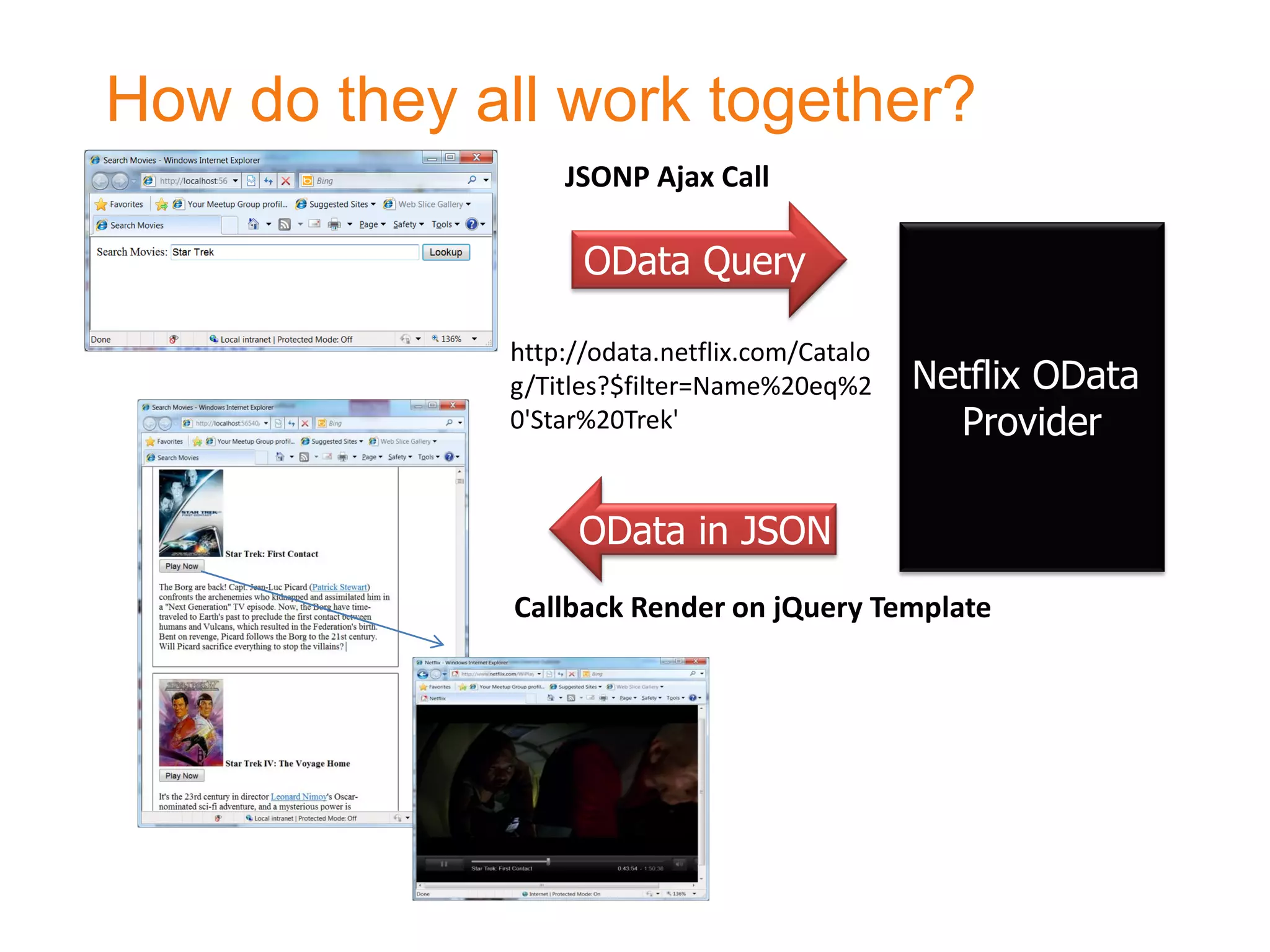
How do they all work together?
                 JSONP Ajax Call

                   OData Query

             http://odata.netflix.com/Catalo
             g/Titles?$filter=Name%20eq%2      Netflix OData
             0'Star%20Trek'                      Provider

                  OData in JSON
              Callback Render on jQuery Template
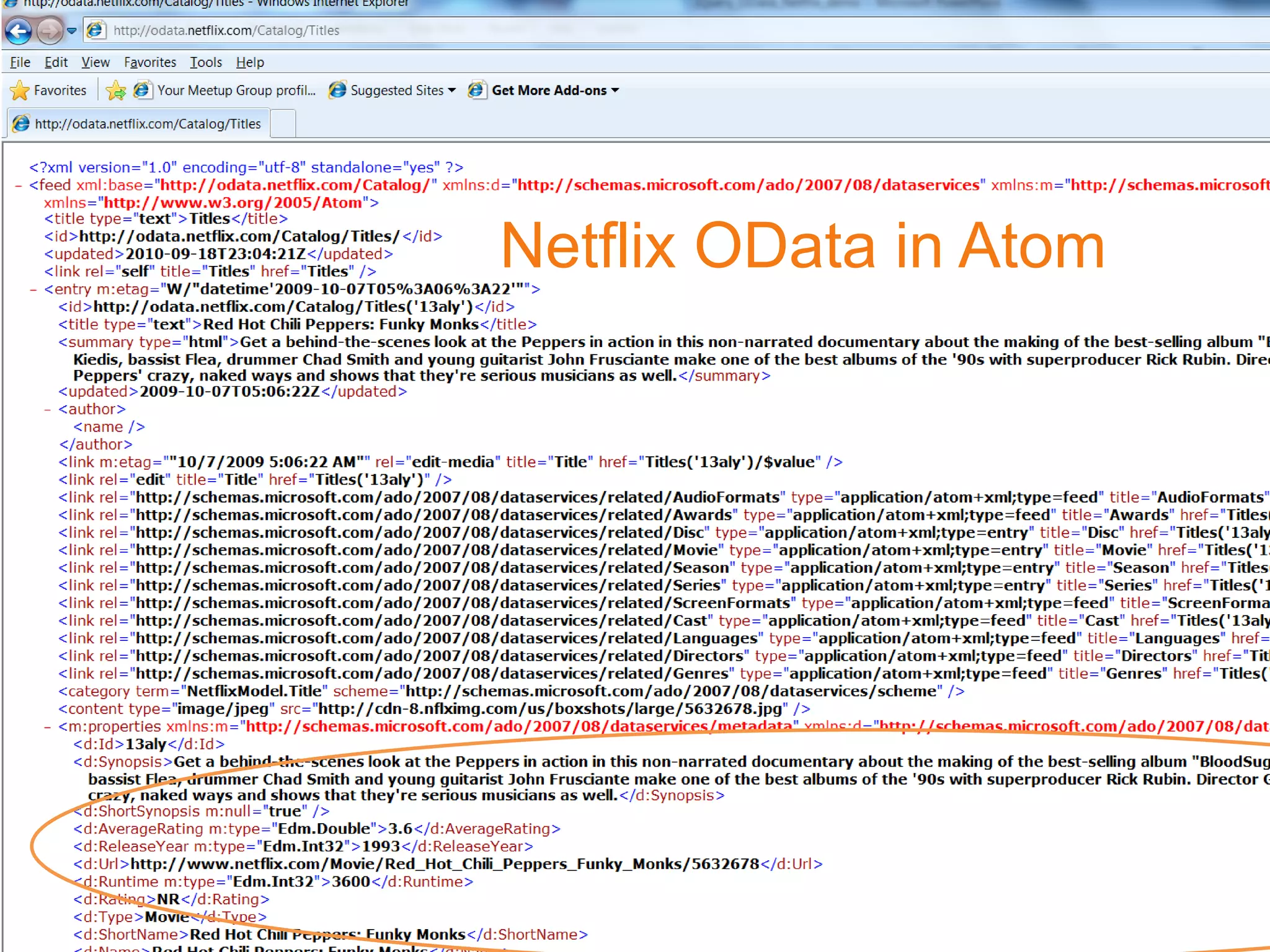
Netflix OData in Atom
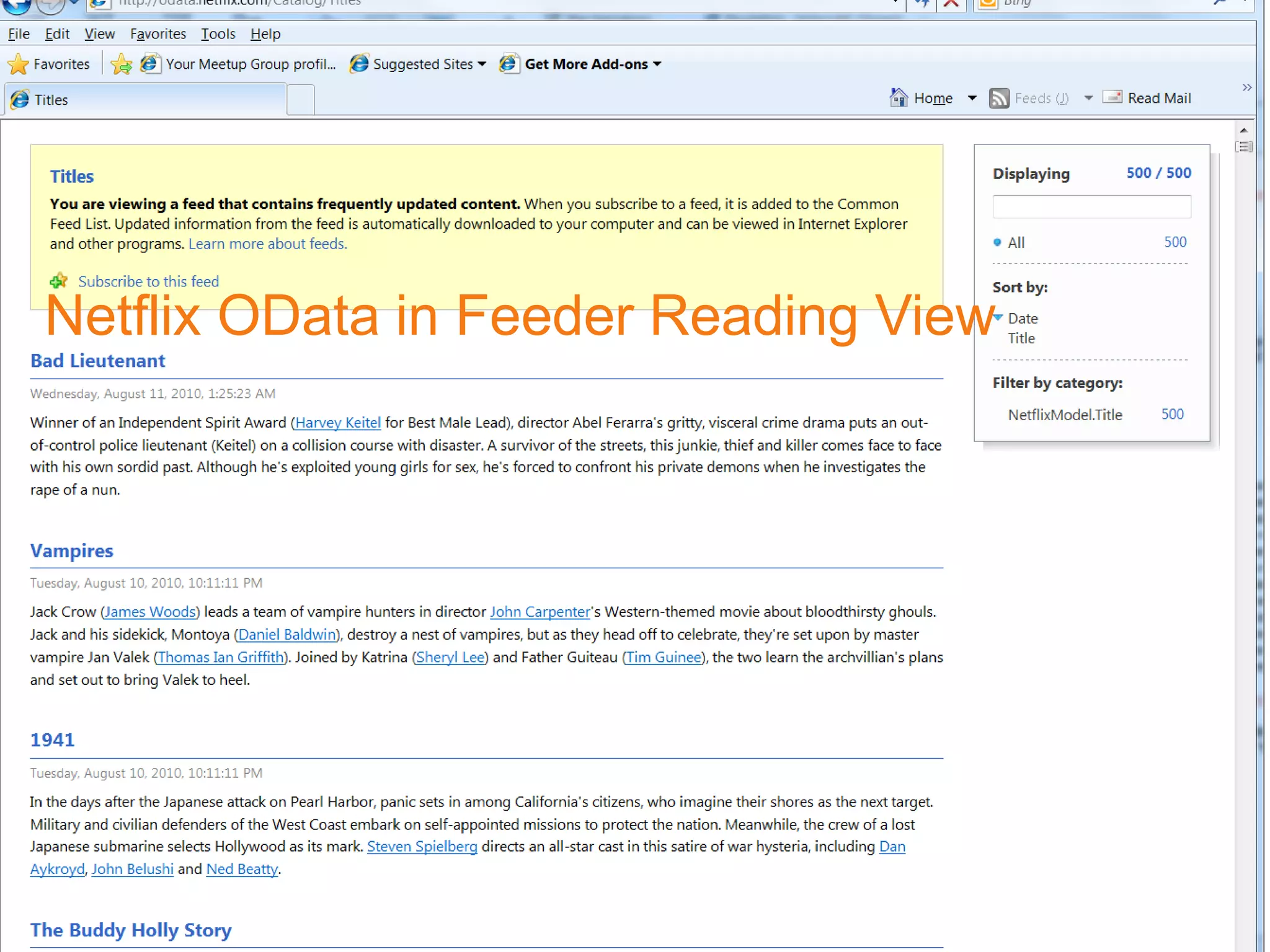
Netflix OData in Feeder Reading View
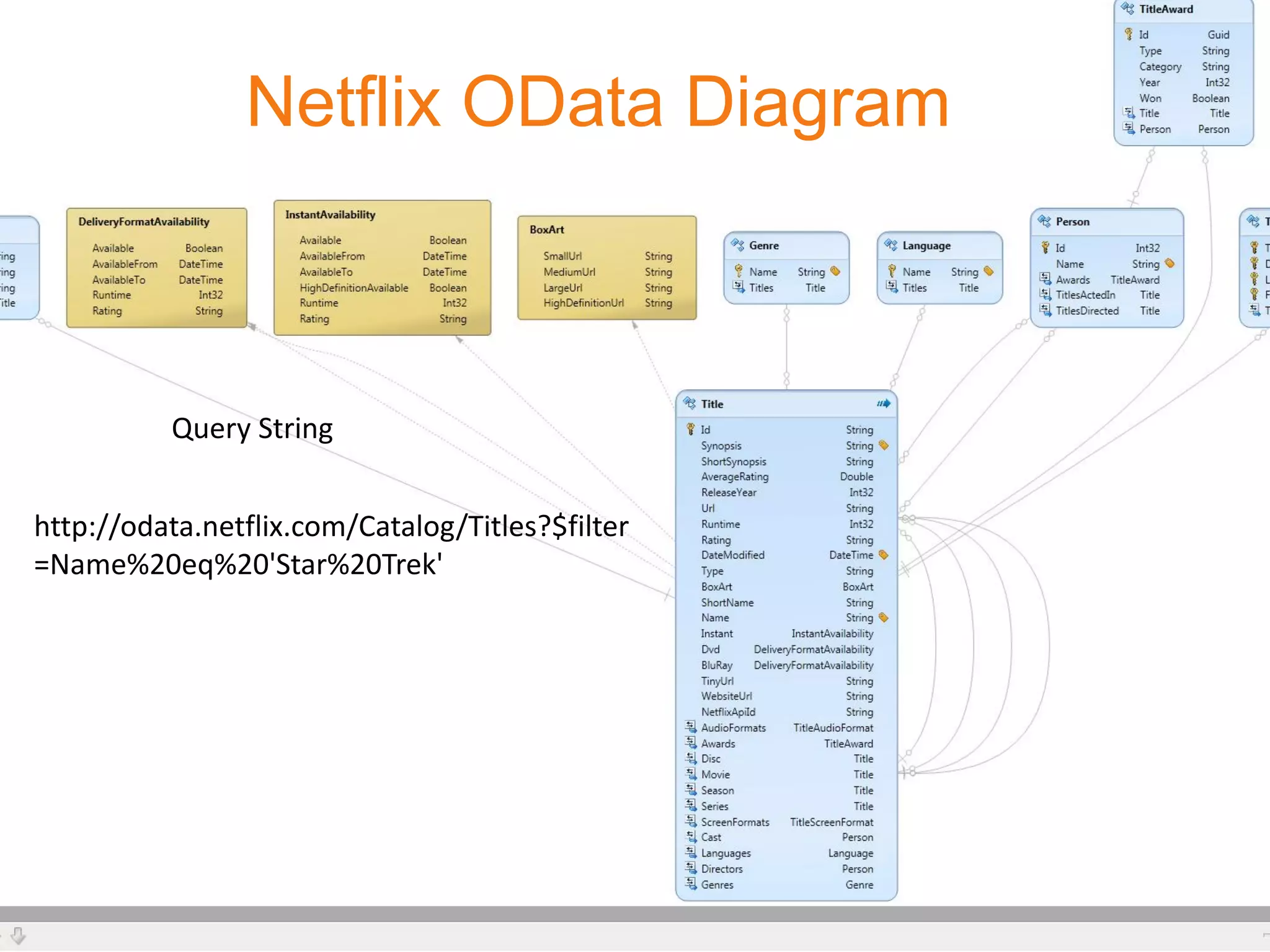
Netflix OData Diagram


          Query String


http://odata.netflix.com/Catalog/Titles?$filter
=Name%20eq%20'Star%20Trek'
Key Steps
•   Start with an empty HTML page
•   Define style or you can put it in a css file
•   Develop start up page
•   Define the template of the response page
•   Compose the JSONP call
•   Implement callback routine and using jQuery template
    – Microsoft has contributed jQuery template jquery.tmpl.js to
      jQuery project and it will be part jQuery in next release.
• Implement movie play using Netflix API
    – You need to apply a Netflix Developer API account and get the
      key.
    – More information http://developer.netflix.com/
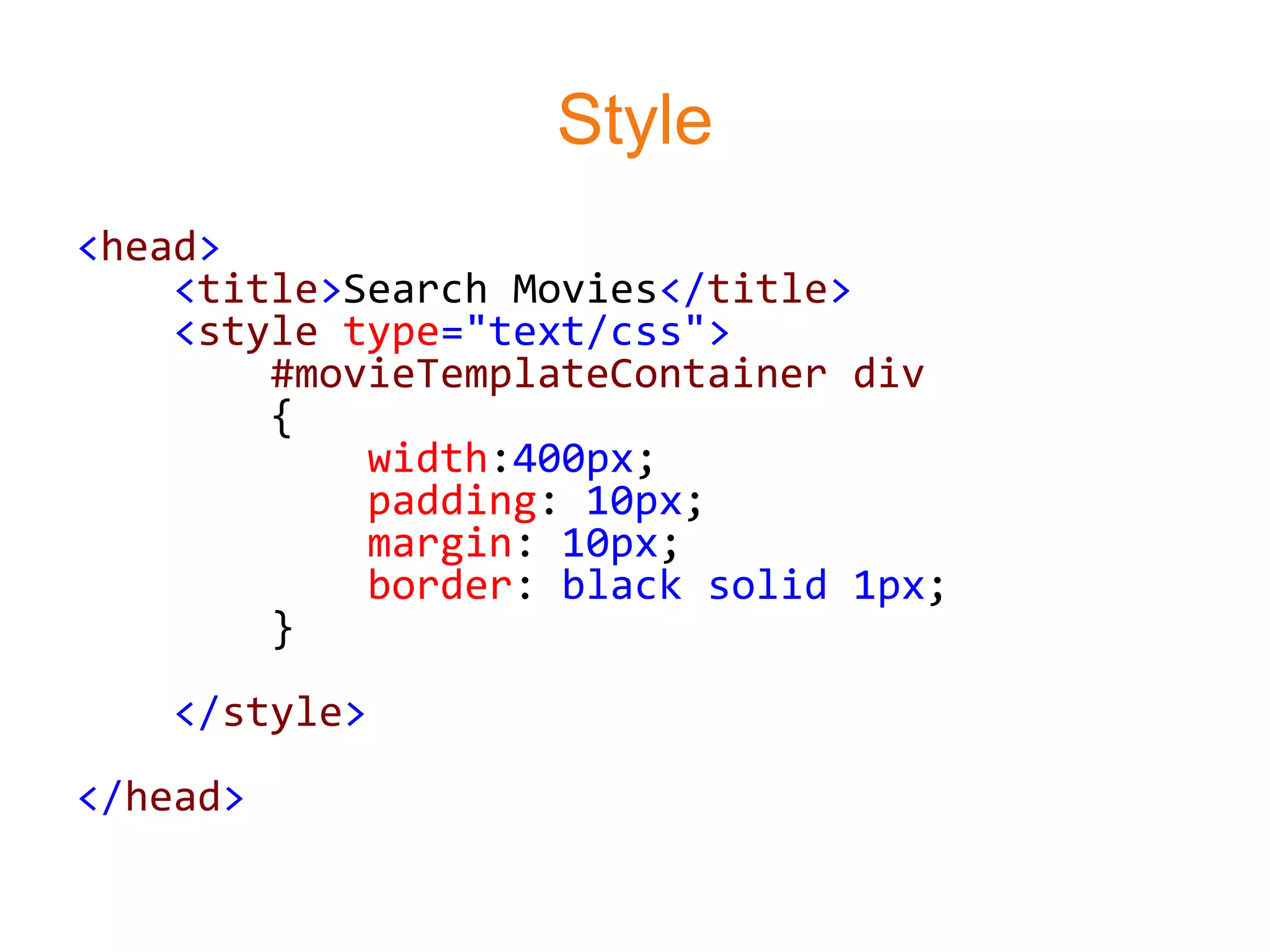
Style
<head>
    <title>Search Movies</title>
    <style type="text/css">
        #movieTemplateContainer div
        {
            width:400px;
            padding: 10px;
            margin: 10px;
            border: black solid 1px;
        }
    </style>
</head>
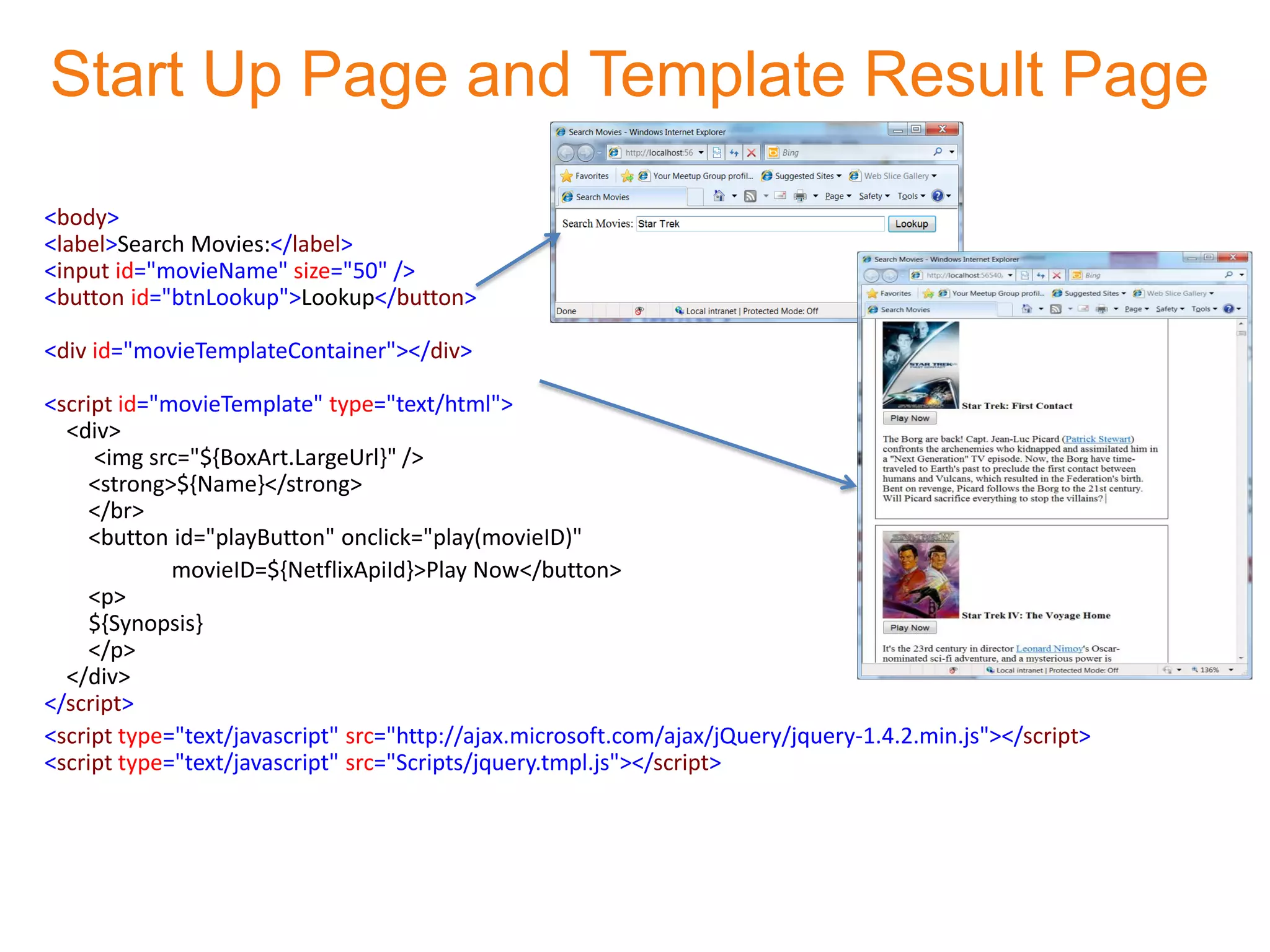
Start Up Page and Template Result Page

<body>
<label>Search Movies:</label>
<input id="movieName" size="50" />
<button id="btnLookup">Lookup</button>

<div id="movieTemplateContainer"></div>

<script id="movieTemplate" type="text/html">
  <div>
     <img src="${BoxArt.LargeUrl}" />
     <strong>${Name}</strong>
     </br>
     <button id="playButton" onclick="play(movieID)"
             movieID=${NetflixApiId}>Play Now</button>
     <p>
     ${Synopsis}
     </p>
  </div>
</script>
<script type="text/javascript" src="http://ajax.microsoft.com/ajax/jQuery/jquery-1.4.2.min.js"></script>
<script type="text/javascript" src="Scripts/jquery.tmpl.js"></script>
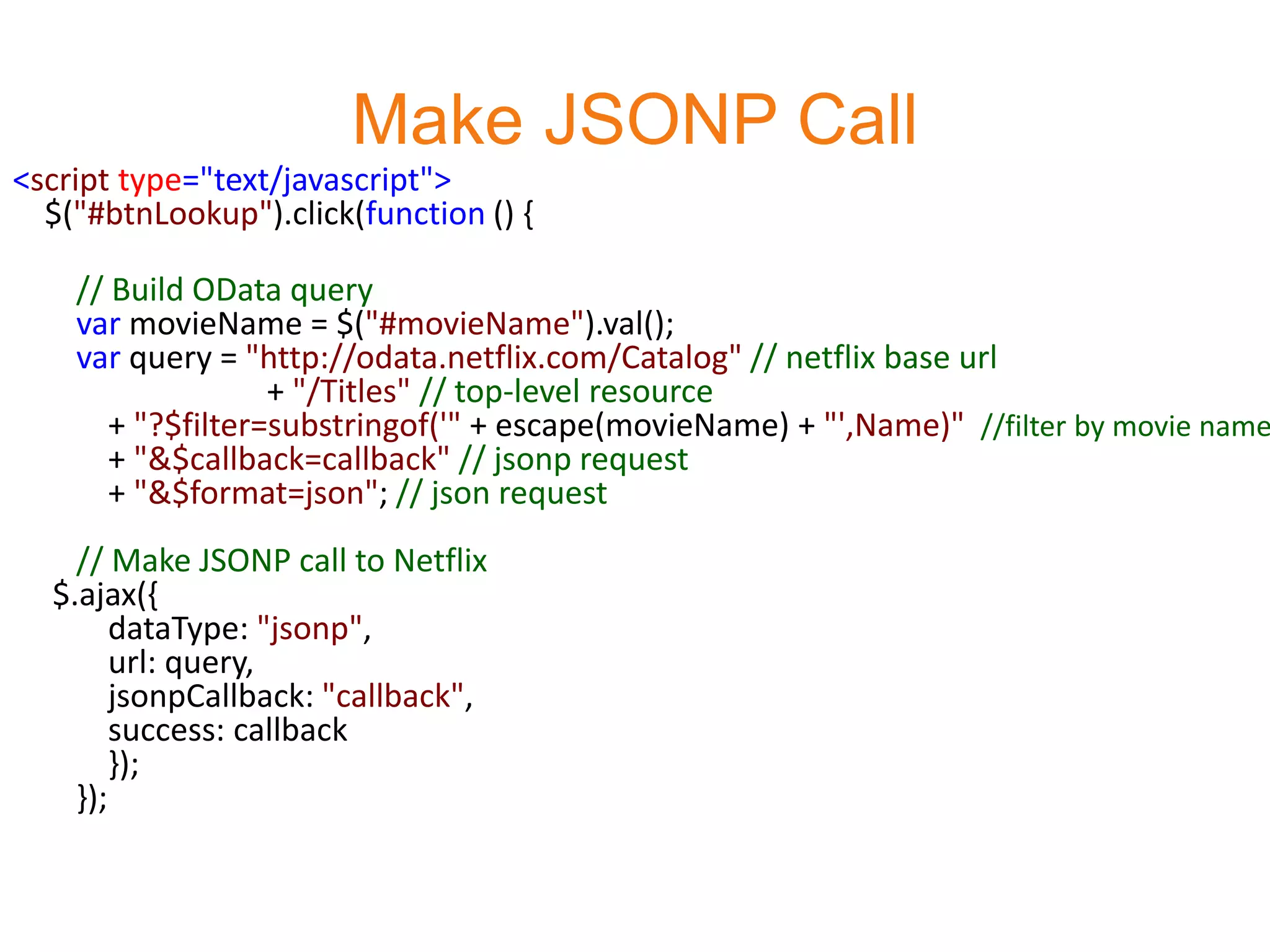
Make JSONP Call
<script type="text/javascript">
  $("#btnLookup").click(function () {

    // Build OData query
    var movieName = $("#movieName").val();
    var query = "http://odata.netflix.com/Catalog" // netflix base url
                   + "/Titles" // top-level resource
       + "?$filter=substringof('" + escape(movieName) + "',Name)" //filter by movie name
       + "&$callback=callback" // jsonp request
       + "&$format=json"; // json request
    // Make JSONP call to Netflix
  $.ajax({
        dataType: "jsonp",
        url: query,
        jsonpCallback: "callback",
        success: callback
        });
    });
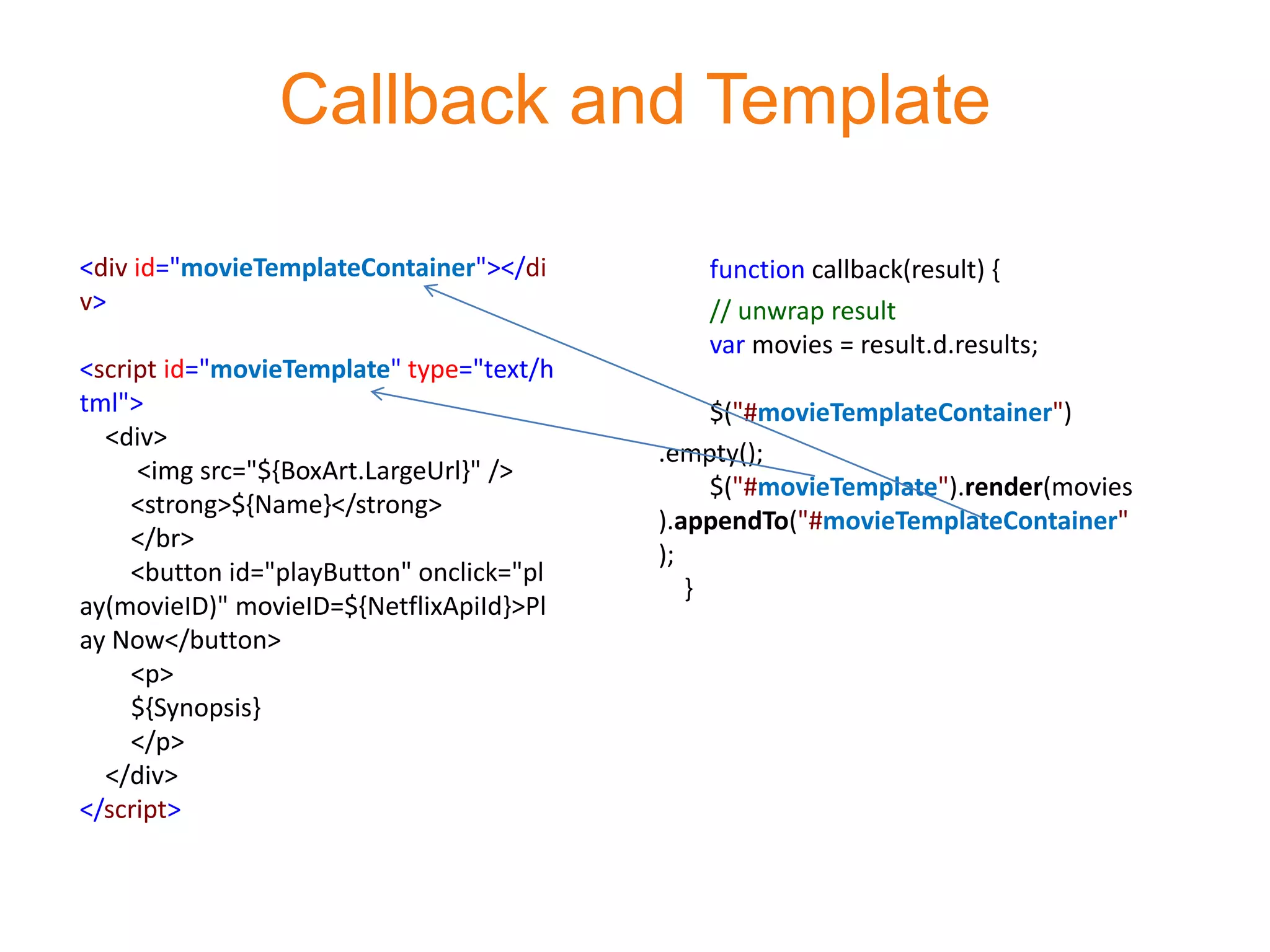
Callback and Template

<div id="movieTemplateContainer"></di          function callback(result) {
v>                                             // unwrap result
                                               var movies = result.d.results;
<script id="movieTemplate" type="text/h
tml">                                           $("#movieTemplateContainer")
  <div>
                                           .empty();
     <img src="${BoxArt.LargeUrl}" />
                                                $("#movieTemplate").render(movies
     <strong>${Name}</strong>
                                           ).appendTo("#movieTemplateContainer"
     </br>
                                           );
     <button id="playButton" onclick="pl
                                              }
ay(movieID)" movieID=${NetflixApiId}>Pl
ay Now</button>
     <p>
     ${Synopsis}
     </p>
  </div>
</script>
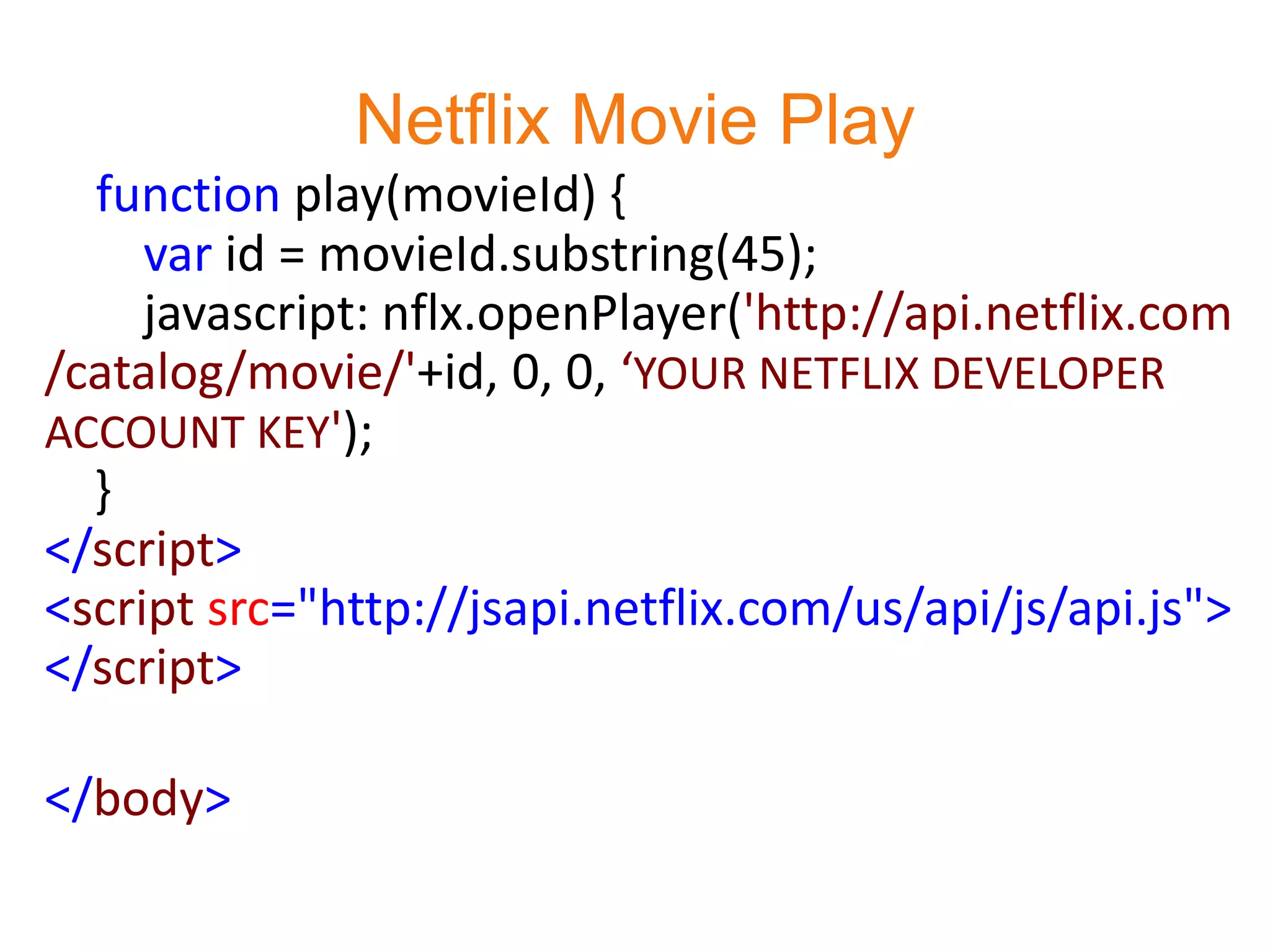
Netflix Movie Play
  function play(movieId) {
     var id = movieId.substring(45);
     javascript: nflx.openPlayer('http://api.netflix.com
/catalog/movie/'+id, 0, 0, ‘YOUR NETFLIX DEVELOPER
ACCOUNT KEY');
  }
</script>
<script src="http://jsapi.netflix.com/us/api/js/api.js">
</script>

</body>
Develop Netflix Movie Search App using jQuery, OData, JSONP and Netflix Technologies

Develop Netflix Movie Search App using jQuery, OData, JSONP and Netflix Technologies

  • 1.
    Develop Netflix MovieSearch Application using jQuery, OData, JSONP and Netflix Technologies Doris Chen Ph.D. Developer Evangelist Microsoft http://blogs.msdn.com/b/dorischen/
  • 2.
    How do theyall work together? JSONP Ajax Call OData Query http://odata.netflix.com/Catalo g/Titles?$filter=Name%20eq%2 Netflix OData 0'Star%20Trek' Provider OData in JSON Callback Render on jQuery Template
  • 3.
  • 4.
    Netflix OData inFeeder Reading View
  • 5.
    Netflix OData Diagram Query String http://odata.netflix.com/Catalog/Titles?$filter =Name%20eq%20'Star%20Trek'
  • 6.
    Key Steps • Start with an empty HTML page • Define style or you can put it in a css file • Develop start up page • Define the template of the response page • Compose the JSONP call • Implement callback routine and using jQuery template – Microsoft has contributed jQuery template jquery.tmpl.js to jQuery project and it will be part jQuery in next release. • Implement movie play using Netflix API – You need to apply a Netflix Developer API account and get the key. – More information http://developer.netflix.com/
  • 7.
    Style <head> <title>Search Movies</title> <style type="text/css"> #movieTemplateContainer div { width:400px; padding: 10px; margin: 10px; border: black solid 1px; } </style> </head>
  • 8.
    Start Up Pageand Template Result Page <body> <label>Search Movies:</label> <input id="movieName" size="50" /> <button id="btnLookup">Lookup</button> <div id="movieTemplateContainer"></div> <script id="movieTemplate" type="text/html"> <div> <img src="${BoxArt.LargeUrl}" /> <strong>${Name}</strong> </br> <button id="playButton" onclick="play(movieID)" movieID=${NetflixApiId}>Play Now</button> <p> ${Synopsis} </p> </div> </script> <script type="text/javascript" src="http://ajax.microsoft.com/ajax/jQuery/jquery-1.4.2.min.js"></script> <script type="text/javascript" src="Scripts/jquery.tmpl.js"></script>
  • 9.
    Make JSONP Call <scripttype="text/javascript"> $("#btnLookup").click(function () { // Build OData query var movieName = $("#movieName").val(); var query = "http://odata.netflix.com/Catalog" // netflix base url + "/Titles" // top-level resource + "?$filter=substringof('" + escape(movieName) + "',Name)" //filter by movie name + "&$callback=callback" // jsonp request + "&$format=json"; // json request // Make JSONP call to Netflix $.ajax({ dataType: "jsonp", url: query, jsonpCallback: "callback", success: callback }); });
  • 10.
    Callback and Template <divid="movieTemplateContainer"></di function callback(result) { v> // unwrap result var movies = result.d.results; <script id="movieTemplate" type="text/h tml"> $("#movieTemplateContainer") <div> .empty(); <img src="${BoxArt.LargeUrl}" /> $("#movieTemplate").render(movies <strong>${Name}</strong> ).appendTo("#movieTemplateContainer" </br> ); <button id="playButton" onclick="pl } ay(movieID)" movieID=${NetflixApiId}>Pl ay Now</button> <p> ${Synopsis} </p> </div> </script>
  • 11.
    Netflix Movie Play function play(movieId) { var id = movieId.substring(45); javascript: nflx.openPlayer('http://api.netflix.com /catalog/movie/'+id, 0, 0, ‘YOUR NETFLIX DEVELOPER ACCOUNT KEY'); } </script> <script src="http://jsapi.netflix.com/us/api/js/api.js"> </script> </body>