Secret Question and Answer

1. Click on the My Profile tab, and click on
   the link:
   Create/Change My Secret Question and
   Answer.                                       Student’s need to change their temporary
                                                  password to ensure confidentiality.
You should choose a question only you will
know the answer to and that you will easily      Remember to log out correctly to ensure
remember.                                         account security

Some suggestions:-

   My dad’s favourite TV show
   The rugby team my dad supports
   My place of work                            For further assistance:
   The place where my family goes for
    holidays
   My sister’s middle name                     Students may seek assistance from Campus
                                                Support Services, Library Staff or their
NOTE:                                           teacher.

1. Don’t use the same word as your
   password. Your secret question and the
   answer must be something different.
                                                                                             DET Portal Login –
                                                                                              Students Guide
2. Make sure you know how to spell the
   answer, and make sure that you type it in
   the same way each time.                                                                   https://portal.det.nsw.edu.au
   For example, if you choose the question
   “:My favourite sport” and you type your
   answer as “rugby” with no capitals, you
   cannot later on type it as “Rugby” with a
   capital “R”, as the system won’t recognise
   it as being the same word.

                                                          Version 1 – January 2009
                                                          Institute Student Services
                                                             Newcastle Campus
IMPORTANT                                                                                           Suggestions:-
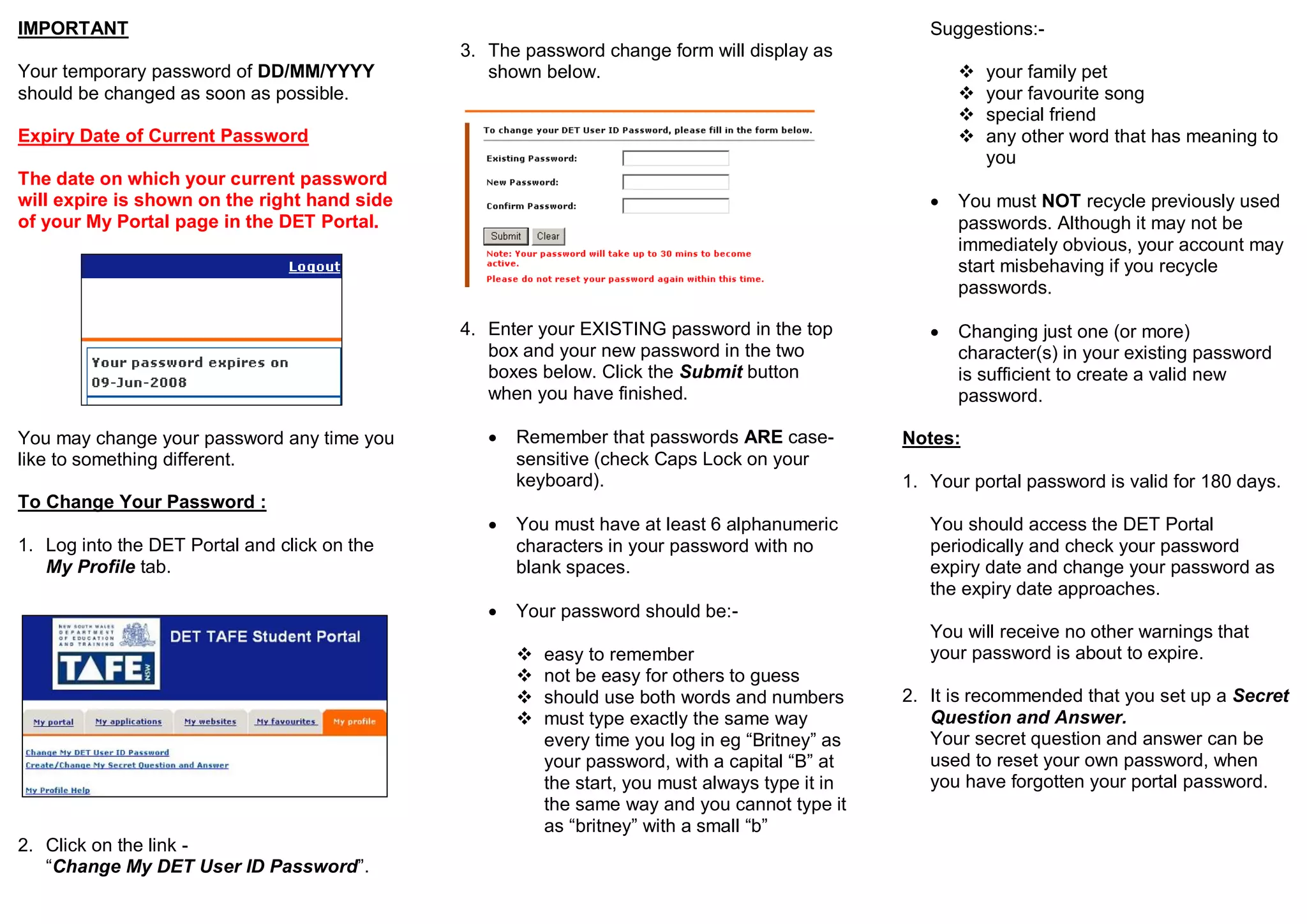
                                              3. The password change form will display as
Your temporary password of DD/MM/YYYY            shown below.                                              your family pet
should be changed as soon as possible.                                                                     your favourite song
                                                                                                           special friend
Expiry Date of Current Password                                                                            any other word that has meaning to
                                                                                                            you
The date on which your current password
will expire is shown on the right hand side                                                            You must NOT recycle previously used
of your My Portal page in the DET Portal.                                                               passwords. Although it may not be
                                                                                                        immediately obvious, your account may
                                                                                                        start misbehaving if you recycle
                                                                                                        passwords.

                                              4. Enter your EXISTING password in the top               Changing just one (or more)
                                                 box and your new password in the two                   character(s) in your existing password
                                                 boxes below. Click the Submit button                   is sufficient to create a valid new
                                                 when you have finished.                                password.

You may change your password any time you           Remember that passwords ARE case-           Notes:
like to something different.                         sensitive (check Caps Lock on your
                                                     keyboard).                                  1. Your portal password is valid for 180 days.
To Change Your Password :
                                                    You must have at least 6 alphanumeric          You should access the DET Portal
1. Log into the DET Portal and click on the          characters in your password with no            periodically and check your password
   My Profile tab.                                   blank spaces.                                  expiry date and change your password as
                                                                                                    the expiry date approaches.
                                                    Your password should be:-
                                                                                                    You will receive no other warnings that
                                                        easy to remember                           your password is about to expire.
                                                        not be easy for others to guess
                                                        should use both words and numbers       2. It is recommended that you set up a Secret
                                                        must type exactly the same way             Question and Answer.
                                                         every time you log in eg “Britney” as      Your secret question and answer can be
                                                         your password, with a capital “B” at       used to reset your own password, when
                                                         the start, you must always type it in      you have forgotten your portal password.
                                                         the same way and you cannot type it
                                                         as “britney” with a small “b”
2. Click on the link -
   “Change My DET User ID Password”.

Det portal login_student_guide

  • 1.
    Secret Question andAnswer 1. Click on the My Profile tab, and click on the link: Create/Change My Secret Question and Answer.  Student’s need to change their temporary password to ensure confidentiality. You should choose a question only you will know the answer to and that you will easily  Remember to log out correctly to ensure remember. account security Some suggestions:-  My dad’s favourite TV show  The rugby team my dad supports  My place of work For further assistance:  The place where my family goes for holidays  My sister’s middle name Students may seek assistance from Campus Support Services, Library Staff or their NOTE: teacher. 1. Don’t use the same word as your password. Your secret question and the answer must be something different. DET Portal Login – Students Guide 2. Make sure you know how to spell the answer, and make sure that you type it in the same way each time. https://portal.det.nsw.edu.au For example, if you choose the question “:My favourite sport” and you type your answer as “rugby” with no capitals, you cannot later on type it as “Rugby” with a capital “R”, as the system won’t recognise it as being the same word. Version 1 – January 2009 Institute Student Services Newcastle Campus
  • 2.
    IMPORTANT Suggestions:- 3. The password change form will display as Your temporary password of DD/MM/YYYY shown below.  your family pet should be changed as soon as possible.  your favourite song  special friend Expiry Date of Current Password  any other word that has meaning to you The date on which your current password will expire is shown on the right hand side  You must NOT recycle previously used of your My Portal page in the DET Portal. passwords. Although it may not be immediately obvious, your account may start misbehaving if you recycle passwords. 4. Enter your EXISTING password in the top  Changing just one (or more) box and your new password in the two character(s) in your existing password boxes below. Click the Submit button is sufficient to create a valid new when you have finished. password. You may change your password any time you  Remember that passwords ARE case- Notes: like to something different. sensitive (check Caps Lock on your keyboard). 1. Your portal password is valid for 180 days. To Change Your Password :  You must have at least 6 alphanumeric You should access the DET Portal 1. Log into the DET Portal and click on the characters in your password with no periodically and check your password My Profile tab. blank spaces. expiry date and change your password as the expiry date approaches.  Your password should be:- You will receive no other warnings that  easy to remember your password is about to expire.  not be easy for others to guess  should use both words and numbers 2. It is recommended that you set up a Secret  must type exactly the same way Question and Answer. every time you log in eg “Britney” as Your secret question and answer can be your password, with a capital “B” at used to reset your own password, when the start, you must always type it in you have forgotten your portal password. the same way and you cannot type it as “britney” with a small “b” 2. Click on the link - “Change My DET User ID Password”.