Linked Symbols
February 25, 2015
AGENDA
Agenda
InduSoft (Fabio Terezinho)
– Internal Architecture
– Linked Symbols
• Goals and Benefits
• Design
• Demos
– Runtime Editions
• Overview
• Graphical support
– Thin Clients
• Overview
• Graphical support
– InduSoft Online Store
– Q & A
INTERNAL ARCHITECTURE
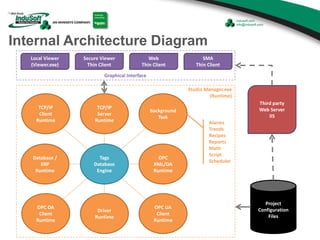
Internal Architecture Diagram
OPC
XML/DA
Runtime
Database /
ERP
Runtime
Driver
Runtime
OPC DA
Client
Runtime
OPC UA
Client
Runtime
TCP/IP
Client
Runtime
Background
Task
TCP/IP
Server
Runtime
Tags
Database
Engine
Alarms
Trends
Recipes
Reports
Math
Script
Scheduler
Studio Manager.exe
(Runtime)
Local Viewer
(Viewer.exe)
Secure Viewer
Thin Client
Web
Thin Client
SMA
Thin Client
Graphical Interface
Third party
Web Server
IIS
Project
Configuration
Files
LINKED SYMBOLS
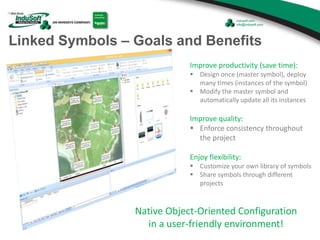
Linked Symbols – Goals and Benefits
Improve productivity (save time):
 Design once (master symbol), deploy
many times (instances of the symbol)
 Modify the master symbol and
automatically update all its instances
Improve quality:
 Enforce consistency throughout
the project
Enjoy flexibility:
 Customize your own library of symbols
 Share symbols through different
projects
Native Object-Oriented Configuration
in a user-friendly environment!
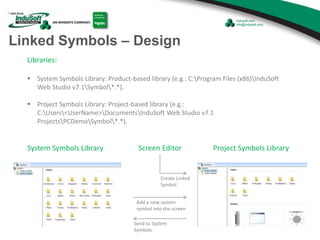
Linked Symbols – Design
Libraries:
 System Symbols Library: Product-based library (e.g.: C:Program Files (x86)InduSoft
Web Studio v7.1Symbol*.*).
 Project Symbols Library: Project-based library (e.g.:
C:Users<UserName>DocumentsInduSoft Web Studio v7.1
ProjectsPCDemoSymbol*.*).
System Symbols Library Project Symbols Library
Create Linked
Symbol
Send to System
Symbols
Screen Editor
Add a new system
symbol into the screen
Linked Symbols – Design
Custom Properties Definition:
 Properties from the Linked Symbols, which can be customized individually for each instance of the master Linked
symbol.
Alphanumeric alias for the custom
property
(e.g.: ValveState).
It follows the same rules for tag
names:
- Up to 1024 chars
- Letters (A..Z), numbers (0..9),
and underscore (_)
- First char cannot be a number
- Not case sensitive.
Optional default value for the custom
property. Possible options:
- Number (e.g.: 10)
- String Text (e.g.: “On”)
- Tag Name (e.g.: Level)
- Expression (e.g.: (Level+10))
#Custom_Property_Name:[Custom_Property_Default_Value]
Custom Properties Syntax:
Hash sign (a.k.a. number sign) Colon character
Custom Properties Behavior:
 During the runtime, everything between the hash sign (#) and the colon character (:), including these two characters,
are ignored, and the runtime executes only what is written after the colon character.
Linked Symbols – Design
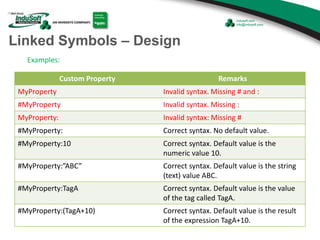
Examples:
Custom Property Remarks
MyProperty Invalid syntax. Missing # and :
#MyProperty Invalid syntax. Missing :
MyProperty: Invalid syntax: Missing #
#MyProperty: Correct syntax. No default value.
#MyProperty:10 Correct syntax. Default value is the
numeric value 10.
#MyProperty:”ABC” Correct syntax. Default value is the string
(text) value ABC.
#MyProperty:TagA Correct syntax. Default value is the value
of the tag called TagA.
#MyProperty:(TagA+10) Correct syntax. Default value is the result
of the expression TagA+10.
Linked Symbols – Design
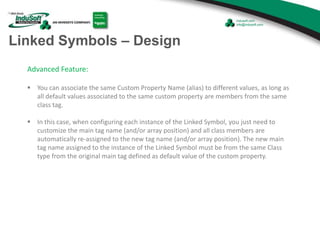
Advanced Feature:
 You can associate the same Custom Property Name (alias) to different values, as long as
all default values associated to the same custom property are members from the same
class tag.
 In this case, when configuring each instance of the Linked Symbol, you just need to
customize the main tag name (and/or array position) and all class members are
automatically re-assigned to the new tag name (and/or array position). The new main
tag name assigned to the instance of the Linked Symbol must be from the same Class
type from the original main tag defined as default value of the custom property.
Linked Symbols – Design
Examples:
Custom Property Remarks
#MyProperty:MainTagA.Member1
#MyProperty:MainTagB.Member1
#MyProperty:MainTagC.Member1
Invalid syntax. You must not associate the same
custom property name (MyProperty) to
different main tag names (MainTagA, MainTagB,
MainTagC).
#MyProperty:MainTagA.Member1
#MyProperty:MainTagA.Member2
#MyProperty:MainTagA.Member3
Correct syntax. The same custom property
name (MyProperty) was associated to different
members (Member1, Member2, Member3)
from the same Main Tag Name (MainTagA).
#MyProperty:MainTagA[1].Member1
#MyProperty:MainTagA[2].Member2
#MyProperty:MainTagA[3].Member3
Invalid syntax. You must not associate the same
custom property name (MyProperty) to
different Array Positions ([1], [2], [3]).
#MyProperty:MainTagA[1].Member1
#MyProperty:MainTagA[1].Member2
#MyProperty:MainTagA[1].Member3
Correct syntax. The same custom property
name (MyProperty) was associated to different
members (Member1, Member2, Member3)
from the same Main Tag Name (MainTagA) and
same Array Position ([1]).
RUNTIME EDITIONS
Target Runtime Editions - Overview
Product
Execution
Mode
Platform
Indusoft Web Studio
Development
and/or Runtime
Windows for desktop/server stations (e.g.: Windows XP, Vista, 7, 8,
2003 Server, 2008 Server R2, 2012 Server)
EmbeddedView Runtime only Windows Embedded (e.g.: XP Embedded, Embedded Standard)
CEView Runtime only
Windows Embedded CE and Windows Mobile (e.g.: Windows CE
v5.0 or newer, Windows Mobile 6.5)
InduSoft Web Studio Embedded View CEView
Develop Once … Deploy Anywhere!
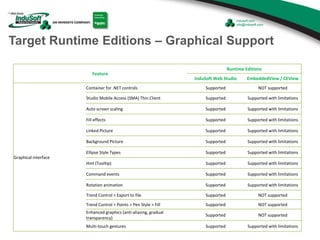
Target Runtime Editions – Graphical Support
Feature
Runtime Editions
InduSoft Web Studio EmbeddedView / CEView
Graphical interface
Container for .NET controls Supported NOT supported
Studio Mobile Access (SMA) Thin Client Supported Supported with limitations
Auto screen scaling Supported Supported with limitations
Fill effects Supported Supported with limitations
Linked Picture Supported Supported with limitations
Background Picture Supported Supported with limitations
Ellipse Style Types Supported Supported with limitations
Hint (Tooltip) Supported Supported with limitations
Command events Supported Supported with limitations
Rotation animation Supported Supported with limitations
Trend Control > Export to file Supported NOT supported
Trend Control > Points > Pen Style > Fill Supported NOT supported
Enhanced graphics (anti-aliasing, gradual
transparency)
Supported NOT supported
Multi-touch gestures Supported Supported with limitations
THIN CLIENTS
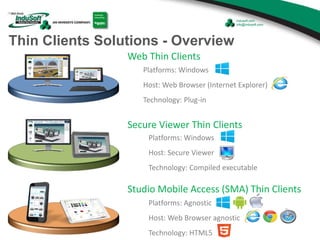
Thin Clients Solutions - Overview
Platforms: Windows
Host: Web Browser (Internet Explorer)
Technology: Plug-in
Web Thin Clients
Platforms: Windows
Host: Secure Viewer
Technology: Compiled executable
Secure Viewer Thin Clients
Platforms: Agnostic
Host: Web Browser agnostic
Technology: HTML5
Studio Mobile Access (SMA) Thin Clients
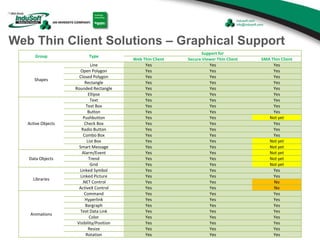
Web Thin Client Solutions – Graphical Support
Group Type
Support for
Web Thin Client Secure Viewer Thin Client SMA Thin Client
Shapes
Line Yes Yes Yes
Open Polygon Yes Yes Yes
Closed Polygon Yes Yes Yes
Rectangle Yes Yes Yes
Rounded Rectangle Yes Yes Yes
Ellipse Yes Yes Yes
Active Objects
Text Yes Yes Yes
Text Box Yes Yes Yes
Button Yes Yes Yes
Pushbutton Yes Yes Not yet
Check Box Yes Yes Yes
Radio Button Yes Yes Yes
Combo Box Yes Yes Yes
List Box Yes Yes Not yet
Smart Message Yes Yes Not yet
Data Objects
Alarm/Event Yes Yes Not yet
Trend Yes Yes Not yet
Grid Yes Yes Not yet
Libraries
Linked Symbol Yes Yes Yes
Linked Picture Yes Yes Yes
.NET Control Yes Yes No
ActiveX Control Yes Yes No
Animations
Command Yes Yes Yes
Hyperlink Yes Yes Yes
Bargraph Yes Yes Yes
Text Data Link Yes Yes Yes
Color Yes Yes Yes
Visibility/Position Yes Yes Yes
Resize Yes Yes Yes
Rotation Yes Yes Yes
INDUSOFT ONLINE STORE
InduSoft Online Store – Free Add-Ons
http://www.indusoft.com/Store/Free-Add-Ons
www.Indusoft.com > Store > Free Add-Ons
Q & A
HOW TO CONTACT
INDUSOFT
Licensing
US and Canada Toll-Free: 855-274-8381
Direct dial from anywhere: 512-910-8044
Support
US and Canada Toll-Free: 855-269-4489
Direct dial from anywhere: 512-879-4107
Additional New InduSoft Numbers
Email
(US) info@indusoft.com
(Brazil) info@indusoft.com.br
(Germany) info@indusoft.com.de
Support support@indusoft.com
Web site
(English) www.indusoft.com
(Portuguese) www.indusoft.com.br
(German) www.indusoft.com.de
Phone (512) 349-0334 (US)
+55-11-3293-9139 (Brazil)
+49 (0) 6227-732510 (Germany)
Toll-Free 877-INDUSOFT (877-463-8763)
Fax (512) 349-0375
Germany
USA
Brazil
Contact InduSoft Today
THANK YOU!

Designing Optimized Symbols for InduSoft Web Studio Projects

  • 1.
  • 2.
  • 3.
    Agenda InduSoft (Fabio Terezinho) –Internal Architecture – Linked Symbols • Goals and Benefits • Design • Demos – Runtime Editions • Overview • Graphical support – Thin Clients • Overview • Graphical support – InduSoft Online Store – Q & A
  • 4.
  • 5.
    Internal Architecture Diagram OPC XML/DA Runtime Database/ ERP Runtime Driver Runtime OPC DA Client Runtime OPC UA Client Runtime TCP/IP Client Runtime Background Task TCP/IP Server Runtime Tags Database Engine Alarms Trends Recipes Reports Math Script Scheduler Studio Manager.exe (Runtime) Local Viewer (Viewer.exe) Secure Viewer Thin Client Web Thin Client SMA Thin Client Graphical Interface Third party Web Server IIS Project Configuration Files
  • 6.
  • 7.
    Linked Symbols –Goals and Benefits Improve productivity (save time):  Design once (master symbol), deploy many times (instances of the symbol)  Modify the master symbol and automatically update all its instances Improve quality:  Enforce consistency throughout the project Enjoy flexibility:  Customize your own library of symbols  Share symbols through different projects Native Object-Oriented Configuration in a user-friendly environment!
  • 8.
    Linked Symbols –Design Libraries:  System Symbols Library: Product-based library (e.g.: C:Program Files (x86)InduSoft Web Studio v7.1Symbol*.*).  Project Symbols Library: Project-based library (e.g.: C:Users<UserName>DocumentsInduSoft Web Studio v7.1 ProjectsPCDemoSymbol*.*). System Symbols Library Project Symbols Library Create Linked Symbol Send to System Symbols Screen Editor Add a new system symbol into the screen
  • 9.
    Linked Symbols –Design Custom Properties Definition:  Properties from the Linked Symbols, which can be customized individually for each instance of the master Linked symbol. Alphanumeric alias for the custom property (e.g.: ValveState). It follows the same rules for tag names: - Up to 1024 chars - Letters (A..Z), numbers (0..9), and underscore (_) - First char cannot be a number - Not case sensitive. Optional default value for the custom property. Possible options: - Number (e.g.: 10) - String Text (e.g.: “On”) - Tag Name (e.g.: Level) - Expression (e.g.: (Level+10)) #Custom_Property_Name:[Custom_Property_Default_Value] Custom Properties Syntax: Hash sign (a.k.a. number sign) Colon character Custom Properties Behavior:  During the runtime, everything between the hash sign (#) and the colon character (:), including these two characters, are ignored, and the runtime executes only what is written after the colon character.
  • 10.
    Linked Symbols –Design Examples: Custom Property Remarks MyProperty Invalid syntax. Missing # and : #MyProperty Invalid syntax. Missing : MyProperty: Invalid syntax: Missing # #MyProperty: Correct syntax. No default value. #MyProperty:10 Correct syntax. Default value is the numeric value 10. #MyProperty:”ABC” Correct syntax. Default value is the string (text) value ABC. #MyProperty:TagA Correct syntax. Default value is the value of the tag called TagA. #MyProperty:(TagA+10) Correct syntax. Default value is the result of the expression TagA+10.
  • 11.
    Linked Symbols –Design Advanced Feature:  You can associate the same Custom Property Name (alias) to different values, as long as all default values associated to the same custom property are members from the same class tag.  In this case, when configuring each instance of the Linked Symbol, you just need to customize the main tag name (and/or array position) and all class members are automatically re-assigned to the new tag name (and/or array position). The new main tag name assigned to the instance of the Linked Symbol must be from the same Class type from the original main tag defined as default value of the custom property.
  • 12.
    Linked Symbols –Design Examples: Custom Property Remarks #MyProperty:MainTagA.Member1 #MyProperty:MainTagB.Member1 #MyProperty:MainTagC.Member1 Invalid syntax. You must not associate the same custom property name (MyProperty) to different main tag names (MainTagA, MainTagB, MainTagC). #MyProperty:MainTagA.Member1 #MyProperty:MainTagA.Member2 #MyProperty:MainTagA.Member3 Correct syntax. The same custom property name (MyProperty) was associated to different members (Member1, Member2, Member3) from the same Main Tag Name (MainTagA). #MyProperty:MainTagA[1].Member1 #MyProperty:MainTagA[2].Member2 #MyProperty:MainTagA[3].Member3 Invalid syntax. You must not associate the same custom property name (MyProperty) to different Array Positions ([1], [2], [3]). #MyProperty:MainTagA[1].Member1 #MyProperty:MainTagA[1].Member2 #MyProperty:MainTagA[1].Member3 Correct syntax. The same custom property name (MyProperty) was associated to different members (Member1, Member2, Member3) from the same Main Tag Name (MainTagA) and same Array Position ([1]).
  • 13.
  • 14.
    Target Runtime Editions- Overview Product Execution Mode Platform Indusoft Web Studio Development and/or Runtime Windows for desktop/server stations (e.g.: Windows XP, Vista, 7, 8, 2003 Server, 2008 Server R2, 2012 Server) EmbeddedView Runtime only Windows Embedded (e.g.: XP Embedded, Embedded Standard) CEView Runtime only Windows Embedded CE and Windows Mobile (e.g.: Windows CE v5.0 or newer, Windows Mobile 6.5) InduSoft Web Studio Embedded View CEView Develop Once … Deploy Anywhere!
  • 15.
    Target Runtime Editions– Graphical Support Feature Runtime Editions InduSoft Web Studio EmbeddedView / CEView Graphical interface Container for .NET controls Supported NOT supported Studio Mobile Access (SMA) Thin Client Supported Supported with limitations Auto screen scaling Supported Supported with limitations Fill effects Supported Supported with limitations Linked Picture Supported Supported with limitations Background Picture Supported Supported with limitations Ellipse Style Types Supported Supported with limitations Hint (Tooltip) Supported Supported with limitations Command events Supported Supported with limitations Rotation animation Supported Supported with limitations Trend Control > Export to file Supported NOT supported Trend Control > Points > Pen Style > Fill Supported NOT supported Enhanced graphics (anti-aliasing, gradual transparency) Supported NOT supported Multi-touch gestures Supported Supported with limitations
  • 16.
  • 17.
    Thin Clients Solutions- Overview Platforms: Windows Host: Web Browser (Internet Explorer) Technology: Plug-in Web Thin Clients Platforms: Windows Host: Secure Viewer Technology: Compiled executable Secure Viewer Thin Clients Platforms: Agnostic Host: Web Browser agnostic Technology: HTML5 Studio Mobile Access (SMA) Thin Clients
  • 18.
    Web Thin ClientSolutions – Graphical Support Group Type Support for Web Thin Client Secure Viewer Thin Client SMA Thin Client Shapes Line Yes Yes Yes Open Polygon Yes Yes Yes Closed Polygon Yes Yes Yes Rectangle Yes Yes Yes Rounded Rectangle Yes Yes Yes Ellipse Yes Yes Yes Active Objects Text Yes Yes Yes Text Box Yes Yes Yes Button Yes Yes Yes Pushbutton Yes Yes Not yet Check Box Yes Yes Yes Radio Button Yes Yes Yes Combo Box Yes Yes Yes List Box Yes Yes Not yet Smart Message Yes Yes Not yet Data Objects Alarm/Event Yes Yes Not yet Trend Yes Yes Not yet Grid Yes Yes Not yet Libraries Linked Symbol Yes Yes Yes Linked Picture Yes Yes Yes .NET Control Yes Yes No ActiveX Control Yes Yes No Animations Command Yes Yes Yes Hyperlink Yes Yes Yes Bargraph Yes Yes Yes Text Data Link Yes Yes Yes Color Yes Yes Yes Visibility/Position Yes Yes Yes Resize Yes Yes Yes Rotation Yes Yes Yes
  • 19.
  • 20.
    InduSoft Online Store– Free Add-Ons http://www.indusoft.com/Store/Free-Add-Ons www.Indusoft.com > Store > Free Add-Ons
  • 21.
  • 22.
  • 23.
    Licensing US and CanadaToll-Free: 855-274-8381 Direct dial from anywhere: 512-910-8044 Support US and Canada Toll-Free: 855-269-4489 Direct dial from anywhere: 512-879-4107 Additional New InduSoft Numbers
  • 24.
    Email (US) info@indusoft.com (Brazil) info@indusoft.com.br (Germany)info@indusoft.com.de Support support@indusoft.com Web site (English) www.indusoft.com (Portuguese) www.indusoft.com.br (German) www.indusoft.com.de Phone (512) 349-0334 (US) +55-11-3293-9139 (Brazil) +49 (0) 6227-732510 (Germany) Toll-Free 877-INDUSOFT (877-463-8763) Fax (512) 349-0375 Germany USA Brazil Contact InduSoft Today
  • 25.