Designing for Operability and Managability
Gaurav Bahrani
CTO,
Shanker Balan
Managing Consultant, sysCredence
Introduction
● Gaurav Bahrani, CTO, MeTripping
○ Building intelligent search engine for travel
○ Expertise in building large scale distributed systems
■ SQL, NoSQL, Big Data
■ Database engines
■ Fault-tolerant systems
○ ex-VPE Cloud Lending Solutions (Fin-tech startup), ex-Yahoo, ex-MS, ex-HP
● Shanker Balan, Freelance DevOps Consultant
○ Infrastructure & Cloud
○ DevOps Consulting For Startups
■ Infibeam, Instamojo, Logistimo, Widas, Quintype, dAlchemy IOT
○ ex-InMobi, ex-Yahoo
Agenda
1. MeTripping - Introduction
2. Operability & Manageability Challenges
3. Design & Architecture Best Practices
4. Q & A
MeTripping - Introduction (1)
MeTripping - Introduction (2)
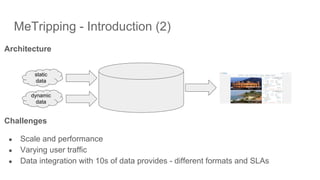
Architecture
Challenges
● Scale and performance
● Varying user traffic
● Data integration with 10s of data provides - different formats and SLAs
dynamic
data
static
data
Operability / Managability Challenges
● Infrastructure & Environment
● Build / Release Process
● Metrics & Availability
● Scaling & Cost Management
● Security & Compliance
● Team Structure
Infrastructure & Environment
● OS Standardisation
○ Latest LTS Releases / Minimal Container OS
○ Minimal Docker Images (Alpine / Atomic)
● Package Management
○ Tarball Installation vs. Package Repos
○ Adopt Docker
● Config Management
○ Hand Manage
○ Ansible vs. Chef vs. Puppet
● Service Management
○ Manual start / stop of services
○ Supervisor vs. Systemd
Build & Release Process
● Build on laptops
● Using IDE For Deployment
● Hand Manage artifacts to remote servers
● Version Management
Metrics & Availability
● Health Checks & External Service Availability
○ Site 24x7 / Uptime Robot / Gomez
● Server Health Monitoring
○ CloudWatch, DataDog, Nagios, Sensu etc
● Application Performance Monitoring
○ Istio / Hystrix
○ Newrelic, App Dynamics, Elastic APM, StackDriver
○ CloudWatch, sysDig
● Logs (ELK)
Security & Compliance
● Secure Coding Guidelines
○ OWASP Top 10
○ Follow Industry Best Practices (PCI, HIPAA)
● Access Controls
○ Central User Management
○ Do not use shared accounts
○ Follow least privilege model
● Restrict Network Access
○ Use both Public & Private Networks
○ Restrict login access only to trusted networks
○ Protect Admin Pages with Google SSO + .htaccess
Application Availability and Scalability
● Resource allocation issues
○ Compute
■ Using old generation servers
■ Using “burstable” instances for production
■ Using high CPU instances without looking at actual CPU utilisation
○ Storage
■ Using magnetic storage
■ Under-provisioning / over-provisioning of storage
■ Provisioned IOPS with Databases
■ Using ephemeral storage
○ Network
■ Ephemeral IPs for Internet facing servers
■ SSL Termination on Application (Apache / Nginx)
■ Nginx / Apache as Application Load Balancers
■ Serving static assets from application
■ Mapping domains to Load Balancer IPs
Managing Costs
● Use less SaaS & PaaS
○ Binpack with Docker
○ Run local MySQL, ElasticSearch, Kafka, ELK etc
● Separate Accounts For BUs & Environments
○ Non Prod Environments (staging, dev etc)
○ Prod Environments
● Shutdown Non Prod Environments when not in use
● Housekeep regularly
Team Structure
● DevOps is hardest to hire (and retain)
● Training freshers in DevOps is time consuming
● What works well
○ Make Engineering Self Sufficient With Operations (Dev+Ops)
■ Make monitoring and deployment as self-service
○ Use Infrastructure As Code tools (Terraform)
○ Rotate oncall within the Dev Team
● Have a shared team to manage Infra
○ Account management
○ IT Stuff
○ Backup / Restore etc
Design & Architecture Best Practices
● System instrumentation - Systems and application monitoring
● Web-services architecture
● System standardisation (dockers)
○ Consistent environments
○ Simplified builds / releases
○ Scalable architecture
● Data systems best practices
○ Design for scale and performance
System Instrumentation - Systems / application monitoring
● Application monitoring setup is “must-have” requirement for all applications
○ Helps identify system and application deficiencies
○ Helps identify problems, proactively
○ Results in efficient (performance and cost effective) systems
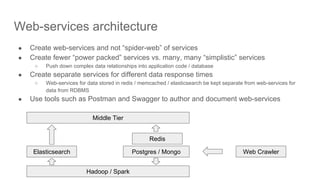
Web-services architecture
● Create web-services and not “spider-web” of services
● Create fewer “power packed” services vs. many, many “simplistic” services
○ Push down complex data relationships into application code / database
● Create separate services for different data response times
○ Web-services for data stored in redis / memcached / elasticsearch be kept separate from web-services for
data from RDBMS
● Use tools such as Postman and Swagger to author and document web-services
Elasticsearch Postgres / Mongo Web Crawler
Hadoop / Spark
Middle Tier
Redis
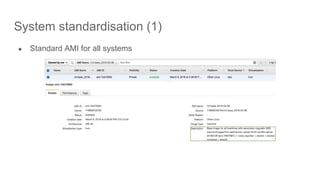
System standardisation (1)
● Standard AMI for all systems
System standardisation (2)
● Minimalistic “coreos” and manage configurations via infrastructure with
Terraform
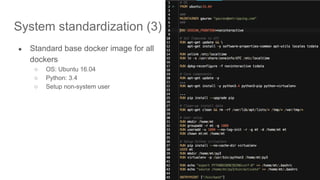
System standardization (3)
● Standard base docker image for all
dockers
○ OS: Ubuntu 16.04
○ Python: 3.4
○ Setup non-system user
System standardisation (4)
● Separate Git repository for build and
configurations
○ MeTrippingDeloyment has docker compose ymls for build
and deployment settings for dev / stage / prod
environments
○ .env files contain environment settings (sourced in by
docker-compose)
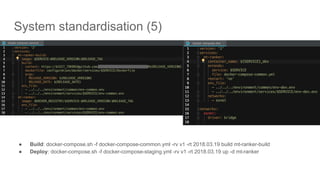
System standardisation (5)
● Build: docker-compose.sh -f docker-compose-common.yml -rv v1 -rt 2018.03.19 build mt-ranker-build
● Deploy: docker-compose.sh -f docker-compose-staging.yml -rv v1 -rt 2018.03.19 up -d mt-ranker
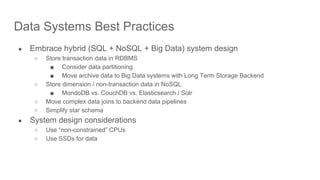
Data Systems Best Practices
● Embrace hybrid (SQL + NoSQL + Big Data) system design
○ Store transaction data in RDBMS
■ Consider data partitioning
■ Move archive data to Big Data systems with Long Term Storage Backend
○ Store dimension / non-transaction data in NoSQL
■ MondoDB vs. CouchDB vs. Elasticsearch / Solr
○ Move complex data joins to backend data pipelines
○ Simplify star schema
● System design considerations
○ Use “non-constrained” CPUs
○ Use SSDs for data
Summary
● Code -> Build -> Deploy -> Manage -> Burn, Burn, Burn -> Re-Design ->
Re-Code -> Re-Build -> Re-Deploy -> Burn, Burn
vs.
● Design -> Code -> Build -> Deploy -> Manage -> Burn Less
Q & A
Thank You!
Gaurav (gaurav@metripping.com), Shanker (shanker@syscredence.com)

Designing for operability and managability

  • 1.
    Designing for Operabilityand Managability Gaurav Bahrani CTO, Shanker Balan Managing Consultant, sysCredence
  • 2.
    Introduction ● Gaurav Bahrani,CTO, MeTripping ○ Building intelligent search engine for travel ○ Expertise in building large scale distributed systems ■ SQL, NoSQL, Big Data ■ Database engines ■ Fault-tolerant systems ○ ex-VPE Cloud Lending Solutions (Fin-tech startup), ex-Yahoo, ex-MS, ex-HP ● Shanker Balan, Freelance DevOps Consultant ○ Infrastructure & Cloud ○ DevOps Consulting For Startups ■ Infibeam, Instamojo, Logistimo, Widas, Quintype, dAlchemy IOT ○ ex-InMobi, ex-Yahoo
  • 3.
    Agenda 1. MeTripping -Introduction 2. Operability & Manageability Challenges 3. Design & Architecture Best Practices 4. Q & A
  • 4.
  • 5.
    MeTripping - Introduction(2) Architecture Challenges ● Scale and performance ● Varying user traffic ● Data integration with 10s of data provides - different formats and SLAs dynamic data static data
  • 6.
    Operability / ManagabilityChallenges ● Infrastructure & Environment ● Build / Release Process ● Metrics & Availability ● Scaling & Cost Management ● Security & Compliance ● Team Structure
  • 7.
    Infrastructure & Environment ●OS Standardisation ○ Latest LTS Releases / Minimal Container OS ○ Minimal Docker Images (Alpine / Atomic) ● Package Management ○ Tarball Installation vs. Package Repos ○ Adopt Docker ● Config Management ○ Hand Manage ○ Ansible vs. Chef vs. Puppet ● Service Management ○ Manual start / stop of services ○ Supervisor vs. Systemd
  • 8.
    Build & ReleaseProcess ● Build on laptops ● Using IDE For Deployment ● Hand Manage artifacts to remote servers ● Version Management
  • 9.
    Metrics & Availability ●Health Checks & External Service Availability ○ Site 24x7 / Uptime Robot / Gomez ● Server Health Monitoring ○ CloudWatch, DataDog, Nagios, Sensu etc ● Application Performance Monitoring ○ Istio / Hystrix ○ Newrelic, App Dynamics, Elastic APM, StackDriver ○ CloudWatch, sysDig ● Logs (ELK)
  • 10.
    Security & Compliance ●Secure Coding Guidelines ○ OWASP Top 10 ○ Follow Industry Best Practices (PCI, HIPAA) ● Access Controls ○ Central User Management ○ Do not use shared accounts ○ Follow least privilege model ● Restrict Network Access ○ Use both Public & Private Networks ○ Restrict login access only to trusted networks ○ Protect Admin Pages with Google SSO + .htaccess
  • 11.
    Application Availability andScalability ● Resource allocation issues ○ Compute ■ Using old generation servers ■ Using “burstable” instances for production ■ Using high CPU instances without looking at actual CPU utilisation ○ Storage ■ Using magnetic storage ■ Under-provisioning / over-provisioning of storage ■ Provisioned IOPS with Databases ■ Using ephemeral storage ○ Network ■ Ephemeral IPs for Internet facing servers ■ SSL Termination on Application (Apache / Nginx) ■ Nginx / Apache as Application Load Balancers ■ Serving static assets from application ■ Mapping domains to Load Balancer IPs
  • 12.
    Managing Costs ● Useless SaaS & PaaS ○ Binpack with Docker ○ Run local MySQL, ElasticSearch, Kafka, ELK etc ● Separate Accounts For BUs & Environments ○ Non Prod Environments (staging, dev etc) ○ Prod Environments ● Shutdown Non Prod Environments when not in use ● Housekeep regularly
  • 13.
    Team Structure ● DevOpsis hardest to hire (and retain) ● Training freshers in DevOps is time consuming ● What works well ○ Make Engineering Self Sufficient With Operations (Dev+Ops) ■ Make monitoring and deployment as self-service ○ Use Infrastructure As Code tools (Terraform) ○ Rotate oncall within the Dev Team ● Have a shared team to manage Infra ○ Account management ○ IT Stuff ○ Backup / Restore etc
  • 14.
    Design & ArchitectureBest Practices ● System instrumentation - Systems and application monitoring ● Web-services architecture ● System standardisation (dockers) ○ Consistent environments ○ Simplified builds / releases ○ Scalable architecture ● Data systems best practices ○ Design for scale and performance
  • 15.
    System Instrumentation -Systems / application monitoring ● Application monitoring setup is “must-have” requirement for all applications ○ Helps identify system and application deficiencies ○ Helps identify problems, proactively ○ Results in efficient (performance and cost effective) systems
  • 16.
    Web-services architecture ● Createweb-services and not “spider-web” of services ● Create fewer “power packed” services vs. many, many “simplistic” services ○ Push down complex data relationships into application code / database ● Create separate services for different data response times ○ Web-services for data stored in redis / memcached / elasticsearch be kept separate from web-services for data from RDBMS ● Use tools such as Postman and Swagger to author and document web-services Elasticsearch Postgres / Mongo Web Crawler Hadoop / Spark Middle Tier Redis
  • 17.
    System standardisation (1) ●Standard AMI for all systems
  • 18.
    System standardisation (2) ●Minimalistic “coreos” and manage configurations via infrastructure with Terraform
  • 19.
    System standardization (3) ●Standard base docker image for all dockers ○ OS: Ubuntu 16.04 ○ Python: 3.4 ○ Setup non-system user
  • 20.
    System standardisation (4) ●Separate Git repository for build and configurations ○ MeTrippingDeloyment has docker compose ymls for build and deployment settings for dev / stage / prod environments ○ .env files contain environment settings (sourced in by docker-compose)
  • 21.
    System standardisation (5) ●Build: docker-compose.sh -f docker-compose-common.yml -rv v1 -rt 2018.03.19 build mt-ranker-build ● Deploy: docker-compose.sh -f docker-compose-staging.yml -rv v1 -rt 2018.03.19 up -d mt-ranker
  • 22.
    Data Systems BestPractices ● Embrace hybrid (SQL + NoSQL + Big Data) system design ○ Store transaction data in RDBMS ■ Consider data partitioning ■ Move archive data to Big Data systems with Long Term Storage Backend ○ Store dimension / non-transaction data in NoSQL ■ MondoDB vs. CouchDB vs. Elasticsearch / Solr ○ Move complex data joins to backend data pipelines ○ Simplify star schema ● System design considerations ○ Use “non-constrained” CPUs ○ Use SSDs for data
  • 23.
    Summary ● Code ->Build -> Deploy -> Manage -> Burn, Burn, Burn -> Re-Design -> Re-Code -> Re-Build -> Re-Deploy -> Burn, Burn vs. ● Design -> Code -> Build -> Deploy -> Manage -> Burn Less
  • 24.
  • 25.
    Thank You! Gaurav (gaurav@metripping.com),Shanker (shanker@syscredence.com)