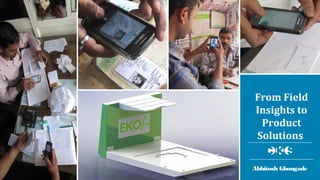
From Field 
Insights to 
Product 
Solutions 
Abhitosh Ghongade
Case Study 
Design of 
Mobile Phone 
Scanner for KYC 
Registration
Evaluation Matrix
Work Flow Variations 
Key Insight 
Speed 
The time taken for KYC 
registration ranged from 1 to 
3 minutes, despite the 
variations in the work flow 
and hand motions 
Hand Motion Variations
Key Insights 
Accuracy 
CSPs were unable to take 
clear customer 
photographs due to 
unsuitable lighting 
conditions in many outlets 
Customer signatures were 
taken on varying surfaces 
leading to unclear 
photographs 
CSPs did not accept bigger 
ID documents, such as 
company recognition 
letter, as they are tedious 
to accurately photograph. 
1.5 ft 
4.75’’ 
1.25 ft 
2 ft 
3’’
Design Brief 
Minimize hand movements 
Compatibility with 
different mobile devices 
Even lighting to capture 
clear images 
Easy alignment of all 
accepted IDs 
Surface to receive clear 
customer signatures 
Convenient and consistent 
customer photography 
Information display for 
promotion 
Failure Case 
Scenario 
Impact 
Information 
Challenge 
Infrastructure 
Challenge 
Skill & 
Attitude 
Challenge 
Technological 
Challenges 
Artefact Related 
Challenges 
Design Consequences 
Functionality / 
Feature 
Form 
KYC registrations 
fails due to unclear 
customer photo ID 
or address proof 
KYC registration 
process has to be 
repeated. 
Customers are 
reluctant to go 
through the KYC 
registration 
process again 
Retail environments 
are small and 
constricted by 
furniture because of 
which the CSP cannot 
move to a position for 
optimal photography 
CSPs are not 
trained to capture 
clear images 
The application does 
not turn on auto 
flash for capturing 
image 
The contrast of the 
photographs in the 
Voter ID is not even 
resulting in unclear 
images 
Even lighting - reduce 
excess lighting or 
increase low lighting 
Small and modular 
Enclosed space to 
avoid excess 
natural / artificial 
lighting 
CSPs find it tedious 
to scan bigger 
documents for e.g. 
electricity bill 
CSPs decline the 
document even if 
the device is 
capable of 
capturing clear 
image 
CSPs don't know 
the list of 
documents 
acceptable 
CSPs find the mobile 
phone screen is too 
small to check 
whether the 
document image is 
clear 
Easy center alignment 
and defined space for 
all type of acceptable 
documents
Low Fidelity 
Prototypes
On Field User 
Validation 
Vertical height adjustment 
of mobile plate is 
necessary for compatibility 
with different mobile 
phones 
Documents should fit 
firmly to the product 
Product should hold mobile 
phone securely and allow 
documents to be oriented 
relative to the device 
Open form of product was 
preferred to the box type 
Product should be portable 
and foldable
Medium Fidelity Prototype
Validation 
Workshop 
CSPs preferred single 
document plate over 
multiple plates of different 
sizes 
CSPs liked the erasable 
signature card, but 
preferred a detachable 
signature card 
In the folded position, CSPs 
inclined the mobile plate to 
view the screen and used 
back of the pillar for 
keyboard 
CSPs also gave inputs 
around visual design, 
branding and desirable cost
Iteration 1 
Iteration 2 
Iteration 3 
High Fidelity Prototypes
Final Prototype
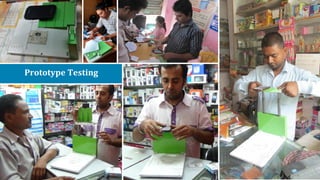
Prototype Testing
Batch Production

Designing for Adoption & Scale

  • 1.
    From Field Insightsto Product Solutions Abhitosh Ghongade
  • 2.
    Case Study Designof Mobile Phone Scanner for KYC Registration
  • 3.
  • 4.
    Work Flow Variations Key Insight Speed The time taken for KYC registration ranged from 1 to 3 minutes, despite the variations in the work flow and hand motions Hand Motion Variations
  • 5.
    Key Insights Accuracy CSPs were unable to take clear customer photographs due to unsuitable lighting conditions in many outlets Customer signatures were taken on varying surfaces leading to unclear photographs CSPs did not accept bigger ID documents, such as company recognition letter, as they are tedious to accurately photograph. 1.5 ft 4.75’’ 1.25 ft 2 ft 3’’
  • 6.
    Design Brief Minimizehand movements Compatibility with different mobile devices Even lighting to capture clear images Easy alignment of all accepted IDs Surface to receive clear customer signatures Convenient and consistent customer photography Information display for promotion Failure Case Scenario Impact Information Challenge Infrastructure Challenge Skill & Attitude Challenge Technological Challenges Artefact Related Challenges Design Consequences Functionality / Feature Form KYC registrations fails due to unclear customer photo ID or address proof KYC registration process has to be repeated. Customers are reluctant to go through the KYC registration process again Retail environments are small and constricted by furniture because of which the CSP cannot move to a position for optimal photography CSPs are not trained to capture clear images The application does not turn on auto flash for capturing image The contrast of the photographs in the Voter ID is not even resulting in unclear images Even lighting - reduce excess lighting or increase low lighting Small and modular Enclosed space to avoid excess natural / artificial lighting CSPs find it tedious to scan bigger documents for e.g. electricity bill CSPs decline the document even if the device is capable of capturing clear image CSPs don't know the list of documents acceptable CSPs find the mobile phone screen is too small to check whether the document image is clear Easy center alignment and defined space for all type of acceptable documents
  • 7.
  • 8.
    On Field User Validation Vertical height adjustment of mobile plate is necessary for compatibility with different mobile phones Documents should fit firmly to the product Product should hold mobile phone securely and allow documents to be oriented relative to the device Open form of product was preferred to the box type Product should be portable and foldable
  • 9.
  • 10.
    Validation Workshop CSPspreferred single document plate over multiple plates of different sizes CSPs liked the erasable signature card, but preferred a detachable signature card In the folded position, CSPs inclined the mobile plate to view the screen and used back of the pillar for keyboard CSPs also gave inputs around visual design, branding and desirable cost
  • 11.
    Iteration 1 Iteration2 Iteration 3 High Fidelity Prototypes
  • 12.
  • 13.
  • 14.