Dell Boomi Overview
By
Nagarjuna Kaipu
What is Dell Boomi?
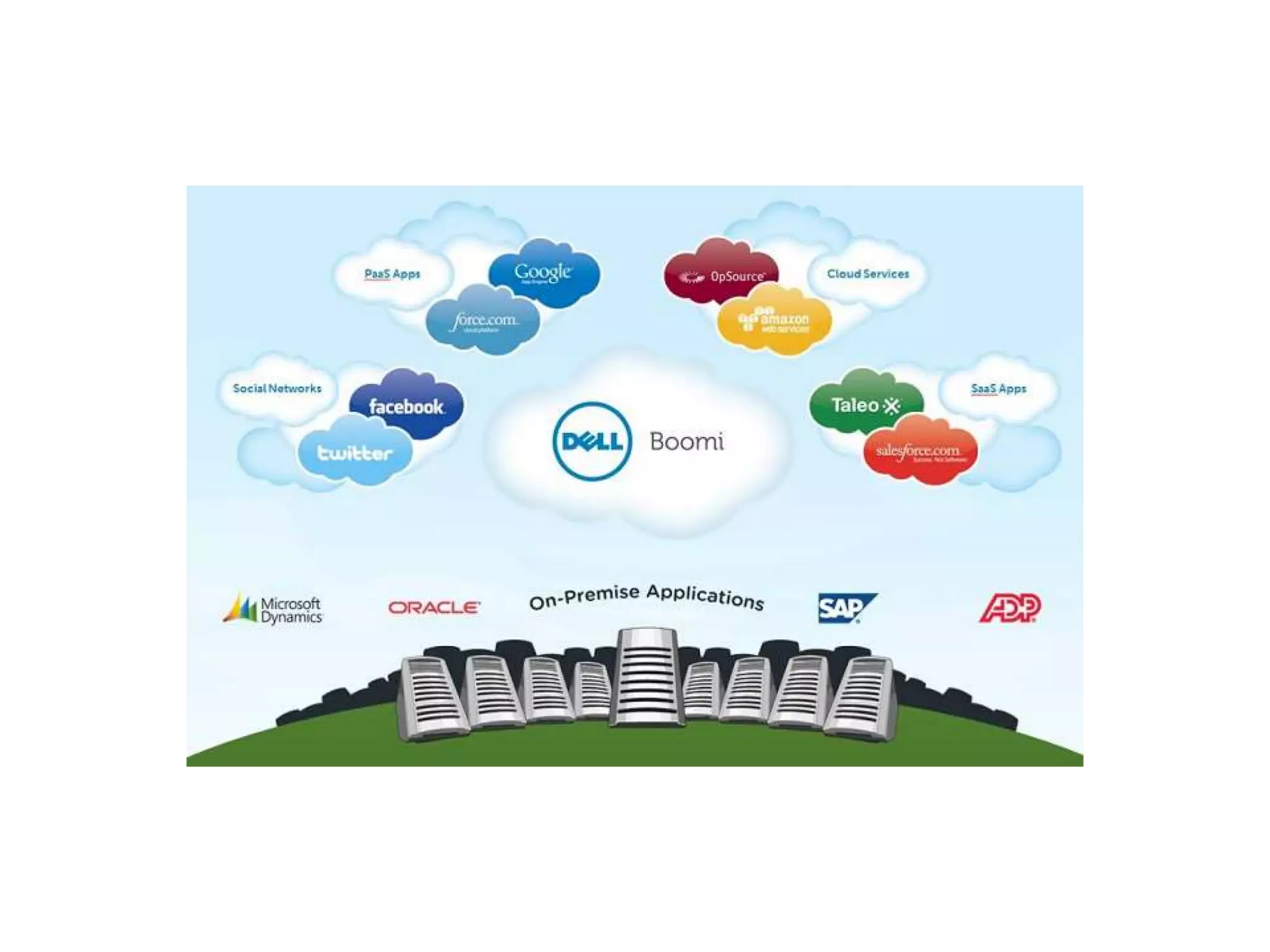
Dell Boomi is an on-demand multi-tenant cloud integration platform for connecting cloud and
on-premises applications and data. The platform enables customers to design cloud-based
integration processes called Atoms and transfer data between cloud and on-
premises applications.
Benefits
1. It scales to your company’s needs and growth
2. A broad set of connectors to enable integration between any combination of
applications
3. A proven single instance multi-tenant infrastructure
4. Low-code integration platform
5. The UI is user-friendly and makes integrating as easy as drag and drop
6. Flexible deployment
7. Reduces errors compared to what manually mapping integration can do
Dell Boomi Integration Process
It is categorized into 3 phases :
1. Build Phase
2. Deploy Phase
3. Manage Phase
1. Build Phase
• Specifies the integration logic to communicate between source and destinationapplications
• Integration process is specified by Boomi's Visual components
2. Deploy Phase
• Deploys the integration process, defined in the Build Phase, to run time engine calledAtom
• Atom allows you to run the integration process on on-premise or atomcloud
3. Manage Phase
• Monitors the health and status of the deployedatom
• Monitors the integration process, logs
How to implement integration process in build phase ?
• In Build phase, we can integrate data between source and destination using process
• A “Process” is the central component ofintegration
• Every Process begins with one input connector and ends with one or more outputconnectors
• A process component contains:
o Execution Shape - It manipulates the data through theprocess
o Logic shape - It controls the flow of data through theprocess
Input connector
• Specifies the incoming data to be used for integration process from the source
• The source may be database, web application,on premise application, disk, FTP, etc.
• Action method GET is used
How to implement integration process in build phase ?
Output connector
• It sends data from the integration process todestination
• The destination may be database, web application, on premise application, disk, FTP, etc.
• Action method SEND is used
Mapping Function
• Implement the mapping between incoming and outgoingdata
• Mapping means how to process the data from input and integrate the data to the destination as
output
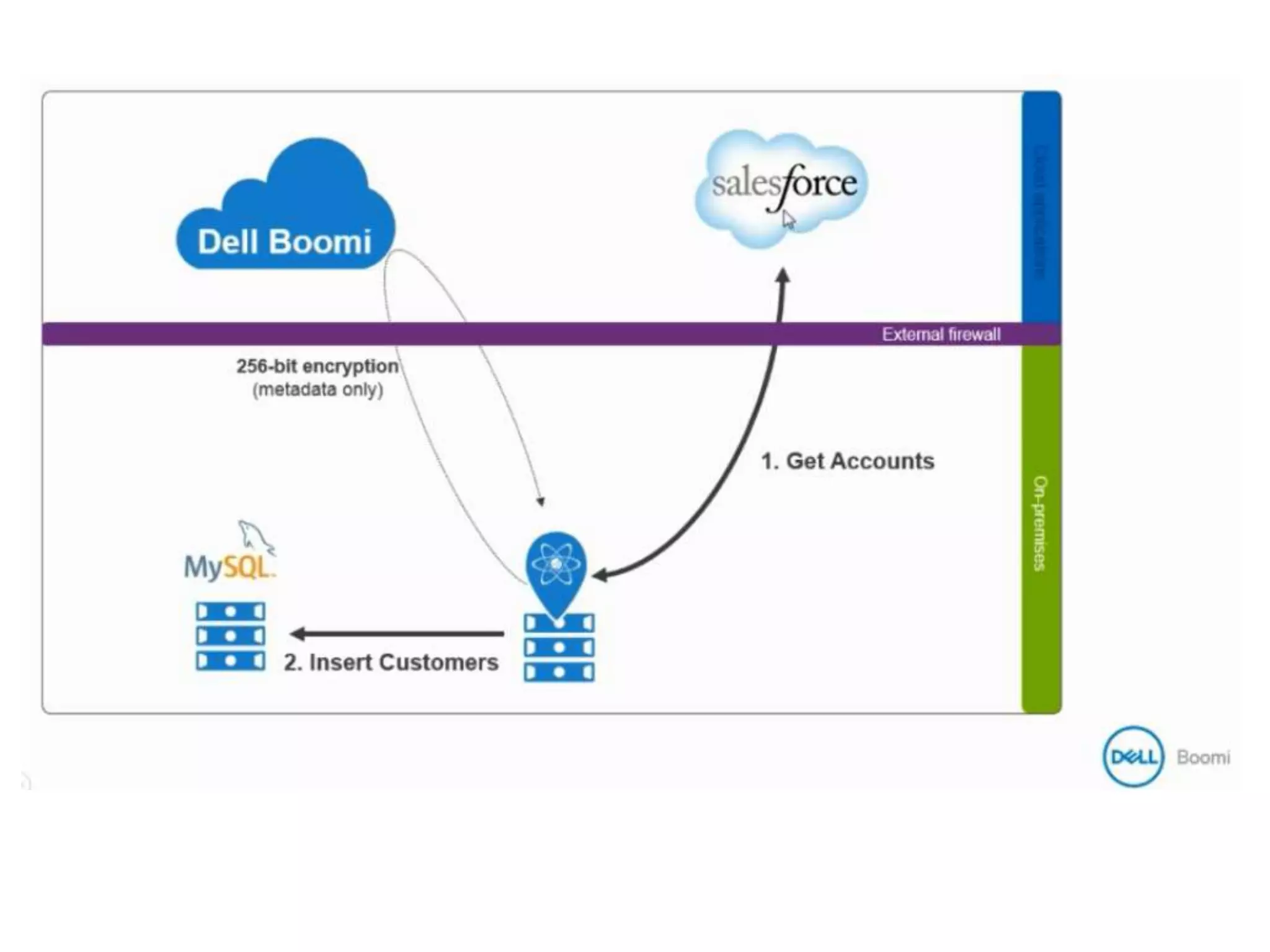
Example: Salesforce integration with on-premise MySQL Database Objective
Need to get Account details -Account ID and Account Name from my
SalesforceApplication
Insert this account information to my on-premise MySQLdatabase
This demo shows how quickly and easily you can integrate cloud-based
and on-premise applications with Boomi.
Pre-Requisites
• Dell Boomi account
• Salesforce account with username, password and securitytoken
• MySQL Database with hostname, port, username, password and database
name
Process Overview
• Get account information from sales force account, using sales force
credentials
• Check if the account already exists indatabase
• Insert account information to MySQLdatabase
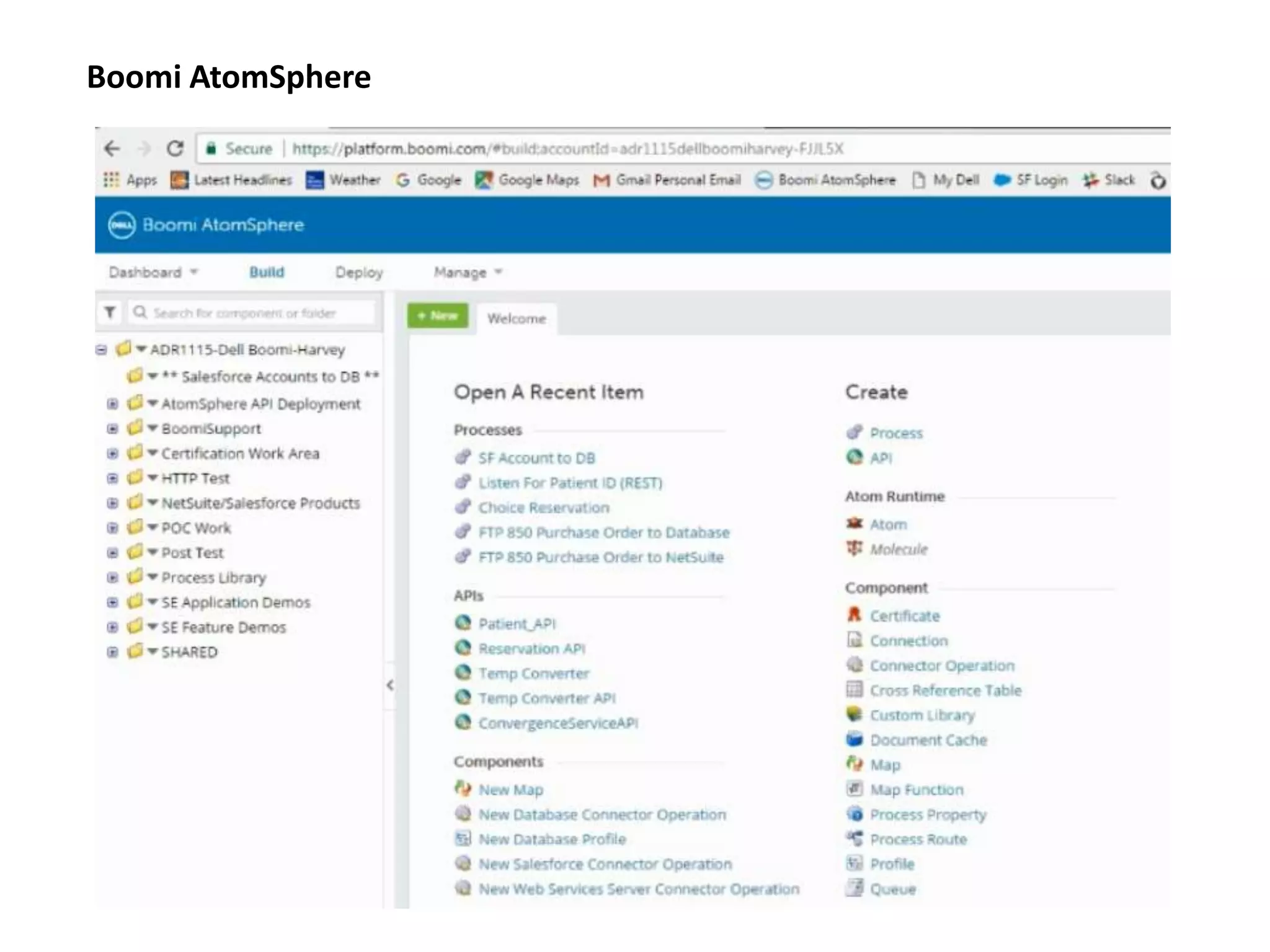
Boomi AtomSphere
Create a process by clicking "Create Component" link
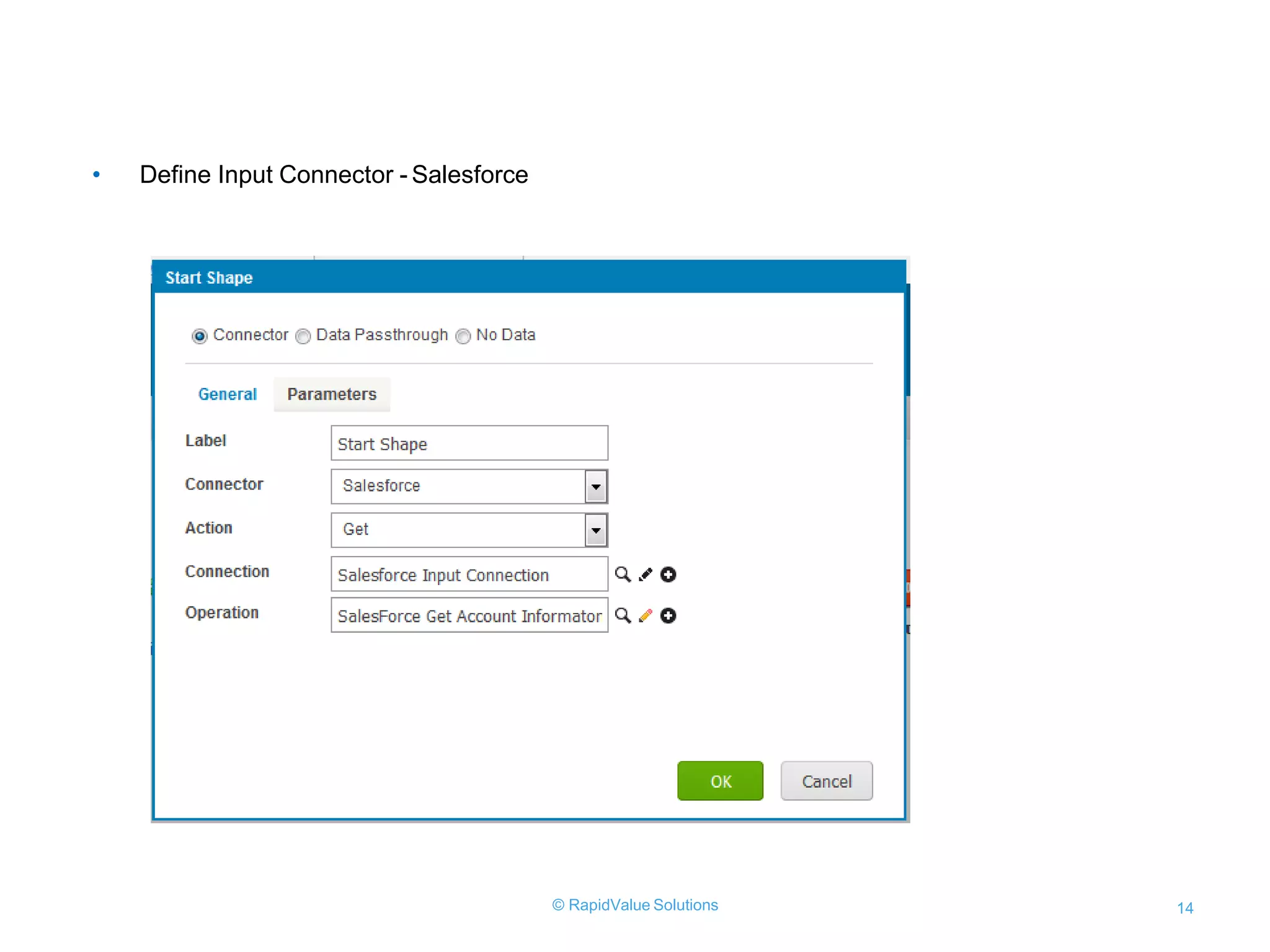
• Define Input Connector - Salesforce
© RapidValue Solutions 14
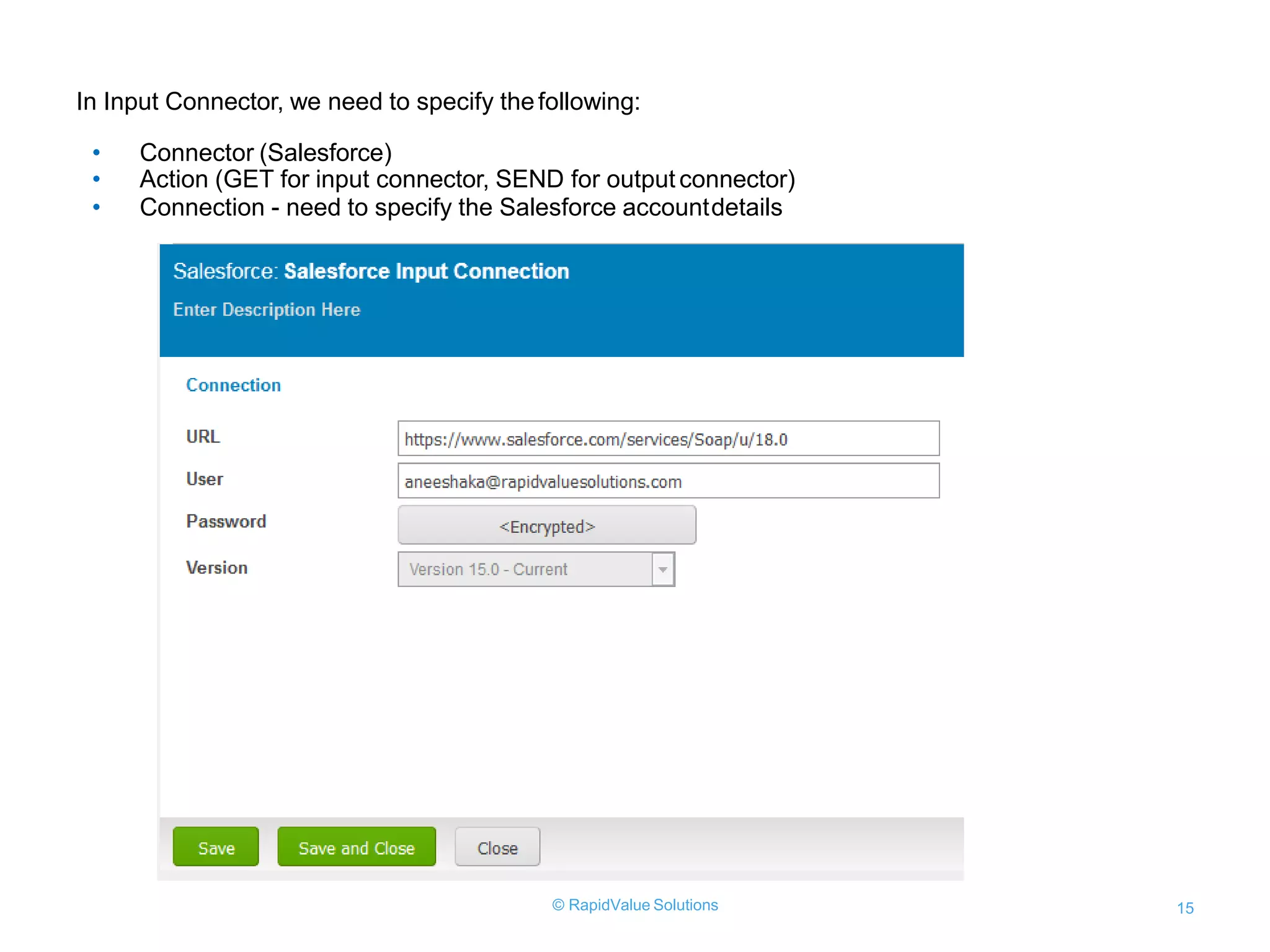
In Input Connector, we need to specify thefollowing:
• Connector (Salesforce)
• Action (GET for input connector, SEND for output connector)
• Connection - need to specify the Salesforce accountdetails
© RapidValue Solutions 15
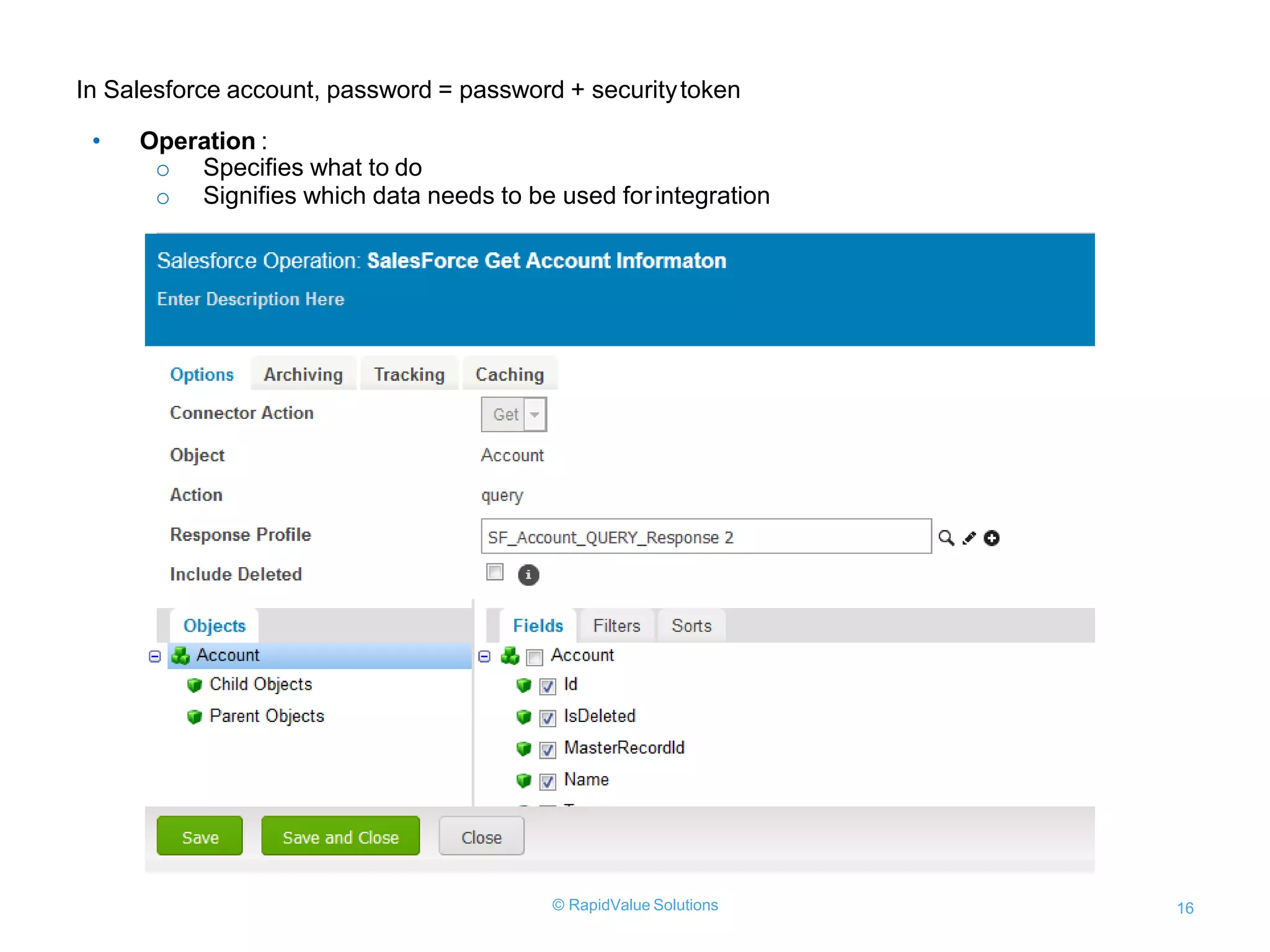
In Salesforce account, password = password + securitytoken
• Operation :
o Specifies what to do
o Signifies which data needs to be used forintegration
© RapidValue Solutions 16
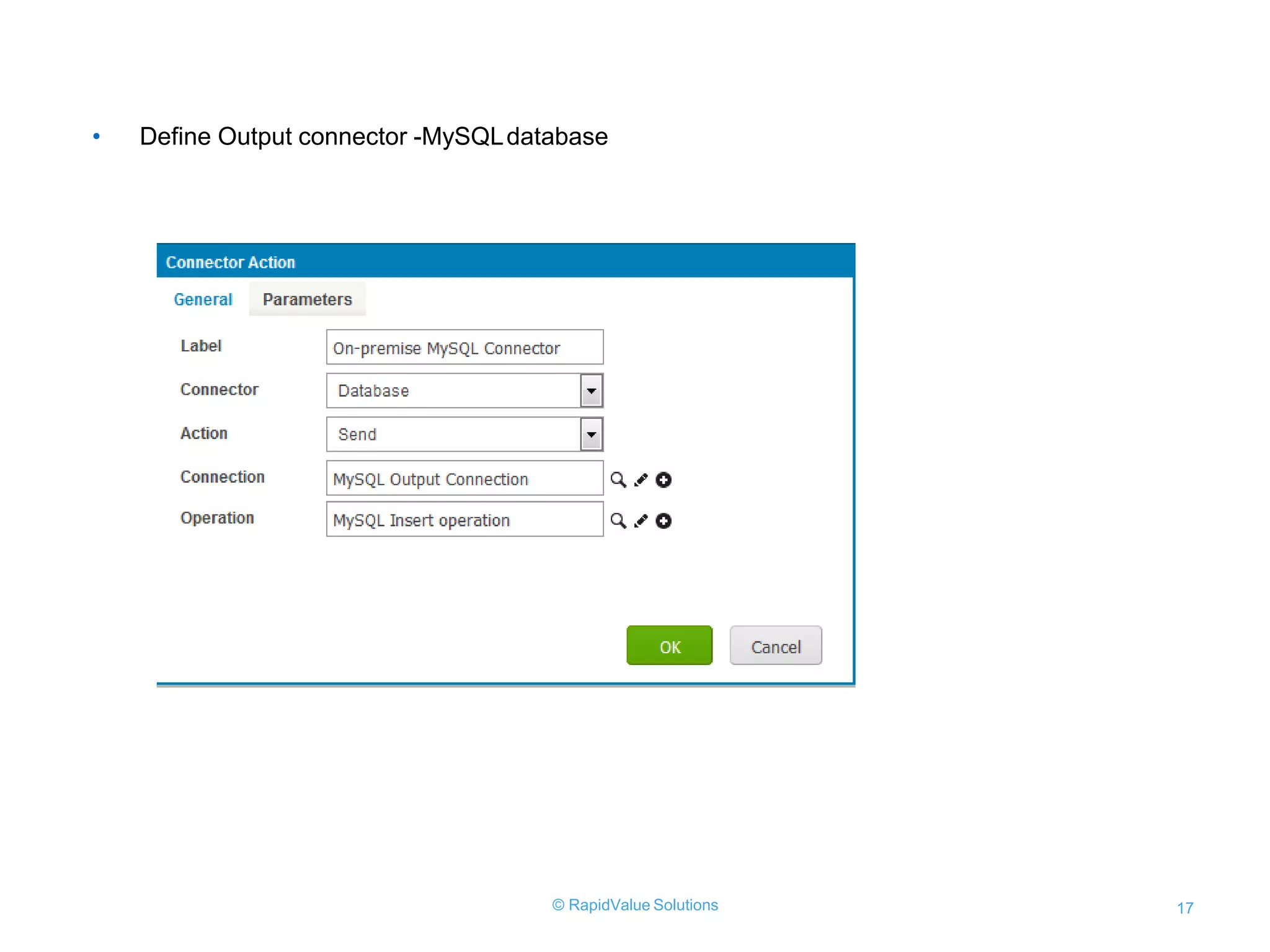
• Define Output connector -MySQLdatabase
© RapidValue Solutions 17
• For Output Connector, the following needs to bespecified:
○ Connector (database)
○ Action - SEND
○ Connection- you need to specify MySQL Database host, port, credentials and database
© RapidValue Solutions 18
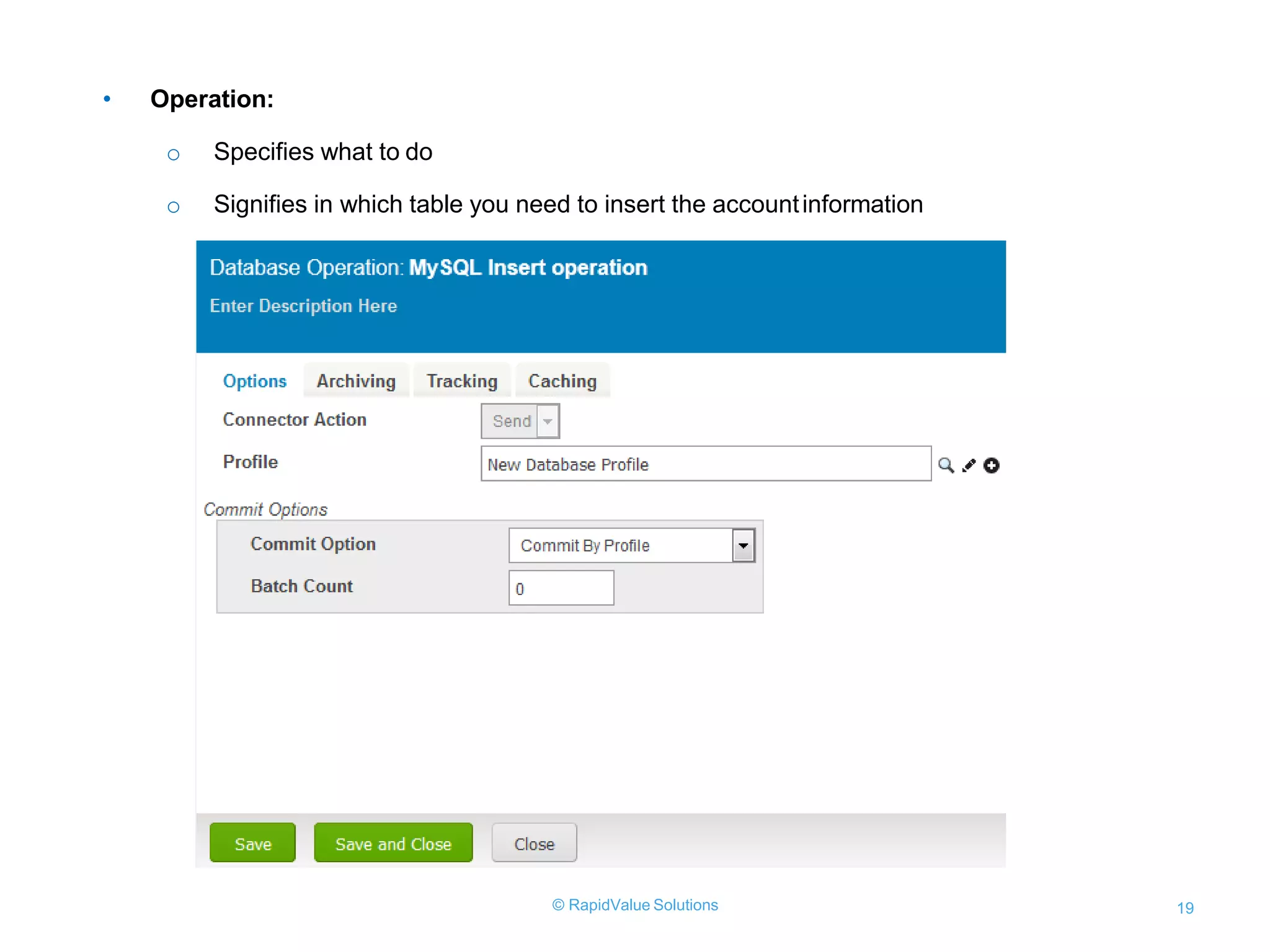
• Operation:
o Specifies what to do
o Signifies in which table you need to insert the accountinformation
© RapidValue Solutions 19
• For output operation, a profile is created, a New DatabaseProfile
• Implemented the basic insert function for the employeetable
© RapidValue Solutions 20
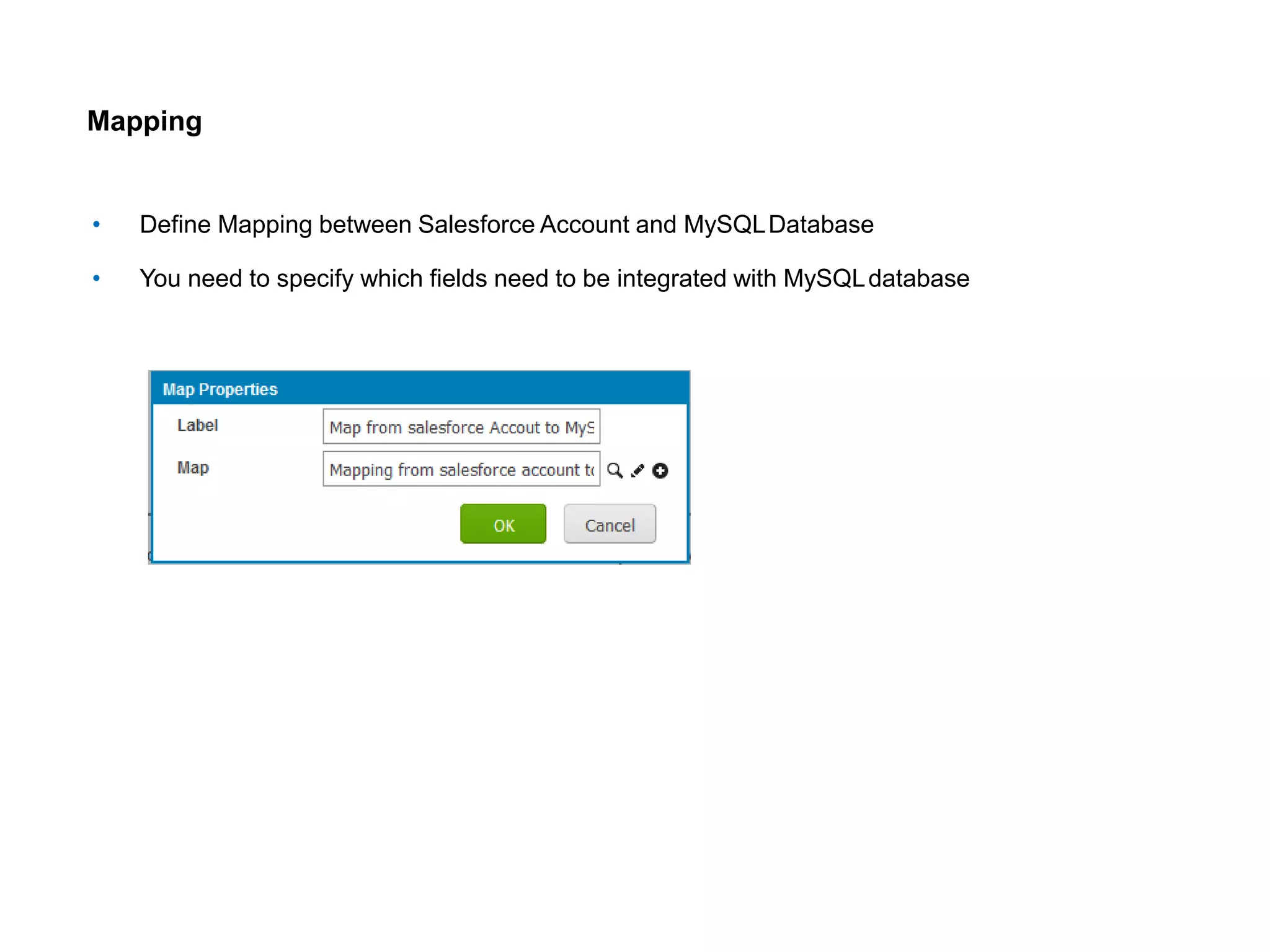
Mapping
• Define Mapping between Salesforce Account and MySQLDatabase
• You need to specify which fields need to be integrated with MySQLdatabase
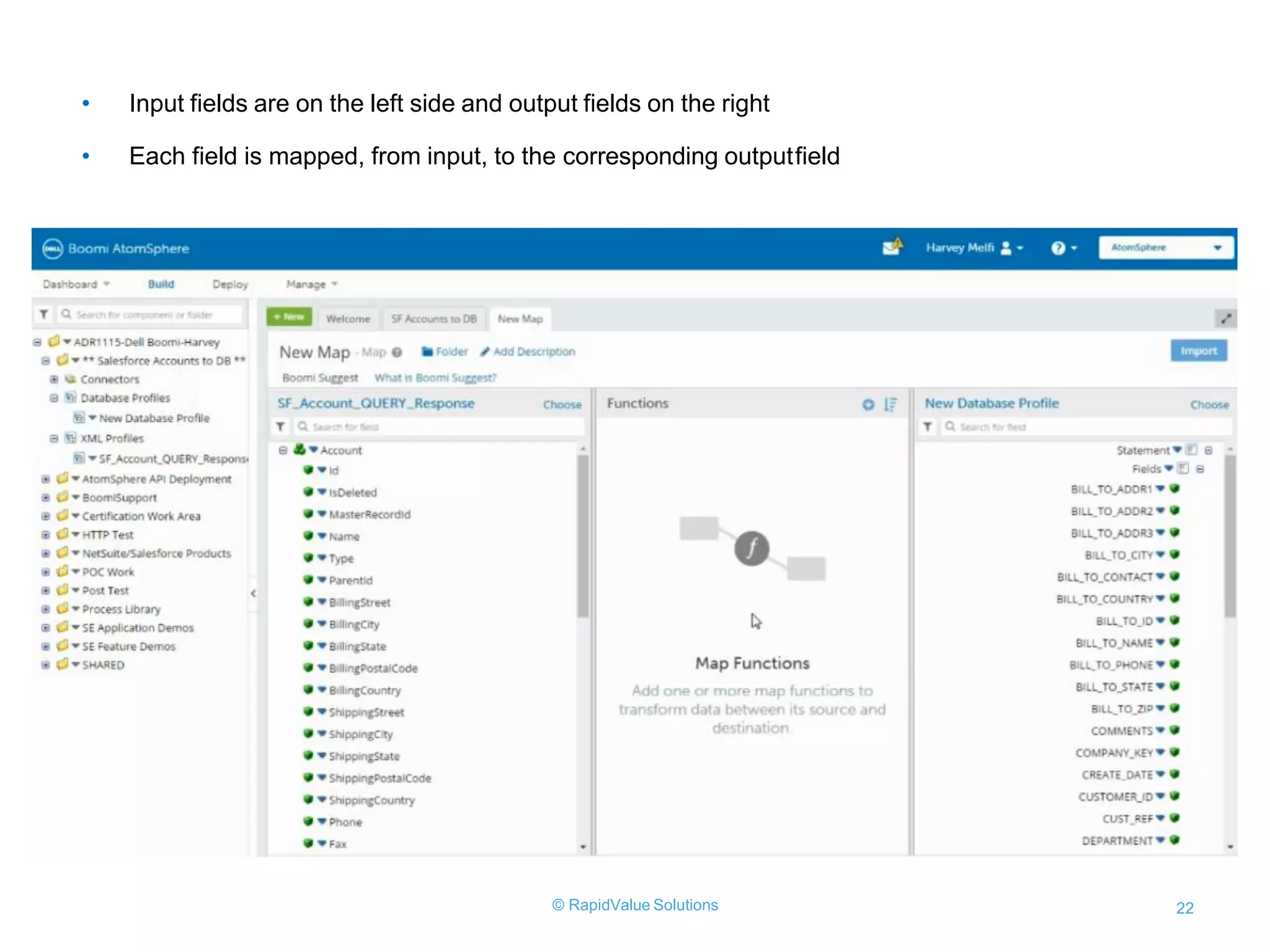
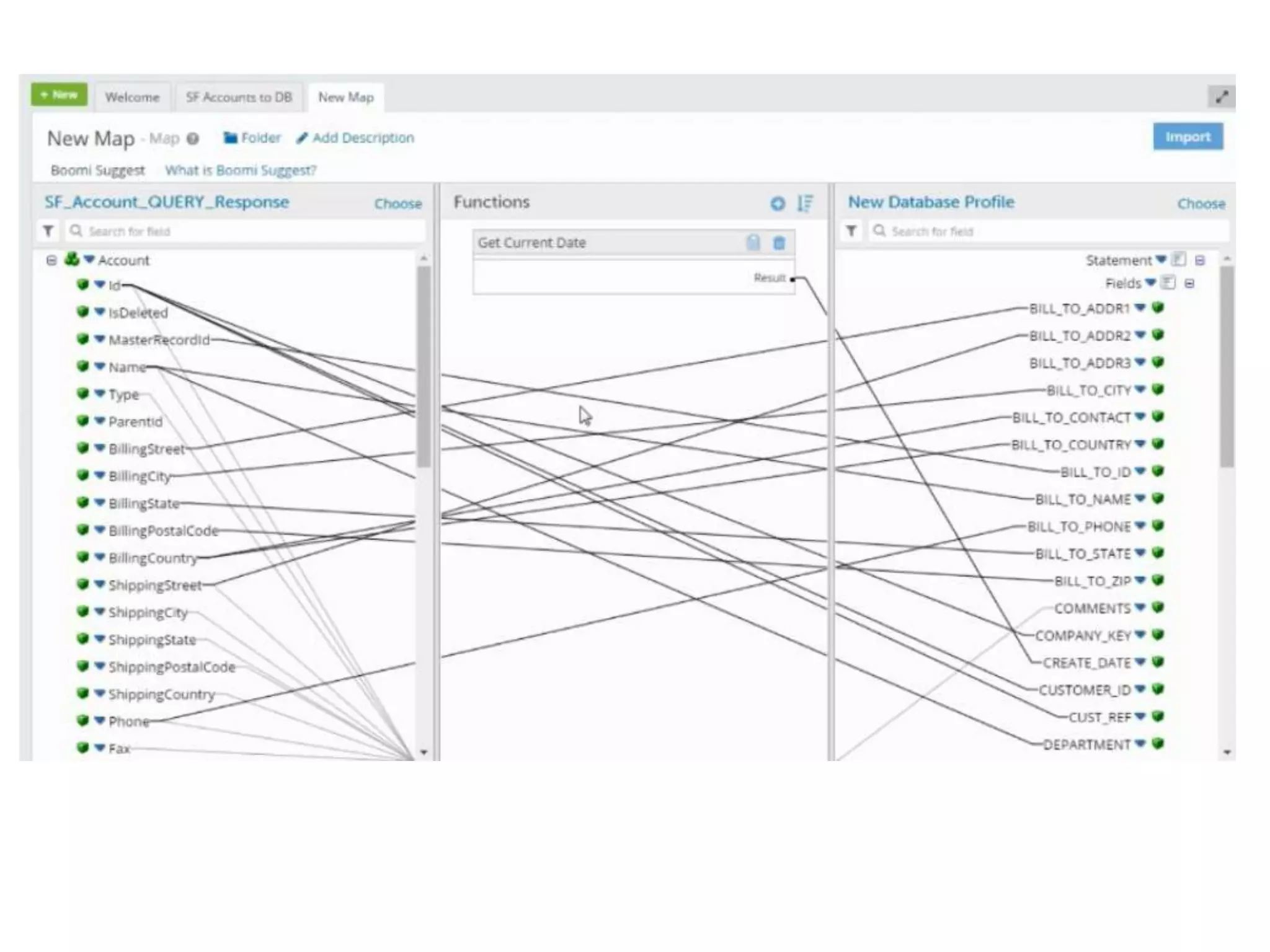
• Input fields are on the left side and output fields on the right
• Each field is mapped, from input, to the corresponding outputfield
© RapidValue Solutions 22
Define Decision Logic
• You can check whether the account already exists in the database, using decisionlogic
• If the account does not exist, insert it into MySQL DB, elseStop
© RapidValue Solutions 24
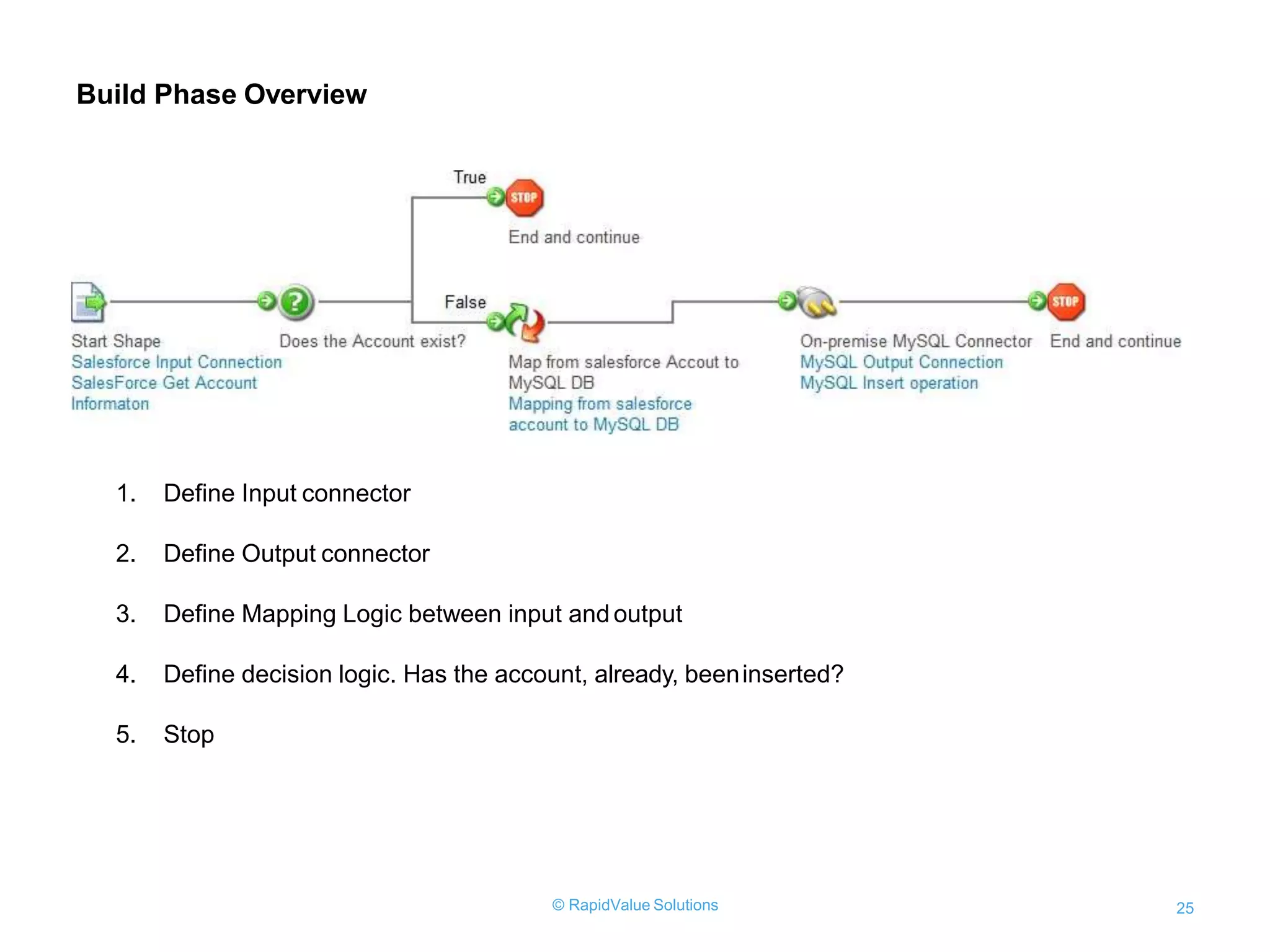
Build Phase Overview
1. Define Input connector
2. Define Output connector
3. Define Mapping Logic between input and output
4. Define decision logic. Has the account, already, beeninserted?
5. Stop
© RapidValue Solutions 25
Test Mode in Build Phase
• You can test the input and output by using „Run a Test’ option on Test Atomcloud
• If you run it, it will go through every single node
• If it‟sa success, individual node is shown as green color
• If it fails, it will be shown as red color
© RapidValue Solutions 26
Sample Output
Test Mode in Build Phase
• During test mode, you can view the input data obtained fromSalesforce
© RapidValue Solutions 28
• View the output response in the MySQLdatabase
© RapidValue Solutions 29
References
1. http://www.boomi.com
2. https://help.boomi.com/bundle/integration/page/c-atm-
Boomi_Integration_navigation_3eeb504e-8421-4091-8592-3f8d6cace5f6.html
3. https://boomi.com/wp-content/uploads/The-Ultimate-Salesforce-Integration-
Guide.pdf
4. https://boomi.com/boomiforsalesforce/
5. https://resources.boomi.com/videos/10-minute-demo-integrating-salesforce-with-
mysql
6. https://community.boomi.com/s/article/Salesforce-Integration-Guide
Thank You

Dell Boomi Integration with Salesforce

  • 1.
  • 2.
    What is DellBoomi? Dell Boomi is an on-demand multi-tenant cloud integration platform for connecting cloud and on-premises applications and data. The platform enables customers to design cloud-based integration processes called Atoms and transfer data between cloud and on- premises applications. Benefits 1. It scales to your company’s needs and growth 2. A broad set of connectors to enable integration between any combination of applications 3. A proven single instance multi-tenant infrastructure 4. Low-code integration platform 5. The UI is user-friendly and makes integrating as easy as drag and drop 6. Flexible deployment 7. Reduces errors compared to what manually mapping integration can do
  • 4.
    Dell Boomi IntegrationProcess It is categorized into 3 phases : 1. Build Phase 2. Deploy Phase 3. Manage Phase 1. Build Phase • Specifies the integration logic to communicate between source and destinationapplications • Integration process is specified by Boomi's Visual components 2. Deploy Phase • Deploys the integration process, defined in the Build Phase, to run time engine calledAtom • Atom allows you to run the integration process on on-premise or atomcloud 3. Manage Phase • Monitors the health and status of the deployedatom • Monitors the integration process, logs
  • 6.
    How to implementintegration process in build phase ? • In Build phase, we can integrate data between source and destination using process • A “Process” is the central component ofintegration • Every Process begins with one input connector and ends with one or more outputconnectors • A process component contains: o Execution Shape - It manipulates the data through theprocess o Logic shape - It controls the flow of data through theprocess Input connector • Specifies the incoming data to be used for integration process from the source • The source may be database, web application,on premise application, disk, FTP, etc. • Action method GET is used
  • 7.
    How to implementintegration process in build phase ? Output connector • It sends data from the integration process todestination • The destination may be database, web application, on premise application, disk, FTP, etc. • Action method SEND is used Mapping Function • Implement the mapping between incoming and outgoingdata • Mapping means how to process the data from input and integrate the data to the destination as output
  • 9.
    Example: Salesforce integrationwith on-premise MySQL Database Objective Need to get Account details -Account ID and Account Name from my SalesforceApplication Insert this account information to my on-premise MySQLdatabase
  • 10.
    This demo showshow quickly and easily you can integrate cloud-based and on-premise applications with Boomi.
  • 11.
    Pre-Requisites • Dell Boomiaccount • Salesforce account with username, password and securitytoken • MySQL Database with hostname, port, username, password and database name Process Overview • Get account information from sales force account, using sales force credentials • Check if the account already exists indatabase • Insert account information to MySQLdatabase
  • 12.
  • 13.
    Create a processby clicking "Create Component" link
  • 14.
    • Define InputConnector - Salesforce © RapidValue Solutions 14
  • 15.
    In Input Connector,we need to specify thefollowing: • Connector (Salesforce) • Action (GET for input connector, SEND for output connector) • Connection - need to specify the Salesforce accountdetails © RapidValue Solutions 15
  • 16.
    In Salesforce account,password = password + securitytoken • Operation : o Specifies what to do o Signifies which data needs to be used forintegration © RapidValue Solutions 16
  • 17.
    • Define Outputconnector -MySQLdatabase © RapidValue Solutions 17
  • 18.
    • For OutputConnector, the following needs to bespecified: ○ Connector (database) ○ Action - SEND ○ Connection- you need to specify MySQL Database host, port, credentials and database © RapidValue Solutions 18
  • 19.
    • Operation: o Specifieswhat to do o Signifies in which table you need to insert the accountinformation © RapidValue Solutions 19
  • 20.
    • For outputoperation, a profile is created, a New DatabaseProfile • Implemented the basic insert function for the employeetable © RapidValue Solutions 20
  • 21.
    Mapping • Define Mappingbetween Salesforce Account and MySQLDatabase • You need to specify which fields need to be integrated with MySQLdatabase
  • 22.
    • Input fieldsare on the left side and output fields on the right • Each field is mapped, from input, to the corresponding outputfield © RapidValue Solutions 22
  • 24.
    Define Decision Logic •You can check whether the account already exists in the database, using decisionlogic • If the account does not exist, insert it into MySQL DB, elseStop © RapidValue Solutions 24
  • 25.
    Build Phase Overview 1.Define Input connector 2. Define Output connector 3. Define Mapping Logic between input and output 4. Define decision logic. Has the account, already, beeninserted? 5. Stop © RapidValue Solutions 25
  • 26.
    Test Mode inBuild Phase • You can test the input and output by using „Run a Test’ option on Test Atomcloud • If you run it, it will go through every single node • If it‟sa success, individual node is shown as green color • If it fails, it will be shown as red color © RapidValue Solutions 26
  • 27.
  • 28.
    Test Mode inBuild Phase • During test mode, you can view the input data obtained fromSalesforce © RapidValue Solutions 28
  • 29.
    • View theoutput response in the MySQLdatabase © RapidValue Solutions 29
  • 30.
    References 1. http://www.boomi.com 2. https://help.boomi.com/bundle/integration/page/c-atm- Boomi_Integration_navigation_3eeb504e-8421-4091-8592-3f8d6cace5f6.html 3.https://boomi.com/wp-content/uploads/The-Ultimate-Salesforce-Integration- Guide.pdf 4. https://boomi.com/boomiforsalesforce/ 5. https://resources.boomi.com/videos/10-minute-demo-integrating-salesforce-with- mysql 6. https://community.boomi.com/s/article/Salesforce-Integration-Guide
  • 31.