DBCA Silent
Mode
Coming Up
DBCA create database 11g
DBCA create database 12c
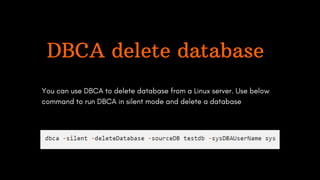
DBCA delete database
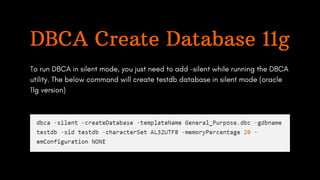
DBCA Create Database 11g
To run DBCA in silent mode, you just need to add -silent while running the DBCA
utility. The below command will create testdb database in silent mode (oracle
11g version)
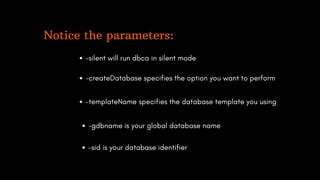
Notice the parameters:
-silent will run dbca in silent mode
-createDatabase specifies the option you want to perform
-templateName specifies the database template you using
-gdbname is your global database name
-sid is your database identifier
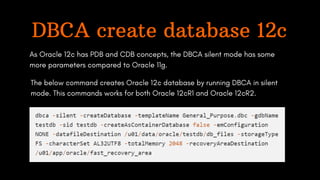
DBCA create database 12c
As Oracle 12c has PDB and CDB concepts, the DBCA silent mode has some
more parameters compared to Oracle 11g.
The below command creates Oracle 12c database by running DBCA in silent
mode. This commands works for both Oracle 12cR1 and Oracle 12cR2.
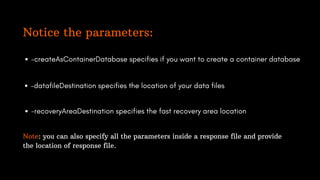
Notice the parameters:
-createAsContainerDatabase specifies if you want to create a container database
-datafileDestination specifies the location of your data files
-recoveryAreaDestination specifies the fast recovery area location
Note: you can also specify all the parameters inside a response file and provide
the location of response file.
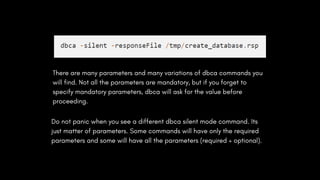
There are many parameters and many variations of dbca commands you
will find. Not all the parameters are mandatory, but if you forget to
specify mandatory parameters, dbca will ask for the value before
proceeding.
Do not panic when you see a different dbca silent mode command. Its
just matter of parameters. Some commands will have only the required
parameters and some will have all the parameters (required + optional).
DBCA delete database
You can use DBCA to delete database from a Linux server. Use below
command to run DBCA in silent mode and delete a database
Courses | Projects | Bootcamps

DBCA Slient Mode

  • 1.
  • 2.
    Coming Up DBCA createdatabase 11g DBCA create database 12c DBCA delete database
  • 3.
    DBCA Create Database11g To run DBCA in silent mode, you just need to add -silent while running the DBCA utility. The below command will create testdb database in silent mode (oracle 11g version)
  • 4.
    Notice the parameters: -silentwill run dbca in silent mode -createDatabase specifies the option you want to perform -templateName specifies the database template you using -gdbname is your global database name -sid is your database identifier
  • 5.
    DBCA create database12c As Oracle 12c has PDB and CDB concepts, the DBCA silent mode has some more parameters compared to Oracle 11g. The below command creates Oracle 12c database by running DBCA in silent mode. This commands works for both Oracle 12cR1 and Oracle 12cR2.
  • 6.
    Notice the parameters: -createAsContainerDatabasespecifies if you want to create a container database -datafileDestination specifies the location of your data files -recoveryAreaDestination specifies the fast recovery area location Note: you can also specify all the parameters inside a response file and provide the location of response file.
  • 7.
    There are manyparameters and many variations of dbca commands you will find. Not all the parameters are mandatory, but if you forget to specify mandatory parameters, dbca will ask for the value before proceeding. Do not panic when you see a different dbca silent mode command. Its just matter of parameters. Some commands will have only the required parameters and some will have all the parameters (required + optional).
  • 8.
    DBCA delete database Youcan use DBCA to delete database from a Linux server. Use below command to run DBCA in silent mode and delete a database
  • 9.
    Courses | Projects| Bootcamps