CSE 136 - Lecture 1 (Part 1)
   Enterprise-class Web Applications
   Design and implementation Prototype
   Large scale web-based applications
   Software web-architecture
   Presented by Isaac Chu
Today's lecture
   Administration
   Overview of this course
   Assignment (project-based)
   Enterprise Software Architecture
   Architectural Design Patterns & Principles
   Object-oriented Design
   Architectural Pattern
   UML
   .NET Overview
Administration
                                Group of 3
   Assignment : one project
   Grading
     One project (70%)
     Final exam (30%)

   TA
       Melvin Go melvin@melrose27.com M/W: 530-
        830pm
   Professor
     Isaac Chu ichu@cs.ucsd.edu
     Mobile office & by appointment on weekends
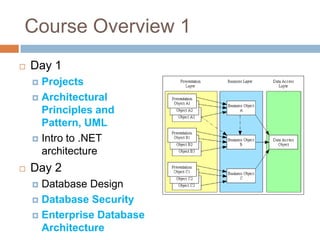
Course Overview 1
   Day 1
     Projects
     Architectural
      Principles and
      Pattern, UML
     Intro to .NET
      architecture
   Day 2
     Database Design
     Database Security

     Enterprise Database
      Architecture
Course Overview 2
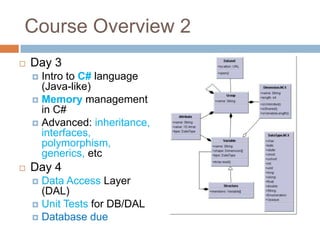
   Day 3
     Intro to C# language
      (Java-like)
     Memory management
      in C#
     Advanced: inheritance,
      interfaces,
      polymorphism,
      generics, etc
   Day 4
     Data Access Layer
      (DAL)
     Unit Tests for DB/DAL
     Database due
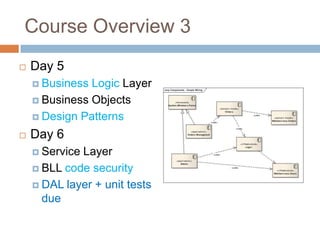
Course Overview 3
   Day 5
     Business Logic Layer
     Business Objects

     Design Patterns

   Day 6
     ServiceLayer
     BLL code security

     DAL layer + unit tests
      due
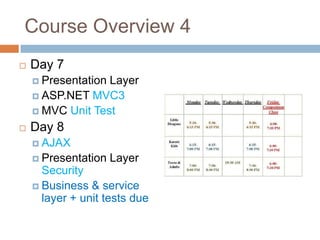
Course Overview 4
   Day 7
     PresentationLayer
     ASP.NET MVC3
     MVC Unit Test

   Day 8
     AJAX
     Presentation   Layer
      Security
     Business & service
      layer + unit tests due
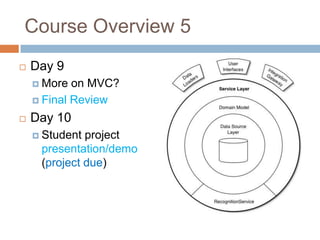
Course Overview 5
   Day 9
     More  on MVC?
     Final Review

   Day 10
     Student project
     presentation/demo
     (project due)
Assignment Options
   Course Registration
       Register classes online
   Library System
       Check-in, checkout books.
   Room/board management system
       Tenants, available rooms.
   Parking Management
       A, B, S parking, violations, payment received
   Cable subscribers
       Customers subscribe to cable TV packages
   E-commerce
       Category, products, purchases, fulfillments
   From CSE 132A DB project
   Think of a ―FLOW‖ of transactions/activities
Course Registration Project example

   Allow administrators to manage courses
     ex: Add/update course descriptions
     ex: Add/update Course plan

   Allow students to view courses offered
   Allow students to add courses
     ex: Enforce Pre-req rule
     ex: Enforce class size

   Allow students to drop classes         These features would be
                                           enough for a group of 3-4
     ex:   Enforce drop before deadline
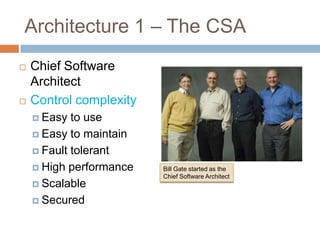
Architecture 1 – The CSA
   Chief Software
    Architect
   Control complexity
     Easy  to use
     Easy to maintain

     Fault tolerant

     High performance   Bill Gate started as the
                         Chief Software Architect
     Scalable

     Secured
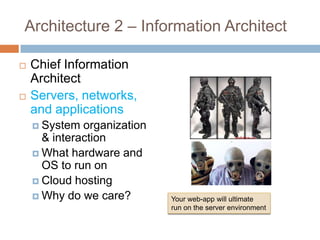
Architecture 2 – Information Architect

   Chief Information
    Architect
   Servers, networks,
    and applications
     System  organization
      & interaction
     What hardware and
      OS to run on
     Cloud hosting
     Why do we care?        Your web-app will ultimate
                             run on the server environment
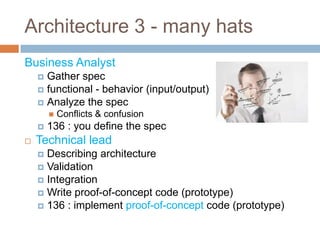
Architecture 3 - many hats
Business Analyst
     Gather spec
     functional - behavior (input/output)
     Analyze the spec
           Conflicts & confusion
       136 : you define the spec
   Technical lead
     Describing architecture
     Validation
     Integration
     Write proof-of-concept code (prototype)
     136 : implement proof-of-concept code (prototype)
Design Principles and Patterns
   Principles - Do you have principles in your life
   Patterns - Your daily habits shaped by your
    principles
   Why we need Software Design Principles and
    Patterns
       We have bad software
         Inexperience
         Miscommunication (he said, she said)
         Forever-changing Specs
       How to fix this
         Fix the human issue (miscommunication)
         Design Principles and Patterns
         Iterative process
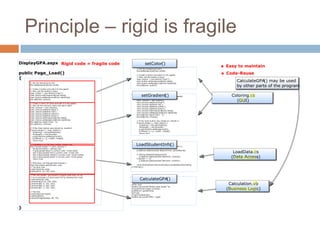
Principle – rigid is fragile
Principle – separation of
concerns
   In Enterprise Application Development
     GUI   developers can start on asp.net/HTML/CSS
      code without data
     Business Logic developers can start designing
      and writing code for GPA calculations (A+, B-
      , P, I, etc)
     Database Design can start data storage design

     Each team can work independently without
      affecting other team.
     Integration : Data Transfer Object
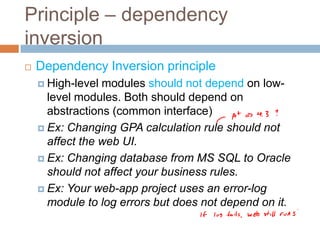
Principle – dependency
inversion
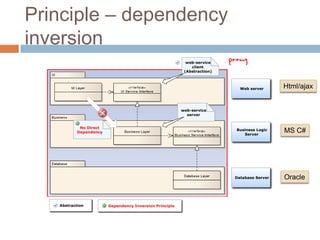
   Dependency Inversion principle
     High-level modules should not depend on low-
      level modules. Both should depend on
      abstractions (common interface)
     Ex: Changing GPA calculation rule should not
      affect the web UI.
     Ex: Changing database from MS SQL to Oracle
      should not affect your business rules.
     Ex: Your web-app project uses an error-log
      module to log errors but does not depend on it.
Principle – dependency
inversion

                         Html/ajax


                         MS C#


                         Oracle
From Design Principle to OO Design

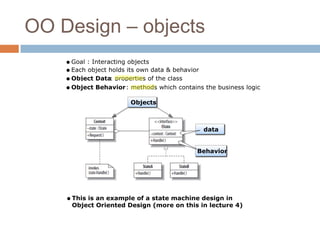
   Object-Oriented Design - a design method to
    achieve the design principles:
     Single Responsibility Object
     Object Definition

     Object Interaction

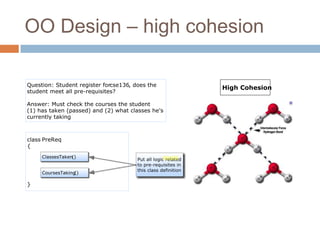
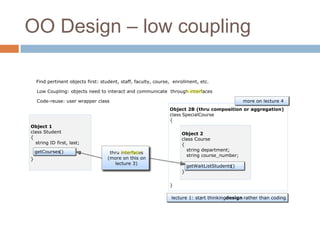
     High cohesion and low coupling

     Open/closed

     Don’t repeat!
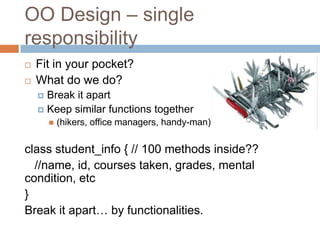
OO Design – single
responsibility
   Fit in your pocket?
   What do we do?
     Break it apart
     Keep similar functions together
           (hikers, office managers, handy-man)

class student_info { // 100 methods inside??
  //name, id, courses taken, grades, mental
condition, etc
}
Break it apart… by functionalities.
OO Design – objects
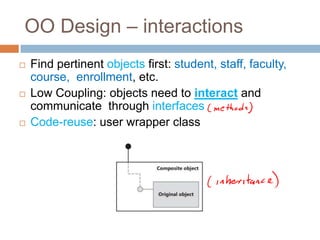
OO Design – interactions
   Find pertinent objects first: student, staff, faculty,
    course, enrollment, etc.
   Low Coupling: objects need to interact and
    communicate through interfaces
   Code-reuse: user wrapper class
OO Design – high cohesion
OO Design – low coupling
OO Design – open/closed
   Open/Closed principle
     Open  for extension but closed for modification.
     Ex: Open for extending a new feature to
      substitute an equivalent course with another for
      graduation purposes.
       Enrollment.SubstituteCourse(student_id,   original_cour
        se_id, sub_course_id)
       Achieve this through inheritance and override
        methods.
       No modification to the original class Enrollment
        definition.
     Experience : more code you modify, the more
     bugs you can create. Close for modification but
     open for extension
OO Design – don’t repeat
   Duplicated logic in two classes.
       Create a new class definition
   Same hard-coded values in your code
       Use constants or put it in configuration file
   ―Switch‖ statements
        If (student_type == ―undergrad‖)
            getUndergradCourses()
        Else if (student_type == ―graduate‖)
            getGradCourses()
        Else if (student_type == ―extension‖)
            getExtCourses()
    Consider using polymorphism (lecture 3)
Transition to Design Patterns
   From basic principles to software design
    patterns (lecture 5)
     Why   office/cubes at work all look similar?
   Software Design Patterns
     Common       good designs in software
       Exercise   is a good pattern in your lifestyle
     Anti-patterns    : common bad/no designs in
     software
       Heavy   drinking is an anti-pattern
   More on Design Pattern in lecture 5
Transition to Architectural
pattern
   From basic principles to software architectural
    patterns
   Architectural Pattern - Early in the course of
    design
     Performance,   security, maintenance, extensibility,
      and testability.
Architectural Patterns - layering
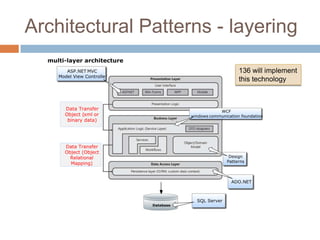
   Layering : Presentation, Service, Business
    Logic, Data Access, and Database.
   Re-usability
   Maintainability
       ex: One place to change the GPA calculation code
   Independent development
   Physical separation - improves performance and
    security
       Keeping the business logic on one computer &
        database on another (physical separation for security)
Architectural Patterns - layering

                         136 will implement
                         this technology
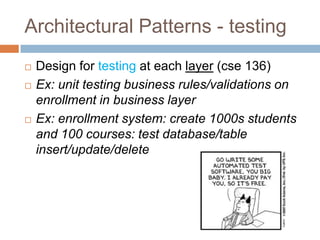
Architectural Patterns - testing
   Design for testing at each layer (cse 136)
   Ex: unit testing business rules/validations on
    enrollment in business layer
   Ex: enrollment system: create 1000s students
    and 100 courses: test database/table
    insert/update/delete
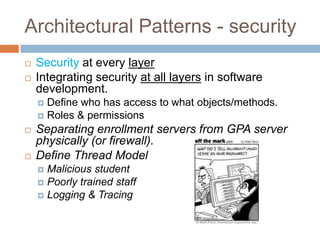
Architectural Patterns - security
   Security at every layer
   Integrating security at all layers in software
    development.
     Define who has access to what objects/methods.
     Roles & permissions
   Separating enrollment servers from GPA server
    physically (or firewall).
   Define Thread Model
     Malicious student
     Poorly trained staff
     Logging & Tracing
Review questions
   When are the projects due?
   Difference between CSA and CIA?
   Difference between principals and patterns?
   What are the design principals?
   What are the OO design principals and how do
    they achieve the overall design principals?
   Difference between OO design principals and
    architectural patterns?
Break time
   Get into a group of Three
   Exchange phone/email
   Decide on a project
CSE 136 - Lecture 1 (Part 2)
   UML
   .NET overview
UML – Unified Modeling Language

   136 will use the following types of UML
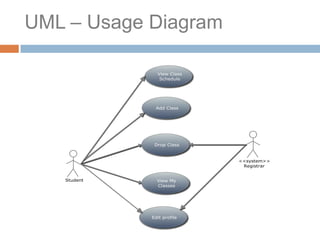
       Usage Case:
           Show users and system interaction
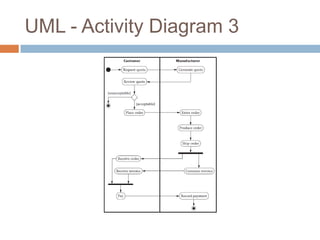
       Activity Diagram:
           To show the ―flow‖ or ―process‖ of user interaction
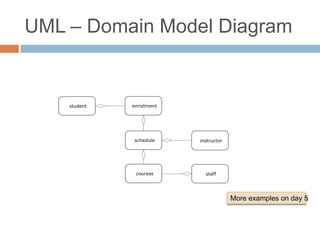
       Domain Entity diagram:
           Define high level entities and relationship
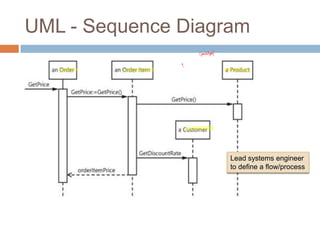
       Sequence Diagram:
           To show the detailed ―flow‖ or ―process‖ between entities
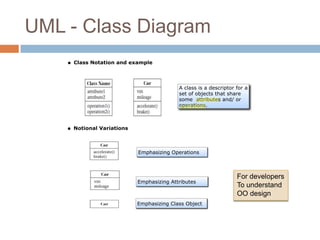
       Class diagram:
           Communicate with developers of your design (more details
            in lecture 5)
UML – Usage Diagram
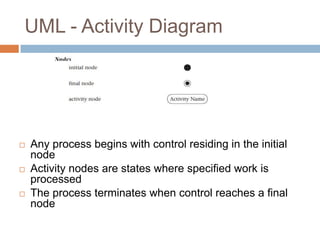
UML - Activity Diagram


   Any process begins with control residing in the initial
    node
   Activity nodes are states where specified work is
    processed
   The process terminates when control reaches a final
    node
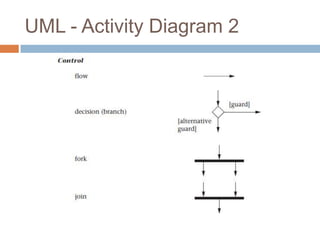
UML - Activity Diagram 2
UML - Activity Diagram 3
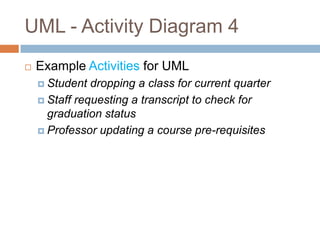
UML - Activity Diagram 4
   Example Activities for UML
     Student  dropping a class for current quarter
     Staff requesting a transcript to check for
      graduation status
     Professor updating a course pre-requisites
UML – Domain Model Diagram


                   More examples on day 5
UML - Sequence Diagram


                    Lead systems engineer
                    to define a flow/process
UML - Class Diagram


                      For developers
                      To understand
                      OO design
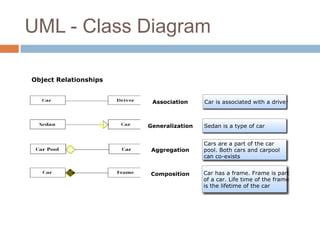
UML - Class Diagram
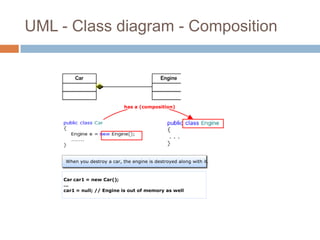
UML - Class diagram - Composition
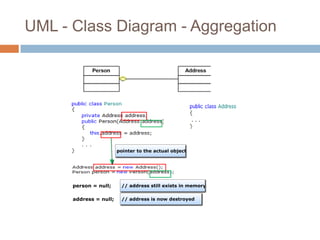
UML - Class Diagram - Aggregation
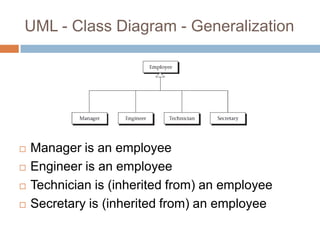
UML - Class Diagram - Generalization


   Manager is an employee
   Engineer is an employee
   Technician is (inherited from) an employee
   Secretary is (inherited from) an employee
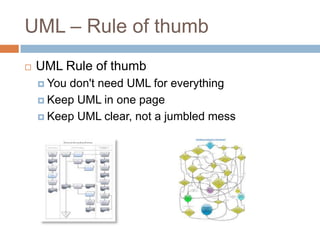
UML – Rule of thumb
   UML Rule of thumb
     Youdon't need UML for everything
     Keep UML in one page

     Keep UML clear, not a jumbled mess
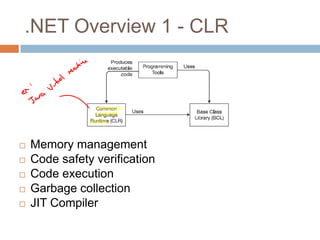
.NET Overview 1 - CLR


   Memory management
   Code safety verification
   Code execution
   Garbage collection
   JIT Compiler
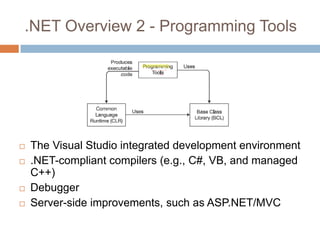
.NET Overview 2 - Programming Tools


   The Visual Studio integrated development environment
   .NET-compliant compilers (e.g., C#, VB, and managed
    C++)
   Debugger
   Server-side improvements, such as ASP.NET/MVC
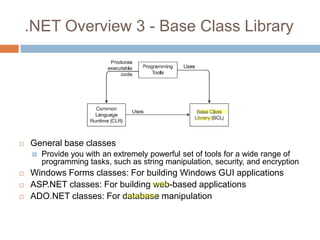
.NET Overview 3 - Base Class Library


   General base classes
       Provide you with an extremely powerful set of tools for a wide range of
        programming tasks, such as string manipulation, security, and encryption
   Windows Forms classes: For building Windows GUI applications
   ASP.NET classes: For building web-based applications
   ADO.NET classes: For database manipulation
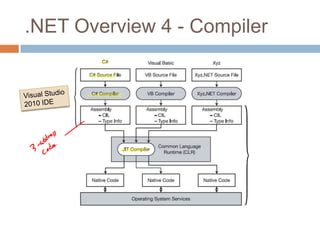
.NET Overview 4 - Compiler
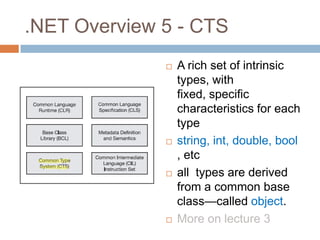
.NET Overview 5 - CTS
                 A rich set of intrinsic
                  types, with
                  fixed, specific
                  characteristics for each
                  type
                 string, int, double, bool
                  , etc
                 all types are derived
                  from a common base
                  class—called object.
                 More on lecture 3
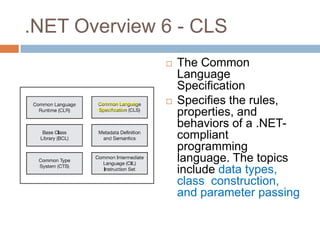
.NET Overview 6 - CLS
                 The Common
                  Language
                  Specification
                 Specifies the rules,
                  properties, and
                  behaviors of a .NET-
                  compliant
                  programming
                  language. The topics
                  include data types,
                  class construction,
                  and parameter passing
Review questions
   What are the five UML diagrams 136 are
    focusing on?
   What is the difference between composition
    and aggregation?
   What is CLR?
   What is BCL?
   What is CTS?
Today's assignment
   Due Day 2
       Create specification for what features you will implement for the
        demo.
       Create one ACTIVITY UML diagram for your project
           Ex: What is the process for staff to create a course plan for next
            quarter? What is the detail process of a student register for classes?
   Due Day 3: Setup your IDE
       Download & install VS 2010 + SP1 & create the layer projects
       Download & install MVC 3.0
       Install SQL 2008 Express & SP & Management Studio & create a
        simple database "cse136"
       Setup a simple .aspx web page in VS 2010
       Create a simple table in SQL 2008 Express (or Dev edition)
       Show that you can retrieve simple data from SQL and display on
        webpage (search Google for example)
References
   .NET : Architecting Applications for the
    Enterprise
   UML 2.0 in a Nutshell

Day1

  • 1.
    CSE 136 -Lecture 1 (Part 1)  Enterprise-class Web Applications  Design and implementation Prototype  Large scale web-based applications  Software web-architecture  Presented by Isaac Chu
  • 2.
    Today's lecture  Administration  Overview of this course  Assignment (project-based)  Enterprise Software Architecture  Architectural Design Patterns & Principles  Object-oriented Design  Architectural Pattern  UML  .NET Overview
  • 3.
    Administration Group of 3  Assignment : one project  Grading  One project (70%)  Final exam (30%)  TA  Melvin Go melvin@melrose27.com M/W: 530- 830pm  Professor  Isaac Chu ichu@cs.ucsd.edu  Mobile office & by appointment on weekends
  • 4.
    Course Overview 1  Day 1  Projects  Architectural Principles and Pattern, UML  Intro to .NET architecture  Day 2  Database Design  Database Security  Enterprise Database Architecture
  • 5.
    Course Overview 2  Day 3  Intro to C# language (Java-like)  Memory management in C#  Advanced: inheritance, interfaces, polymorphism, generics, etc  Day 4  Data Access Layer (DAL)  Unit Tests for DB/DAL  Database due
  • 6.
    Course Overview 3  Day 5  Business Logic Layer  Business Objects  Design Patterns  Day 6  ServiceLayer  BLL code security  DAL layer + unit tests due
  • 7.
    Course Overview 4  Day 7  PresentationLayer  ASP.NET MVC3  MVC Unit Test  Day 8  AJAX  Presentation Layer Security  Business & service layer + unit tests due
  • 8.
    Course Overview 5  Day 9  More on MVC?  Final Review  Day 10  Student project presentation/demo (project due)
  • 9.
    Assignment Options  Course Registration  Register classes online  Library System  Check-in, checkout books.  Room/board management system  Tenants, available rooms.  Parking Management  A, B, S parking, violations, payment received  Cable subscribers  Customers subscribe to cable TV packages  E-commerce  Category, products, purchases, fulfillments  From CSE 132A DB project  Think of a ―FLOW‖ of transactions/activities
  • 10.
    Course Registration Projectexample  Allow administrators to manage courses  ex: Add/update course descriptions  ex: Add/update Course plan  Allow students to view courses offered  Allow students to add courses  ex: Enforce Pre-req rule  ex: Enforce class size  Allow students to drop classes These features would be enough for a group of 3-4  ex: Enforce drop before deadline
  • 11.
    Architecture 1 –The CSA  Chief Software Architect  Control complexity  Easy to use  Easy to maintain  Fault tolerant  High performance Bill Gate started as the Chief Software Architect  Scalable  Secured
  • 12.
    Architecture 2 –Information Architect  Chief Information Architect  Servers, networks, and applications  System organization & interaction  What hardware and OS to run on  Cloud hosting  Why do we care? Your web-app will ultimate run on the server environment
  • 13.
    Architecture 3 -many hats Business Analyst  Gather spec  functional - behavior (input/output)  Analyze the spec  Conflicts & confusion  136 : you define the spec  Technical lead  Describing architecture  Validation  Integration  Write proof-of-concept code (prototype)  136 : implement proof-of-concept code (prototype)
  • 14.
    Design Principles andPatterns  Principles - Do you have principles in your life  Patterns - Your daily habits shaped by your principles  Why we need Software Design Principles and Patterns  We have bad software  Inexperience  Miscommunication (he said, she said)  Forever-changing Specs  How to fix this  Fix the human issue (miscommunication)  Design Principles and Patterns  Iterative process
  • 15.
  • 16.
    Principle – separationof concerns  In Enterprise Application Development  GUI developers can start on asp.net/HTML/CSS code without data  Business Logic developers can start designing and writing code for GPA calculations (A+, B- , P, I, etc)  Database Design can start data storage design  Each team can work independently without affecting other team.  Integration : Data Transfer Object
  • 17.
    Principle – dependency inversion  Dependency Inversion principle  High-level modules should not depend on low- level modules. Both should depend on abstractions (common interface)  Ex: Changing GPA calculation rule should not affect the web UI.  Ex: Changing database from MS SQL to Oracle should not affect your business rules.  Ex: Your web-app project uses an error-log module to log errors but does not depend on it.
  • 18.
  • 19.
    From Design Principleto OO Design  Object-Oriented Design - a design method to achieve the design principles:  Single Responsibility Object  Object Definition  Object Interaction  High cohesion and low coupling  Open/closed  Don’t repeat!
  • 20.
    OO Design –single responsibility  Fit in your pocket?  What do we do?  Break it apart  Keep similar functions together  (hikers, office managers, handy-man) class student_info { // 100 methods inside?? //name, id, courses taken, grades, mental condition, etc } Break it apart… by functionalities.
  • 21.
  • 22.
    OO Design –interactions  Find pertinent objects first: student, staff, faculty, course, enrollment, etc.  Low Coupling: objects need to interact and communicate through interfaces  Code-reuse: user wrapper class
  • 23.
    OO Design –high cohesion
  • 24.
    OO Design –low coupling
  • 25.
    OO Design –open/closed  Open/Closed principle  Open for extension but closed for modification.  Ex: Open for extending a new feature to substitute an equivalent course with another for graduation purposes.  Enrollment.SubstituteCourse(student_id, original_cour se_id, sub_course_id)  Achieve this through inheritance and override methods.  No modification to the original class Enrollment definition.  Experience : more code you modify, the more bugs you can create. Close for modification but open for extension
  • 26.
    OO Design –don’t repeat  Duplicated logic in two classes.  Create a new class definition  Same hard-coded values in your code  Use constants or put it in configuration file  ―Switch‖ statements If (student_type == ―undergrad‖) getUndergradCourses() Else if (student_type == ―graduate‖) getGradCourses() Else if (student_type == ―extension‖) getExtCourses() Consider using polymorphism (lecture 3)
  • 27.
    Transition to DesignPatterns  From basic principles to software design patterns (lecture 5)  Why office/cubes at work all look similar?  Software Design Patterns  Common good designs in software  Exercise is a good pattern in your lifestyle  Anti-patterns : common bad/no designs in software  Heavy drinking is an anti-pattern  More on Design Pattern in lecture 5
  • 28.
    Transition to Architectural pattern  From basic principles to software architectural patterns  Architectural Pattern - Early in the course of design  Performance, security, maintenance, extensibility, and testability.
  • 29.
    Architectural Patterns -layering  Layering : Presentation, Service, Business Logic, Data Access, and Database.  Re-usability  Maintainability  ex: One place to change the GPA calculation code  Independent development  Physical separation - improves performance and security  Keeping the business logic on one computer & database on another (physical separation for security)
  • 30.
    Architectural Patterns -layering 136 will implement this technology
  • 31.
    Architectural Patterns -testing  Design for testing at each layer (cse 136)  Ex: unit testing business rules/validations on enrollment in business layer  Ex: enrollment system: create 1000s students and 100 courses: test database/table insert/update/delete
  • 32.
    Architectural Patterns -security  Security at every layer  Integrating security at all layers in software development.  Define who has access to what objects/methods.  Roles & permissions  Separating enrollment servers from GPA server physically (or firewall).  Define Thread Model  Malicious student  Poorly trained staff  Logging & Tracing
  • 33.
    Review questions  When are the projects due?  Difference between CSA and CIA?  Difference between principals and patterns?  What are the design principals?  What are the OO design principals and how do they achieve the overall design principals?  Difference between OO design principals and architectural patterns?
  • 34.
    Break time  Get into a group of Three  Exchange phone/email  Decide on a project
  • 35.
    CSE 136 -Lecture 1 (Part 2)  UML  .NET overview
  • 36.
    UML – UnifiedModeling Language  136 will use the following types of UML  Usage Case:  Show users and system interaction  Activity Diagram:  To show the ―flow‖ or ―process‖ of user interaction  Domain Entity diagram:  Define high level entities and relationship  Sequence Diagram:  To show the detailed ―flow‖ or ―process‖ between entities  Class diagram:  Communicate with developers of your design (more details in lecture 5)
  • 37.
  • 38.
    UML - ActivityDiagram  Any process begins with control residing in the initial node  Activity nodes are states where specified work is processed  The process terminates when control reaches a final node
  • 39.
    UML - ActivityDiagram 2
  • 40.
    UML - ActivityDiagram 3
  • 41.
    UML - ActivityDiagram 4  Example Activities for UML  Student dropping a class for current quarter  Staff requesting a transcript to check for graduation status  Professor updating a course pre-requisites
  • 42.
    UML – DomainModel Diagram More examples on day 5
  • 43.
    UML - SequenceDiagram Lead systems engineer to define a flow/process
  • 44.
    UML - ClassDiagram For developers To understand OO design
  • 45.
    UML - ClassDiagram
  • 46.
    UML - Classdiagram - Composition
  • 47.
    UML - ClassDiagram - Aggregation
  • 48.
    UML - ClassDiagram - Generalization  Manager is an employee  Engineer is an employee  Technician is (inherited from) an employee  Secretary is (inherited from) an employee
  • 49.
    UML – Ruleof thumb  UML Rule of thumb  Youdon't need UML for everything  Keep UML in one page  Keep UML clear, not a jumbled mess
  • 50.
    .NET Overview 1- CLR  Memory management  Code safety verification  Code execution  Garbage collection  JIT Compiler
  • 51.
    .NET Overview 2- Programming Tools  The Visual Studio integrated development environment  .NET-compliant compilers (e.g., C#, VB, and managed C++)  Debugger  Server-side improvements, such as ASP.NET/MVC
  • 52.
    .NET Overview 3- Base Class Library  General base classes  Provide you with an extremely powerful set of tools for a wide range of programming tasks, such as string manipulation, security, and encryption  Windows Forms classes: For building Windows GUI applications  ASP.NET classes: For building web-based applications  ADO.NET classes: For database manipulation
  • 53.
    .NET Overview 4- Compiler
  • 54.
    .NET Overview 5- CTS  A rich set of intrinsic types, with fixed, specific characteristics for each type  string, int, double, bool , etc  all types are derived from a common base class—called object.  More on lecture 3
  • 55.
    .NET Overview 6- CLS  The Common Language Specification  Specifies the rules, properties, and behaviors of a .NET- compliant programming language. The topics include data types, class construction, and parameter passing
  • 56.
    Review questions  What are the five UML diagrams 136 are focusing on?  What is the difference between composition and aggregation?  What is CLR?  What is BCL?  What is CTS?
  • 57.
    Today's assignment  Due Day 2  Create specification for what features you will implement for the demo.  Create one ACTIVITY UML diagram for your project  Ex: What is the process for staff to create a course plan for next quarter? What is the detail process of a student register for classes?  Due Day 3: Setup your IDE  Download & install VS 2010 + SP1 & create the layer projects  Download & install MVC 3.0  Install SQL 2008 Express & SP & Management Studio & create a simple database "cse136"  Setup a simple .aspx web page in VS 2010  Create a simple table in SQL 2008 Express (or Dev edition)  Show that you can retrieve simple data from SQL and display on webpage (search Google for example)
  • 58.
    References  .NET : Architecting Applications for the Enterprise  UML 2.0 in a Nutshell