ExperienceDesignPortfolio
UI . UX . Product Design
David Shastry
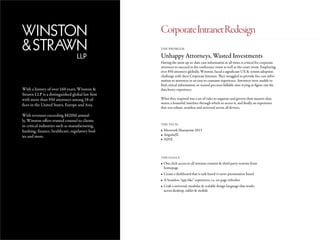
With a history of over 160 years, Winston &
Strawn LLP is a distinguished global law firm
with more than 850 attorneys among 18 of-
fices in the United States, Europe and Asia.
With revenues exceeding $820M annual-
ly, Winston offers trusted counsel to clients
in critical industries such as manufacturing,
banking, finance, healthcare, regulatory bod-
ies and more.
Unhappy Attorneys, Wasted Investments
THE PROBLEM
THE TECH
THE GOALS
Having the most up-to-date case information at all times is critical for corporate
attorneys to succeed in the conference room as well as the court room. Employing
over 850 attorneys globally, Winston, faced a significant UX & system adoption
challenge with their Corporate Intranet. They struggled to provide live case infor-
mation to attorneys in an easy to consume experience. Attorneys were unable to
find critical information, or wasted precious billable time trying to figure out the
data heavy experience.
What they required was a set of rules to organize and govern their massive data
stores, a beautiful interface through which to access it, and finally an experience
that was robust, seamless and universal across all devices.
•	Microsoft Sharepoint 2013
•	AngularJS
•	AJAX
•	One click access to all intranet content & third party systems from
homepage
•	Create a dashboard that is task based vs news presentation based
•	A Seamless “app-like” experience, i.e. no page refreshes
•	Craft a universal, modular & scalable design language that works
across desktop, tablet & mobile
CorporateIntranetRedesign
TheProcess-UX
1. INITIAL STATE
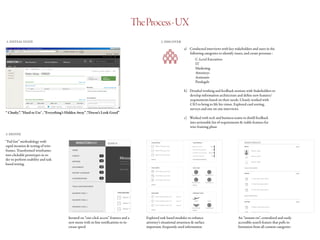
“ Clunky”, “Hard to Use’ , “Everything’s Hidden Away” ,“Doesn’t Look Good”
2. DISCOVER
a)	 Conducted interviews with key stakeholders and users in the 	
following categories to identify issues, and create personas :
		C-Level Executives
		IT
		Marketing
		Attorneys
		Assistants
		Paralegals
b)	 Detailed working and feedback sessions with Stakeholders to
develop information architecture and define new features/
requirements based on their needs. Closely worked with
CIO to bring to life his vision. Explored card sorting,
surveys and one on one interviews.
c)	 Worked with tech and business teams to distill feedback
into actionable list of requirements & viable features for
wire-framing phase
3. DEFINE
Iterated on “one-click access” features and a
new menu with in-line notifications to in-
crease speed
Explored task based modules to enhance
attorney’s situational awareness & surface
important, frequently used information
An “instant-on”, centralized and easily
accessible search feature that pulls in-
formation from all content categories
“Fail fast” methodology with
rapid iteration & testing of wire-
frames. Transformed wireframes
into clickable prototypes in or-
der to perform usability and task
based testing.
TheProcess-Design
1. DEFINE STYLE 3. COMPILE & CREATE LAYOUTS
2. DEVELOP MODULES
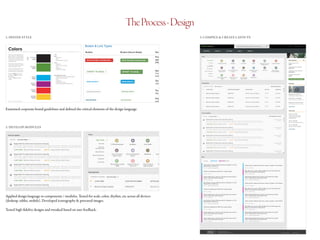
Examined corporate brand guidelines and defined the critical elements of the design language
Applied design language to components / modules. Tested for scale, color, rhythm, etc across all devices
(desktop, tablet, mobile). Developed iconography & procured images.
Tested high-fidelity designs and tweaked based on user feedback.
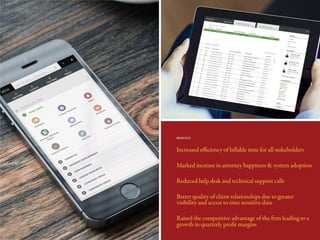
Increased efficiency of billable time for all stakeholders
Marked increase in attorney happiness & system adoption
Reduced help desk and technical support calls
Better quality of client relationships due to greater
visibility and access to time sensitive data
Raised the competitive advantage of the firm leading to a
growth in quarterly profit margins
RESULTS
SomeOtherLegalClientsI’veHelpedWithThisApproach
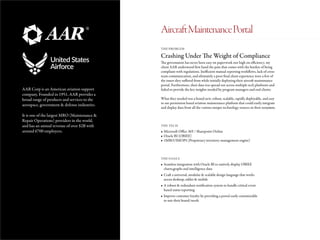
AAR Corp is an American aviation support
company. Founded in 1951, AAR provides a
broad range of products and services to the
aerospace, government & defense industries.
It is one of the largest MRO (Maintenance &
Repair Operations) providers in the world,
and has an annual revenue of over $2B with
around 6700 employees.
Crashing Under The Weight of Compliance
THE PROBLEM
THE TECH
THE GOALS
The government has never been easy on paperwork nor high on efficiency; my
client AAR understood first hand the pain that comes with the burden of being
compliant with regulations. Inefficient manual reporting workflows, lack of cross-
team communication, and ultimately a poor final client experience were a few of
the issues they suffered from while initially deploying their aircraft maintenance
portal. Furthermore, their data was spread out across multiple tech platforms and
failed to provide the key insights needed by program managers and end clients.
What they needed was a brand new, robust, scalable, rapidly deployable, and easy
to use permission based aviation maintenance platform that could easily integrate
and display data from all the various unique technology sources in their ecosystem.
•	Microsoft Office 365 / Sharepoint Online
•	Oracle BI (OBIEE)
•	1MRO/IMOPS (Proprietary inventory management engine)
•	Seamless integration with Oracle BI to natively display OBIEE
charts,graphs and intelligence data
•	Craft a universal, modular & scalable design language that works
across desktop, tablet & mobile
•	A robust & redundant notification system to handle critical event
based status reporting
•	Improve customer loyalty by providing a portal easily customizable
to suit their brand/needs
AircraftMaintenancePortal
TheProcess-UX
1. INITIAL STATE
“Highly manual process” , “Limited visibility on fleet status” , “Compliance is resource intensive”
2. DISCOVER
a)	 Reviewed government defined compliance regulations and
led discussions to gather key project requirements with:
		C-Level Executives
		 IT / Systems Integrations Teams
		Marketing
		 Aviation Subject Matter Experts
		 Defense Subject Matter Experts
		 Government Contract Subject Matter Experts
b)	 Detailed working and feedback sessions with Stakeholders to
identify minimum features and outline compliance plans.
Collaborated on interviewing and documenting sessions.
c)	 Advised SME’s, client and tech teams to distill feedback
into actionable plans for a 45 day minimum viable product
go live plan
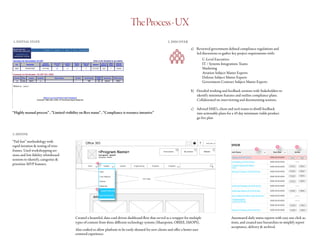
3. DEFINE
Created a beautiful, data-card driven dashboard flow that served as a wrapper for multiple
types of content from three different technology systems (Sharepoint, OBIEE, IMOPS).
Also crafted to allow platform to be easily skinned for new clients and offer a better user
centered experience.
Automated daily status reports with easy one click ac-
tions, and created user hierarchies to simplify report
acceptance, delivery & archival.
“Fail fast” methodology with
rapid iteration & testing of wire-
frames. Used workshopping ses-
sions and low fidelity whiteboard
sessions to identify, categorize &
prioritize MVP features.
TheProcess-Design
1. DEFINE STYLE 3. COMPILE & CREATE LAYOUTS
2. DESIGN CARDS
The AAR logo is a single element made up of two parts
— a symbol (a set of stylized arrows that form an abstract
turbine engine) and the AAR text.
The AAR logo should always be used as a complete unit.
Always keep the symbol and text together and retain its
approved form.
Camera-ready artwork and electronic files are available
through Corporate Communications. Under certain
approved circumstances, variations of the logo are
allowed. Any variation must reviewed and approved
by Corp Comm at corpcomm@aarcorp.com.
The AAR logo should be positioned away from distracting
design elements. It should be distinct — not part of a larger
design element or pattern.
The area of isolation surrounds the entire logo, and should
be equal to 1/2 the cap height of the logotype. The area
of isolation does not refer to page limitations but to other
graphic and typographic elements (excluding address).
APPROVED COLOR COMBINATIONS
CORPORATE SIGNATURE
Pantone®
542
CMYK: C50/M15/Y0/K5
SWOP: DS 22-5C
RGB: R91/G151/B200
Web: 5B97C8
20% K
Pantone®
542 & Black
Black logos should only be
placed on colors with a value
less than 30% black.
2-color logos should only be
placed on colors with a value
less than 20% black.
White logos can be placed
on any color background
with a value greater than
40% black.
Black
Symbol AAR Text
PMS 877 White
The “safety zone” shown in gray.
The “safety zone” is 1/2 the cap height of the AAR logotype.
APPROVED LOGO COLORS
AREA OF ISOLATION
The AAR corporate signature should be placed on
values that make the logo easy to read.
PLACING THE LOGO ON BACKGROUND COLORS
Black
CMYK: C0/M0/Y0/K100
RGB: R0/G0/B0
Web: 000000
White
CMYK: C0/M0/Y0/K0
RGB: R255/G255/G255
PMS 877 (Metallic Silver)
CMYK: C42/M32/Y32/K0
RGB: R134/G142/B148
30% K 40% K
X
X
XX
Always keep the logo
elements together.
The size of the individual
logo elements should
always remain the same.
Always keep the position of
individual logo elements
the same.
Always keep the position of
individual logo elements
the same.
Always use only one back-
ground color for the logo.
Always place the logo on
a plain (non-patterned)
background.
Always keep the logo straight. Always retain the color of
the logo elements.
Always place the 2-color logo
on backgrounds with values less
than 20% black.
Always place the white logo
on backgrounds with values
greater than 40% black.
Always maintain the original
logo proportions.
Always keep accepted logo
colors separate. Only use
the four approved logo color
versions.
Always keep the white version of
the logo un-outlined.
Always keep elements or text
out of the safety area.
CORRECT LOGO USAGE
c
For copies of the logo request, please contact Corp Comm at corpcomm@aarcorp.com
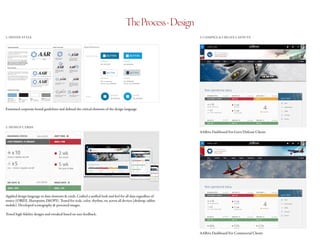
Examined corporate brand guidelines and defined the critical elements of the design language
AARive Dashboard For Govt/Defense Clients
AARive Dashboard For Commercial Clients
Applied design language to data elements & cards. Crafted a unified look and feel for all data regardless of
source (OBIEE, Sharepoint, IMOPS). Tested for scale, color, rhythm, etc across all devices (desktop, tablet,
mobile). Developed iconography & procured images.
Tested high-fidelity designs and tweaked based on user feedback.
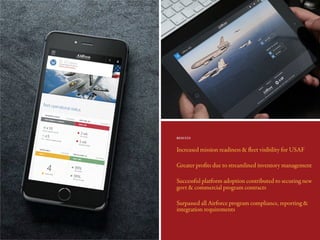
Increased mission readiness & fleet visibility for USAF
Greater profits due to streamlined inventory management
Successful platform adoption contributed to securing new
govt & commercial program contracts
Surpassed all Airforce program compliance, reporting &
integration requirements
RESULTS
SomeOtherGovernmentClientsI’veHelpedWithThisApproach
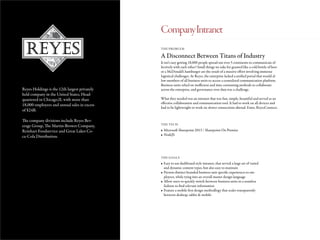
Reyes Holdings is the 12th largest privately
held company in the United States, Head-
quartered in Chicago,IL with more than
18,000 employees and annual sales in excess
of $24B.
The company divisions include Reyes Bev-
erage Group, The Martin-Brower Company,
Reinhart Foodservice and Great Lakes Co-
ca-Cola Distribution.
A Disconnect Between Titans of Industry
THE PROBLEM
THE TECH
THE GOALS
It isn’t easy getting 18,000 people spread out over 5 continents to communicate ef-
fectively with each other! Small things we take for granted like a cold bottle of beer
or a McDonald’s hamburger are the result of a massive effort involving immense
logistical challenges. At Reyes, the enterprise lacked a unified portal that would al-
low members of all business units to access a centralized communication platform.
Business units relied on inefficient and time consuming methods to collaborate
across the enterprise, and governance over data was a challenge.
What they needed was an intranet that was fast, simple, beautiful and served as an
effective collaboration and communication tool. It had to work on all devices and
had to be lightweight to work on slower connections abroad. Enter, ReyesConnect.
•	Microsoft Sharepoint 2013 / Sharepoint On Premise
•	NodeJS
•	Easy to use dashboard style intranet, that served a large set of varied
and dynamic content types, but also easy to maintain
•	Present distinct branded business unit specific experiences to em-
ployees, while tying into an overall master design language
•	Allow users to quickly switch between business units in a seamless
fashion to find relevant information
•	Feature a mobile first design methodlogy that scales transparently
between desktop, tablet & mobile
CompanyIntranet
TheProcess-UX
1. INITIAL STATE
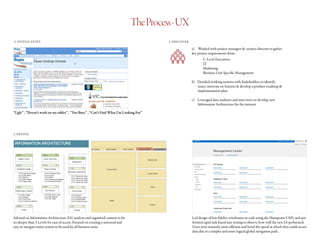
“Ugly” , “Doesn’t work on my tablet” , “Too Busy” , “Can’t Find What I’m Looking For”
2. DISCOVER
a)	 Worked with project managers & creative director to gather
key project requirements from:
		C-Level Executives
		IT
		Marketing
		 Business Unit Specific Management
b)	 Detailed working sessions with Stakeholders to identify
issues, innovate on features & develop a product roadmap &
implementation plan
c)	 Leveraged data analytics and interviews to develop new
Information Architecture for the intranet
3. DEFINE
Advised on Information Architecture (IA) analysis and organized content to be
no deeper than 3 Levels for ease of access. Focused on creating a universal and
easy to navigate menu system to be used by all business units.
Led design of low fidelity wireframes in code using the Sharepoint CMS, and per-
formed rapid task based user testing to observe how well the new IA performed.
Users were instantly more efficient and loved the speed at which they could access
data due to a simpler and more logical global navigation path.
TheProcess-Design
1. DEFINE STYLE 3. COMPILE & CREATE LAYOUTS
2. DESIGN MASTER THEME & WEBPARTS/DATA MODULES
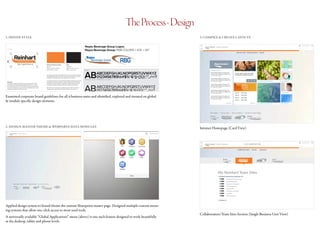
Examined corporate brand guidelines for all 4 business units and identified, explored and iterated on global
& module specific design elements.
Intranet Homepage (Card View)
Collaboration/Team Sites Section (Single Business Unit View)
Applied design system to brand/theme the custom Sharepoint master page. Designed multiple custom menu-
ing systems that allow one-click access to most used tools.
A universally available “Global Applications” menu (above) is one such feature designed to work beautifully
at the desktop, tablet and phone levels.
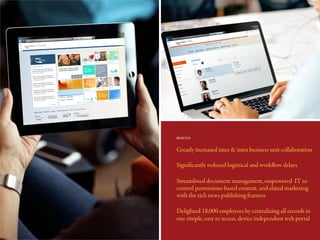
Greatly increased inter & intra business unit collaboration
Significantly reduced logistical and workflow delays
Streamlined document management, empowered IT to
control permissions based content, and elated marketing
with the rich news publishing features
Delighted 18,000 employees by centralizing all records in
one simple, easy to access, device independent web portal
RESULTS
SomeOtherManufacturingClientsI’veHelpedWithThisApproach
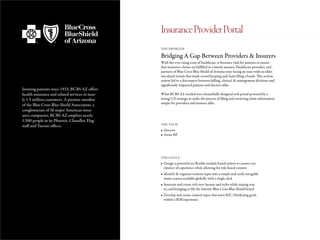
Insuring patients since 1933, BCBS AZ offers
health insurance and related services to near-
ly 1.5 million customers. A premier member
of the Blue Cross Blue Shield Association, a
conglomerate of 36 major American insur-
ance companies, BCBS AZ employs nearly
1,500 people in its Phoenix, Chandler, Flag-
staff and Tucson offices.
Bridging A Gap Between Providers & Insurers
THE PROBLEM
THE TECH
THE GOALS
With the ever rising costs of healthcare, it becomes vital for patients to ensure
that insurance claims are fulfilled in a timely manner. Healthcare providers and
partners of Blue Cross Blue Shield of Arizona were facing an issue with an older
out-dated system that made record keeping and claim filing a hassle. This archaic
system led to a disconnect between billing, clerical, & management divisions and
significantly impacted patients and doctors alike.
What BCBS AZ needed was a beautifully designed web portal powered by a
strong UX strategy to make the process of filing and retrieving claim information
simple for providers and insurers alike.
•	Sitecore
•	Axure RP
•	Design a powerful yet flexible module based system to ensure con-
sistency of experience while allowing for role based content
•	Identify & organize content types into a simple and easily navigable
menu system available globally with a single click
•	Innovate and create rich new layouts and styles while staying true
to, and bringing to life the historic Blue Cross Blue Shield brand
•	Develop and create content types that meet B2C/Marketing goals
within a B2B experience
InsuranceProviderPortal
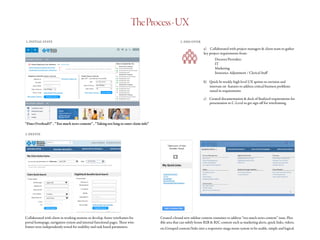
TheProcess-UX
1. INITIAL STATE
“Data Overload!!” , “Too much news content” , “Taking too long to enter claim info”
2. DISCOVER
a)	 Collaborated with project managers & client team to gather
key project requirements from:
		Doctors/Providers
		IT
		Marketing
		 Insurance Adjustment / Clerical Staff
b)	 Quick bi-weekly high level UX sprints to envision and
innovate on features to address critical business problems
raised in requirements
c)	 Created documentation & deck of finalized requirements for
presentation to C-Level to get sign off for wireframing
3. DEFINE
Collaborated with client in working sessions to develop Axure wireframes for
portal homepage, navigation system and internal functional pages. These wire-
frames were independently tested for usability and task based parameters.
Created a brand new sidebar content container to address “too much news content” issue. Flex-
ible area that can subtly house B2B & B2C content such as marketing alerts, quick links, videos,
etc.Grouped content/links into a responsive mega menu system to be usable, simple and logical.
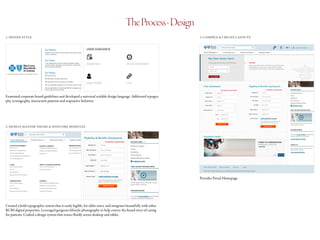
TheProcess-Design
1. DEFINE STYLE 3. COMPILE & CREATE LAYOUTS
2. DESIGN MASTER THEME & SITECORE MODULES
Examined corporate brand guidelines and developed a universal scalable design language. Addressed typogra-
phy, iconography, interaction patterns and responsive behavior.
Provider Portal Homepage
Created a bold typographic system that is easily legible, for older users, and integrates beautifully with other
BCBS digital properties. Leveraged gorgeous lifestyle photography to help convey the brand story of caring
for patients. Crafted a design system that resizes fluidly across desktop and tablet.
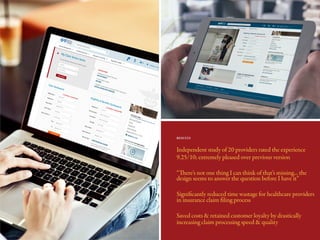
Independent study of 20 providers rated the experience
9.25/10; extremely pleased over previous version
“There’s not one thing I can think of that’s missing... the
design seems to answer the question before I have it”
Significantly reduced time wastage for healthcare providers
in insurance claim filing process
Saved costs & retained customer loyalty by drastically
increasing claim processing speed & quality
RESULTS
SomeOtherHealthcareClientsI’veHelpedWithThisApproach
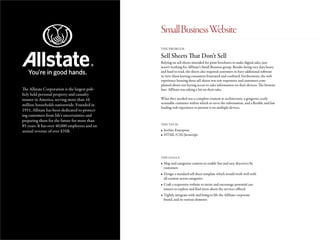
The Allstate Corporation is the largest pub-
licly held personal property and casualty
insurer in America, serving more than 16
million households nationwide. Founded in
1931, Allstate has been dedicated to protect-
ing customers from life’s uncertainties and
preparing them for the future for more than
85 years. It has over 40,000 employees and an
annual revenue of over $35B.
Sell Sheets That Don’t Sell
THE PROBLEM
THE TECH
THE GOALS
Relying on sell sheets intended for print brochures to make digital sales, just
wasn’t working for AllState’s Small Business group. Besides being very data heavy
and hard to read, the sheets also required customers to have additional software
to view them leaving consumers frustrated and confused. Furthermore, the web
experience housing these sell sheets was not responsive and customers com-
plained about not having access to sales information on their devices. The bottom
line: AllState was taking a hit on their sales.
What they needed was a complete content re-architecture, a gorgeous, easily
scannable container within which to serve the information, and a flexible and fast
loading web experience to present it on multiple devices.
•	liveSite Enterprise
•	HTML/CSS/Javascript
•	Map and categorize content to enable fast and easy discovery by
customers
•	Design a standard sell sheet template which would work well with
all content across categories
•	Craft a responsive website to invite and encourage potential cus-
tomers to explore and find more about the services offered
•	Tightly integrate with and bring to life the AllState corporate
brand, and its various elements
SmallBusinessWebsite
TheProcess-UX
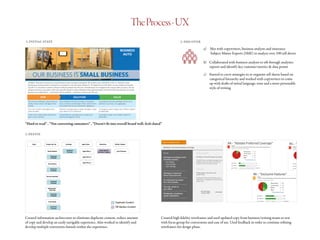
1. INITIAL STATE
“Hard to read” , “Not converting customers” , “Doesn’t fit into overall brand well; feels dated”
2. DISCOVER
a)	 Met with copywriters, business analysts and insurance
Subject Matter Experts (SME) to analyze over 100 sell sheets
b)	 Collaborated with business analysts to sift through analytics
reports and identify key customer metrics & data points
c)	 Started to carve strategies to re-organize sell sheets based on
categorical hierarchy and worked with copywriters to come
up with drafts of initial language, tone and a more personable
style of writing
3. DEFINE
Created information architecture to eliminate duplicate content, reduce amount
of copy and develop an easily navigable experience. Also worked to identify and
develop multiple conversion funnels within the experience.
Created high fidelity wireframes and used updated copy from business/writing teams to test
with focus group for conversions and ease of use. Used feedback in order to continue refining
wireframes for design phase.
TheProcess-Design
1. DEFINE STYLE 3. COMPILE & CREATE LAYOUTS
2. DESIGN MASTER THEME, SELL SHEET LAYOUTS, & ICONS
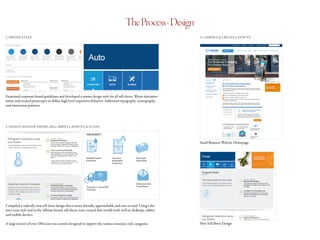
Examined corporate brand guidelines and developed a master design style for all sell sheets. Wrote documen-
tation and created prototypes to define high level responsive behavior. Addressed typography, iconography,
and interaction patterns.
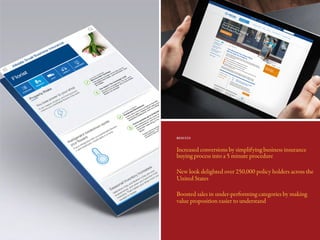
Small Business Website Homepage
New Sell Sheet Design
Compiled a radically new sell sheet design that is more friendly, approachable and easy to read. Using a dis-
tinct icon style tied to the Allstate brand, sell sheets were created that would work well on desktops, tablets
and mobile devices.
A large iconset of over 100 icons was custom designed to support the various insurance risk categories.
Increased conversions by simplifying business insurance
buying process into a 5 minute procedure
New look delighted over 250,000 policy holders across the
United States
Boosted sales in under-performing categories by making
value proposition easier to understand
RESULTS
SomeOtherInsuranceClientsI’veHelpedWithThisApproach
http://www.davidshastry.com
connect@davidshastry.com
https://www.linkedin.com/in/davidshastry
Let’s Talk

David Shastry Experience Design Portfolio

  • 1.
    ExperienceDesignPortfolio UI . UX. Product Design David Shastry
  • 2.
    With a historyof over 160 years, Winston & Strawn LLP is a distinguished global law firm with more than 850 attorneys among 18 of- fices in the United States, Europe and Asia. With revenues exceeding $820M annual- ly, Winston offers trusted counsel to clients in critical industries such as manufacturing, banking, finance, healthcare, regulatory bod- ies and more. Unhappy Attorneys, Wasted Investments THE PROBLEM THE TECH THE GOALS Having the most up-to-date case information at all times is critical for corporate attorneys to succeed in the conference room as well as the court room. Employing over 850 attorneys globally, Winston, faced a significant UX & system adoption challenge with their Corporate Intranet. They struggled to provide live case infor- mation to attorneys in an easy to consume experience. Attorneys were unable to find critical information, or wasted precious billable time trying to figure out the data heavy experience. What they required was a set of rules to organize and govern their massive data stores, a beautiful interface through which to access it, and finally an experience that was robust, seamless and universal across all devices. • Microsoft Sharepoint 2013 • AngularJS • AJAX • One click access to all intranet content & third party systems from homepage • Create a dashboard that is task based vs news presentation based • A Seamless “app-like” experience, i.e. no page refreshes • Craft a universal, modular & scalable design language that works across desktop, tablet & mobile CorporateIntranetRedesign
  • 3.
    TheProcess-UX 1. INITIAL STATE “Clunky”, “Hard to Use’ , “Everything’s Hidden Away” ,“Doesn’t Look Good” 2. DISCOVER a) Conducted interviews with key stakeholders and users in the following categories to identify issues, and create personas : C-Level Executives IT Marketing Attorneys Assistants Paralegals b) Detailed working and feedback sessions with Stakeholders to develop information architecture and define new features/ requirements based on their needs. Closely worked with CIO to bring to life his vision. Explored card sorting, surveys and one on one interviews. c) Worked with tech and business teams to distill feedback into actionable list of requirements & viable features for wire-framing phase 3. DEFINE Iterated on “one-click access” features and a new menu with in-line notifications to in- crease speed Explored task based modules to enhance attorney’s situational awareness & surface important, frequently used information An “instant-on”, centralized and easily accessible search feature that pulls in- formation from all content categories “Fail fast” methodology with rapid iteration & testing of wire- frames. Transformed wireframes into clickable prototypes in or- der to perform usability and task based testing.
  • 4.
    TheProcess-Design 1. DEFINE STYLE3. COMPILE & CREATE LAYOUTS 2. DEVELOP MODULES Examined corporate brand guidelines and defined the critical elements of the design language Applied design language to components / modules. Tested for scale, color, rhythm, etc across all devices (desktop, tablet, mobile). Developed iconography & procured images. Tested high-fidelity designs and tweaked based on user feedback.
  • 5.
    Increased efficiency ofbillable time for all stakeholders Marked increase in attorney happiness & system adoption Reduced help desk and technical support calls Better quality of client relationships due to greater visibility and access to time sensitive data Raised the competitive advantage of the firm leading to a growth in quarterly profit margins RESULTS
  • 6.
  • 7.
    AAR Corp isan American aviation support company. Founded in 1951, AAR provides a broad range of products and services to the aerospace, government & defense industries. It is one of the largest MRO (Maintenance & Repair Operations) providers in the world, and has an annual revenue of over $2B with around 6700 employees. Crashing Under The Weight of Compliance THE PROBLEM THE TECH THE GOALS The government has never been easy on paperwork nor high on efficiency; my client AAR understood first hand the pain that comes with the burden of being compliant with regulations. Inefficient manual reporting workflows, lack of cross- team communication, and ultimately a poor final client experience were a few of the issues they suffered from while initially deploying their aircraft maintenance portal. Furthermore, their data was spread out across multiple tech platforms and failed to provide the key insights needed by program managers and end clients. What they needed was a brand new, robust, scalable, rapidly deployable, and easy to use permission based aviation maintenance platform that could easily integrate and display data from all the various unique technology sources in their ecosystem. • Microsoft Office 365 / Sharepoint Online • Oracle BI (OBIEE) • 1MRO/IMOPS (Proprietary inventory management engine) • Seamless integration with Oracle BI to natively display OBIEE charts,graphs and intelligence data • Craft a universal, modular & scalable design language that works across desktop, tablet & mobile • A robust & redundant notification system to handle critical event based status reporting • Improve customer loyalty by providing a portal easily customizable to suit their brand/needs AircraftMaintenancePortal
  • 8.
    TheProcess-UX 1. INITIAL STATE “Highlymanual process” , “Limited visibility on fleet status” , “Compliance is resource intensive” 2. DISCOVER a) Reviewed government defined compliance regulations and led discussions to gather key project requirements with: C-Level Executives IT / Systems Integrations Teams Marketing Aviation Subject Matter Experts Defense Subject Matter Experts Government Contract Subject Matter Experts b) Detailed working and feedback sessions with Stakeholders to identify minimum features and outline compliance plans. Collaborated on interviewing and documenting sessions. c) Advised SME’s, client and tech teams to distill feedback into actionable plans for a 45 day minimum viable product go live plan 3. DEFINE Created a beautiful, data-card driven dashboard flow that served as a wrapper for multiple types of content from three different technology systems (Sharepoint, OBIEE, IMOPS). Also crafted to allow platform to be easily skinned for new clients and offer a better user centered experience. Automated daily status reports with easy one click ac- tions, and created user hierarchies to simplify report acceptance, delivery & archival. “Fail fast” methodology with rapid iteration & testing of wire- frames. Used workshopping ses- sions and low fidelity whiteboard sessions to identify, categorize & prioritize MVP features.
  • 9.
    TheProcess-Design 1. DEFINE STYLE3. COMPILE & CREATE LAYOUTS 2. DESIGN CARDS The AAR logo is a single element made up of two parts — a symbol (a set of stylized arrows that form an abstract turbine engine) and the AAR text. The AAR logo should always be used as a complete unit. Always keep the symbol and text together and retain its approved form. Camera-ready artwork and electronic files are available through Corporate Communications. Under certain approved circumstances, variations of the logo are allowed. Any variation must reviewed and approved by Corp Comm at corpcomm@aarcorp.com. The AAR logo should be positioned away from distracting design elements. It should be distinct — not part of a larger design element or pattern. The area of isolation surrounds the entire logo, and should be equal to 1/2 the cap height of the logotype. The area of isolation does not refer to page limitations but to other graphic and typographic elements (excluding address). APPROVED COLOR COMBINATIONS CORPORATE SIGNATURE Pantone® 542 CMYK: C50/M15/Y0/K5 SWOP: DS 22-5C RGB: R91/G151/B200 Web: 5B97C8 20% K Pantone® 542 & Black Black logos should only be placed on colors with a value less than 30% black. 2-color logos should only be placed on colors with a value less than 20% black. White logos can be placed on any color background with a value greater than 40% black. Black Symbol AAR Text PMS 877 White The “safety zone” shown in gray. The “safety zone” is 1/2 the cap height of the AAR logotype. APPROVED LOGO COLORS AREA OF ISOLATION The AAR corporate signature should be placed on values that make the logo easy to read. PLACING THE LOGO ON BACKGROUND COLORS Black CMYK: C0/M0/Y0/K100 RGB: R0/G0/B0 Web: 000000 White CMYK: C0/M0/Y0/K0 RGB: R255/G255/G255 PMS 877 (Metallic Silver) CMYK: C42/M32/Y32/K0 RGB: R134/G142/B148 30% K 40% K X X XX Always keep the logo elements together. The size of the individual logo elements should always remain the same. Always keep the position of individual logo elements the same. Always keep the position of individual logo elements the same. Always use only one back- ground color for the logo. Always place the logo on a plain (non-patterned) background. Always keep the logo straight. Always retain the color of the logo elements. Always place the 2-color logo on backgrounds with values less than 20% black. Always place the white logo on backgrounds with values greater than 40% black. Always maintain the original logo proportions. Always keep accepted logo colors separate. Only use the four approved logo color versions. Always keep the white version of the logo un-outlined. Always keep elements or text out of the safety area. CORRECT LOGO USAGE c For copies of the logo request, please contact Corp Comm at corpcomm@aarcorp.com Examined corporate brand guidelines and defined the critical elements of the design language AARive Dashboard For Govt/Defense Clients AARive Dashboard For Commercial Clients Applied design language to data elements & cards. Crafted a unified look and feel for all data regardless of source (OBIEE, Sharepoint, IMOPS). Tested for scale, color, rhythm, etc across all devices (desktop, tablet, mobile). Developed iconography & procured images. Tested high-fidelity designs and tweaked based on user feedback.
  • 10.
    Increased mission readiness& fleet visibility for USAF Greater profits due to streamlined inventory management Successful platform adoption contributed to securing new govt & commercial program contracts Surpassed all Airforce program compliance, reporting & integration requirements RESULTS
  • 11.
  • 12.
    Reyes Holdings isthe 12th largest privately held company in the United States, Head- quartered in Chicago,IL with more than 18,000 employees and annual sales in excess of $24B. The company divisions include Reyes Bev- erage Group, The Martin-Brower Company, Reinhart Foodservice and Great Lakes Co- ca-Cola Distribution. A Disconnect Between Titans of Industry THE PROBLEM THE TECH THE GOALS It isn’t easy getting 18,000 people spread out over 5 continents to communicate ef- fectively with each other! Small things we take for granted like a cold bottle of beer or a McDonald’s hamburger are the result of a massive effort involving immense logistical challenges. At Reyes, the enterprise lacked a unified portal that would al- low members of all business units to access a centralized communication platform. Business units relied on inefficient and time consuming methods to collaborate across the enterprise, and governance over data was a challenge. What they needed was an intranet that was fast, simple, beautiful and served as an effective collaboration and communication tool. It had to work on all devices and had to be lightweight to work on slower connections abroad. Enter, ReyesConnect. • Microsoft Sharepoint 2013 / Sharepoint On Premise • NodeJS • Easy to use dashboard style intranet, that served a large set of varied and dynamic content types, but also easy to maintain • Present distinct branded business unit specific experiences to em- ployees, while tying into an overall master design language • Allow users to quickly switch between business units in a seamless fashion to find relevant information • Feature a mobile first design methodlogy that scales transparently between desktop, tablet & mobile CompanyIntranet
  • 13.
    TheProcess-UX 1. INITIAL STATE “Ugly”, “Doesn’t work on my tablet” , “Too Busy” , “Can’t Find What I’m Looking For” 2. DISCOVER a) Worked with project managers & creative director to gather key project requirements from: C-Level Executives IT Marketing Business Unit Specific Management b) Detailed working sessions with Stakeholders to identify issues, innovate on features & develop a product roadmap & implementation plan c) Leveraged data analytics and interviews to develop new Information Architecture for the intranet 3. DEFINE Advised on Information Architecture (IA) analysis and organized content to be no deeper than 3 Levels for ease of access. Focused on creating a universal and easy to navigate menu system to be used by all business units. Led design of low fidelity wireframes in code using the Sharepoint CMS, and per- formed rapid task based user testing to observe how well the new IA performed. Users were instantly more efficient and loved the speed at which they could access data due to a simpler and more logical global navigation path.
  • 14.
    TheProcess-Design 1. DEFINE STYLE3. COMPILE & CREATE LAYOUTS 2. DESIGN MASTER THEME & WEBPARTS/DATA MODULES Examined corporate brand guidelines for all 4 business units and identified, explored and iterated on global & module specific design elements. Intranet Homepage (Card View) Collaboration/Team Sites Section (Single Business Unit View) Applied design system to brand/theme the custom Sharepoint master page. Designed multiple custom menu- ing systems that allow one-click access to most used tools. A universally available “Global Applications” menu (above) is one such feature designed to work beautifully at the desktop, tablet and phone levels.
  • 15.
    Greatly increased inter& intra business unit collaboration Significantly reduced logistical and workflow delays Streamlined document management, empowered IT to control permissions based content, and elated marketing with the rich news publishing features Delighted 18,000 employees by centralizing all records in one simple, easy to access, device independent web portal RESULTS
  • 16.
  • 17.
    Insuring patients since1933, BCBS AZ offers health insurance and related services to near- ly 1.5 million customers. A premier member of the Blue Cross Blue Shield Association, a conglomerate of 36 major American insur- ance companies, BCBS AZ employs nearly 1,500 people in its Phoenix, Chandler, Flag- staff and Tucson offices. Bridging A Gap Between Providers & Insurers THE PROBLEM THE TECH THE GOALS With the ever rising costs of healthcare, it becomes vital for patients to ensure that insurance claims are fulfilled in a timely manner. Healthcare providers and partners of Blue Cross Blue Shield of Arizona were facing an issue with an older out-dated system that made record keeping and claim filing a hassle. This archaic system led to a disconnect between billing, clerical, & management divisions and significantly impacted patients and doctors alike. What BCBS AZ needed was a beautifully designed web portal powered by a strong UX strategy to make the process of filing and retrieving claim information simple for providers and insurers alike. • Sitecore • Axure RP • Design a powerful yet flexible module based system to ensure con- sistency of experience while allowing for role based content • Identify & organize content types into a simple and easily navigable menu system available globally with a single click • Innovate and create rich new layouts and styles while staying true to, and bringing to life the historic Blue Cross Blue Shield brand • Develop and create content types that meet B2C/Marketing goals within a B2B experience InsuranceProviderPortal
  • 18.
    TheProcess-UX 1. INITIAL STATE “DataOverload!!” , “Too much news content” , “Taking too long to enter claim info” 2. DISCOVER a) Collaborated with project managers & client team to gather key project requirements from: Doctors/Providers IT Marketing Insurance Adjustment / Clerical Staff b) Quick bi-weekly high level UX sprints to envision and innovate on features to address critical business problems raised in requirements c) Created documentation & deck of finalized requirements for presentation to C-Level to get sign off for wireframing 3. DEFINE Collaborated with client in working sessions to develop Axure wireframes for portal homepage, navigation system and internal functional pages. These wire- frames were independently tested for usability and task based parameters. Created a brand new sidebar content container to address “too much news content” issue. Flex- ible area that can subtly house B2B & B2C content such as marketing alerts, quick links, videos, etc.Grouped content/links into a responsive mega menu system to be usable, simple and logical.
  • 19.
    TheProcess-Design 1. DEFINE STYLE3. COMPILE & CREATE LAYOUTS 2. DESIGN MASTER THEME & SITECORE MODULES Examined corporate brand guidelines and developed a universal scalable design language. Addressed typogra- phy, iconography, interaction patterns and responsive behavior. Provider Portal Homepage Created a bold typographic system that is easily legible, for older users, and integrates beautifully with other BCBS digital properties. Leveraged gorgeous lifestyle photography to help convey the brand story of caring for patients. Crafted a design system that resizes fluidly across desktop and tablet.
  • 20.
    Independent study of20 providers rated the experience 9.25/10; extremely pleased over previous version “There’s not one thing I can think of that’s missing... the design seems to answer the question before I have it” Significantly reduced time wastage for healthcare providers in insurance claim filing process Saved costs & retained customer loyalty by drastically increasing claim processing speed & quality RESULTS
  • 21.
  • 22.
    The Allstate Corporationis the largest pub- licly held personal property and casualty insurer in America, serving more than 16 million households nationwide. Founded in 1931, Allstate has been dedicated to protect- ing customers from life’s uncertainties and preparing them for the future for more than 85 years. It has over 40,000 employees and an annual revenue of over $35B. Sell Sheets That Don’t Sell THE PROBLEM THE TECH THE GOALS Relying on sell sheets intended for print brochures to make digital sales, just wasn’t working for AllState’s Small Business group. Besides being very data heavy and hard to read, the sheets also required customers to have additional software to view them leaving consumers frustrated and confused. Furthermore, the web experience housing these sell sheets was not responsive and customers com- plained about not having access to sales information on their devices. The bottom line: AllState was taking a hit on their sales. What they needed was a complete content re-architecture, a gorgeous, easily scannable container within which to serve the information, and a flexible and fast loading web experience to present it on multiple devices. • liveSite Enterprise • HTML/CSS/Javascript • Map and categorize content to enable fast and easy discovery by customers • Design a standard sell sheet template which would work well with all content across categories • Craft a responsive website to invite and encourage potential cus- tomers to explore and find more about the services offered • Tightly integrate with and bring to life the AllState corporate brand, and its various elements SmallBusinessWebsite
  • 23.
    TheProcess-UX 1. INITIAL STATE “Hardto read” , “Not converting customers” , “Doesn’t fit into overall brand well; feels dated” 2. DISCOVER a) Met with copywriters, business analysts and insurance Subject Matter Experts (SME) to analyze over 100 sell sheets b) Collaborated with business analysts to sift through analytics reports and identify key customer metrics & data points c) Started to carve strategies to re-organize sell sheets based on categorical hierarchy and worked with copywriters to come up with drafts of initial language, tone and a more personable style of writing 3. DEFINE Created information architecture to eliminate duplicate content, reduce amount of copy and develop an easily navigable experience. Also worked to identify and develop multiple conversion funnels within the experience. Created high fidelity wireframes and used updated copy from business/writing teams to test with focus group for conversions and ease of use. Used feedback in order to continue refining wireframes for design phase.
  • 24.
    TheProcess-Design 1. DEFINE STYLE3. COMPILE & CREATE LAYOUTS 2. DESIGN MASTER THEME, SELL SHEET LAYOUTS, & ICONS Examined corporate brand guidelines and developed a master design style for all sell sheets. Wrote documen- tation and created prototypes to define high level responsive behavior. Addressed typography, iconography, and interaction patterns. Small Business Website Homepage New Sell Sheet Design Compiled a radically new sell sheet design that is more friendly, approachable and easy to read. Using a dis- tinct icon style tied to the Allstate brand, sell sheets were created that would work well on desktops, tablets and mobile devices. A large iconset of over 100 icons was custom designed to support the various insurance risk categories.
  • 25.
    Increased conversions bysimplifying business insurance buying process into a 5 minute procedure New look delighted over 250,000 policy holders across the United States Boosted sales in under-performing categories by making value proposition easier to understand RESULTS
  • 26.
  • 27.