Introduction to Databases
Databases A database is a collection of related pieces of information A database can be computerised or non-computerised (manual - such as filing system, phone book etc.)
Advantages of Computerised Databases speed of information retrieval storage capabilities easy to update and delete ease of access multiple access security
Disadvantages of Computerised Databases privacy and ethical issues security risks training of staff initial expense (equipment, software) software upgrades
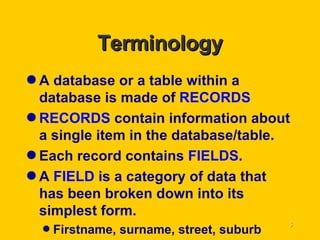
Terminology A database or a table within a database is made of  RECORDS RECORDS  contain information about a single item in the database/table. Each record contains  FIELDS . A  FIELD  is a category of data that has been broken down into its simplest form. Firstname, surname, street, suburb
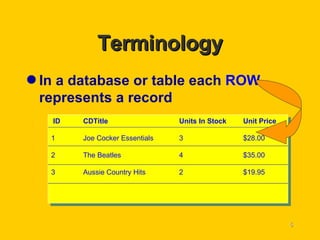
Terminology In a database or table each  ROW  represents a record ID CDTitle Units In Stock Unit Price 1 Joe Cocker Essentials 3 $28.00 2 The Beatles 4 $35.00 3 Aussie Country Hits 2 $19.95
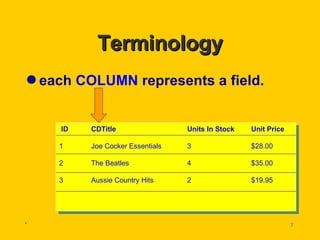
Terminology each  COLUMN  represents a field. . ID CDTitle Units In Stock Unit Price 1 Joe Cocker Essentials 3 $28.00 2 The Beatles 4 $35.00 3 Aussie Country Hits 2 $19.95
Terminology Every record in the same table has the same fields. Databases are designed so that each data item is stored only once
Terminology The method of retrieving information from the database is known as  QUERYING  the database. A query allows you to display a set of records which meet certain criteria students in year 9 people with postcode 6192 etc.
Terminology Information taken from a database and designed for hardcopy (printout) is referred to as a  REPORT . Reports can be generated from tables or queries. Reports can be formatted in many different styles depending on the target audience.
Terminology Other database operations include: SEARCHING   locate the first record to contain some specific criteria SORTING sorting the database by a nominated field
Terminology Some database applications also provide a user friendly interface called a  FORM . Forms are used to display data from a table or query in an easy to read format.
Planning a Database  Careful planning of a database before it is created will prove to be a useful exercise. Step 1 Determine what data should be stored in each record. Generate a list and eliminate information that is not directly related to the overall purpose of the database.
Planning a Database  Step 2 What operations are to be performed on the database? Do these operations require any missing information from the list? Will there be any need to reduce the list further? Adjust the list from step 1
Planning a Database  Step 3 Create a list of fields and field names from step 2 Create a description of the data and their types (text, number, YES/NO etc) Design a simple form for a single record on paper
Planning a Database  Step 4 Create a new database/table using your software with the planned fields. Enter the data into database

Databases

  • 1.
  • 2.
    Databases A databaseis a collection of related pieces of information A database can be computerised or non-computerised (manual - such as filing system, phone book etc.)
  • 3.
    Advantages of ComputerisedDatabases speed of information retrieval storage capabilities easy to update and delete ease of access multiple access security
  • 4.
    Disadvantages of ComputerisedDatabases privacy and ethical issues security risks training of staff initial expense (equipment, software) software upgrades
  • 5.
    Terminology A databaseor a table within a database is made of RECORDS RECORDS contain information about a single item in the database/table. Each record contains FIELDS . A FIELD is a category of data that has been broken down into its simplest form. Firstname, surname, street, suburb
  • 6.
    Terminology In adatabase or table each ROW represents a record ID CDTitle Units In Stock Unit Price 1 Joe Cocker Essentials 3 $28.00 2 The Beatles 4 $35.00 3 Aussie Country Hits 2 $19.95
  • 7.
    Terminology each COLUMN represents a field. . ID CDTitle Units In Stock Unit Price 1 Joe Cocker Essentials 3 $28.00 2 The Beatles 4 $35.00 3 Aussie Country Hits 2 $19.95
  • 8.
    Terminology Every recordin the same table has the same fields. Databases are designed so that each data item is stored only once
  • 9.
    Terminology The methodof retrieving information from the database is known as QUERYING the database. A query allows you to display a set of records which meet certain criteria students in year 9 people with postcode 6192 etc.
  • 10.
    Terminology Information takenfrom a database and designed for hardcopy (printout) is referred to as a REPORT . Reports can be generated from tables or queries. Reports can be formatted in many different styles depending on the target audience.
  • 11.
    Terminology Other databaseoperations include: SEARCHING locate the first record to contain some specific criteria SORTING sorting the database by a nominated field
  • 12.
    Terminology Some databaseapplications also provide a user friendly interface called a FORM . Forms are used to display data from a table or query in an easy to read format.
  • 13.
    Planning a Database Careful planning of a database before it is created will prove to be a useful exercise. Step 1 Determine what data should be stored in each record. Generate a list and eliminate information that is not directly related to the overall purpose of the database.
  • 14.
    Planning a Database Step 2 What operations are to be performed on the database? Do these operations require any missing information from the list? Will there be any need to reduce the list further? Adjust the list from step 1
  • 15.
    Planning a Database Step 3 Create a list of fields and field names from step 2 Create a description of the data and their types (text, number, YES/NO etc) Design a simple form for a single record on paper
  • 16.
    Planning a Database Step 4 Create a new database/table using your software with the planned fields. Enter the data into database