©Silberschatz, Korth and Sudarshan
1.1
Database System Concepts
Chapter 1: Introduction
 Database Applications:
 Purpose of Database Systems(FMS Vs DBMS)
 View of Data
 Levels of Abstraction
 Schema and Instance
 Data Models
 Data Definition Language
 Data Manipulation Language
 Database Administrator
 Database Users
 Overall System Structure
©Silberschatz, Korth and Sudarshan
1.2
Database System Concepts
Database Management System (DBMS)
 Collection of interrelated data
 Set of programs to access the data
 DBMS contains information about a particular enterprise
 DBMS provides an environment that is both convenient and
efficient to use.
 Database Applications:
 Banking: all transactions
 Airlines: reservations, schedules
 Universities: registration, grades
 Sales: customers, products, purchases
 Manufacturing: production, inventory, orders, supply chain
 Human resources: employee records, salaries, tax deductions
 Databases touch all aspects of our lives
©Silberschatz, Korth and Sudarshan
1.3
Database System Concepts
Purpose of Database System
 In the early days, database applications were built on top of
file systems
 Drawbacks of using file systems to store data:
 Data redundancy and inconsistency
 Multiple file formats, duplication of information in different files
 Difficulty in accessing data
 Need to write a new program to carry out each new task
 Data isolation — multiple files and formats
 Integrity problems
 Integrity constraints (e.g. account balance > 0) become part
of program code
 Hard to add new constraints or change existing ones
©Silberschatz, Korth and Sudarshan
1.4
Database System Concepts
Purpose of Database Systems (Cont.)
 Drawbacks of using file systems (cont.)
 Atomicity of updates
 Failures may leave database in an inconsistent state with partial
updates carried out
 E.g. transfer of funds from one account to another should either
complete or not happen at all
 Concurrent access by multiple users
 Concurrent accessed needed for performance
 Uncontrolled concurrent accesses can lead to inconsistencies
– E.g. two people reading a balance and updating it at the same
time
 Security problems: Not every user of the database system should be
able to access all the data.
 Database systems offer solutions to all the above problems
©Silberschatz, Korth and Sudarshan
1.5
Database System Concepts
Data Abstraction(Hiding)
 A major purpose of a database system is to provide users with an
abstract view of the data. That is, the system
hides certain details of how the data are stored and maintained.
 Since many database-system users are not computer trained,
developers hide the complexity from users through several levels
of abstraction, to simplify users’ interactions with the system:
©Silberschatz, Korth and Sudarshan
1.6
Database System Concepts
Levels of Abstraction
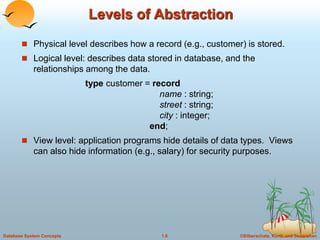
 Physical level describes how a record (e.g., customer) is stored.
 Logical level: describes data stored in database, and the
relationships among the data.
type customer = record
name : string;
street : string;
city : integer;
end;
 View level: application programs hide details of data types. Views
can also hide information (e.g., salary) for security purposes.
©Silberschatz, Korth and Sudarshan
1.7
Database System Concepts
 type instructor = record
 ID : char (5);
 name : char (20);
 dept name : char (20);
 salary : numeric (8,2);
 end;
©Silberschatz, Korth and Sudarshan
1.8
Database System Concepts
Levels of Abstraction
©Silberschatz, Korth and Sudarshan
1.9
Database System Concepts
View of Data
An architecture for a database system-3 Level Schema
©Silberschatz, Korth and Sudarshan
1.10
Database System Concepts
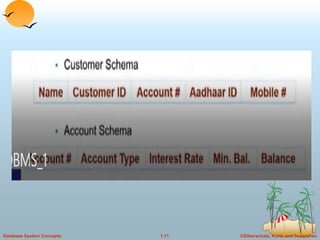
Schemas and Instances
 Similar to types and variables in programming languages
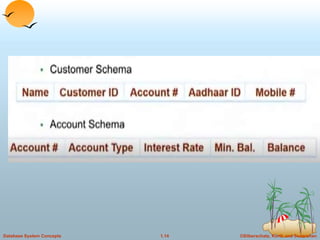
 Schema – the logical structure of the database
 e.g., the database consists of information about a set of customers and accounts
and the relationship between them)
 Analogous to type information of a variable in a program
 Physical schema: database design at the physical level
 Logical schema: database design at the logical level
 Instance – the actual content of the database at a particular point in time
 Analogous to the value of a variable
©Silberschatz, Korth and Sudarshan
1.11
Database System Concepts
©Silberschatz, Korth and Sudarshan
1.12
Database System Concepts
©Silberschatz, Korth and Sudarshan
1.13
Database System Concepts
©Silberschatz, Korth and Sudarshan
1.14
Database System Concepts
©Silberschatz, Korth and Sudarshan
1.15
Database System Concepts
 Physical Data Independence – the ability to modify the physical schema
without changing the logical schema
 Applications depend on the logical schema
 In general, the interfaces between the various levels and components should
be well defined so that changes in some parts do not seriously influence
others.
 Logical Data Independence – the ability to modify the logical schema without
changing the view level schema
©Silberschatz, Korth and Sudarshan
1.16
Database System Concepts
View of Data
An architecture for a database system-3 Level Schema
©Silberschatz, Korth and Sudarshan
1.17
Database System Concepts
Data Models
 A collection of tools for describing
 data
 data relationships
 data semantics
 data constraints
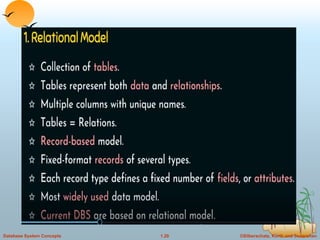
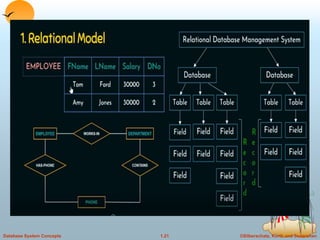
 Relational model(We focus in this course)
 Entity-Relationship model
 Other models:
 object-oriented model
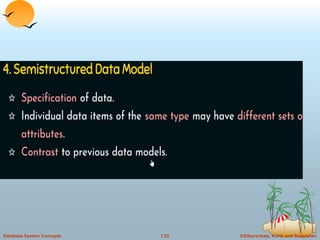
 semi-structured data models
 Older models: network model and hierarchical model
©Silberschatz, Korth and Sudarshan
1.18
Database System Concepts
©Silberschatz, Korth and Sudarshan
1.19
Database System Concepts
©Silberschatz, Korth and Sudarshan
1.20
Database System Concepts
©Silberschatz, Korth and Sudarshan
1.21
Database System Concepts
©Silberschatz, Korth and Sudarshan
1.22
Database System Concepts
Relational Model
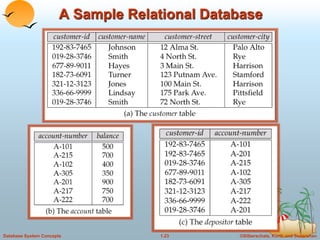
 Example of tabular data in the relational model
customer-
name
Customer-
id
customer-
street
customer-
city
account-
number
Johnson
Smith
Johnson
Jones
Smith
192-83-7465
019-28-3746
192-83-7465
321-12-3123
019-28-3746
Alma
North
Alma
Main
North
Palo Alto
Rye
Palo Alto
Harrison
Rye
A-101
A-215
A-201
A-217
A-201
Attributes
©Silberschatz, Korth and Sudarshan
1.23
Database System Concepts
A Sample Relational Database
©Silberschatz, Korth and Sudarshan
1.24
Database System Concepts
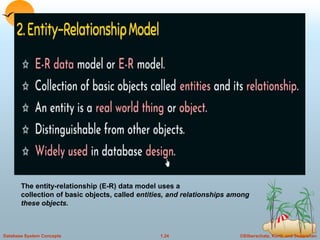
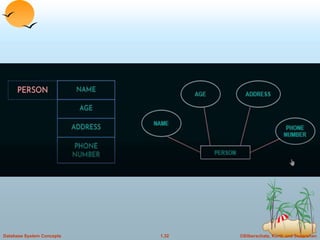
The entity-relationship (E-R) data model uses a
collection of basic objects, called entities, and relationships among
these objects.
©Silberschatz, Korth and Sudarshan
1.25
Database System Concepts
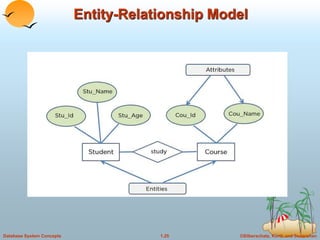
Entity-Relationship Model
©Silberschatz, Korth and Sudarshan
1.26
Database System Concepts
©Silberschatz, Korth and Sudarshan
1.27
Database System Concepts
©Silberschatz, Korth and Sudarshan
1.28
Database System Concepts
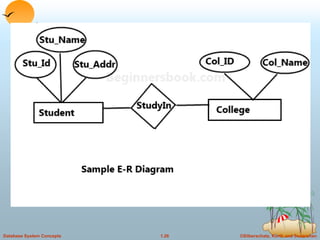
Entity-Relationship Model
Example of schema in the entity-relationship model
©Silberschatz, Korth and Sudarshan
1.29
Database System Concepts
Entity Relationship Model (Cont.)
 E-R model of real world
 Entities (objects)
 E.g. customers, accounts, bank branch
 Relationships between entities
 E.g. Account A-101 is held by customer Johnson
 Relationship set depositor associates customers with accounts
 Widely used for database design
 Database design in E-R model usually converted to design in the
relational model (coming up next) which is used for storage and
processing
©Silberschatz, Korth and Sudarshan
1.30
Database System Concepts
©Silberschatz, Korth and Sudarshan
1.31
Database System Concepts
©Silberschatz, Korth and Sudarshan
1.32
Database System Concepts
©Silberschatz, Korth and Sudarshan
1.33
Database System Concepts
©Silberschatz, Korth and Sudarshan
1.34
Database System Concepts
©Silberschatz, Korth and Sudarshan
1.35
Database System Concepts
©Silberschatz, Korth and Sudarshan
1.36
Database System Concepts
©Silberschatz, Korth and Sudarshan
1.37
Database System Concepts
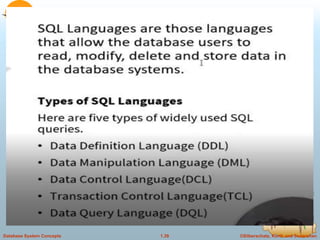
Data Definition Language (DDL)
 Specification notation for defining the database schema
 E.g.
create table account (
account-number char(10),
balance integer)
 DDL compiler generates a set of tables stored in a data
dictionary
 Data dictionary contains metadata (i.e., data about data)
 database schema
 Data storage and definition language
 language in which the storage structure and access methods
used by the database system are specified
 Usually an extension of the data definition language
©Silberschatz, Korth and Sudarshan
1.38
Database System Concepts
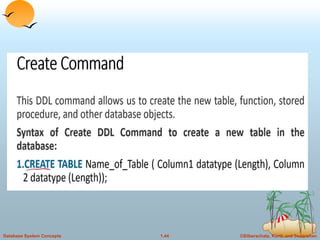
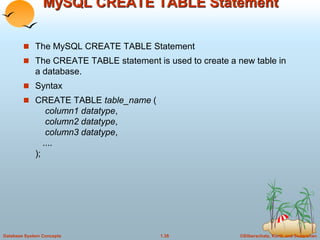
MySQL CREATE TABLE Statement
 The MySQL CREATE TABLE Statement
 The CREATE TABLE statement is used to create a new table in
a database.
 Syntax
 CREATE TABLE table_name (
column1 datatype,
column2 datatype,
column3 datatype,
....
);
©Silberschatz, Korth and Sudarshan
1.39
Database System Concepts
©Silberschatz, Korth and Sudarshan
1.40
Database System Concepts
©Silberschatz, Korth and Sudarshan
1.41
Database System Concepts
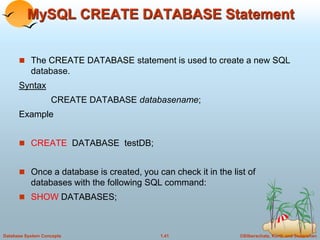
MySQL CREATE DATABASE Statement
 The CREATE DATABASE statement is used to create a new SQL
database.
Syntax
CREATE DATABASE databasename;
Example
 CREATE DATABASE testDB;
 Once a database is created, you can check it in the list of
databases with the following SQL command:
 SHOW DATABASES;
©Silberschatz, Korth and Sudarshan
1.42
Database System Concepts
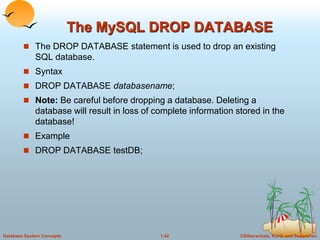
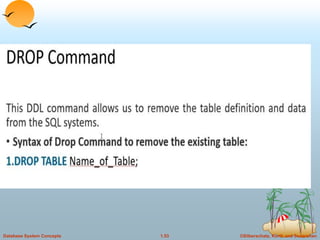
The MySQL DROP DATABASE
 The DROP DATABASE statement is used to drop an existing
SQL database.
 Syntax
 DROP DATABASE databasename;
 Note: Be careful before dropping a database. Deleting a
database will result in loss of complete information stored in the
database!
 Example
 DROP DATABASE testDB;
©Silberschatz, Korth and Sudarshan
1.43
Database System Concepts
©Silberschatz, Korth and Sudarshan
1.44
Database System Concepts
©Silberschatz, Korth and Sudarshan
1.45
Database System Concepts
 Syntax
 CREATE TABLE table_name (
column1 datatype (length),
column2 datatype (length),
column3 datatype (length),
);
 Example:see document
©Silberschatz, Korth and Sudarshan
1.46
Database System Concepts
©Silberschatz, Korth and Sudarshan
1.47
Database System Concepts
©Silberschatz, Korth and Sudarshan
1.48
Database System Concepts
DROP COLUMN
 The DROP COLUMN command is used to delete a column in an
existing table.
 The following SQL deletes the "ContactName" column from the
"Customers" table:
 Example
 ALTER TABLE Customers
DROP COLUMN ContactName;
©Silberschatz, Korth and Sudarshan
1.49
Database System Concepts
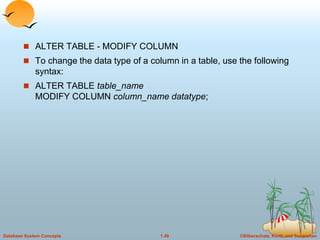
 ALTER TABLE - MODIFY COLUMN
 To change the data type of a column in a table, use the following
syntax:
 ALTER TABLE table_name
MODIFY COLUMN column_name datatype;
©Silberschatz, Korth and Sudarshan
1.50
Database System Concepts
 Change Data Type Example
 Now we want to change the data type of the column named
"DateOfBirth" in the "Persons" table.
 We use the following SQL statement:
 Example
 ALTER TABLE Persons
MODIFY COLUMN DateOfBirth year;
 Notice that the "DateOfBirth" column is now of type year and is
going to hold a year in a two- or four-digit format.
©Silberschatz, Korth and Sudarshan
1.51
Database System Concepts
©Silberschatz, Korth and Sudarshan
1.52
Database System Concepts
©Silberschatz, Korth and Sudarshan
1.53
Database System Concepts
©Silberschatz, Korth and Sudarshan
1.54
Database System Concepts
DML
©Silberschatz, Korth and Sudarshan
1.55
Database System Concepts
©Silberschatz, Korth and Sudarshan
1.56
Database System Concepts
©Silberschatz, Korth and Sudarshan
1.57
Database System Concepts
©Silberschatz, Korth and Sudarshan
1.58
Database System Concepts
©Silberschatz, Korth and Sudarshan
1.59
Database System Concepts
©Silberschatz, Korth and Sudarshan
1.60
Database System Concepts
©Silberschatz, Korth and Sudarshan
1.61
Database System Concepts
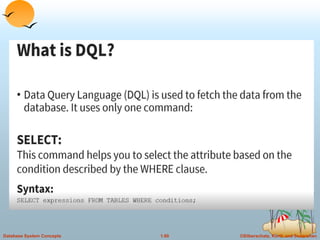
 The SQL SELECT Statement
 The SELECT statement is used to select data from a database.
 The data returned is stored in a result table, called the result-set.
 SELECT Syntax
 SELECT column1, column2, ...
FROM table_name;
 Here, column1, column2, ... are the field names of the table you
want to select data from.
©Silberschatz, Korth and Sudarshan
1.62
Database System Concepts
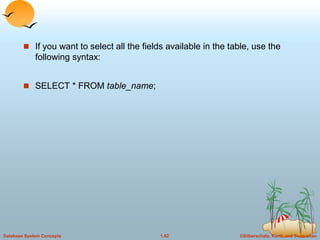
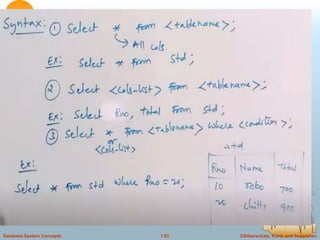
 If you want to select all the fields available in the table, use the
following syntax:
 SELECT * FROM table_name;
©Silberschatz, Korth and Sudarshan
1.63
Database System Concepts
©Silberschatz, Korth and Sudarshan
1.64
Database System Concepts
©Silberschatz, Korth and Sudarshan
1.65
Database System Concepts
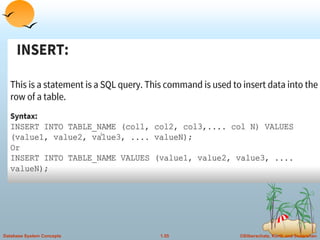
 MySQL INSERT INTO Statement
 ❮ PreviousNext ❯

INSERT INTO table_name (column1, column2, column3, ...)
VALUES (value1, value2, value3, ...);
©Silberschatz, Korth and Sudarshan
1.66
Database System Concepts
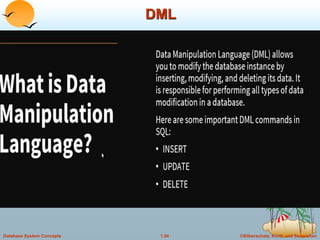
Data Manipulation Language (DML)
 Language for accessing and manipulating the data organized by
the appropriate data model
 DML also known as query language
 Two classes of languages
 Procedural – user specifies what data is required and how to get
those data
 Nonprocedural – user specifies what data is required without
specifying how to get those data
 SQL is the most widely used query language
©Silberschatz, Korth and Sudarshan
1.67
Database System Concepts
SQL
 SQL: widely used non-procedural language
 E.g. find the name of the customer with customer-id 192-83-7465
select customer.customer-name
from customer
where customer.customer-id = ‘192-83-7465’
 E.g. find the balances of all accounts held by the customer with
customer-id 192-83-7465
select account.balance
from depositor, account
where depositor.customer-id = ‘192-83-7465’ and
depositor.account-number = account.account-number
 Application programs generally access databases through one of
 Language extensions to allow embedded SQL
 Application program interface (e.g. ODBC/JDBC) which allow SQL
queries to be sent to a database
©Silberschatz, Korth and Sudarshan
1.68
Database System Concepts
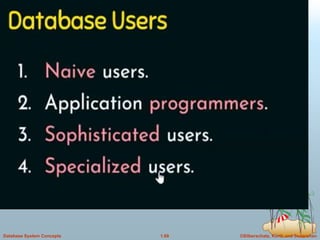
Database Users
 Users are differentiated by the way they expect to interact with
the system
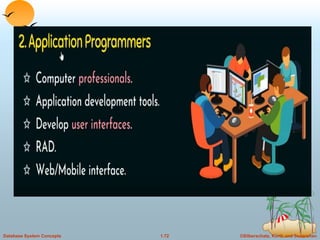
 Application programmers – interact with system through DML
calls
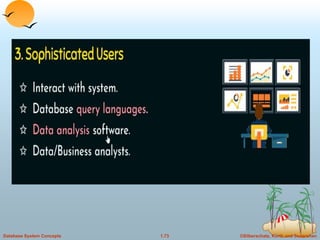
 Sophisticated users – form requests in a database query
language
 Specialized users – write specialized database applications that
do not fit into the traditional data processing framework
 Naïve users – invoke one of the permanent application programs
that have been written previously
 E.g. people accessing database over the web, bank tellers, clerical
staff
©Silberschatz, Korth and Sudarshan
1.69
Database System Concepts
©Silberschatz, Korth and Sudarshan
1.70
Database System Concepts
©Silberschatz, Korth and Sudarshan
1.71
Database System Concepts
©Silberschatz, Korth and Sudarshan
1.72
Database System Concepts
©Silberschatz, Korth and Sudarshan
1.73
Database System Concepts
©Silberschatz, Korth and Sudarshan
1.74
Database System Concepts
©Silberschatz, Korth and Sudarshan
1.75
Database System Concepts
Database Administrator
 Coordinates all the activities of the database system; the database
administrator has a good understanding of the enterprise’s
information resources and needs.
 Database administrator's duties include:
 Schema definition
 Storage structure and access method definition
 Schema and physical organization modification
 Granting user authority to access the database
 Specifying integrity constraints
 Acting as liaison with users
 Monitoring performance and responding to changes in requirements
©Silberschatz, Korth and Sudarshan
1.76
Database System Concepts
©Silberschatz, Korth and Sudarshan
1.77
Database System Concepts
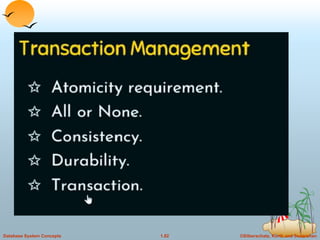
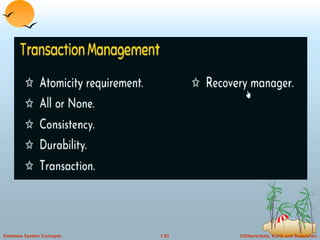
Transaction Management
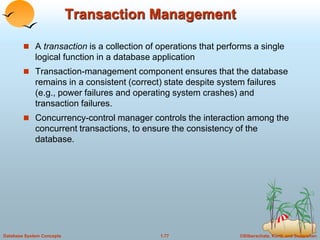
 A transaction is a collection of operations that performs a single
logical function in a database application
 Transaction-management component ensures that the database
remains in a consistent (correct) state despite system failures
(e.g., power failures and operating system crashes) and
transaction failures.
 Concurrency-control manager controls the interaction among the
concurrent transactions, to ensure the consistency of the
database.
©Silberschatz, Korth and Sudarshan
1.78
Database System Concepts
Storage Management
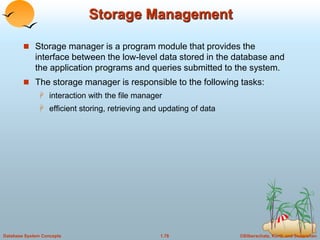
 Storage manager is a program module that provides the
interface between the low-level data stored in the database and
the application programs and queries submitted to the system.
 The storage manager is responsible to the following tasks:
 interaction with the file manager
 efficient storing, retrieving and updating of data
©Silberschatz, Korth and Sudarshan
1.79
Database System Concepts
Overall System Structure
©Silberschatz, Korth and Sudarshan
1.80
Database System Concepts
©Silberschatz, Korth and Sudarshan
1.81
Database System Concepts
©Silberschatz, Korth and Sudarshan
1.82
Database System Concepts
©Silberschatz, Korth and Sudarshan
1.83
Database System Concepts
©Silberschatz, Korth and Sudarshan
1.84
Database System Concepts
©Silberschatz, Korth and Sudarshan
1.85
Database System Concepts
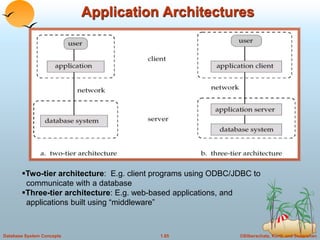
Application Architectures
Two-tier architecture: E.g. client programs using ODBC/JDBC to
communicate with a database
Three-tier architecture: E.g. web-based applications, and
applications built using “middleware”
©Silberschatz, Korth and Sudarshan
1.86
Database System Concepts
©Silberschatz, Korth and Sudarshan
1.87
Database System Concepts
©Silberschatz, Korth and Sudarshan
1.88
Database System Concepts
Database Design and E-R Model
1. What are the steps in designing a database?
2. Why is the ER model used to create an initial
design?
3. What are the main concepts in the ER model?
4. What are guidelines for using the ER model
effectively?
©Silberschatz, Korth and Sudarshan
1.89
Database System Concepts
 The (Entity Relationship ER) data model allows us to describe
the data involved in a real-world enterprise in terms of objects
and their relationships and is widely used to (develop an initial
database design.
©Silberschatz, Korth and Sudarshan
1.90
Database System Concepts
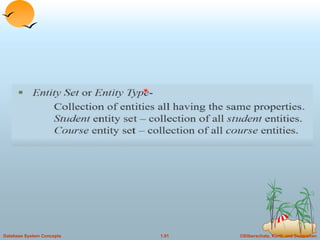
ENTITIES, ATTRIBUTES, AND ENTITY
SETS
 The entity-relationship (E-R) data model uses a collection of basic
objects, called entities, and relationships among these objects.
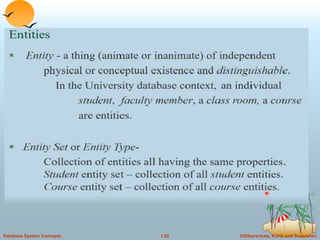
 An entity is a “thing” or “object” in the real world that is
distinguishable from other objects.
 For example, each person is an entity, and bank accounts can be
considered as entities.
©Silberschatz, Korth and Sudarshan
1.91
Database System Concepts
©Silberschatz, Korth and Sudarshan
1.92
Database System Concepts
©Silberschatz, Korth and Sudarshan
1.93
Database System Concepts
©Silberschatz, Korth and Sudarshan
1.94
Database System Concepts
Attributes.
 Entities are described in a database by a set of attributes.
©Silberschatz, Korth and Sudarshan
1.95
Database System Concepts
Attributes.
©Silberschatz, Korth and Sudarshan
1.96
Database System Concepts
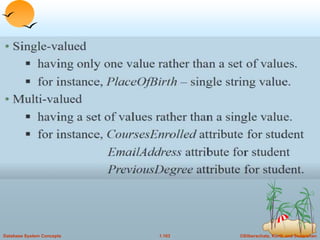
For each attribute, there is a set of permitted values, called the
domain, or value
set, of that attribute.
 Simple and composite attributes.
 Single-valued and multivalued attributes.
 Derived attribute.
©Silberschatz, Korth and Sudarshan
1.97
Database System Concepts
1.Can be divided into subparts(Ex:Name-
>(fname,mname,lname)
©Silberschatz, Korth and Sudarshan
1.98
Database System Concepts
 For example, an attribute name could be structured as a
composite attribute consisting of first name, middle initial, and
last name.
©Silberschatz, Korth and Sudarshan
1.99
Database System Concepts
©Silberschatz, Korth and Sudarshan
1.100
Database System Concepts
©Silberschatz, Korth and Sudarshan
1.101
Database System Concepts
©Silberschatz, Korth and Sudarshan
1.102
Database System Concepts
©Silberschatz, Korth and Sudarshan
1.103
Database System Concepts
©Silberschatz, Korth and Sudarshan
1.104
Database System Concepts
 Derived attribute. The value for this type of attribute can be
derived from the values of other related attributes or entities.
 Ex:age,total,avg,netpay…
©Silberschatz, Korth and Sudarshan
1.105
Database System Concepts
 An attribute takes a null value when an entity does not have a
value for it.
 i.e.. attribute value may be not applicable or unknown
©Silberschatz, Korth and Sudarshan
1.106
Database System Concepts
©Silberschatz, Korth and Sudarshan
1.107
Database System Concepts
Relationship Sets
 A relationship is an association among several entities. A
relationship set is a set of relationships of the same type.
©Silberschatz, Korth and Sudarshan
1.108
Database System Concepts
©Silberschatz, Korth and Sudarshan
1.109
Database System Concepts
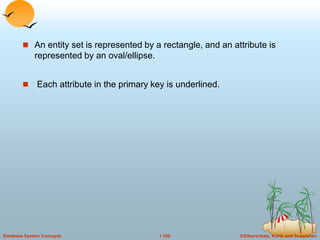
 An entity set is represented by a rectangle, and an attribute is
represented by an oval/ellipse.
 Each attribute in the primary key is underlined.
©Silberschatz, Korth and Sudarshan
1.110
Database System Concepts
 A key is a minimal set of attributes whose values uniquely
identify an entity in the set.
©Silberschatz, Korth and Sudarshan
1.111
Database System Concepts
©Silberschatz, Korth and Sudarshan
1.112
Database System Concepts
©Silberschatz, Korth and Sudarshan
1.113
Database System Concepts
Constraints
 Mapping Cardinalities
 Participation Constraints
©Silberschatz, Korth and Sudarshan
1.114
Database System Concepts
Mapping cardinalities
©Silberschatz, Korth and Sudarshan
1.115
Database System Concepts
©Silberschatz, Korth and Sudarshan
1.116
Database System Concepts
©Silberschatz, Korth and Sudarshan
1.117
Database System Concepts
©Silberschatz, Korth and Sudarshan
1.118
Database System Concepts
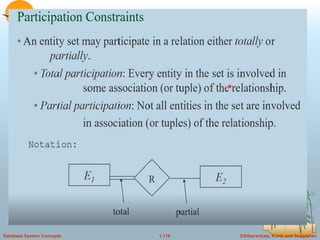
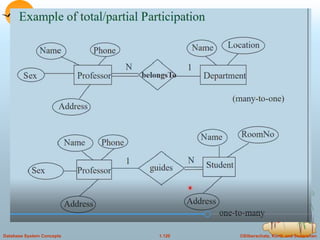
Participation Constraints
 Total Participation
 Partial Participation
©Silberschatz, Korth and Sudarshan
1.119
Database System Concepts
©Silberschatz, Korth and Sudarshan
1.120
Database System Concepts
©Silberschatz, Korth and Sudarshan
1.121
Database System Concepts
Entity-Relationship Diagrams
 an E-R diagram can express the overall logical structure of a
database graphically. E-R diagrams are simple and clear.
 Basic Structure
 An E-R diagram consists of the following major components:
 Rectangles divided into two parts represent entity sets. The
first part, contains the name of the entity set.
 The second part contains the names of all the attributes of the
entity set.
 Diamonds represent relationship sets.
 Undivided rectangles represent the attributes of a relationship
set.
 Attributes that are part of the primary key are underlined.
©Silberschatz, Korth and Sudarshan
1.122
Database System Concepts
©Silberschatz, Korth and Sudarshan
1.123
Database System Concepts
©Silberschatz, Korth and Sudarshan
1.124
Database System Concepts
©Silberschatz, Korth and Sudarshan
1.125
Database System Concepts
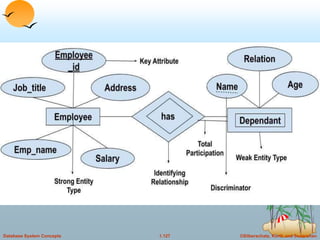
 Lines link entity sets to relationship sets.
 Dashed lines link attributes of a relationship set to the
relationship set.
 Double lines indicate total participation of an entity in a
relationship set.
 Double diamonds represent identifying relationship sets linked
to weak entity sets
©Silberschatz, Korth and Sudarshan
1.126
Database System Concepts
Weak Entity Sets
©Silberschatz, Korth and Sudarshan
1.127
Database System Concepts
©Silberschatz, Korth and Sudarshan
1.128
Database System Concepts
©Silberschatz, Korth and Sudarshan
1.129
Database System Concepts
©Silberschatz, Korth and Sudarshan
1.130
Database System Concepts
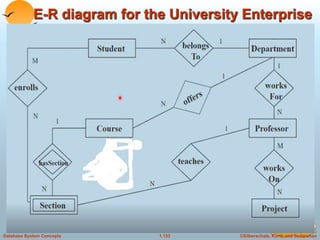
E-R diagram for the University Enterprise
©Silberschatz, Korth and Sudarshan
1.131
Database System Concepts
©Silberschatz, Korth and Sudarshan
1.132
Database System Concepts
©Silberschatz, Korth and Sudarshan
1.133
Database System Concepts
E-R diagram for the University Enterprise
©Silberschatz, Korth and Sudarshan
1.134
Database System Concepts
©Silberschatz, Korth and Sudarshan
1.135
Database System Concepts
©Silberschatz, Korth and Sudarshan
1.136
Database System Concepts
©Silberschatz, Korth and Sudarshan
1.137
Database System Concepts
Design issues
 Use of Entity Sets versus Attributes
 Use of Entity Sets versus Relationship Sets
 Binary versus n-ary Relationship Sets
 Placement of Relationship Attributes
©Silberschatz, Korth and Sudarshan
1.138
Database System Concepts
Design issues
 Use of Entity Sets versus Attributes
©Silberschatz, Korth and Sudarshan
1.139
Database System Concepts
©Silberschatz, Korth and Sudarshan
1.140
Database System Concepts
©Silberschatz, Korth and Sudarshan
1.141
Database System Concepts
Design issues
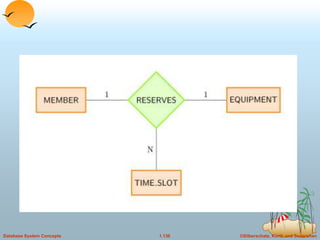
 Use of Entity Sets versus Relationship Sets
©Silberschatz, Korth and Sudarshan
1.142
Database System Concepts
 Binary versus n-ary Relationship Sets:
 Relationships in databases are often binary. Some relationships
that appear to be nonbinary could actually be better represented
by several binary relationships.
©Silberschatz, Korth and Sudarshan
1.143
Database System Concepts
©Silberschatz, Korth and Sudarshan
1.144
Database System Concepts
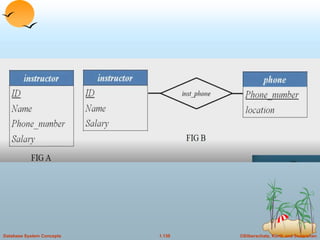
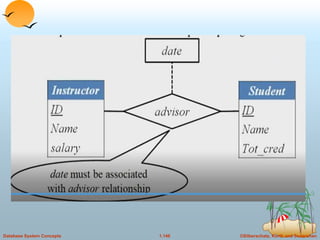
 Placement of Relationship Attributes
©Silberschatz, Korth and Sudarshan
1.145
Database System Concepts
©Silberschatz, Korth and Sudarshan
1.146
Database System Concepts
©Silberschatz, Korth and Sudarshan
1.147
Database System Concepts
©Silberschatz, Korth and Sudarshan
1.148
Database System Concepts
Extended E-R Features
 Specialization
 Generalization
 Aggregation
©Silberschatz, Korth and Sudarshan
1.149
Database System Concepts
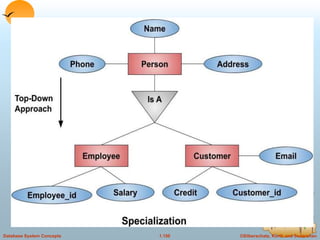
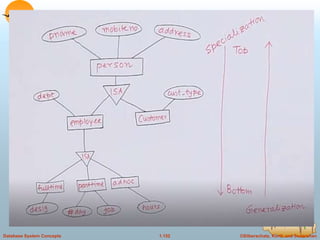
Specialization
 An entity set may include subgroupings of entities that are
distinct in some way from other entities in the set.
 For instance, a subset of entities within an entity set may have
attributes that are not shared by all the entities in the entity set.
 design process proceed in a top-down manner
©Silberschatz, Korth and Sudarshan
1.150
Database System Concepts
©Silberschatz, Korth and Sudarshan
1.151
Database System Concepts
©Silberschatz, Korth and Sudarshan
1.152
Database System Concepts
©Silberschatz, Korth and Sudarshan
1.153
Database System Concepts
©Silberschatz, Korth and Sudarshan
1.154
Database System Concepts
©Silberschatz, Korth and Sudarshan
1.155
Database System Concepts
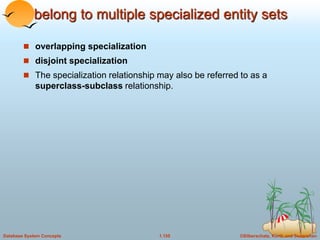
belong to multiple specialized entity sets
 overlapping specialization
 disjoint specialization
 The specialization relationship may also be referred to as a
superclass-subclass relationship.
©Silberschatz, Korth and Sudarshan
1.156
Database System Concepts
Generalization
 design process may proceed in a bottom-up manner
©Silberschatz, Korth and Sudarshan
1.157
Database System Concepts
 Total generalization or specialization. Each higher-level entity
must belong to a lower-level entity set.
 Partial generalization or specialization. Some higher-level
entities may not belong to any lower-level entity set.
©Silberschatz, Korth and Sudarshan
1.158
Database System Concepts
Aggregation
 One limitation of the E-R model is that it cannot express
relationships among relationships.
 To illustrate the need for such a construct, consider the ternary
relationship proj guide, which we saw earlier, between an instructor,
student and project
©Silberschatz, Korth and Sudarshan
1.159
Database System Concepts
©Silberschatz, Korth and Sudarshan
1.160
Database System Concepts
©Silberschatz, Korth and Sudarshan
1.161
Database System Concepts
Alternative E-R Notations
©Silberschatz, Korth and Sudarshan
1.162
Database System Concepts
©Silberschatz, Korth and Sudarshan
1.163
Database System Concepts

databasemanagementsystempptforbeginners.ppt

  • 1.
    ©Silberschatz, Korth andSudarshan 1.1 Database System Concepts Chapter 1: Introduction  Database Applications:  Purpose of Database Systems(FMS Vs DBMS)  View of Data  Levels of Abstraction  Schema and Instance  Data Models  Data Definition Language  Data Manipulation Language  Database Administrator  Database Users  Overall System Structure
  • 2.
    ©Silberschatz, Korth andSudarshan 1.2 Database System Concepts Database Management System (DBMS)  Collection of interrelated data  Set of programs to access the data  DBMS contains information about a particular enterprise  DBMS provides an environment that is both convenient and efficient to use.  Database Applications:  Banking: all transactions  Airlines: reservations, schedules  Universities: registration, grades  Sales: customers, products, purchases  Manufacturing: production, inventory, orders, supply chain  Human resources: employee records, salaries, tax deductions  Databases touch all aspects of our lives
  • 3.
    ©Silberschatz, Korth andSudarshan 1.3 Database System Concepts Purpose of Database System  In the early days, database applications were built on top of file systems  Drawbacks of using file systems to store data:  Data redundancy and inconsistency  Multiple file formats, duplication of information in different files  Difficulty in accessing data  Need to write a new program to carry out each new task  Data isolation — multiple files and formats  Integrity problems  Integrity constraints (e.g. account balance > 0) become part of program code  Hard to add new constraints or change existing ones
  • 4.
    ©Silberschatz, Korth andSudarshan 1.4 Database System Concepts Purpose of Database Systems (Cont.)  Drawbacks of using file systems (cont.)  Atomicity of updates  Failures may leave database in an inconsistent state with partial updates carried out  E.g. transfer of funds from one account to another should either complete or not happen at all  Concurrent access by multiple users  Concurrent accessed needed for performance  Uncontrolled concurrent accesses can lead to inconsistencies – E.g. two people reading a balance and updating it at the same time  Security problems: Not every user of the database system should be able to access all the data.  Database systems offer solutions to all the above problems
  • 5.
    ©Silberschatz, Korth andSudarshan 1.5 Database System Concepts Data Abstraction(Hiding)  A major purpose of a database system is to provide users with an abstract view of the data. That is, the system hides certain details of how the data are stored and maintained.  Since many database-system users are not computer trained, developers hide the complexity from users through several levels of abstraction, to simplify users’ interactions with the system:
  • 6.
    ©Silberschatz, Korth andSudarshan 1.6 Database System Concepts Levels of Abstraction  Physical level describes how a record (e.g., customer) is stored.  Logical level: describes data stored in database, and the relationships among the data. type customer = record name : string; street : string; city : integer; end;  View level: application programs hide details of data types. Views can also hide information (e.g., salary) for security purposes.
  • 7.
    ©Silberschatz, Korth andSudarshan 1.7 Database System Concepts  type instructor = record  ID : char (5);  name : char (20);  dept name : char (20);  salary : numeric (8,2);  end;
  • 8.
    ©Silberschatz, Korth andSudarshan 1.8 Database System Concepts Levels of Abstraction
  • 9.
    ©Silberschatz, Korth andSudarshan 1.9 Database System Concepts View of Data An architecture for a database system-3 Level Schema
  • 10.
    ©Silberschatz, Korth andSudarshan 1.10 Database System Concepts Schemas and Instances  Similar to types and variables in programming languages  Schema – the logical structure of the database  e.g., the database consists of information about a set of customers and accounts and the relationship between them)  Analogous to type information of a variable in a program  Physical schema: database design at the physical level  Logical schema: database design at the logical level  Instance – the actual content of the database at a particular point in time  Analogous to the value of a variable
  • 11.
    ©Silberschatz, Korth andSudarshan 1.11 Database System Concepts
  • 12.
    ©Silberschatz, Korth andSudarshan 1.12 Database System Concepts
  • 13.
    ©Silberschatz, Korth andSudarshan 1.13 Database System Concepts
  • 14.
    ©Silberschatz, Korth andSudarshan 1.14 Database System Concepts
  • 15.
    ©Silberschatz, Korth andSudarshan 1.15 Database System Concepts  Physical Data Independence – the ability to modify the physical schema without changing the logical schema  Applications depend on the logical schema  In general, the interfaces between the various levels and components should be well defined so that changes in some parts do not seriously influence others.  Logical Data Independence – the ability to modify the logical schema without changing the view level schema
  • 16.
    ©Silberschatz, Korth andSudarshan 1.16 Database System Concepts View of Data An architecture for a database system-3 Level Schema
  • 17.
    ©Silberschatz, Korth andSudarshan 1.17 Database System Concepts Data Models  A collection of tools for describing  data  data relationships  data semantics  data constraints  Relational model(We focus in this course)  Entity-Relationship model  Other models:  object-oriented model  semi-structured data models  Older models: network model and hierarchical model
  • 18.
    ©Silberschatz, Korth andSudarshan 1.18 Database System Concepts
  • 19.
    ©Silberschatz, Korth andSudarshan 1.19 Database System Concepts
  • 20.
    ©Silberschatz, Korth andSudarshan 1.20 Database System Concepts
  • 21.
    ©Silberschatz, Korth andSudarshan 1.21 Database System Concepts
  • 22.
    ©Silberschatz, Korth andSudarshan 1.22 Database System Concepts Relational Model  Example of tabular data in the relational model customer- name Customer- id customer- street customer- city account- number Johnson Smith Johnson Jones Smith 192-83-7465 019-28-3746 192-83-7465 321-12-3123 019-28-3746 Alma North Alma Main North Palo Alto Rye Palo Alto Harrison Rye A-101 A-215 A-201 A-217 A-201 Attributes
  • 23.
    ©Silberschatz, Korth andSudarshan 1.23 Database System Concepts A Sample Relational Database
  • 24.
    ©Silberschatz, Korth andSudarshan 1.24 Database System Concepts The entity-relationship (E-R) data model uses a collection of basic objects, called entities, and relationships among these objects.
  • 25.
    ©Silberschatz, Korth andSudarshan 1.25 Database System Concepts Entity-Relationship Model
  • 26.
    ©Silberschatz, Korth andSudarshan 1.26 Database System Concepts
  • 27.
    ©Silberschatz, Korth andSudarshan 1.27 Database System Concepts
  • 28.
    ©Silberschatz, Korth andSudarshan 1.28 Database System Concepts Entity-Relationship Model Example of schema in the entity-relationship model
  • 29.
    ©Silberschatz, Korth andSudarshan 1.29 Database System Concepts Entity Relationship Model (Cont.)  E-R model of real world  Entities (objects)  E.g. customers, accounts, bank branch  Relationships between entities  E.g. Account A-101 is held by customer Johnson  Relationship set depositor associates customers with accounts  Widely used for database design  Database design in E-R model usually converted to design in the relational model (coming up next) which is used for storage and processing
  • 30.
    ©Silberschatz, Korth andSudarshan 1.30 Database System Concepts
  • 31.
    ©Silberschatz, Korth andSudarshan 1.31 Database System Concepts
  • 32.
    ©Silberschatz, Korth andSudarshan 1.32 Database System Concepts
  • 33.
    ©Silberschatz, Korth andSudarshan 1.33 Database System Concepts
  • 34.
    ©Silberschatz, Korth andSudarshan 1.34 Database System Concepts
  • 35.
    ©Silberschatz, Korth andSudarshan 1.35 Database System Concepts
  • 36.
    ©Silberschatz, Korth andSudarshan 1.36 Database System Concepts
  • 37.
    ©Silberschatz, Korth andSudarshan 1.37 Database System Concepts Data Definition Language (DDL)  Specification notation for defining the database schema  E.g. create table account ( account-number char(10), balance integer)  DDL compiler generates a set of tables stored in a data dictionary  Data dictionary contains metadata (i.e., data about data)  database schema  Data storage and definition language  language in which the storage structure and access methods used by the database system are specified  Usually an extension of the data definition language
  • 38.
    ©Silberschatz, Korth andSudarshan 1.38 Database System Concepts MySQL CREATE TABLE Statement  The MySQL CREATE TABLE Statement  The CREATE TABLE statement is used to create a new table in a database.  Syntax  CREATE TABLE table_name ( column1 datatype, column2 datatype, column3 datatype, .... );
  • 39.
    ©Silberschatz, Korth andSudarshan 1.39 Database System Concepts
  • 40.
    ©Silberschatz, Korth andSudarshan 1.40 Database System Concepts
  • 41.
    ©Silberschatz, Korth andSudarshan 1.41 Database System Concepts MySQL CREATE DATABASE Statement  The CREATE DATABASE statement is used to create a new SQL database. Syntax CREATE DATABASE databasename; Example  CREATE DATABASE testDB;  Once a database is created, you can check it in the list of databases with the following SQL command:  SHOW DATABASES;
  • 42.
    ©Silberschatz, Korth andSudarshan 1.42 Database System Concepts The MySQL DROP DATABASE  The DROP DATABASE statement is used to drop an existing SQL database.  Syntax  DROP DATABASE databasename;  Note: Be careful before dropping a database. Deleting a database will result in loss of complete information stored in the database!  Example  DROP DATABASE testDB;
  • 43.
    ©Silberschatz, Korth andSudarshan 1.43 Database System Concepts
  • 44.
    ©Silberschatz, Korth andSudarshan 1.44 Database System Concepts
  • 45.
    ©Silberschatz, Korth andSudarshan 1.45 Database System Concepts  Syntax  CREATE TABLE table_name ( column1 datatype (length), column2 datatype (length), column3 datatype (length), );  Example:see document
  • 46.
    ©Silberschatz, Korth andSudarshan 1.46 Database System Concepts
  • 47.
    ©Silberschatz, Korth andSudarshan 1.47 Database System Concepts
  • 48.
    ©Silberschatz, Korth andSudarshan 1.48 Database System Concepts DROP COLUMN  The DROP COLUMN command is used to delete a column in an existing table.  The following SQL deletes the "ContactName" column from the "Customers" table:  Example  ALTER TABLE Customers DROP COLUMN ContactName;
  • 49.
    ©Silberschatz, Korth andSudarshan 1.49 Database System Concepts  ALTER TABLE - MODIFY COLUMN  To change the data type of a column in a table, use the following syntax:  ALTER TABLE table_name MODIFY COLUMN column_name datatype;
  • 50.
    ©Silberschatz, Korth andSudarshan 1.50 Database System Concepts  Change Data Type Example  Now we want to change the data type of the column named "DateOfBirth" in the "Persons" table.  We use the following SQL statement:  Example  ALTER TABLE Persons MODIFY COLUMN DateOfBirth year;  Notice that the "DateOfBirth" column is now of type year and is going to hold a year in a two- or four-digit format.
  • 51.
    ©Silberschatz, Korth andSudarshan 1.51 Database System Concepts
  • 52.
    ©Silberschatz, Korth andSudarshan 1.52 Database System Concepts
  • 53.
    ©Silberschatz, Korth andSudarshan 1.53 Database System Concepts
  • 54.
    ©Silberschatz, Korth andSudarshan 1.54 Database System Concepts DML
  • 55.
    ©Silberschatz, Korth andSudarshan 1.55 Database System Concepts
  • 56.
    ©Silberschatz, Korth andSudarshan 1.56 Database System Concepts
  • 57.
    ©Silberschatz, Korth andSudarshan 1.57 Database System Concepts
  • 58.
    ©Silberschatz, Korth andSudarshan 1.58 Database System Concepts
  • 59.
    ©Silberschatz, Korth andSudarshan 1.59 Database System Concepts
  • 60.
    ©Silberschatz, Korth andSudarshan 1.60 Database System Concepts
  • 61.
    ©Silberschatz, Korth andSudarshan 1.61 Database System Concepts  The SQL SELECT Statement  The SELECT statement is used to select data from a database.  The data returned is stored in a result table, called the result-set.  SELECT Syntax  SELECT column1, column2, ... FROM table_name;  Here, column1, column2, ... are the field names of the table you want to select data from.
  • 62.
    ©Silberschatz, Korth andSudarshan 1.62 Database System Concepts  If you want to select all the fields available in the table, use the following syntax:  SELECT * FROM table_name;
  • 63.
    ©Silberschatz, Korth andSudarshan 1.63 Database System Concepts
  • 64.
    ©Silberschatz, Korth andSudarshan 1.64 Database System Concepts
  • 65.
    ©Silberschatz, Korth andSudarshan 1.65 Database System Concepts  MySQL INSERT INTO Statement  ❮ PreviousNext ❯  INSERT INTO table_name (column1, column2, column3, ...) VALUES (value1, value2, value3, ...);
  • 66.
    ©Silberschatz, Korth andSudarshan 1.66 Database System Concepts Data Manipulation Language (DML)  Language for accessing and manipulating the data organized by the appropriate data model  DML also known as query language  Two classes of languages  Procedural – user specifies what data is required and how to get those data  Nonprocedural – user specifies what data is required without specifying how to get those data  SQL is the most widely used query language
  • 67.
    ©Silberschatz, Korth andSudarshan 1.67 Database System Concepts SQL  SQL: widely used non-procedural language  E.g. find the name of the customer with customer-id 192-83-7465 select customer.customer-name from customer where customer.customer-id = ‘192-83-7465’  E.g. find the balances of all accounts held by the customer with customer-id 192-83-7465 select account.balance from depositor, account where depositor.customer-id = ‘192-83-7465’ and depositor.account-number = account.account-number  Application programs generally access databases through one of  Language extensions to allow embedded SQL  Application program interface (e.g. ODBC/JDBC) which allow SQL queries to be sent to a database
  • 68.
    ©Silberschatz, Korth andSudarshan 1.68 Database System Concepts Database Users  Users are differentiated by the way they expect to interact with the system  Application programmers – interact with system through DML calls  Sophisticated users – form requests in a database query language  Specialized users – write specialized database applications that do not fit into the traditional data processing framework  Naïve users – invoke one of the permanent application programs that have been written previously  E.g. people accessing database over the web, bank tellers, clerical staff
  • 69.
    ©Silberschatz, Korth andSudarshan 1.69 Database System Concepts
  • 70.
    ©Silberschatz, Korth andSudarshan 1.70 Database System Concepts
  • 71.
    ©Silberschatz, Korth andSudarshan 1.71 Database System Concepts
  • 72.
    ©Silberschatz, Korth andSudarshan 1.72 Database System Concepts
  • 73.
    ©Silberschatz, Korth andSudarshan 1.73 Database System Concepts
  • 74.
    ©Silberschatz, Korth andSudarshan 1.74 Database System Concepts
  • 75.
    ©Silberschatz, Korth andSudarshan 1.75 Database System Concepts Database Administrator  Coordinates all the activities of the database system; the database administrator has a good understanding of the enterprise’s information resources and needs.  Database administrator's duties include:  Schema definition  Storage structure and access method definition  Schema and physical organization modification  Granting user authority to access the database  Specifying integrity constraints  Acting as liaison with users  Monitoring performance and responding to changes in requirements
  • 76.
    ©Silberschatz, Korth andSudarshan 1.76 Database System Concepts
  • 77.
    ©Silberschatz, Korth andSudarshan 1.77 Database System Concepts Transaction Management  A transaction is a collection of operations that performs a single logical function in a database application  Transaction-management component ensures that the database remains in a consistent (correct) state despite system failures (e.g., power failures and operating system crashes) and transaction failures.  Concurrency-control manager controls the interaction among the concurrent transactions, to ensure the consistency of the database.
  • 78.
    ©Silberschatz, Korth andSudarshan 1.78 Database System Concepts Storage Management  Storage manager is a program module that provides the interface between the low-level data stored in the database and the application programs and queries submitted to the system.  The storage manager is responsible to the following tasks:  interaction with the file manager  efficient storing, retrieving and updating of data
  • 79.
    ©Silberschatz, Korth andSudarshan 1.79 Database System Concepts Overall System Structure
  • 80.
    ©Silberschatz, Korth andSudarshan 1.80 Database System Concepts
  • 81.
    ©Silberschatz, Korth andSudarshan 1.81 Database System Concepts
  • 82.
    ©Silberschatz, Korth andSudarshan 1.82 Database System Concepts
  • 83.
    ©Silberschatz, Korth andSudarshan 1.83 Database System Concepts
  • 84.
    ©Silberschatz, Korth andSudarshan 1.84 Database System Concepts
  • 85.
    ©Silberschatz, Korth andSudarshan 1.85 Database System Concepts Application Architectures Two-tier architecture: E.g. client programs using ODBC/JDBC to communicate with a database Three-tier architecture: E.g. web-based applications, and applications built using “middleware”
  • 86.
    ©Silberschatz, Korth andSudarshan 1.86 Database System Concepts
  • 87.
    ©Silberschatz, Korth andSudarshan 1.87 Database System Concepts
  • 88.
    ©Silberschatz, Korth andSudarshan 1.88 Database System Concepts Database Design and E-R Model 1. What are the steps in designing a database? 2. Why is the ER model used to create an initial design? 3. What are the main concepts in the ER model? 4. What are guidelines for using the ER model effectively?
  • 89.
    ©Silberschatz, Korth andSudarshan 1.89 Database System Concepts  The (Entity Relationship ER) data model allows us to describe the data involved in a real-world enterprise in terms of objects and their relationships and is widely used to (develop an initial database design.
  • 90.
    ©Silberschatz, Korth andSudarshan 1.90 Database System Concepts ENTITIES, ATTRIBUTES, AND ENTITY SETS  The entity-relationship (E-R) data model uses a collection of basic objects, called entities, and relationships among these objects.  An entity is a “thing” or “object” in the real world that is distinguishable from other objects.  For example, each person is an entity, and bank accounts can be considered as entities.
  • 91.
    ©Silberschatz, Korth andSudarshan 1.91 Database System Concepts
  • 92.
    ©Silberschatz, Korth andSudarshan 1.92 Database System Concepts
  • 93.
    ©Silberschatz, Korth andSudarshan 1.93 Database System Concepts
  • 94.
    ©Silberschatz, Korth andSudarshan 1.94 Database System Concepts Attributes.  Entities are described in a database by a set of attributes.
  • 95.
    ©Silberschatz, Korth andSudarshan 1.95 Database System Concepts Attributes.
  • 96.
    ©Silberschatz, Korth andSudarshan 1.96 Database System Concepts For each attribute, there is a set of permitted values, called the domain, or value set, of that attribute.  Simple and composite attributes.  Single-valued and multivalued attributes.  Derived attribute.
  • 97.
    ©Silberschatz, Korth andSudarshan 1.97 Database System Concepts 1.Can be divided into subparts(Ex:Name- >(fname,mname,lname)
  • 98.
    ©Silberschatz, Korth andSudarshan 1.98 Database System Concepts  For example, an attribute name could be structured as a composite attribute consisting of first name, middle initial, and last name.
  • 99.
    ©Silberschatz, Korth andSudarshan 1.99 Database System Concepts
  • 100.
    ©Silberschatz, Korth andSudarshan 1.100 Database System Concepts
  • 101.
    ©Silberschatz, Korth andSudarshan 1.101 Database System Concepts
  • 102.
    ©Silberschatz, Korth andSudarshan 1.102 Database System Concepts
  • 103.
    ©Silberschatz, Korth andSudarshan 1.103 Database System Concepts
  • 104.
    ©Silberschatz, Korth andSudarshan 1.104 Database System Concepts  Derived attribute. The value for this type of attribute can be derived from the values of other related attributes or entities.  Ex:age,total,avg,netpay…
  • 105.
    ©Silberschatz, Korth andSudarshan 1.105 Database System Concepts  An attribute takes a null value when an entity does not have a value for it.  i.e.. attribute value may be not applicable or unknown
  • 106.
    ©Silberschatz, Korth andSudarshan 1.106 Database System Concepts
  • 107.
    ©Silberschatz, Korth andSudarshan 1.107 Database System Concepts Relationship Sets  A relationship is an association among several entities. A relationship set is a set of relationships of the same type.
  • 108.
    ©Silberschatz, Korth andSudarshan 1.108 Database System Concepts
  • 109.
    ©Silberschatz, Korth andSudarshan 1.109 Database System Concepts  An entity set is represented by a rectangle, and an attribute is represented by an oval/ellipse.  Each attribute in the primary key is underlined.
  • 110.
    ©Silberschatz, Korth andSudarshan 1.110 Database System Concepts  A key is a minimal set of attributes whose values uniquely identify an entity in the set.
  • 111.
    ©Silberschatz, Korth andSudarshan 1.111 Database System Concepts
  • 112.
    ©Silberschatz, Korth andSudarshan 1.112 Database System Concepts
  • 113.
    ©Silberschatz, Korth andSudarshan 1.113 Database System Concepts Constraints  Mapping Cardinalities  Participation Constraints
  • 114.
    ©Silberschatz, Korth andSudarshan 1.114 Database System Concepts Mapping cardinalities
  • 115.
    ©Silberschatz, Korth andSudarshan 1.115 Database System Concepts
  • 116.
    ©Silberschatz, Korth andSudarshan 1.116 Database System Concepts
  • 117.
    ©Silberschatz, Korth andSudarshan 1.117 Database System Concepts
  • 118.
    ©Silberschatz, Korth andSudarshan 1.118 Database System Concepts Participation Constraints  Total Participation  Partial Participation
  • 119.
    ©Silberschatz, Korth andSudarshan 1.119 Database System Concepts
  • 120.
    ©Silberschatz, Korth andSudarshan 1.120 Database System Concepts
  • 121.
    ©Silberschatz, Korth andSudarshan 1.121 Database System Concepts Entity-Relationship Diagrams  an E-R diagram can express the overall logical structure of a database graphically. E-R diagrams are simple and clear.  Basic Structure  An E-R diagram consists of the following major components:  Rectangles divided into two parts represent entity sets. The first part, contains the name of the entity set.  The second part contains the names of all the attributes of the entity set.  Diamonds represent relationship sets.  Undivided rectangles represent the attributes of a relationship set.  Attributes that are part of the primary key are underlined.
  • 122.
    ©Silberschatz, Korth andSudarshan 1.122 Database System Concepts
  • 123.
    ©Silberschatz, Korth andSudarshan 1.123 Database System Concepts
  • 124.
    ©Silberschatz, Korth andSudarshan 1.124 Database System Concepts
  • 125.
    ©Silberschatz, Korth andSudarshan 1.125 Database System Concepts  Lines link entity sets to relationship sets.  Dashed lines link attributes of a relationship set to the relationship set.  Double lines indicate total participation of an entity in a relationship set.  Double diamonds represent identifying relationship sets linked to weak entity sets
  • 126.
    ©Silberschatz, Korth andSudarshan 1.126 Database System Concepts Weak Entity Sets
  • 127.
    ©Silberschatz, Korth andSudarshan 1.127 Database System Concepts
  • 128.
    ©Silberschatz, Korth andSudarshan 1.128 Database System Concepts
  • 129.
    ©Silberschatz, Korth andSudarshan 1.129 Database System Concepts
  • 130.
    ©Silberschatz, Korth andSudarshan 1.130 Database System Concepts E-R diagram for the University Enterprise
  • 131.
    ©Silberschatz, Korth andSudarshan 1.131 Database System Concepts
  • 132.
    ©Silberschatz, Korth andSudarshan 1.132 Database System Concepts
  • 133.
    ©Silberschatz, Korth andSudarshan 1.133 Database System Concepts E-R diagram for the University Enterprise
  • 134.
    ©Silberschatz, Korth andSudarshan 1.134 Database System Concepts
  • 135.
    ©Silberschatz, Korth andSudarshan 1.135 Database System Concepts
  • 136.
    ©Silberschatz, Korth andSudarshan 1.136 Database System Concepts
  • 137.
    ©Silberschatz, Korth andSudarshan 1.137 Database System Concepts Design issues  Use of Entity Sets versus Attributes  Use of Entity Sets versus Relationship Sets  Binary versus n-ary Relationship Sets  Placement of Relationship Attributes
  • 138.
    ©Silberschatz, Korth andSudarshan 1.138 Database System Concepts Design issues  Use of Entity Sets versus Attributes
  • 139.
    ©Silberschatz, Korth andSudarshan 1.139 Database System Concepts
  • 140.
    ©Silberschatz, Korth andSudarshan 1.140 Database System Concepts
  • 141.
    ©Silberschatz, Korth andSudarshan 1.141 Database System Concepts Design issues  Use of Entity Sets versus Relationship Sets
  • 142.
    ©Silberschatz, Korth andSudarshan 1.142 Database System Concepts  Binary versus n-ary Relationship Sets:  Relationships in databases are often binary. Some relationships that appear to be nonbinary could actually be better represented by several binary relationships.
  • 143.
    ©Silberschatz, Korth andSudarshan 1.143 Database System Concepts
  • 144.
    ©Silberschatz, Korth andSudarshan 1.144 Database System Concepts  Placement of Relationship Attributes
  • 145.
    ©Silberschatz, Korth andSudarshan 1.145 Database System Concepts
  • 146.
    ©Silberschatz, Korth andSudarshan 1.146 Database System Concepts
  • 147.
    ©Silberschatz, Korth andSudarshan 1.147 Database System Concepts
  • 148.
    ©Silberschatz, Korth andSudarshan 1.148 Database System Concepts Extended E-R Features  Specialization  Generalization  Aggregation
  • 149.
    ©Silberschatz, Korth andSudarshan 1.149 Database System Concepts Specialization  An entity set may include subgroupings of entities that are distinct in some way from other entities in the set.  For instance, a subset of entities within an entity set may have attributes that are not shared by all the entities in the entity set.  design process proceed in a top-down manner
  • 150.
    ©Silberschatz, Korth andSudarshan 1.150 Database System Concepts
  • 151.
    ©Silberschatz, Korth andSudarshan 1.151 Database System Concepts
  • 152.
    ©Silberschatz, Korth andSudarshan 1.152 Database System Concepts
  • 153.
    ©Silberschatz, Korth andSudarshan 1.153 Database System Concepts
  • 154.
    ©Silberschatz, Korth andSudarshan 1.154 Database System Concepts
  • 155.
    ©Silberschatz, Korth andSudarshan 1.155 Database System Concepts belong to multiple specialized entity sets  overlapping specialization  disjoint specialization  The specialization relationship may also be referred to as a superclass-subclass relationship.
  • 156.
    ©Silberschatz, Korth andSudarshan 1.156 Database System Concepts Generalization  design process may proceed in a bottom-up manner
  • 157.
    ©Silberschatz, Korth andSudarshan 1.157 Database System Concepts  Total generalization or specialization. Each higher-level entity must belong to a lower-level entity set.  Partial generalization or specialization. Some higher-level entities may not belong to any lower-level entity set.
  • 158.
    ©Silberschatz, Korth andSudarshan 1.158 Database System Concepts Aggregation  One limitation of the E-R model is that it cannot express relationships among relationships.  To illustrate the need for such a construct, consider the ternary relationship proj guide, which we saw earlier, between an instructor, student and project
  • 159.
    ©Silberschatz, Korth andSudarshan 1.159 Database System Concepts
  • 160.
    ©Silberschatz, Korth andSudarshan 1.160 Database System Concepts
  • 161.
    ©Silberschatz, Korth andSudarshan 1.161 Database System Concepts Alternative E-R Notations
  • 162.
    ©Silberschatz, Korth andSudarshan 1.162 Database System Concepts
  • 163.
    ©Silberschatz, Korth andSudarshan 1.163 Database System Concepts