Web Programming in Python
with Django!
Instructors:
Steve Levine '11
Maria Rodriguez '11
Geoffrey Thomas '10
sipb-iap-django@mit.edu
http://sipb.mit.edu/iap/django/
Wednesday, January 27th
SIPB IAP 2010
Course Overview
 What is Django?
 Apps, Models, and Views
 URL Structure
 Templates
 Admin Interface
 Forms
 Examples / Tutorials
What is Django?
What is Django?
django
django [jāngō]
-noun
noun
1. a shiny web framework that allows one to
build dynamic, professional-looking websites
in python: Need to make a slick website?
Use django!
2. masculine form of popular Hasbro game
Jenga® (will not be discussed tonight)
3. magic
Funk-tacular Features
 projects or “apps” are pluggable
 object­relational mapper: combines the advantages
of having a database with the advantages of using
an object­oriented programming language
 database allows for efficient data storage and
retrieval
 Python allows for cleaner and more readable code
Funk-tacular Features
 automatic admin interface offers the functionality
of adding, editing, and deleting items within a
database in a graphical, user­friendly way
 flexible template language that provides a way to
retrieve data and display it on a webpage in its
desired format
 url design is elegant and easy to read
Marvelous Websites Made the
Django Way:
Models & Views
MySQL: Database
Model
Controller View
User Interface
(HTTP Output)
App Layer
MVC
Database Layer
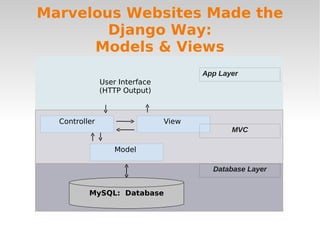
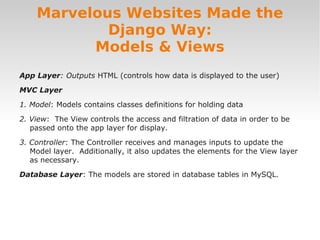
App Layer: Outputs HTML (controls how data is displayed to the user)
MVC Layer
1. Model: Models contains classes definitions for holding data
2. View: The View controls the access and filtration of data in order to be
passed onto the app layer for display.
3. Controller: The Controller receives and manages inputs to update the
Model layer. Additionally, it also updates the elements for the View layer
as necessary.
Database Layer: The models are stored in database tables in MySQL.
Marvelous Websites Made the
Django Way:
Models & Views
The Django Way
Amazing Apps
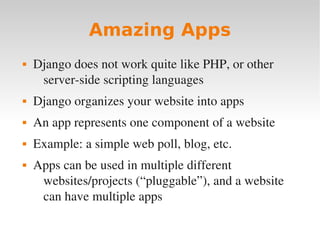
 Django does not work quite like PHP, or other
server­side scripting languages
 Django organizes your website into apps
 An app represents one component of a website
 Example: a simple web poll, blog, etc.
 Apps can be used in multiple different
websites/projects (“pluggable”), and a website
can have multiple apps
Amazing Apps
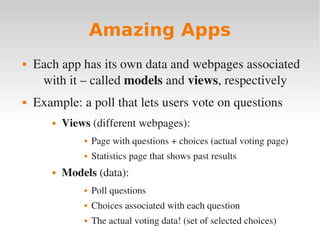
 Each app has its own data and webpages associated
with it – called models and views, respectively
 Example: a poll that lets users vote on questions
 Views (different webpages):
 Page with questions + choices (actual voting page)
 Statistics page that shows past results
 Models (data):
 Poll questions
 Choices associated with each question
 The actual voting data! (set of selected choices)
Amazing Apps
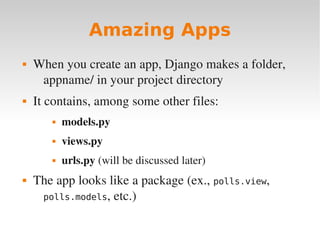
 When you create an app, Django makes a folder,
appname/ in your project directory
 It contains, among some other files:
 models.py
 views.py
 urls.py (will be discussed later)
 The app looks like a package (ex., polls.view,
polls.models, etc.)
Models
Magnificent Models
 Models store data for your app
 Key for making dynamic websites!
 Models are implemented as Python classes, in
models.py file
 Awesome feature of Django: the “object relational
mapper”
 Allows you to access/change a database (ex.,
MySQL) just by calling functions on your models
Magnificent Models
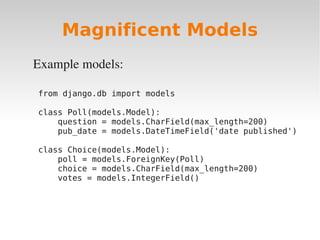
Example models:
from django.db import models
class Poll(models.Model):
question = models.CharField(max_length=200)
pub_date = models.DateTimeField('date published')
class Choice(models.Model):
poll = models.ForeignKey(Poll)
choice = models.CharField(max_length=200)
votes = models.IntegerField()
Magnificent Models
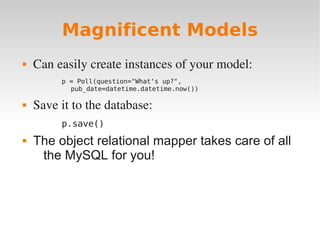
 Can easily create instances of your model:
p = Poll(question="What's up?",
pub_date=datetime.datetime.now())
 Save it to the database:
p.save()
 The object relational mapper takes care of all
the MySQL for you!
Magnificent Models
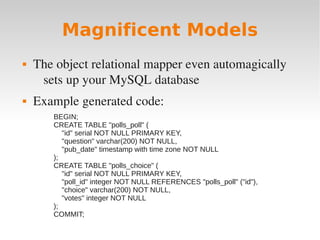
 The object relational mapper even automagically
sets up your MySQL database
 Example generated code:
BEGIN;
CREATE TABLE "polls_poll" (
"id" serial NOT NULL PRIMARY KEY,
"question" varchar(200) NOT NULL,
"pub_date" timestamp with time zone NOT NULL
);
CREATE TABLE "polls_choice" (
"id" serial NOT NULL PRIMARY KEY,
"poll_id" integer NOT NULL REFERENCES "polls_poll" ("id"),
"choice" varchar(200) NOT NULL,
"votes" integer NOT NULL
);
COMMIT;
Magnificent Models
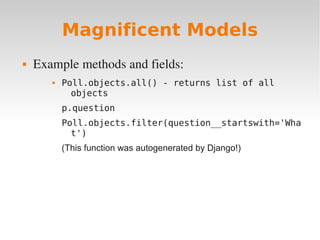
 Example methods and fields:
 Poll.objects.all() - returns list of all
objects
p.question
Poll.objects.filter(question__startswith='Wha
t')
(This function was autogenerated by Django!)
A word about databases
 Although Django certainly does do a lot for you, it
helps to know a bit about databases
 When designing a model, useful to think about
good database practice
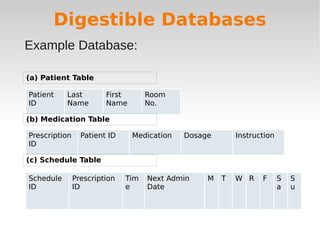
Good Database Design in a Nutshell:
1. Groups of related fields belong in the same table
2. New tables should be created for data fields that are
almost always empty
3. Most of the time the information contained in
unrelated fields will not need to be retrieved at the
same time, so those groups of fields should be in
separate fields as one another
Digestible Databases
Patient
ID
Last
Name
First
Name
Room
No.
(a) Patient Table
(b) Medication Table
Prescription
ID
Patient ID Medication Dosage Instruction
(c) Schedule Table
Schedule
ID
Prescription
ID
Tim
e
Next Admin
Date
M T W R F S
a
S
u
Example Database:
Views
Vivacious Views
 Views are Python functions ­ they make the web
pages users see
 Can make use of models for getting data
 Can use anything that Python has to offer!
 ...and there's A LOT Python can do! Makes for
interesting websites
Vivacious Views
Vivacious Views
 View functions take as input: HttpResponse object
– contains useful information about the client,
sessions, etc.
 Return as output HttpResponse object – basically
HTML output
 Most often, views don't actually write HTML – they
fill in templates! (discussed shortly)
Vivacious Views
 Example view:
from django.shortcuts import render_to_response
from mysite.polls.models import Poll
def index(request):
latest_poll_list = Poll.objects.all().order_by('-pub_date')[:5]
return render_to_response('polls/index.html', {'poll_list': poll_list})
Templates
Templates, Tags, & Tricks
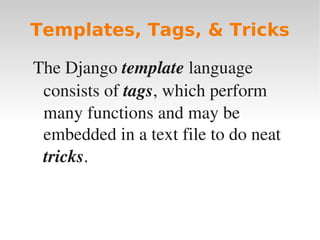
The Django template language
consists of tags, which perform
many functions and may be
embedded in a text file to do neat
tricks.
Templates, Tags, & Tricks
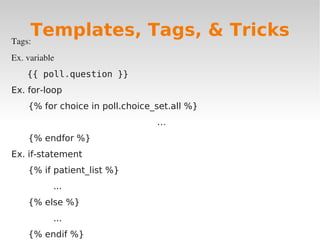
Tags:
Ex. variable
{{ poll.question }}
Ex. for-loop
{% for choice in poll.choice_set.all %}
…
{% endfor %}
Ex. if-statement
{% if patient_list %}
...
{% else %}
...
{% endif %}
Templates, Tags, & Tricks
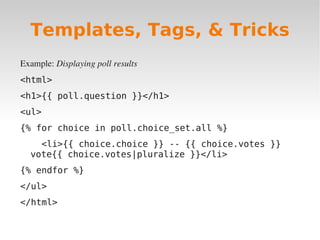
Example: Displaying poll results
<html>
<h1>{{ poll.question }}</h1>
<ul>
{% for choice in poll.choice_set.all %}
<li>{{ choice.choice }} -- {{ choice.votes }}
vote{{ choice.votes|pluralize }}</li>
{% endfor %}
</ul>
</html>
Templates, Tags, & Tricks
Django URL Structure
Utterly Unblemished URL's
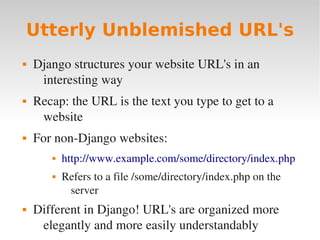
 Django structures your website URL's in an
interesting way
 Recap: the URL is the text you type to get to a
website
 For non­Django websites:
 http://www.example.com/some/directory/index.php
 Refers to a file /some/directory/index.php on the
server
 Different in Django! URL's are organized more
elegantly and more easily understandably
Utterly Unblemished URL's
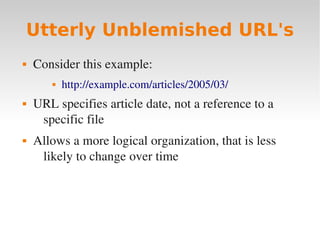
 Consider this example:
 http://example.com/articles/2005/03/
 URL specifies article date, not a reference to a
specific file
 Allows a more logical organization, that is less
likely to change over time
Utterly Unblemished URL's
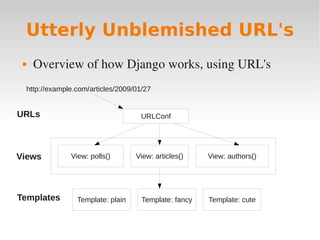
 Overview of how Django works, using URL's
http://example.com/articles/2009/01/27
URLConf
View: polls() View: articles() View: authors()
Template: fancy
URLs
Views
Templates Template: cute
Template: plain
Utterly Unblemished URL's
 URL patterns map to Views
 Views may use templates
 Templates contain HTML (discussed later)
 This puts a layer of abstraction between URL
names and files
 The file urls.py that specifies how URL's get
mapped to views, using regular expressions
Utterly Unblemished URL's
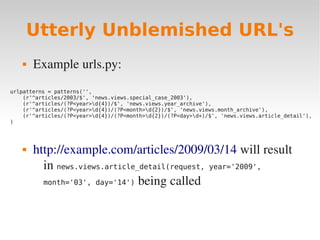
 Example urls.py:
 http://example.com/articles/2009/03/14 will result
in news.views.article_detail(request, year='2009',
month='03', day='14') being called
urlpatterns = patterns('',
(r'^articles/2003/$', 'news.views.special_case_2003'),
(r'^articles/(?P<year>d{4})/$', 'news.views.year_archive'),
(r'^articles/(?P<year>d{4})/(?P<month>d{2})/$', 'news.views.month_archive'),
(r'^articles/(?P<year>d{4})/(?P<month>d{2})/(?P<day>d+)/$', 'news.views.article_detail'),
)
Utterly Unblemished URL's
 These are mostly like regular expressions, which
are outside of the scope of this class
Admin Interface
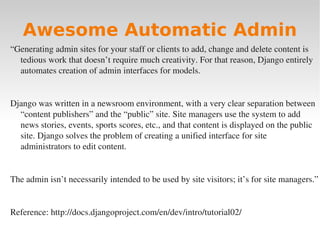
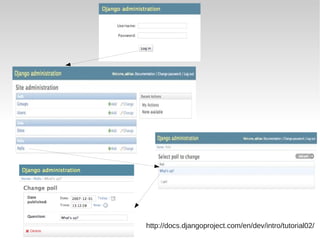
Awesome Automatic Admin
“Generating admin sites for your staff or clients to add, change and delete content is
tedious work that doesn’t require much creativity. For that reason, Django entirely
automates creation of admin interfaces for models.
Django was written in a newsroom environment, with a very clear separation between
“content publishers” and the “public” site. Site managers use the system to add
news stories, events, sports scores, etc., and that content is displayed on the public
site. Django solves the problem of creating a unified interface for site
administrators to edit content.
The admin isn’t necessarily intended to be used by site visitors; it’s for site managers.”
Reference: http://docs.djangoproject.com/en/dev/intro/tutorial02/
http://docs.djangoproject.com/en/dev/intro/tutorial02/
Forms
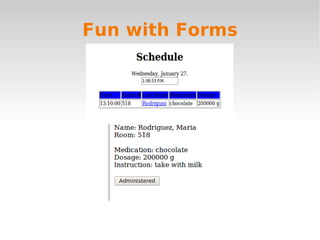
Fun with Forms
Why use them?
1. Automatically generate form widgets.
2. Input validation.
3. Redisplay a form after invalid input.
4. Convert submitted form data to Python data types.
Fun with Forms
Example:
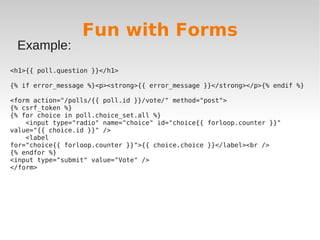
<h1>{{ poll.question }}</h1>
{% if error_message %}<p><strong>{{ error_message }}</strong></p>{% endif %}
<form action="/polls/{{ poll.id }}/vote/" method="post">
{% csrf_token %}
{% for choice in poll.choice_set.all %}
<input type="radio" name="choice" id="choice{{ forloop.counter }}"
value="{{ choice.id }}" />
<label
for="choice{{ forloop.counter }}">{{ choice.choice }}</label><br />
{% endfor %}
<input type="submit" value="Vote" />
</form>
Fun with Forms
Other Nifty Django Features
Satisfying Sessions
 You can uses sessions in Django, just like the
sessions in PHP
 Sessions allow you to store state across different
pages of your website
 Common uses: store logged in username, shopping
cart information, etc.
 If you write to a session in one view (webpage), it
will be visible in all views afterwards as well
 Session is found in the HttpResponse object
Real Live Examples!
Real-World Apps
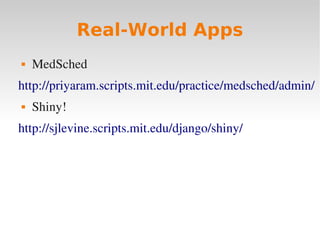
 MedSched
http://priyaram.scripts.mit.edu/practice/medsched/admin/
 Shiny!
http://sjlevine.scripts.mit.edu/django/shiny/
Tutorial: Polling
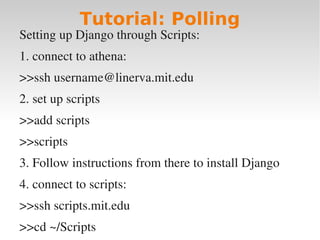
Setting up Django through Scripts:
1. connect to athena:
>>ssh username@linerva.mit.edu
2. set up scripts
>>add scripts
>>scripts
3. Follow instructions from there to install Django
4. connect to scripts:
>>ssh scripts.mit.edu
>>cd ~/Scripts
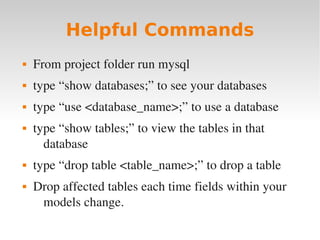
 From project folder run mysql
 type “show databases;” to see your databases
 type “use <database_name>;” to use a database
 type “show tables;” to view the tables in that
database
 type “drop table <table_name>;” to drop a table
 Drop affected tables each time fields within your
models change.
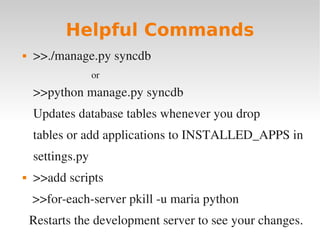
Helpful Commands
Helpful Commands
 >>./manage.py syncdb
or
>>python manage.py syncdb
Updates database tables whenever you drop
tables or add applications to INSTALLED_APPS in
settings.py
 >>add scripts
>>for­each­server pkill ­u maria python
Restarts the development server to see your changes.
Handy References
 Official Django website:
http://www.djangoproject.org/
 Contains an amazing tutorial that you should follow
 Information on setting up Django
 Documentation for various classes, functions, etc.

CCCDjango2010.pdf

  • 1.
    Web Programming inPython with Django! Instructors: Steve Levine '11 Maria Rodriguez '11 Geoffrey Thomas '10 sipb-iap-django@mit.edu http://sipb.mit.edu/iap/django/ Wednesday, January 27th SIPB IAP 2010
  • 2.
    Course Overview  Whatis Django?  Apps, Models, and Views  URL Structure  Templates  Admin Interface  Forms  Examples / Tutorials
  • 3.
  • 4.
    What is Django? django django[jāngō] -noun noun 1. a shiny web framework that allows one to build dynamic, professional-looking websites in python: Need to make a slick website? Use django! 2. masculine form of popular Hasbro game Jenga® (will not be discussed tonight) 3. magic
  • 5.
    Funk-tacular Features  projectsor “apps” are pluggable  object­relational mapper: combines the advantages of having a database with the advantages of using an object­oriented programming language  database allows for efficient data storage and retrieval  Python allows for cleaner and more readable code
  • 6.
    Funk-tacular Features  automaticadmin interface offers the functionality of adding, editing, and deleting items within a database in a graphical, user­friendly way  flexible template language that provides a way to retrieve data and display it on a webpage in its desired format  url design is elegant and easy to read
  • 7.
    Marvelous Websites Madethe Django Way: Models & Views MySQL: Database Model Controller View User Interface (HTTP Output) App Layer MVC Database Layer
  • 8.
    App Layer: OutputsHTML (controls how data is displayed to the user) MVC Layer 1. Model: Models contains classes definitions for holding data 2. View: The View controls the access and filtration of data in order to be passed onto the app layer for display. 3. Controller: The Controller receives and manages inputs to update the Model layer. Additionally, it also updates the elements for the View layer as necessary. Database Layer: The models are stored in database tables in MySQL. Marvelous Websites Made the Django Way: Models & Views
  • 9.
  • 10.
    Amazing Apps  Djangodoes not work quite like PHP, or other server­side scripting languages  Django organizes your website into apps  An app represents one component of a website  Example: a simple web poll, blog, etc.  Apps can be used in multiple different websites/projects (“pluggable”), and a website can have multiple apps
  • 11.
    Amazing Apps  Eachapp has its own data and webpages associated with it – called models and views, respectively  Example: a poll that lets users vote on questions  Views (different webpages):  Page with questions + choices (actual voting page)  Statistics page that shows past results  Models (data):  Poll questions  Choices associated with each question  The actual voting data! (set of selected choices)
  • 12.
    Amazing Apps  Whenyou create an app, Django makes a folder, appname/ in your project directory  It contains, among some other files:  models.py  views.py  urls.py (will be discussed later)  The app looks like a package (ex., polls.view, polls.models, etc.)
  • 13.
  • 14.
    Magnificent Models  Modelsstore data for your app  Key for making dynamic websites!  Models are implemented as Python classes, in models.py file  Awesome feature of Django: the “object relational mapper”  Allows you to access/change a database (ex., MySQL) just by calling functions on your models
  • 15.
    Magnificent Models Example models: fromdjango.db import models class Poll(models.Model): question = models.CharField(max_length=200) pub_date = models.DateTimeField('date published') class Choice(models.Model): poll = models.ForeignKey(Poll) choice = models.CharField(max_length=200) votes = models.IntegerField()
  • 16.
    Magnificent Models  Caneasily create instances of your model: p = Poll(question="What's up?", pub_date=datetime.datetime.now())  Save it to the database: p.save()  The object relational mapper takes care of all the MySQL for you!
  • 17.
    Magnificent Models  Theobject relational mapper even automagically sets up your MySQL database  Example generated code: BEGIN; CREATE TABLE "polls_poll" ( "id" serial NOT NULL PRIMARY KEY, "question" varchar(200) NOT NULL, "pub_date" timestamp with time zone NOT NULL ); CREATE TABLE "polls_choice" ( "id" serial NOT NULL PRIMARY KEY, "poll_id" integer NOT NULL REFERENCES "polls_poll" ("id"), "choice" varchar(200) NOT NULL, "votes" integer NOT NULL ); COMMIT;
  • 18.
    Magnificent Models  Examplemethods and fields:  Poll.objects.all() - returns list of all objects p.question Poll.objects.filter(question__startswith='Wha t') (This function was autogenerated by Django!)
  • 19.
    A word aboutdatabases  Although Django certainly does do a lot for you, it helps to know a bit about databases  When designing a model, useful to think about good database practice
  • 20.
    Good Database Designin a Nutshell: 1. Groups of related fields belong in the same table 2. New tables should be created for data fields that are almost always empty 3. Most of the time the information contained in unrelated fields will not need to be retrieved at the same time, so those groups of fields should be in separate fields as one another Digestible Databases
  • 21.
    Digestible Databases Patient ID Last Name First Name Room No. (a) PatientTable (b) Medication Table Prescription ID Patient ID Medication Dosage Instruction (c) Schedule Table Schedule ID Prescription ID Tim e Next Admin Date M T W R F S a S u Example Database:
  • 22.
  • 23.
    Vivacious Views  Viewsare Python functions ­ they make the web pages users see  Can make use of models for getting data  Can use anything that Python has to offer!  ...and there's A LOT Python can do! Makes for interesting websites
  • 24.
  • 25.
    Vivacious Views  Viewfunctions take as input: HttpResponse object – contains useful information about the client, sessions, etc.  Return as output HttpResponse object – basically HTML output  Most often, views don't actually write HTML – they fill in templates! (discussed shortly)
  • 26.
    Vivacious Views  Exampleview: from django.shortcuts import render_to_response from mysite.polls.models import Poll def index(request): latest_poll_list = Poll.objects.all().order_by('-pub_date')[:5] return render_to_response('polls/index.html', {'poll_list': poll_list})
  • 27.
  • 28.
    Templates, Tags, &Tricks The Django template language consists of tags, which perform many functions and may be embedded in a text file to do neat tricks. Templates, Tags, & Tricks
  • 29.
    Tags: Ex. variable {{ poll.question}} Ex. for-loop {% for choice in poll.choice_set.all %} … {% endfor %} Ex. if-statement {% if patient_list %} ... {% else %} ... {% endif %} Templates, Tags, & Tricks
  • 30.
    Example: Displaying pollresults <html> <h1>{{ poll.question }}</h1> <ul> {% for choice in poll.choice_set.all %} <li>{{ choice.choice }} -- {{ choice.votes }} vote{{ choice.votes|pluralize }}</li> {% endfor %} </ul> </html> Templates, Tags, & Tricks
  • 31.
  • 32.
    Utterly Unblemished URL's Django structures your website URL's in an interesting way  Recap: the URL is the text you type to get to a website  For non­Django websites:  http://www.example.com/some/directory/index.php  Refers to a file /some/directory/index.php on the server  Different in Django! URL's are organized more elegantly and more easily understandably
  • 33.
    Utterly Unblemished URL's Consider this example:  http://example.com/articles/2005/03/  URL specifies article date, not a reference to a specific file  Allows a more logical organization, that is less likely to change over time
  • 34.
    Utterly Unblemished URL's Overview of how Django works, using URL's http://example.com/articles/2009/01/27 URLConf View: polls() View: articles() View: authors() Template: fancy URLs Views Templates Template: cute Template: plain
  • 35.
    Utterly Unblemished URL's URL patterns map to Views  Views may use templates  Templates contain HTML (discussed later)  This puts a layer of abstraction between URL names and files  The file urls.py that specifies how URL's get mapped to views, using regular expressions
  • 36.
    Utterly Unblemished URL's Example urls.py:  http://example.com/articles/2009/03/14 will result in news.views.article_detail(request, year='2009', month='03', day='14') being called urlpatterns = patterns('', (r'^articles/2003/$', 'news.views.special_case_2003'), (r'^articles/(?P<year>d{4})/$', 'news.views.year_archive'), (r'^articles/(?P<year>d{4})/(?P<month>d{2})/$', 'news.views.month_archive'), (r'^articles/(?P<year>d{4})/(?P<month>d{2})/(?P<day>d+)/$', 'news.views.article_detail'), )
  • 37.
    Utterly Unblemished URL's These are mostly like regular expressions, which are outside of the scope of this class
  • 38.
  • 39.
    Awesome Automatic Admin “Generatingadmin sites for your staff or clients to add, change and delete content is tedious work that doesn’t require much creativity. For that reason, Django entirely automates creation of admin interfaces for models. Django was written in a newsroom environment, with a very clear separation between “content publishers” and the “public” site. Site managers use the system to add news stories, events, sports scores, etc., and that content is displayed on the public site. Django solves the problem of creating a unified interface for site administrators to edit content. The admin isn’t necessarily intended to be used by site visitors; it’s for site managers.” Reference: http://docs.djangoproject.com/en/dev/intro/tutorial02/
  • 40.
  • 41.
  • 42.
    Fun with Forms Whyuse them? 1. Automatically generate form widgets. 2. Input validation. 3. Redisplay a form after invalid input. 4. Convert submitted form data to Python data types.
  • 43.
    Fun with Forms Example: <h1>{{poll.question }}</h1> {% if error_message %}<p><strong>{{ error_message }}</strong></p>{% endif %} <form action="/polls/{{ poll.id }}/vote/" method="post"> {% csrf_token %} {% for choice in poll.choice_set.all %} <input type="radio" name="choice" id="choice{{ forloop.counter }}" value="{{ choice.id }}" /> <label for="choice{{ forloop.counter }}">{{ choice.choice }}</label><br /> {% endfor %} <input type="submit" value="Vote" /> </form>
  • 44.
  • 45.
  • 46.
    Satisfying Sessions  Youcan uses sessions in Django, just like the sessions in PHP  Sessions allow you to store state across different pages of your website  Common uses: store logged in username, shopping cart information, etc.  If you write to a session in one view (webpage), it will be visible in all views afterwards as well  Session is found in the HttpResponse object
  • 47.
  • 48.
  • 49.
    Tutorial: Polling Setting upDjango through Scripts: 1. connect to athena: >>ssh username@linerva.mit.edu 2. set up scripts >>add scripts >>scripts 3. Follow instructions from there to install Django 4. connect to scripts: >>ssh scripts.mit.edu >>cd ~/Scripts
  • 50.
     From projectfolder run mysql  type “show databases;” to see your databases  type “use <database_name>;” to use a database  type “show tables;” to view the tables in that database  type “drop table <table_name>;” to drop a table  Drop affected tables each time fields within your models change. Helpful Commands
  • 51.
    Helpful Commands  >>./manage.pysyncdb or >>python manage.py syncdb Updates database tables whenever you drop tables or add applications to INSTALLED_APPS in settings.py  >>add scripts >>for­each­server pkill ­u maria python Restarts the development server to see your changes.
  • 52.
    Handy References  OfficialDjango website: http://www.djangoproject.org/  Contains an amazing tutorial that you should follow  Information on setting up Django  Documentation for various classes, functions, etc.