Database Modeling for radio
cab services.
Outline
 Database Modeling Introduction
 Steps involved in Data Modeling
 Logical Model of cab service.
 E-R diagrams
 Example queries.
About the Presentation
 Focus is on Data modeling and various
techniques like normalization.
 The whole process of data modeling
has been demonstrated taking an
example of radio cabs.
 We would be discussing how we came
up with cab database in 3 steps.
Step 1:
Conceptual Modeling
 The conceptual data model  is a (relatively) 
technology independent specification of the data to
be held in the database.
 It is the focus of communication between the data
modeler and business stakeholders,
and it is usually presented as a diagram with
supporting documentation
Conceptual Modeling
■ Modeler: What is your business model?
■ Business Specialist: We are aggregators i.e we aren’t
direct service providers
■ Modeler: Ok, so we need not be concerned about the
maintenance of cabs!. So what all information about the
drivers would you like to keep?
■ Business Specialist: Security issues have been
popping up, we would need to verify each driver based
on his past history, validity of his registration, Car
condition etc.
Conceptual Modeling
■Modeler: So maybe we could have a separate table
containing the details of the drivers and would call it
“Driver Table”. By the way, would you like to store the
information about the clientele?
■ Business Specialist: Definitely. We would like to have
a detailed record of them so that we can utilize that data
for advertisement and business analysis.
■Modeler: Sure deed! Let as develop a basic design for
you and we shall discuss further.
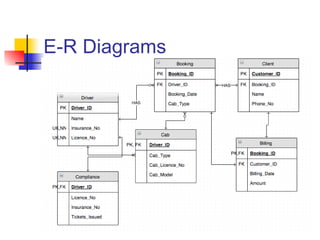
E-R Diagrams as part of
Conceptual Modeling
 Based on the communication with the
business specialist various entities and
relationships are developed.
 Data Representation:
 Relational Notation.
 Chen notation.
 Oracle designer’s notation.
E-R Diagrams
 Conventions that we have tried to follow while drawing the E-R
diagrams like how to give entity names, attribute names and
relationship names.
 These are very fundamental to data modeling.
 Convention followed for:
 Entity names
 Attribute names
 Relationships
Conventions
 Why Correct Naming: If the data modeler doesn’t name
correctly then it might create confusion in the minds of people
using the database and could result in wrong entries.
 For example:
 One  should not abbreviate entity names unnecessarily. This can
create a lot of confusion to those who use the database
 For example, In student administration system if two entities are
named M-Parent and F-Parent then database user can understand
M-Parent as Male parent or he can understand it as Mother Parent.
Things like this create a lot of wrong inputs to the database.
Conventions
 similarly other conventions that need to be followed are:
 The name of an entity class must be in the singular and refer to a
single instance i.e a row not to the whole table.
 One should never name the entity class on the name of  the most
“important” attribute. Since later on we we add other attributes to it
then this entity name would not make much sense.
 One should never name one entity class by adding a prefix to the
name of another,

Example: External Employee  when there is already an Employee  entity class.
This creates unwanted assumptions in the mind that all employee in the
Employee class are internal employee.
E-R Diagrams
Step 2:
Logical Modeling Stage
 The logical data model  is a translation of the
conceptual model into structures that can be
implemented using a database management system
(DBMS).
  This model specifies tables and columns. These are
the basic building blocks of relational databases.
Logical Modeling Stage
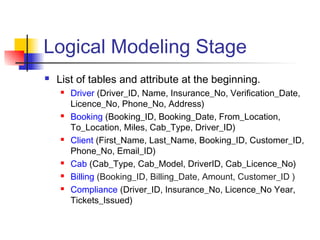
 List of tables and attribute at the beginning.
 Driver (Driver_ID, Name, Insurance_No, Verification_Date,
Licence_No, Phone_No, Address)
 Booking (Booking_ID, Booking_Date, From_Location,
To_Location, Miles, Cab_Type, Driver_ID)
 Client (First_Name, Last_Name, Booking_ID, Customer_ID,
Phone_No, Email_ID)
 Cab (Cab_Type, Cab_Model, DriverID, Cab_Licence_No)
 Billing (Booking_ID, Billing_Date, Amount, Customer_ID )
 Compliance (Driver_ID, Insurance_No, Licence_No Year,
Tickets_Issued)
Normalization of Tables
 Why Normalization
 completeness,
 nonredundancy
 flexibility of extending repeating
groups
 ease of data reuse
 programming simplicity
 Note: Need for Unnormalization
 Performance
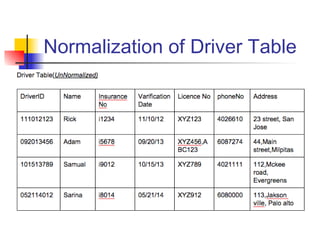
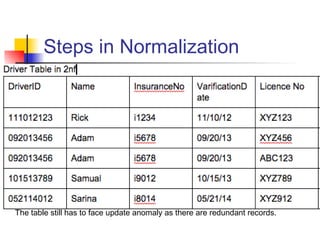
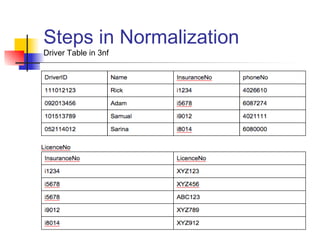
Normalization of Driver Table
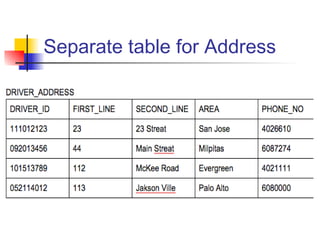
Separate table for Address
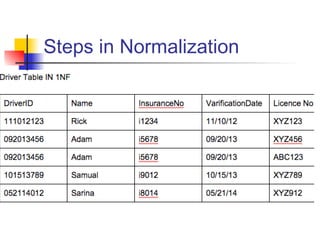
Steps in Normalization
The table still has to face update anomaly as there are redundant records.
Steps in Normalization
Driver Table in 3nf
Efficient Querying
 Once the database is in place it is very
important that we query it in the most
efficient way.
 This can be done by improving the
performance of SQL statements
 This is called as SQL tuning
SQL Tuning On Cab
DataBase
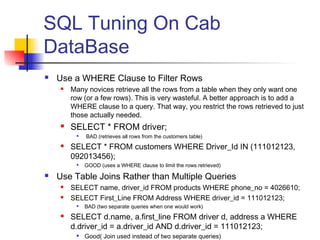
 Use a WHERE Clause to Filter Rows
 Many novices retrieve all the rows from a table when they only want one
row (or a few rows). This is very wasteful. A better approach is to add a
WHERE clause to a query. That way, you restrict the rows retrieved to just
those actually needed.
 SELECT * FROM driver;

BAD (retrieves all rows from the customers table)
 SELECT * FROM customers WHERE Driver_Id IN (111012123,
092013456);

GOOD (uses a WHERE clause to limit the rows retrieved)
 Use Table Joins Rather than Multiple Queries
 SELECT name, driver_id FROM products WHERE phone_no = 4026610;
 SELECT First_Line FROM Address WHERE driver_id = 111012123;

BAD (two separate queries when one would work)
 SELECT d.name, a.first_line FROM driver d, address a WHERE
d.driver_id = a.driver_id AND d.driver_id = 111012123;

Good( Join used instead of two separate queries)
SQL Tuning
 Fully Qualified Column References
 When Performing Joins Always include table aliases in your queries and
use the alias for each column in your query.
 This is known as “fully qualifying” your column references.
 That way, the database doesn’t have to search for each column in the
tables used in your query.
 SELECT d.name, a.first_line, phone_no, Licence_no FROM Driver
d, Address a WHERE d.driver_id = a.driver_id;

BAD (Phone_no and Licence_no columns are not fully qualified)
 SELECT d.name, a.first_line, a.phone_no, d.Licence_no FROM
Driver d, Address a WHERE d.driver_id = a.driver_id;

Good(Column references are Fully Qualified)
SQL Tuning
 Use CASE Expressions Rather than Multiple Queries
 SELECT Driver_ID, CASE WHEN Tickets_Issued Between 8
AND 12 THEN ‘High_Risk’ WHEN Tickets_Issued
BETWEEN 5 AND 8 THEN ‘Med_Risk’ ELSE ‘Fine’ END
FROM Compliance;
 Add Indexes to Tables
 Generally, you should create an index on a column when you are retrieving
a small number of rows from a table containing many rows.
 A good rule of thumb is Create an index when a query retrieves <= 10
percent of the total rows in a table.
 Why shouldn’t we create Index without the above Rule?
 The downside of indexes is that when a row is added to the table, additional
time is required to update the index for the new row.
Step 3
Physical Model
 It is a transition from logical to physical model. Goal
is to achieve adequate performance.
 We may need to work creatively with the database
designer to propose and evaluate changes to the
logical model to be incorporated in the physical
model, if these are needed to achieve adequate
performance.
 similarly, we may need to work with the business
stakeholders and process modelers or programmers
to assess the impact of such changes
on them.
 The physical model describes the actual implemented
database including the tables, constraints etc.
Thank You!

Database Modeling presentation

  • 1.
    Database Modeling forradio cab services.
  • 2.
    Outline  Database ModelingIntroduction  Steps involved in Data Modeling  Logical Model of cab service.  E-R diagrams  Example queries.
  • 3.
    About the Presentation Focus is on Data modeling and various techniques like normalization.  The whole process of data modeling has been demonstrated taking an example of radio cabs.  We would be discussing how we came up with cab database in 3 steps.
  • 4.
    Step 1: Conceptual Modeling The conceptual data model  is a (relatively)  technology independent specification of the data to be held in the database.  It is the focus of communication between the data modeler and business stakeholders, and it is usually presented as a diagram with supporting documentation
  • 5.
    Conceptual Modeling ■ Modeler:What is your business model? ■ Business Specialist: We are aggregators i.e we aren’t direct service providers ■ Modeler: Ok, so we need not be concerned about the maintenance of cabs!. So what all information about the drivers would you like to keep? ■ Business Specialist: Security issues have been popping up, we would need to verify each driver based on his past history, validity of his registration, Car condition etc.
  • 6.
    Conceptual Modeling ■Modeler: Somaybe we could have a separate table containing the details of the drivers and would call it “Driver Table”. By the way, would you like to store the information about the clientele? ■ Business Specialist: Definitely. We would like to have a detailed record of them so that we can utilize that data for advertisement and business analysis. ■Modeler: Sure deed! Let as develop a basic design for you and we shall discuss further.
  • 7.
    E-R Diagrams aspart of Conceptual Modeling  Based on the communication with the business specialist various entities and relationships are developed.  Data Representation:  Relational Notation.  Chen notation.  Oracle designer’s notation.
  • 8.
    E-R Diagrams  Conventionsthat we have tried to follow while drawing the E-R diagrams like how to give entity names, attribute names and relationship names.  These are very fundamental to data modeling.  Convention followed for:  Entity names  Attribute names  Relationships
  • 9.
    Conventions  Why CorrectNaming: If the data modeler doesn’t name correctly then it might create confusion in the minds of people using the database and could result in wrong entries.  For example:  One  should not abbreviate entity names unnecessarily. This can create a lot of confusion to those who use the database  For example, In student administration system if two entities are named M-Parent and F-Parent then database user can understand M-Parent as Male parent or he can understand it as Mother Parent. Things like this create a lot of wrong inputs to the database.
  • 10.
    Conventions  similarly otherconventions that need to be followed are:  The name of an entity class must be in the singular and refer to a single instance i.e a row not to the whole table.  One should never name the entity class on the name of  the most “important” attribute. Since later on we we add other attributes to it then this entity name would not make much sense.  One should never name one entity class by adding a prefix to the name of another,  Example: External Employee  when there is already an Employee  entity class. This creates unwanted assumptions in the mind that all employee in the Employee class are internal employee.
  • 11.
  • 12.
    Step 2: Logical ModelingStage  The logical data model  is a translation of the conceptual model into structures that can be implemented using a database management system (DBMS).   This model specifies tables and columns. These are the basic building blocks of relational databases.
  • 13.
    Logical Modeling Stage List of tables and attribute at the beginning.  Driver (Driver_ID, Name, Insurance_No, Verification_Date, Licence_No, Phone_No, Address)  Booking (Booking_ID, Booking_Date, From_Location, To_Location, Miles, Cab_Type, Driver_ID)  Client (First_Name, Last_Name, Booking_ID, Customer_ID, Phone_No, Email_ID)  Cab (Cab_Type, Cab_Model, DriverID, Cab_Licence_No)  Billing (Booking_ID, Billing_Date, Amount, Customer_ID )  Compliance (Driver_ID, Insurance_No, Licence_No Year, Tickets_Issued)
  • 14.
    Normalization of Tables Why Normalization  completeness,  nonredundancy  flexibility of extending repeating groups  ease of data reuse  programming simplicity  Note: Need for Unnormalization  Performance
  • 15.
  • 16.
  • 17.
  • 18.
    Steps in Normalization Thetable still has to face update anomaly as there are redundant records.
  • 19.
  • 20.
    Efficient Querying  Oncethe database is in place it is very important that we query it in the most efficient way.  This can be done by improving the performance of SQL statements  This is called as SQL tuning
  • 21.
    SQL Tuning OnCab DataBase  Use a WHERE Clause to Filter Rows  Many novices retrieve all the rows from a table when they only want one row (or a few rows). This is very wasteful. A better approach is to add a WHERE clause to a query. That way, you restrict the rows retrieved to just those actually needed.  SELECT * FROM driver;  BAD (retrieves all rows from the customers table)  SELECT * FROM customers WHERE Driver_Id IN (111012123, 092013456);  GOOD (uses a WHERE clause to limit the rows retrieved)  Use Table Joins Rather than Multiple Queries  SELECT name, driver_id FROM products WHERE phone_no = 4026610;  SELECT First_Line FROM Address WHERE driver_id = 111012123;  BAD (two separate queries when one would work)  SELECT d.name, a.first_line FROM driver d, address a WHERE d.driver_id = a.driver_id AND d.driver_id = 111012123;  Good( Join used instead of two separate queries)
  • 22.
    SQL Tuning  FullyQualified Column References  When Performing Joins Always include table aliases in your queries and use the alias for each column in your query.  This is known as “fully qualifying” your column references.  That way, the database doesn’t have to search for each column in the tables used in your query.  SELECT d.name, a.first_line, phone_no, Licence_no FROM Driver d, Address a WHERE d.driver_id = a.driver_id;  BAD (Phone_no and Licence_no columns are not fully qualified)  SELECT d.name, a.first_line, a.phone_no, d.Licence_no FROM Driver d, Address a WHERE d.driver_id = a.driver_id;  Good(Column references are Fully Qualified)
  • 23.
    SQL Tuning  UseCASE Expressions Rather than Multiple Queries  SELECT Driver_ID, CASE WHEN Tickets_Issued Between 8 AND 12 THEN ‘High_Risk’ WHEN Tickets_Issued BETWEEN 5 AND 8 THEN ‘Med_Risk’ ELSE ‘Fine’ END FROM Compliance;  Add Indexes to Tables  Generally, you should create an index on a column when you are retrieving a small number of rows from a table containing many rows.  A good rule of thumb is Create an index when a query retrieves <= 10 percent of the total rows in a table.  Why shouldn’t we create Index without the above Rule?  The downside of indexes is that when a row is added to the table, additional time is required to update the index for the new row.
  • 24.
    Step 3 Physical Model It is a transition from logical to physical model. Goal is to achieve adequate performance.  We may need to work creatively with the database designer to propose and evaluate changes to the logical model to be incorporated in the physical model, if these are needed to achieve adequate performance.  similarly, we may need to work with the business stakeholders and process modelers or programmers to assess the impact of such changes on them.  The physical model describes the actual implemented database including the tables, constraints etc.
  • 25.