Data viz – telling stories with data

Tom Smith, OCSI
About OCSI


 www.ocsi.co.uk   +44 1273 810 270 info@ocsi.co.uk
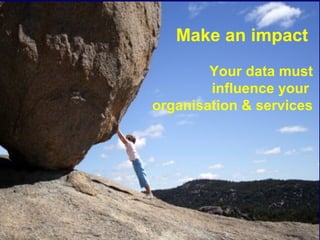
Make an impact
        Your data must
        influence your
organisation & services
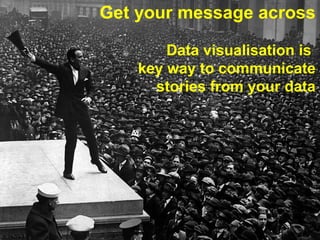
Get your message across

        Data visualisation is
    key way to communicate
      stories from your data
Information from data. Order from chaos

 • “data graphics can do much more than … substitute for
   statistical tables…. [They] are instruments for reasoning
   about quantitative information ”, Tufte, 1983
How can data visualisation help
local organisations?
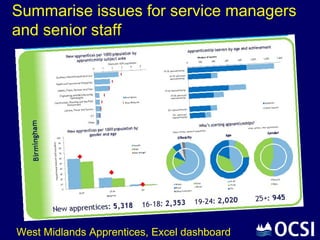
Summarise issues for service managers
and senior staff


West Midlands Apprentices, Excel dashboard
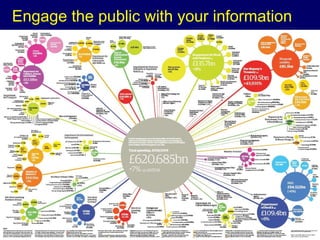
Engage the public with your information
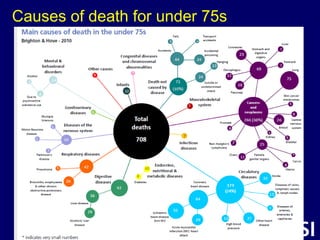
Causes of death for under 75s
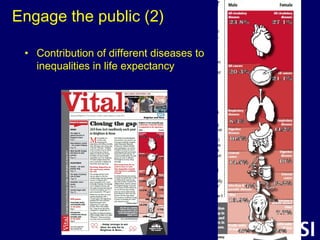
Engage the public (2)

 • Contribution of different diseases to
   inequalities in life expectancy
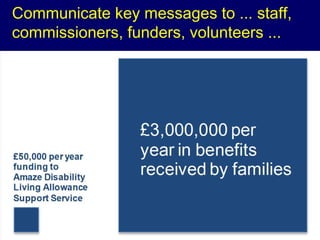
Communicate key messages to ... staff,
commissioners, funders, volunteers ...
Data visualisation principles
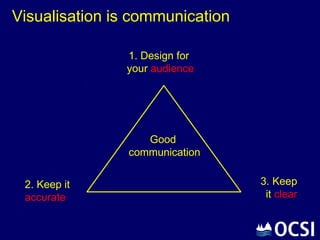
Visualisation is communication

               1. Design for
               your audience


                   Good
                communication


 2. Keep it                      3. Keep
 accurate                         it clear
Principle 1: Design for your audience

 • Key points for this visualisation for this audience
    – Limit what you show. Be selective

 • Know your audience
    – What information does your audience want/ need?
    – What will they quickly understand?
    – What do they need to help them see the data story

 • Test your visualisation - colleagues? managers?
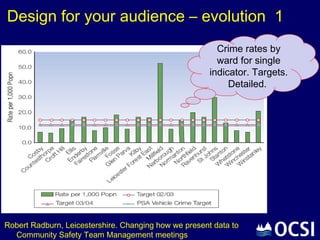
Design for your audience – evolution 1
                                                         Crime rates by
                                                         ward for single
                                                       indicator. Targets.
                                                            Detailed.


Robert Radburn, Leicestershire. Changing how we present data to
  Community Safety Team Management meetings
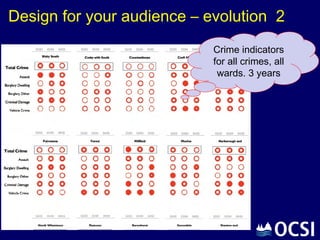
Design for your audience – evolution 2
                            Crime indicators
                            for all crimes, all
                             wards. 3 years
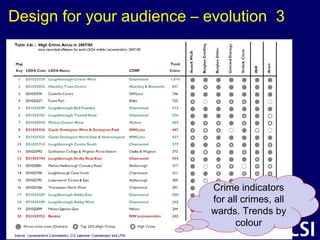
Design for your audience – evolution 3


                           Crime indicators
                           for all crimes, all
                           wards. Trends by
                                 colour
Principles 2 & 3: Keep it accurate & clear

 • Focus on the message(s) for the audience

 • Show the data without distortion
    – Avoid common pitfalls (do’s and dont’s)

 • Don’t obscure the information
    – Use the right type of chart

 • Learn from others
    – Look at examples and resources – there’s lots out there!
Data visualisation practical

Do’s and Don’ts
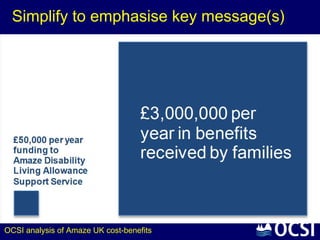
Simplify to emphasise key message(s)


OCSI analysis of Amaze UK cost-benefits
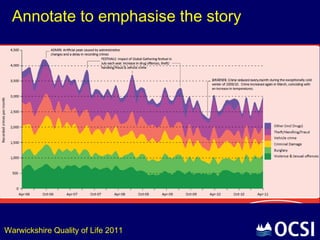
Annotate to emphasise the story


Warwickshire Quality of Life 2011
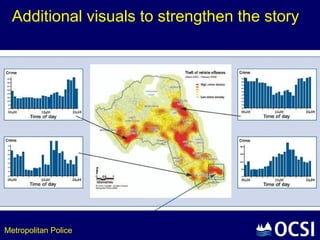
Additional visuals to strengthen the story


Metropolitan Police
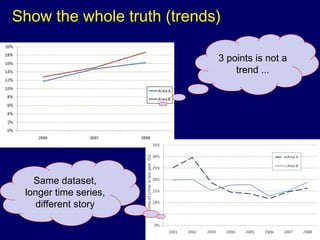
Show the whole truth (trends)

                            3 points is not a
                                trend ...


   Same dataset,
 longer time series,
   different story
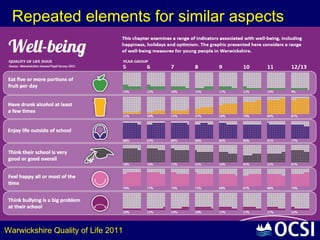
Repeated elements for similar aspects


Warwickshire Quality of Life 2011
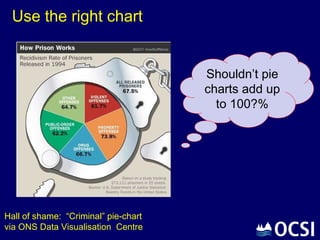
Use the right chart


                                      Shouldn’t pie
                                      charts add up
                                        to 100?%


Hall of shame: “Criminal” pie-chart
via ONS Data Visualisation Centre
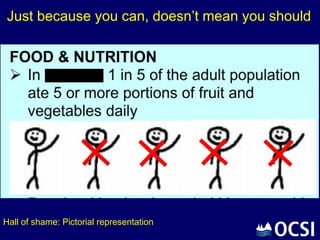
Just because you can, doesn’t mean you should


Hall of shame: Pictorial representation
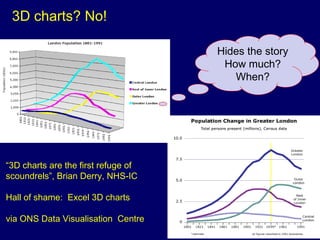
3D charts? No!

                                     Hides the story
                                      How much?
                                        When?


“3D charts are the first refuge of
scoundrels”, Brian Derry, NHS-IC

Hall of shame: Excel 3D charts

via ONS Data Visualisation Centre
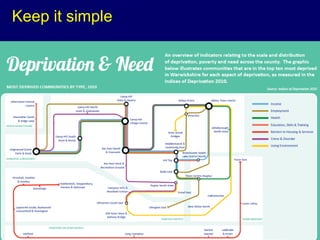
Keep it simple
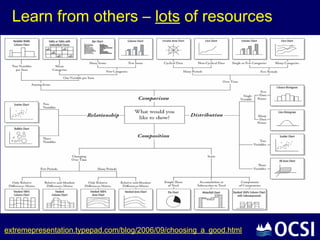
Learn from others – lots of resources

 • www.improving-visualisation.org.uk/links
   visualisation support for public sector researchers

 • www.visualisingdata.com (lots of links, tutorials, tools)

 • Flowing Data, www.flowingdata.com (examples)

 • www.gapminder.org (Hans Rosling videos)

 • ONS Data Viz centre
   www.ons.gov.uk/ons/interactive/index.html
Learn from others – lots of resources


extremepresentation.typepad.com/blog/2006/09/choosing_a_good.html
Summing up
 • Your data must influence your organisation & services
    – Make an impact

 • Data visualisation is key way to communicate stories
   from your data
    – Get your message across. Lots of uses in local organisations

 • Principles - design for audience, keep it accurate & clear

 • Practicals - do's & don'ts

 • Learn from others - resources

 • Have fun
Tom Smith
Oxford Consultants for Social Inclusion (OCSI)

e: info@ocsi.co.uk
t: +44 1273 810 270
w: www.ocsi.co.uk
Data viz and photo credits

    •   Warwickshire Quality of Life 2011 report
    •   Brighton & Hove Annual Director Public Health 2012 report
    •   Leicestershire Research & Intelligence analysis and reports
    •   OCSI analysis for Amaze UK disability charity
    •   West Midlands Regional Observatory Apprentice Dashboard
    •   Guardian Public Spending wallchart
    •   David McCandless Map Venn diagram
    •   ONS Data Visualisation Centre , visuals and hall of shame
    •   DCLG / OCSI, Improving Visualisation for public sector researchers
    •   Chart Chooser
    •   Flowing Data
    •   Wikimedia Commons

Data Viz - telling stories with data

  • 1.
    Data viz –telling stories with data Tom Smith, OCSI
  • 2.
    About OCSI www.ocsi.co.uk +44 1273 810 270 info@ocsi.co.uk
  • 3.
    Make an impact Your data must influence your organisation & services
  • 4.
    Get your messageacross Data visualisation is key way to communicate stories from your data
  • 5.
    Information from data.Order from chaos • “data graphics can do much more than … substitute for statistical tables…. [They] are instruments for reasoning about quantitative information ”, Tufte, 1983
  • 6.
    How can datavisualisation help local organisations?
  • 7.
    Summarise issues forservice managers and senior staff West Midlands Apprentices, Excel dashboard
  • 8.
    Engage the publicwith your information
  • 9.
    Causes of deathfor under 75s
  • 10.
    Engage the public(2) • Contribution of different diseases to inequalities in life expectancy
  • 11.
    Communicate key messagesto ... staff, commissioners, funders, volunteers ...
  • 12.
  • 13.
    Visualisation is communication 1. Design for your audience Good communication 2. Keep it 3. Keep accurate it clear
  • 14.
    Principle 1: Designfor your audience • Key points for this visualisation for this audience – Limit what you show. Be selective • Know your audience – What information does your audience want/ need? – What will they quickly understand? – What do they need to help them see the data story • Test your visualisation - colleagues? managers?
  • 15.
    Design for youraudience – evolution 1 Crime rates by ward for single indicator. Targets. Detailed. Robert Radburn, Leicestershire. Changing how we present data to Community Safety Team Management meetings
  • 16.
    Design for youraudience – evolution 2 Crime indicators for all crimes, all wards. 3 years
  • 17.
    Design for youraudience – evolution 3 Crime indicators for all crimes, all wards. Trends by colour
  • 18.
    Principles 2 &3: Keep it accurate & clear • Focus on the message(s) for the audience • Show the data without distortion – Avoid common pitfalls (do’s and dont’s) • Don’t obscure the information – Use the right type of chart • Learn from others – Look at examples and resources – there’s lots out there!
  • 19.
  • 20.
    Simplify to emphasisekey message(s) OCSI analysis of Amaze UK cost-benefits
  • 21.
    Annotate to emphasisethe story Warwickshire Quality of Life 2011
  • 22.
    Additional visuals tostrengthen the story Metropolitan Police
  • 23.
    Show the wholetruth (trends) 3 points is not a trend ... Same dataset, longer time series, different story
  • 24.
    Repeated elements forsimilar aspects Warwickshire Quality of Life 2011
  • 25.
    Use the rightchart Shouldn’t pie charts add up to 100?% Hall of shame: “Criminal” pie-chart via ONS Data Visualisation Centre
  • 26.
    Just because youcan, doesn’t mean you should Hall of shame: Pictorial representation
  • 27.
    3D charts? No! Hides the story How much? When? “3D charts are the first refuge of scoundrels”, Brian Derry, NHS-IC Hall of shame: Excel 3D charts via ONS Data Visualisation Centre
  • 28.
  • 29.
    Learn from others– lots of resources • www.improving-visualisation.org.uk/links visualisation support for public sector researchers • www.visualisingdata.com (lots of links, tutorials, tools) • Flowing Data, www.flowingdata.com (examples) • www.gapminder.org (Hans Rosling videos) • ONS Data Viz centre www.ons.gov.uk/ons/interactive/index.html
  • 30.
    Learn from others– lots of resources extremepresentation.typepad.com/blog/2006/09/choosing_a_good.html
  • 31.
    Summing up •Your data must influence your organisation & services – Make an impact • Data visualisation is key way to communicate stories from your data – Get your message across. Lots of uses in local organisations • Principles - design for audience, keep it accurate & clear • Practicals - do's & don'ts • Learn from others - resources • Have fun
  • 32.
    Tom Smith Oxford Consultantsfor Social Inclusion (OCSI) e: info@ocsi.co.uk t: +44 1273 810 270 w: www.ocsi.co.uk
  • 33.
    Data viz andphoto credits • Warwickshire Quality of Life 2011 report • Brighton & Hove Annual Director Public Health 2012 report • Leicestershire Research & Intelligence analysis and reports • OCSI analysis for Amaze UK disability charity • West Midlands Regional Observatory Apprentice Dashboard • Guardian Public Spending wallchart • David McCandless Map Venn diagram • ONS Data Visualisation Centre , visuals and hall of shame • DCLG / OCSI, Improving Visualisation for public sector researchers • Chart Chooser • Flowing Data • Wikimedia Commons