Data Visualisation
Design Workshop
July 2016
Cam Taylor
@heycamtaylor
Product & UX @ 3CS software
1. The Problem
2. Data
3. Audience
4. Visuals
5. Pro Tips
6. Team Exercise
Today’s
Topics
Data in growing faster & faster
It’s 2016 and…
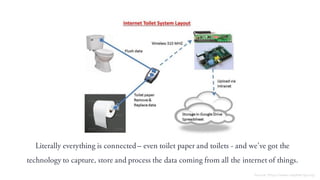
Literally everything is connected – even toilet paper and toilets - and we’ve got the
technology to capture, store and process the data coming from all the internet of things.
Source: https://www.raspberrypi.org
Meaning…
There’s to use & understand it
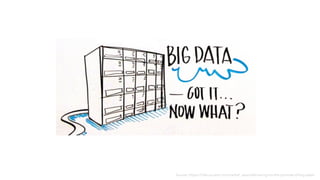
Source: https://infocus.emc.com/rachel_west/delivering-on-the-promise-of-big-data/
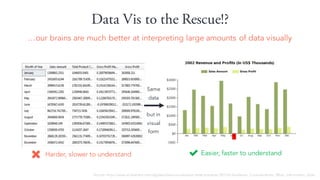
Data Vis to the Rescue!?
…our brains are much better at interpreting large amounts of data visually
Easier, faster to understandHarder, slower to understand
Same
data
but in
visual
form
Source: http://www.slideshare.net/idigdata/data-visualization-best-practices-2013/6-Audience_Considerations_What_information_does
But…
It’s to visualise data well
Which means not all data visualisation’s are clear, precise, efficient
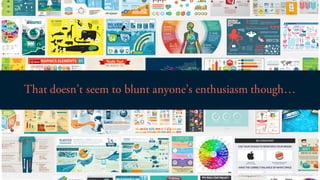
That doesn’t seem to blunt anyone’s enthusiasm though…
Source: google image search “info graphics”
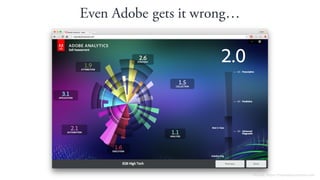
Even Adobe gets it wrong…
Source: https://myanalyticsscore.com
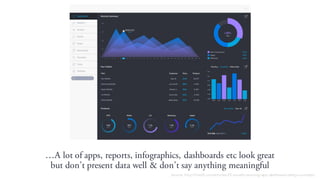
…A lot of apps, reports, infographics, dashboards etc look great
but don’t present data well & don’t say anything meaningful
Source: http://line25.com/articles/25-visually-stunning-app-dashboard-design-concepts
We’re unwittingly making it harder to
find the needles of useful information
in rapidly growing mounds of hay.
Stephen Few – Perpetual Edge
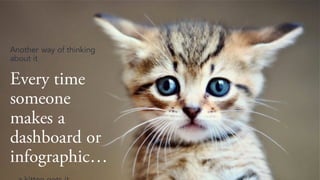
Every time
someone
makes a
dashboard or
infographic…
Another way of thinking
about it
Even as UX’ers sometimes we’re just as guilty…
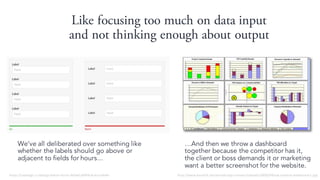
Like focusing too much on data input
and not thinking enough about output
We’ve all deliberated over something like
whether the labels should go above or
adjacent to fields for hours...
…And then we throw a dashboard
together because the competitor has it,
the client or boss demands it or marketing
want a better screenshot for the website.
https://uxdesign.cc/design-better-forms-96fadca0f49c#.wuctxle4h http://www.kaushik.net/avinash/wp-content/uploads/2008/04/sub-optimal-dashboard-1.jpg
So today’s a good time to learn a few new things and
refresh the stuff we already know….
...about good data visualation practices
1. The Problem
2. Data
3. Audience
4. Visuals
5. Pro Tips
6. Team Exercise
Today’s
Topics
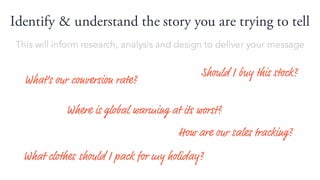
Identify & understand the story you are trying to tell
How are our sales tracking?
What clothes should I pack for my holiday?
What’s our conversion rate?
Should I buy this stock?
Where is global warming at its worst?
This will inform research, analysis and design to deliver your message
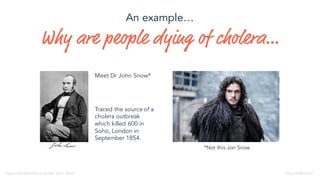
Why are people dying of cholera…
*Not this Jon Snow
Meet Dr John Snow*
https://en.wikipedia.org/wiki/John_Snow
Traced the source of a
cholera outbreak
which killed 600 in
Soho, London in
September 1854.
https://HBO.com
An example…
Taking the data he’d captured from his street corner
detective work...
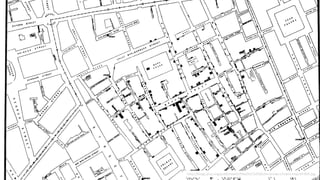
…He commissioned lithographer Charles Cheffins to
illustrate the clusters of cholera cases
http://blogs.plos.org/publichealth/files/2013/03/John-Snows-cholera-map-of-009.jpg
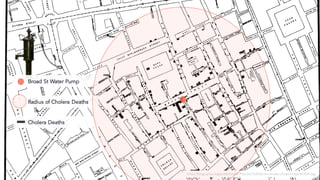
Broad St Water Pump
Radius of Cholera Deaths
http://blogs.plos.org/publichealth/files/2013/03/John-Snows-cholera-map-of-009.jpg
Cholera Deaths
What transpired?
http://www.edwardtufte.com/bboard/q-and-a-fetch-msg?msg_id=0002Je
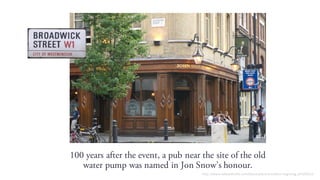
100 years after the event, a pub near the site of the old
water pump was named in Jon Snow’s honour.
http://www.edwardtufte.com/bboard/q-and-a-fetch-msg?msg_id=0002Je
1. The Problem
2. Data
3. Audience
4. Visuals
5. Pro Tips
6. Team Exercise
Today’s
Topics
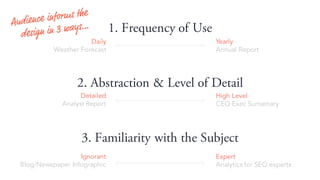
Who are we designing the Data for?
1. Frequency of Use
3. Familiarity with the Subject
2. Abstraction & Level of Detail
Daily
Weather Forecast
Yearly
Annual Report
Expert
Analytics for SEO experts
Ignorant
Blog/Newspaper Infographic
High Level
CEO Exec Sumamary
Detailed
Analyst Report
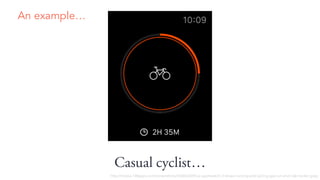
Casual cyclist…
An example…
http://media.148apps.com/screenshots/426826309/us-applewatch-2-strava-running-and-cycling-gps-run-and-ride-tracker.jpeg
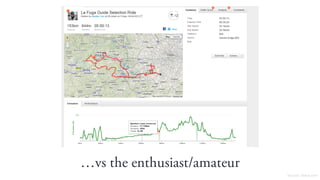
…vs the enthusiast/amateur
Source: Stava.com
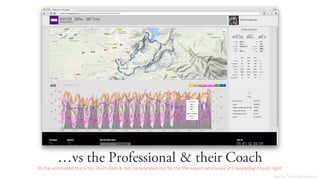
…vs the Professional & their Coach
To the uninitiated this is too much data & too complicated but for the the expert who looks at it everyday it’s just right.
Source: TrainingPeaks.com
1. The Problem
2. Data
3. Audience
4. Visuals
5. Pro Tips
6. Team Exercise
Today’s
Topics
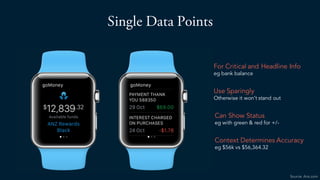
Single Data Points
For Critical and Headline Info
eg bank balance
Use Sparingly
Otherwise it won’t stand out
Can Show Status
eg with green & red for +/-
Context Determines Accuracy
eg $56k vs $56,364.32
Source: Anz.com
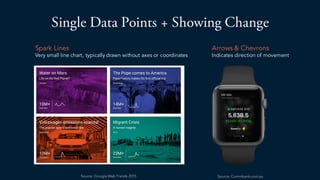
Single Data Points + Showing Change
Spark Lines
Very small line chart, typically drawn without axes or coordinates
Arrows & Chevrons
Indicates direction of movement
Source: Commbank.com.auSource: Google Web Trends 2015
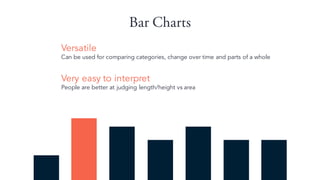
Bar Charts
Versatile
Can be used for comparing categories, change over time and parts of a whole
Very easy to interpret
People are better at judging length/height vs area
Bar
Chart
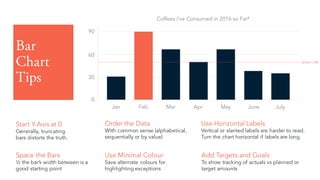
Tips
Start Y-Axis at 0
Generally, truncating
bars distorts the truth.
Order the Data
With common sense (alphabetical,
sequentially or by value)
Use Horizontal Labels
Vertical or slanted labels are harder to read.
Turn the chart horizontal if labels are long.
Use Minimal Colour
Save alternate colours for
highlighting exceptions
Jan Feb Mar Apr May June July
30
60
0
90
Coffees I’ve Consumed in 2016 so Far*
Space the Bars
½ the bar’s width between is a
good starting point
Add Targets and Goals
To show tracking of actuals vs planned or
target amounts
Goal = 50
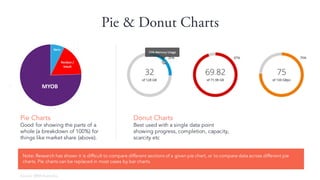
Pie & Donut Charts
Donut Charts
Best used with a single data point
showing progress, completion, capacity,
scarcity etc
Pie Charts
Good for showing the parts of a
whole (a breakdown of 100%) for
things like market share (above).
Note: Research has shown it is difficult to compare different sections of a given pie chart, or to compare data across different pie
charts. Pie charts can be replaced in most cases by bar charts.
Source: BRW Australia
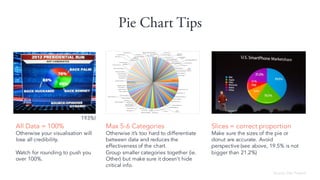
Pie Chart Tips
All Data = 100%
Otherwise your visualisation will
lose all credibility.
Watch for rounding to push you
over 100%.
Max 5-6 Categories
Otherwise it’s too hard to differentiate
between data and reduces the
effectiveness of the chart.
Group smaller categories together (ie.
Other) but make sure it doesn’t hide
critical info.
Slices = correct proportion
Make sure the sizes of the pie or
donut are accurate. Avoid
perspective (see above, 19.5% is not
bigger than 21.2%)
Source: Des Traynor
193%!
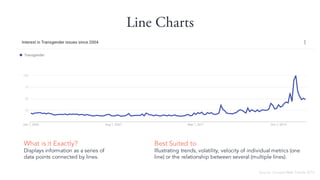
Line Charts
What is it Exactly?
Displays information as a series of
data points connected by lines.
Best Suited to
Illustrating trends, volatility, velocity of individual metrics (one
line) or the relationship between several (multiple lines).
Source: Google Web Trends 2015
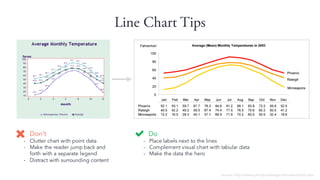
Line Chart Tips
Do
- Place labels next to the lines
- Complement visual chart with tabular data
- Make the data the hero
Don’t
- Clutter chart with point data
- Make the reader jump back and
forth with a separate legend
- Distract with surrounding content
Source: http://www.perceptualedge.com/example2.php
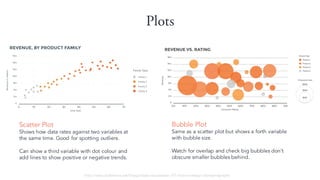
Plots
Scatter Plot
Shows how data rates against two variables at
the same time. Good for spotting outliers.
Can show a third variable with dot colour and
add lines to show positive or negative trends.
Bubble Plot
Same as a scatter plot but shows a forth variable
with bubble size.
Watch for overlap and check big bubbles don’t
obscure smaller bubbles behind.
http://www.slideshare.net/Visage/data-visualization-101-how-to-design-chartsandgraphs
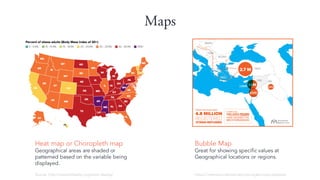
Maps
Heat map or Choropleth map
Geographical areas are shaded or
patterned based on the variable being
displayed.
Source: http://stateofobesity.org/adult-obesity/
Bubble Map
Great for showing specific values at
Geographical locations or regions.
https://internationalmedicalcorps.org/europe-response
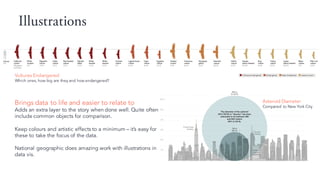
Illustrations
Brings data to life and easier to relate to
Adds an extra layer to the story when done well. Quite often
include common objects for comparison.
Keep colours and artistic effects to a minimum – it’s easy for
these to take the focus of the data.
National geographic does amazing work with illustrations in
data vis.
Vultures Endangered
Which ones, how big are they and how endangered?
Asteroid Diameter
Compared to New York City
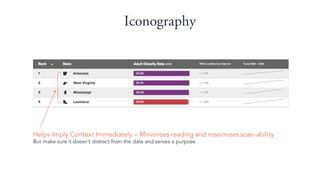
Iconography
Helps Imply Context Immediately – Minimises reading and maximises scan-ability
But make sure it doesn’t distract from the data and serves a purpose.
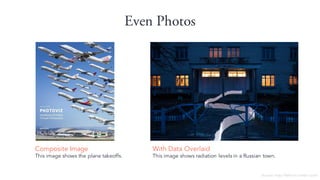
Even Photos
Composite Image
This image shows the plane takeoffs.
Source: http://feltron.tumblr.com/
With Data Overlaid
This image shows radiation levels in a Russian town.
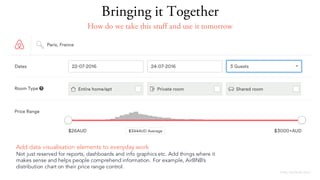
http://airbnb.com
Add data visualisation elements to everyday work
Not just reserved for reports, dashboards and info graphics etc. Add things where it
makes sense and helps people comprehend information. For example, AirBNB’s
distribution chart on their price range control.
Bringing it Together
How do we take this stuff and use it tomorrow
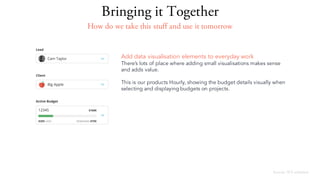
Source: 3CS software
Add data visualisation elements to everyday work
There’s lots of place where adding small visualisations makes sense
and adds value.
This is our products Hourly, showing the budget details visually when
selecting and displaying budgets on projects.
Bringing it Together
How do we take this stuff and use it tomorrow
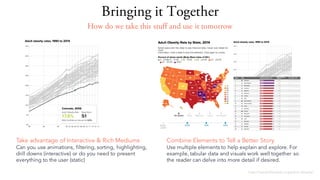
Bringing it Together
http://stateofobesity.org/adult-obesity/
Combine Elements to Tell a Better Story
Use multiple elements to help explain and explore. For
example, tabular data and visuals work well together so
the reader can delve into more detail if desired.
Take advantage of Interactive & Rich Mediums
Can you use animations, filtering, sorting, highlighting,
drill downs (interactive) or do you need to present
everything to the user (static)
How do we take this stuff and use it tomorrow
1. The Problem
2. Data
3. Audience
4. Visuals
5. Pro Tips
6. Team Exercise
Today’s
Topics
Comprehension - Make it easier not harder
If your data visualisation has the same effect on users as an Escher
diagram, then you haven’t done your job well…
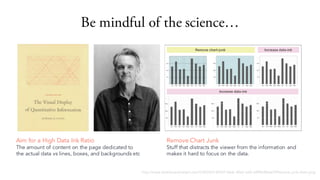
Be mindful of the science…
http://www.dashboardinsight.com/CMS/b5144547-0ecb-40c0-aaf2-a5f96c8b6e7f/Remove-junk-chart.png
Remove Chart Junk
Stuff that distracts the viewer from the information and
makes it hard to focus on the data.
Aim for a High Data Ink Ratio
The amount of content on the page dedicated to
the actual data vs lines, boxes, and backgrounds etc
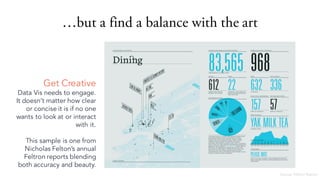
…but a find a balance with the art
Get Creative
Data Vis needs to engage.
It doesn’t matter how clear
or concise it is if no one
wants to look at or interact
with it.
This sample is one from
Nicholas Felton’s annual
Feltron reports blending
both accuracy and beauty.
Source: Feltron Report
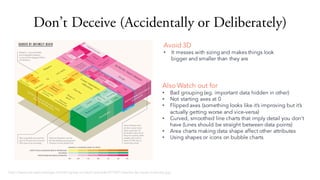
Don’t Deceive (Accidentally or Deliberately)
Avoid 3D
• It messes with sizing and makes things look
bigger and smaller than they are
http://www.perceptualedge.com/blog/wp-content/uploads/2014/01/deaths-by-cause-treemap.jpg
Also Watch out for
• Bad grouping (eg. important data hidden in other)
• Not starting axes at 0
• Flipped axes (something looks like it’s improving but it’s
actually getting worse and vice-versa)
• Curved, smoothed line charts that imply detail you don’t
have (Lines should be straight between data points)
• Area charts making data shape affect other attributes
• Using shapes or icons on bubble charts
In summary…
It’s
• Workout what story to tell or question to answer (Data)
• Understand who you’re designing for (Audience)
• Know your visual elements and how to use them (Visuals)
• Integrate visualisations into everyday work
• Remember to take advantage of interactive mediums
• Don’t make the user work to extract the data
• Balance the art & science
• Don’t deceive
to visualise data well
Remember the kittens…
Up next… Team Exercise
1. The Problem
2. Data
3. Audience
4. Visuals
5. Pro Tips
6. Team Exercise
Today’s
Topics
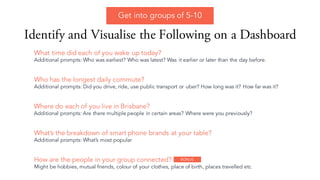
Identify and Visualise the Following on a Dashboard
How are the people in your group connected?
Might be hobbies, mutual friends, colour of your clothes, place of birth, places travelled etc
Who has the longest daily commute?
Additional prompts: Did you drive, ride, use public transport or uber? How long was it? How far was it?
Where do each of you live in Brisbane?
Additional prompts: Are there multiple people in certain areas? Where were you previously?
What’s the breakdown of smart phone brands at your table?
Additional prompts: What’s most popular
What time did each of you wake up today?
Additional prompts: Who was earliest? Who was latest? Was it earlier or later than the day before.
Get into groups of 5-10
BONUS
To get in touch:
Cam@3cssoftware.com.au
Thank You

Data Visualisation Design Workshop #UXbne

  • 1.
  • 2.
  • 3.
    1. The Problem 2.Data 3. Audience 4. Visuals 5. Pro Tips 6. Team Exercise Today’s Topics
  • 4.
    Data in growingfaster & faster It’s 2016 and…
  • 5.
    Literally everything isconnected – even toilet paper and toilets - and we’ve got the technology to capture, store and process the data coming from all the internet of things. Source: https://www.raspberrypi.org
  • 6.
  • 7.
  • 8.
    Data Vis tothe Rescue!? …our brains are much better at interpreting large amounts of data visually Easier, faster to understandHarder, slower to understand Same data but in visual form Source: http://www.slideshare.net/idigdata/data-visualization-best-practices-2013/6-Audience_Considerations_What_information_does
  • 9.
    But… It’s to visualisedata well Which means not all data visualisation’s are clear, precise, efficient
  • 10.
    That doesn’t seemto blunt anyone’s enthusiasm though… Source: google image search “info graphics”
  • 11.
    Even Adobe getsit wrong… Source: https://myanalyticsscore.com
  • 12.
    …A lot ofapps, reports, infographics, dashboards etc look great but don’t present data well & don’t say anything meaningful Source: http://line25.com/articles/25-visually-stunning-app-dashboard-design-concepts
  • 13.
    We’re unwittingly makingit harder to find the needles of useful information in rapidly growing mounds of hay. Stephen Few – Perpetual Edge
  • 15.
    Every time someone makes a dashboardor infographic… Another way of thinking about it
  • 16.
    Even as UX’erssometimes we’re just as guilty…
  • 17.
    Like focusing toomuch on data input and not thinking enough about output We’ve all deliberated over something like whether the labels should go above or adjacent to fields for hours... …And then we throw a dashboard together because the competitor has it, the client or boss demands it or marketing want a better screenshot for the website. https://uxdesign.cc/design-better-forms-96fadca0f49c#.wuctxle4h http://www.kaushik.net/avinash/wp-content/uploads/2008/04/sub-optimal-dashboard-1.jpg
  • 18.
    So today’s agood time to learn a few new things and refresh the stuff we already know…. ...about good data visualation practices
  • 19.
    1. The Problem 2.Data 3. Audience 4. Visuals 5. Pro Tips 6. Team Exercise Today’s Topics
  • 20.
    Identify & understandthe story you are trying to tell How are our sales tracking? What clothes should I pack for my holiday? What’s our conversion rate? Should I buy this stock? Where is global warming at its worst? This will inform research, analysis and design to deliver your message
  • 21.
    Why are peopledying of cholera… *Not this Jon Snow Meet Dr John Snow* https://en.wikipedia.org/wiki/John_Snow Traced the source of a cholera outbreak which killed 600 in Soho, London in September 1854. https://HBO.com An example…
  • 22.
    Taking the datahe’d captured from his street corner detective work... …He commissioned lithographer Charles Cheffins to illustrate the clusters of cholera cases
  • 23.
  • 24.
    Broad St WaterPump Radius of Cholera Deaths http://blogs.plos.org/publichealth/files/2013/03/John-Snows-cholera-map-of-009.jpg Cholera Deaths
  • 25.
  • 26.
    100 years afterthe event, a pub near the site of the old water pump was named in Jon Snow’s honour. http://www.edwardtufte.com/bboard/q-and-a-fetch-msg?msg_id=0002Je
  • 27.
    1. The Problem 2.Data 3. Audience 4. Visuals 5. Pro Tips 6. Team Exercise Today’s Topics
  • 28.
    Who are wedesigning the Data for?
  • 29.
    1. Frequency ofUse 3. Familiarity with the Subject 2. Abstraction & Level of Detail Daily Weather Forecast Yearly Annual Report Expert Analytics for SEO experts Ignorant Blog/Newspaper Infographic High Level CEO Exec Sumamary Detailed Analyst Report
  • 30.
  • 31.
  • 32.
    …vs the Professional& their Coach To the uninitiated this is too much data & too complicated but for the the expert who looks at it everyday it’s just right. Source: TrainingPeaks.com
  • 33.
    1. The Problem 2.Data 3. Audience 4. Visuals 5. Pro Tips 6. Team Exercise Today’s Topics
  • 34.
    Single Data Points ForCritical and Headline Info eg bank balance Use Sparingly Otherwise it won’t stand out Can Show Status eg with green & red for +/- Context Determines Accuracy eg $56k vs $56,364.32 Source: Anz.com
  • 35.
    Single Data Points+ Showing Change Spark Lines Very small line chart, typically drawn without axes or coordinates Arrows & Chevrons Indicates direction of movement Source: Commbank.com.auSource: Google Web Trends 2015
  • 36.
    Bar Charts Versatile Can beused for comparing categories, change over time and parts of a whole Very easy to interpret People are better at judging length/height vs area
  • 37.
    Bar Chart Tips Start Y-Axis at0 Generally, truncating bars distorts the truth. Order the Data With common sense (alphabetical, sequentially or by value) Use Horizontal Labels Vertical or slanted labels are harder to read. Turn the chart horizontal if labels are long. Use Minimal Colour Save alternate colours for highlighting exceptions Jan Feb Mar Apr May June July 30 60 0 90 Coffees I’ve Consumed in 2016 so Far* Space the Bars ½ the bar’s width between is a good starting point Add Targets and Goals To show tracking of actuals vs planned or target amounts Goal = 50
  • 38.
    Pie & DonutCharts Donut Charts Best used with a single data point showing progress, completion, capacity, scarcity etc Pie Charts Good for showing the parts of a whole (a breakdown of 100%) for things like market share (above). Note: Research has shown it is difficult to compare different sections of a given pie chart, or to compare data across different pie charts. Pie charts can be replaced in most cases by bar charts. Source: BRW Australia
  • 39.
    Pie Chart Tips AllData = 100% Otherwise your visualisation will lose all credibility. Watch for rounding to push you over 100%. Max 5-6 Categories Otherwise it’s too hard to differentiate between data and reduces the effectiveness of the chart. Group smaller categories together (ie. Other) but make sure it doesn’t hide critical info. Slices = correct proportion Make sure the sizes of the pie or donut are accurate. Avoid perspective (see above, 19.5% is not bigger than 21.2%) Source: Des Traynor 193%!
  • 40.
    Line Charts What isit Exactly? Displays information as a series of data points connected by lines. Best Suited to Illustrating trends, volatility, velocity of individual metrics (one line) or the relationship between several (multiple lines). Source: Google Web Trends 2015
  • 41.
    Line Chart Tips Do -Place labels next to the lines - Complement visual chart with tabular data - Make the data the hero Don’t - Clutter chart with point data - Make the reader jump back and forth with a separate legend - Distract with surrounding content Source: http://www.perceptualedge.com/example2.php
  • 42.
    Plots Scatter Plot Shows howdata rates against two variables at the same time. Good for spotting outliers. Can show a third variable with dot colour and add lines to show positive or negative trends. Bubble Plot Same as a scatter plot but shows a forth variable with bubble size. Watch for overlap and check big bubbles don’t obscure smaller bubbles behind. http://www.slideshare.net/Visage/data-visualization-101-how-to-design-chartsandgraphs
  • 43.
    Maps Heat map orChoropleth map Geographical areas are shaded or patterned based on the variable being displayed. Source: http://stateofobesity.org/adult-obesity/ Bubble Map Great for showing specific values at Geographical locations or regions. https://internationalmedicalcorps.org/europe-response
  • 44.
    Illustrations Brings data tolife and easier to relate to Adds an extra layer to the story when done well. Quite often include common objects for comparison. Keep colours and artistic effects to a minimum – it’s easy for these to take the focus of the data. National geographic does amazing work with illustrations in data vis. Vultures Endangered Which ones, how big are they and how endangered? Asteroid Diameter Compared to New York City
  • 45.
    Iconography Helps Imply ContextImmediately – Minimises reading and maximises scan-ability But make sure it doesn’t distract from the data and serves a purpose.
  • 46.
    Even Photos Composite Image Thisimage shows the plane takeoffs. Source: http://feltron.tumblr.com/ With Data Overlaid This image shows radiation levels in a Russian town.
  • 47.
    http://airbnb.com Add data visualisationelements to everyday work Not just reserved for reports, dashboards and info graphics etc. Add things where it makes sense and helps people comprehend information. For example, AirBNB’s distribution chart on their price range control. Bringing it Together How do we take this stuff and use it tomorrow
  • 48.
    Source: 3CS software Adddata visualisation elements to everyday work There’s lots of place where adding small visualisations makes sense and adds value. This is our products Hourly, showing the budget details visually when selecting and displaying budgets on projects. Bringing it Together How do we take this stuff and use it tomorrow
  • 49.
    Bringing it Together http://stateofobesity.org/adult-obesity/ CombineElements to Tell a Better Story Use multiple elements to help explain and explore. For example, tabular data and visuals work well together so the reader can delve into more detail if desired. Take advantage of Interactive & Rich Mediums Can you use animations, filtering, sorting, highlighting, drill downs (interactive) or do you need to present everything to the user (static) How do we take this stuff and use it tomorrow
  • 50.
    1. The Problem 2.Data 3. Audience 4. Visuals 5. Pro Tips 6. Team Exercise Today’s Topics
  • 51.
    Comprehension - Makeit easier not harder If your data visualisation has the same effect on users as an Escher diagram, then you haven’t done your job well…
  • 52.
    Be mindful ofthe science… http://www.dashboardinsight.com/CMS/b5144547-0ecb-40c0-aaf2-a5f96c8b6e7f/Remove-junk-chart.png Remove Chart Junk Stuff that distracts the viewer from the information and makes it hard to focus on the data. Aim for a High Data Ink Ratio The amount of content on the page dedicated to the actual data vs lines, boxes, and backgrounds etc
  • 53.
    …but a finda balance with the art Get Creative Data Vis needs to engage. It doesn’t matter how clear or concise it is if no one wants to look at or interact with it. This sample is one from Nicholas Felton’s annual Feltron reports blending both accuracy and beauty. Source: Feltron Report
  • 54.
    Don’t Deceive (Accidentallyor Deliberately) Avoid 3D • It messes with sizing and makes things look bigger and smaller than they are http://www.perceptualedge.com/blog/wp-content/uploads/2014/01/deaths-by-cause-treemap.jpg Also Watch out for • Bad grouping (eg. important data hidden in other) • Not starting axes at 0 • Flipped axes (something looks like it’s improving but it’s actually getting worse and vice-versa) • Curved, smoothed line charts that imply detail you don’t have (Lines should be straight between data points) • Area charts making data shape affect other attributes • Using shapes or icons on bubble charts
  • 55.
    In summary… It’s • Workoutwhat story to tell or question to answer (Data) • Understand who you’re designing for (Audience) • Know your visual elements and how to use them (Visuals) • Integrate visualisations into everyday work • Remember to take advantage of interactive mediums • Don’t make the user work to extract the data • Balance the art & science • Don’t deceive to visualise data well Remember the kittens… Up next… Team Exercise
  • 56.
    1. The Problem 2.Data 3. Audience 4. Visuals 5. Pro Tips 6. Team Exercise Today’s Topics
  • 57.
    Identify and Visualisethe Following on a Dashboard How are the people in your group connected? Might be hobbies, mutual friends, colour of your clothes, place of birth, places travelled etc Who has the longest daily commute? Additional prompts: Did you drive, ride, use public transport or uber? How long was it? How far was it? Where do each of you live in Brisbane? Additional prompts: Are there multiple people in certain areas? Where were you previously? What’s the breakdown of smart phone brands at your table? Additional prompts: What’s most popular What time did each of you wake up today? Additional prompts: Who was earliest? Who was latest? Was it earlier or later than the day before. Get into groups of 5-10 BONUS
  • 58.
    To get intouch: Cam@3cssoftware.com.au Thank You