Ülkər Əmirova İlham Məmmədli
not null, unique key, primary key,
check integrity, rowed, rownum,
union, union all, intersect, minus
NOT NULL
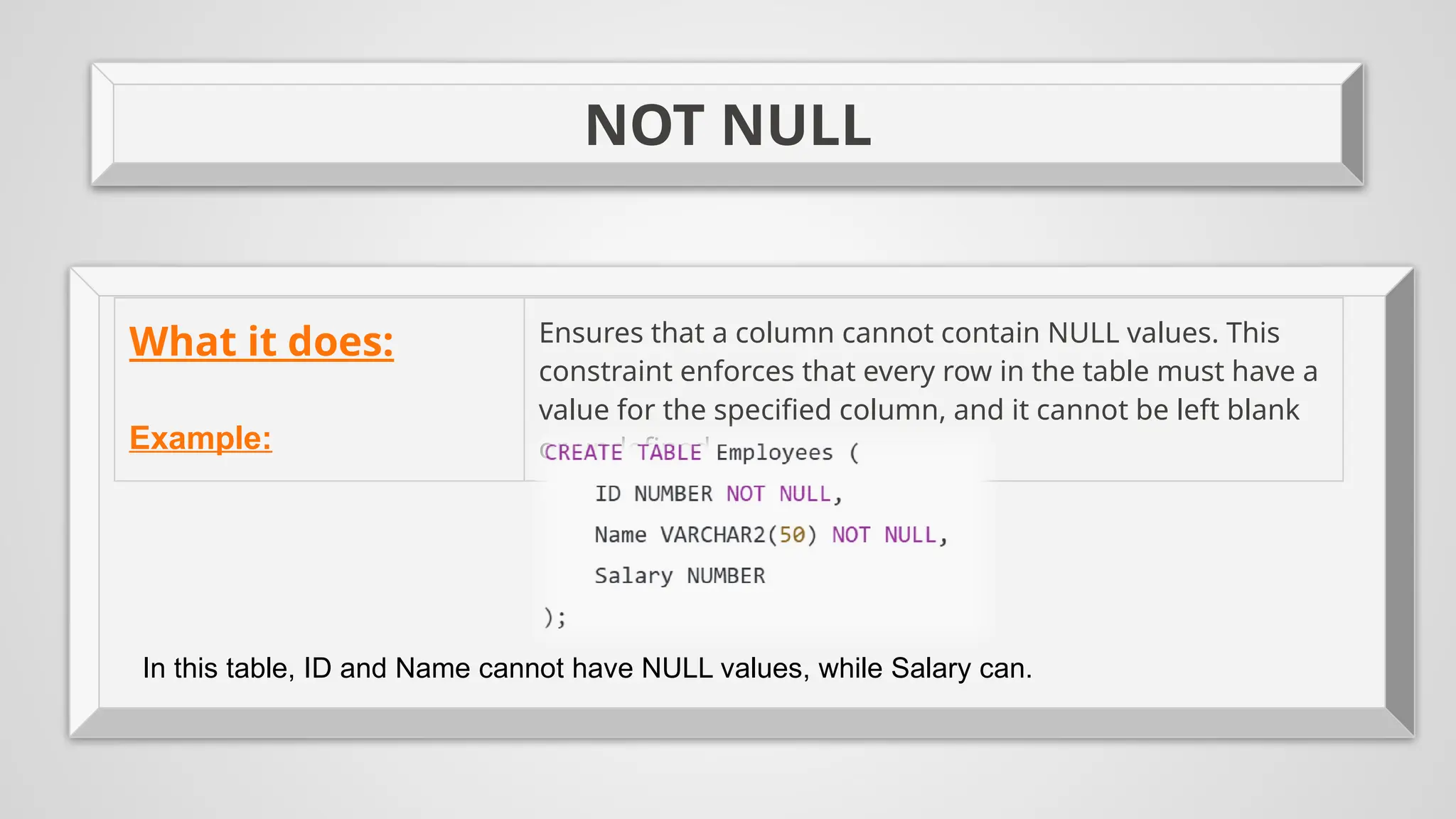
What it does: Ensures that a column cannot contain NULL values. This
constraint enforces that every row in the table must have a
value for the specified column, and it cannot be left blank
or undefined.
Example:
In this table, ID and Name cannot have NULL values, while Salary can.
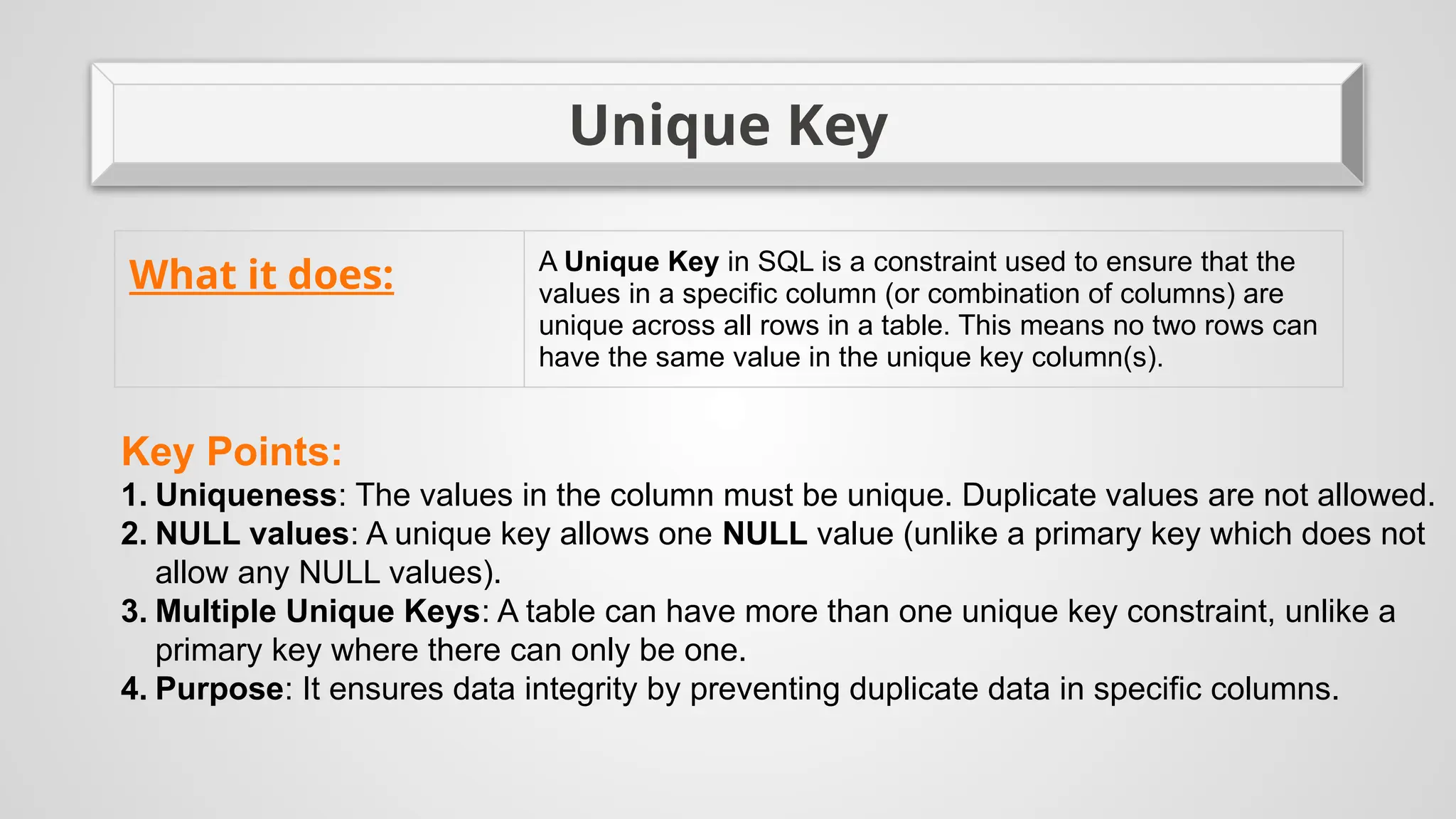
Unique Key
What it does: A Unique Key in SQL is a constraint used to ensure that the
values in a specific column (or combination of columns) are
unique across all rows in a table. This means no two rows can
have the same value in the unique key column(s).
Key Points:
1. Uniqueness: The values in the column must be unique. Duplicate values are not allowed.
2. NULL values: A unique key allows one NULL value (unlike a primary key which does not
allow any NULL values).
3. Multiple Unique Keys: A table can have more than one unique key constraint, unlike a
primary key where there can only be one.
4. Purpose: It ensures data integrity by preventing duplicate data in specific columns.
Unique Key
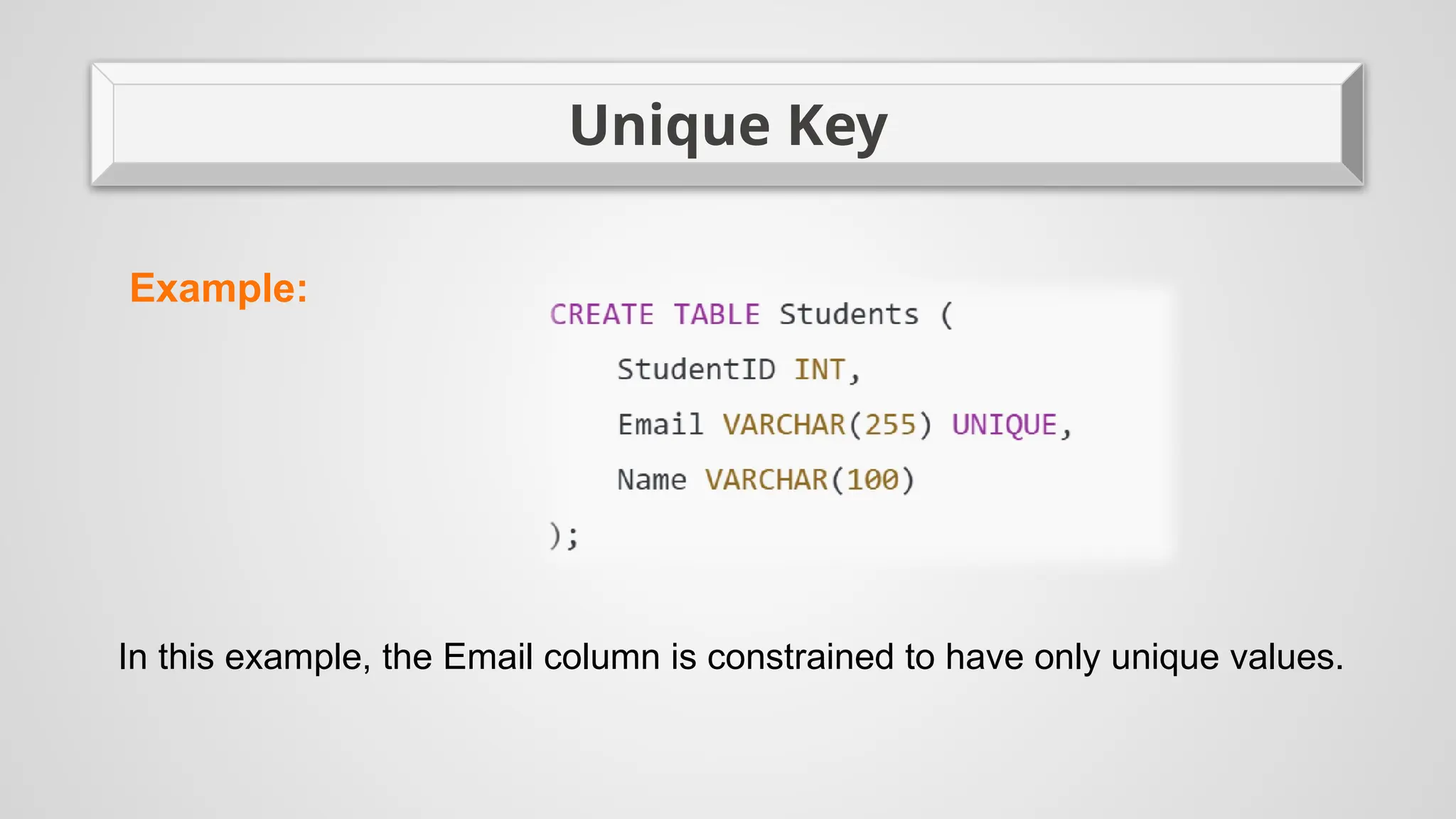
Example:
In this example, the Email column is constrained to have only unique values.
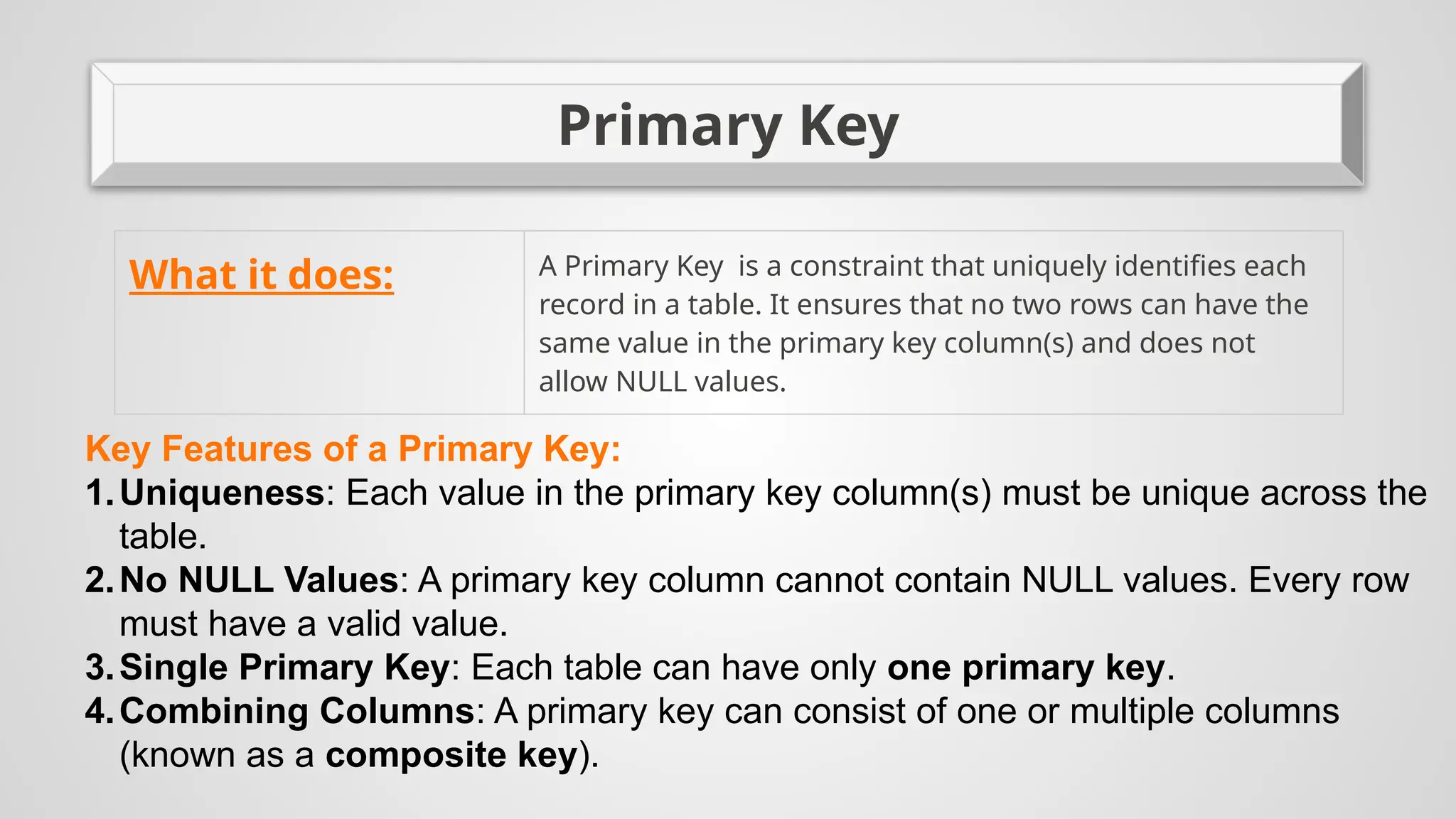
Primary Key
What it does: A Primary Key is a constraint that uniquely identifies each
record in a table. It ensures that no two rows can have the
same value in the primary key column(s) and does not
allow NULL values.
Key Features of a Primary Key:
1.Uniqueness: Each value in the primary key column(s) must be unique across the
table.
2.No NULL Values: A primary key column cannot contain NULL values. Every row
must have a valid value.
3.Single Primary Key: Each table can have only one primary key.
4.Combining Columns: A primary key can consist of one or multiple columns
(known as a composite key).
Primary Key
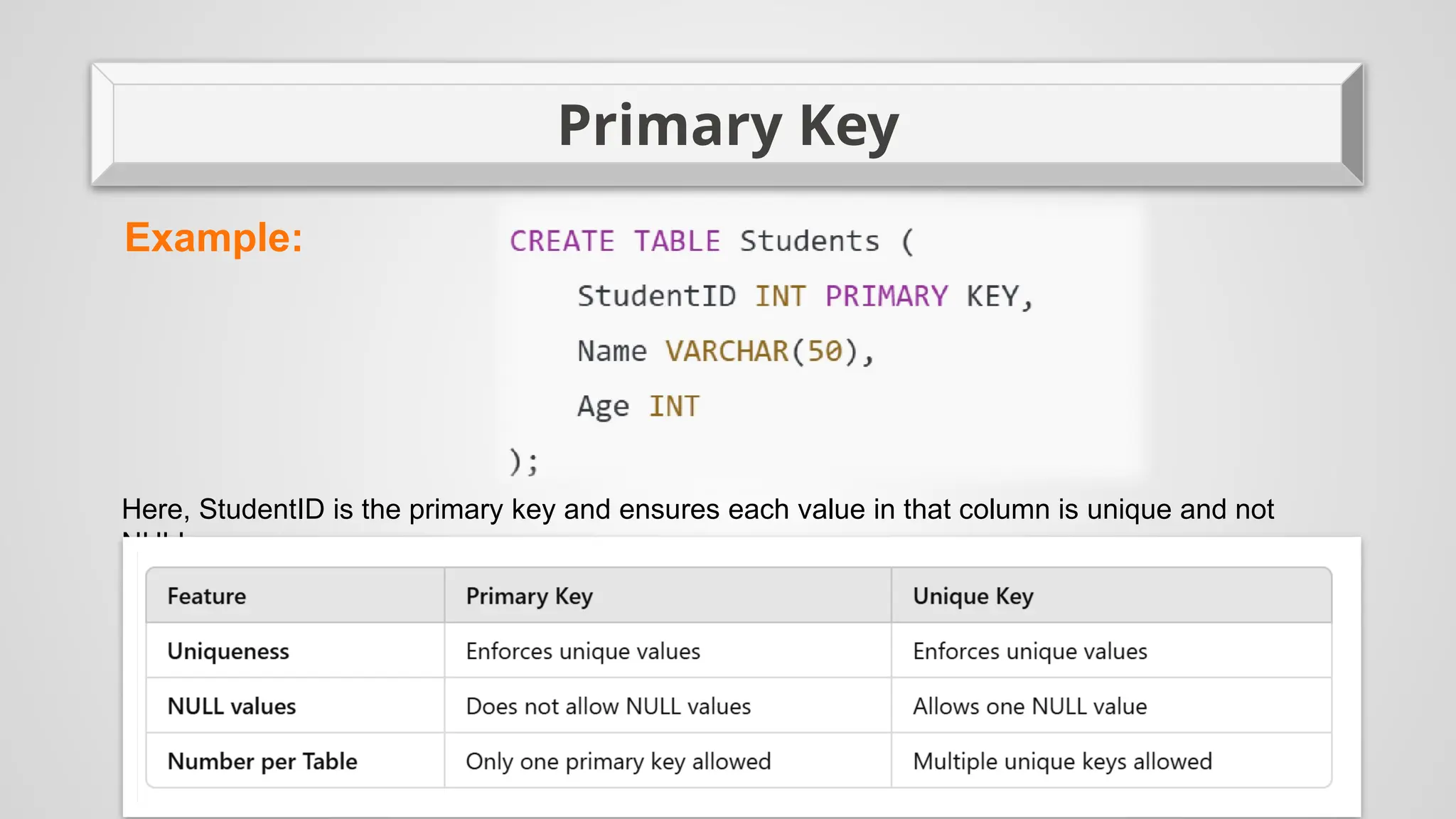
Example:
Here, StudentID is the primary key and ensures each value in that column is unique and not
NULL.
CHECK
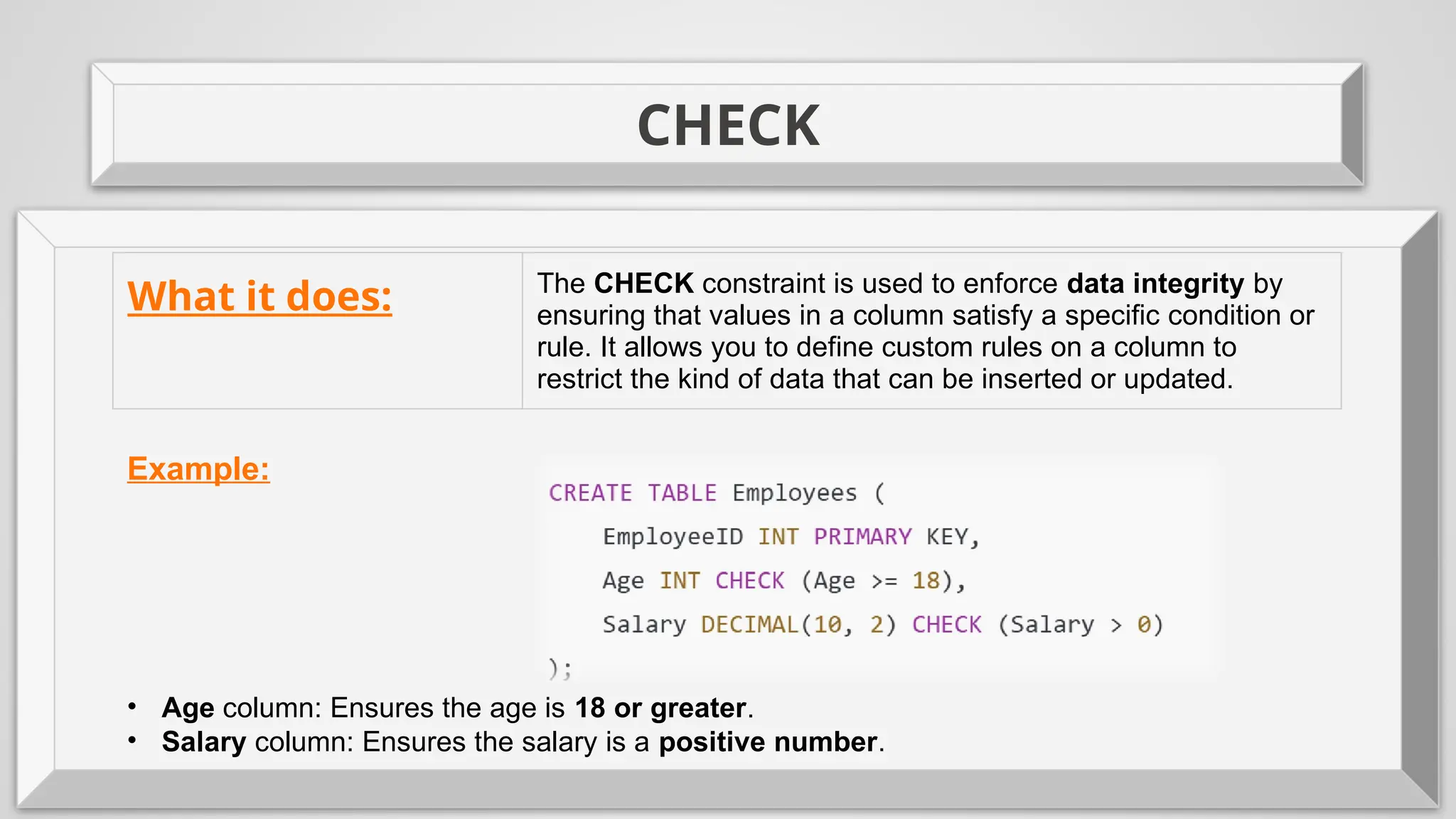
What it does: The CHECK constraint is used to enforce data integrity by
ensuring that values in a column satisfy a specific condition or
rule. It allows you to define custom rules on a column to
restrict the kind of data that can be inserted or updated.
Example:
• Age column: Ensures the age is 18 or greater.
• Salary column: Ensures the salary is a positive number.
ROWID
In SQL, ROWID is a unique identifier for each row in a database table. It is often
used to quickly locate a specific row in a table. The exact implementation and
behavior of ROWID can vary depending on the database management system
(DBMS), but it generally serves the following purposes:
Uniqueness: Every row in a table has a unique ROWID, which makes it a reliable way to
refer to rows directly.
Performance: Since ROWID is typically stored as a physical address or pointer to the
data on disk, it can be used for faster access to rows in certain DBMSs, especially when you
want to retrieve or update a specific row efficiently.
Pseudocolumn: In some databases like Oracle, ROWID is a pseudocolumn, meaning it
is automatically available for use without needing to be explicitly defined in the schema.
Immutable: The ROWID for a row is generally fixed for the life of the row, so if the row is
moved or deleted and reinserted, it may get a new ROWID.
In practical terms, ROWID is rarely used in queries for normal operations, but it can be
helpful for debugging, maintenance, or low-level optimizations.
ROWNUM
ROWNUM is a pseudocolumn that returns the sequential number assigned to each row in
the result set of a query, starting from 1 for the first row. It is assigned to the rows before any
sorting is done. This makes ROWNUM useful for limiting the number of rows returned by a
query or for pagination.
Key Characteristics of ROWNUM:
Sequential Numbering:ROWNUM starts at 1 for the first row returned and increments by 1
for each subsequent row.It is assigned before the ORDER BY clause is applied. This is
important when using ROWNUM in queries with sorting.
Used for Limiting Results:ROWNUM can be used to limit the number of rows returned by
a query. For example, to get the first 10 rows from a result set, you can filter the rows by
ROWNUM.
No Order Guarantee:Since ROWNUM is assigned before sorting, the order of the rows
may not be predictable unless you explicitly apply ORDER BY after filtering with ROWNUM.
Cannot Be Used in the ORDER BY Clause:You cannot directly use ROWNUM in the
ORDER BY clause. If you want to sort the rows and then limit the result, you need to use a
subquery.
ROWNUM
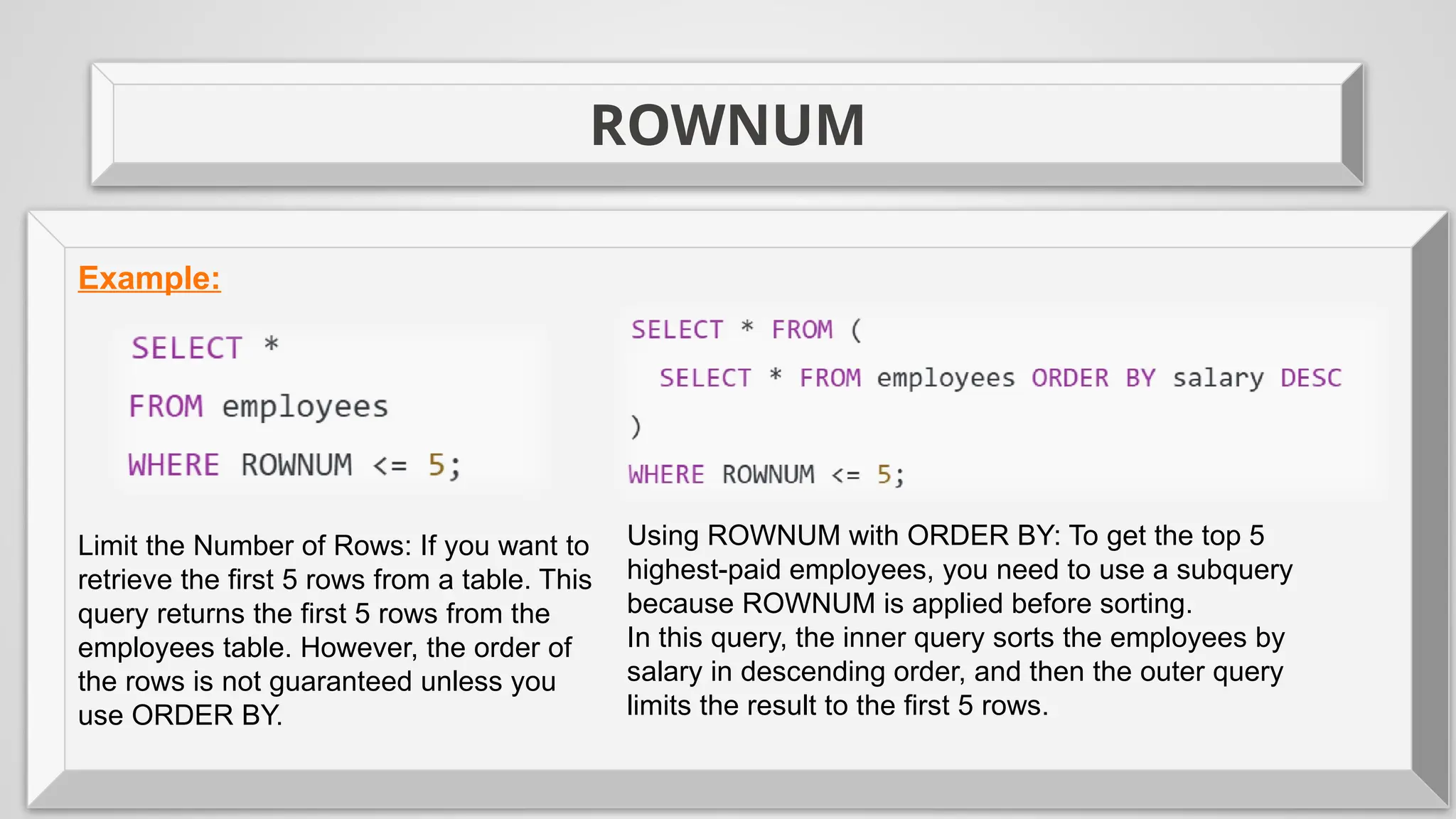
Example:
Limit the Number of Rows: If you want to
retrieve the first 5 rows from a table. This
query returns the first 5 rows from the
employees table. However, the order of
the rows is not guaranteed unless you
use ORDER BY.
Using ROWNUM with ORDER BY: To get the top 5
highest-paid employees, you need to use a subquery
because ROWNUM is applied before sorting.
In this query, the inner query sorts the employees by
salary in descending order, and then the outer query
limits the result to the first 5 rows.
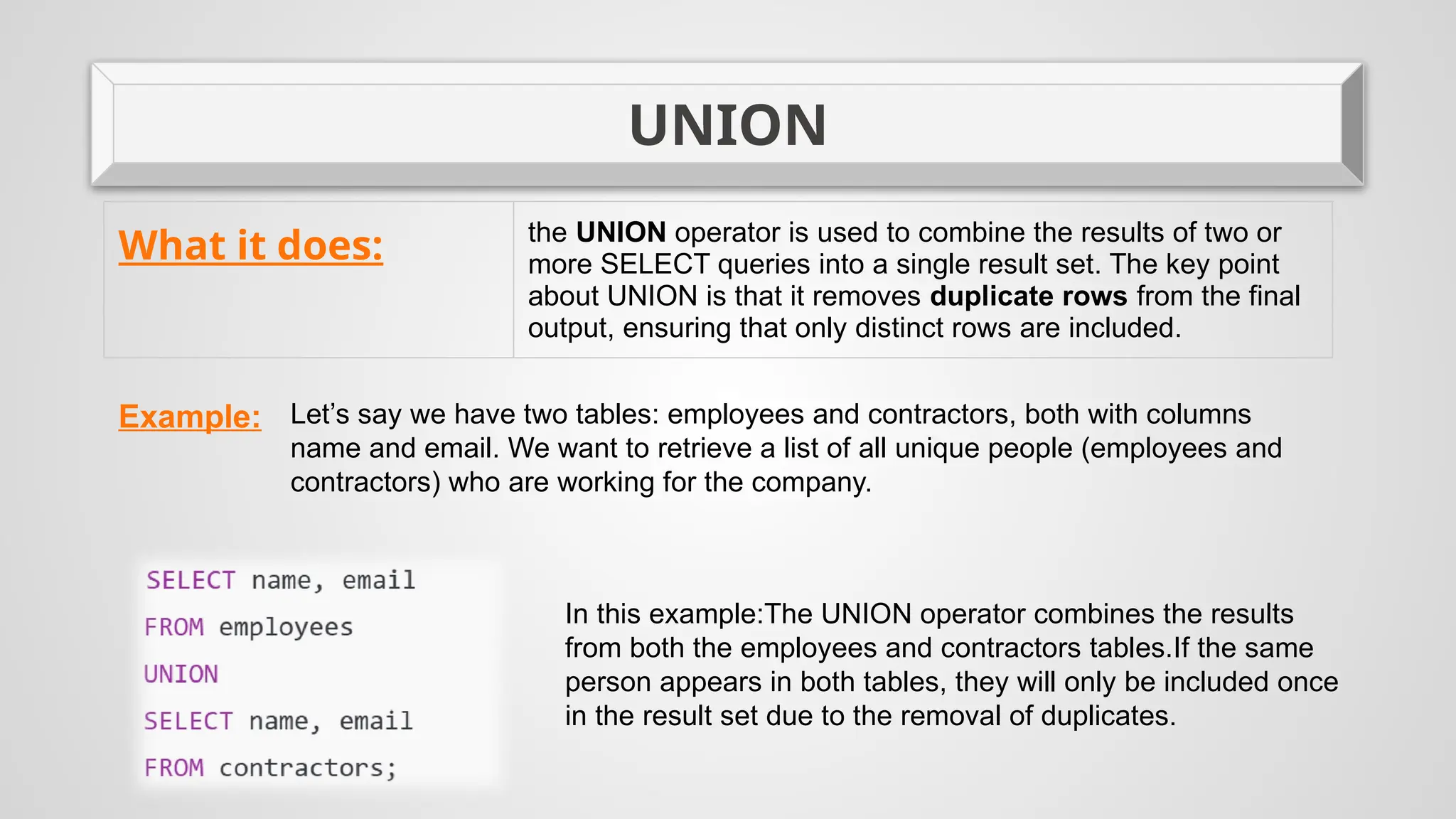
UNION
What it does: the UNION operator is used to combine the results of two or
more SELECT queries into a single result set. The key point
about UNION is that it removes duplicate rows from the final
output, ensuring that only distinct rows are included.
Example: Let’s say we have two tables: employees and contractors, both with columns
name and email. We want to retrieve a list of all unique people (employees and
contractors) who are working for the company.
In this example:The UNION operator combines the results
from both the employees and contractors tables.If the same
person appears in both tables, they will only be included once
in the result set due to the removal of duplicates.
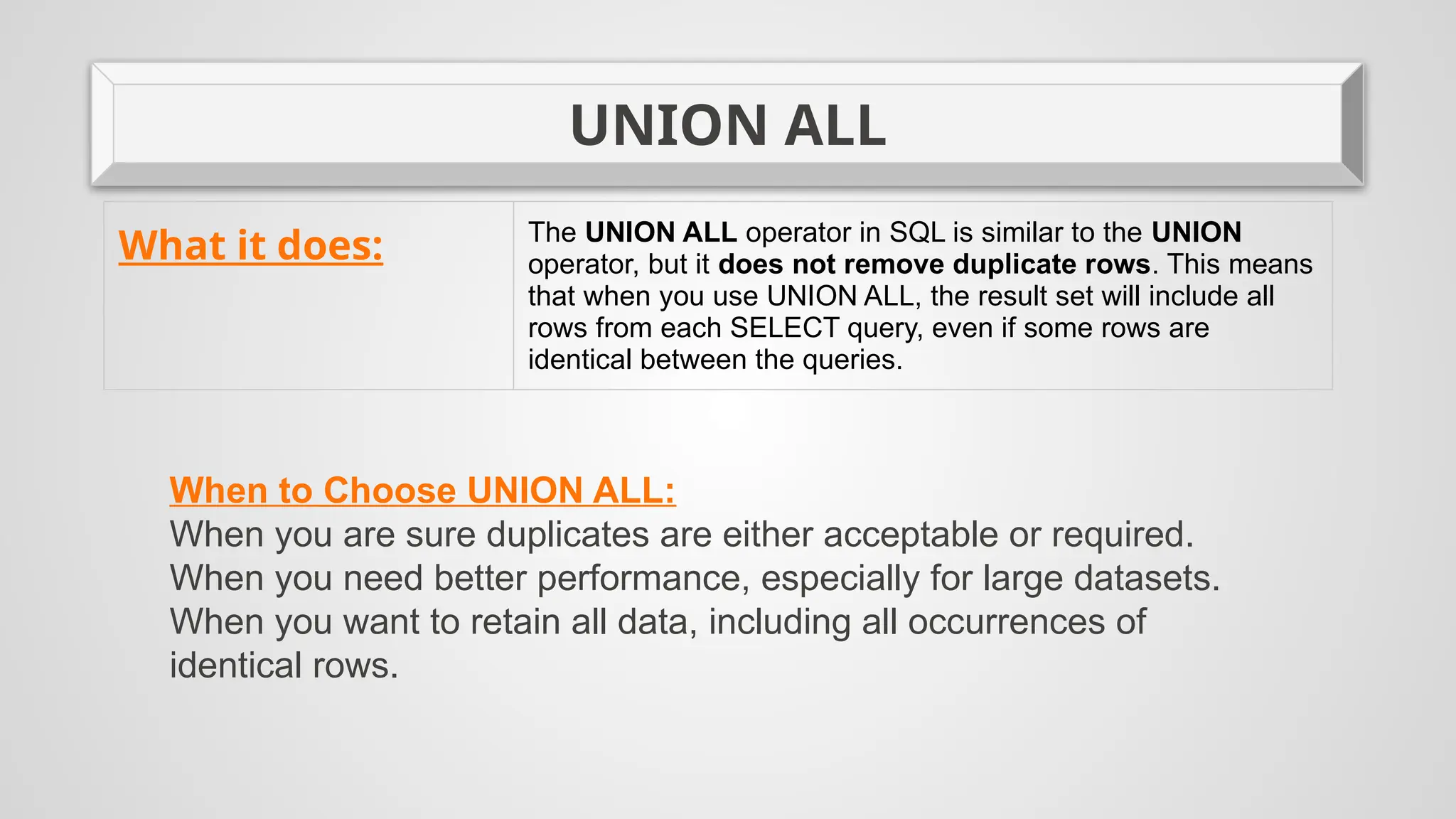
UNION ALL
What it does: The UNION ALL operator in SQL is similar to the UNION
operator, but it does not remove duplicate rows. This means
that when you use UNION ALL, the result set will include all
rows from each SELECT query, even if some rows are
identical between the queries.
When to Choose UNION ALL:
When you are sure duplicates are either acceptable or required.
When you need better performance, especially for large datasets.
When you want to retain all data, including all occurrences of
identical rows.
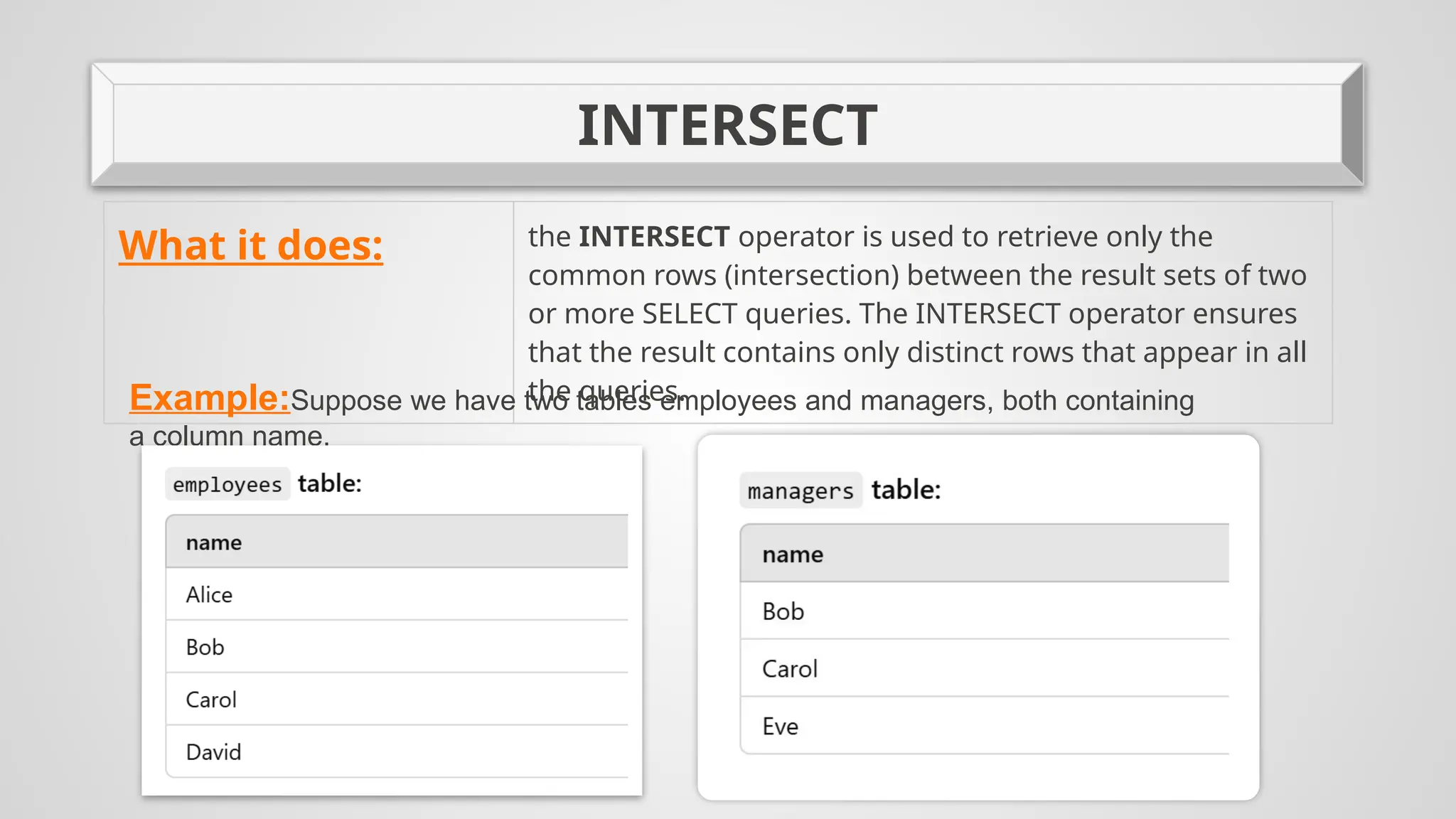
INTERSECT
What it does: the INTERSECT operator is used to retrieve only the
common rows (intersection) between the result sets of two
or more SELECT queries. The INTERSECT operator ensures
that the result contains only distinct rows that appear in all
the queries.
Example:Suppose we have two tables employees and managers, both containing
a column name.
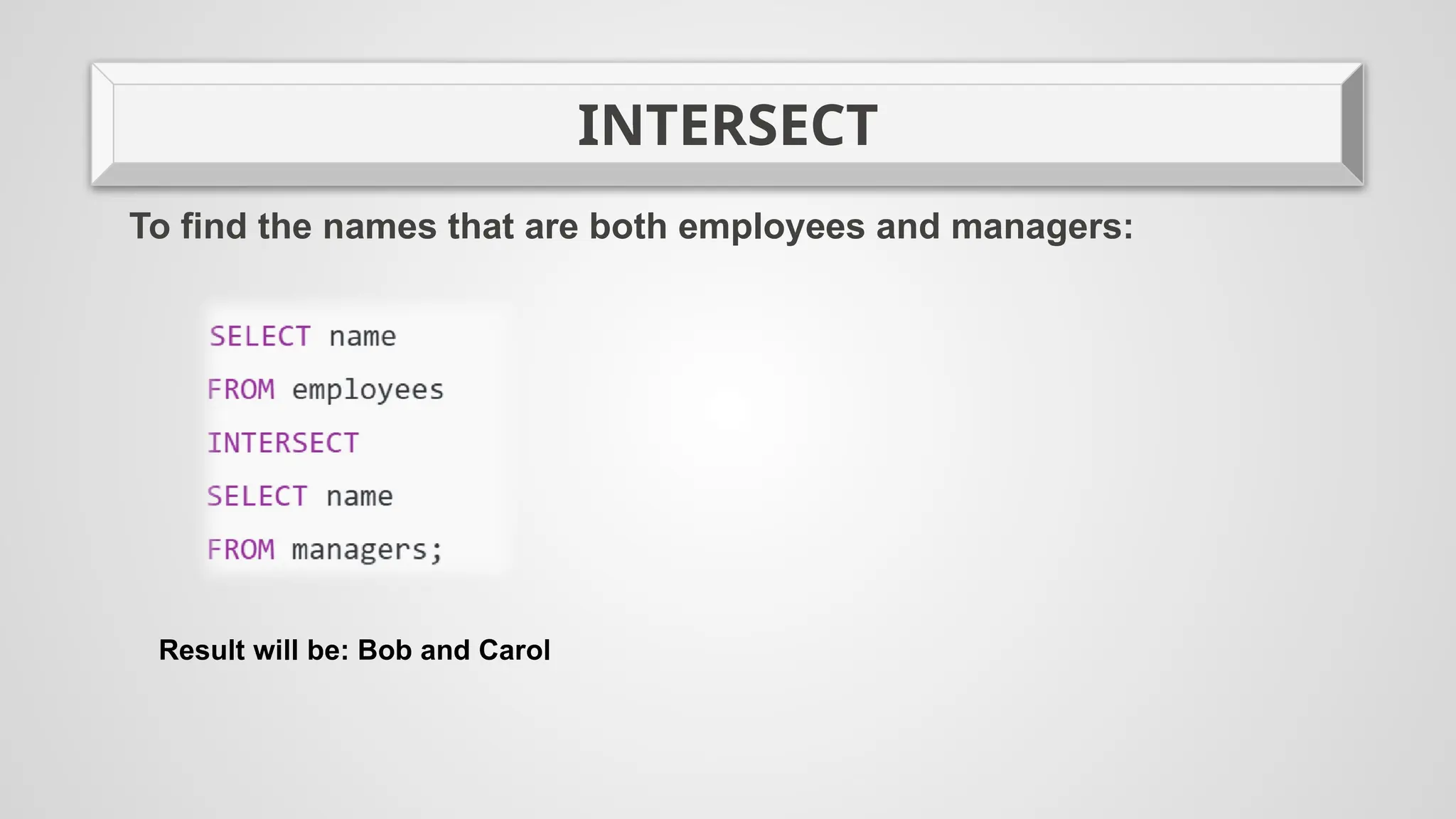
INTERSECT
To find the names that are both employees and managers:
Result will be: Bob and Carol
MINUS
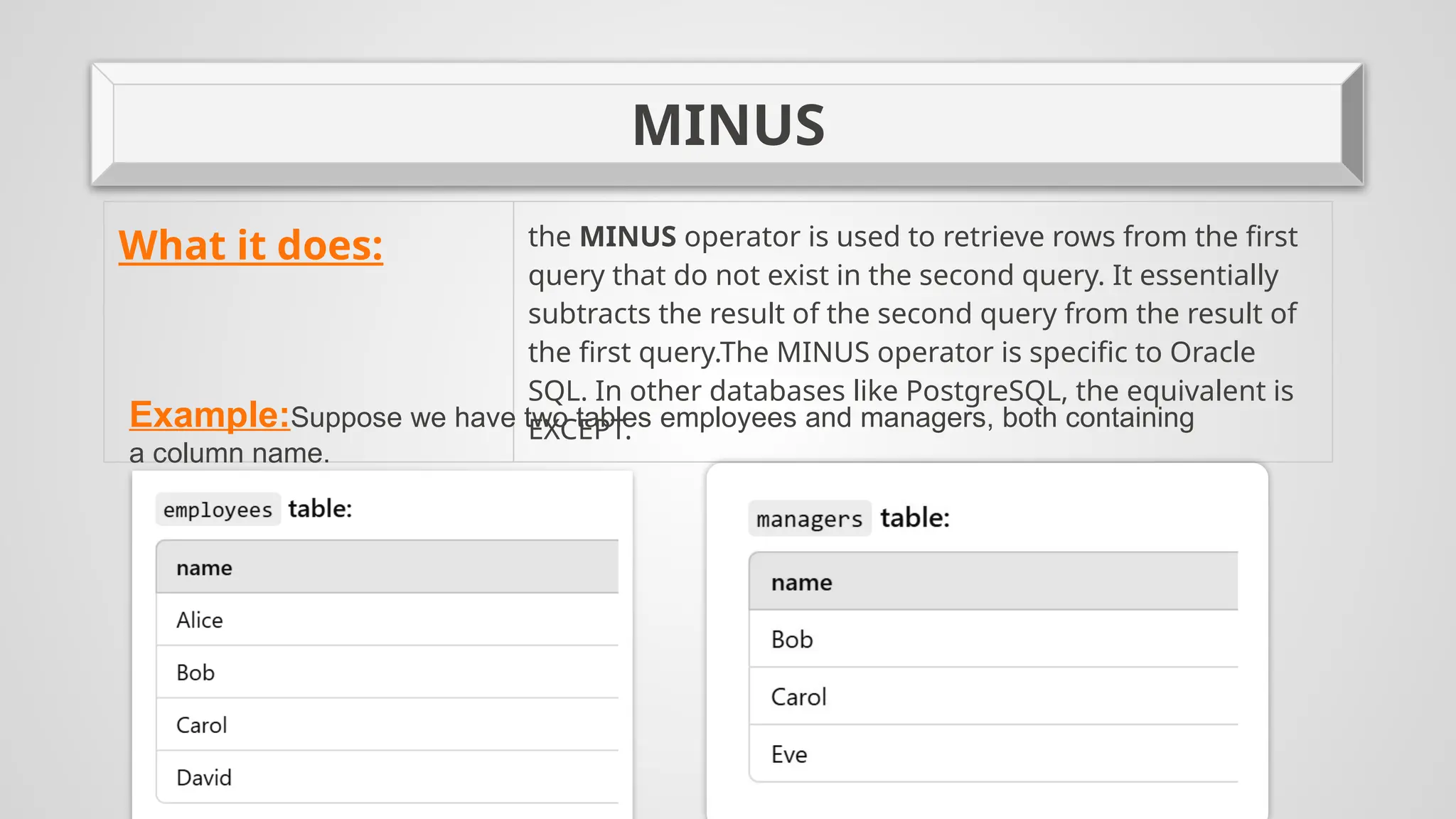
What it does: the MINUS operator is used to retrieve rows from the first
query that do not exist in the second query. It essentially
subtracts the result of the second query from the result of
the first query.The MINUS operator is specific to Oracle
SQL. In other databases like PostgreSQL, the equivalent is
EXCEPT.
Example:Suppose we have two tables employees and managers, both containing
a column name.
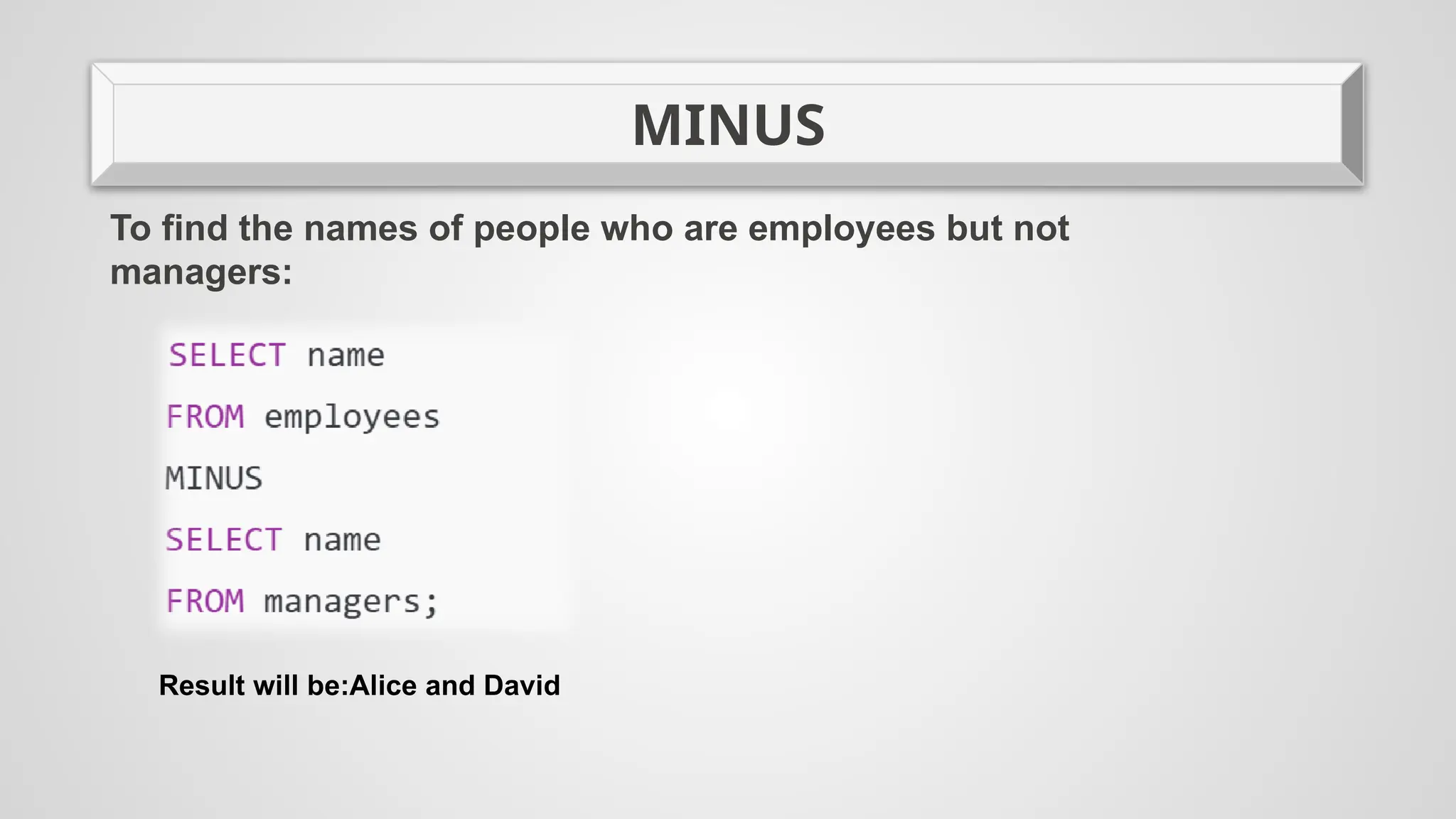
MINUS
To find the names of people who are employees but not
managers:
Result will be:Alice and David
Thanks for your
attention

Data-driven Programming Class for University by Slidesgo.pptxData-driven Programming Class for University by Slidesgo.pptxData-driven Programming Class for University by Slidesgo.pptx
  • 1.
    Ülkər Əmirova İlhamMəmmədli not null, unique key, primary key, check integrity, rowed, rownum, union, union all, intersect, minus
  • 2.
    NOT NULL What itdoes: Ensures that a column cannot contain NULL values. This constraint enforces that every row in the table must have a value for the specified column, and it cannot be left blank or undefined. Example: In this table, ID and Name cannot have NULL values, while Salary can.
  • 3.
    Unique Key What itdoes: A Unique Key in SQL is a constraint used to ensure that the values in a specific column (or combination of columns) are unique across all rows in a table. This means no two rows can have the same value in the unique key column(s). Key Points: 1. Uniqueness: The values in the column must be unique. Duplicate values are not allowed. 2. NULL values: A unique key allows one NULL value (unlike a primary key which does not allow any NULL values). 3. Multiple Unique Keys: A table can have more than one unique key constraint, unlike a primary key where there can only be one. 4. Purpose: It ensures data integrity by preventing duplicate data in specific columns.
  • 4.
    Unique Key Example: In thisexample, the Email column is constrained to have only unique values.
  • 5.
    Primary Key What itdoes: A Primary Key is a constraint that uniquely identifies each record in a table. It ensures that no two rows can have the same value in the primary key column(s) and does not allow NULL values. Key Features of a Primary Key: 1.Uniqueness: Each value in the primary key column(s) must be unique across the table. 2.No NULL Values: A primary key column cannot contain NULL values. Every row must have a valid value. 3.Single Primary Key: Each table can have only one primary key. 4.Combining Columns: A primary key can consist of one or multiple columns (known as a composite key).
  • 6.
    Primary Key Example: Here, StudentIDis the primary key and ensures each value in that column is unique and not NULL.
  • 7.
    CHECK What it does:The CHECK constraint is used to enforce data integrity by ensuring that values in a column satisfy a specific condition or rule. It allows you to define custom rules on a column to restrict the kind of data that can be inserted or updated. Example: • Age column: Ensures the age is 18 or greater. • Salary column: Ensures the salary is a positive number.
  • 8.
    ROWID In SQL, ROWIDis a unique identifier for each row in a database table. It is often used to quickly locate a specific row in a table. The exact implementation and behavior of ROWID can vary depending on the database management system (DBMS), but it generally serves the following purposes: Uniqueness: Every row in a table has a unique ROWID, which makes it a reliable way to refer to rows directly. Performance: Since ROWID is typically stored as a physical address or pointer to the data on disk, it can be used for faster access to rows in certain DBMSs, especially when you want to retrieve or update a specific row efficiently. Pseudocolumn: In some databases like Oracle, ROWID is a pseudocolumn, meaning it is automatically available for use without needing to be explicitly defined in the schema. Immutable: The ROWID for a row is generally fixed for the life of the row, so if the row is moved or deleted and reinserted, it may get a new ROWID. In practical terms, ROWID is rarely used in queries for normal operations, but it can be helpful for debugging, maintenance, or low-level optimizations.
  • 9.
    ROWNUM ROWNUM is apseudocolumn that returns the sequential number assigned to each row in the result set of a query, starting from 1 for the first row. It is assigned to the rows before any sorting is done. This makes ROWNUM useful for limiting the number of rows returned by a query or for pagination. Key Characteristics of ROWNUM: Sequential Numbering:ROWNUM starts at 1 for the first row returned and increments by 1 for each subsequent row.It is assigned before the ORDER BY clause is applied. This is important when using ROWNUM in queries with sorting. Used for Limiting Results:ROWNUM can be used to limit the number of rows returned by a query. For example, to get the first 10 rows from a result set, you can filter the rows by ROWNUM. No Order Guarantee:Since ROWNUM is assigned before sorting, the order of the rows may not be predictable unless you explicitly apply ORDER BY after filtering with ROWNUM. Cannot Be Used in the ORDER BY Clause:You cannot directly use ROWNUM in the ORDER BY clause. If you want to sort the rows and then limit the result, you need to use a subquery.
  • 10.
    ROWNUM Example: Limit the Numberof Rows: If you want to retrieve the first 5 rows from a table. This query returns the first 5 rows from the employees table. However, the order of the rows is not guaranteed unless you use ORDER BY. Using ROWNUM with ORDER BY: To get the top 5 highest-paid employees, you need to use a subquery because ROWNUM is applied before sorting. In this query, the inner query sorts the employees by salary in descending order, and then the outer query limits the result to the first 5 rows.
  • 11.
    UNION What it does:the UNION operator is used to combine the results of two or more SELECT queries into a single result set. The key point about UNION is that it removes duplicate rows from the final output, ensuring that only distinct rows are included. Example: Let’s say we have two tables: employees and contractors, both with columns name and email. We want to retrieve a list of all unique people (employees and contractors) who are working for the company. In this example:The UNION operator combines the results from both the employees and contractors tables.If the same person appears in both tables, they will only be included once in the result set due to the removal of duplicates.
  • 12.
    UNION ALL What itdoes: The UNION ALL operator in SQL is similar to the UNION operator, but it does not remove duplicate rows. This means that when you use UNION ALL, the result set will include all rows from each SELECT query, even if some rows are identical between the queries. When to Choose UNION ALL: When you are sure duplicates are either acceptable or required. When you need better performance, especially for large datasets. When you want to retain all data, including all occurrences of identical rows.
  • 13.
    INTERSECT What it does:the INTERSECT operator is used to retrieve only the common rows (intersection) between the result sets of two or more SELECT queries. The INTERSECT operator ensures that the result contains only distinct rows that appear in all the queries. Example:Suppose we have two tables employees and managers, both containing a column name.
  • 14.
    INTERSECT To find thenames that are both employees and managers: Result will be: Bob and Carol
  • 15.
    MINUS What it does:the MINUS operator is used to retrieve rows from the first query that do not exist in the second query. It essentially subtracts the result of the second query from the result of the first query.The MINUS operator is specific to Oracle SQL. In other databases like PostgreSQL, the equivalent is EXCEPT. Example:Suppose we have two tables employees and managers, both containing a column name.
  • 16.
    MINUS To find thenames of people who are employees but not managers: Result will be:Alice and David
  • 17.