City University
Course Title: Data Communication
Course Code: CSE 313
Assignment 01
Submitted to:
Pranab Bondhu Nath
Sr. Lecturer
Department of CSE
City University
Submitted By:
Md. Sultan Alauddin
ID : 1915002529
Semester : Spring 2021
Batch : 50th ( Eve)
Dept. : CSE
1. Question : What is Data Communication & What is Network ?
Ans : Data Communication : Data transmission and data reception is the transfer and reception
of data over a point-to-point or point-to-multipoint communication channel. Examples of such
channels are copper wires, optical fibers, wireless communication channels, storage media and
computer buses.
Network : A computer network is a group of computers that use a set of common
communication protocols over digital interconnections for the purpose of sharing resources
located on or provided by the network nodes.
2. What is the Difference Data Communication & Network ?
Ans :
Data Communication Network
Data Communication deals with the
communication and data transfers across
different nodes and which helps in networking
methodologies for the same.
Computer Network is one of the known and
best networking methodologies to transfer
data and information across different
geographies.
Data Communication uses mainly 3 layers of
architectural designs and then deals with the
multi-node transmission across different
regions and communicating with the same
also.
Computer networks can be defined into
different types of architectural layers such as
Client-Server, peer-to-peer or hybrid and all
of them is primarily depending upon its
architecture and the interconnected layers.
Data Communication uses different magnetic
multimedia and three layers of structures. The
twisted pair cable can be used to transfer
across different layers and cables and
communication performance depends on the
same
Computer Network offers to template through
different geographies across different cities
and locations. The performance can be based
on the layers of networking
Data Communication doesn’t provide any
data binding process and direct interrelated
testing for the communication parameter is a
bit difficult than networking.
Performance testing is more preferred in
Computer Network than Data
Communication
3. What is PAN ?
Ans : A personal area network is a computer network for interconnecting electronic devices
centered on an individual person's workspace. A PAN provides data transmission among devices
such as computers, smartphones, tablets and personal digital assistants.
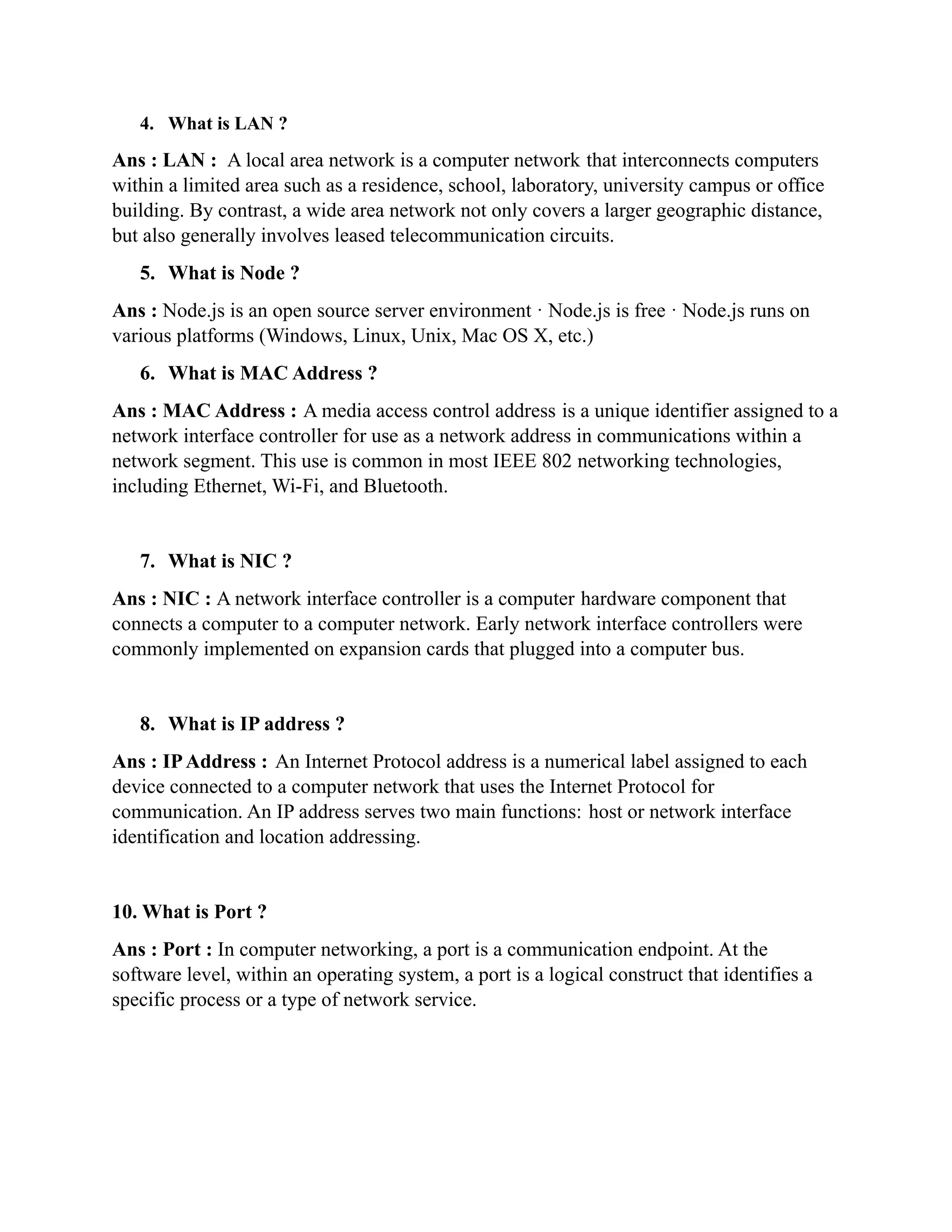
4. What is LAN ?
Ans : LAN : A local area network is a computer network that interconnects computers
within a limited area such as a residence, school, laboratory, university campus or office
building. By contrast, a wide area network not only covers a larger geographic distance,
but also generally involves leased telecommunication circuits.
5. What is Node ?
Ans : Node.js is an open source server environment · Node.js is free · Node.js runs on
various platforms (Windows, Linux, Unix, Mac OS X, etc.)
6. What is MAC Address ?
Ans : MAC Address : A media access control address is a unique identifier assigned to a
network interface controller for use as a network address in communications within a
network segment. This use is common in most IEEE 802 networking technologies,
including Ethernet, Wi-Fi, and Bluetooth.
7. What is NIC ?
Ans : NIC : A network interface controller is a computer hardware component that
connects a computer to a computer network. Early network interface controllers were
commonly implemented on expansion cards that plugged into a computer bus.
8. What is IP address ?
Ans : IPAddress : An Internet Protocol address is a numerical label assigned to each
device connected to a computer network that uses the Internet Protocol for
communication. An IP address serves two main functions: host or network interface
identification and location addressing.
10. What is Port ?
Ans : Port : In computer networking, a port is a communication endpoint. At the
software level, within an operating system, a port is a logical construct that identifies a
specific process or a type of network service.
11. Computer Network Device ..
Ans : Computer Network Device :
Router : A router is a networking device that forwards data packets between computer
networks. Routers perform the traffic directing functions on the Internet. Data sent
through the internet, such as a web page or email, is in the form of data packets.
Switch : A network switch is networking hardware that connects devices on a computer
network by using packet switching to receive and forward data to the destination device.
A network switch is a multiport network bridge that uses MAC addresses to forward data
at the data link layer of the OSI model.
Hub : An Ethernet hub, active hub, network hub, repeater hub, multiport repeater, or
simply hub is a network hardware device for connecting multiple Ethernet devices
together and making them act as a single network segment
13. What is Switch ?
Ans : Switch : A switch is used to network multiple computers together. Switches made
for the consumer market are typically small, flat boxes with 4 to 8 Ethernet ports. These
ports can connect to computers, cable or DSL modems, and other switches. High-end
switches can have more than 50 ports and often are rack mounted.Switches are more
advanced than hubs and less capable than routers.
14. MAC Address ?
Ans : MAC Address : A media access control address is a unique identifier assigned to a
network interface controller for use as a network address in communications within a
network segment. This use is common in most IEEE 802 networking technologies,
including Ethernet, Wi-Fi, and Bluetooth.
15. What is Bit and Byte ?
Ans : Bit : The bit is the most basic unit of information in computing and digital
communications. The name is a contraction of binary digit. The bit represents a logical
state with one of two possible values.
Byte : The byte is a unit of digital information that most commonly consists of eight bits.
Historically, the byte was the number of bits used to encode a single character of text in a
computer and for this reason it is the smallest addressable unit of memory in many
computer architectures.
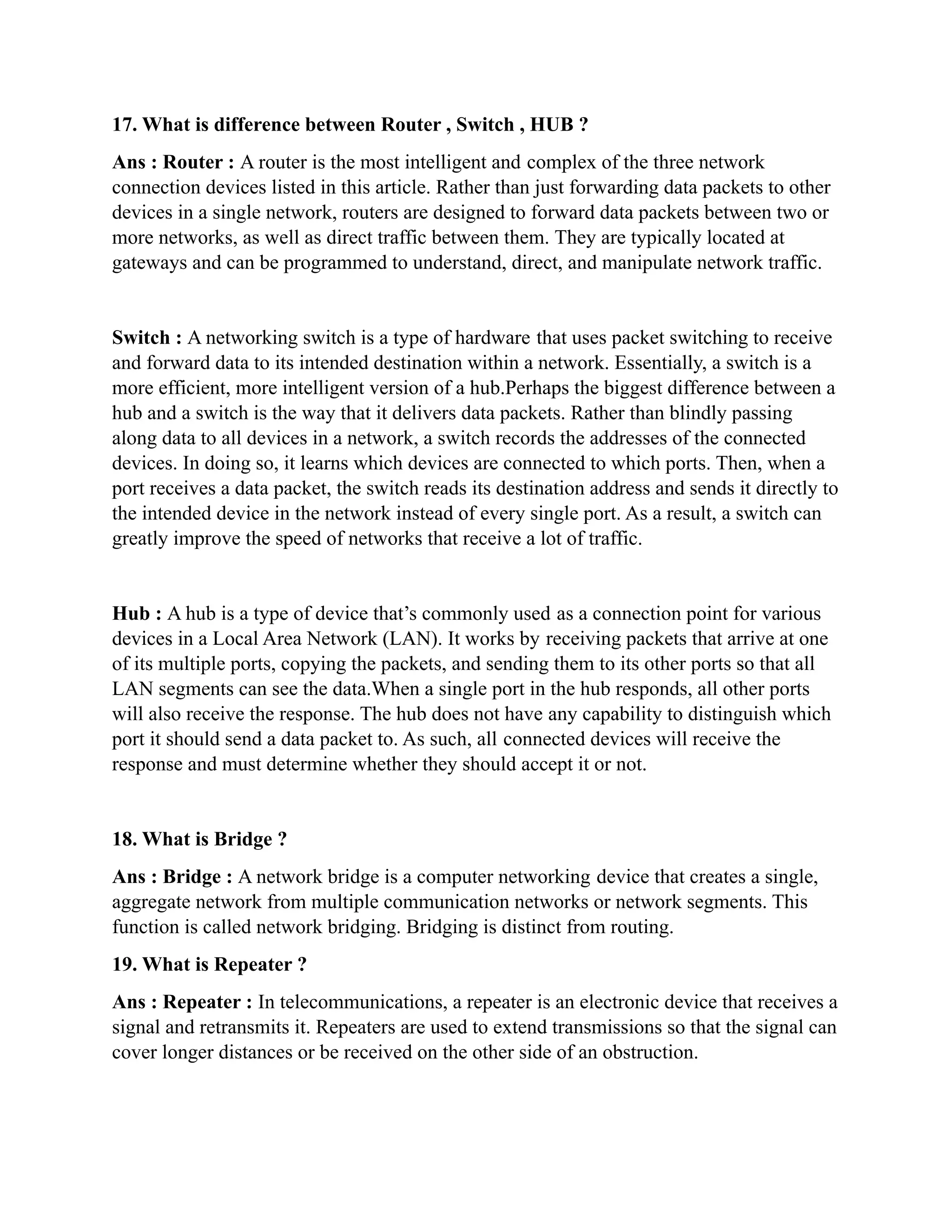
17. What is difference between Router , Switch , HUB ?
Ans : Router : A router is the most intelligent and complex of the three network
connection devices listed in this article. Rather than just forwarding data packets to other
devices in a single network, routers are designed to forward data packets between two or
more networks, as well as direct traffic between them. They are typically located at
gateways and can be programmed to understand, direct, and manipulate network traffic.
Switch : A networking switch is a type of hardware that uses packet switching to receive
and forward data to its intended destination within a network. Essentially, a switch is a
more efficient, more intelligent version of a hub.Perhaps the biggest difference between a
hub and a switch is the way that it delivers data packets. Rather than blindly passing
along data to all devices in a network, a switch records the addresses of the connected
devices. In doing so, it learns which devices are connected to which ports. Then, when a
port receives a data packet, the switch reads its destination address and sends it directly to
the intended device in the network instead of every single port. As a result, a switch can
greatly improve the speed of networks that receive a lot of traffic.
Hub : A hub is a type of device that’s commonly used as a connection point for various
devices in a Local Area Network (LAN). It works by receiving packets that arrive at one
of its multiple ports, copying the packets, and sending them to its other ports so that all
LAN segments can see the data.When a single port in the hub responds, all other ports
will also receive the response. The hub does not have any capability to distinguish which
port it should send a data packet to. As such, all connected devices will receive the
response and must determine whether they should accept it or not.
18. What is Bridge ?
Ans : Bridge : A network bridge is a computer networking device that creates a single,
aggregate network from multiple communication networks or network segments. This
function is called network bridging. Bridging is distinct from routing.
19. What is Repeater ?
Ans : Repeater : In telecommunications, a repeater is an electronic device that receives a
signal and retransmits it. Repeaters are used to extend transmissions so that the signal can
cover longer distances or be received on the other side of an obstruction.
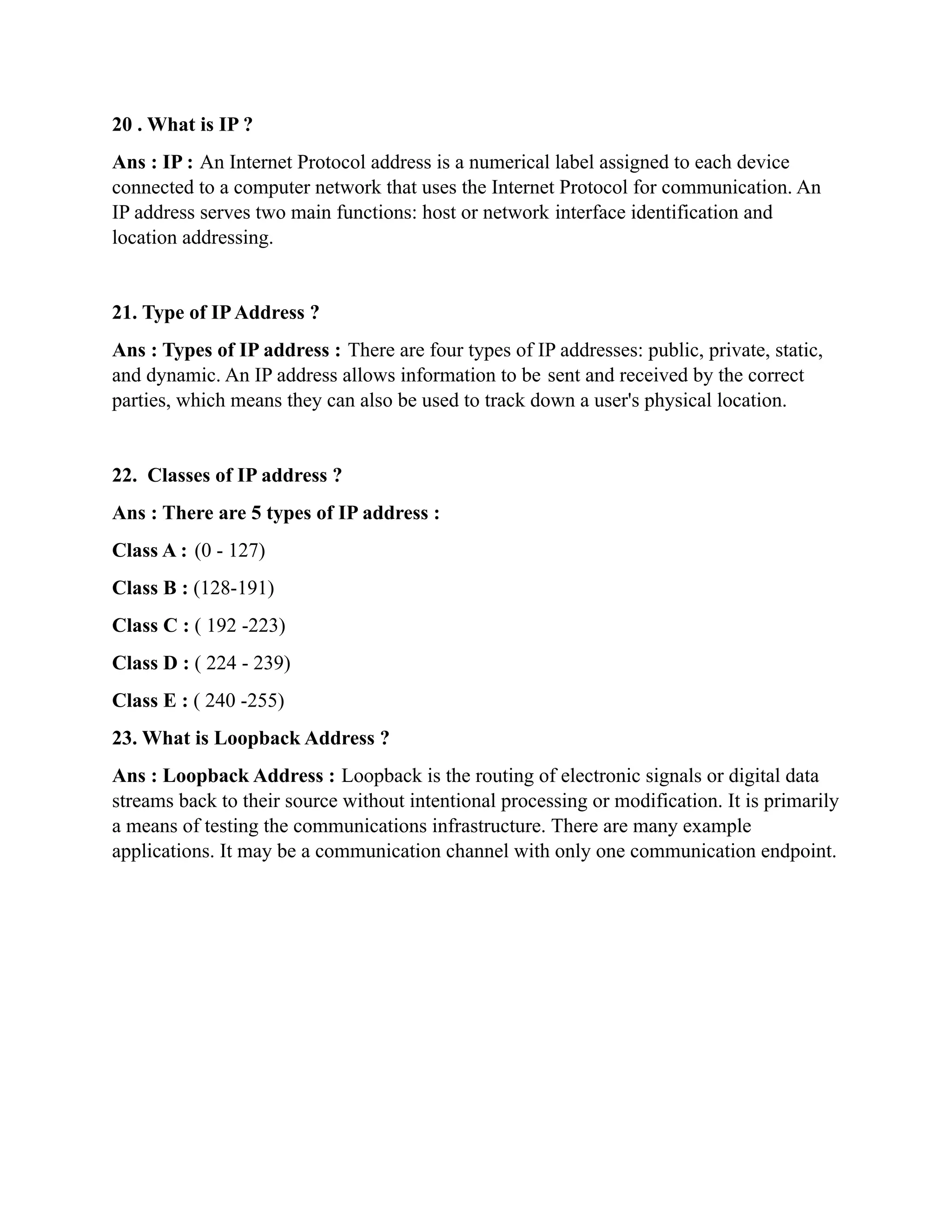
20 . What is IP ?
Ans : IP : An Internet Protocol address is a numerical label assigned to each device
connected to a computer network that uses the Internet Protocol for communication. An
IP address serves two main functions: host or network interface identification and
location addressing.
21. Type of IPAddress ?
Ans : Types of IP address : There are four types of IP addresses: public, private, static,
and dynamic. An IP address allows information to be sent and received by the correct
parties, which means they can also be used to track down a user's physical location.
22. Classes of IP address ?
Ans : There are 5 types of IP address :
Class A : (0 - 127)
Class B : (128-191)
Class C : ( 192 -223)
Class D : ( 224 - 239)
Class E : ( 240 -255)
23. What is Loopback Address ?
Ans : Loopback Address : Loopback is the routing of electronic signals or digital data
streams back to their source without intentional processing or modification. It is primarily
a means of testing the communications infrastructure. There are many example
applications. It may be a communication channel with only one communication endpoint.

Data communication assingment.docx (1)

  • 1.
    City University Course Title:Data Communication Course Code: CSE 313 Assignment 01 Submitted to: Pranab Bondhu Nath Sr. Lecturer Department of CSE City University Submitted By: Md. Sultan Alauddin ID : 1915002529 Semester : Spring 2021 Batch : 50th ( Eve) Dept. : CSE
  • 2.
    1. Question :What is Data Communication & What is Network ? Ans : Data Communication : Data transmission and data reception is the transfer and reception of data over a point-to-point or point-to-multipoint communication channel. Examples of such channels are copper wires, optical fibers, wireless communication channels, storage media and computer buses. Network : A computer network is a group of computers that use a set of common communication protocols over digital interconnections for the purpose of sharing resources located on or provided by the network nodes. 2. What is the Difference Data Communication & Network ? Ans : Data Communication Network Data Communication deals with the communication and data transfers across different nodes and which helps in networking methodologies for the same. Computer Network is one of the known and best networking methodologies to transfer data and information across different geographies. Data Communication uses mainly 3 layers of architectural designs and then deals with the multi-node transmission across different regions and communicating with the same also. Computer networks can be defined into different types of architectural layers such as Client-Server, peer-to-peer or hybrid and all of them is primarily depending upon its architecture and the interconnected layers. Data Communication uses different magnetic multimedia and three layers of structures. The twisted pair cable can be used to transfer across different layers and cables and communication performance depends on the same Computer Network offers to template through different geographies across different cities and locations. The performance can be based on the layers of networking Data Communication doesn’t provide any data binding process and direct interrelated testing for the communication parameter is a bit difficult than networking. Performance testing is more preferred in Computer Network than Data Communication 3. What is PAN ? Ans : A personal area network is a computer network for interconnecting electronic devices centered on an individual person's workspace. A PAN provides data transmission among devices such as computers, smartphones, tablets and personal digital assistants.
  • 3.
    4. What isLAN ? Ans : LAN : A local area network is a computer network that interconnects computers within a limited area such as a residence, school, laboratory, university campus or office building. By contrast, a wide area network not only covers a larger geographic distance, but also generally involves leased telecommunication circuits. 5. What is Node ? Ans : Node.js is an open source server environment · Node.js is free · Node.js runs on various platforms (Windows, Linux, Unix, Mac OS X, etc.) 6. What is MAC Address ? Ans : MAC Address : A media access control address is a unique identifier assigned to a network interface controller for use as a network address in communications within a network segment. This use is common in most IEEE 802 networking technologies, including Ethernet, Wi-Fi, and Bluetooth. 7. What is NIC ? Ans : NIC : A network interface controller is a computer hardware component that connects a computer to a computer network. Early network interface controllers were commonly implemented on expansion cards that plugged into a computer bus. 8. What is IP address ? Ans : IPAddress : An Internet Protocol address is a numerical label assigned to each device connected to a computer network that uses the Internet Protocol for communication. An IP address serves two main functions: host or network interface identification and location addressing. 10. What is Port ? Ans : Port : In computer networking, a port is a communication endpoint. At the software level, within an operating system, a port is a logical construct that identifies a specific process or a type of network service.
  • 4.
    11. Computer NetworkDevice .. Ans : Computer Network Device : Router : A router is a networking device that forwards data packets between computer networks. Routers perform the traffic directing functions on the Internet. Data sent through the internet, such as a web page or email, is in the form of data packets. Switch : A network switch is networking hardware that connects devices on a computer network by using packet switching to receive and forward data to the destination device. A network switch is a multiport network bridge that uses MAC addresses to forward data at the data link layer of the OSI model. Hub : An Ethernet hub, active hub, network hub, repeater hub, multiport repeater, or simply hub is a network hardware device for connecting multiple Ethernet devices together and making them act as a single network segment 13. What is Switch ? Ans : Switch : A switch is used to network multiple computers together. Switches made for the consumer market are typically small, flat boxes with 4 to 8 Ethernet ports. These ports can connect to computers, cable or DSL modems, and other switches. High-end switches can have more than 50 ports and often are rack mounted.Switches are more advanced than hubs and less capable than routers. 14. MAC Address ? Ans : MAC Address : A media access control address is a unique identifier assigned to a network interface controller for use as a network address in communications within a network segment. This use is common in most IEEE 802 networking technologies, including Ethernet, Wi-Fi, and Bluetooth. 15. What is Bit and Byte ? Ans : Bit : The bit is the most basic unit of information in computing and digital communications. The name is a contraction of binary digit. The bit represents a logical state with one of two possible values. Byte : The byte is a unit of digital information that most commonly consists of eight bits. Historically, the byte was the number of bits used to encode a single character of text in a computer and for this reason it is the smallest addressable unit of memory in many computer architectures.
  • 5.
    17. What isdifference between Router , Switch , HUB ? Ans : Router : A router is the most intelligent and complex of the three network connection devices listed in this article. Rather than just forwarding data packets to other devices in a single network, routers are designed to forward data packets between two or more networks, as well as direct traffic between them. They are typically located at gateways and can be programmed to understand, direct, and manipulate network traffic. Switch : A networking switch is a type of hardware that uses packet switching to receive and forward data to its intended destination within a network. Essentially, a switch is a more efficient, more intelligent version of a hub.Perhaps the biggest difference between a hub and a switch is the way that it delivers data packets. Rather than blindly passing along data to all devices in a network, a switch records the addresses of the connected devices. In doing so, it learns which devices are connected to which ports. Then, when a port receives a data packet, the switch reads its destination address and sends it directly to the intended device in the network instead of every single port. As a result, a switch can greatly improve the speed of networks that receive a lot of traffic. Hub : A hub is a type of device that’s commonly used as a connection point for various devices in a Local Area Network (LAN). It works by receiving packets that arrive at one of its multiple ports, copying the packets, and sending them to its other ports so that all LAN segments can see the data.When a single port in the hub responds, all other ports will also receive the response. The hub does not have any capability to distinguish which port it should send a data packet to. As such, all connected devices will receive the response and must determine whether they should accept it or not. 18. What is Bridge ? Ans : Bridge : A network bridge is a computer networking device that creates a single, aggregate network from multiple communication networks or network segments. This function is called network bridging. Bridging is distinct from routing. 19. What is Repeater ? Ans : Repeater : In telecommunications, a repeater is an electronic device that receives a signal and retransmits it. Repeaters are used to extend transmissions so that the signal can cover longer distances or be received on the other side of an obstruction.
  • 6.
    20 . Whatis IP ? Ans : IP : An Internet Protocol address is a numerical label assigned to each device connected to a computer network that uses the Internet Protocol for communication. An IP address serves two main functions: host or network interface identification and location addressing. 21. Type of IPAddress ? Ans : Types of IP address : There are four types of IP addresses: public, private, static, and dynamic. An IP address allows information to be sent and received by the correct parties, which means they can also be used to track down a user's physical location. 22. Classes of IP address ? Ans : There are 5 types of IP address : Class A : (0 - 127) Class B : (128-191) Class C : ( 192 -223) Class D : ( 224 - 239) Class E : ( 240 -255) 23. What is Loopback Address ? Ans : Loopback Address : Loopback is the routing of electronic signals or digital data streams back to their source without intentional processing or modification. It is primarily a means of testing the communications infrastructure. There are many example applications. It may be a communication channel with only one communication endpoint.