Jun Kim , Senior Solution Architect &
Database Specialist
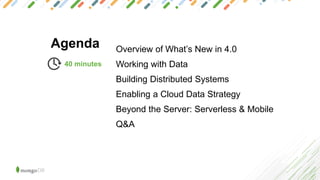
Agenda Overview of What’s New in 4.0
Working with Data
Building Distributed Systems
Enabling a Cloud Data Strategy
Beyond the Server: Serverless & Mobile
Q&A
40 minutes
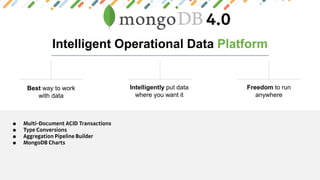
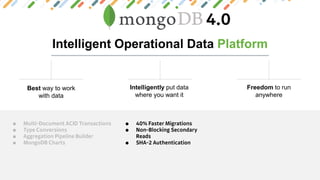
Intelligent Operational Data Platform
Best way to work
with data
Intelligently put data
where you want it
Freedom to run
anywhere
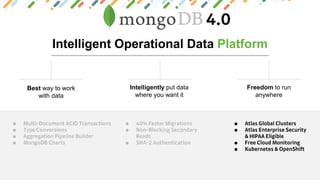
Intelligent Operational Data Platform
Best way to work
with data
Intelligently put data
where you want it
Freedom to run
anywhere
Intelligent Operational Data Platform
Best way to work
with data
Intelligently put data
where you want it
Freedom to run
anywhere
Intelligent Operational Data Platform
Best way to work
with data
Intelligently put data
where you want it
Freedom to run
anywhere
BEST WAY TO WORK WITH DATA
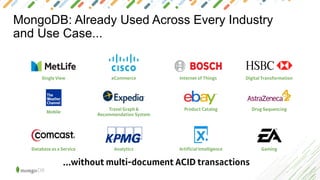
MongoDB: Already Used Across Every Industry
and Use Case...
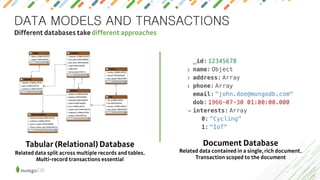
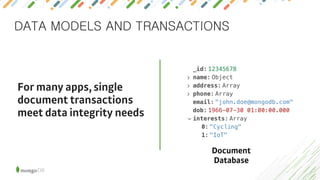
DATA MODELS AND TRANSACTIONS
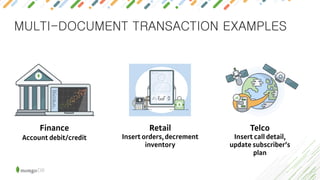
MULTI-DOCUMENT TRANSACTION EXAMPLES
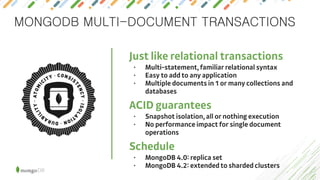
MONGODB MULTI-DOCUMENT TRANSACTIONS
•
•
•
•
•
•
•
X
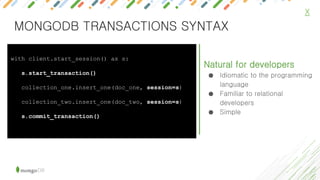
Natural for developers
● Idiomatic to the programming
language
● Familiar to relational
developers
● Simple
with client.start_session() as s:
s.start_transaction()
collection_one.insert_one(doc_one, session=s)
collection_two.insert_one(doc_two, session=s)
s.commit_transaction()
MONGODB TRANSACTIONS SYNTAX
X
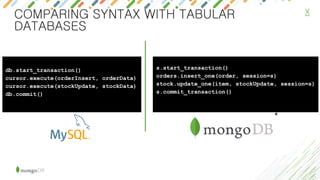
s.start_transaction()
orders.insert_one(order, session=s)
stock.update_one(item, stockUpdate, session=s)
s.commit_transaction()
db.start_transaction()
cursor.execute(orderInsert, orderData)
cursor.execute(stockUpdate, stockData)
db.commit()
*
COMPARING SYNTAX WITH TABULAR
DATABASES
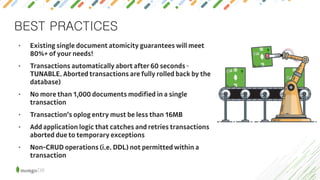
BEST PRACTICES
•
•
•
•
•
•
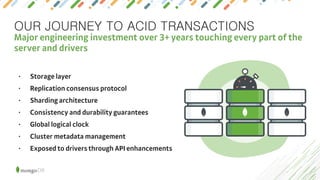
OUR JOURNEY TO ACID TRANSACTIONS
•
•
•
•
•
•
•
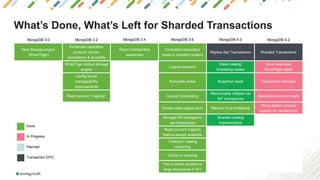
What’s Done, What’s Left for Sharded Transactions
MongoDB 3.0 MongoDB 3.2 MongoDB 3.4 MongoDB 3.6 MongoDB 4.0 MongoDB 4.2
New Storage engine
(WiredTiger)
Enhanced replication
protocol: stricter
consistency & durability
Shard membership
awareness
Consistent secondary
reads in sharded clusters
Replica Set Transactions Sharded Transactions
WiredTiger default storage
engine
Logical sessions
Make catalog
timestamp-aware
More extensive
WiredTiger repair
Config server
manageability
improvements
Retryable writes Snapshot reads Transaction manager
Read concern “majority” Causal Consistency
Recoverable rollback via
WT checkpoints
Global point-in-time reads
Cluster-wide logical clock Recover to a timestamp
Oplog applier prepare
support for transactions
Storage API changes to
use timestamps
Sharded catalog
improvements
Read concern majority
feature always available
Collection catalog
versioning
UUIDs in sharding
Fast in-place updates to
large documents in WT
In Progress
Done
Transaction EPIC
Planned
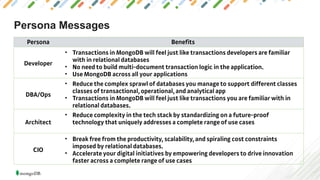
Persona Messages
•
•
•
•
•
•
•
•
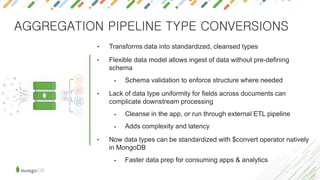
AGGREGATION PIPELINE TYPE CONVERSIONS
• Transforms data into standardized, cleansed types
• Flexible data model allows ingest of data without pre-defining
schema
• Schema validation to enforce structure where needed
• Lack of data type uniformity for fields across documents can
complicate downstream processing
• Cleanse in the app, or run through external ETL pipeline
• Adds complexity and latency
• Now data types can be standardized with $convert operator natively
in MongoDB
• Faster data prep for consuming apps & analytics
X
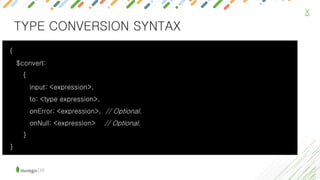
{
$convert:
{
input: <expression>,
to: <type expression>,
onError: <expression>, // Optional.
onNull: <expression> // Optional.
}
}
TYPE CONVERSION SYNTAX
X
TYPE CONVERSION EXAMPLE
db.address.insert( { street: "Canal st", building: NumberDecimal(21), _id: 0})
db.address.insert( { street: "43rd st", building: "229", _id: 1} )
db.address.insert( { street: "Fulton st", building: "31", _id: 2 } )
db.address.aggregate( [
{ $addFields: { building: {$convert: { input: "$building", to: "int" }} } },
{ $sort: {building: 1}}
])
db.address.insert( { street: "52nd st", building: "11w", _id: 3} )
db.address.aggregate( [
{ $addFields: { building: { $convert: { input: "$building", to: "int", onError: 0 } } } },
{ $sort: {building: 1}}
])
X
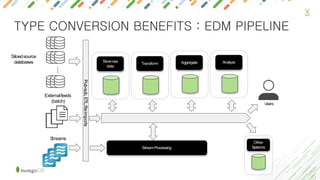
TYPE CONVERSION BENEFITS : EDM PIPELINE
…Siloedsource
databases
Externalfeeds
(batch)
Streams
Transform
Storeraw
data
AnalyzeAggregate
Pub-sub,ETL,fileimports
StreamProcessing
Users
Other
Systems
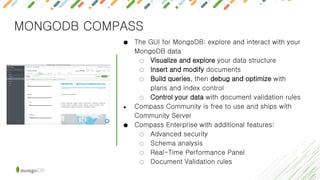
MONGODB COMPASS
● The GUI for MongoDB: explore and interact with your
MongoDB data
○ Visualize and explore your data structure
○ Insert and modify documents
○ Build queries, then debug and optimize with
plans and index control
○ Control your data with document validation rules
● Compass Community is free to use and ships with
Community Server
● Compass Enterprise with additional features:
○ Advanced security
○ Schema analysis
○ Real-Time Performance Panel
○ Document Validation rules
AGGREGATION PIPELINE
db.customers.aggregate([
{
$unwind: "$address",
},
{
$match: {"address.location": "home"}
},
{
$group: {
_id: "$address.city",
totalSpend: {$sum: "$annualSpend"},
averageSpend: {$avg: "$annualSpend"},
maximumSpend: {$max: "$annualSpend"},
customers: {$sum: 1}
}
}
])
MongoDB’s aggregation framework has the flexibility you need to get
value from your data, but without the complexity and fragility of SQL
These “phases” are distinct and
easy to understand
They can be thought about in
order… no nesting.
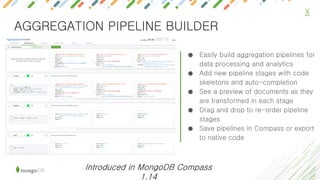
● Easily build aggregation pipelines for
data processing and analytics
● Add new pipeline stages with code
skeletons and auto-completion
● See a preview of documents as they
are transformed in each stage
● Drag and drop to re-order pipeline
stages
● Save pipelines in Compass or export
to native code
X
AGGREGATION PIPELINE BUILDER
Introduced in MongoDB Compass
1.14
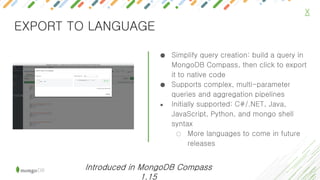
● Simplify query creation: build a query in
MongoDB Compass, then click to export
it to native code
● Supports complex, multi-parameter
queries and aggregation pipelines
● Initially supported: C#/.NET, Java,
JavaScript, Python, and mongo shell
syntax
○ More languages to come in future
releases
X
EXPORT TO LANGUAGE
Introduced in MongoDB Compass
1.15
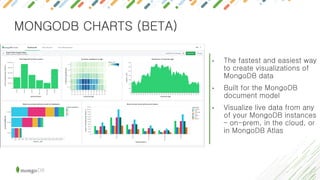
MONGODB CHARTS (BETA)
• The fastest and easiest way
to create visualizations of
MongoDB data
• Built for the MongoDB
document model
• Visualize live data from any
of your MongoDB instances
– on-prem, in the cloud, or
in MongoDB Atlas
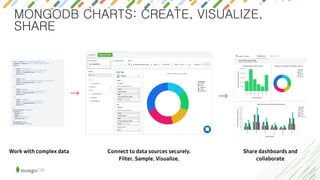
MONGODB CHARTS: CREATE, VISUALIZE,
SHARE
INTELLIGENTLY PUT DATA WHERE YOU
WANT IT
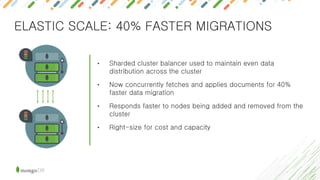
ELASTIC SCALE: 40% FASTER MIGRATIONS
• Sharded cluster balancer used to maintain even data
distribution across the cluster
• Now concurrently fetches and applies documents for 40%
faster data migration
• Responds faster to nodes being added and removed from the
cluster
• Right-size for cost and capacity
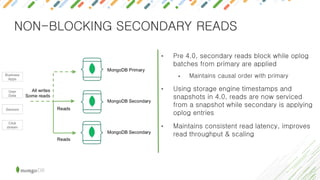
NON-BLOCKING SECONDARY READS
• Pre 4.0, secondary reads block while oplog
batches from primary are applied
• Maintains causal order with primary
• Using storage engine timestamps and
snapshots in 4.0, reads are now serviced
from a snapshot while secondary is applying
oplog entries
• Maintains consistent read latency, improves
read throughput & scaling
UPGRADED SECURITY
• Access control, auditing, encryption: MongoDB
offers some of strictest security controls of any
modern database
• Upgraded authentication (SHA2) and encryption
TLS (1.1+) to latest and strongest standards.
FREEDOM TO RUN ANYWHERE
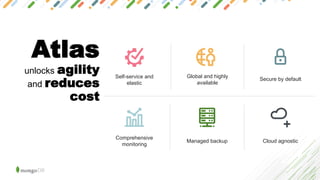
Atlas
unlocks agility
and reduces
cost
Self-service and
elastic
Global and highly
available
Secure by default
Comprehensive
monitoring
Managed backup Cloud agnostic
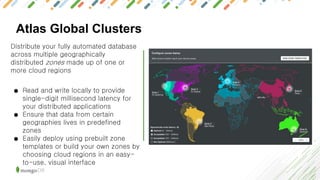
Atlas Global Clusters
Distribute your fully automated database
across multiple geographically
distributed zones made up of one or
more cloud regions
● Read and write locally to provide
single-digit millisecond latency for
your distributed applications
● Ensure that data from certain
geographies lives in predefined
zones
● Easily deploy using prebuilt zone
templates or build your own zones by
choosing cloud regions in an easy-
to-use, visual interface
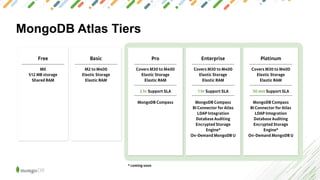
MongoDB Atlas Tiers
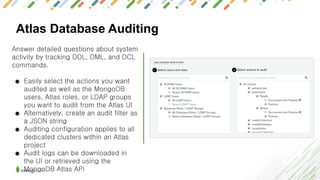
Atlas Database Auditing
Answer detailed questions about system
activity by tracking DDL, DML, and DCL
commands.
● Easily select the actions you want
audited as well as the MongoDB
users, Atlas roles, or LDAP groups
you want to audit from the Atlas UI
● Alternatively, create an audit filter as
a JSON string
● Auditing configuration applies to all
dedicated clusters within an Atlas
project
● Audit logs can be downloaded in
the UI or retrieved using the
MongoDB Atlas API
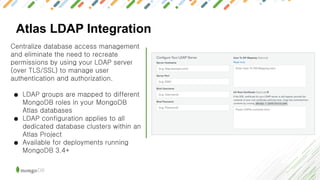
Atlas LDAP Integration
Centralize database access management
and eliminate the need to recreate
permissions by using your LDAP server
(over TLS/SSL) to manage user
authentication and authorization.
● LDAP groups are mapped to different
MongoDB roles in your MongoDB
Atlas databases
● LDAP configuration applies to all
dedicated database clusters within an
Atlas Project
● Available for deployments running
MongoDB 3.4+
Encryption at Rest: Bring Your Own KMS
MongoDB Atlas integrates with your key
management service of choice (AWS KMS &
Azure KeyVault), allowing you to centralize
control of the keys used to encrypt your
MongoDB data
● BYO KMS leverages MongoDB’s
encrypted storage engine (AES256-CBC
via OpenSSL) for database-level
encryption
● Create, import, and rotate keys for
MongoDB Atlas as well as define usage
policies and audit usage with the same
console/CLI used to manage keys for
your other cloud services
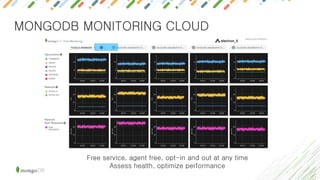
MONGODB MONITORING CLOUD
Free service, agent free, opt-in and out at any time
Assess health, optimize performance
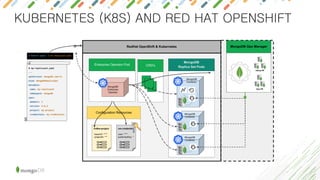
KUBERNETES (K8S) AND RED HAT OPENSHIFT
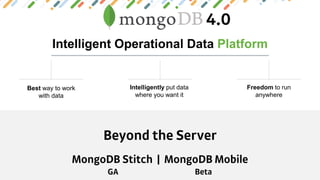
BEYOND THE SERVER
Intelligent Operational Data Platform
Best way to work
with data
Intelligently put data
where you want it
Freedom to run
anywhere
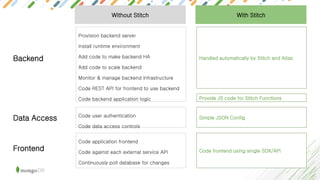
Code user authentication
Code data access controls
Provision backend server
Install runtime environment
Add code to make backend HA
Add code to scale backend
Monitor & manage backend infrastructure
Code REST API for frontend to use backend
Code backend application logic
Code application frontend
Code against each external service API
Continuously poll database for changes
Without Stitch
Simple JSON Config
Handled automatically by Stitch and Atlas
Code frontend using single SDK/API
With Stitch
Backend
Data Access
Frontend
Provide JS code for Stitch Functions
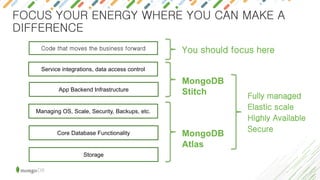
App Backend Infrastructure
Core Database Functionality
Storage
Service integrations, data access control
Code that moves the business forward
Managing OS, Scale, Security, Backups, etc.
MongoDB
Atlas
MongoDB
Stitch Fully managed
Elastic scale
Highly Available
Secure
You should focus here
FOCUS YOUR ENERGY WHERE YOU CAN MAKE A
DIFFERENCE
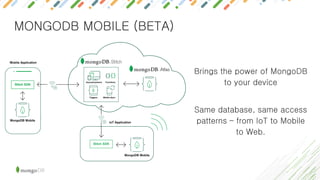
MONGODB MOBILE (BETA)
Brings the power of MongoDB
to your device
Same database, same access
patterns – from IoT to Mobile
to Web.
THANK YOU

MongoDB 4.0 새로운 기능 소개

  • 1.
    Jun Kim ,Senior Solution Architect & Database Specialist
  • 2.
    Agenda Overview ofWhat’s New in 4.0 Working with Data Building Distributed Systems Enabling a Cloud Data Strategy Beyond the Server: Serverless & Mobile Q&A 40 minutes
  • 3.
    Intelligent Operational DataPlatform Best way to work with data Intelligently put data where you want it Freedom to run anywhere
  • 4.
    Intelligent Operational DataPlatform Best way to work with data Intelligently put data where you want it Freedom to run anywhere
  • 5.
    Intelligent Operational DataPlatform Best way to work with data Intelligently put data where you want it Freedom to run anywhere
  • 6.
    Intelligent Operational DataPlatform Best way to work with data Intelligently put data where you want it Freedom to run anywhere
  • 7.
    BEST WAY TOWORK WITH DATA
  • 8.
    MongoDB: Already UsedAcross Every Industry and Use Case...
  • 9.
    DATA MODELS ANDTRANSACTIONS
  • 10.
    DATA MODELS ANDTRANSACTIONS
  • 11.
  • 12.
  • 13.
    X Natural for developers ●Idiomatic to the programming language ● Familiar to relational developers ● Simple with client.start_session() as s: s.start_transaction() collection_one.insert_one(doc_one, session=s) collection_two.insert_one(doc_two, session=s) s.commit_transaction() MONGODB TRANSACTIONS SYNTAX
  • 14.
    X s.start_transaction() orders.insert_one(order, session=s) stock.update_one(item, stockUpdate,session=s) s.commit_transaction() db.start_transaction() cursor.execute(orderInsert, orderData) cursor.execute(stockUpdate, stockData) db.commit() * COMPARING SYNTAX WITH TABULAR DATABASES
  • 15.
  • 16.
    OUR JOURNEY TOACID TRANSACTIONS • • • • • • •
  • 17.
    What’s Done, What’sLeft for Sharded Transactions MongoDB 3.0 MongoDB 3.2 MongoDB 3.4 MongoDB 3.6 MongoDB 4.0 MongoDB 4.2 New Storage engine (WiredTiger) Enhanced replication protocol: stricter consistency & durability Shard membership awareness Consistent secondary reads in sharded clusters Replica Set Transactions Sharded Transactions WiredTiger default storage engine Logical sessions Make catalog timestamp-aware More extensive WiredTiger repair Config server manageability improvements Retryable writes Snapshot reads Transaction manager Read concern “majority” Causal Consistency Recoverable rollback via WT checkpoints Global point-in-time reads Cluster-wide logical clock Recover to a timestamp Oplog applier prepare support for transactions Storage API changes to use timestamps Sharded catalog improvements Read concern majority feature always available Collection catalog versioning UUIDs in sharding Fast in-place updates to large documents in WT In Progress Done Transaction EPIC Planned
  • 19.
  • 20.
    AGGREGATION PIPELINE TYPECONVERSIONS • Transforms data into standardized, cleansed types • Flexible data model allows ingest of data without pre-defining schema • Schema validation to enforce structure where needed • Lack of data type uniformity for fields across documents can complicate downstream processing • Cleanse in the app, or run through external ETL pipeline • Adds complexity and latency • Now data types can be standardized with $convert operator natively in MongoDB • Faster data prep for consuming apps & analytics
  • 21.
    X { $convert: { input: <expression>, to: <typeexpression>, onError: <expression>, // Optional. onNull: <expression> // Optional. } } TYPE CONVERSION SYNTAX
  • 22.
    X TYPE CONVERSION EXAMPLE db.address.insert({ street: "Canal st", building: NumberDecimal(21), _id: 0}) db.address.insert( { street: "43rd st", building: "229", _id: 1} ) db.address.insert( { street: "Fulton st", building: "31", _id: 2 } ) db.address.aggregate( [ { $addFields: { building: {$convert: { input: "$building", to: "int" }} } }, { $sort: {building: 1}} ]) db.address.insert( { street: "52nd st", building: "11w", _id: 3} ) db.address.aggregate( [ { $addFields: { building: { $convert: { input: "$building", to: "int", onError: 0 } } } }, { $sort: {building: 1}} ])
  • 23.
    X TYPE CONVERSION BENEFITS: EDM PIPELINE …Siloedsource databases Externalfeeds (batch) Streams Transform Storeraw data AnalyzeAggregate Pub-sub,ETL,fileimports StreamProcessing Users Other Systems
  • 24.
    MONGODB COMPASS ● TheGUI for MongoDB: explore and interact with your MongoDB data ○ Visualize and explore your data structure ○ Insert and modify documents ○ Build queries, then debug and optimize with plans and index control ○ Control your data with document validation rules ● Compass Community is free to use and ships with Community Server ● Compass Enterprise with additional features: ○ Advanced security ○ Schema analysis ○ Real-Time Performance Panel ○ Document Validation rules
  • 25.
    AGGREGATION PIPELINE db.customers.aggregate([ { $unwind: "$address", }, { $match:{"address.location": "home"} }, { $group: { _id: "$address.city", totalSpend: {$sum: "$annualSpend"}, averageSpend: {$avg: "$annualSpend"}, maximumSpend: {$max: "$annualSpend"}, customers: {$sum: 1} } } ]) MongoDB’s aggregation framework has the flexibility you need to get value from your data, but without the complexity and fragility of SQL These “phases” are distinct and easy to understand They can be thought about in order… no nesting.
  • 26.
    ● Easily buildaggregation pipelines for data processing and analytics ● Add new pipeline stages with code skeletons and auto-completion ● See a preview of documents as they are transformed in each stage ● Drag and drop to re-order pipeline stages ● Save pipelines in Compass or export to native code X AGGREGATION PIPELINE BUILDER Introduced in MongoDB Compass 1.14
  • 27.
    ● Simplify querycreation: build a query in MongoDB Compass, then click to export it to native code ● Supports complex, multi-parameter queries and aggregation pipelines ● Initially supported: C#/.NET, Java, JavaScript, Python, and mongo shell syntax ○ More languages to come in future releases X EXPORT TO LANGUAGE Introduced in MongoDB Compass 1.15
  • 28.
    MONGODB CHARTS (BETA) •The fastest and easiest way to create visualizations of MongoDB data • Built for the MongoDB document model • Visualize live data from any of your MongoDB instances – on-prem, in the cloud, or in MongoDB Atlas
  • 29.
    MONGODB CHARTS: CREATE,VISUALIZE, SHARE
  • 30.
    INTELLIGENTLY PUT DATAWHERE YOU WANT IT
  • 31.
    ELASTIC SCALE: 40%FASTER MIGRATIONS • Sharded cluster balancer used to maintain even data distribution across the cluster • Now concurrently fetches and applies documents for 40% faster data migration • Responds faster to nodes being added and removed from the cluster • Right-size for cost and capacity
  • 32.
    NON-BLOCKING SECONDARY READS •Pre 4.0, secondary reads block while oplog batches from primary are applied • Maintains causal order with primary • Using storage engine timestamps and snapshots in 4.0, reads are now serviced from a snapshot while secondary is applying oplog entries • Maintains consistent read latency, improves read throughput & scaling
  • 33.
    UPGRADED SECURITY • Accesscontrol, auditing, encryption: MongoDB offers some of strictest security controls of any modern database • Upgraded authentication (SHA2) and encryption TLS (1.1+) to latest and strongest standards.
  • 34.
  • 35.
    Atlas unlocks agility and reduces cost Self-serviceand elastic Global and highly available Secure by default Comprehensive monitoring Managed backup Cloud agnostic
  • 36.
    Atlas Global Clusters Distributeyour fully automated database across multiple geographically distributed zones made up of one or more cloud regions ● Read and write locally to provide single-digit millisecond latency for your distributed applications ● Ensure that data from certain geographies lives in predefined zones ● Easily deploy using prebuilt zone templates or build your own zones by choosing cloud regions in an easy- to-use, visual interface
  • 37.
  • 38.
    Atlas Database Auditing Answerdetailed questions about system activity by tracking DDL, DML, and DCL commands. ● Easily select the actions you want audited as well as the MongoDB users, Atlas roles, or LDAP groups you want to audit from the Atlas UI ● Alternatively, create an audit filter as a JSON string ● Auditing configuration applies to all dedicated clusters within an Atlas project ● Audit logs can be downloaded in the UI or retrieved using the MongoDB Atlas API
  • 39.
    Atlas LDAP Integration Centralizedatabase access management and eliminate the need to recreate permissions by using your LDAP server (over TLS/SSL) to manage user authentication and authorization. ● LDAP groups are mapped to different MongoDB roles in your MongoDB Atlas databases ● LDAP configuration applies to all dedicated database clusters within an Atlas Project ● Available for deployments running MongoDB 3.4+
  • 40.
    Encryption at Rest:Bring Your Own KMS MongoDB Atlas integrates with your key management service of choice (AWS KMS & Azure KeyVault), allowing you to centralize control of the keys used to encrypt your MongoDB data ● BYO KMS leverages MongoDB’s encrypted storage engine (AES256-CBC via OpenSSL) for database-level encryption ● Create, import, and rotate keys for MongoDB Atlas as well as define usage policies and audit usage with the same console/CLI used to manage keys for your other cloud services
  • 41.
    MONGODB MONITORING CLOUD Freeservice, agent free, opt-in and out at any time Assess health, optimize performance
  • 42.
    KUBERNETES (K8S) ANDRED HAT OPENSHIFT
  • 43.
  • 44.
    Intelligent Operational DataPlatform Best way to work with data Intelligently put data where you want it Freedom to run anywhere
  • 45.
    Code user authentication Codedata access controls Provision backend server Install runtime environment Add code to make backend HA Add code to scale backend Monitor & manage backend infrastructure Code REST API for frontend to use backend Code backend application logic Code application frontend Code against each external service API Continuously poll database for changes Without Stitch Simple JSON Config Handled automatically by Stitch and Atlas Code frontend using single SDK/API With Stitch Backend Data Access Frontend Provide JS code for Stitch Functions
  • 46.
    App Backend Infrastructure CoreDatabase Functionality Storage Service integrations, data access control Code that moves the business forward Managing OS, Scale, Security, Backups, etc. MongoDB Atlas MongoDB Stitch Fully managed Elastic scale Highly Available Secure You should focus here FOCUS YOUR ENERGY WHERE YOU CAN MAKE A DIFFERENCE
  • 47.
    MONGODB MOBILE (BETA) Bringsthe power of MongoDB to your device Same database, same access patterns – from IoT to Mobile to Web.
  • 48.