Jay Mehta
Cyber Forensics ?
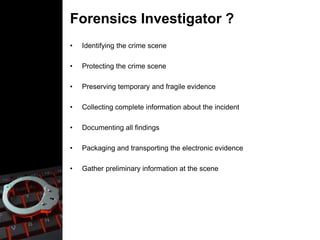
Forensics Investigator ?
• Identifying the crime scene
• Protecting the crime scene
• Preserving temporary and fragile evidence
• Collecting complete information about the incident
• Documenting all findings
• Packaging and transporting the electronic evidence
• Gather preliminary information at the scene
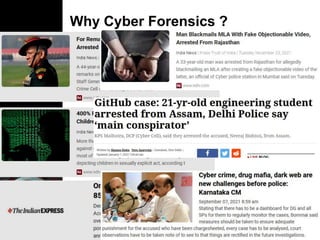
Why Cyber Forensics ?
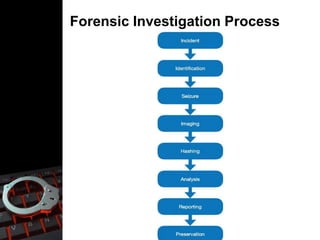
Forensic Investigation Process
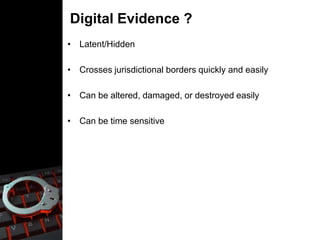
Digital Evidence ?
• Latent/Hidden
• Crosses jurisdictional borders quickly and easily
• Can be altered, damaged, or destroyed easily
• Can be time sensitive
Chain of Custody ?
• A list of all devices that were secured from the crime scene for further
Investigation
• Accurate information about the devices that has been copied, transferred,
and collected
• Timestamp of all the collected evidence
• Who processed the item?
• Who is the owner of the item?
• Where was it taken or seized from?
• All electronic evidence that was collected from the crime scene must be
properly documented each time that evidence is viewed
• Such documentation must be made available, if requested by the client,
throughout the pre-trial discovery phase.
Forensic Investigation Challenges
• Inadequate chain of custody
• Not maintaining legal procedures
• Inadequate evidential integrity
• Inadequate evidence gathering and maintaining accuracy,
authenticity, completeness
Who uses Cyber Forensics ?
• Criminal Prosecutors
• Civil Litigations
• Insurance Companies
• Private Corporations
• Law Enforcement Officials
• Individual/Private Citizens
Evidence Processing Guidelines
• Step 1: Shut down the computer
• Step 2: Document the Hardware Configuration of The System
• Step 3: Transport the Computer System to A Secure Location
• Step 4: Make Bit Stream Backups of Hard Disks and Floppy Disks
• Step 5: Mathematically Authenticate Data on All Storage Devices
• Step 6: Document the System Date and Time
• Step 7: Make a List of Key Search Words
• Step 8: Evaluate Unallocated Space (Erased Files)
• Step 9: Document File Names, Dates and Times
• Step 10: Identify File, Program and Storage Anomalies
• Step 11: Evaluate Program Functionality
• Step 12: Document Your Findings
• Step 13: Retain Copies of Software Used
Types of Cyber Forensics
• Database forensics
• Email forensics
• Malware forensics
• Memory forensics
• Mobile forensics
• Network forensics
Cyber forensics and investigations

Cyber forensics and investigations

  • 1.
  • 2.
  • 3.
  • 4.
    Forensics Investigator ? •Identifying the crime scene • Protecting the crime scene • Preserving temporary and fragile evidence • Collecting complete information about the incident • Documenting all findings • Packaging and transporting the electronic evidence • Gather preliminary information at the scene
  • 5.
  • 6.
  • 7.
    Digital Evidence ? •Latent/Hidden • Crosses jurisdictional borders quickly and easily • Can be altered, damaged, or destroyed easily • Can be time sensitive
  • 8.
    Chain of Custody? • A list of all devices that were secured from the crime scene for further Investigation • Accurate information about the devices that has been copied, transferred, and collected • Timestamp of all the collected evidence • Who processed the item? • Who is the owner of the item? • Where was it taken or seized from? • All electronic evidence that was collected from the crime scene must be properly documented each time that evidence is viewed • Such documentation must be made available, if requested by the client, throughout the pre-trial discovery phase.
  • 9.
    Forensic Investigation Challenges •Inadequate chain of custody • Not maintaining legal procedures • Inadequate evidential integrity • Inadequate evidence gathering and maintaining accuracy, authenticity, completeness
  • 10.
    Who uses CyberForensics ? • Criminal Prosecutors • Civil Litigations • Insurance Companies • Private Corporations • Law Enforcement Officials • Individual/Private Citizens
  • 11.
    Evidence Processing Guidelines •Step 1: Shut down the computer • Step 2: Document the Hardware Configuration of The System • Step 3: Transport the Computer System to A Secure Location • Step 4: Make Bit Stream Backups of Hard Disks and Floppy Disks • Step 5: Mathematically Authenticate Data on All Storage Devices • Step 6: Document the System Date and Time • Step 7: Make a List of Key Search Words • Step 8: Evaluate Unallocated Space (Erased Files) • Step 9: Document File Names, Dates and Times • Step 10: Identify File, Program and Storage Anomalies • Step 11: Evaluate Program Functionality • Step 12: Document Your Findings • Step 13: Retain Copies of Software Used
  • 12.
    Types of CyberForensics • Database forensics • Email forensics • Malware forensics • Memory forensics • Mobile forensics • Network forensics