Introduction to Unix and OS
Module 2
Dr. Girisha G S
Dept. of CSE
SoE,DSU, Bengaluru
Customizing the Unix Environment
Agenda
 The Shells
 Environment Variables
 Command Aliases- Shorthand names for commands
 Command History
 The Initialization Scripts
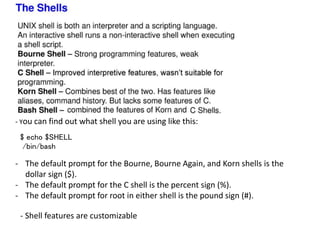
- You can find out what shell you are using like this:
$ echo $SHELL
/bin/bash
- Shell features are customizable
- The default prompt for the Bourne, Bourne Again, and Korn shells is the
dollar sign ($).
- The default prompt for the C shell is the percent sign (%).
- The default prompt for root in either shell is the pound sign (#).
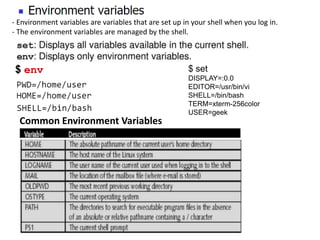
$ env
Common Environment Variables
$ set
DISPLAY=:0.0
EDITOR=/usr/bin/vi
SHELL=/bin/bash
TERM=xterm-256color
USER=geek
- Environment variables are variables that are set up in your shell when you log in.
- The environment variables are managed by the shell.
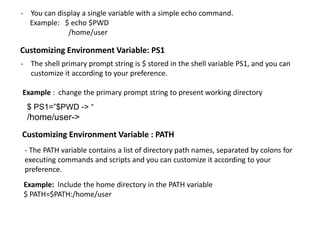
Customizing Environment Variable: PS1
- The shell primary prompt string is $ stored in the shell variable PS1, and you can
customize it according to your preference.
Example : change the primary prompt string to present working directory
$ PS1=”$PWD -> “
/home/user->
Customizing Environment Variable : PATH
- The PATH variable contains a list of directory path names, separated by colons for
executing commands and scripts and you can customize it according to your
preference.
Example: Include the home directory in the PATH variable
$ PATH=$PATH:/home/user
- You can display a single variable with a simple echo command.
Example: $ echo $PWD
/home/user
Aliases
- Aliases let you assign shorthand names to frequently used commands
alias: This command assign shorthand names to command
The syntax is as follows:
$ alias shortname=“command [options]”
Example: Create an alias called list, which will use the ls command to print a long-style
listing of all files in the current directory
$ alias list=‘ls –la’
$ list
unalias: this command unset an alias
Example: To unset alias list
$ unalias list
Command history
- Lets you recall previous commands and edit/ re-execute them
- Every command is treated as an event and assigned an event number
- Using this number you can recall previous command, edit them if
required and re-execute them
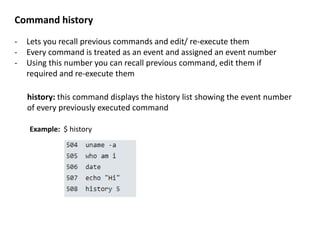
history: this command displays the history list showing the event number
of every previously executed command
Example: $ history
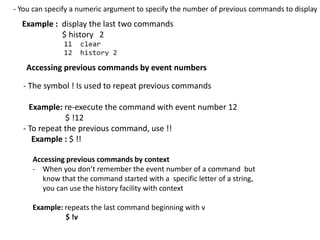
Example : display the last two commands
$ history 2
- The symbol ! Is used to repeat previous commands
Example: re-execute the command with event number 12
$ !12
- To repeat the previous command, use !!
Example : $ !!
Accessing previous commands by event numbers
Accessing previous commands by context
- When you don’t remember the event number of a command but
know that the command started with a specific letter of a string,
you can use the history facility with context
Example: repeats the last command beginning with v
$ !v
- You can specify a numeric argument to specify the number of previous commands to display
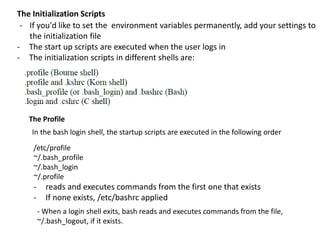
The Initialization Scripts
- The start up scripts are executed when the user logs in
- The initialization scripts in different shells are:
The Profile
- If you'd like to set the environment variables permanently, add your settings to
the initialization file
In the bash login shell, the startup scripts are executed in the following order
/etc/profile
~/.bash_profile
~/.bash_login
~/.profile
- reads and executes commands from the first one that exists
- If none exists, /etc/bashrc applied
- When a login shell exits, bash reads and executes commands from the file,
~/.bash_logout, if it exists.
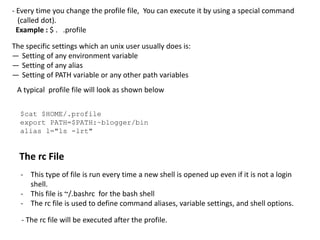
- Every time you change the profile file, You can execute it by using a special command
(called dot).
Example : $ . .profile
The specific settings which an unix user usually does is:
― Setting of any environment variable
― Setting of any alias
― Setting of PATH variable or any other path variables
$cat $HOME/.profile
export PATH=$PATH:~blogger/bin
alias l="ls -lrt"
A typical profile file will look as shown below
The rc File
- This type of file is run every time a new shell is opened up even if it is not a login
shell.
- This file is ~/.bashrc for the bash shell
- The rc file is used to define command aliases, variable settings, and shell options.
- The rc file will be executed after the profile.

Customizing the unix environment

  • 1.
    Introduction to Unixand OS Module 2 Dr. Girisha G S Dept. of CSE SoE,DSU, Bengaluru Customizing the Unix Environment
  • 2.
    Agenda  The Shells Environment Variables  Command Aliases- Shorthand names for commands  Command History  The Initialization Scripts
  • 3.
    - You canfind out what shell you are using like this: $ echo $SHELL /bin/bash - Shell features are customizable - The default prompt for the Bourne, Bourne Again, and Korn shells is the dollar sign ($). - The default prompt for the C shell is the percent sign (%). - The default prompt for root in either shell is the pound sign (#).
  • 4.
    $ env Common EnvironmentVariables $ set DISPLAY=:0.0 EDITOR=/usr/bin/vi SHELL=/bin/bash TERM=xterm-256color USER=geek - Environment variables are variables that are set up in your shell when you log in. - The environment variables are managed by the shell.
  • 5.
    Customizing Environment Variable:PS1 - The shell primary prompt string is $ stored in the shell variable PS1, and you can customize it according to your preference. Example : change the primary prompt string to present working directory $ PS1=”$PWD -> “ /home/user-> Customizing Environment Variable : PATH - The PATH variable contains a list of directory path names, separated by colons for executing commands and scripts and you can customize it according to your preference. Example: Include the home directory in the PATH variable $ PATH=$PATH:/home/user - You can display a single variable with a simple echo command. Example: $ echo $PWD /home/user
  • 6.
    Aliases - Aliases letyou assign shorthand names to frequently used commands alias: This command assign shorthand names to command The syntax is as follows: $ alias shortname=“command [options]” Example: Create an alias called list, which will use the ls command to print a long-style listing of all files in the current directory $ alias list=‘ls –la’ $ list unalias: this command unset an alias Example: To unset alias list $ unalias list
  • 7.
    Command history - Letsyou recall previous commands and edit/ re-execute them - Every command is treated as an event and assigned an event number - Using this number you can recall previous command, edit them if required and re-execute them history: this command displays the history list showing the event number of every previously executed command Example: $ history
  • 8.
    Example : displaythe last two commands $ history 2 - The symbol ! Is used to repeat previous commands Example: re-execute the command with event number 12 $ !12 - To repeat the previous command, use !! Example : $ !! Accessing previous commands by event numbers Accessing previous commands by context - When you don’t remember the event number of a command but know that the command started with a specific letter of a string, you can use the history facility with context Example: repeats the last command beginning with v $ !v - You can specify a numeric argument to specify the number of previous commands to display
  • 9.
    The Initialization Scripts -The start up scripts are executed when the user logs in - The initialization scripts in different shells are: The Profile - If you'd like to set the environment variables permanently, add your settings to the initialization file In the bash login shell, the startup scripts are executed in the following order /etc/profile ~/.bash_profile ~/.bash_login ~/.profile - reads and executes commands from the first one that exists - If none exists, /etc/bashrc applied - When a login shell exits, bash reads and executes commands from the file, ~/.bash_logout, if it exists.
  • 10.
    - Every timeyou change the profile file, You can execute it by using a special command (called dot). Example : $ . .profile The specific settings which an unix user usually does is: ― Setting of any environment variable ― Setting of any alias ― Setting of PATH variable or any other path variables $cat $HOME/.profile export PATH=$PATH:~blogger/bin alias l="ls -lrt" A typical profile file will look as shown below The rc File - This type of file is run every time a new shell is opened up even if it is not a login shell. - This file is ~/.bashrc for the bash shell - The rc file is used to define command aliases, variable settings, and shell options. - The rc file will be executed after the profile.

Editor's Notes

  • #4 Interactive shell shell run by the user after logging on. A shell running a script is always a non-interactive shell. Bash shell is often identified by a '$' sign in the command prompt. Shell prompts are extremely customizable. The type of shell, which may be customized for each user Environment variables hold values related to the current environment, like the Operating System In simple terms, it is a variable with a name and a value. Environment variables are dynamic in nature, and it can be changed. There are a number of environment variables that can be referenced by programs and can be useful in finding information about their computing environment.
  • #5 environment variables are global system variables accessible by all the processes To display the environment variables that are currently set on your system, use the env command. Editor: Defines the default editor for the shell
  • #6 PS1 - Defines your command prompt. The default prompt for the Bourne, Bourne Again, and Korn shells is the dollar sign ($). The default prompt for the C, TC, and Z shells is the percent sign (%). The default prompt for root in either shell is the pound sign (#).
  • #7 to run the longer command with less typing.aliases are shortcut names for commands. alias - This command creates an alias shortcut for long or complex command.  used to avoid typing long commands avoid having to remember complex combinations of commands and options.  unalias removes alias name specified
  • #8 Executing the same command or a short sequence of commands over and over. Unix records all of the commands executed To list previous commands, use the history command
  • #9 With bash, the complete history list is displayed
  • #10 the shell program /bin/bash (hereafter referred to as just "the shell") uses a collection of startup files to help create an environment.  The name of the profile file varies depending on the default shell of the user.  what exactly goes into one of these environment setup files?