Digitizing Workflows and Centralizing Data

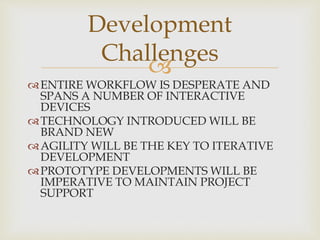
ENTIRE WORKFLOW IS DESPERATE AND
SPANS A NUMBER OF INTERACTIVE
DEVICES
TECHNOLOGY INTRODUCED WILL BE
BRAND NEW
AGILITY WILL BE THE KEY TO ITERATIVE
DEVELOPMENT
PROTOTYPE DEVELOPMENTS WILL BE
IMPERATIVE TO MAINTAIN PROJECT
SUPPORT
Development
Challenges
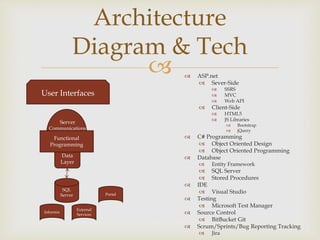
  ASP.net
 Sever-Side
 SSRS
 MVC
 Web API
 Client-Side
 HTML5
 JS Libraries
 Bootstrap
 jQuery
 C# Programming
 Object Oriented Design
 Object Oriented Programming
 Database
 Entity Framework
 SQL Server
 Stored Procedures
 IDE
 Visual Studio
 Testing
 Microsoft Test Manager
 Source Control
 BitBucket Git
 Scrum/Sprints/Bug Reporting Tracking
 Jira
Architecture
Diagram & Tech
SQL
Server
Informix
Portal
External
Services
Data
Layer
Functional
Programming
Server
Communications
User Interfaces

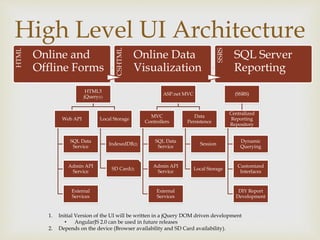
High Level UI Architecture
HTML5
jQuery(1)
Web API
SQL Data
Service
Admin API
Service
External
Services
Local Storage
IndexedDB(2)
SD Card(2)
ASP.net MVC
MVC
Controllers
SQL Data
Service
Admin API
Service
External
Services
Data
Persistence
Session
Local Storage
(SSRS)
Centralized
Reporting
Repository
Dynamic
Querying
Customized
Interfaces
DIY Report
Development
HTML
Online and
Offline Forms
CSHTML
Online Data
Visualization
SSRS
SQL Server
Reporting
1. Initial Version of the UI will be written in a jQuery DOM driven development
• AngularJS 2.0 can be used in future releases
2. Depends on the device (Browser availability and SD Card availability).

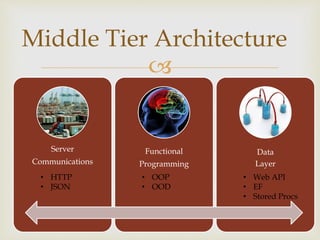
Middle Tier Architecture
Server
Communications
Functional
Programming
Data
Layer
• OOP
• OOD
• HTTP
• JSON
• Web API
• EF
• Stored Procs

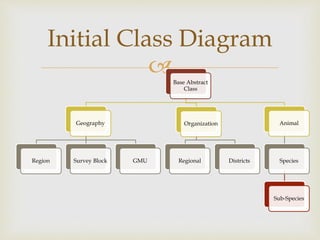
Initial Class Diagram
Base Abstract
Class
Geography
Region Survey Block GMU
Organization
Regional Districts
Animal
Species
Sub-Species

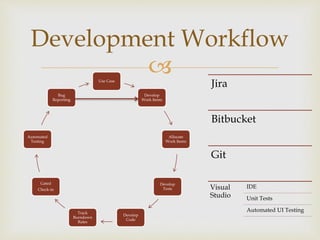
Development Workflow
Use Case
Develop
Work Items
Allocate
Work Items
Develop
Tests
Develop
Code
Track
Burndown
Rates
Gated
Check-in
Automated
Testing
Bug
Reporting
Jira
Bitbucket
Git
Visual
Studio
IDE
Unit Tests
Automated UI Testing

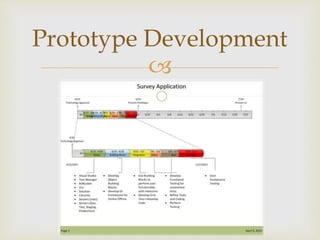
Prototype Development

Supplements
Additional Information

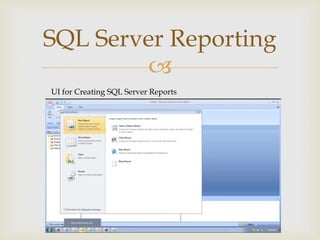
SQL Server Reporting
UI for Creating SQL Server Reports

GDMS Application Platform (1)

  • 1.
    Digitizing Workflows andCentralizing Data
  • 2.
     ENTIRE WORKFLOW ISDESPERATE AND SPANS A NUMBER OF INTERACTIVE DEVICES TECHNOLOGY INTRODUCED WILL BE BRAND NEW AGILITY WILL BE THE KEY TO ITERATIVE DEVELOPMENT PROTOTYPE DEVELOPMENTS WILL BE IMPERATIVE TO MAINTAIN PROJECT SUPPORT Development Challenges
  • 3.
      ASP.net Sever-Side  SSRS  MVC  Web API  Client-Side  HTML5  JS Libraries  Bootstrap  jQuery  C# Programming  Object Oriented Design  Object Oriented Programming  Database  Entity Framework  SQL Server  Stored Procedures  IDE  Visual Studio  Testing  Microsoft Test Manager  Source Control  BitBucket Git  Scrum/Sprints/Bug Reporting Tracking  Jira Architecture Diagram & Tech SQL Server Informix Portal External Services Data Layer Functional Programming Server Communications User Interfaces
  • 4.
     High Level UIArchitecture HTML5 jQuery(1) Web API SQL Data Service Admin API Service External Services Local Storage IndexedDB(2) SD Card(2) ASP.net MVC MVC Controllers SQL Data Service Admin API Service External Services Data Persistence Session Local Storage (SSRS) Centralized Reporting Repository Dynamic Querying Customized Interfaces DIY Report Development HTML Online and Offline Forms CSHTML Online Data Visualization SSRS SQL Server Reporting 1. Initial Version of the UI will be written in a jQuery DOM driven development • AngularJS 2.0 can be used in future releases 2. Depends on the device (Browser availability and SD Card availability).
  • 5.
     Middle Tier Architecture Server Communications Functional Programming Data Layer •OOP • OOD • HTTP • JSON • Web API • EF • Stored Procs
  • 6.
     Initial Class Diagram BaseAbstract Class Geography Region Survey Block GMU Organization Regional Districts Animal Species Sub-Species
  • 7.
     Development Workflow Use Case Develop WorkItems Allocate Work Items Develop Tests Develop Code Track Burndown Rates Gated Check-in Automated Testing Bug Reporting Jira Bitbucket Git Visual Studio IDE Unit Tests Automated UI Testing
  • 8.
  • 9.
  • 10.
     SQL Server Reporting UIfor Creating SQL Server Reports

Editor's Notes

  • #3 The platform has the typical challenges of a brand new implementation of a computerized solution. This is when Agile Development is best suited.
  • #4 Developing with the .Net Stack and reusing a number of the currently implemented tools for project development and management.
  • #5 The use of the 3 different page/report rendering technologies allows us to use the right technology for each page needed. 1. The strength of the HTML pages and the use of Angular JS is that they allow for online and offline functionality. Weaknesses include the learning curve associated with developing on the client side directly using Angular JS. Waiting until Angular JS 2.0, may 2. The strength of the ASP.net MVC is the ability to write a lot of server side code for rendering the JS required to provide the functionality to interact with the data presented in the initial model. Weaknesses include - offline functionality can compromise the strengths and the page sizes can be larger. 3. The strength of SSRS is that the ability to leverage a server functionality. Flexible stored procedures ensure reusability and SQL Server Reporting Services provides “power users” the ability to create their own reports.
  • #6 Server Comm MVVM Develop Class Interfaces and Abstract Classes for Carrying the Data To/From Server/UI (View Model) Prototype the instantiation of View Model, hydrate, and pass to UI for consumption. Prototype the Modification of the View Model on the UI and then pass back to the Web API for consumption. Functional Programming Abstract classes will provide much of the backbone for the activities like gathering/processing data. This will work with the agile development process. Interfaces will be primarily used that the basis for the interacting with other classes and services. So the communications with the UI will be based on consuming/producing classes will proper interfaces. The same will be true for the data service layer. Classes based on the abstract classes will perform activities that interface with other classes based on other abstract classes and their communications will be based on interfaces enforcing the protocols. Data Layer Provide an interface based service to process/gather data. Use Stored Procedures with Entity Framework.
  • #7 Build a Base Class that provide the very general functionality. Develop highly abstracted methods, events and properties. Three main root classes: Geography => Provides Foundational Object for all related to geography Organization => Provide Foundational Object for all related organizations, departments Animal => Provide Foundational Object for all related animals Within C# we can only inherit from a single class but we can use many interfaces. Interfaces will be used to define the templates of class consumption and creation.
  • #8 Use Cases: developed in PowerPoint to describe the User Interaction for the Programming (including UI and Processes). Develop Work Items: Breakdown the Work to create the functionality into Tasks driven by Testing. Allocate Work Items: Distribute the work items to developers. Develop Tests: Develop Tests required to test each loosely coupled encapsulation and aggregations of various objects, ending in the complete use case testing. Develop Code: Write the code for each object with reusability as the primary focus and measuring the code against the Unit Test. Track Burndown Rate: Track the progress of work items completed within a sprint and then the relative completion for the deliverable. Gated Check-in: Once the code has been written in conformance with Code Testing Metrics (Cyclomatic Complexity, Code Coverage) and Unit Testing, it can be checked-in. Automated Testing: Once the code is checked-in, Functional and Performance testing will be conducted and resulting reports will be generated. If everything is within acceptable ranges, the build can be moved to the next phase in release. Bug Reporting: As issues are discovered they are reported to the bug file and then assigned to a developer as a work item. The bug may be sent to refine/redesign the Use Case.
  • #9 I will developing the platform in modules that stand alone and work in an aggregate. The Prototype Provides a Vertical sampling of the Individual Layers Testable Individually or any Collection (including the Entire).
  • #11 Great Tutorial (Creating Executive Dashboards With SQL Server Report Builder) @ https://www.youtube.com/watch?v=00SX1XX3fl4