1
Operating Systems and Virtualization
Digital Assignment-2
Topic: Kernel Compilation
Objective:
The main objective is to compile the own Linux kernel to create a
customized Linux kernel
Steps:
Obtaining Kernel Sources:
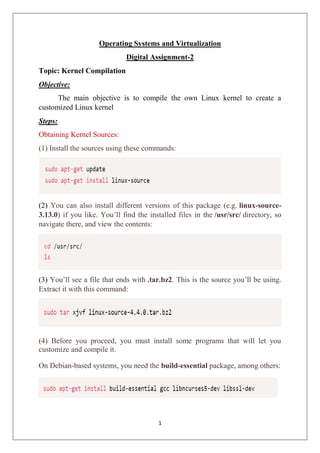
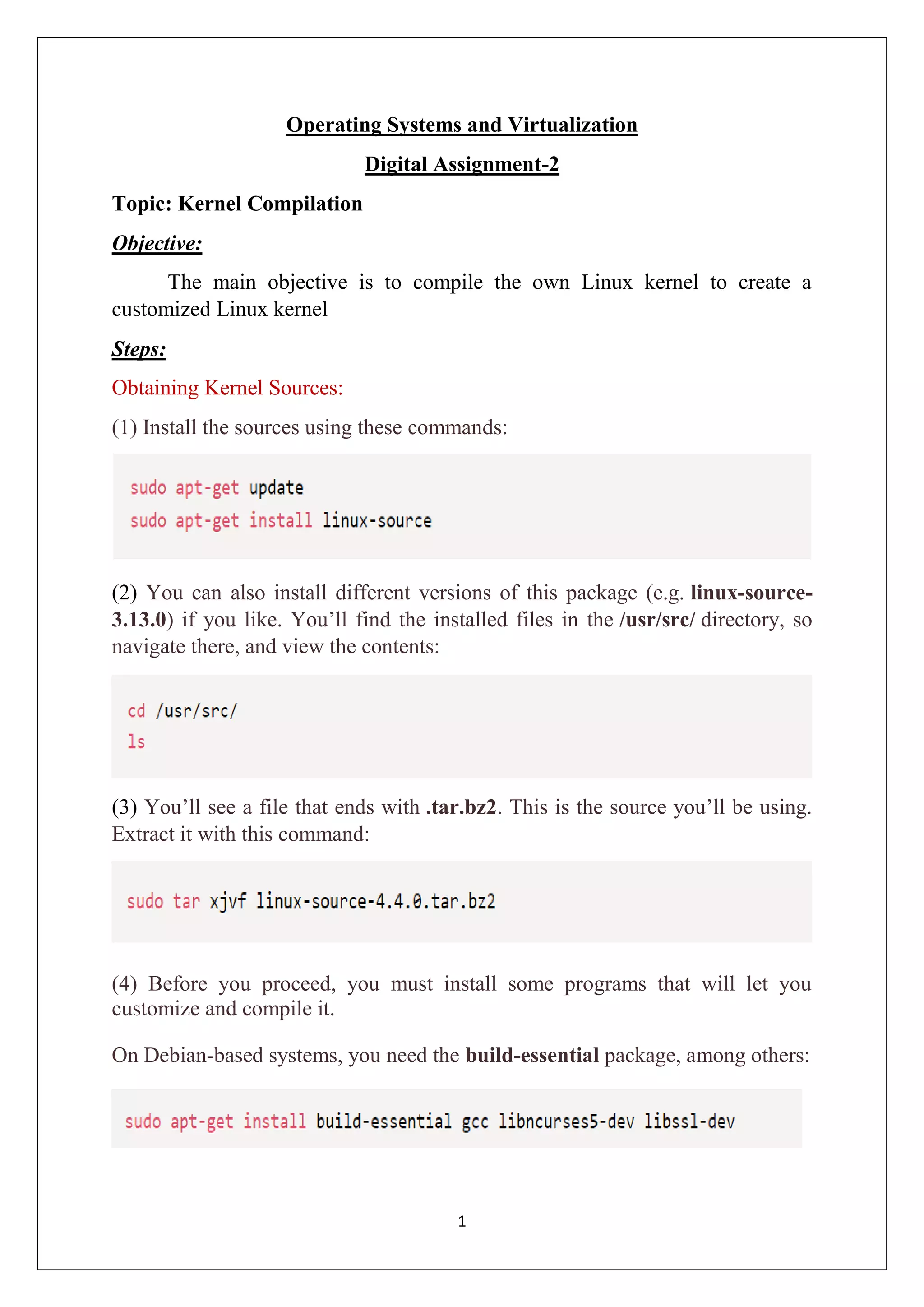
(1) Install the sources using these commands:
(2) You can also install different versions of this package (e.g. linux-source-
3.13.0) if you like. You’ll find the installed files in the /usr/src/ directory, so
navigate there, and view the contents:
(3) You’ll see a file that ends with .tar.bz2. This is the source you’ll be using.
Extract it with this command:
(4) Before you proceed, you must install some programs that will let you
customize and compile it.
On Debian-based systems, you need the build-essential package, among others:
2
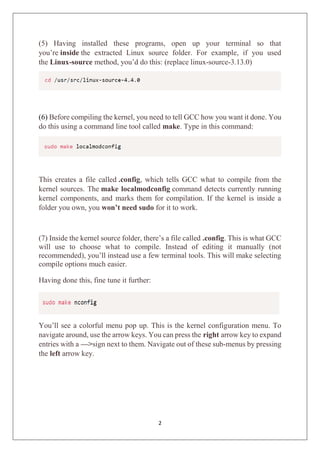
(5) Having installed these programs, open up your terminal so that
you’re inside the extracted Linux source folder. For example, if you used
the Linux-source method, you’d do this: (replace linux-source-3.13.0)
(6) Before compiling the kernel, you need to tell GCC how you want it done. You
do this using a command line tool called make. Type in this command:
This creates a file called .config, which tells GCC what to compile from the
kernel sources. The make localmodconfig command detects currently running
kernel components, and marks them for compilation. If the kernel is inside a
folder you own, you won’t need sudo for it to work.
(7) Inside the kernel source folder, there’s a file called .config. This is what GCC
will use to choose what to compile. Instead of editing it manually (not
recommended), you’ll instead use a few terminal tools. This will make selecting
compile options much easier.
Having done this, fine tune it further:
You’ll see a colorful menu pop up. This is the kernel configuration menu. To
navigate around, use the arrow keys. You can press the right arrow key to expand
entries with a —>sign next to them. Navigate out of these sub-menus by pressing
the left arrow key.
3
You can toggle menu entries that have the <> or [] sign next to them by pressing
the space bar. This will cycle through the different menu options. If you see
a * or M inside, that specific kernel component will be compiled. The only
difference between them is that the M option will be loaded when it’s needed.
This can be useful if you’re compiling a driver for example, that won’t be used
often. In this exercise, We removed Plug and Play Support in Custom Kernel.
If you want to know more about what a specific switch does, press F2 over it.
You’ll see a helpful description of what you’re compiling.
4
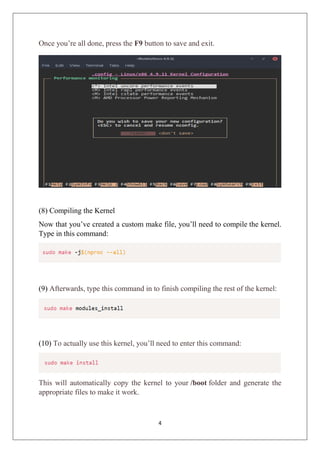
Once you’re all done, press the F9 button to save and exit.
(8) Compiling the Kernel
Now that you’ve created a custom make file, you’ll need to compile the kernel.
Type in this command:
(9) Afterwards, type this command in to finish compiling the rest of the kernel:
(10) To actually use this kernel, you’ll need to enter this command:
This will automatically copy the kernel to your /boot folder and generate the
appropriate files to make it work.
5
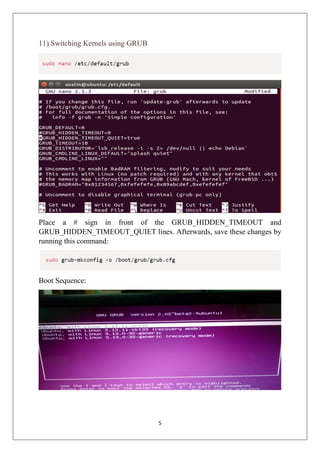
11) Switching Kernels using GRUB
Place a # sign in front of the GRUB_HIDDEN_TIMEOUT and
GRUB_HIDDEN_TIMEOUT_QUIET lines. Afterwards, save these changes by
running this command:
Boot Sequence:
6
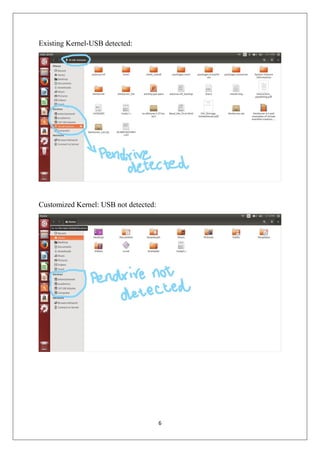
Existing Kernel-USB detected:
Customized Kernel: USB not detected:
7
Kernel Versions:
Old Kernel:
New Kernel:

Custom kernel creation

  • 1.
    1 Operating Systems andVirtualization Digital Assignment-2 Topic: Kernel Compilation Objective: The main objective is to compile the own Linux kernel to create a customized Linux kernel Steps: Obtaining Kernel Sources: (1) Install the sources using these commands: (2) You can also install different versions of this package (e.g. linux-source- 3.13.0) if you like. You’ll find the installed files in the /usr/src/ directory, so navigate there, and view the contents: (3) You’ll see a file that ends with .tar.bz2. This is the source you’ll be using. Extract it with this command: (4) Before you proceed, you must install some programs that will let you customize and compile it. On Debian-based systems, you need the build-essential package, among others:
  • 2.
    2 (5) Having installedthese programs, open up your terminal so that you’re inside the extracted Linux source folder. For example, if you used the Linux-source method, you’d do this: (replace linux-source-3.13.0) (6) Before compiling the kernel, you need to tell GCC how you want it done. You do this using a command line tool called make. Type in this command: This creates a file called .config, which tells GCC what to compile from the kernel sources. The make localmodconfig command detects currently running kernel components, and marks them for compilation. If the kernel is inside a folder you own, you won’t need sudo for it to work. (7) Inside the kernel source folder, there’s a file called .config. This is what GCC will use to choose what to compile. Instead of editing it manually (not recommended), you’ll instead use a few terminal tools. This will make selecting compile options much easier. Having done this, fine tune it further: You’ll see a colorful menu pop up. This is the kernel configuration menu. To navigate around, use the arrow keys. You can press the right arrow key to expand entries with a —>sign next to them. Navigate out of these sub-menus by pressing the left arrow key.
  • 3.
    3 You can togglemenu entries that have the <> or [] sign next to them by pressing the space bar. This will cycle through the different menu options. If you see a * or M inside, that specific kernel component will be compiled. The only difference between them is that the M option will be loaded when it’s needed. This can be useful if you’re compiling a driver for example, that won’t be used often. In this exercise, We removed Plug and Play Support in Custom Kernel. If you want to know more about what a specific switch does, press F2 over it. You’ll see a helpful description of what you’re compiling.
  • 4.
    4 Once you’re alldone, press the F9 button to save and exit. (8) Compiling the Kernel Now that you’ve created a custom make file, you’ll need to compile the kernel. Type in this command: (9) Afterwards, type this command in to finish compiling the rest of the kernel: (10) To actually use this kernel, you’ll need to enter this command: This will automatically copy the kernel to your /boot folder and generate the appropriate files to make it work.
  • 5.
    5 11) Switching Kernelsusing GRUB Place a # sign in front of the GRUB_HIDDEN_TIMEOUT and GRUB_HIDDEN_TIMEOUT_QUIET lines. Afterwards, save these changes by running this command: Boot Sequence:
  • 6.
  • 7.