Cursors in PL/SQL
Includes cursor example and
continuation of first cursor example
Interesting 
Explicit cursor
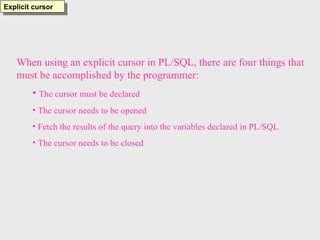
When using an explicit cursor in PL/SQL, there are four things that
must be accomplished by the programmer:
• The cursor must be declared
• The cursor needs to be opened
• Fetch the results of the query into the variables declared in PL/SQL
• The cursor needs to be closed
DECLARE
v_name donor.name%TYPE;
v_yrgoal donor.yrgoal%TYPE;
v_state donor.state%TYPE;
CURSOR donor_cursor IS
SELECT name, yrgoal, state
FROM donor;
BEGIN
OPEN donor_cursor;
FETCH donor_cursor INTO v_name, v_yrgoal, v_state;
WHILE donor_cursor%FOUND LOOP
INSERT INTO donor_part
VALUES(v_name, v_yrgoal, v_state);
FETCH donor_cursor INTO v_name, v_yrgoal, v_state;
END LOOP;
CLOSE donor_cursor;
END;
/
Explicit cursors
SQL> edit cursor1
SQL> @ cursor1
PL/SQL procedure successfully completed.
SQL> SELECT * FROM donor_part;
NAME YRGOAL ST
--------------- --------- --
Stephen Daniels 500 MA
Jennifer Ames 400 RI
Carl Hersey RI
Susan Ash 100 MA
Nancy Taylor 50 MA
Robert Brooks 50 MA
The table donor_part was empty before
cursor1 was executed. After running the
anonymous block, there are now six
records in the table. They correspond to
the six records that were in the donor
table.
Explicit cursor
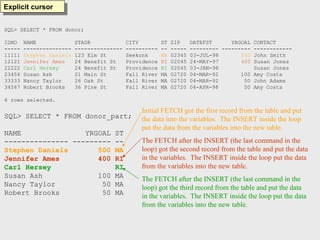
SQL> SELECT * FROM donor;
IDNO NAME STADR CITY ST ZIP DATEFST YRGOAL CONTACT
----- --------------- --------------- ---------- -- ----- --------- --------- ------------
11111 Stephen Daniels 123 Elm St Seekonk MA 02345 03-JUL-98 500 John Smith
12121 Jennifer Ames 24 Benefit St Providence RI 02045 24-MAY-97 400 Susan Jones
22222 Carl Hersey 24 Benefit St Providence RI 02045 03-JAN-98 Susan Jones
23456 Susan Ash 21 Main St Fall River MA 02720 04-MAR-92 100 Amy Costa
33333 Nancy Taylor 26 Oak St Fall River MA 02720 04-MAR-92 50 John Adams
34567 Robert Brooks 36 Pine St Fall River MA 02720 04-APR-98 50 Amy Costa
6 rows selected.
SQL> SELECT * FROM donor_part;
NAME YRGOAL ST
--------------- --------- --
Stephen Daniels 500 MA
Jennifer Ames 400 RI
Carl Hersey RI
Susan Ash 100 MA
Nancy Taylor 50 MA
Robert Brooks 50 MA
Initial FETCH got the first record from the table and put
the data into the variables. The INSERT inside the loop
put the data from the variables into the new table.
The FETCH after the INSERT (the last command in the
loop) got the second record from the table and put the data
in the variables. The INSERT inside the loop put the data
from the variables into the new table.
The FETCH after the INSERT (the last command in the
loop) got the third record from the table and put the data
in the variables. The INSERT inside the loop put the data
from the variables into the new table.
DECLARE
v_name donor.name%TYPE;
v_yrgoal donor.yrgoal%TYPE;
v_state donor.state%TYPE;
CURSOR donor_cursor IS
SELECT name, yrgoal, state
FROM donor;
BEGIN
OPEN donor_cursor;
FETCH donor_cursor INTO v_name, v_yrgoal, v_state;
WHILE donor_cursor%FOUND LOOP
INSERT INTO donor_part
VALUES(v_name, v_yrgoal, v_state);
FETCH donor_cursor INTO v_name, v_yrgoal, v_state;
END LOOP;
CLOSE donor_cursor;
END;
/
Explicit cursor
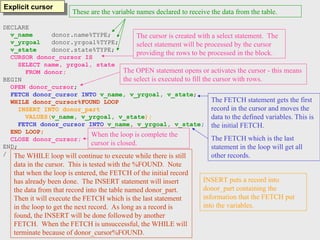
These are the variable names declared to receive the data from the table.
The cursor is created with a select statement. The
select statement will be processed by the cursor
providing the rows to be processed in the block.
The OPEN statement opens or activates the cursor - this means
the select is executed to fill the cursor with rows.
The FETCH statement gets the first
record in the cursor and moves the
data to the defined variables. This is
the initial FETCH.
The FETCH which is the last
statement in the loop will get all
other records.
The WHILE loop will continue to execute while there is still
data in the cursor. This is tested with the %FOUND. Note
that when the loop is entered, the FETCH of the initial record
has already been done. The INSERT statement will insert
the data from that record into the table named donor_part.
Then it will execute the FETCH which is the last statement
in the loop to get the next record. As long as a record is
found, the INSERT will be done followed by another
FETCH. When the FETCH is unsuccessful, the WHILE will
terminate because of donor_cursor%FOUND.
When the loop is complete the
cursor is closed.
INSERT puts a record into
donor_part containing the
information that the FETCH put
into the variables.
DECLARE
v_name donor.name%TYPE;
v_yrgoal donor.yrgoal%TYPE;
v_state donor.state%TYPE;
CURSOR donor_cursor IS
SELECT name, yrgoal, state
FROM donor;
BEGIN
OPEN donor_cursor;
FETCH donor_cursor INTO v_name, v_yrgoal, v_state;
WHILE donor_cursor%FOUND LOOP
IF v_yrgoal > 50 THEN
INSERT INTO donor_part
VALUES(v_name, v_yrgoal, v_state);
END IF;
FETCH donor_cursor INTO v_name, v_yrgoal, v_state;
END LOOP;
CLOSE donor_cursor;
END;
/
Explicit cursor
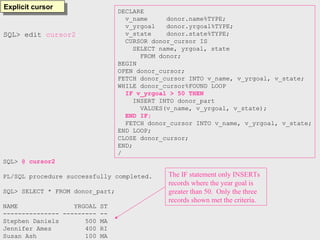
SQL> edit cursor2
SQL> @ cursor2
PL/SQL procedure successfully completed.
SQL> SELECT * FROM donor_part;
NAME YRGOAL ST
--------------- --------- --
Stephen Daniels 500 MA
Jennifer Ames 400 RI
Susan Ash 100 MA
The IF statement only INSERTs
records where the year goal is
greater than 50. Only the three
records shown met the criteria.
DECLARE
v_name donor.name%TYPE;
v_yrgoal donor.yrgoal%TYPE;
v_state donor.state%TYPE;
CURSOR donor_cursor IS
SELECT name, yrgoal, state
FROM donor
WHERE yrgoal> 50;
BEGIN
OPEN donor_cursor;
FETCH donor_cursor INTO v_name, v_yrgoal, v_state;
WHILE donor_cursor%FOUND LOOP
INSERT INTO donor_part
VALUES(v_name, v_yrgoal, v_state);
FETCH donor_cursor INTO v_name, v_yrgoal, v_state;
END LOOP;
CLOSE donor_cursor;
END;
/
Explicit cursor
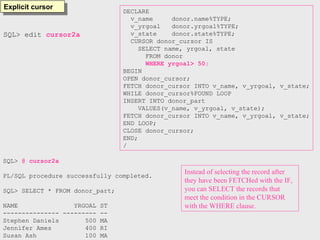
SQL> edit cursor2a
SQL> @ cursor2a
PL/SQL procedure successfully completed.
SQL> SELECT * FROM donor_part;
NAME YRGOAL ST
--------------- --------- --
Stephen Daniels 500 MA
Jennifer Ames 400 RI
Susan Ash 100 MA
Instead of selecting the record after
they have been FETCHed with the IF,
you can SELECT the records that
meet the condition in the CURSOR
with the WHERE clause.
Explicit cursor
DECLARE
v_name donor.name%TYPE;
v_yrgoal donor.yrgoal%TYPE;
v_state donor.state%TYPE;
CURSOR donor_cursor IS
SELECT name, yrgoal, state
FROM donor
WHERE yrgoal> 50;
BEGIN
OPEN donor_cursor;
FETCH donor_cursor INTO v_name, v_yrgoal, v_state;
LOOP
INSERT INTO donor_part
VALUES(v_name, v_yrgoal, v_state);
FETCH donor_cursor INTO v_name, v_yrgoal, v_state;
EXIT WHEN donor_cursor%NOTFOUND;
END LOOP;
CLOSE donor_cursor;
END;
/
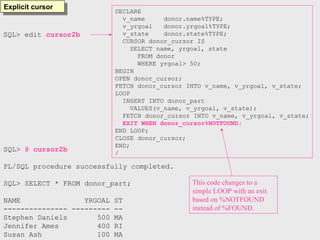
SQL> edit cursor2b
SQL> @ cursor2b
PL/SQL procedure successfully completed.
SQL> SELECT * FROM donor_part;
NAME YRGOAL ST
--------------- --------- --
Stephen Daniels 500 MA
Jennifer Ames 400 RI
Susan Ash 100 MA
This code changes to a
simple LOOP with an exit
based on %NOTFOUND
instead of %FOUND.
DECLARE
v_name donor.name%TYPE;
v_yrgoal donor.yrgoal%TYPE;
v_state donor.state%TYPE;
CURSOR donor_cursor IS
SELECT name, yrgoal, state
FROM donor;
BEGIN
OPEN donor_cursor;
FETCH donor_cursor INTO v_name, v_yrgoal, v_state;
WHILE donor_cursor%ROWCOUNT < 5 AND donor_cursor%FOUND LOOP
INSERT INTO donor_part
VALUES(v_name, v_yrgoal, v_state);
FETCH donor_cursor INTO v_name, v_yrgoal, v_state;
END LOOP;
CLOSE donor_cursor;
END;
/
Explicit
cursor
SQL> @ cursor3
PL/SQL procedure successfully completed.
SQL> SELECT * FROM donor_part;
NAME YRGOAL ST
--------------- --------- --
Stephen Daniels 500 MA
Jennifer Ames 400 RI
Carl Hersey RI
Susan Ash 100 MA
The while loop will terminate after
4 records have been processed or
when no more records are in the
cursor. %ROWCOUNT is used to
determine when 4 records have
been processed.
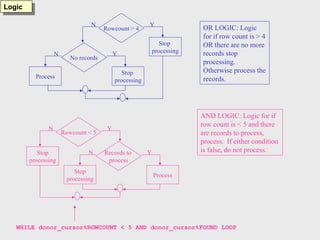
WHILE donor_cursor%ROWCOUNT < 5 AND donor_cursor%FOUND LOOP
Logic
Rowcount > 4
Stop
processing
Y
N
No records
Stop
processing
Y
N
Process
OR LOGIC: Logic
for if row count is > 4
OR there are no more
records stop
processing.
Otherwise process the
records.
Rowcount < 5
Y
N
Records to
process
Process
Y
N
Stop
processing
Stop
processing
AND LOGIC: Logic for if
row count is < 5 and there
are records to process,
process. If either condition
is false, do not process.
SET SERVEROUTPUT ON
DECLARE
v_drive_no drive.driveno%TYPE;
v_drive_name drive.drivename%TYPE;
v_contamt donation.contamt%TYPE;
v_tot_contamt cont_info.contamt%TYPE;
CURSOR drive_cursor IS
SELECT driveno, drivename FROM drive
ORDER BY driveno;
CURSOR donation_cursor IS
SELECT contamt FROM donation
WHERE v_drive_no = driveno
ORDER BY driveno;
BEGIN
OPEN drive_cursor;
LOOP
FETCH drive_cursor INTO v_drive_no, v_drive_name;
EXIT WHEN drive_cursor%NOTFOUND;
IF donation_cursor%ISOPEN THEN
CLOSE donation_cursor;
END IF;
OPEN donation_cursor;
v_tot_contamt := 0;
LOOP
FETCH donation_cursor INTO v_contamt;
EXIT WHEN donation_cursor%NOTFOUND;
v_tot_contamt := v_tot_contamt + v_contamt;
dbms_output.put_line('The current amount is: '||v_tot_contamt);
END LOOP;
INSERT into cont_info
VALUES(v_drive_no, v_drive_name, v_tot_contamt);
CLOSE donation_cursor;
END LOOP;
CLOSE drive_cursor;
END;
/
SET SERVEROUTPUT OFF
Explicit cursor
Inner loop that will
process the
information in the
donation cursor.
Outer loop that processes
the information in the
drive table.
SQL> edit cursor6a
SQL> SELECT * FROM drive;
DRI DRIVENAME DRIVECHAIR LASTYEAR THISYEAR
--- --------------- ------------ --------- ---------
100 Kids Shelter Ann Smith 10000 0
200 Animal Home Linda Grant 5000 0
300 Health Aid David Ross 7000 0
400 Half Way Robert Doe 0 0
Data and results
SQL> SELECT * FROM cont_info;
DRI DRIVENAME CONTAMT
--- --------------- ---------
100 Kids Shelter 105
200 Animal Home 75
300 Health Aid 20
400 Half Way 0
SQL> @ cursor6a
The current amount is: 25
The current amount is: 45
The current amount is: 55
The current amount is: 105
The current amount is: 40
The current amount is: 75
The current amount is: 10
The current amount is: 20
PL/SQL procedure successfully completed.
SQL> SELECT * FROM donation
2 ORDER by driveno;
IDNO DRI CONTDATE CONTAMT
----- --- --------- ---------
11111 100 07-JAN-99 25
23456 100 03-MAR-99 20
22222 100 14-MAR-99 10
12121 100 04-JUN-99 50
12121 200 23-FEB-99 40
11111 200 12-JUN-99 35
33333 300 10-MAR-99 10
23456 300 14-JUN-99 10
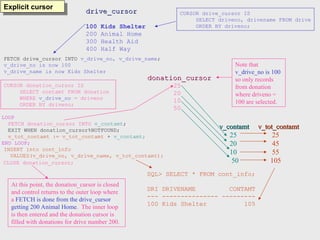
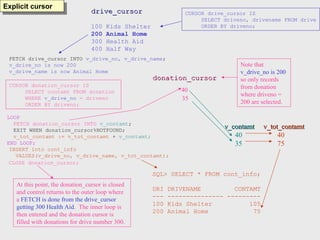
drive_cursor
drive_cursor
100 Kids Shelter
200 Animal Home
300 Health Aid
400 Half Way
CURSOR drive_cursor IS
SELECT driveno, drivename FROM drive
ORDER BY driveno;
Explicit cursor
CURSOR donation_cursor IS
SELECT contamt FROM donation
WHERE v_drive_no = driveno
ORDER BY driveno;
donation_cursor
donation_cursor
25
20
10
50
FETCH drive_cursor INTO v_drive_no, v_drive_name;
v_drive_no is now 100
v_drive_name is now Kids Shelter
Note that
v_drive_no is 100
so only records
from donation
where driveno =
100 are selected.
LOOP
FETCH donation_cursor INTO v_contamt;
EXIT WHEN donation_cursor%NOTFOUND;
v_tot_contamt := v_tot_contamt + v_contamt;
END LOOP;
v_contamt
v_contamt v_tot_contamt
v_tot_contamt
25 25
20 45
10 55
50 105
SQL> SELECT * FROM cont_info;
DRI DRIVENAME CONTAMT
--- --------------- ---------
100 Kids Shelter 105
INSERT into cont_info
VALUES(v_drive_no, v_drive_name, v_tot_contamt);
CLOSE donation_cursor;
At this point, the donation_cursor is closed
and control returns to the outer loop where
a FETCH is done from the drive_cursor
getting 200 Animal Home. The inner loop
is then entered and the donation cursor is
filled with donations for drive number 200.
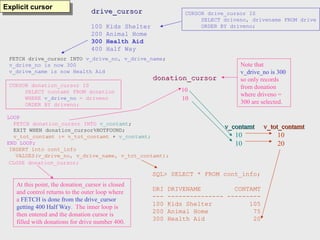
drive_cursor
drive_cursor
100 Kids Shelter
200 Animal Home
300 Health Aid
400 Half Way
CURSOR drive_cursor IS
SELECT driveno, drivename FROM drive
ORDER BY driveno;
Explicit cursor
CURSOR donation_cursor IS
SELECT contamt FROM donation
WHERE v_drive_no = driveno
ORDER BY driveno;
donation_cursor
donation_cursor
40
35
FETCH drive_cursor INTO v_drive_no, v_drive_name;
v_drive_no is now 200
v_drive_name is now Animal Home
Note that
v_drive_no is 200
so only records
from donation
where driveno =
200 are selected.
LOOP
FETCH donation_cursor INTO v_contamt;
EXIT WHEN donation_cursor%NOTFOUND;
v_tot_contamt := v_tot_contamt + v_contamt;
END LOOP;
v_contamt
v_contamt v_tot_contamt
v_tot_contamt
40 40
35 75
SQL> SELECT * FROM cont_info;
DRI DRIVENAME CONTAMT
--- --------------- ---------
100 Kids Shelter 105
200 Animal Home 75
INSERT into cont_info
VALUES(v_drive_no, v_drive_name, v_tot_contamt);
CLOSE donation_cursor;
At this point, the donation_cursor is closed
and control returns to the outer loop where
a FETCH is done from the drive_cursor
getting 300 Health Aid. The inner loop is
then entered and the donation cursor is
filled with donations for drive number 300.
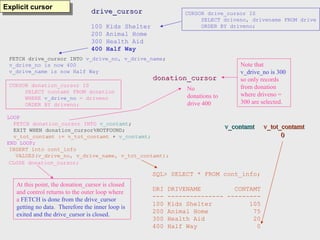
drive_cursor
drive_cursor
100 Kids Shelter
200 Animal Home
300 Health Aid
400 Half Way
CURSOR drive_cursor IS
SELECT driveno, drivename FROM drive
ORDER BY driveno;
Explicit cursor
CURSOR donation_cursor IS
SELECT contamt FROM donation
WHERE v_drive_no = driveno
ORDER BY driveno;
donation_cursor
donation_cursor
10
10
FETCH drive_cursor INTO v_drive_no, v_drive_name;
v_drive_no is now 300
v_drive_name is now Health Aid
Note that
v_drive_no is 300
so only records
from donation
where driveno =
300 are selected.
LOOP
FETCH donation_cursor INTO v_contamt;
EXIT WHEN donation_cursor%NOTFOUND;
v_tot_contamt := v_tot_contamt + v_contamt;
END LOOP;
v_contamt
v_contamt v_tot_contamt
v_tot_contamt
10 10
10 20
SQL> SELECT * FROM cont_info;
DRI DRIVENAME CONTAMT
--- --------------- ---------
100 Kids Shelter 105
200 Animal Home 75
300 Health Aid 20
INSERT into cont_info
VALUES(v_drive_no, v_drive_name, v_tot_contamt);
CLOSE donation_cursor;
At this point, the donation_cursor is closed
and control returns to the outer loop where
a FETCH is done from the drive_cursor
getting 400 Half Way. The inner loop is
then entered and the donation cursor is
filled with donations for drive number 400.
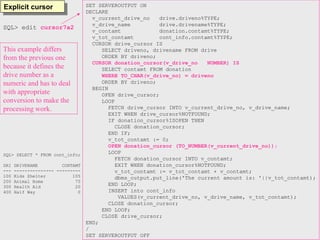
drive_cursor
drive_cursor
100 Kids Shelter
200 Animal Home
300 Health Aid
400 Half Way
CURSOR drive_cursor IS
SELECT driveno, drivename FROM drive
ORDER BY driveno;
Explicit cursor
CURSOR donation_cursor IS
SELECT contamt FROM donation
WHERE v_drive_no = driveno
ORDER BY driveno;
donation_cursor
donation_cursor
FETCH drive_cursor INTO v_drive_no, v_drive_name;
v_drive_no is now 400
v_drive_name is now Half Way
Note that
v_drive_no is 300
so only records
from donation
where driveno =
300 are selected.
LOOP
FETCH donation_cursor INTO v_contamt;
EXIT WHEN donation_cursor%NOTFOUND;
v_tot_contamt := v_tot_contamt + v_contamt;
END LOOP;
v_contamt
v_contamt v_tot_contamt
v_tot_contamt
0
0
SQL> SELECT * FROM cont_info;
DRI DRIVENAME CONTAMT
--- --------------- ---------
100 Kids Shelter 105
200 Animal Home 75
300 Health Aid 20
400 Half Way 0
INSERT into cont_info
VALUES(v_drive_no, v_drive_name, v_tot_contamt);
CLOSE donation_cursor;
At this point, the donation_cursor is closed
and control returns to the outer loop where
a FETCH is done from the drive_cursor
getting no data. Therefore the inner loop is
exited and the drive_cursor is closed.
No
donations to
drive 400
SET SERVEROUTPUT ON
DECLARE
v_current_drive_no drive.driveno%TYPE;
v_drive_name drive.drivename%TYPE;
v_contamt donation.contamt%TYPE;
v_tot_contamt cont_info.contamt%TYPE;
CURSOR drive_cursor IS
SELECT driveno, drivename FROM drive
ORDER BY driveno;
CURSOR donation_cursor(v_drive_no VARCHAR2) IS
SELECT contamt FROM donation
WHERE v_drive_no = driveno
ORDER BY driveno;
BEGIN
OPEN drive_cursor;
LOOP
FETCH drive_cursor INTO v_current_drive_no, v_drive_name;
EXIT WHEN drive_cursor%NOTFOUND;
IF donation_cursor%ISOPEN THEN
CLOSE donation_cursor;
END IF;
v_tot_contamt := 0;
OPEN donation_cursor (v_current_drive_no);
LOOP
FETCH donation_cursor INTO v_contamt;
EXIT WHEN donation_cursor%NOTFOUND;
v_tot_contamt := v_tot_contamt + v_contamt;
dbms_output.put_line('The current amount is: '||v_tot_contamt);
END LOOP;
INSERT into cont_info
VALUES(v_current_drive_no, v_drive_name, v_tot_contamt);
CLOSE donation_cursor;
END LOOP;
CLOSE drive_cursor;
END;
/
SET SERVEROUTPUT OFF
Explicit cursor
SQL> edit cursor7a2x
In this example the
drive_cursor is opened
and the first fetch puts
the driveno from the
first record into
v_current_drive_no.
Then, when the donation
cursor is opened it takes
the drive no that is
passed to it and opens
the donation cursor
looking for a match.
You could in reality
pass any thing you want
to the donation_cursor
and have the WHERE
clause tied to the pass.
Explicit cursor SET SERVEROUTPUT ON
DECLARE
v_current_drive_no drive.driveno%TYPE;
v_drive_name drive.drivename%TYPE;
v_contamt donation.contamt%TYPE;
v_tot_contamt cont_info.contamt%TYPE;
CURSOR drive_cursor IS
SELECT driveno, drivename FROM drive
ORDER BY driveno;
CURSOR donation_cursor(v_drive_no NUMBER) IS
SELECT contamt FROM donation
WHERE TO_CHAR(v_drive_no) = driveno
ORDER BY driveno;
BEGIN
OPEN drive_cursor;
LOOP
FETCH drive_cursor INTO v_current_drive_no, v_drive_name;
EXIT WHEN drive_cursor%NOTFOUND;
IF donation_cursor%ISOPEN THEN
CLOSE donation_cursor;
END IF;
v_tot_contamt := 0;
OPEN donation_cursor (TO_NUMBER(v_current_drive_no));
LOOP
FETCH donation_cursor INTO v_contamt;
EXIT WHEN donation_cursor%NOTFOUND;
v_tot_contamt := v_tot_contamt + v_contamt;
dbms_output.put_line('The current amount is: '||v_tot_contamt);
END LOOP;
INSERT into cont_info
VALUES(v_current_drive_no, v_drive_name, v_tot_contamt);
CLOSE donation_cursor;
END LOOP;
CLOSE drive_cursor;
END;
/
SET SERVEROUTPUT OFF
SQL> edit cursor7a2
This example differs
from the previous one
because it defines the
drive number as a
numeric and has to deal
with appropriate
conversion to make the
processing work.
SQL> SELECT * FROM cont_info;
DRI DRIVENAME CONTAMT
--- --------------- ---------
100 Kids Shelter 105
200 Animal Home 75
300 Health Aid 20
400 Half Way 0
SET SERVEROUTPUT ON
DECLARE
v_current_drive_no drive.driveno%TYPE;
v_drive_name drive.drivename%TYPE;
v_lastyear drive.lastyear%TYPE;
v_calc drive.lastyear%TYPE;
v_contamt donation.contamt%TYPE;
v_tot_contamt cont_info.contamt%TYPE;
CURSOR drive_cursor IS
SELECT driveno, drivename, lastyear FROM drive
ORDER BY driveno;
CURSOR donation_cursor(v_drive_no VARCHAR2, v_calc NUMBER) IS
SELECT contamt FROM donation
WHERE v_drive_no = driveno and contamt > v_calc
ORDER BY driveno;
BEGIN
OPEN drive_cursor;
LOOP
FETCH drive_cursor INTO v_current_drive_no, v_drive_name, v_lastyear;
EXIT WHEN drive_cursor%NOTFOUND;
IF donation_cursor%ISOPEN THEN
CLOSE donation_cursor;
END IF;
v_calc := v_lastyear/500;
v_tot_contamt := 0;
OPEN donation_cursor (v_current_drive_no, v_calc);
LOOP
FETCH donation_cursor INTO v_contamt;
EXIT WHEN donation_cursor%NOTFOUND;
v_tot_contamt := v_tot_contamt + v_contamt;
dbms_output.put_line('The current amount is: '||v_tot_contamt);
END LOOP;
INSERT into cont_info
VALUES(v_current_drive_no, v_drive_name, v_tot_contamt);
CLOSE donation_cursor;
END LOOP;
CLOSE drive_cursor;
END;
/
SET SERVEROUTPUT OFF
Explicit cursor
SQL> edit cursor9
Explicit cursor SQL> SELECT * FROM drive;
DRI DRIVENAME DRIVECHAIR LASTYEAR THISYEAR
--- --------------- ------------ --------- ---------
100 Kids Shelter Ann Smith 10000 0
200 Animal Home Linda Grant 5000 0
300 Health Aid David Ross 7000 0
400 Half Way Robert Doe 0 0
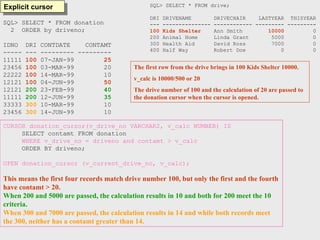
The first row from the drive brings in 100 Kids Shelter 10000.
v_calc is 10000/500 or 20
The drive number of 100 and the calculation of 20 are passed to
the donation cursor when the cursor is opened.
CURSOR donation_cursor(v_drive_no VARCHAR2, v_calc NUMBER) IS
SELECT contamt FROM donation
WHERE v_drive_no = driveno and contamt > v_calc
ORDER BY driveno;
OPEN donation_cursor (v_current_drive_no, v_calc);
This means the first four records match drive number 100, but only the first and the fourth
have contamt > 20.
When 200 and 5000 are passed, the calculation results in 10 and both for 200 meet the 10
criteria.
When 300 and 7000 are passed, the calculation results in 14 and while both records meet
the 300, neither has a contamt greater than 14.
SQL> SELECT * FROM donation
2 ORDER by driveno;
IDNO DRI CONTDATE CONTAMT
----- --- --------- ---------
11111 100 07-JAN-99 25
23456 100 03-MAR-99 20
22222 100 14-MAR-99 10
12121 100 04-JUN-99 50
12121 200 23-FEB-99 40
11111 200 12-JUN-99 35
33333 300 10-MAR-99 10
23456 300 14-JUN-99 10
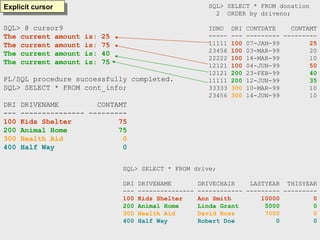
SQL> @ cursor9
The current amount is: 25
The current amount is: 75
The current amount is: 40
The current amount is: 75
PL/SQL procedure successfully completed.
SQL> SELECT * FROM cont_info;
DRI DRIVENAME CONTAMT
--- --------------- ---------
100 Kids Shelter 75
200 Animal Home 75
300 Health Aid 0
400 Half Way 0
Explicit cursor SQL> SELECT * FROM donation
2 ORDER by driveno;
IDNO DRI CONTDATE CONTAMT
----- --- --------- ---------
11111 100 07-JAN-99 25
23456 100 03-MAR-99 20
22222 100 14-MAR-99 10
12121 100 04-JUN-99 50
12121 200 23-FEB-99 40
11111 200 12-JUN-99 35
33333 300 10-MAR-99 10
23456 300 14-JUN-99 10
SQL> SELECT * FROM drive;
DRI DRIVENAME DRIVECHAIR LASTYEAR THISYEAR
--- --------------- ------------ --------- ---------
100 Kids Shelter Ann Smith 10000 0
200 Animal Home Linda Grant 5000 0
300 Health Aid David Ross 7000 0
400 Half Way Robert Doe 0 0
Explicit cursor SET SERVEROUTPUT ON
DECLARE
v_drive_no drive.driveno%TYPE;
v_drive_name drive.drivename%TYPE;
v_contamt donation.contamt%TYPE;
v_tot_contamt cont_info.contamt%TYPE;
CURSOR drive_cursor IS
SELECT driveno, drivename FROM drive
ORDER BY driveno;
CURSOR donation_cursor IS
SELECT contamt FROM donation
WHERE v_drive_no = driveno
ORDER BY driveno;
BEGIN
OPEN drive_cursor;
FETCH drive_cursor INTO v_drive_no, v_drive_name;
WHILE drive_cursor%FOUND LOOP
IF donation_cursor%ISOPEN THEN
CLOSE donation_cursor;
END IF;
OPEN donation_cursor;
v_tot_contamt := 0;
FETCH donation_cursor INTO v_contamt;
WHILE donation_cursor%FOUND LOOP
v_tot_contamt := v_tot_contamt + v_contamt;
dbms_output.put_line('The current amount is: '||v_tot_contamt);
FETCH donation_cursor INTO v_contamt;
END LOOP;
INSERT into cont_info
VALUES(v_drive_no, v_drive_name, v_tot_contamt);
CLOSE donation_cursor;
FETCH drive_cursor INTO v_drive_no, v_drive_name;
END LOOP;
CLOSE drive_cursor;
END;
/
SET SERVEROUTPUT OFF
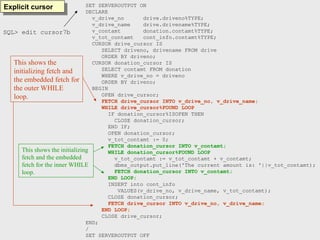
This shows the
initializing fetch and
the embedded fetch for
the outer WHILE
loop.
This shows the initializing
fetch and the embedded
fetch for the inner WHILE
loop.
SQL> edit cursor7b

Cursors in oracle database for learn student.ppt

  • 1.
    Cursors in PL/SQL Includescursor example and continuation of first cursor example Interesting 
  • 2.
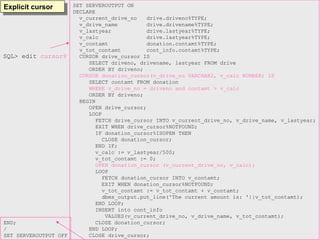
    Explicit cursor When usingan explicit cursor in PL/SQL, there are four things that must be accomplished by the programmer: • The cursor must be declared • The cursor needs to be opened • Fetch the results of the query into the variables declared in PL/SQL • The cursor needs to be closed
  • 3.
    DECLARE v_name donor.name%TYPE; v_yrgoal donor.yrgoal%TYPE; v_statedonor.state%TYPE; CURSOR donor_cursor IS SELECT name, yrgoal, state FROM donor; BEGIN OPEN donor_cursor; FETCH donor_cursor INTO v_name, v_yrgoal, v_state; WHILE donor_cursor%FOUND LOOP INSERT INTO donor_part VALUES(v_name, v_yrgoal, v_state); FETCH donor_cursor INTO v_name, v_yrgoal, v_state; END LOOP; CLOSE donor_cursor; END; / Explicit cursors SQL> edit cursor1 SQL> @ cursor1 PL/SQL procedure successfully completed. SQL> SELECT * FROM donor_part; NAME YRGOAL ST --------------- --------- -- Stephen Daniels 500 MA Jennifer Ames 400 RI Carl Hersey RI Susan Ash 100 MA Nancy Taylor 50 MA Robert Brooks 50 MA The table donor_part was empty before cursor1 was executed. After running the anonymous block, there are now six records in the table. They correspond to the six records that were in the donor table.
  • 4.
    Explicit cursor SQL> SELECT* FROM donor; IDNO NAME STADR CITY ST ZIP DATEFST YRGOAL CONTACT ----- --------------- --------------- ---------- -- ----- --------- --------- ------------ 11111 Stephen Daniels 123 Elm St Seekonk MA 02345 03-JUL-98 500 John Smith 12121 Jennifer Ames 24 Benefit St Providence RI 02045 24-MAY-97 400 Susan Jones 22222 Carl Hersey 24 Benefit St Providence RI 02045 03-JAN-98 Susan Jones 23456 Susan Ash 21 Main St Fall River MA 02720 04-MAR-92 100 Amy Costa 33333 Nancy Taylor 26 Oak St Fall River MA 02720 04-MAR-92 50 John Adams 34567 Robert Brooks 36 Pine St Fall River MA 02720 04-APR-98 50 Amy Costa 6 rows selected. SQL> SELECT * FROM donor_part; NAME YRGOAL ST --------------- --------- -- Stephen Daniels 500 MA Jennifer Ames 400 RI Carl Hersey RI Susan Ash 100 MA Nancy Taylor 50 MA Robert Brooks 50 MA Initial FETCH got the first record from the table and put the data into the variables. The INSERT inside the loop put the data from the variables into the new table. The FETCH after the INSERT (the last command in the loop) got the second record from the table and put the data in the variables. The INSERT inside the loop put the data from the variables into the new table. The FETCH after the INSERT (the last command in the loop) got the third record from the table and put the data in the variables. The INSERT inside the loop put the data from the variables into the new table.
  • 5.
    DECLARE v_name donor.name%TYPE; v_yrgoal donor.yrgoal%TYPE; v_statedonor.state%TYPE; CURSOR donor_cursor IS SELECT name, yrgoal, state FROM donor; BEGIN OPEN donor_cursor; FETCH donor_cursor INTO v_name, v_yrgoal, v_state; WHILE donor_cursor%FOUND LOOP INSERT INTO donor_part VALUES(v_name, v_yrgoal, v_state); FETCH donor_cursor INTO v_name, v_yrgoal, v_state; END LOOP; CLOSE donor_cursor; END; / Explicit cursor These are the variable names declared to receive the data from the table. The cursor is created with a select statement. The select statement will be processed by the cursor providing the rows to be processed in the block. The OPEN statement opens or activates the cursor - this means the select is executed to fill the cursor with rows. The FETCH statement gets the first record in the cursor and moves the data to the defined variables. This is the initial FETCH. The FETCH which is the last statement in the loop will get all other records. The WHILE loop will continue to execute while there is still data in the cursor. This is tested with the %FOUND. Note that when the loop is entered, the FETCH of the initial record has already been done. The INSERT statement will insert the data from that record into the table named donor_part. Then it will execute the FETCH which is the last statement in the loop to get the next record. As long as a record is found, the INSERT will be done followed by another FETCH. When the FETCH is unsuccessful, the WHILE will terminate because of donor_cursor%FOUND. When the loop is complete the cursor is closed. INSERT puts a record into donor_part containing the information that the FETCH put into the variables.
  • 6.
    DECLARE v_name donor.name%TYPE; v_yrgoal donor.yrgoal%TYPE; v_statedonor.state%TYPE; CURSOR donor_cursor IS SELECT name, yrgoal, state FROM donor; BEGIN OPEN donor_cursor; FETCH donor_cursor INTO v_name, v_yrgoal, v_state; WHILE donor_cursor%FOUND LOOP IF v_yrgoal > 50 THEN INSERT INTO donor_part VALUES(v_name, v_yrgoal, v_state); END IF; FETCH donor_cursor INTO v_name, v_yrgoal, v_state; END LOOP; CLOSE donor_cursor; END; / Explicit cursor SQL> edit cursor2 SQL> @ cursor2 PL/SQL procedure successfully completed. SQL> SELECT * FROM donor_part; NAME YRGOAL ST --------------- --------- -- Stephen Daniels 500 MA Jennifer Ames 400 RI Susan Ash 100 MA The IF statement only INSERTs records where the year goal is greater than 50. Only the three records shown met the criteria.
  • 7.
    DECLARE v_name donor.name%TYPE; v_yrgoal donor.yrgoal%TYPE; v_statedonor.state%TYPE; CURSOR donor_cursor IS SELECT name, yrgoal, state FROM donor WHERE yrgoal> 50; BEGIN OPEN donor_cursor; FETCH donor_cursor INTO v_name, v_yrgoal, v_state; WHILE donor_cursor%FOUND LOOP INSERT INTO donor_part VALUES(v_name, v_yrgoal, v_state); FETCH donor_cursor INTO v_name, v_yrgoal, v_state; END LOOP; CLOSE donor_cursor; END; / Explicit cursor SQL> edit cursor2a SQL> @ cursor2a PL/SQL procedure successfully completed. SQL> SELECT * FROM donor_part; NAME YRGOAL ST --------------- --------- -- Stephen Daniels 500 MA Jennifer Ames 400 RI Susan Ash 100 MA Instead of selecting the record after they have been FETCHed with the IF, you can SELECT the records that meet the condition in the CURSOR with the WHERE clause.
  • 8.
    Explicit cursor DECLARE v_name donor.name%TYPE; v_yrgoaldonor.yrgoal%TYPE; v_state donor.state%TYPE; CURSOR donor_cursor IS SELECT name, yrgoal, state FROM donor WHERE yrgoal> 50; BEGIN OPEN donor_cursor; FETCH donor_cursor INTO v_name, v_yrgoal, v_state; LOOP INSERT INTO donor_part VALUES(v_name, v_yrgoal, v_state); FETCH donor_cursor INTO v_name, v_yrgoal, v_state; EXIT WHEN donor_cursor%NOTFOUND; END LOOP; CLOSE donor_cursor; END; / SQL> edit cursor2b SQL> @ cursor2b PL/SQL procedure successfully completed. SQL> SELECT * FROM donor_part; NAME YRGOAL ST --------------- --------- -- Stephen Daniels 500 MA Jennifer Ames 400 RI Susan Ash 100 MA This code changes to a simple LOOP with an exit based on %NOTFOUND instead of %FOUND.
  • 9.
    DECLARE v_name donor.name%TYPE; v_yrgoal donor.yrgoal%TYPE; v_statedonor.state%TYPE; CURSOR donor_cursor IS SELECT name, yrgoal, state FROM donor; BEGIN OPEN donor_cursor; FETCH donor_cursor INTO v_name, v_yrgoal, v_state; WHILE donor_cursor%ROWCOUNT < 5 AND donor_cursor%FOUND LOOP INSERT INTO donor_part VALUES(v_name, v_yrgoal, v_state); FETCH donor_cursor INTO v_name, v_yrgoal, v_state; END LOOP; CLOSE donor_cursor; END; / Explicit cursor SQL> @ cursor3 PL/SQL procedure successfully completed. SQL> SELECT * FROM donor_part; NAME YRGOAL ST --------------- --------- -- Stephen Daniels 500 MA Jennifer Ames 400 RI Carl Hersey RI Susan Ash 100 MA The while loop will terminate after 4 records have been processed or when no more records are in the cursor. %ROWCOUNT is used to determine when 4 records have been processed.
  • 10.
    WHILE donor_cursor%ROWCOUNT <5 AND donor_cursor%FOUND LOOP Logic Rowcount > 4 Stop processing Y N No records Stop processing Y N Process OR LOGIC: Logic for if row count is > 4 OR there are no more records stop processing. Otherwise process the records. Rowcount < 5 Y N Records to process Process Y N Stop processing Stop processing AND LOGIC: Logic for if row count is < 5 and there are records to process, process. If either condition is false, do not process.
  • 11.
    SET SERVEROUTPUT ON DECLARE v_drive_nodrive.driveno%TYPE; v_drive_name drive.drivename%TYPE; v_contamt donation.contamt%TYPE; v_tot_contamt cont_info.contamt%TYPE; CURSOR drive_cursor IS SELECT driveno, drivename FROM drive ORDER BY driveno; CURSOR donation_cursor IS SELECT contamt FROM donation WHERE v_drive_no = driveno ORDER BY driveno; BEGIN OPEN drive_cursor; LOOP FETCH drive_cursor INTO v_drive_no, v_drive_name; EXIT WHEN drive_cursor%NOTFOUND; IF donation_cursor%ISOPEN THEN CLOSE donation_cursor; END IF; OPEN donation_cursor; v_tot_contamt := 0; LOOP FETCH donation_cursor INTO v_contamt; EXIT WHEN donation_cursor%NOTFOUND; v_tot_contamt := v_tot_contamt + v_contamt; dbms_output.put_line('The current amount is: '||v_tot_contamt); END LOOP; INSERT into cont_info VALUES(v_drive_no, v_drive_name, v_tot_contamt); CLOSE donation_cursor; END LOOP; CLOSE drive_cursor; END; / SET SERVEROUTPUT OFF Explicit cursor Inner loop that will process the information in the donation cursor. Outer loop that processes the information in the drive table. SQL> edit cursor6a
  • 12.
    SQL> SELECT *FROM drive; DRI DRIVENAME DRIVECHAIR LASTYEAR THISYEAR --- --------------- ------------ --------- --------- 100 Kids Shelter Ann Smith 10000 0 200 Animal Home Linda Grant 5000 0 300 Health Aid David Ross 7000 0 400 Half Way Robert Doe 0 0 Data and results SQL> SELECT * FROM cont_info; DRI DRIVENAME CONTAMT --- --------------- --------- 100 Kids Shelter 105 200 Animal Home 75 300 Health Aid 20 400 Half Way 0 SQL> @ cursor6a The current amount is: 25 The current amount is: 45 The current amount is: 55 The current amount is: 105 The current amount is: 40 The current amount is: 75 The current amount is: 10 The current amount is: 20 PL/SQL procedure successfully completed. SQL> SELECT * FROM donation 2 ORDER by driveno; IDNO DRI CONTDATE CONTAMT ----- --- --------- --------- 11111 100 07-JAN-99 25 23456 100 03-MAR-99 20 22222 100 14-MAR-99 10 12121 100 04-JUN-99 50 12121 200 23-FEB-99 40 11111 200 12-JUN-99 35 33333 300 10-MAR-99 10 23456 300 14-JUN-99 10
  • 13.
    drive_cursor drive_cursor 100 Kids Shelter 200Animal Home 300 Health Aid 400 Half Way CURSOR drive_cursor IS SELECT driveno, drivename FROM drive ORDER BY driveno; Explicit cursor CURSOR donation_cursor IS SELECT contamt FROM donation WHERE v_drive_no = driveno ORDER BY driveno; donation_cursor donation_cursor 25 20 10 50 FETCH drive_cursor INTO v_drive_no, v_drive_name; v_drive_no is now 100 v_drive_name is now Kids Shelter Note that v_drive_no is 100 so only records from donation where driveno = 100 are selected. LOOP FETCH donation_cursor INTO v_contamt; EXIT WHEN donation_cursor%NOTFOUND; v_tot_contamt := v_tot_contamt + v_contamt; END LOOP; v_contamt v_contamt v_tot_contamt v_tot_contamt 25 25 20 45 10 55 50 105 SQL> SELECT * FROM cont_info; DRI DRIVENAME CONTAMT --- --------------- --------- 100 Kids Shelter 105 INSERT into cont_info VALUES(v_drive_no, v_drive_name, v_tot_contamt); CLOSE donation_cursor; At this point, the donation_cursor is closed and control returns to the outer loop where a FETCH is done from the drive_cursor getting 200 Animal Home. The inner loop is then entered and the donation cursor is filled with donations for drive number 200.
  • 14.
    drive_cursor drive_cursor 100 Kids Shelter 200Animal Home 300 Health Aid 400 Half Way CURSOR drive_cursor IS SELECT driveno, drivename FROM drive ORDER BY driveno; Explicit cursor CURSOR donation_cursor IS SELECT contamt FROM donation WHERE v_drive_no = driveno ORDER BY driveno; donation_cursor donation_cursor 40 35 FETCH drive_cursor INTO v_drive_no, v_drive_name; v_drive_no is now 200 v_drive_name is now Animal Home Note that v_drive_no is 200 so only records from donation where driveno = 200 are selected. LOOP FETCH donation_cursor INTO v_contamt; EXIT WHEN donation_cursor%NOTFOUND; v_tot_contamt := v_tot_contamt + v_contamt; END LOOP; v_contamt v_contamt v_tot_contamt v_tot_contamt 40 40 35 75 SQL> SELECT * FROM cont_info; DRI DRIVENAME CONTAMT --- --------------- --------- 100 Kids Shelter 105 200 Animal Home 75 INSERT into cont_info VALUES(v_drive_no, v_drive_name, v_tot_contamt); CLOSE donation_cursor; At this point, the donation_cursor is closed and control returns to the outer loop where a FETCH is done from the drive_cursor getting 300 Health Aid. The inner loop is then entered and the donation cursor is filled with donations for drive number 300.
  • 15.
    drive_cursor drive_cursor 100 Kids Shelter 200Animal Home 300 Health Aid 400 Half Way CURSOR drive_cursor IS SELECT driveno, drivename FROM drive ORDER BY driveno; Explicit cursor CURSOR donation_cursor IS SELECT contamt FROM donation WHERE v_drive_no = driveno ORDER BY driveno; donation_cursor donation_cursor 10 10 FETCH drive_cursor INTO v_drive_no, v_drive_name; v_drive_no is now 300 v_drive_name is now Health Aid Note that v_drive_no is 300 so only records from donation where driveno = 300 are selected. LOOP FETCH donation_cursor INTO v_contamt; EXIT WHEN donation_cursor%NOTFOUND; v_tot_contamt := v_tot_contamt + v_contamt; END LOOP; v_contamt v_contamt v_tot_contamt v_tot_contamt 10 10 10 20 SQL> SELECT * FROM cont_info; DRI DRIVENAME CONTAMT --- --------------- --------- 100 Kids Shelter 105 200 Animal Home 75 300 Health Aid 20 INSERT into cont_info VALUES(v_drive_no, v_drive_name, v_tot_contamt); CLOSE donation_cursor; At this point, the donation_cursor is closed and control returns to the outer loop where a FETCH is done from the drive_cursor getting 400 Half Way. The inner loop is then entered and the donation cursor is filled with donations for drive number 400.
  • 16.
    drive_cursor drive_cursor 100 Kids Shelter 200Animal Home 300 Health Aid 400 Half Way CURSOR drive_cursor IS SELECT driveno, drivename FROM drive ORDER BY driveno; Explicit cursor CURSOR donation_cursor IS SELECT contamt FROM donation WHERE v_drive_no = driveno ORDER BY driveno; donation_cursor donation_cursor FETCH drive_cursor INTO v_drive_no, v_drive_name; v_drive_no is now 400 v_drive_name is now Half Way Note that v_drive_no is 300 so only records from donation where driveno = 300 are selected. LOOP FETCH donation_cursor INTO v_contamt; EXIT WHEN donation_cursor%NOTFOUND; v_tot_contamt := v_tot_contamt + v_contamt; END LOOP; v_contamt v_contamt v_tot_contamt v_tot_contamt 0 0 SQL> SELECT * FROM cont_info; DRI DRIVENAME CONTAMT --- --------------- --------- 100 Kids Shelter 105 200 Animal Home 75 300 Health Aid 20 400 Half Way 0 INSERT into cont_info VALUES(v_drive_no, v_drive_name, v_tot_contamt); CLOSE donation_cursor; At this point, the donation_cursor is closed and control returns to the outer loop where a FETCH is done from the drive_cursor getting no data. Therefore the inner loop is exited and the drive_cursor is closed. No donations to drive 400
  • 17.
    SET SERVEROUTPUT ON DECLARE v_current_drive_nodrive.driveno%TYPE; v_drive_name drive.drivename%TYPE; v_contamt donation.contamt%TYPE; v_tot_contamt cont_info.contamt%TYPE; CURSOR drive_cursor IS SELECT driveno, drivename FROM drive ORDER BY driveno; CURSOR donation_cursor(v_drive_no VARCHAR2) IS SELECT contamt FROM donation WHERE v_drive_no = driveno ORDER BY driveno; BEGIN OPEN drive_cursor; LOOP FETCH drive_cursor INTO v_current_drive_no, v_drive_name; EXIT WHEN drive_cursor%NOTFOUND; IF donation_cursor%ISOPEN THEN CLOSE donation_cursor; END IF; v_tot_contamt := 0; OPEN donation_cursor (v_current_drive_no); LOOP FETCH donation_cursor INTO v_contamt; EXIT WHEN donation_cursor%NOTFOUND; v_tot_contamt := v_tot_contamt + v_contamt; dbms_output.put_line('The current amount is: '||v_tot_contamt); END LOOP; INSERT into cont_info VALUES(v_current_drive_no, v_drive_name, v_tot_contamt); CLOSE donation_cursor; END LOOP; CLOSE drive_cursor; END; / SET SERVEROUTPUT OFF Explicit cursor SQL> edit cursor7a2x In this example the drive_cursor is opened and the first fetch puts the driveno from the first record into v_current_drive_no. Then, when the donation cursor is opened it takes the drive no that is passed to it and opens the donation cursor looking for a match. You could in reality pass any thing you want to the donation_cursor and have the WHERE clause tied to the pass.
  • 18.
    Explicit cursor SETSERVEROUTPUT ON DECLARE v_current_drive_no drive.driveno%TYPE; v_drive_name drive.drivename%TYPE; v_contamt donation.contamt%TYPE; v_tot_contamt cont_info.contamt%TYPE; CURSOR drive_cursor IS SELECT driveno, drivename FROM drive ORDER BY driveno; CURSOR donation_cursor(v_drive_no NUMBER) IS SELECT contamt FROM donation WHERE TO_CHAR(v_drive_no) = driveno ORDER BY driveno; BEGIN OPEN drive_cursor; LOOP FETCH drive_cursor INTO v_current_drive_no, v_drive_name; EXIT WHEN drive_cursor%NOTFOUND; IF donation_cursor%ISOPEN THEN CLOSE donation_cursor; END IF; v_tot_contamt := 0; OPEN donation_cursor (TO_NUMBER(v_current_drive_no)); LOOP FETCH donation_cursor INTO v_contamt; EXIT WHEN donation_cursor%NOTFOUND; v_tot_contamt := v_tot_contamt + v_contamt; dbms_output.put_line('The current amount is: '||v_tot_contamt); END LOOP; INSERT into cont_info VALUES(v_current_drive_no, v_drive_name, v_tot_contamt); CLOSE donation_cursor; END LOOP; CLOSE drive_cursor; END; / SET SERVEROUTPUT OFF SQL> edit cursor7a2 This example differs from the previous one because it defines the drive number as a numeric and has to deal with appropriate conversion to make the processing work. SQL> SELECT * FROM cont_info; DRI DRIVENAME CONTAMT --- --------------- --------- 100 Kids Shelter 105 200 Animal Home 75 300 Health Aid 20 400 Half Way 0
  • 19.
    SET SERVEROUTPUT ON DECLARE v_current_drive_nodrive.driveno%TYPE; v_drive_name drive.drivename%TYPE; v_lastyear drive.lastyear%TYPE; v_calc drive.lastyear%TYPE; v_contamt donation.contamt%TYPE; v_tot_contamt cont_info.contamt%TYPE; CURSOR drive_cursor IS SELECT driveno, drivename, lastyear FROM drive ORDER BY driveno; CURSOR donation_cursor(v_drive_no VARCHAR2, v_calc NUMBER) IS SELECT contamt FROM donation WHERE v_drive_no = driveno and contamt > v_calc ORDER BY driveno; BEGIN OPEN drive_cursor; LOOP FETCH drive_cursor INTO v_current_drive_no, v_drive_name, v_lastyear; EXIT WHEN drive_cursor%NOTFOUND; IF donation_cursor%ISOPEN THEN CLOSE donation_cursor; END IF; v_calc := v_lastyear/500; v_tot_contamt := 0; OPEN donation_cursor (v_current_drive_no, v_calc); LOOP FETCH donation_cursor INTO v_contamt; EXIT WHEN donation_cursor%NOTFOUND; v_tot_contamt := v_tot_contamt + v_contamt; dbms_output.put_line('The current amount is: '||v_tot_contamt); END LOOP; INSERT into cont_info VALUES(v_current_drive_no, v_drive_name, v_tot_contamt); CLOSE donation_cursor; END LOOP; CLOSE drive_cursor; END; / SET SERVEROUTPUT OFF Explicit cursor SQL> edit cursor9
  • 20.
    Explicit cursor SQL>SELECT * FROM drive; DRI DRIVENAME DRIVECHAIR LASTYEAR THISYEAR --- --------------- ------------ --------- --------- 100 Kids Shelter Ann Smith 10000 0 200 Animal Home Linda Grant 5000 0 300 Health Aid David Ross 7000 0 400 Half Way Robert Doe 0 0 The first row from the drive brings in 100 Kids Shelter 10000. v_calc is 10000/500 or 20 The drive number of 100 and the calculation of 20 are passed to the donation cursor when the cursor is opened. CURSOR donation_cursor(v_drive_no VARCHAR2, v_calc NUMBER) IS SELECT contamt FROM donation WHERE v_drive_no = driveno and contamt > v_calc ORDER BY driveno; OPEN donation_cursor (v_current_drive_no, v_calc); This means the first four records match drive number 100, but only the first and the fourth have contamt > 20. When 200 and 5000 are passed, the calculation results in 10 and both for 200 meet the 10 criteria. When 300 and 7000 are passed, the calculation results in 14 and while both records meet the 300, neither has a contamt greater than 14. SQL> SELECT * FROM donation 2 ORDER by driveno; IDNO DRI CONTDATE CONTAMT ----- --- --------- --------- 11111 100 07-JAN-99 25 23456 100 03-MAR-99 20 22222 100 14-MAR-99 10 12121 100 04-JUN-99 50 12121 200 23-FEB-99 40 11111 200 12-JUN-99 35 33333 300 10-MAR-99 10 23456 300 14-JUN-99 10
  • 21.
    SQL> @ cursor9 Thecurrent amount is: 25 The current amount is: 75 The current amount is: 40 The current amount is: 75 PL/SQL procedure successfully completed. SQL> SELECT * FROM cont_info; DRI DRIVENAME CONTAMT --- --------------- --------- 100 Kids Shelter 75 200 Animal Home 75 300 Health Aid 0 400 Half Way 0 Explicit cursor SQL> SELECT * FROM donation 2 ORDER by driveno; IDNO DRI CONTDATE CONTAMT ----- --- --------- --------- 11111 100 07-JAN-99 25 23456 100 03-MAR-99 20 22222 100 14-MAR-99 10 12121 100 04-JUN-99 50 12121 200 23-FEB-99 40 11111 200 12-JUN-99 35 33333 300 10-MAR-99 10 23456 300 14-JUN-99 10 SQL> SELECT * FROM drive; DRI DRIVENAME DRIVECHAIR LASTYEAR THISYEAR --- --------------- ------------ --------- --------- 100 Kids Shelter Ann Smith 10000 0 200 Animal Home Linda Grant 5000 0 300 Health Aid David Ross 7000 0 400 Half Way Robert Doe 0 0
  • 22.
    Explicit cursor SETSERVEROUTPUT ON DECLARE v_drive_no drive.driveno%TYPE; v_drive_name drive.drivename%TYPE; v_contamt donation.contamt%TYPE; v_tot_contamt cont_info.contamt%TYPE; CURSOR drive_cursor IS SELECT driveno, drivename FROM drive ORDER BY driveno; CURSOR donation_cursor IS SELECT contamt FROM donation WHERE v_drive_no = driveno ORDER BY driveno; BEGIN OPEN drive_cursor; FETCH drive_cursor INTO v_drive_no, v_drive_name; WHILE drive_cursor%FOUND LOOP IF donation_cursor%ISOPEN THEN CLOSE donation_cursor; END IF; OPEN donation_cursor; v_tot_contamt := 0; FETCH donation_cursor INTO v_contamt; WHILE donation_cursor%FOUND LOOP v_tot_contamt := v_tot_contamt + v_contamt; dbms_output.put_line('The current amount is: '||v_tot_contamt); FETCH donation_cursor INTO v_contamt; END LOOP; INSERT into cont_info VALUES(v_drive_no, v_drive_name, v_tot_contamt); CLOSE donation_cursor; FETCH drive_cursor INTO v_drive_no, v_drive_name; END LOOP; CLOSE drive_cursor; END; / SET SERVEROUTPUT OFF This shows the initializing fetch and the embedded fetch for the outer WHILE loop. This shows the initializing fetch and the embedded fetch for the inner WHILE loop. SQL> edit cursor7b

Editor's Notes

  • #1 Oracle supports the implicit cursor which is created and managed by PL/SQL when the block processes a SQL statement and the explicit cursor which is created and managed by the programmer/developer. This presentation includes information from three handouts: Cursors in PL/SQL Cursor Example Continuation of first cursor example.
  • #2 An explicit cursor is the key to managing multiple records one record at a time in your PL/SQL code.
  • #3 The cursor structure allows you to process multiple records, one record at a time within PL/SQL. On the next slide will look at the data and on the following slide we will look at the components of the block.
  • #4 As you can see, information from the donor table is now in the donor_part table. When the FETCH after the INSERT (the last command in the loop) does not retrieve data the LOOP will end.
  • #5 Note that the variable names use TYPE so that they have the columns on the donor table that is being used as input to the block code. Notice that there is an initial FETCH that fetches the first record. Then the processing loop is entered and the record gets processed. There is another FETCH at the bottom of the processing loop which will get another record.
  • #6 Two of the records on donor have a year goal of 50 and one has a null year goal. These three records were not inserted because of the IF statement.
  • #7 Because of the WHERE clause only records with a yearly goal greater than 50 are in the cursor. Therefore only those records get processed to the new table.
  • #8 Please be sure to check the notes for cursor attributes. They are discussed in the notes but not in this presentation
  • #9 As stated, I want to only process 4 records but in case there are not 4 records, good programming means I also test for essentially end of file - in this case, no more records in the cursor. So if row count is > 4 OR there are no more records, processing will terminate. When I put these conditions in a WHILE loop, I have to phrase them as the conditions to keep processing. Therefore, I say keep processing while rowcount is < 5 AND there are still records.
  • #10 This shows the logic discussed on the previous slide. Notice that the same objectives are accomplished but one expresses the logic with the OR logic that decides when to stop and the other expresses the logic with the AND logic that decides when to process.
  • #11 This slide starts looking at the handout cursor example. The code that I have written will take the first drive from the drive table, go to the donation table and accumulate all of the contributions to that drive and write the results as a row/record on the cont_info table. It will then go back and read the next row/record from the drive table and go to the donation table and accumulate all of the contributions for that drive and write to the cont_info table. Processing will stop when all of the drives from the drive table have been processed. The check for donation_cursor%ISOPEN is not needed for the logic. It is used to demonstrate the command.
  • #12 The two tables that are used in the next cursor example are drive and donor. This slide shows the data. The output that is produced is also shown
  • #13 Note, in this demonstration I am not showing the line that I displayed from the inner loop as a tool to help with understanding. The drive_cursor has 100 Kids Shelter and the donation_cursor has records with a drive number of 100.
  • #14 There are two donations to drive 200. They are for 40 and 35 so the total of 75 gets written to the new table.
  • #15 There are two donations to drive 300, each of them is for 10.
  • #16 Since there are no donations to drive 400, the code is exited after the first attempt at the FETCH.
  • #17 This starts continuation of first cursor example (but this example does not appear on the notes). This example does not take full advantage of the power of passing a parameter. In fact processing could be done prior to the opening of the donation_cursor and a wide variety of information could be passed. Note the output is the same as in previous examples that did not use the parameter.
  • #18 This slide starts with continuation of first cursor example (this one refers to the first example in the notes). The information being covered is a cursor with parameters. The open statement passes parameter values to the cursor that will be used in the query when it is executed. For each parameter you define in the cursor, there must be an actual parameter in the OPEN statement to correspond to it. The select statement used with a parameter does not have the into clause. Note the output is the same as previous examples with the dbms lines and the rows inserted into the table.
  • #19 Note that two parameters are passed to the donation_cursor when it is opened and the WHERE clause tests both of the parameters. Therefore only rows that meet the criteria are put in the cursor.
  • #20 The output from this processing is shown on the next slide.
  • #21 This shows the processing and output from cursor9.
  • #22 This slide shows the same logic but it uses the WHILE loop instead of the simple loop. The output is the same as the output from the other loops where all records are processed.