Curry Connect
                Student Access Guide


617.333.2195 | careerdevelopment@curry.edu | King Administration Building
Logging On
Current Students: Log onto the Curry Portal using
your username and password. Select the Curry
Connect icon on the Quick Launch menu.

Current CE & Grad Students: Visit
https://www.myinterfase.com/curry/student and
select “Register Here” to create your account. Use
this web address and login information during
each visit to Curry Connect.

Alumni: Visit
https://www.myinterfase.com/curry/alumni and
select “Register Here” to create your account. Use
this web address and login information during
each visit to Curry Connect.
Welcome to your Curry Connect Homepage!

You can:
 Upload a resume, cover letter, and other documents

 Discover employers and organizations

 Search for jobs/internships/on-campus employment

 Report that you have been hired by a Curry Connect employer

 Create and update a professional profile

 RSVP for Career Services Events

 & More!
To Create/Edit Your Curry Connect Profile:


 Choose My Account and select My Profile


 Select the Edit button next to any field and edit
 your information. Be sure to keep your profile
 information up to date!
Uploading Your Resume:
.
Hover over My Account and select My Documents


                                      Scroll down to the Resume section and select
                                      Upload File.
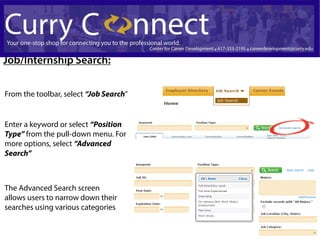
Job/Internship Search:

From the toolbar, select “Job Search”


Enter a keyword or select “Position
Type” from the pull-down menu. For
more options, select “Advanced
Search”


The Advanced Search screen
allows users to narrow down their
searches using various categories
Student Employment:
After selecting the “Position Type” relating to
the job you are seeking (Work Study or On-
Campus Employment: Non-Work Study),
please view the listings of available positions.


Select the job title to view
additional information about
this position.

To apply, follow the applications instructions
located at the bottom of the job listing and select
the “On-line Application Address.” The hyperlink will
open your Student Employment Application.
For additional           assistance,
 contact the Center for Career Development at
617-333-2195 or careerdevelopment@curry.edu

Curry Connect Guide

  • 1.
    Curry Connect Student Access Guide 617.333.2195 | careerdevelopment@curry.edu | King Administration Building
  • 2.
    Logging On Current Students:Log onto the Curry Portal using your username and password. Select the Curry Connect icon on the Quick Launch menu. Current CE & Grad Students: Visit https://www.myinterfase.com/curry/student and select “Register Here” to create your account. Use this web address and login information during each visit to Curry Connect. Alumni: Visit https://www.myinterfase.com/curry/alumni and select “Register Here” to create your account. Use this web address and login information during each visit to Curry Connect.
  • 3.
    Welcome to yourCurry Connect Homepage! You can: Upload a resume, cover letter, and other documents Discover employers and organizations Search for jobs/internships/on-campus employment Report that you have been hired by a Curry Connect employer Create and update a professional profile RSVP for Career Services Events & More!
  • 4.
    To Create/Edit YourCurry Connect Profile: Choose My Account and select My Profile Select the Edit button next to any field and edit your information. Be sure to keep your profile information up to date!
  • 5.
    Uploading Your Resume: . Hoverover My Account and select My Documents Scroll down to the Resume section and select Upload File.
  • 6.
    Job/Internship Search: From thetoolbar, select “Job Search” Enter a keyword or select “Position Type” from the pull-down menu. For more options, select “Advanced Search” The Advanced Search screen allows users to narrow down their searches using various categories
  • 7.
    Student Employment: After selectingthe “Position Type” relating to the job you are seeking (Work Study or On- Campus Employment: Non-Work Study), please view the listings of available positions. Select the job title to view additional information about this position. To apply, follow the applications instructions located at the bottom of the job listing and select the “On-line Application Address.” The hyperlink will open your Student Employment Application.
  • 8.
    For additional assistance, contact the Center for Career Development at 617-333-2195 or careerdevelopment@curry.edu