ShikshaGuru
Registration, Profile maintenance &
benefits
Institute Registration
 New User>Institute>Fill in Registration form.
 In the registration form, profile-image
upload is optional.
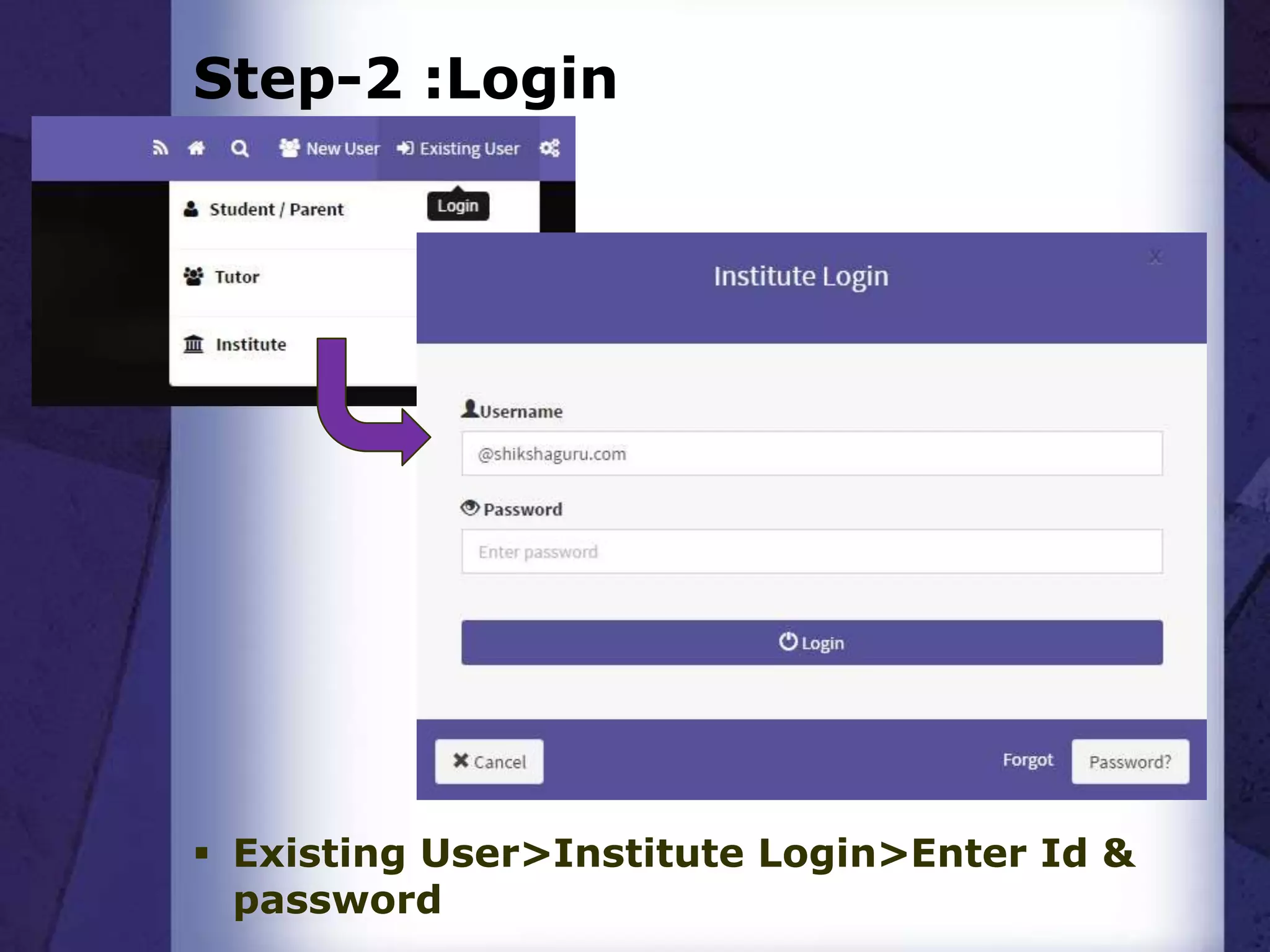
Step-2 :Login
 Existing User>Institute Login>Enter Id &
password
A newly Registered Institute’s Profile
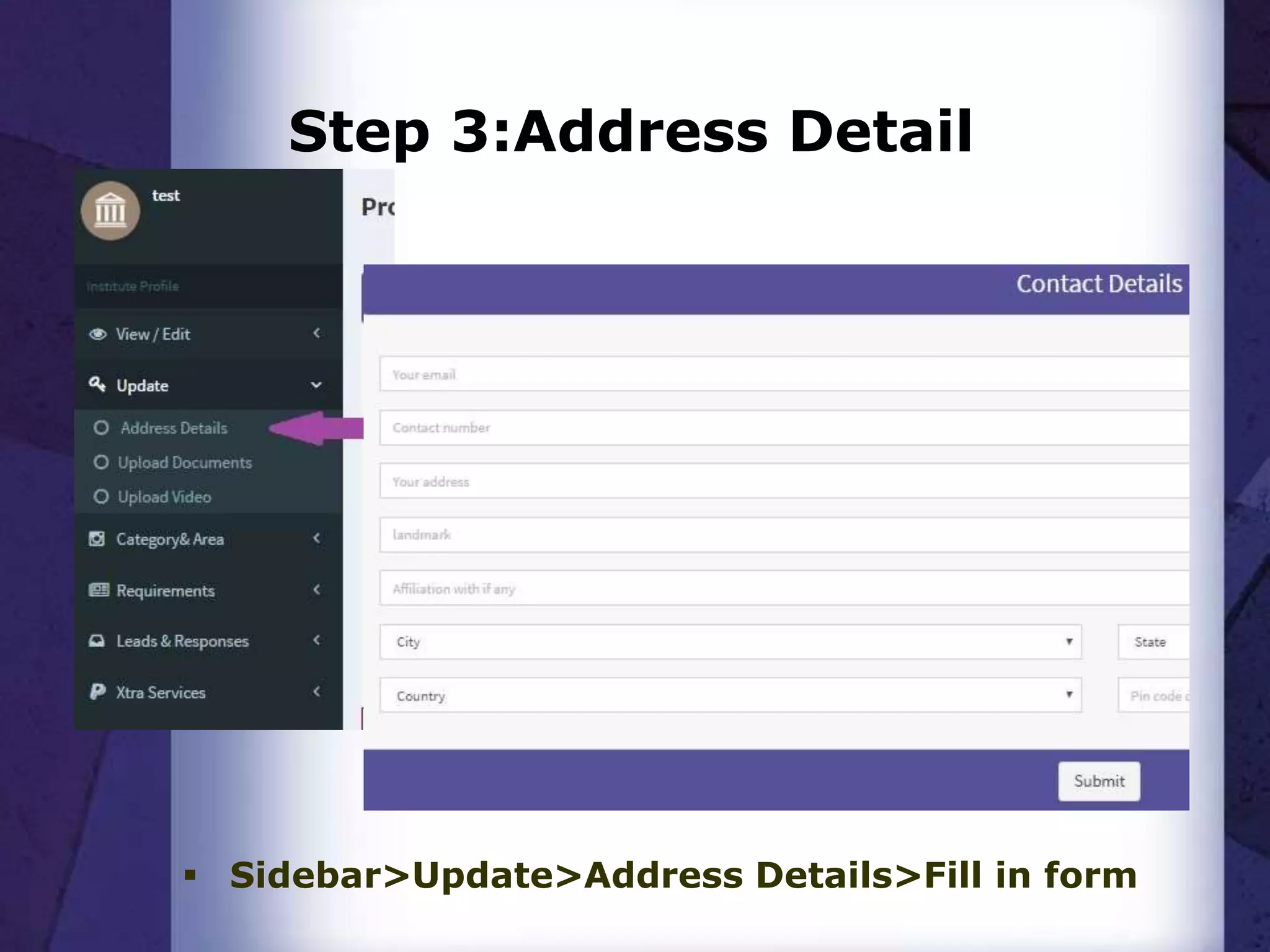
Step 3:Address Detail
 Sidebar>Update>Address Details>Fill in form
Step 4: Category & Subject
 To select your categories and
subjects:
Login>sidebar>Category & Area>Edit
Category & Subject.
Why?
 The above mentioned details are the
minimum required essentials for your
institute to be listed in most of our
searches, hence mandatory to be filled as
soon as your account is created.
 The more information you provide, the
better your account looks to the visiting
user, increasing the chances of engagement
with that user.
 Its on the basis of some of these details that
we are able to provide you with student
leads (indirect). You will also get tutor leads
when you provide your requirement
(teaching jobs) details.
Benefits of Enrolling with us-
 Generation of student leads – Direct
 Student database access via ShikshaGuru
 Teacher / Faculty leads
 Communication - Interactive platform
 Marketing platform - with video upload facility
 Information dissemination mechanism
 Advertising / Branding / Visibility enhancement
platform
 Digital Locker
What else?
 Feel free to Explore your profile and
upload other documents and lists, such
as videos, faculty list, certifications etc.
This will affirm your credibility among
visiting users.
 Students and tutors can post reviews on
your institute with rating, based on your
engagement with them. Better reviews
mean more interested users.
 To edit any details: Login>Sidebar>Edit.
Other benefits
 In the Leads and Responses section
you can find direct leads from
students and tutors who have tried to
contact you and their contact
frequencies.
 You can also exchange limited details
with these users, by clicking their
respective reply buttons.
 We also provide various plans for you
to post Ads and improve your
visibility on our portal. You can know
more about these plans in the Xtra
services section on the side bar of
your profile page.
Thank you…
 For any queries please fill-in the
contact form at the bottom of our
home page or provide feedbacks via
feedback button in your profile page
or
Mail us at info@shikshaguru.com Call
us at 011-428801348.
ShikshaGuru team

ShikshaGuru for Institutes

  • 1.
  • 2.
    Institute Registration  NewUser>Institute>Fill in Registration form.  In the registration form, profile-image upload is optional.
  • 3.
    Step-2 :Login  ExistingUser>Institute Login>Enter Id & password
  • 4.
    A newly RegisteredInstitute’s Profile
  • 5.
    Step 3:Address Detail Sidebar>Update>Address Details>Fill in form
  • 6.
    Step 4: Category& Subject  To select your categories and subjects: Login>sidebar>Category & Area>Edit Category & Subject.
  • 7.
    Why?  The abovementioned details are the minimum required essentials for your institute to be listed in most of our searches, hence mandatory to be filled as soon as your account is created.  The more information you provide, the better your account looks to the visiting user, increasing the chances of engagement with that user.  Its on the basis of some of these details that we are able to provide you with student leads (indirect). You will also get tutor leads when you provide your requirement (teaching jobs) details.
  • 8.
    Benefits of Enrollingwith us-  Generation of student leads – Direct  Student database access via ShikshaGuru  Teacher / Faculty leads  Communication - Interactive platform  Marketing platform - with video upload facility  Information dissemination mechanism  Advertising / Branding / Visibility enhancement platform  Digital Locker
  • 9.
    What else?  Feelfree to Explore your profile and upload other documents and lists, such as videos, faculty list, certifications etc. This will affirm your credibility among visiting users.  Students and tutors can post reviews on your institute with rating, based on your engagement with them. Better reviews mean more interested users.  To edit any details: Login>Sidebar>Edit.
  • 10.
    Other benefits  Inthe Leads and Responses section you can find direct leads from students and tutors who have tried to contact you and their contact frequencies.  You can also exchange limited details with these users, by clicking their respective reply buttons.  We also provide various plans for you to post Ads and improve your visibility on our portal. You can know more about these plans in the Xtra services section on the side bar of your profile page.
  • 11.
    Thank you…  Forany queries please fill-in the contact form at the bottom of our home page or provide feedbacks via feedback button in your profile page or Mail us at info@shikshaguru.com Call us at 011-428801348. ShikshaGuru team