What is Cucumber?
Cucumber is a tool that executes plain-text functional descriptions as
automated tests.
Here is an example:


BDD: Behavior Driven Development
Running test cases
How Cucumber works: Gherkin
• Gherkin is the language that Cucumber
  understands.
• It is a Business Readable, Domain Specific
  Language that lets you describe software’s
  behaviour without detailing how that behaviour
  is implemented.
• So everyone can write Gherkin.
• Gherkin serves two purposes – documentation
  and automated tests. The third is a bonus feature
  – when it yells in red it’s talking to you, telling
  you what code you should write.
Gherkin Example
1: Feature: Some terse yet descriptive text of what is desired
2: In order to realize a named business value
3: As an explicit system actor
4: I want to gain some beneficial outcome which furthers the goal
5:
6: Scenario: Some determinable business situation
7: Given some precondition
8:    And some other precondition
9: When some action by the actor
10:    And some other action
11:    And yet another action
12: Then some testable outcome is achieved
13:    And something else we can check happens too
14:
15: Scenario: A different situation
16:    ...
Gherkin Documents
How Cucumber works: Backgrounder
• Language: Ruby, etc.
Gherkin:
Scenario: Users can enter an invoice item
 . . .
 Then I enter a product quantity of 5


Step definition:
When /enter a product quantity of (d+)/ do |quantity|
 pending "TODO: Do we need to have a product code passed as well?"
End
How Cucumber works: Capybara
• Capybara helps you test Rails and Rack
  applications by simulating how a real user
  would interact with your app.
• It is agnostic about the driver running your
  tests and comes with Rack::Test and Selenium
  support built in.
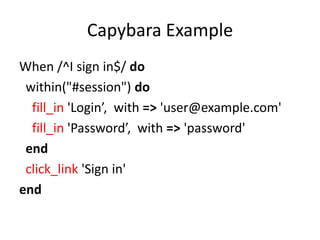
Capybara Example
When /^I sign in$/ do
 within("#session") do
  fill_in 'Login’, with => 'user@example.com'
  fill_in 'Password’, with => 'password'
 end
 click_link 'Sign in'
end
Capybara DSL
• Navigation: visit
• Interact: attach_file, text, check, choose, click_link_or_button,
  click_button, click_link, field_labeled, fill_in, select, unselect, uncheck,
  click_on
• Find: all, first, find, find_button, find_by_id, find_field, find_link
• Query: has_content?, has_css?, has_no_content?, has_no_css?,
  has_no_xpath?, has_xpath?, has_link?, has_no_link?, has_button,
  has_no_button?, has_field?, has_no_field?, has_checked_field?,
  has_unchecked_field?, has_no_table?, has_table?, has_select?,
  has_no_select?, has_selector?, has_no_selector?,
  has_no_checked_field?, has_no_unchecked_field?
• Debugging: save_page, save_and_open_page
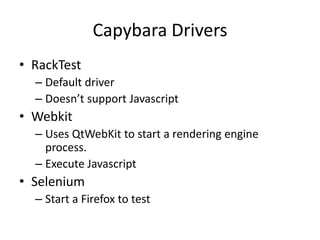
Capybara Drivers
• RackTest
  – Default driver
  – Doesn’t support Javascript
• Webkit
  – Uses QtWebKit to start a rendering engine
    process.
  – Execute Javascript
• Selenium
  – Start a Firefox to test
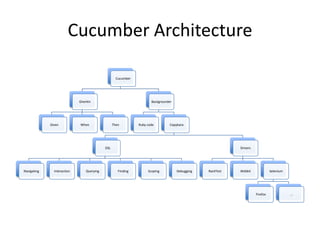
Cucumber Architecture

                                                    Cucumber


                             Gherkin                                  Backgrounder


             Given           When                 Then         Ruby code         Capybara


                                            DSL                                                             Drivers


Navigating     Interaction       Querying            Finding        Scoping          Debugging   RackTest   Webkit              Selenium


                                                                                                                      Firefox              …
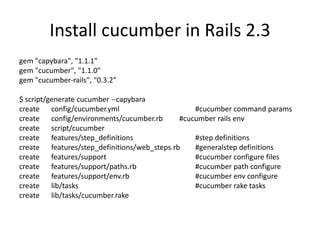
Install cucumber in Rails 2.3
gem "capybara", "1.1.1"
gem "cucumber", "1.1.0"
gem "cucumber-rails", "0.3.2”

$ script/generate cucumber --capybara
create config/cucumber.yml                       #cucumber command params
create config/environments/cucumber.rb       #cucumber rails env
create script/cucumber
create features/step_definitions                 #step definitions
create features/step_definitions/web_steps.rb    #generalstep definitions
create features/support                          #cucumber configure files
create features/support/paths.rb                 #cucumber path configure
create features/support/env.rb                   #cucumber env configure
create lib/tasks                                 #cucumber rake tasks
create lib/tasks/cucumber.rake
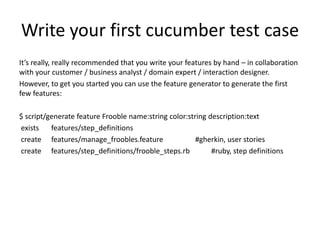
Write your first cucumber test case
It’s really, really recommended that you write your features by hand – in collaboration
with your customer / business analyst / domain expert / interaction designer.
However, to get you started you can use the feature generator to generate the first
few features:

$ script/generate feature Frooble name:string color:string description:text
exists    features/step_definitions
create features/manage_froobles.feature                #gherkin, user stories
create features/step_definitions/frooble_steps.rb           #ruby, step definitions
How to use Cucumber?
1.   Describe behaviour in plain text
2.   Write a step definition in Ruby
3.   Run and watch it fail
4.   Write code to make the step pass
5.   Run again and see the step pass
6.   Repeat 2-5 until green like a cuke
7.   Repeat 1-6 until the money runs out
More info?

Cucumber

  • 2.
    What is Cucumber? Cucumberis a tool that executes plain-text functional descriptions as automated tests. Here is an example: BDD: Behavior Driven Development
  • 3.
  • 4.
    How Cucumber works:Gherkin • Gherkin is the language that Cucumber understands. • It is a Business Readable, Domain Specific Language that lets you describe software’s behaviour without detailing how that behaviour is implemented. • So everyone can write Gherkin. • Gherkin serves two purposes – documentation and automated tests. The third is a bonus feature – when it yells in red it’s talking to you, telling you what code you should write.
  • 5.
    Gherkin Example 1: Feature:Some terse yet descriptive text of what is desired 2: In order to realize a named business value 3: As an explicit system actor 4: I want to gain some beneficial outcome which furthers the goal 5: 6: Scenario: Some determinable business situation 7: Given some precondition 8: And some other precondition 9: When some action by the actor 10: And some other action 11: And yet another action 12: Then some testable outcome is achieved 13: And something else we can check happens too 14: 15: Scenario: A different situation 16: ...
  • 6.
  • 7.
    How Cucumber works:Backgrounder • Language: Ruby, etc. Gherkin: Scenario: Users can enter an invoice item . . . Then I enter a product quantity of 5 Step definition: When /enter a product quantity of (d+)/ do |quantity| pending "TODO: Do we need to have a product code passed as well?" End
  • 8.
    How Cucumber works:Capybara • Capybara helps you test Rails and Rack applications by simulating how a real user would interact with your app. • It is agnostic about the driver running your tests and comes with Rack::Test and Selenium support built in.
  • 9.
    Capybara Example When /^Isign in$/ do within("#session") do fill_in 'Login’, with => 'user@example.com' fill_in 'Password’, with => 'password' end click_link 'Sign in' end
  • 10.
    Capybara DSL • Navigation:visit • Interact: attach_file, text, check, choose, click_link_or_button, click_button, click_link, field_labeled, fill_in, select, unselect, uncheck, click_on • Find: all, first, find, find_button, find_by_id, find_field, find_link • Query: has_content?, has_css?, has_no_content?, has_no_css?, has_no_xpath?, has_xpath?, has_link?, has_no_link?, has_button, has_no_button?, has_field?, has_no_field?, has_checked_field?, has_unchecked_field?, has_no_table?, has_table?, has_select?, has_no_select?, has_selector?, has_no_selector?, has_no_checked_field?, has_no_unchecked_field? • Debugging: save_page, save_and_open_page
  • 11.
    Capybara Drivers • RackTest – Default driver – Doesn’t support Javascript • Webkit – Uses QtWebKit to start a rendering engine process. – Execute Javascript • Selenium – Start a Firefox to test
  • 12.
    Cucumber Architecture Cucumber Gherkin Backgrounder Given When Then Ruby code Capybara DSL Drivers Navigating Interaction Querying Finding Scoping Debugging RackTest Webkit Selenium Firefox …
  • 13.
    Install cucumber inRails 2.3 gem "capybara", "1.1.1" gem "cucumber", "1.1.0" gem "cucumber-rails", "0.3.2” $ script/generate cucumber --capybara create config/cucumber.yml #cucumber command params create config/environments/cucumber.rb #cucumber rails env create script/cucumber create features/step_definitions #step definitions create features/step_definitions/web_steps.rb #generalstep definitions create features/support #cucumber configure files create features/support/paths.rb #cucumber path configure create features/support/env.rb #cucumber env configure create lib/tasks #cucumber rake tasks create lib/tasks/cucumber.rake
  • 14.
    Write your firstcucumber test case It’s really, really recommended that you write your features by hand – in collaboration with your customer / business analyst / domain expert / interaction designer. However, to get you started you can use the feature generator to generate the first few features: $ script/generate feature Frooble name:string color:string description:text exists features/step_definitions create features/manage_froobles.feature #gherkin, user stories create features/step_definitions/frooble_steps.rb #ruby, step definitions
  • 15.
    How to useCucumber? 1. Describe behaviour in plain text 2. Write a step definition in Ruby 3. Run and watch it fail 4. Write code to make the step pass 5. Run again and see the step pass 6. Repeat 2-5 until green like a cuke 7. Repeat 1-6 until the money runs out
  • 16.