CSS3 Transitions
CSS Transitions Introduction


   CSS Transitions allow property changes in CSS values to occur smoothly over a
   specified duration. This smoothing animates the changing of a CSS value when
   triggered by a mouse click, focus or active state, or any changes to the element
   (including even a change on the element’s class attribute).
Basic Rollover


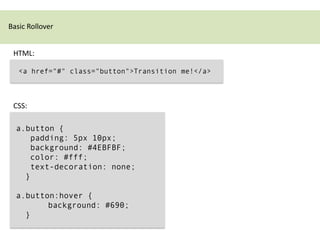
 HTML:

   <a href="#" class="button">Transition me!</a>


 CSS:

  a.button {
     padding: 5px 10px;
     background: #4EBFBF;
     color: #fff;
     text-decoration: none;
    }

  a.button:hover {
         background: #690;
    }
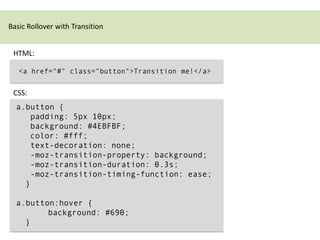
Basic Rollover with Transition


 HTML:

   <a href="#" class="button">Transition me!</a>


 CSS:
  a.button {
     padding: 5px 10px;
     background: #4EBFBF;
     color: #fff;
     text-decoration: none;
     -moz-transition-property: background;
     -moz-transition-duration: 0.3s;
     -moz-transition-timing-function: ease;
    }

  a.button:hover {
         background: #690;
    }
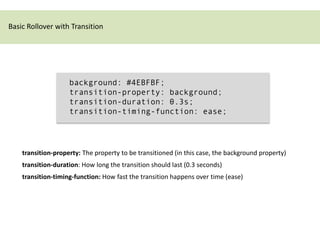
Basic Rollover with Transition


                    background: #4EBFBF;
                    transition-property: background;
                    transition-duration: 0.3s;
                    transition-timing-function: ease;


    transition-property: The property to be transitioned (in this case, the background property)
    transition-duration: How long the transition should last (0.3 seconds)
    transition-timing-function: How fast the transition happens over time (ease)
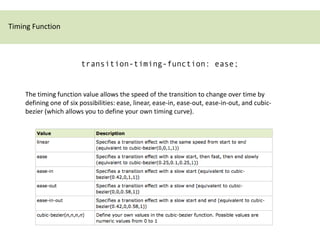
Timing Function


                        transition-timing-function: ease;


    The timing function value allows the speed of the transition to change over time by
    defining one of six possibilities: ease, linear, ease-in, ease-out, ease-in-out, and cubic-
    bezier (which allows you to define your own timing curve).
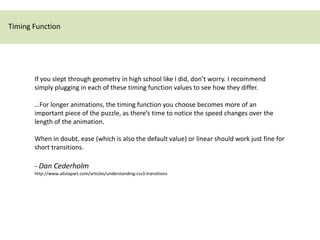
Timing Function


       If you slept through geometry in high school like I did, don’t worry. I recommend
       simply plugging in each of these timing function values to see how they differ.

       …For longer animations, the timing function you choose becomes more of an
       important piece of the puzzle, as there’s time to notice the speed changes over the
       length of the animation.

       When in doubt, ease (which is also the default value) or linear should work just fine for
       short transitions.

       - Dan Cederholm
       http://www.alistapart.com/articles/understanding-css3-transitions
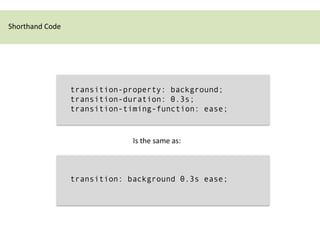
Shorthand Code


                 transition-property: background;
                 transition-duration: 0.3s;
                 transition-timing-function: ease;


                              Is the same as:


                 transition: background 0.3s ease;
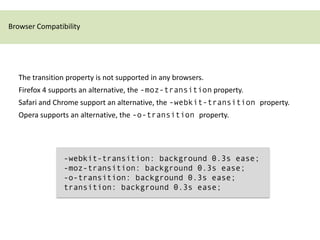
Browser Compatibility


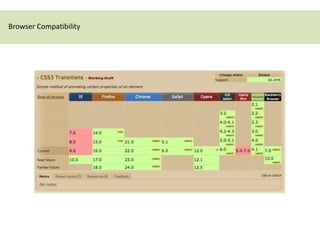
  The transition property is not supported in any browsers.
  Firefox 4 supports an alternative, the -moz-transition property.
  Safari and Chrome support an alternative, the -webkit-transition property.
  Opera supports an alternative, the -o-transition property.


                -webkit-transition: background 0.3s ease;
                -moz-transition: background 0.3s ease;
                -o-transition: background 0.3s ease;
                transition: background 0.3s ease;
Browser Compatibility
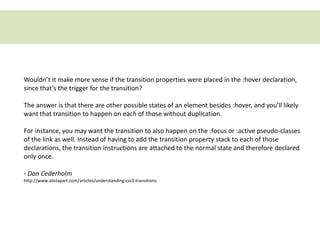
Wouldn’t it make more sense if the transition properties were placed in the :hover declaration,
since that’s the trigger for the transition?

The answer is that there are other possible states of an element besides :hover, and you’ll likely
want that transition to happen on each of those without duplication.

For instance, you may want the transition to also happen on the :focus or :active pseudo-classes
of the link as well. Instead of having to add the transition property stack to each of those
declarations, the transition instructions are attached to the normal state and therefore declared
only once.

- Dan Cederholm
http://www.alistapart.com/articles/understanding-css3-transitions
Transitioning multiple properties


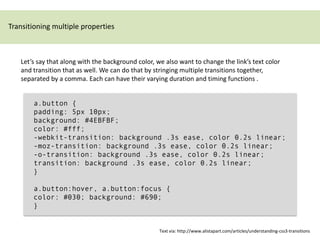
   Let’s say that along with the background color, we also want to change the link’s text color
   and transition that as well. We can do that by stringing multiple transitions together,
   separated by a comma. Each can have their varying duration and timing functions .


       a.button {
       padding: 5px 10px;
       background: #4EBFBF;
       color: #fff;
       -webkit-transition: background .3s ease, color 0.2s linear;
       -moz-transition: background .3s ease, color 0.2s linear;
       -o-transition: background .3s ease, color 0.2s linear;
       transition: background .3s ease, color 0.2s linear;
       }

       a.button:hover, a.button:focus {
       color: #030; background: #690;
       }


                                                    Text via: http://www.alistapart.com/articles/understanding-css3-transitions
Transitioning multiple properties


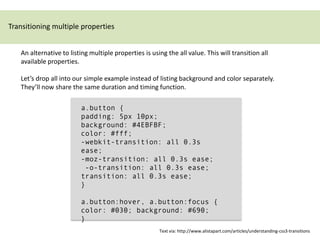
   An alternative to listing multiple properties is using the all value. This will transition all
   available properties.

   Let’s drop all into our simple example instead of listing background and color separately.
   They’ll now share the same duration and timing function.

                         a.button {
                         padding: 5px 10px;
                         background: #4EBFBF;
                         color: #fff;
                         -webkit-transition: all 0.3s
                         ease;
                         -moz-transition: all 0.3s ease;
                          -o-transition: all 0.3s ease;
                         transition: all 0.3s ease;
                         }

                         a.button:hover, a.button:focus {
                         color: #030; background: #690;
                         }
                                                       Text via: http://www.alistapart.com/articles/understanding-css3-transitions
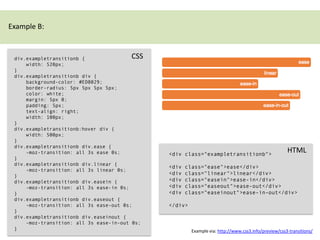
Example B:


 div.exampletransitionb {               CSS
     width: 520px;
 }
 div.exampletransitionb div {
     background-color: #ED8029;
     border-radius: 5px 5px 5px 5px;
     color: white;
     margin: 5px 0;
     padding: 5px;
     text-align: right;
     width: 100px;
 }
 div.exampletransitionb:hover div {
     width: 500px;
 }
 div.exampletransitionb div.ease {
     -moz-transition: all 3s ease 0s;          <div class="exampletransitionb">
                                                                                                      HTML
 }
 div.exampletransitionb div.linear {
                                               <div   class="ease">ease</div>
     -moz-transition: all 3s linear 0s;
 }
                                               <div   class="linear">linear</div>
 div.exampletransitionb div.easein {           <div   class="easein">ease-in</div>
     -moz-transition: all 3s ease-in 0s;       <div   class="easeout">ease-out</div>
 }                                             <div   class="easeinout">ease-in-out</div>
 div.exampletransitionb div.easeout {
     -moz-transition: all 3s ease-out 0s;      </div>
 }
 div.exampletransitionb div.easeinout {
     -moz-transition: all 3s ease-in-out 0s;
 }                                                      Example via: http://www.css3.info/preview/css3-transitions/
http://leaverou.github.com/animatable/
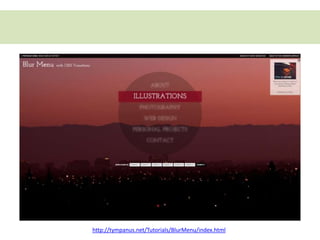
http://tympanus.net/Tutorials/BlurMenu/index.html
Further Reading


         www.alistapart.com/articles/understanding-css3-transitions
         http://www.w3schools.com/css3/css3_transitions.asp
         http://www.impressivewebs.com/css3-transitions-without-hover
         http://www.netmagazine.com/tutorials/more-efficient-css3-transitions
         http://en.wikipedia.org/wiki/12_basic_principles_of_animation

CSS3 Transitions

  • 1.
  • 2.
    CSS Transitions Introduction CSS Transitions allow property changes in CSS values to occur smoothly over a specified duration. This smoothing animates the changing of a CSS value when triggered by a mouse click, focus or active state, or any changes to the element (including even a change on the element’s class attribute).
  • 3.
    Basic Rollover HTML: <a href="#" class="button">Transition me!</a> CSS: a.button { padding: 5px 10px; background: #4EBFBF; color: #fff; text-decoration: none; } a.button:hover { background: #690; }
  • 4.
    Basic Rollover withTransition HTML: <a href="#" class="button">Transition me!</a> CSS: a.button { padding: 5px 10px; background: #4EBFBF; color: #fff; text-decoration: none; -moz-transition-property: background; -moz-transition-duration: 0.3s; -moz-transition-timing-function: ease; } a.button:hover { background: #690; }
  • 5.
    Basic Rollover withTransition background: #4EBFBF; transition-property: background; transition-duration: 0.3s; transition-timing-function: ease; transition-property: The property to be transitioned (in this case, the background property) transition-duration: How long the transition should last (0.3 seconds) transition-timing-function: How fast the transition happens over time (ease)
  • 6.
    Timing Function transition-timing-function: ease; The timing function value allows the speed of the transition to change over time by defining one of six possibilities: ease, linear, ease-in, ease-out, ease-in-out, and cubic- bezier (which allows you to define your own timing curve).
  • 7.
    Timing Function If you slept through geometry in high school like I did, don’t worry. I recommend simply plugging in each of these timing function values to see how they differ. …For longer animations, the timing function you choose becomes more of an important piece of the puzzle, as there’s time to notice the speed changes over the length of the animation. When in doubt, ease (which is also the default value) or linear should work just fine for short transitions. - Dan Cederholm http://www.alistapart.com/articles/understanding-css3-transitions
  • 8.
    Shorthand Code transition-property: background; transition-duration: 0.3s; transition-timing-function: ease; Is the same as: transition: background 0.3s ease;
  • 9.
    Browser Compatibility The transition property is not supported in any browsers. Firefox 4 supports an alternative, the -moz-transition property. Safari and Chrome support an alternative, the -webkit-transition property. Opera supports an alternative, the -o-transition property. -webkit-transition: background 0.3s ease; -moz-transition: background 0.3s ease; -o-transition: background 0.3s ease; transition: background 0.3s ease;
  • 10.
  • 11.
    Wouldn’t it makemore sense if the transition properties were placed in the :hover declaration, since that’s the trigger for the transition? The answer is that there are other possible states of an element besides :hover, and you’ll likely want that transition to happen on each of those without duplication. For instance, you may want the transition to also happen on the :focus or :active pseudo-classes of the link as well. Instead of having to add the transition property stack to each of those declarations, the transition instructions are attached to the normal state and therefore declared only once. - Dan Cederholm http://www.alistapart.com/articles/understanding-css3-transitions
  • 12.
    Transitioning multiple properties Let’s say that along with the background color, we also want to change the link’s text color and transition that as well. We can do that by stringing multiple transitions together, separated by a comma. Each can have their varying duration and timing functions . a.button { padding: 5px 10px; background: #4EBFBF; color: #fff; -webkit-transition: background .3s ease, color 0.2s linear; -moz-transition: background .3s ease, color 0.2s linear; -o-transition: background .3s ease, color 0.2s linear; transition: background .3s ease, color 0.2s linear; } a.button:hover, a.button:focus { color: #030; background: #690; } Text via: http://www.alistapart.com/articles/understanding-css3-transitions
  • 13.
    Transitioning multiple properties An alternative to listing multiple properties is using the all value. This will transition all available properties. Let’s drop all into our simple example instead of listing background and color separately. They’ll now share the same duration and timing function. a.button { padding: 5px 10px; background: #4EBFBF; color: #fff; -webkit-transition: all 0.3s ease; -moz-transition: all 0.3s ease; -o-transition: all 0.3s ease; transition: all 0.3s ease; } a.button:hover, a.button:focus { color: #030; background: #690; } Text via: http://www.alistapart.com/articles/understanding-css3-transitions
  • 14.
    Example B: div.exampletransitionb{ CSS width: 520px; } div.exampletransitionb div { background-color: #ED8029; border-radius: 5px 5px 5px 5px; color: white; margin: 5px 0; padding: 5px; text-align: right; width: 100px; } div.exampletransitionb:hover div { width: 500px; } div.exampletransitionb div.ease { -moz-transition: all 3s ease 0s; <div class="exampletransitionb"> HTML } div.exampletransitionb div.linear { <div class="ease">ease</div> -moz-transition: all 3s linear 0s; } <div class="linear">linear</div> div.exampletransitionb div.easein { <div class="easein">ease-in</div> -moz-transition: all 3s ease-in 0s; <div class="easeout">ease-out</div> } <div class="easeinout">ease-in-out</div> div.exampletransitionb div.easeout { -moz-transition: all 3s ease-out 0s; </div> } div.exampletransitionb div.easeinout { -moz-transition: all 3s ease-in-out 0s; } Example via: http://www.css3.info/preview/css3-transitions/
  • 15.
  • 16.
  • 17.
    Further Reading www.alistapart.com/articles/understanding-css3-transitions http://www.w3schools.com/css3/css3_transitions.asp http://www.impressivewebs.com/css3-transitions-without-hover http://www.netmagazine.com/tutorials/more-efficient-css3-transitions http://en.wikipedia.org/wiki/12_basic_principles_of_animation