
Disclaimer: This presentation is prepared by trainees of
baabtra as a part of mentoring program. This is not official
document of baabtra –Mentoring Partner
Baabtra-Mentoring Partner is the mentoring division of baabte System Technologies Pvt .
Ltd
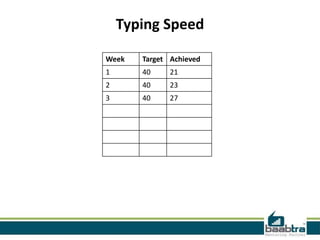
Typing Speed
Week

Target Achieved

1

40

21

2

40

23

3

40

27
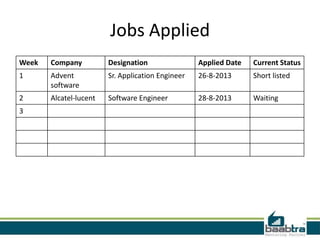
Jobs Applied
Week

Company

Designation

Applied Date

Current Status

1

Advent
software

Sr. Application Engineer

26-8-2013

Short listed

2

Alcatel-lucent

Software Engineer

28-8-2013

Waiting

3
Cascading Style Sheets
[CSS]
Muhammed Noufal V T
muhammednoufalvt@gmail.c
om
www.facebook.com/vtnoufa
lvt
twitter.com/noufalurnappy
in.linkedin.com/pub/muham
med-noufal
9744003056
What is CSS

• CSS stands for Cascading Style Sheets
• Styles define how to display HTML elements
• Three ways to Insert CSS
1. External style sheet
2. Embedded styles
3. Inline styles
• External Style Sheets can save a lot of work
• External Style Sheets are stored in CSS files
Advantages of Style Sheets
•
•
•
•
•
•

Saves time
Easy to change
Keep consistency
Give you more control over layout
Use styles with JavaScript
Make it easy to create a common format
for all the Web pages
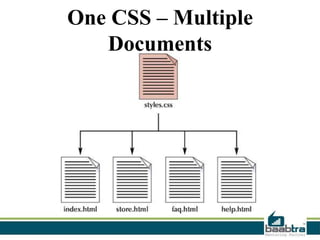
One CSS – Multiple
Documents
CSS Syntax
• A CSS rule has two main parts: a
selector, and one or more declarations:
• The selector is normally the HTML
element you want to style.
• Each declaration consists of a property
and a value.
• The property is the style attribute you
want to change. Each property has a
value.
• Example
CSS Id and Class

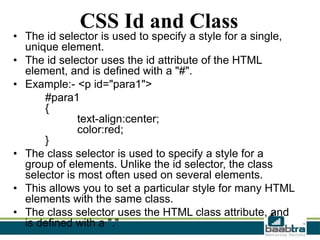
• The id selector is used to specify a style for a single,
unique element.
• The id selector uses the id attribute of the HTML
element, and is defined with a "#".
• Example:- <p id="para1">
#para1
{
text-align:center;
color:red;
}
• The class selector is used to specify a style for a
group of elements. Unlike the id selector, the class
selector is most often used on several elements.
• This allows you to set a particular style for many HTML
elements with the same class.
• The class selector uses the HTML class attribute, and
is defined with a "."
Three ways to Insert CSS

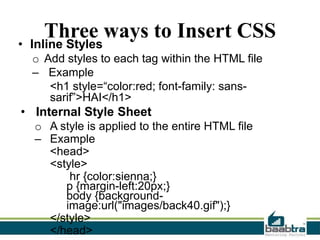
• Inline Styles

o Add styles to each tag within the HTML file
– Example
<h1 style=“color:red; font-family: sanssarif”>HAI</h1>

• Internal Style Sheet
o A style is applied to the entire HTML file
– Example
<head>
<style>
hr {color:sienna;}
p {margin-left:20px;}
body {backgroundimage:url("images/back40.gif");}
</style>
</head>
Three ways to Insert CSS
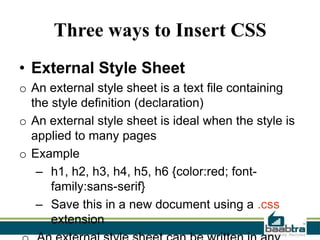
• External Style Sheet
o An external style sheet is a text file containing
the style definition (declaration)
o An external style sheet is ideal when the style is
applied to many pages
o Example
– h1, h2, h3, h4, h5, h6 {color:red; fontfamily:sans-serif}
– Save this in a new document using a .css
extension
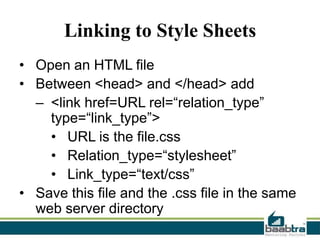
Linking to Style Sheets
• Open an HTML file
• Between <head> and </head> add
– <link href=URL rel=“relation_type”
type=“link_type”>
• URL is the file.css
• Relation_type=“stylesheet”
• Link_type=“text/css”
• Save this file and the .css file in the same
web server directory
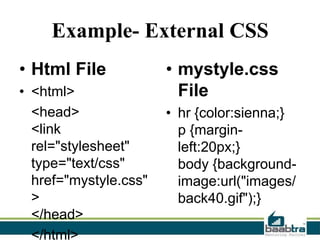
Example- External CSS
• Html File
• <html>
<head>
<link
rel="stylesheet"
type="text/css"
href="mystyle.css"
>
</head>
</html>

• mystyle.css
File
• hr {color:sienna;}
p {marginleft:20px;}
body {backgroundimage:url("images/
back40.gif");}
Contact Us
Emarald Mall (Big Bazar Building)
Mavoor Road, Kozhikode,
Kerala, India.
Ph: + 91 – 495 40 25 550

Start up Village
Eranakulam,
Kerala, India.
Email: info@baabtra.com

NC Complex, Near Bus Stand
Mukkam, Kozhikode,
Kerala, India.
Ph: + 91 – 495 40 25 550

Css

  • 2.
    Disclaimer: This presentationis prepared by trainees of baabtra as a part of mentoring program. This is not official document of baabtra –Mentoring Partner Baabtra-Mentoring Partner is the mentoring division of baabte System Technologies Pvt . Ltd
  • 3.
  • 4.
    Jobs Applied Week Company Designation Applied Date CurrentStatus 1 Advent software Sr. Application Engineer 26-8-2013 Short listed 2 Alcatel-lucent Software Engineer 28-8-2013 Waiting 3
  • 5.
    Cascading Style Sheets [CSS] MuhammedNoufal V T muhammednoufalvt@gmail.c om www.facebook.com/vtnoufa lvt twitter.com/noufalurnappy in.linkedin.com/pub/muham med-noufal 9744003056
  • 6.
    What is CSS •CSS stands for Cascading Style Sheets • Styles define how to display HTML elements • Three ways to Insert CSS 1. External style sheet 2. Embedded styles 3. Inline styles • External Style Sheets can save a lot of work • External Style Sheets are stored in CSS files
  • 7.
    Advantages of StyleSheets • • • • • • Saves time Easy to change Keep consistency Give you more control over layout Use styles with JavaScript Make it easy to create a common format for all the Web pages
  • 8.
    One CSS –Multiple Documents
  • 9.
    CSS Syntax • ACSS rule has two main parts: a selector, and one or more declarations: • The selector is normally the HTML element you want to style. • Each declaration consists of a property and a value. • The property is the style attribute you want to change. Each property has a value. • Example
  • 10.
    CSS Id andClass • The id selector is used to specify a style for a single, unique element. • The id selector uses the id attribute of the HTML element, and is defined with a "#". • Example:- <p id="para1"> #para1 { text-align:center; color:red; } • The class selector is used to specify a style for a group of elements. Unlike the id selector, the class selector is most often used on several elements. • This allows you to set a particular style for many HTML elements with the same class. • The class selector uses the HTML class attribute, and is defined with a "."
  • 11.
    Three ways toInsert CSS • Inline Styles o Add styles to each tag within the HTML file – Example <h1 style=“color:red; font-family: sanssarif”>HAI</h1> • Internal Style Sheet o A style is applied to the entire HTML file – Example <head> <style> hr {color:sienna;} p {margin-left:20px;} body {backgroundimage:url("images/back40.gif");} </style> </head>
  • 12.
    Three ways toInsert CSS • External Style Sheet o An external style sheet is a text file containing the style definition (declaration) o An external style sheet is ideal when the style is applied to many pages o Example – h1, h2, h3, h4, h5, h6 {color:red; fontfamily:sans-serif} – Save this in a new document using a .css extension
  • 13.
    Linking to StyleSheets • Open an HTML file • Between <head> and </head> add – <link href=URL rel=“relation_type” type=“link_type”> • URL is the file.css • Relation_type=“stylesheet” • Link_type=“text/css” • Save this file and the .css file in the same web server directory
  • 14.
    Example- External CSS •Html File • <html> <head> <link rel="stylesheet" type="text/css" href="mystyle.css" > </head> </html> • mystyle.css File • hr {color:sienna;} p {marginleft:20px;} body {backgroundimage:url("images/ back40.gif");}
  • 15.
    Contact Us Emarald Mall(Big Bazar Building) Mavoor Road, Kozhikode, Kerala, India. Ph: + 91 – 495 40 25 550 Start up Village Eranakulam, Kerala, India. Email: info@baabtra.com NC Complex, Near Bus Stand Mukkam, Kozhikode, Kerala, India. Ph: + 91 – 495 40 25 550