1
CS101 Introduction to Computing
Lecture 23Flow Control & Loops
(Web Development Lecture 8)
2
During the last lecture we had a discussion
on Data Types, Variables & Operators
• We found out about JavaScript data types
• About variables and literals
• We also discussed several operators
supported by JavaScript
3
JavaScript Data Types
• JavaScript recognizes & distinguishes among
the following types of values:
–Numbers
–Booleans
–Strings
–Undefined
4
Variables
• Variables give us the ability to manipulate data
through reference instead of actual value
• Variables are containers that hold values
5
Declaring Variables
Although JavaScript allows variable
declaration, it does not require it - except in
the case when we want to declare a variable
being local (more on local variables later in
the course!)
6
JavaScript Variables are Dynamically Typed
Any variable in JavaScript can hold any
type of value, and the that type can change
midway through the program
7
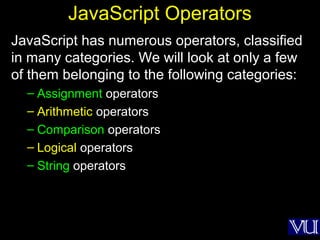
JavaScript Operators
JavaScript has numerous operators, classified
in many categories. We will look at only a few
of them belonging to the following categories:
– Assignment operators
– Arithmetic operators
– Comparison operators
– Logical operators
– String operators
8
comments let
the code speak
for itself!
9
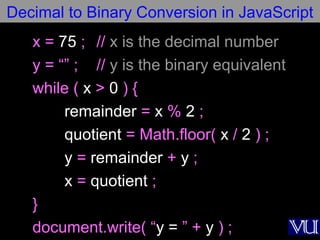
x = 75 ; // x is the decimal number
y = “” ; // y is the binary equivalent
while ( x > 0 ) {
remainder = x % 2 ;
quotient = Math.floor( x / 2 ) ;
y = remainder + y ;
x = quotient ;
}
document.write( “y = ” + y ) ;
Decimal to Binary Conversion in JavaScript
10
Today’s Lecture:
Flow Control & Loops
• We’ll try to understand the concept of flow
control using the “if” and “switch” structures
• And also the concept behind the “while” and
“for” looping structures
• We will solve simple problems using flow
control and loop structures
11
Flow
Control
12
Select between alternate courses of action
depending upon the evaluation of a condition
statement
block 1
condition
True False
statement
block 2
13
JavaScript Flow Control Structures
if … else
switch
14
if: Example 1
if ( day == “Sunday” )
bhola = “Cool” ;
Set the value of the variable
‘bhola to ‘Cool’ if the ‘day’ is
equal to ‘Sunday’
The condition
enclosed in
parentheses semicolon
15
This was the case if we want to
execute a single statement given that
the condition is true
What if we want to execute multiple
statements in case the condition is
true?
16
if: Example 2
if ( day == “Sunday” ) {
bhola = “Cool” ;
mood = “Great” ;
clothing = “Casual” ;
}
Set the value of the variable ‘bhola to ‘Cool’,
‘mood’ to ‘Great’, and ‘clothing’ to ‘casual’ if
the ‘day’ is equal to ‘Sunday’
These curly braces
group the multiple
statements into a
single compound
statement
17
if: Example 2
if ( day == “Sunday” ) {
bhola = “Cool” ;
mood = “Great” ;
clothing = “Casual” ;
}
Set the value of the variable ‘status’ to
‘Cool’, ‘mood’ to ‘Great’, and ‘clothing’ to
‘casual’ if the ‘day’ is equal to ‘Sunday’
Note: No semicolon
after the closing
curly brace
18
Compound Statements
1. At times, we need to put multiple statements
at places where JavaScript expects only one
2. For those situations, JavaScript provides a
way of grouping a number of statements into
a single statement, called a “statement block”
19
Compound Statements
3. This is done simply by enclosing any number
of statements within curly braces, { }
4. NOTE: Although the statements within the
block end in semicolons, the block itself
doesn’t
20
if: Example 3
if ( (day == “Sunday”) || (day == “Saturday”) ) {
bhola = “Cool” ;
mood = “Great” ;
clothing = “Casual” ;
}
21
if: Example 4
weekend = ( day == “Sunday” ) || ( day ==
“Saturday” ) ;
if ( weekend ) {
bhola = “Cool” ;
mood = “Great” ;
clothing = “Casual” ;
}
What is the
data type of
the variable
“weekend”?
22
We now know how to execute a
statement or a block of statements
given that the condition is true
What if we want to include an alternate
action as well, i.e. a statement or a
block of statements to be executed in
case the condition in not true
23
if … else: Example 1
if ( GPA >= 1.0 )
bhola = “Pass” ;
else
bhola = “Fail” ;
24
if … else: Example 2
if ( GPA >= 1.0 ) {
bhola = “Pass” ;
}
else
bhola = “Fail” ;
25
if … else: Example 3
if ( GPA >= 1.0 ) {
bhola = “Pass” ;
mood = “Great” ;
}
else
bhola = “Fail” ;
26
if … else: Example 4
if ( GPA >= 1.0 ) {
bhola = “Pass” ;
mood = “Great” ;
}
else {
bhola = “Fail” ;
mood = “Terrible” ;
}
27
if … else: Example 5
if ( grade == “A” )
points = 4.0 ;
if ( grade == “B” )
points = 3.0 ;
if ( grade == “C” )
points = 2.0 ;
if ( grade == “D” )
points = 1.0 ;
if ( grade == “F” )
points = 0.0 ;
What can we
do to
improve it?
This piece
of code is
correct, but
not very
efficient!
28
Nested
if … else
Structures
29
if … else:
Example 6
if ( grade == “A” )
points = 4.0 ;
else {
if ( grade == “B” )
points = 3.0 ;
else {
if ( grade == “C” )
points = 2.0 ;
else {
if ( grade == “D” )
points = 1.0 ;
else
points = 0.0 ;
}
}
}
30
JavaScript Flow Control Structures
if … else
switch
31
switch:
Example 1
switch ( grade ) {
case “A” :
points = 4.0 ;
break ;
case “B” :
points = 3.0 ;
break ;
case “C” :
points = 2.0 ;
break ;
case “D” :
points = 1.0 ;
break ;
default :
points = 0.0 ;
}
The expression
enclosed in
parentheses is
evaluated and
matched with
case labels
This is a
case label
A colon
following
the case
label is
required
This ‘break’
statement is the
exit pointThe ‘default’ statement
acts like the ‘else’ clause
in the ‘if…else’ structure
32
switch: Example 2switch ( inquiry ) {
case “apple” :
document.write( “Apples are Rs 50/kg” ) ;
break ;
case “mangos” :
document.write( “Mangos are Rs 90/kg” ) ;
break ;
case “grapes” :
document.write( “Grapes are Rs 60/kg” ) ;
break ;
default :
document.write( inquiry + “? Please retry!” ) ;
}
33
?if … elseif … else
switchswitch
34
if…else --?-- switch
• If the action to be taken of the value of a
single variable (or a single expression),
use ‘switch’
• When the action depends on the values
of multiple variables (or expressions),
use the ‘if...else’ structure
35
if … else: Example 7
if ( ( GPA >= 1.0 ) && ( attendance >= 40 ) )
bhola = “Pass” ;
else {
if ( ( GPA >= 2.0 ) && ( attendance >= 36 ) ) bhola =
“Probation” ;
else
bhola = “Fail” ;
}
36
Loops
37
Loop through a set of statements
as long as a condition is true
condition
True
False
statement
block
38
JavaScript’s Looping Structures
while
for
…
…
39
x = 75 ; // x is the decimal number
y = “” ; // y is the binary equivalent
while ( x > 0 ) {
remainder = x % 2 ;
quotient = Math.floor( x / 2 ) ;
y = remainder + y ;
x = quotient ;
}
document.write( “y = ” + y ) ;
Decimal to Binary Conversion in JavaScript
The condition
enclosed in
parentheses
40
while: Example 2
while ( tankIsFull == false ) {
tank = tank + bucket ;
}
document.write ( “Tank is full now” ) ;
41
while: Example 3
x = 1 ;
while ( x < 6000 ) {
document.write ( x ) ;
x = x + 1 ;
}
42
JavaScript’s Looping Structures
while
for
…
…
43
for: Example 1
x = 1 ;
while ( x < 6000 ) {
document.write ( x ) ;
x = x + 1 ;
} for ( x = 1 ; x < 6000 ; x = x + 1 ) {
document.write ( x ) ;
}
Initial count Condition Operation
44
for: Description (1)
1. The ‘for’ loop starts by initializing the counter
variable (which in this case is x)
2. The initial value in this case is ‘1’, but can be
any other positive or negative number as well
3. Next the ‘for’ loop checks the condition. If the
condition evaluates to a ‘true’ value, the ‘for’
loop goes through the loop once
45
for: Description (2)
4. After reaching the end of that iteration, the
‘for’ loop goes to the top once again, performs
the operation, checks the condition
5. If the condition evaluates to a ‘false’ value, the
‘for’ loop finishes looping
6. Otherwise, the ‘for’ loop goes through the loop
once again
7. Repeat from step 4
46
for: Example 2
for ( x = 99 ; x < 6000 ; x = x + 1 ) {
document.write ( x ) ;
}
47
for: Example 3
for ( x = 6000 ; x > 0 ; x = x - 1 ) {
document.write ( x ) ;
}
How many
iterations would
this ‘for’ loop
run for?
6000?
48
for: Example 4
for ( x = 6000 ; x < 0 ; x = x - 1 ) {
document.write ( x ) ;
}
How many
iterations would
this ‘for’ loop
run for?
None?
49
?forfor
whilewhile
50
for --?-- while
• When the exact number of iterations is
known, use the ‘for’ loop
• When the number of iterations depend
upon a condition being met, use the
‘while’ loop
51
‘for’ loops become especially useful
when used in conjunction with arrays
We’ll find out about arrays next time,
and we’ll probe their usefulness as
part of ‘for’ loop structures
52
During Today’s Lecture …
• We discussed the concept of flow control using
the “if” and “switch” structures
• And also the concept behind the “while” and
“for” looping structures
• We also solved simple problems using flow
control and loop structures
53
Next (the 9th
) Web Dev Lecture:
Arrays
• We will find out why we need arrays
• We will become able to use arrays for solving
simple problems

CS101- Introduction to Computing- Lecture 23

  • 1.
    1 CS101 Introduction toComputing Lecture 23Flow Control & Loops (Web Development Lecture 8)
  • 2.
    2 During the lastlecture we had a discussion on Data Types, Variables & Operators • We found out about JavaScript data types • About variables and literals • We also discussed several operators supported by JavaScript
  • 3.
    3 JavaScript Data Types •JavaScript recognizes & distinguishes among the following types of values: –Numbers –Booleans –Strings –Undefined
  • 4.
    4 Variables • Variables giveus the ability to manipulate data through reference instead of actual value • Variables are containers that hold values
  • 5.
    5 Declaring Variables Although JavaScriptallows variable declaration, it does not require it - except in the case when we want to declare a variable being local (more on local variables later in the course!)
  • 6.
    6 JavaScript Variables areDynamically Typed Any variable in JavaScript can hold any type of value, and the that type can change midway through the program
  • 7.
    7 JavaScript Operators JavaScript hasnumerous operators, classified in many categories. We will look at only a few of them belonging to the following categories: – Assignment operators – Arithmetic operators – Comparison operators – Logical operators – String operators
  • 8.
    8 comments let the codespeak for itself!
  • 9.
    9 x = 75; // x is the decimal number y = “” ; // y is the binary equivalent while ( x > 0 ) { remainder = x % 2 ; quotient = Math.floor( x / 2 ) ; y = remainder + y ; x = quotient ; } document.write( “y = ” + y ) ; Decimal to Binary Conversion in JavaScript
  • 10.
    10 Today’s Lecture: Flow Control& Loops • We’ll try to understand the concept of flow control using the “if” and “switch” structures • And also the concept behind the “while” and “for” looping structures • We will solve simple problems using flow control and loop structures
  • 11.
  • 12.
    12 Select between alternatecourses of action depending upon the evaluation of a condition statement block 1 condition True False statement block 2
  • 13.
    13 JavaScript Flow ControlStructures if … else switch
  • 14.
    14 if: Example 1 if( day == “Sunday” ) bhola = “Cool” ; Set the value of the variable ‘bhola to ‘Cool’ if the ‘day’ is equal to ‘Sunday’ The condition enclosed in parentheses semicolon
  • 15.
    15 This was thecase if we want to execute a single statement given that the condition is true What if we want to execute multiple statements in case the condition is true?
  • 16.
    16 if: Example 2 if( day == “Sunday” ) { bhola = “Cool” ; mood = “Great” ; clothing = “Casual” ; } Set the value of the variable ‘bhola to ‘Cool’, ‘mood’ to ‘Great’, and ‘clothing’ to ‘casual’ if the ‘day’ is equal to ‘Sunday’ These curly braces group the multiple statements into a single compound statement
  • 17.
    17 if: Example 2 if( day == “Sunday” ) { bhola = “Cool” ; mood = “Great” ; clothing = “Casual” ; } Set the value of the variable ‘status’ to ‘Cool’, ‘mood’ to ‘Great’, and ‘clothing’ to ‘casual’ if the ‘day’ is equal to ‘Sunday’ Note: No semicolon after the closing curly brace
  • 18.
    18 Compound Statements 1. Attimes, we need to put multiple statements at places where JavaScript expects only one 2. For those situations, JavaScript provides a way of grouping a number of statements into a single statement, called a “statement block”
  • 19.
    19 Compound Statements 3. Thisis done simply by enclosing any number of statements within curly braces, { } 4. NOTE: Although the statements within the block end in semicolons, the block itself doesn’t
  • 20.
    20 if: Example 3 if( (day == “Sunday”) || (day == “Saturday”) ) { bhola = “Cool” ; mood = “Great” ; clothing = “Casual” ; }
  • 21.
    21 if: Example 4 weekend= ( day == “Sunday” ) || ( day == “Saturday” ) ; if ( weekend ) { bhola = “Cool” ; mood = “Great” ; clothing = “Casual” ; } What is the data type of the variable “weekend”?
  • 22.
    22 We now knowhow to execute a statement or a block of statements given that the condition is true What if we want to include an alternate action as well, i.e. a statement or a block of statements to be executed in case the condition in not true
  • 23.
    23 if … else:Example 1 if ( GPA >= 1.0 ) bhola = “Pass” ; else bhola = “Fail” ;
  • 24.
    24 if … else:Example 2 if ( GPA >= 1.0 ) { bhola = “Pass” ; } else bhola = “Fail” ;
  • 25.
    25 if … else:Example 3 if ( GPA >= 1.0 ) { bhola = “Pass” ; mood = “Great” ; } else bhola = “Fail” ;
  • 26.
    26 if … else:Example 4 if ( GPA >= 1.0 ) { bhola = “Pass” ; mood = “Great” ; } else { bhola = “Fail” ; mood = “Terrible” ; }
  • 27.
    27 if … else:Example 5 if ( grade == “A” ) points = 4.0 ; if ( grade == “B” ) points = 3.0 ; if ( grade == “C” ) points = 2.0 ; if ( grade == “D” ) points = 1.0 ; if ( grade == “F” ) points = 0.0 ; What can we do to improve it? This piece of code is correct, but not very efficient!
  • 28.
  • 29.
    29 if … else: Example6 if ( grade == “A” ) points = 4.0 ; else { if ( grade == “B” ) points = 3.0 ; else { if ( grade == “C” ) points = 2.0 ; else { if ( grade == “D” ) points = 1.0 ; else points = 0.0 ; } } }
  • 30.
    30 JavaScript Flow ControlStructures if … else switch
  • 31.
    31 switch: Example 1 switch (grade ) { case “A” : points = 4.0 ; break ; case “B” : points = 3.0 ; break ; case “C” : points = 2.0 ; break ; case “D” : points = 1.0 ; break ; default : points = 0.0 ; } The expression enclosed in parentheses is evaluated and matched with case labels This is a case label A colon following the case label is required This ‘break’ statement is the exit pointThe ‘default’ statement acts like the ‘else’ clause in the ‘if…else’ structure
  • 32.
    32 switch: Example 2switch( inquiry ) { case “apple” : document.write( “Apples are Rs 50/kg” ) ; break ; case “mangos” : document.write( “Mangos are Rs 90/kg” ) ; break ; case “grapes” : document.write( “Grapes are Rs 60/kg” ) ; break ; default : document.write( inquiry + “? Please retry!” ) ; }
  • 33.
    33 ?if … elseif… else switchswitch
  • 34.
    34 if…else --?-- switch •If the action to be taken of the value of a single variable (or a single expression), use ‘switch’ • When the action depends on the values of multiple variables (or expressions), use the ‘if...else’ structure
  • 35.
    35 if … else:Example 7 if ( ( GPA >= 1.0 ) && ( attendance >= 40 ) ) bhola = “Pass” ; else { if ( ( GPA >= 2.0 ) && ( attendance >= 36 ) ) bhola = “Probation” ; else bhola = “Fail” ; }
  • 36.
  • 37.
    37 Loop through aset of statements as long as a condition is true condition True False statement block
  • 38.
  • 39.
    39 x = 75; // x is the decimal number y = “” ; // y is the binary equivalent while ( x > 0 ) { remainder = x % 2 ; quotient = Math.floor( x / 2 ) ; y = remainder + y ; x = quotient ; } document.write( “y = ” + y ) ; Decimal to Binary Conversion in JavaScript The condition enclosed in parentheses
  • 40.
    40 while: Example 2 while( tankIsFull == false ) { tank = tank + bucket ; } document.write ( “Tank is full now” ) ;
  • 41.
    41 while: Example 3 x= 1 ; while ( x < 6000 ) { document.write ( x ) ; x = x + 1 ; }
  • 42.
  • 43.
    43 for: Example 1 x= 1 ; while ( x < 6000 ) { document.write ( x ) ; x = x + 1 ; } for ( x = 1 ; x < 6000 ; x = x + 1 ) { document.write ( x ) ; } Initial count Condition Operation
  • 44.
    44 for: Description (1) 1.The ‘for’ loop starts by initializing the counter variable (which in this case is x) 2. The initial value in this case is ‘1’, but can be any other positive or negative number as well 3. Next the ‘for’ loop checks the condition. If the condition evaluates to a ‘true’ value, the ‘for’ loop goes through the loop once
  • 45.
    45 for: Description (2) 4.After reaching the end of that iteration, the ‘for’ loop goes to the top once again, performs the operation, checks the condition 5. If the condition evaluates to a ‘false’ value, the ‘for’ loop finishes looping 6. Otherwise, the ‘for’ loop goes through the loop once again 7. Repeat from step 4
  • 46.
    46 for: Example 2 for( x = 99 ; x < 6000 ; x = x + 1 ) { document.write ( x ) ; }
  • 47.
    47 for: Example 3 for( x = 6000 ; x > 0 ; x = x - 1 ) { document.write ( x ) ; } How many iterations would this ‘for’ loop run for? 6000?
  • 48.
    48 for: Example 4 for( x = 6000 ; x < 0 ; x = x - 1 ) { document.write ( x ) ; } How many iterations would this ‘for’ loop run for? None?
  • 49.
  • 50.
    50 for --?-- while •When the exact number of iterations is known, use the ‘for’ loop • When the number of iterations depend upon a condition being met, use the ‘while’ loop
  • 51.
    51 ‘for’ loops becomeespecially useful when used in conjunction with arrays We’ll find out about arrays next time, and we’ll probe their usefulness as part of ‘for’ loop structures
  • 52.
    52 During Today’s Lecture… • We discussed the concept of flow control using the “if” and “switch” structures • And also the concept behind the “while” and “for” looping structures • We also solved simple problems using flow control and loop structures
  • 53.
    53 Next (the 9th )Web Dev Lecture: Arrays • We will find out why we need arrays • We will become able to use arrays for solving simple problems