Control statement in
Javascript
Algorithms
• Actions to be executed
• Order in which the actions are to be executed
• Pseudocode: informal representation of an algorithm
• If prepared carefully, pseudocode statements can be converted in to actual
programming code in a fairly straightforward fashion
Control Structures
• Elements of code that define an individual action
• Like most programming languages, JavaScript has three control structures:
• Sequence structure
• Any individual non-selection and non-repetition statement falls into this category:
individual calculation, input or output statement, type conversion, etc.
• Selection structure: three in JavaScript
• if
• if…else
• switch
• Repetition structure: four in JavaScript
• while
• do…while
• for
• for…in
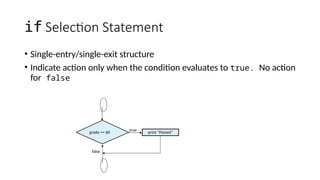
if Selection Statement
• Single-entry/single-exit structure
• Indicate action only when the condition evaluates to true. No action
for false
grade >= 60
true
false
print “Passed”
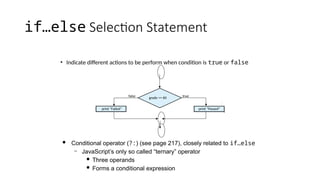
if…else Selection Statement
• Indicate different actions to be perform when condition is true or false
grade >= 60 true
print “Failed”
false
print “Passed”
 Conditional operator (?:) (see page 217), closely related to if…else
– JavaScript’s only so called “ternary” operator
 Three operands
 Forms a conditional expression
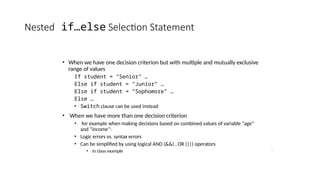
Nested if…else Selection Statement
• When we have one decision criterion but with multiple and mutually exclusive
range of values
If student = “Senior” …
Else if student = “Junior” …
Else if student = “Sophomore” …
Else …
• Switch clause can be used instead
• When we have more than one decision criterion
• for example when making decisions based on combined values of variable “age”
and “income”:
• Logic errors vs. syntax errors
• Can be simplified by using logical AND (&&) , OR (||) operators
• In class example
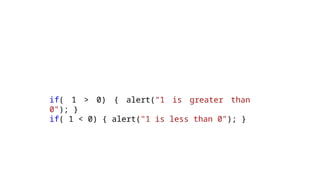
if( 1 > 0) { alert("1 is greater than
0"); }
if( 1 < 0) { alert("1 is less than 0"); }
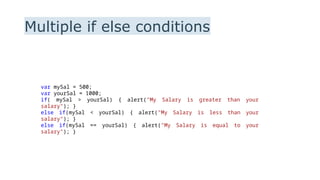
Multiple if else conditions
var mySal = 500;
var yourSal = 1000;
if( mySal > yourSal) { alert("My Salary is greater than your
salary"); }
else if(mySal < yourSal) { alert("My Salary is less than your
salary"); }
else if(mySal == yourSal) { alert("My Salary is equal to your
salary"); }
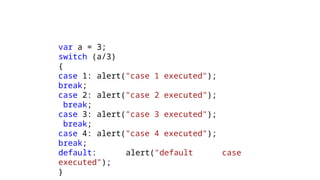
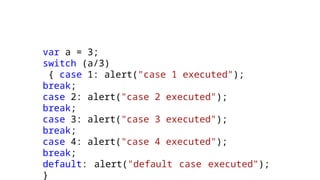
var a = 3;
switch (a/3)
{
case 1: alert("case 1 executed");
break;
case 2: alert("case 2 executed");
break;
case 3: alert("case 3 executed");
break;
case 4: alert("case 4 executed");
break;
default: alert("default case
executed");
}
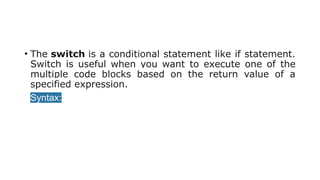
• The switch is a conditional statement like if statement.
Switch is useful when you want to execute one of the
multiple code blocks based on the return value of a
specified expression.
• Syntax:
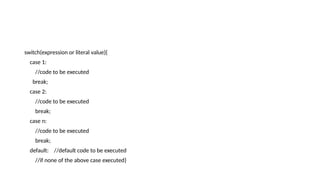
switch(expression or literal value){
case 1:
//code to be executed
break;
case 2:
//code to be executed
break;
case n:
//code to be executed
break;
default: //default code to be executed
//if none of the above case executed}
var a = 3;
switch (a/3)
{ case 1: alert("case 1 executed");
break;
case 2: alert("case 2 executed");
break;
case 3: alert("case 3 executed");
break;
case 4: alert("case 4 executed");
break;
default: alert("default case executed");
}
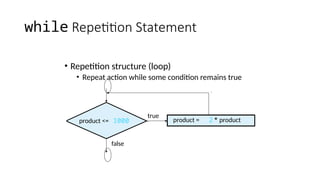
while Repetition Statement
• Repetition structure (loop)
• Repeat action while some condition remains true
product <= 1000 product = 2* product
true
false
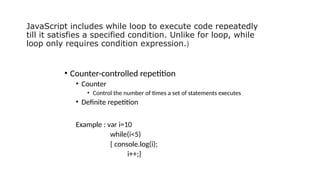
JavaScript includes while loop to execute code repeatedly
till it satisfies a specified condition. Unlike for loop, while
loop only requires condition expression.)
• Counter-controlled repetition
• Counter
• Control the number of times a set of statements executes
• Definite repetition
Example : var i=10
while(i<5)
{ console.log(i);
i++;}
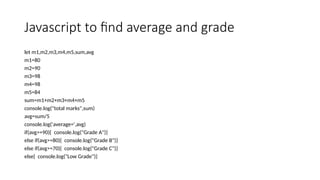
Javascript to find average and grade
let m1,m2,m3,m4,m5,sum,avg
m1=80
m2=90
m3=98
m4=98
m5=84
sum=m1+m2+m3+m4+m5
console.log("total marks",sum)
avg=sum/5
console.log('average=',avg)
if(avg>=90){ console.log("Grade A")}
else if(avg>=80){ console.log("Grade B")}
else if(avg>=70){ console.log("Grade C")}
else{ console.log("Low Grade")}
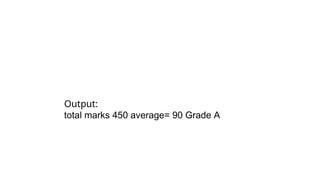
Output:
total marks 450 average= 90 Grade A
JavaScript for Loop
• JavaScript includes for loop like Java or C#. Use for loop
to execute code repeatedly.
syntax
for(initializer; condition; iteration)
{ // Code to be executed }
for(initializer; condition; iteration) { // Code to be executed }
<script>
var arr = [10, 11, 12, 13, 14];
for (var i = 0; i < 5; i++)
{
document.getElementById("p" + i).innerHTML = arr[i];
}
</script>
Example
<!DOCTYPE html>
<html>
<body>
<h1>Demo: for loop</h1>
<p id="p0"></p>
<p id="p1"></p>
<p id="p2"></p>
<p id="p3"></p>
<p id="p4"></p>
<script>
var arr = [10, 11, 12, 13, 14];
var i = 0;
for (; ;) {
if (i >= 5)
break;
document.getElementById("p" + i).innerHTML = arr[i];
i++;
}
</script>
</body>
</html>
Functions in JavaScript
• Functions are the basic building block of JavaScript.
Functions allow us to encapsulate a block of code and
reuse it multiple times.
• Functions make JavaScript code more readable,
organized, reusable, and maintainable.
• syntax
function <function-name>(arg1, arg2, arg3,...)
{ //write function code here };
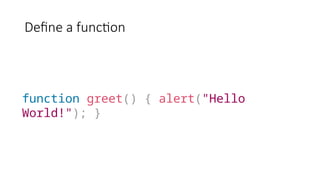
Define a function
function greet() { alert("Hello
World!"); }
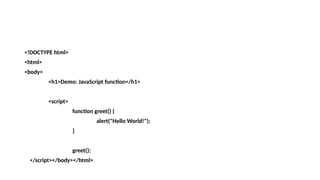
<!DOCTYPE html>
<html>
<body>
<h1>Demo: JavaScript function</h1>
<script>
function greet() {
alert("Hello World!");
}
greet();
</script></body></html>
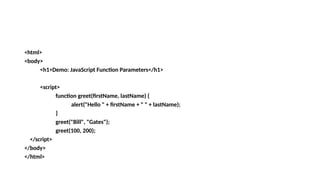
<html>
<body>
<h1>Demo: JavaScript Function Parameters</h1>
<script>
function greet(firstName, lastName) {
alert("Hello " + firstName + " " + lastName);
}
greet("Bill", "Gates");
greet(100, 200);
</script>
</body>
</html>
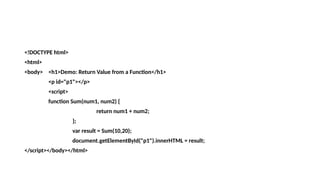
<!DOCTYPE html>
<html>
<body> <h1>Demo: Return Value from a Function</h1>
<p id="p1"></p>
<script>
function Sum(num1, num2) {
return num1 + num2;
};
var result = Sum(10,20);
document.getElementById("p1").innerHTML = result;
</script></body></html>
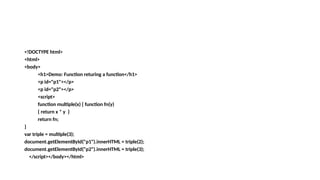
<!DOCTYPE html>
<html>
<body>
<h1>Demo: Function returing a function</h1>
<p id="p1"></p>
<p id="p2"></p>
<script>
function multiple(x) { function fn(y)
{ return x * y }
return fn;
}
var triple = multiple(3);
document.getElementById("p1").innerHTML = triple(2);
document.getElementById("p2").innerHTML = triple(3);
</script></body></html>
<!DOCTYPE html>
<html>
<body><h1>Demo: Anonymous Function as Callback</h1>
<p id="p1"></p>
<script>
let numbers = [2, 3, 4, 5];
let squareNumbers = numbers.map(function(number) {
return number * number;
});
document.getElementById("p1").innerHTML = squareNumbers;
</script> </body></html>

control_javascript_for _beginners_and _pro.pptx

  • 1.
  • 2.
    Algorithms • Actions tobe executed • Order in which the actions are to be executed • Pseudocode: informal representation of an algorithm • If prepared carefully, pseudocode statements can be converted in to actual programming code in a fairly straightforward fashion
  • 3.
    Control Structures • Elementsof code that define an individual action • Like most programming languages, JavaScript has three control structures: • Sequence structure • Any individual non-selection and non-repetition statement falls into this category: individual calculation, input or output statement, type conversion, etc. • Selection structure: three in JavaScript • if • if…else • switch • Repetition structure: four in JavaScript • while • do…while • for • for…in
  • 4.
    if Selection Statement •Single-entry/single-exit structure • Indicate action only when the condition evaluates to true. No action for false grade >= 60 true false print “Passed”
  • 5.
    if…else Selection Statement •Indicate different actions to be perform when condition is true or false grade >= 60 true print “Failed” false print “Passed”  Conditional operator (?:) (see page 217), closely related to if…else – JavaScript’s only so called “ternary” operator  Three operands  Forms a conditional expression
  • 6.
    Nested if…else SelectionStatement • When we have one decision criterion but with multiple and mutually exclusive range of values If student = “Senior” … Else if student = “Junior” … Else if student = “Sophomore” … Else … • Switch clause can be used instead • When we have more than one decision criterion • for example when making decisions based on combined values of variable “age” and “income”: • Logic errors vs. syntax errors • Can be simplified by using logical AND (&&) , OR (||) operators • In class example
  • 7.
    if( 1 >0) { alert("1 is greater than 0"); } if( 1 < 0) { alert("1 is less than 0"); }
  • 8.
    Multiple if elseconditions var mySal = 500; var yourSal = 1000; if( mySal > yourSal) { alert("My Salary is greater than your salary"); } else if(mySal < yourSal) { alert("My Salary is less than your salary"); } else if(mySal == yourSal) { alert("My Salary is equal to your salary"); }
  • 10.
    var a =3; switch (a/3) { case 1: alert("case 1 executed"); break; case 2: alert("case 2 executed"); break; case 3: alert("case 3 executed"); break; case 4: alert("case 4 executed"); break; default: alert("default case executed"); }
  • 11.
    • The switchis a conditional statement like if statement. Switch is useful when you want to execute one of the multiple code blocks based on the return value of a specified expression. • Syntax:
  • 12.
    switch(expression or literalvalue){ case 1: //code to be executed break; case 2: //code to be executed break; case n: //code to be executed break; default: //default code to be executed //if none of the above case executed}
  • 13.
    var a =3; switch (a/3) { case 1: alert("case 1 executed"); break; case 2: alert("case 2 executed"); break; case 3: alert("case 3 executed"); break; case 4: alert("case 4 executed"); break; default: alert("default case executed"); }
  • 14.
    while Repetition Statement •Repetition structure (loop) • Repeat action while some condition remains true product <= 1000 product = 2* product true false
  • 15.
    JavaScript includes whileloop to execute code repeatedly till it satisfies a specified condition. Unlike for loop, while loop only requires condition expression.) • Counter-controlled repetition • Counter • Control the number of times a set of statements executes • Definite repetition Example : var i=10 while(i<5) { console.log(i); i++;}
  • 16.
    Javascript to findaverage and grade let m1,m2,m3,m4,m5,sum,avg m1=80 m2=90 m3=98 m4=98 m5=84 sum=m1+m2+m3+m4+m5 console.log("total marks",sum) avg=sum/5 console.log('average=',avg) if(avg>=90){ console.log("Grade A")} else if(avg>=80){ console.log("Grade B")} else if(avg>=70){ console.log("Grade C")} else{ console.log("Low Grade")}
  • 17.
    Output: total marks 450average= 90 Grade A
  • 18.
    JavaScript for Loop •JavaScript includes for loop like Java or C#. Use for loop to execute code repeatedly. syntax for(initializer; condition; iteration) { // Code to be executed } for(initializer; condition; iteration) { // Code to be executed }
  • 19.
    <script> var arr =[10, 11, 12, 13, 14]; for (var i = 0; i < 5; i++) { document.getElementById("p" + i).innerHTML = arr[i]; } </script>
  • 20.
    Example <!DOCTYPE html> <html> <body> <h1>Demo: forloop</h1> <p id="p0"></p> <p id="p1"></p> <p id="p2"></p> <p id="p3"></p> <p id="p4"></p>
  • 21.
    <script> var arr =[10, 11, 12, 13, 14]; var i = 0; for (; ;) { if (i >= 5) break; document.getElementById("p" + i).innerHTML = arr[i]; i++; } </script> </body> </html>
  • 22.
    Functions in JavaScript •Functions are the basic building block of JavaScript. Functions allow us to encapsulate a block of code and reuse it multiple times. • Functions make JavaScript code more readable, organized, reusable, and maintainable. • syntax function <function-name>(arg1, arg2, arg3,...) { //write function code here };
  • 23.
    Define a function functiongreet() { alert("Hello World!"); }
  • 24.
    <!DOCTYPE html> <html> <body> <h1>Demo: JavaScriptfunction</h1> <script> function greet() { alert("Hello World!"); } greet(); </script></body></html>
  • 25.
    <html> <body> <h1>Demo: JavaScript FunctionParameters</h1> <script> function greet(firstName, lastName) { alert("Hello " + firstName + " " + lastName); } greet("Bill", "Gates"); greet(100, 200); </script> </body> </html>
  • 26.
    <!DOCTYPE html> <html> <body> <h1>Demo:Return Value from a Function</h1> <p id="p1"></p> <script> function Sum(num1, num2) { return num1 + num2; }; var result = Sum(10,20); document.getElementById("p1").innerHTML = result; </script></body></html>
  • 27.
    <!DOCTYPE html> <html> <body> <h1>Demo: Functionreturing a function</h1> <p id="p1"></p> <p id="p2"></p> <script> function multiple(x) { function fn(y) { return x * y } return fn; } var triple = multiple(3); document.getElementById("p1").innerHTML = triple(2); document.getElementById("p2").innerHTML = triple(3); </script></body></html>
  • 28.
    <!DOCTYPE html> <html> <body><h1>Demo: AnonymousFunction as Callback</h1> <p id="p1"></p> <script> let numbers = [2, 3, 4, 5]; let squareNumbers = numbers.map(function(number) { return number * number; }); document.getElementById("p1").innerHTML = squareNumbers; </script> </body></html>