JAVA
SCRIPT
Table of content
JS Variables
If Statement
Loops
Array
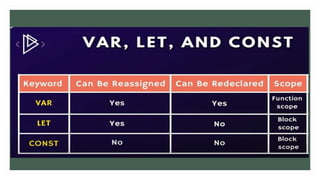
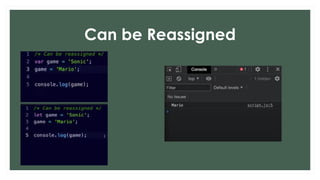
Can be Reassigned
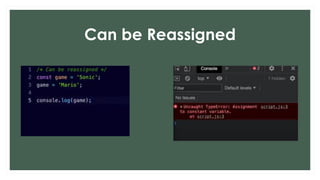
Can be Reassigned
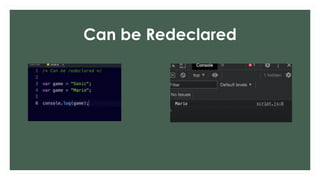
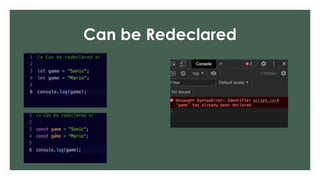
Can be Redeclared
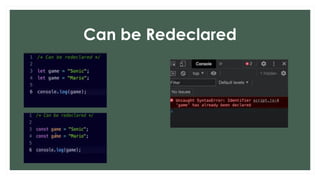
Can be Redeclared
Can be Redeclared
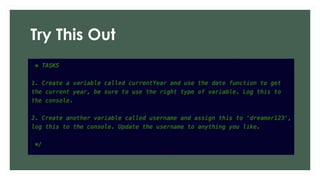
Try This Out
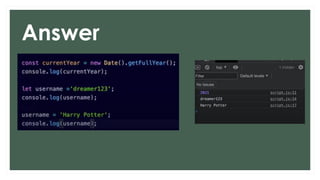
Answer
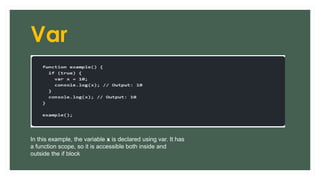
Var
In this example, the variable x is declared using var. It has
a function scope, so it is accessible both inside and
outside the if block
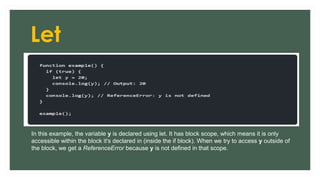
Let
In this example, the variable y is declared using let. It has block scope, which means it is only
accessible within the block it's declared in (inside the if block). When we try to access y outside of
the block, we get a ReferenceError because y is not defined in that scope.
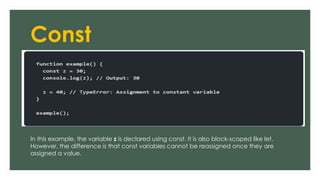
Const
In this example, the variable z is declared using const. It is also block-scoped like let.
However, the difference is that const variables cannot be reassigned once they are
assigned a value.
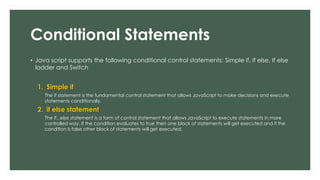
Conditional Statements
• Java script supports the following conditional control statements: Simple if, If else, If else
ladder and Switch
1. Simple if
The if statement is the fundamental control statement that allows JavaScript to make decisions and execute
statements conditionally.
2. if else statement
The if...else statement is a form of control statement that allows JavaScript to execute statements in more
controlled way. If the condition evaluates to true then one block of statements will get executed and if the
condition is false other block of statements will get executed.
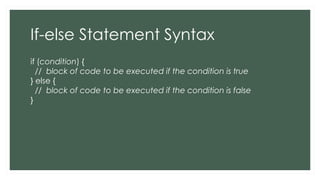
If-else Statement Syntax
if (condition) {
// block of code to be executed if the condition is true
} else {
// block of code to be executed if the condition is false
}
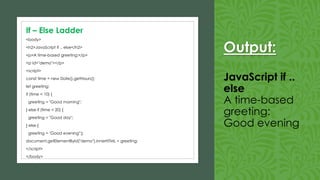
Output:
JavaScript if ..
else
A time-based
greeting:
Good evening
<body>
<h2>JavaScript if .. else</h2>
<p>A time-based greeting:</p>
<p id="demo"></p>
<script>
const time = new Date().getHours();
let greeting;
if (time < 10) {
greeting = "Good morning";
} else if (time < 20) {
greeting = "Good day";
} else {
greeting = "Good evening";}
document.getElementById("demo").innerHTML = greeting;
</script>
</body>
If – Else Ladder
Conditional Statements
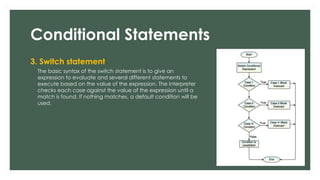
3. Switch statement
The basic syntax of the switch statement is to give an
expression to evaluate and several different statements to
execute based on the value of the expression. The interpreter
checks each case against the value of the expression until a
match is found. If nothing matches, a default condition will be
used.
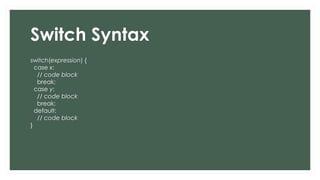
Switch Syntax
switch(expression) {
case x:
// code block
break;
case y:
// code block
break;
default:
// code block
}
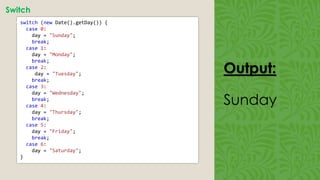
Output:
Sunday
Switch
• switch (new Date().getDay()) {
case 0:
day = "Sunday";
break;
case 1:
day = "Monday";
break;
case 2:
day = "Tuesday";
break;
case 3:
day = "Wednesday";
break;
case 4:
day = "Thursday";
break;
case 5:
day = "Friday";
break;
case 6:
day = "Saturday";
}
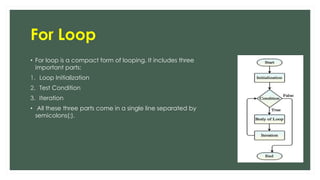
For Loop
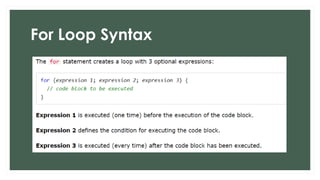
• For loop is a compact form of looping. It includes three
important parts:
1. Loop Initialization
2. Test Condition
3. Iteration
• All these three parts come in a single line separated by
semicolons(;).
For Loop Syntax
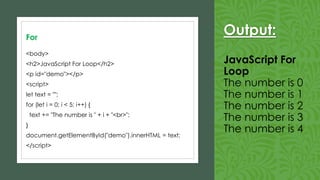
Output:
JavaScript For
Loop
The number is 0
The number is 1
The number is 2
The number is 3
The number is 4
For
<body>
<h2>JavaScript For Loop</h2>
<p id="demo"></p>
<script>
let text = "";
for (let i = 0; i < 5; i++) {
text += "The number is " + i + "<br>";
}
document.getElementById("demo").innerHTML = text;
</script>
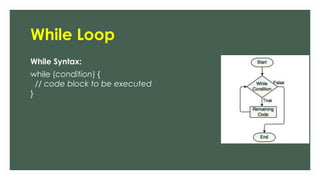
While Loop
While Syntax:
while (condition) {
// code block to be executed
}
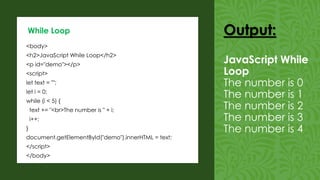
<body>
<h2>JavaScript While Loop</h2>
<p id="demo"></p>
<script>
let text = "";
let i = 0;
while (i < 5) {
text += "<br>The number is " + i;
i++;
}
document.getElementById("demo").innerHTML = text;
</script>
</body>
While Loop Output:
JavaScript While
Loop
The number is 0
The number is 1
The number is 2
The number is 3
The number is 4
Arrays in Javascript
var myArray; // untyped and undefined
myArray = new Array(); // size not needed
myArray[0] = “Hello”; // array size now 1
myArray[1] = 1; // array size now 2
myArray[2]= new Array(); // array element 3 is another array
If an array size is specified, and the number of elements
assigned to the array exceeds the size of the array, the array
grows itself!
29
More on arrays
var myArray = [0,1,2,3]; // declared & initialized
myArray[4]= -1; // now [0,1,2,3,-1]
myArray[6]= 8; // now [0,1,2,3,-1, undefined, 8]
myArray[0]= “hello”; // legal!
30
<body>
<h1>JavaScript Arrays</h1>
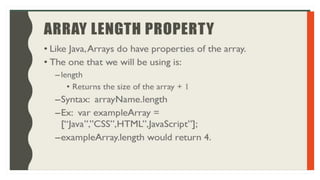
<h2>The length Property</h2>
<p>The length property returns the length of an array:</p>
<p id="demo"></p>
<script>
const fruits = ["Banana", "Orange", "Apple", "Mango"];
let size = fruits.length;
document.getElementById("demo").innerHTML = size;
</script>
</body>
Array
Output:
JavaScript Arrays
The length Property
The length property
returns the length of
an array:
4
THANK YOU

Java Script 2nd lec.pdfsssssssssssssssss

  • 1.
  • 2.
    Table of content JSVariables If Statement Loops Array
  • 5.
  • 6.
  • 7.
  • 8.
  • 9.
  • 10.
  • 11.
  • 13.
    Var In this example,the variable x is declared using var. It has a function scope, so it is accessible both inside and outside the if block
  • 14.
    Let In this example,the variable y is declared using let. It has block scope, which means it is only accessible within the block it's declared in (inside the if block). When we try to access y outside of the block, we get a ReferenceError because y is not defined in that scope.
  • 15.
    Const In this example,the variable z is declared using const. It is also block-scoped like let. However, the difference is that const variables cannot be reassigned once they are assigned a value.
  • 18.
    Conditional Statements • Javascript supports the following conditional control statements: Simple if, If else, If else ladder and Switch 1. Simple if The if statement is the fundamental control statement that allows JavaScript to make decisions and execute statements conditionally. 2. if else statement The if...else statement is a form of control statement that allows JavaScript to execute statements in more controlled way. If the condition evaluates to true then one block of statements will get executed and if the condition is false other block of statements will get executed.
  • 19.
    If-else Statement Syntax if(condition) { // block of code to be executed if the condition is true } else { // block of code to be executed if the condition is false }
  • 20.
    Output: JavaScript if .. else Atime-based greeting: Good evening <body> <h2>JavaScript if .. else</h2> <p>A time-based greeting:</p> <p id="demo"></p> <script> const time = new Date().getHours(); let greeting; if (time < 10) { greeting = "Good morning"; } else if (time < 20) { greeting = "Good day"; } else { greeting = "Good evening";} document.getElementById("demo").innerHTML = greeting; </script> </body> If – Else Ladder
  • 21.
    Conditional Statements 3. Switchstatement The basic syntax of the switch statement is to give an expression to evaluate and several different statements to execute based on the value of the expression. The interpreter checks each case against the value of the expression until a match is found. If nothing matches, a default condition will be used.
  • 22.
    Switch Syntax switch(expression) { casex: // code block break; case y: // code block break; default: // code block }
  • 23.
    Output: Sunday Switch • switch (newDate().getDay()) { case 0: day = "Sunday"; break; case 1: day = "Monday"; break; case 2: day = "Tuesday"; break; case 3: day = "Wednesday"; break; case 4: day = "Thursday"; break; case 5: day = "Friday"; break; case 6: day = "Saturday"; }
  • 24.
    For Loop • Forloop is a compact form of looping. It includes three important parts: 1. Loop Initialization 2. Test Condition 3. Iteration • All these three parts come in a single line separated by semicolons(;).
  • 25.
  • 26.
    Output: JavaScript For Loop The numberis 0 The number is 1 The number is 2 The number is 3 The number is 4 For <body> <h2>JavaScript For Loop</h2> <p id="demo"></p> <script> let text = ""; for (let i = 0; i < 5; i++) { text += "The number is " + i + "<br>"; } document.getElementById("demo").innerHTML = text; </script>
  • 27.
    While Loop While Syntax: while(condition) { // code block to be executed }
  • 28.
    <body> <h2>JavaScript While Loop</h2> <pid="demo"></p> <script> let text = ""; let i = 0; while (i < 5) { text += "<br>The number is " + i; i++; } document.getElementById("demo").innerHTML = text; </script> </body> While Loop Output: JavaScript While Loop The number is 0 The number is 1 The number is 2 The number is 3 The number is 4
  • 29.
    Arrays in Javascript varmyArray; // untyped and undefined myArray = new Array(); // size not needed myArray[0] = “Hello”; // array size now 1 myArray[1] = 1; // array size now 2 myArray[2]= new Array(); // array element 3 is another array If an array size is specified, and the number of elements assigned to the array exceeds the size of the array, the array grows itself! 29
  • 30.
    More on arrays varmyArray = [0,1,2,3]; // declared & initialized myArray[4]= -1; // now [0,1,2,3,-1] myArray[6]= 8; // now [0,1,2,3,-1, undefined, 8] myArray[0]= “hello”; // legal! 30
  • 32.
    <body> <h1>JavaScript Arrays</h1> <h2>The lengthProperty</h2> <p>The length property returns the length of an array:</p> <p id="demo"></p> <script> const fruits = ["Banana", "Orange", "Apple", "Mango"]; let size = fruits.length; document.getElementById("demo").innerHTML = size; </script> </body> Array Output: JavaScript Arrays The length Property The length property returns the length of an array: 4
  • 38.