SPRUCE
cRIsp:
Crowdsourcing
Representation
Information
to Support
Preservation
Andrew N. Jackson, Maureen Pennock and Paul Wheatley
Digital Preservation:
How are we doing?
?
Issues with the current approach
 Duplication of effort
 Little or no articulation of requirements
 Insufficient awareness of existing solutions
 Poorly targeted effort
 Insufficient engagement with practitioners
 Theoretical solutions without a focus on concrete problems
 Creation of tools or resources that are difficult to
maintain and/or reuse
 Bloatware/monolithic solutions
 Poor technology choices
 Half hearted “Open source”, that requires massive effort just to
build and is difficult to contribute to.
Challenges that history has shown are difficult
to solve as individuals or even individual
institutions
Digital preservation costing initiatives
 LIFE 1, 2 and 3. Projects to explore digital preservation costing, and develop costing models.
 Cost Model for Digital Preservation (CMDP): Project at the Royal Danish Library and the
Danish National Archives to develop a new cost model. Currently covers Planning, Migrations
and Ingest
 Keeping Research Data Safe 1 and 2 (KRDS):Cost model and benefits analysis for
preserving research data
 Presto Prime cost model for digital storage
 Cost Estimation Toolkit (CET): Data centre costing model and toolkit, from NASA Goddard
 Cost Model for Small Scale Automated Digital Preservation Archives (Strodl and Rauber)
 APARSEN Project activity focused on digital preservation costing
 EPRSC and JISC study on Cost analysis of cloud computing for research
 Cost forecasting model for new digitization projects (Excel and web tool under development)
(Karim Boughida, Martha Whittaker, Linda Colet, Dan Chudnov)
 DP4lib business and cost model for a digital preservation service
 DANS Costs of Digital Archiving Volume 2 Project, focusing on preservation and
dissemination of research datasets
 Blue Ribbon Task Force on Sustainable Digital Preservation and Access
 Economic Sustainability Reference Model
 ENSURE Project - Enabling kNowledge Sustainability Usability and Recovery for Economic
value
 http://wiki.opf-labs.org/display/CDP/Home
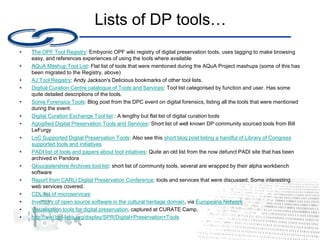
Lists of DP tools…
• 
The OPF Tool Registry: Embyonic OPF wiki registry of digital preservation tools, uses tagging to make browsing
easy, and references experiences of using the tools where available
• 
AQuA Mashup Tool List: Flat list of tools that were mentioned during the AQuA Project mashups (some of this has
been migrated to the Registry, above)
• AJ Tool Registry: Andy Jackson's Delicious bookmarks of other tool lists.
• Digitial Curation Centre catalogue of Tools and Services: Tool list categorised by function and user. Has some
quite detailed descriptions of the tools.
• Some Forensics Tools: Blog post from the DPC event on digital forensics, listing all the tools that were mentioned
during the event.
• Digital Curation Exchange Tool list : A lengthy but flat list of digital curation tools
• Agogified Digital Preservation Tools and Services: Short list of well known DP community sourced tools from Bill
LeFurgy
• LoC Supported Digital Preservation Tools: Also see this short blog post listing a handful of Library of Congress
supported tools and initiatives
• PADI list of tools and papers about tool intiatives: Quite an old list from the now defunct PADI site that has been
archived in Pandora
• Gloucestershire Archives tool list: short list of community tools, several are wrapped by their alpha workbench
software
• Report from CARLI Digital Preservation Conference: tools and services that were discussed. Some interesting
web services covered.
• CDL list of microservices
• Inventory of open source software in the cultural heritage domain, via Europeana Network
• Visualisation tools for digital preservation, captured at CURATE Camp.
• http://wiki.opf-labs.org/display/SPR/Digital+Preservation+Tools
Crowdsourcing
 Growing in use by memory organisations
 Wiki, Q&A, gamification
 Leverages the “public crowd”, eg:
 UK SoundMap (BL)
 TROVE (NLA)
 Digital Koot (NL Finland)
 Leverage the “expert crowd”, eg:
 ChemSpider
! Dependent on critical mass of contributors
Community approaches
 Exploit existing work more effectively
 Build on existing initiatives
 Contribute to open source projects where possible
 The default solution to a newly encountered DP problem is *not*
a software engineering project
 Share and communicate
 Not just new projects or completed solutions, but also
requirements, or even solution failures
 Agile events work very well! SPRUCE Mashups, DEV8d,
CURATE Camp
 Pool knowledge in sensible locations, don’t duplicate
Examples of online community driven
approaches:
bit.ly/spruce-collaborate
 DP Questions and Answers
 Libraries and Information Science Stack Exchange
 Capture and share challenges and requirements
 OPF Wiki: Datasets, Issues and Solutions
What makes them a success?
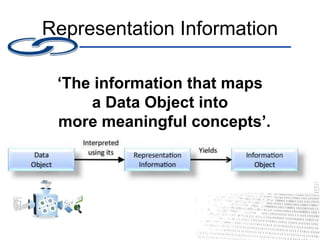
Representation Information
‘The information that maps
a Data Object into
more meaningful concepts’.
RI examples
• Descriptive Representation Information
– Describes how to interpret a data object, eg
a file format specification
• Instantiated Representation Information
– A component of a technical environment that
supports interpretation of said object, eg
software or hardware platform
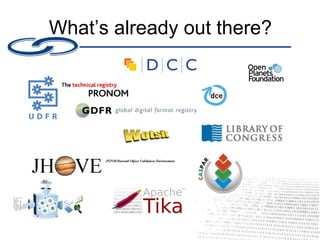
What’s already out there?
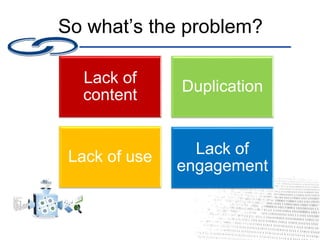
So what’s the problem?
Lack of
content
Duplication
Lack of use Lack of
engagement
And the solution?
SPRUCE
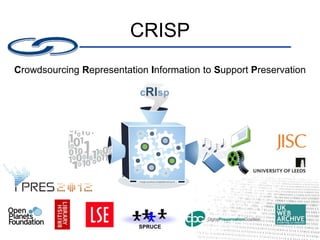
CRISP
Crowdsourcing Representation Information to Support Preservation
The CRISP objective:
GET
THE
DATA
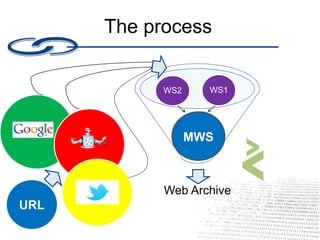
The process
Web Archive
Master
SS
WS2 WS1
Bookmar
klet
URL
MWS
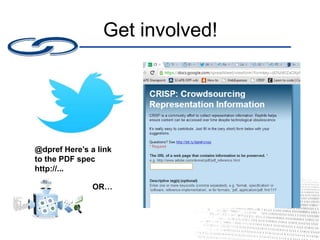
Get involved!
@dpref Here’s a link
to the PDF spec
http://...
OR…
Other important roles
 Help curate the spreadsheet
 Archive the links in the
spreadsheet
 Spread the word!
@dpref | bit.ly/dpref-crisp
Over to you…

Crowdsourcing Representation Information to Support Preservation: CRISP

  • 1.
  • 2.
  • 3.
    Issues with thecurrent approach  Duplication of effort  Little or no articulation of requirements  Insufficient awareness of existing solutions  Poorly targeted effort  Insufficient engagement with practitioners  Theoretical solutions without a focus on concrete problems  Creation of tools or resources that are difficult to maintain and/or reuse  Bloatware/monolithic solutions  Poor technology choices  Half hearted “Open source”, that requires massive effort just to build and is difficult to contribute to. Challenges that history has shown are difficult to solve as individuals or even individual institutions
  • 4.
    Digital preservation costinginitiatives  LIFE 1, 2 and 3. Projects to explore digital preservation costing, and develop costing models.  Cost Model for Digital Preservation (CMDP): Project at the Royal Danish Library and the Danish National Archives to develop a new cost model. Currently covers Planning, Migrations and Ingest  Keeping Research Data Safe 1 and 2 (KRDS):Cost model and benefits analysis for preserving research data  Presto Prime cost model for digital storage  Cost Estimation Toolkit (CET): Data centre costing model and toolkit, from NASA Goddard  Cost Model for Small Scale Automated Digital Preservation Archives (Strodl and Rauber)  APARSEN Project activity focused on digital preservation costing  EPRSC and JISC study on Cost analysis of cloud computing for research  Cost forecasting model for new digitization projects (Excel and web tool under development) (Karim Boughida, Martha Whittaker, Linda Colet, Dan Chudnov)  DP4lib business and cost model for a digital preservation service  DANS Costs of Digital Archiving Volume 2 Project, focusing on preservation and dissemination of research datasets  Blue Ribbon Task Force on Sustainable Digital Preservation and Access  Economic Sustainability Reference Model  ENSURE Project - Enabling kNowledge Sustainability Usability and Recovery for Economic value  http://wiki.opf-labs.org/display/CDP/Home
  • 5.
    Lists of DPtools… •  The OPF Tool Registry: Embyonic OPF wiki registry of digital preservation tools, uses tagging to make browsing easy, and references experiences of using the tools where available •  AQuA Mashup Tool List: Flat list of tools that were mentioned during the AQuA Project mashups (some of this has been migrated to the Registry, above) • AJ Tool Registry: Andy Jackson's Delicious bookmarks of other tool lists. • Digitial Curation Centre catalogue of Tools and Services: Tool list categorised by function and user. Has some quite detailed descriptions of the tools. • Some Forensics Tools: Blog post from the DPC event on digital forensics, listing all the tools that were mentioned during the event. • Digital Curation Exchange Tool list : A lengthy but flat list of digital curation tools • Agogified Digital Preservation Tools and Services: Short list of well known DP community sourced tools from Bill LeFurgy • LoC Supported Digital Preservation Tools: Also see this short blog post listing a handful of Library of Congress supported tools and initiatives • PADI list of tools and papers about tool intiatives: Quite an old list from the now defunct PADI site that has been archived in Pandora • Gloucestershire Archives tool list: short list of community tools, several are wrapped by their alpha workbench software • Report from CARLI Digital Preservation Conference: tools and services that were discussed. Some interesting web services covered. • CDL list of microservices • Inventory of open source software in the cultural heritage domain, via Europeana Network • Visualisation tools for digital preservation, captured at CURATE Camp. • http://wiki.opf-labs.org/display/SPR/Digital+Preservation+Tools
  • 6.
    Crowdsourcing  Growing inuse by memory organisations  Wiki, Q&A, gamification  Leverages the “public crowd”, eg:  UK SoundMap (BL)  TROVE (NLA)  Digital Koot (NL Finland)  Leverage the “expert crowd”, eg:  ChemSpider ! Dependent on critical mass of contributors
  • 7.
    Community approaches  Exploitexisting work more effectively  Build on existing initiatives  Contribute to open source projects where possible  The default solution to a newly encountered DP problem is *not* a software engineering project  Share and communicate  Not just new projects or completed solutions, but also requirements, or even solution failures  Agile events work very well! SPRUCE Mashups, DEV8d, CURATE Camp  Pool knowledge in sensible locations, don’t duplicate
  • 8.
    Examples of onlinecommunity driven approaches: bit.ly/spruce-collaborate  DP Questions and Answers  Libraries and Information Science Stack Exchange  Capture and share challenges and requirements  OPF Wiki: Datasets, Issues and Solutions
  • 9.
    What makes thema success?
  • 10.
    Representation Information ‘The informationthat maps a Data Object into more meaningful concepts’.
  • 11.
    RI examples • DescriptiveRepresentation Information – Describes how to interpret a data object, eg a file format specification • Instantiated Representation Information – A component of a technical environment that supports interpretation of said object, eg software or hardware platform
  • 12.
  • 13.
    So what’s theproblem? Lack of content Duplication Lack of use Lack of engagement
  • 14.
  • 15.
  • 16.
  • 17.
    The process Web Archive Master SS WS2WS1 Bookmar klet URL MWS
  • 18.
    Get involved! @dpref Here’sa link to the PDF spec http://... OR…
  • 19.
    Other important roles Help curate the spreadsheet  Archive the links in the spreadsheet  Spread the word!
  • 20.