Creating Visual Effects and Animation
Objectives
Assess responsive design
Construct a multipart media query
Test layouts with an emulator
Add a column with a media query
Create a widescreen layout
Create responsive navigation
2HTML5 and CSS3 – Illustrated, 2nd
Edition
Objectives (continued)
Implement adaptive content
Use progressive enhancement
3HTML5 and CSS3 – Illustrated, 2nd
Edition
Add Generated Content
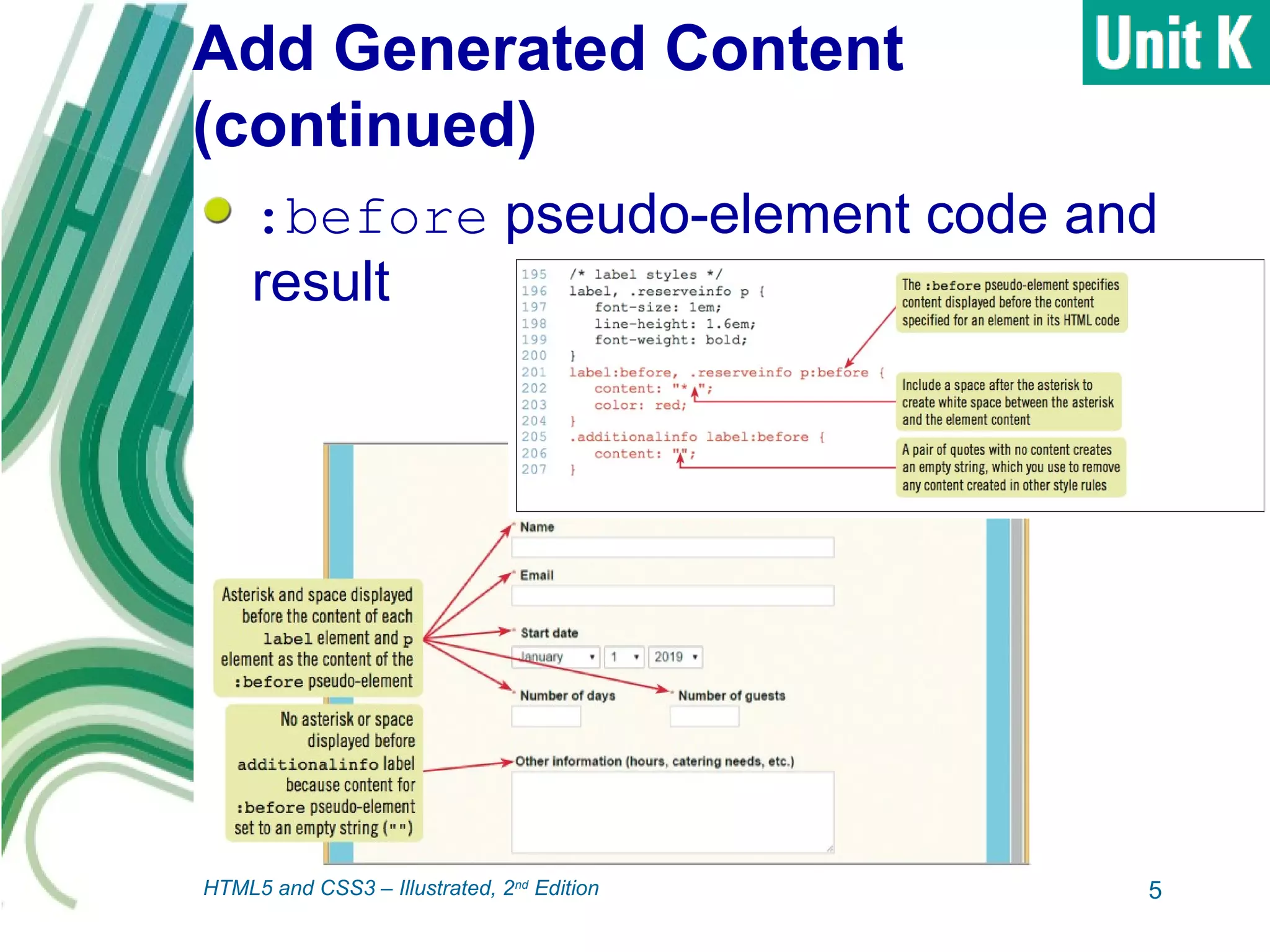
:before and :after pseudo-
elements: enable you to insert content
into web page using style rules
 Result known as generated content
 Can be used for text, pictures, or other
content
 Must specify value for the content
property
• Can be text or path to an image
4HTML5 and CSS3 – Illustrated, 2nd
Edition
Add Generated Content
(continued)
:before pseudo-element code and
result
5HTML5 and CSS3 – Illustrated, 2nd
Edition
Add Visual Form Feedback
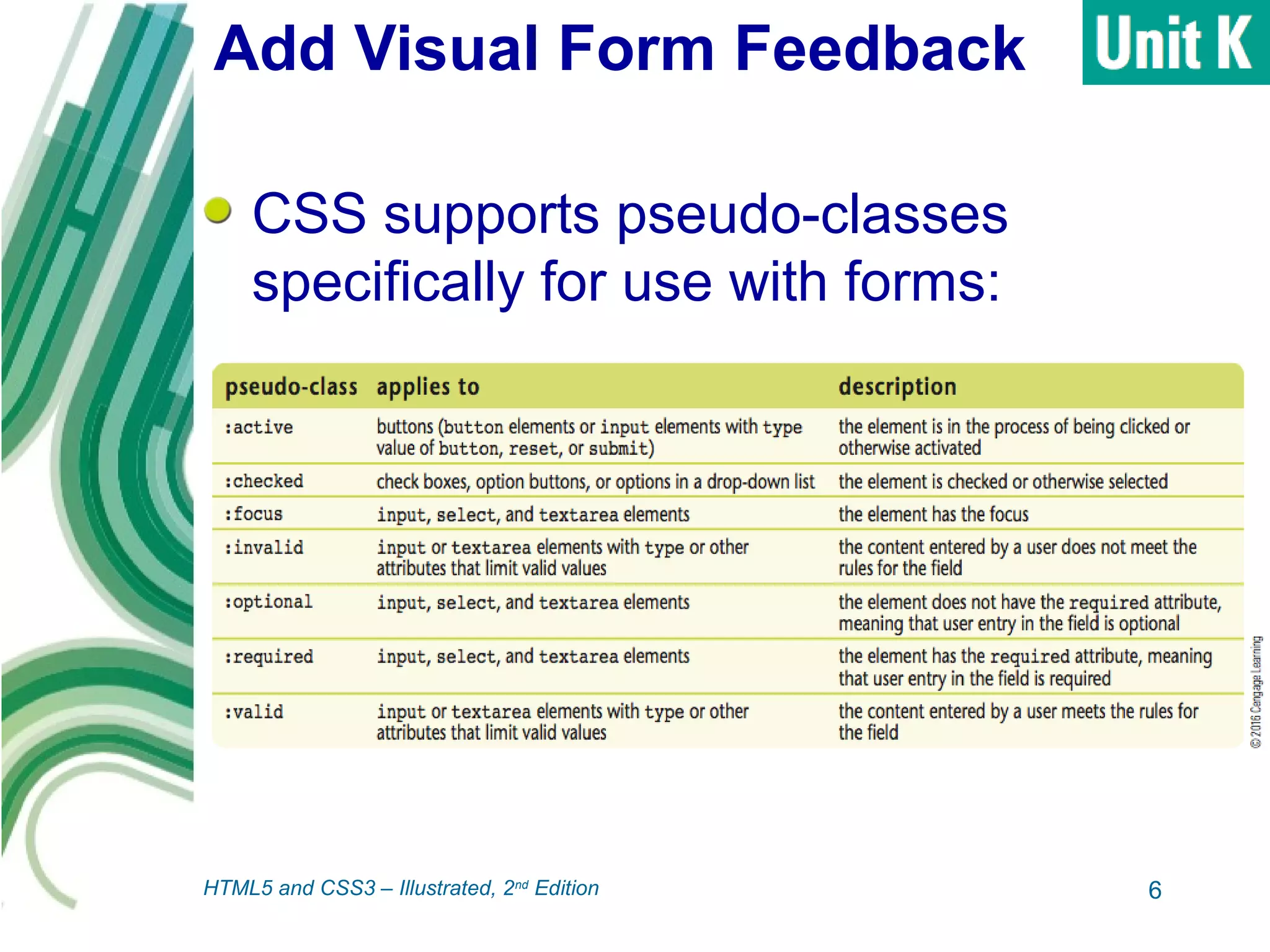
CSS supports pseudo-classes
specifically for use with forms:
6HTML5 and CSS3 – Illustrated, 2nd
Edition
Add Visual Form Feedback
(continued)
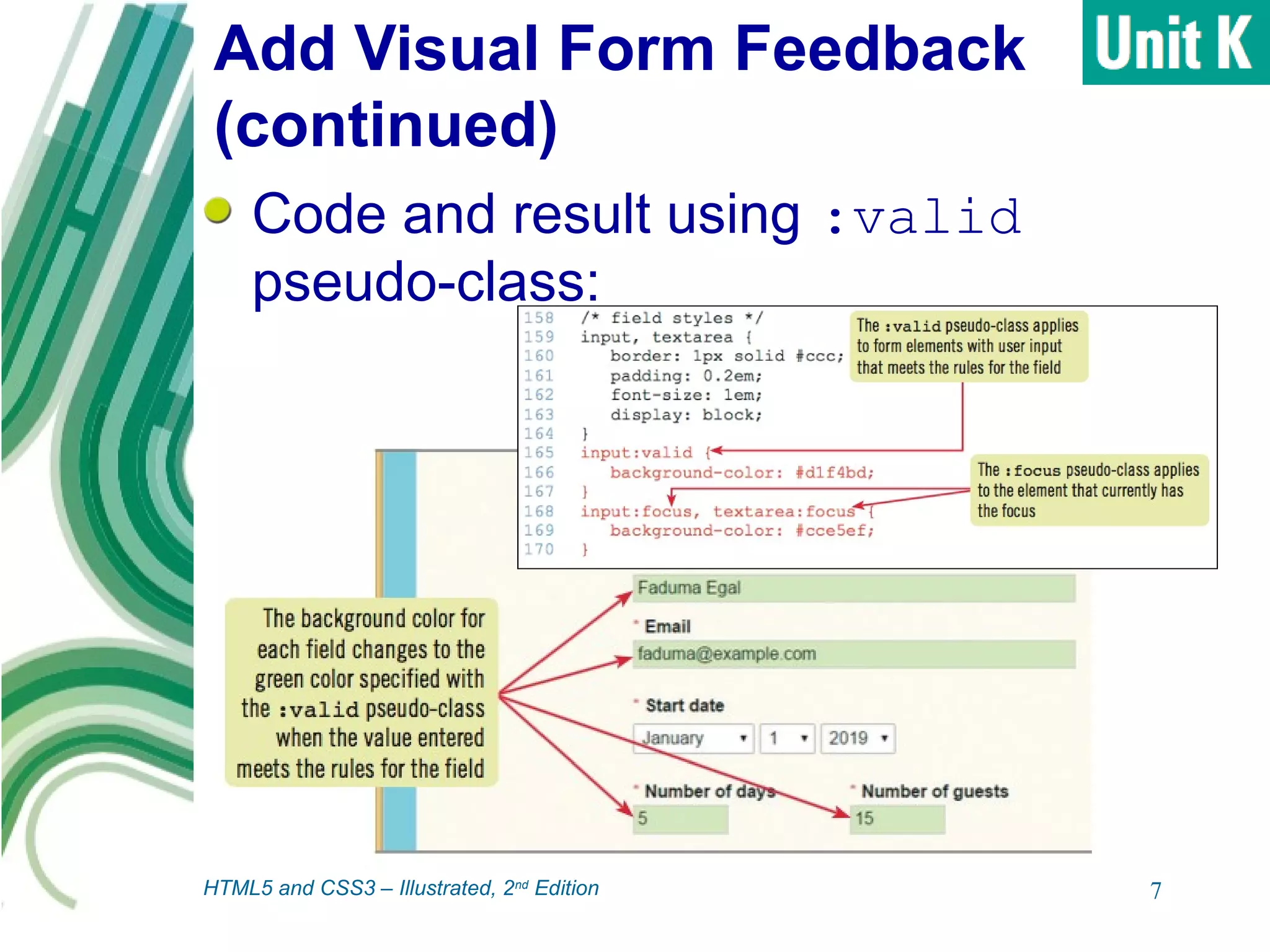
Code and result using :valid
pseudo-class:
7HTML5 and CSS3 – Illustrated, 2nd
Edition
Add Visual Form Feedback
(continued)
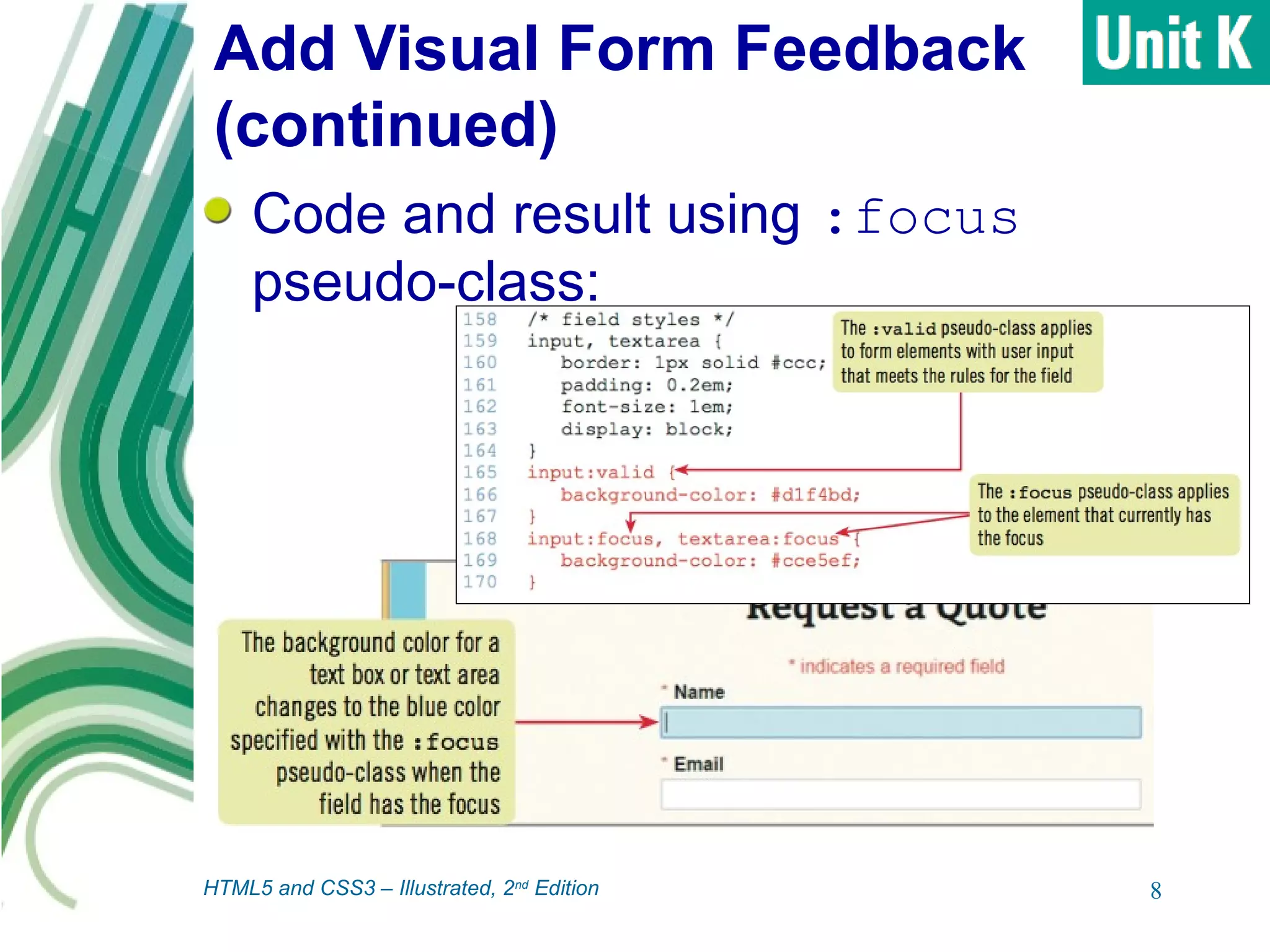
Code and result using :focus
pseudo-class:
8HTML5 and CSS3 – Illustrated, 2nd
Edition
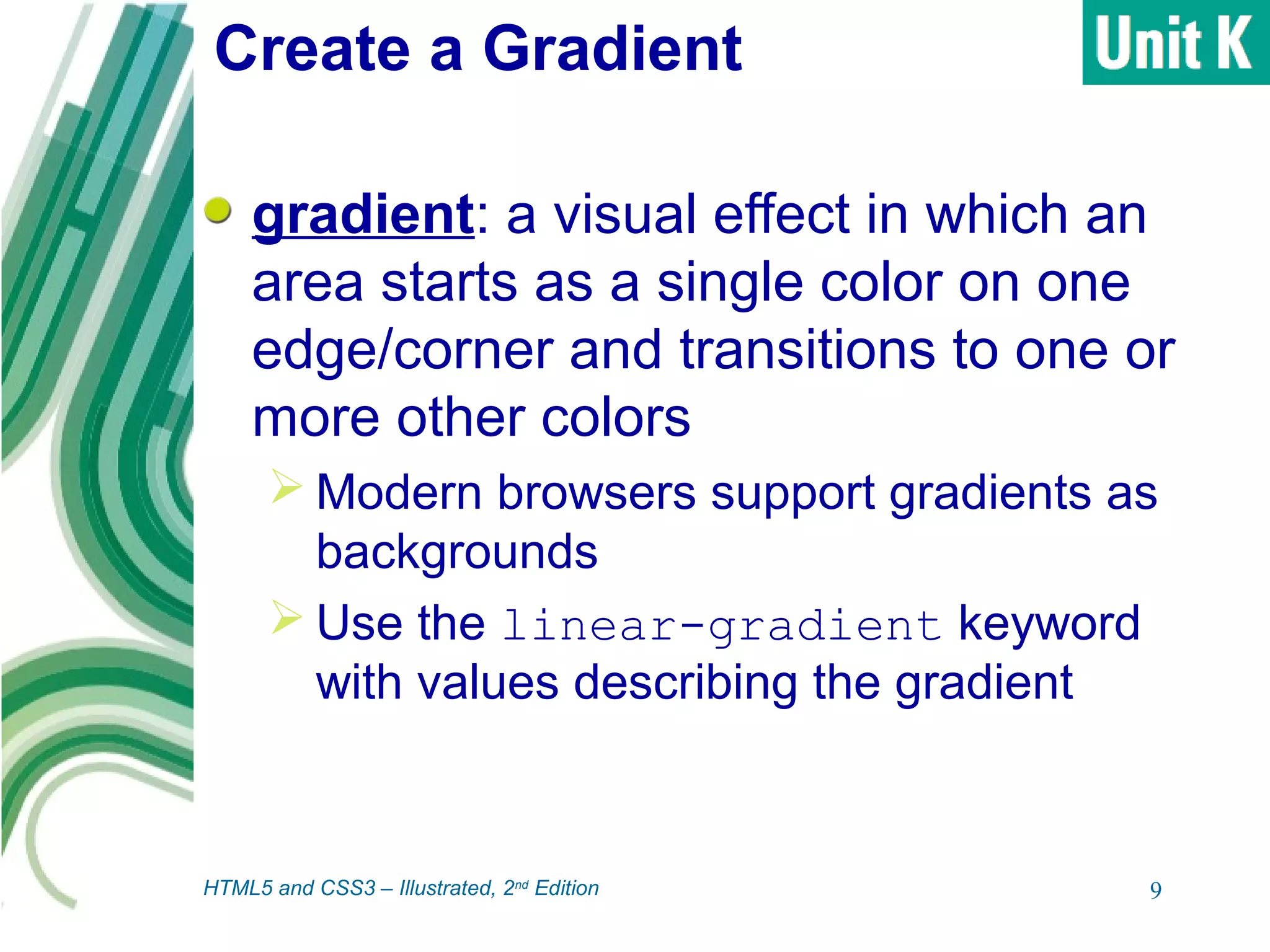
Create a Gradient
gradient: a visual effect in which an
area starts as a single color on one
edge/corner and transitions to one or
more other colors
 Modern browsers support gradients as
backgrounds
 Use the linear-gradient keyword
with values describing the gradient
9HTML5 and CSS3 – Illustrated, 2nd
Edition
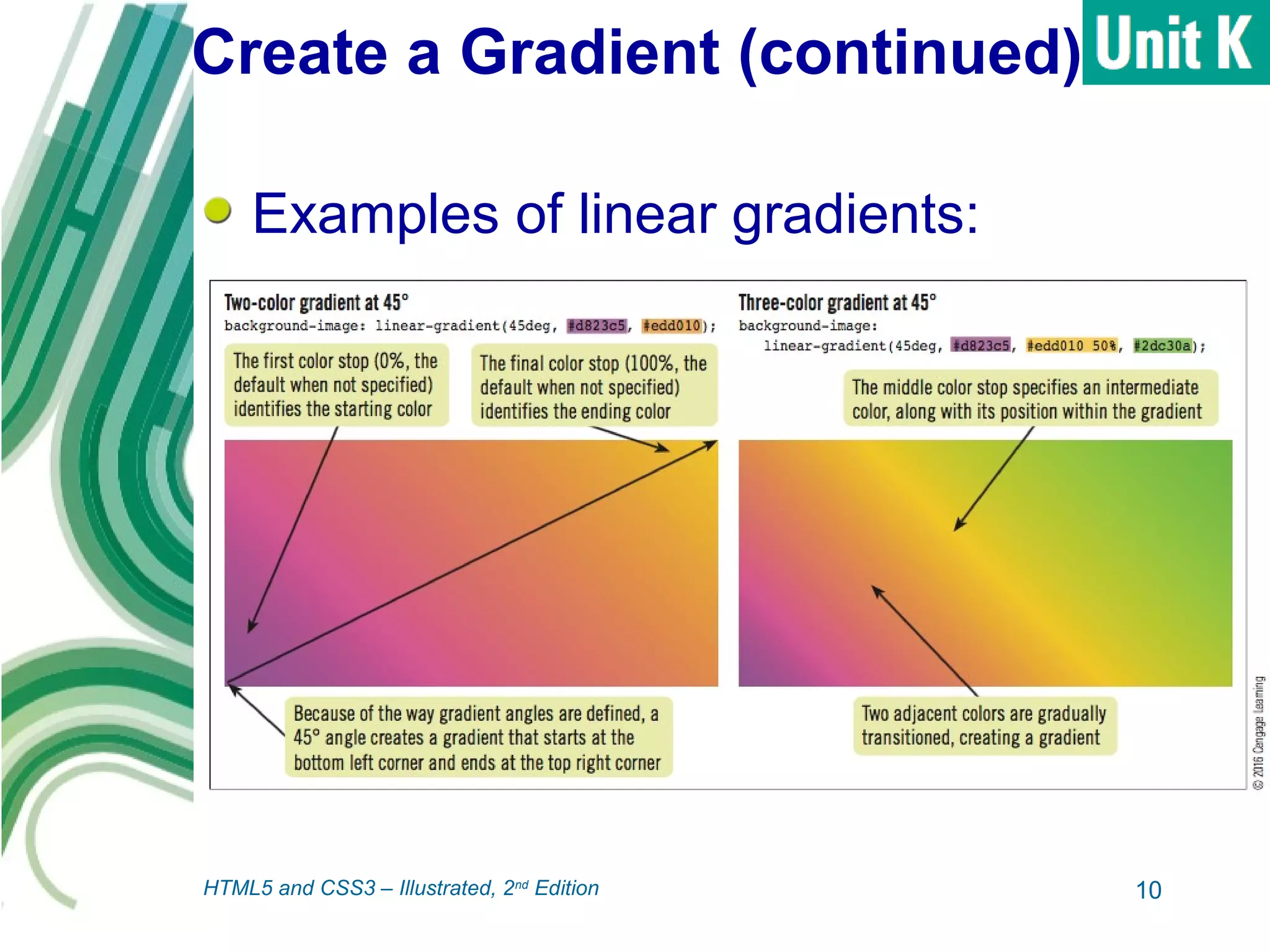
Create a Gradient (continued)
Examples of linear gradients:
10HTML5 and CSS3 – Illustrated, 2nd
Edition
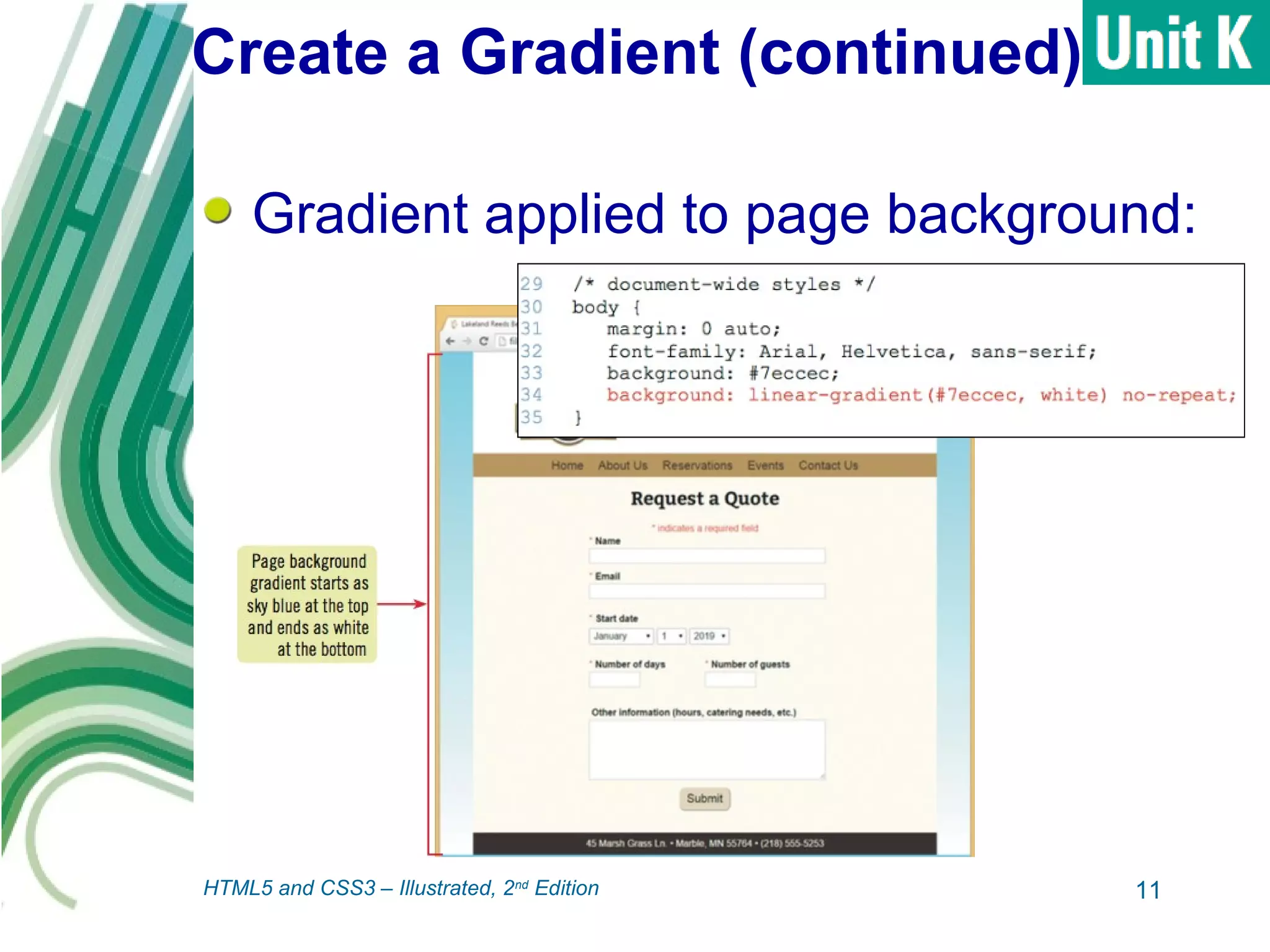
Create a Gradient (continued)
Gradient applied to page background:
11HTML5 and CSS3 – Illustrated, 2nd
Edition
Create a CSS Shape
Can use CSS properties to change
shapes of HTML elements
 Enhance visual design
 Replace shapes that would otherwise
require an image file, reducing page size
12HTML5 and CSS3 – Illustrated, 2nd
Edition
Create a CSS Shape
(continued)
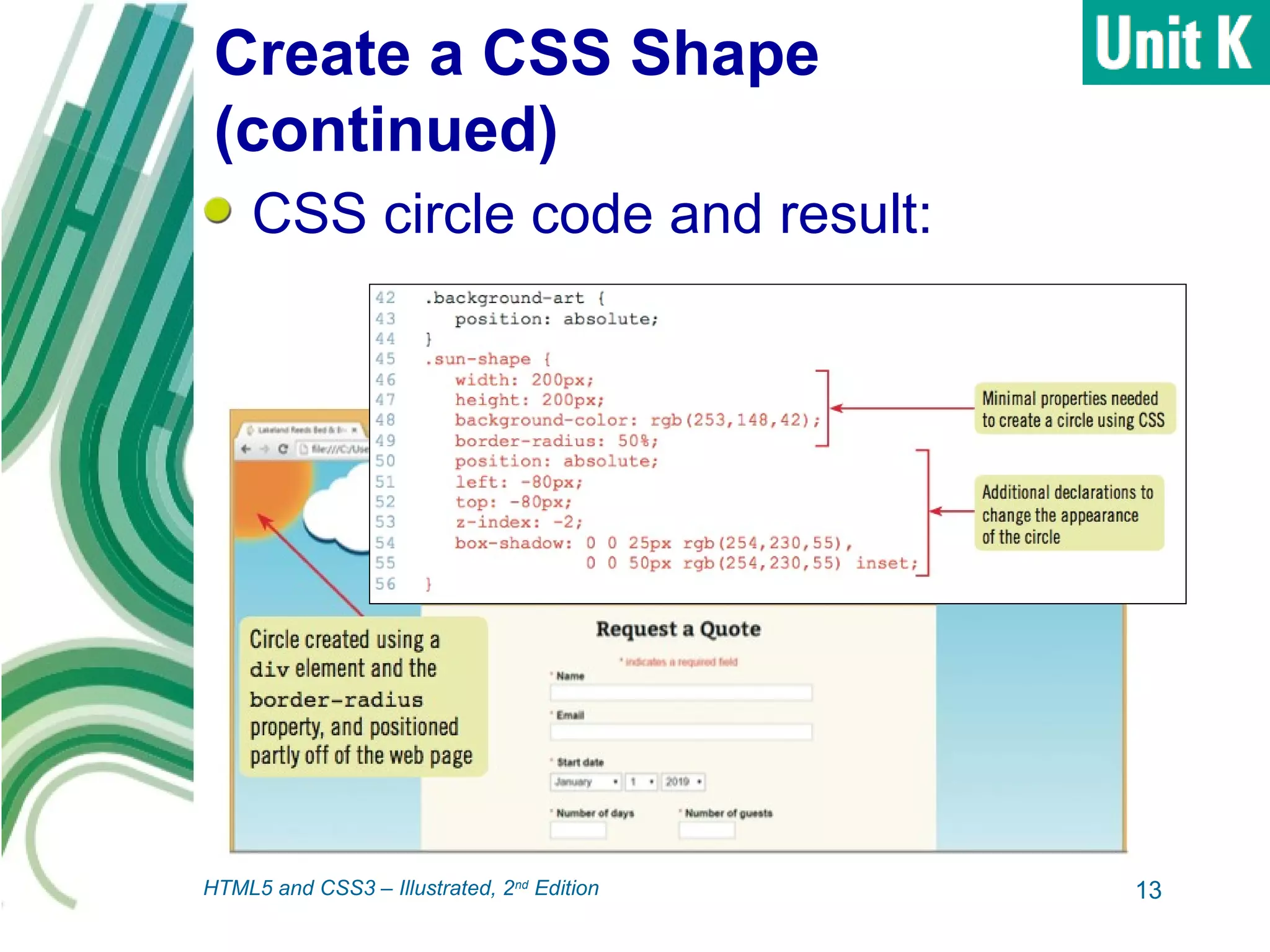
CSS circle code and result:
13HTML5 and CSS3 – Illustrated, 2nd
Edition
Apply Styles Based on Feature
Detection
Newer styles not recognized by older
browsers (like IE8)
Graceful degradation: when a site
uses newer styles in modern browsers
while displaying useable layout and all
page content in older browsers
 Modernizr is a free script library that
helps with this process
 Feature detection: process of detecting
which properties a browser supports
14HTML5 and CSS3 – Illustrated, 2nd
Edition
Apply Styles Based on Feature
Detection (continued)
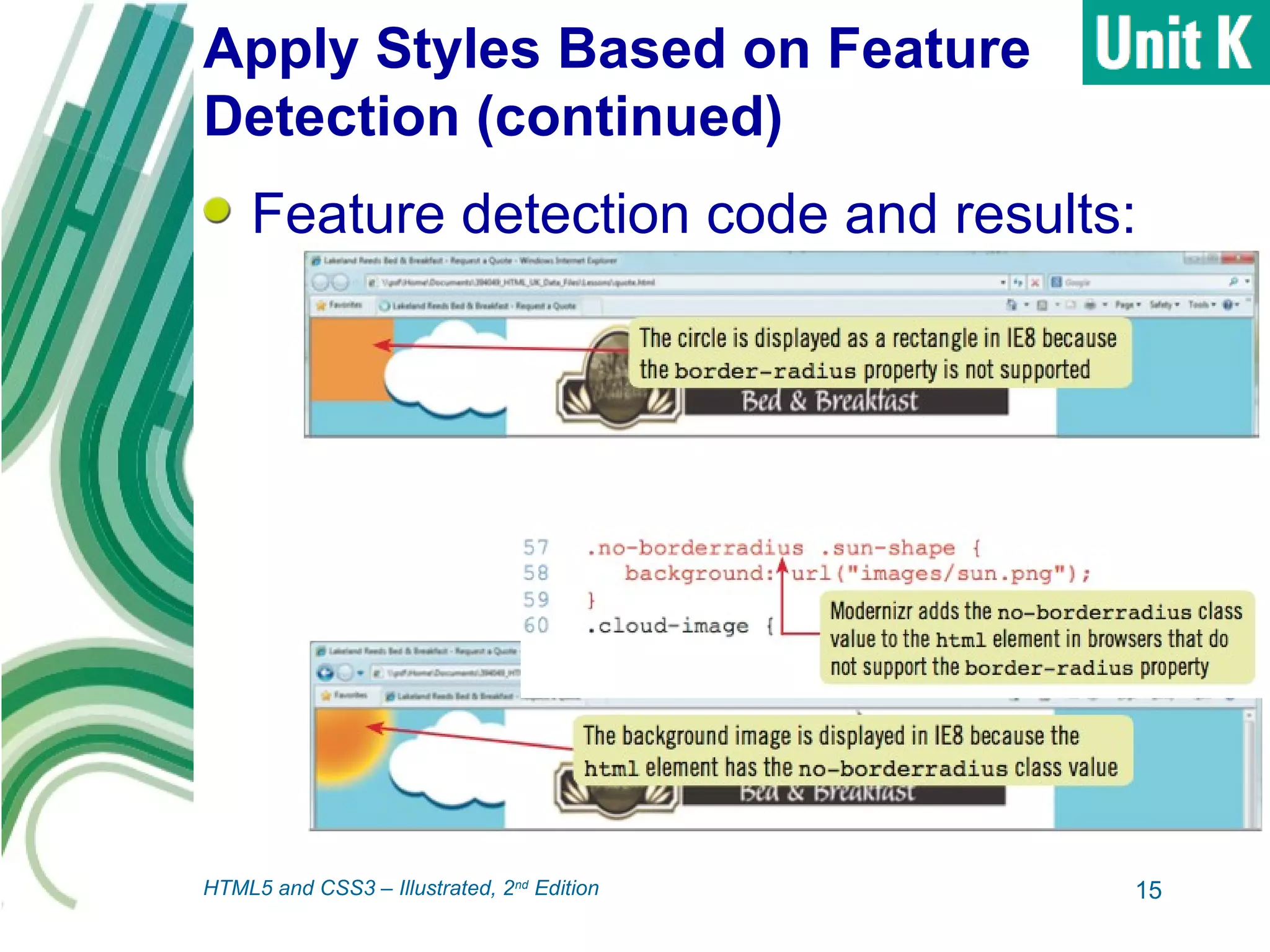
Feature detection code and results:
15HTML5 and CSS3 – Illustrated, 2nd
Edition
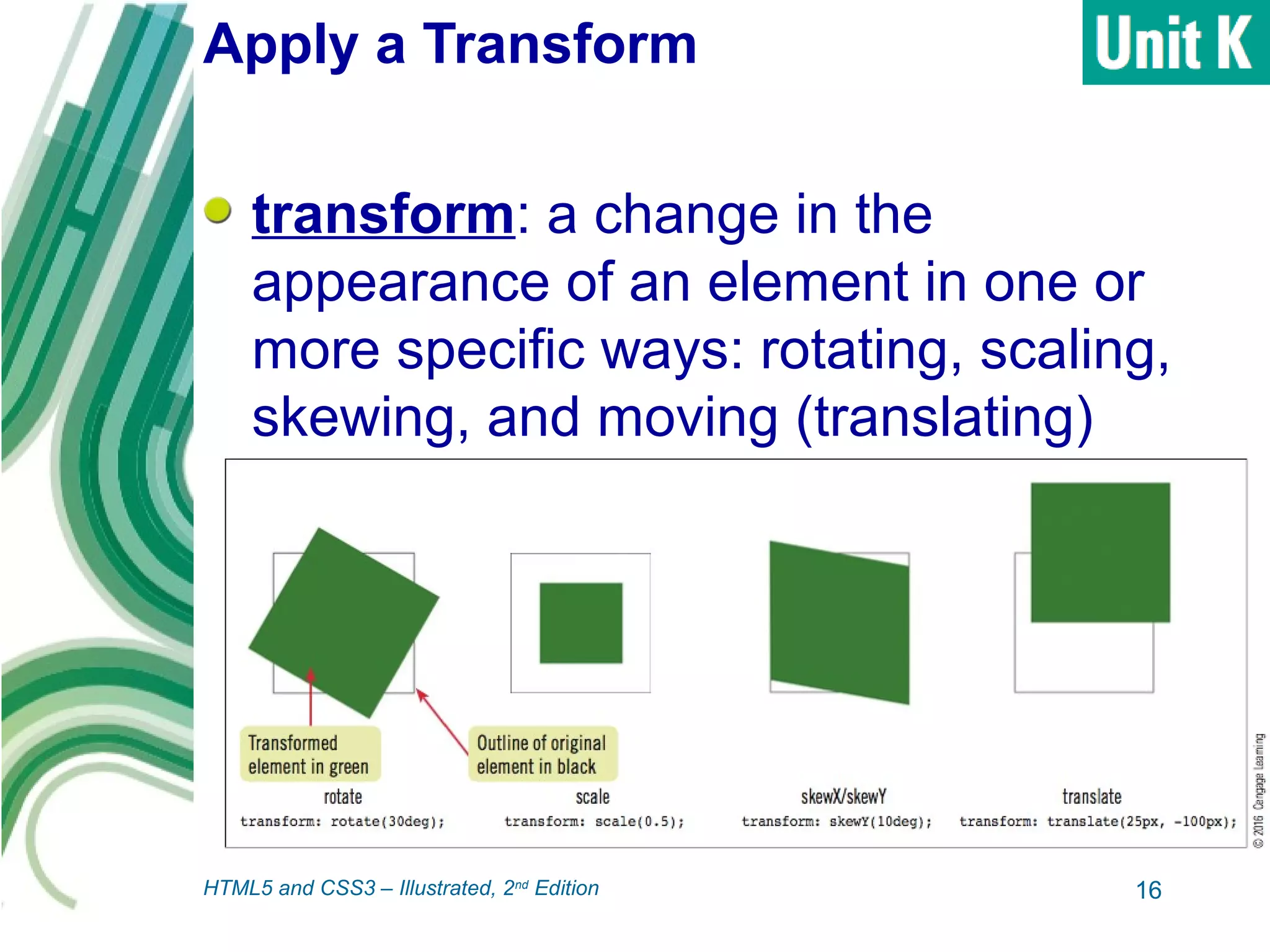
Apply a Transform
transform: a change in the
appearance of an element in one or
more specific ways: rotating, scaling,
skewing, and moving (translating)
16HTML5 and CSS3 – Illustrated, 2nd
Edition
Apply a Transform (continued)
Implemented in modern browsers with
browser prefixes
 Words or abbreviations added to start of
property name and specific one or more
browsers or rendering engines
Create declaration using unprefixed
form, then precede with declarations
using all browser prefixes
17HTML5 and CSS3 – Illustrated, 2nd
Edition
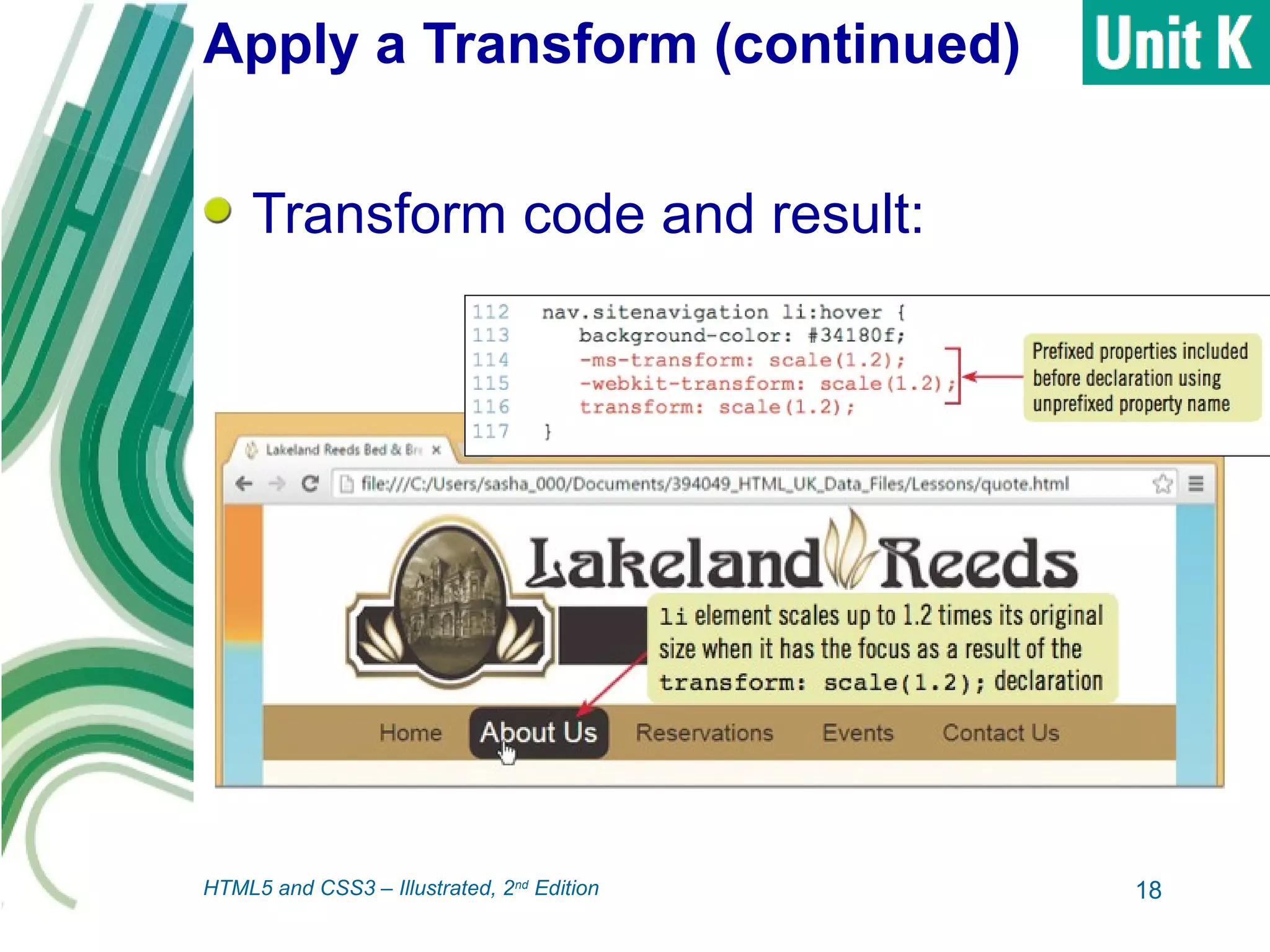
Apply a Transform (continued)
Transform code and result:
18HTML5 and CSS3 – Illustrated, 2nd
Edition
Create a Transition
transitions: CSS features that
gradually apply changes to properties
in response to user actions
 Supported by modern browsers
 Create simple animations
 Example: create transform to rotate an
element, then use transition to spin
element into position over several
seconds
19HTML5 and CSS3 – Illustrated, 2nd
Edition
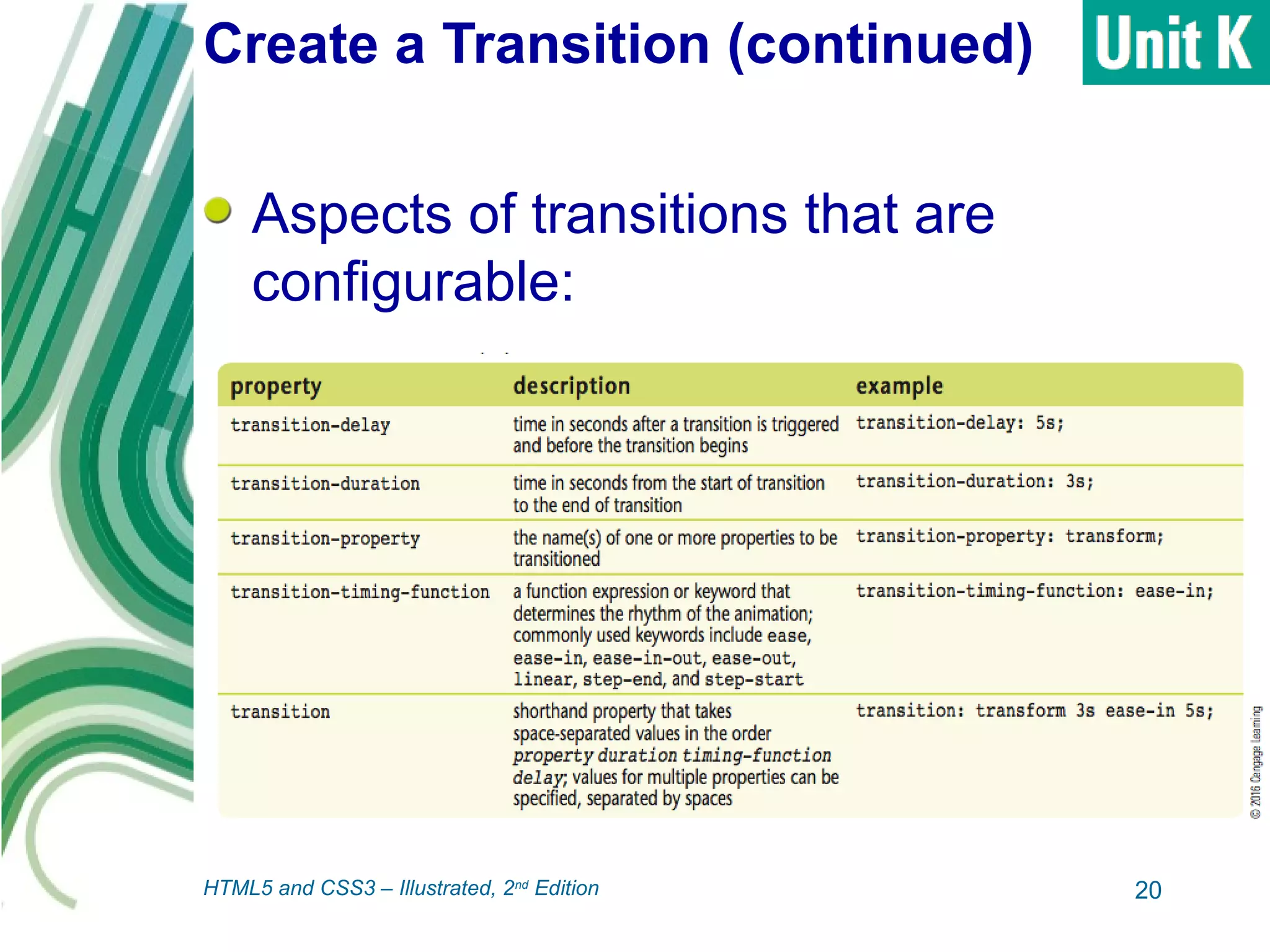
Create a Transition (continued)
Aspects of transitions that are
configurable:
20HTML5 and CSS3 – Illustrated, 2nd
Edition
Create a Transition (continued)
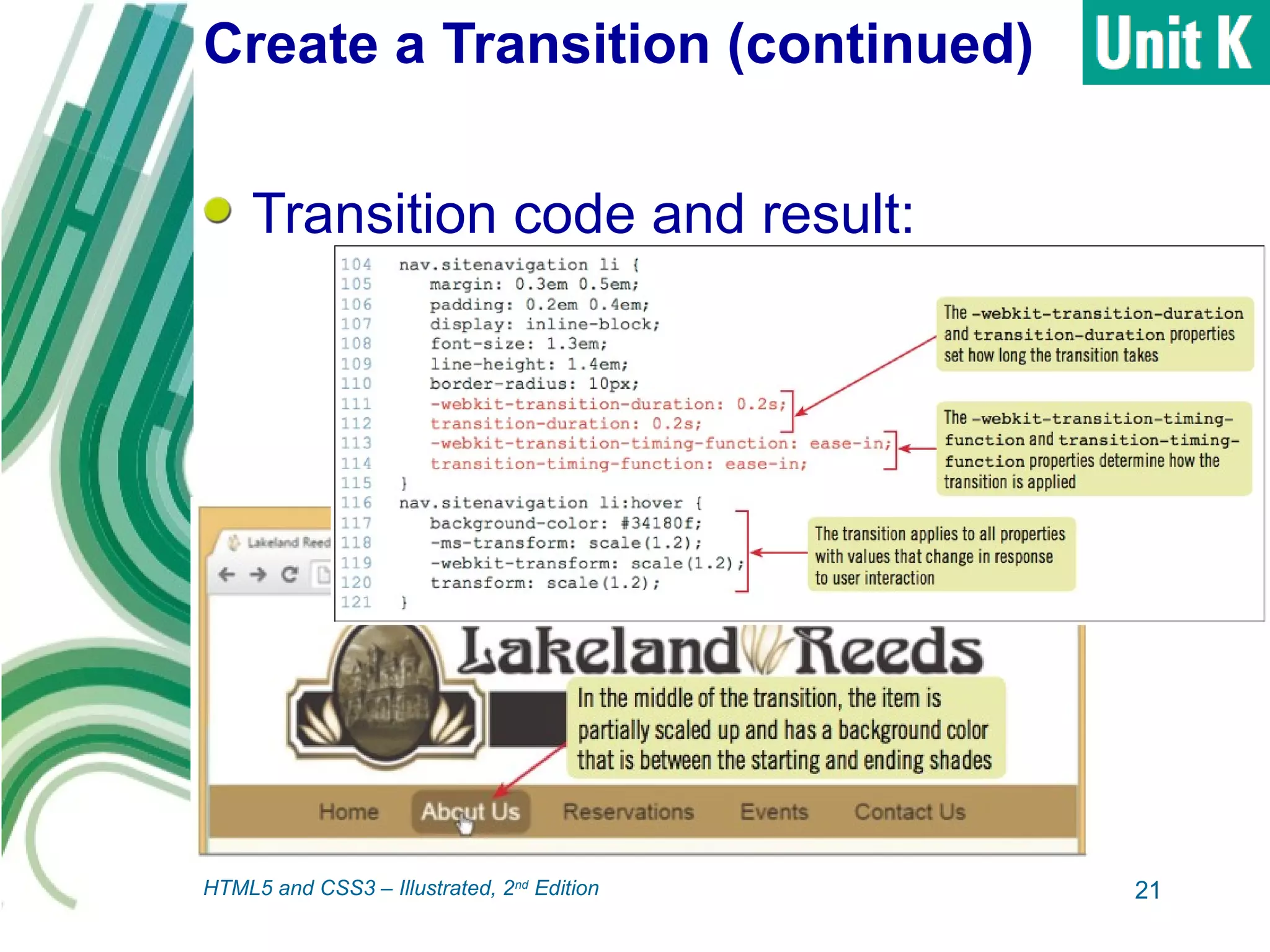
Transition code and result:
21HTML5 and CSS3 – Illustrated, 2nd
Edition
Animate Content
keyframe animation: an animation
created using animation properties
and the @keyframes rule
 Supported by modern browsers
 Enable you to control what animation
looks like at various points between start
and end
 @keyframes rule: name for rule,
followed by nested rules in braces, with
percentage selectors
22HTML5 and CSS3 – Illustrated, 2nd
Edition
Animate Content (continued)
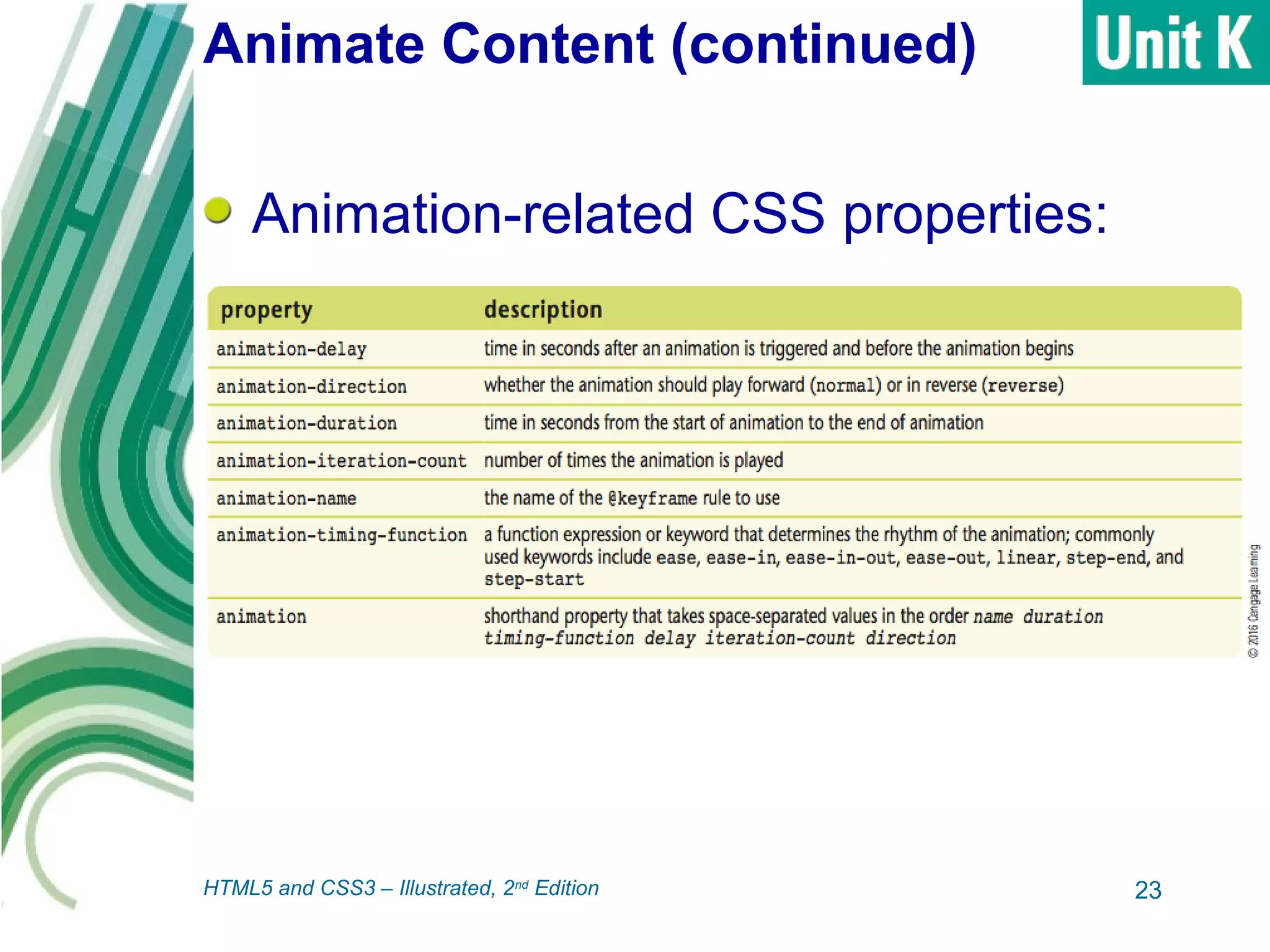
Animation-related CSS properties:
23HTML5 and CSS3 – Illustrated, 2nd
Edition
Animate Content (continued)
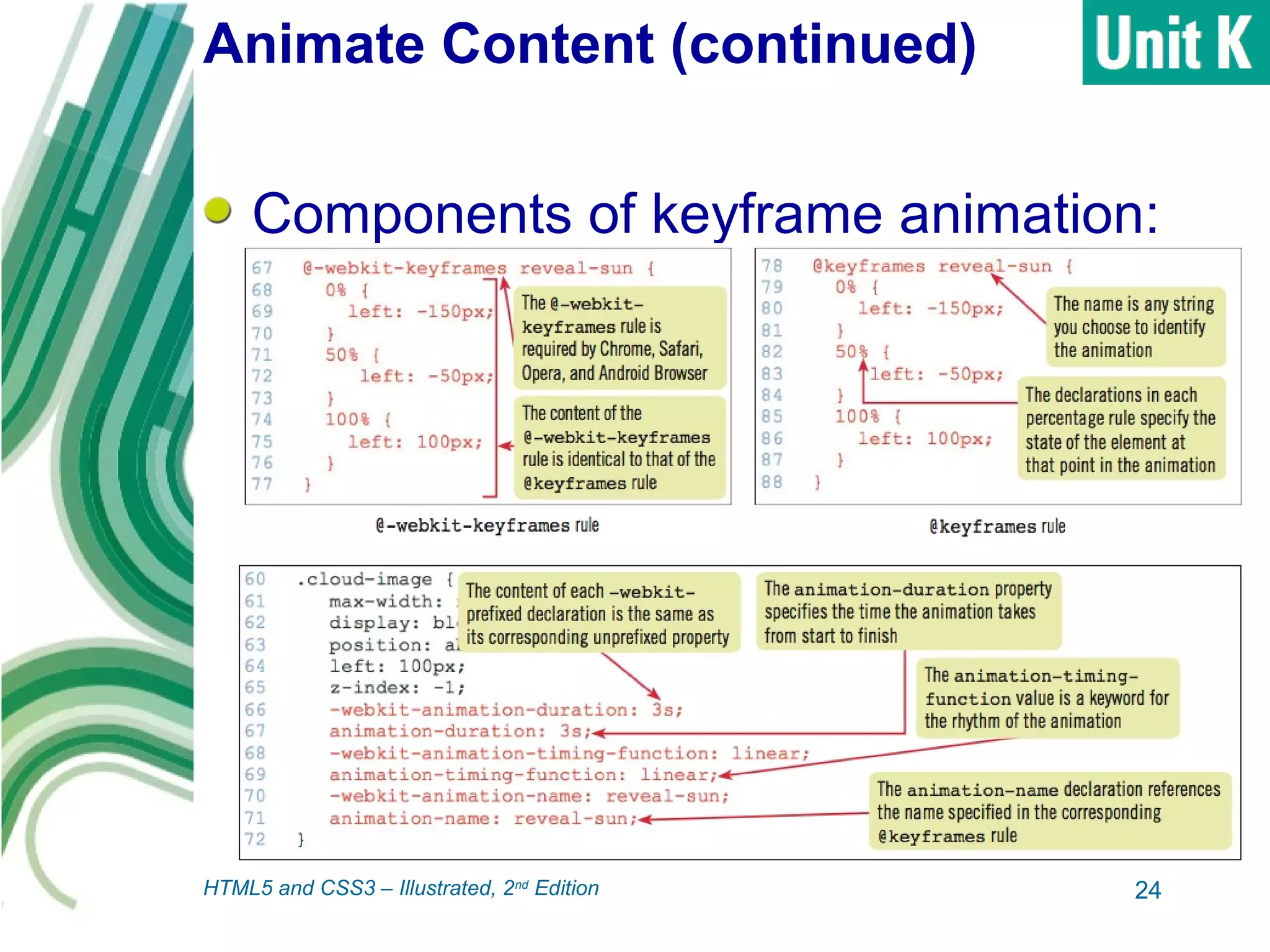
Components of keyframe animation:
24HTML5 and CSS3 – Illustrated, 2nd
Edition
Summary
The :before and :after pseudo-
elements enable you to insert content
-- known as generated content -- into
web pages using style rules.
CSS supports several pseudo-classes
specifically for use with forms, which
you can use to change properties in
forms in response to user actions.
25HTML5 and CSS3 – Illustrated, 2nd
Edition
Summary (continued)
A gradient is a visual effect in which
an area starts as a single color on one
edge or corner and transitions
gradually to one or more other colors.
You can use CSS properties to
change the shapes of HTML elements
to enhance your visual design.
26HTML5 and CSS3 – Illustrated, 2nd
Edition
Summary (continued)
You can use Modernizr to implement
graceful degradation, which describes
a layout that uses newer styles in
modern browsers while displaying a
usable layout and all page content in
older browsers.
A transform is a change in the
appearance of an element in one or
more specific ways (rotating, scaling,
skewing, or moving).
27HTML5 and CSS3 – Illustrated, 2nd
Edition
Summary (continued)
Transitions are CSS features that
gradually apply changes to properties
in response to user actions over a
number of seconds.
A keyframe animation uses animation
properties and the @keyframes rule
and enables you to control what the
animation looks like at various points
between the start and end.
28HTML5 and CSS3 – Illustrated, 2nd
Edition

Creating Visual Effects and Animation

  • 1.
  • 2.
    Objectives Assess responsive design Constructa multipart media query Test layouts with an emulator Add a column with a media query Create a widescreen layout Create responsive navigation 2HTML5 and CSS3 – Illustrated, 2nd Edition
  • 3.
    Objectives (continued) Implement adaptivecontent Use progressive enhancement 3HTML5 and CSS3 – Illustrated, 2nd Edition
  • 4.
    Add Generated Content :beforeand :after pseudo- elements: enable you to insert content into web page using style rules  Result known as generated content  Can be used for text, pictures, or other content  Must specify value for the content property • Can be text or path to an image 4HTML5 and CSS3 – Illustrated, 2nd Edition
  • 5.
    Add Generated Content (continued) :beforepseudo-element code and result 5HTML5 and CSS3 – Illustrated, 2nd Edition
  • 6.
    Add Visual FormFeedback CSS supports pseudo-classes specifically for use with forms: 6HTML5 and CSS3 – Illustrated, 2nd Edition
  • 7.
    Add Visual FormFeedback (continued) Code and result using :valid pseudo-class: 7HTML5 and CSS3 – Illustrated, 2nd Edition
  • 8.
    Add Visual FormFeedback (continued) Code and result using :focus pseudo-class: 8HTML5 and CSS3 – Illustrated, 2nd Edition
  • 9.
    Create a Gradient gradient:a visual effect in which an area starts as a single color on one edge/corner and transitions to one or more other colors  Modern browsers support gradients as backgrounds  Use the linear-gradient keyword with values describing the gradient 9HTML5 and CSS3 – Illustrated, 2nd Edition
  • 10.
    Create a Gradient(continued) Examples of linear gradients: 10HTML5 and CSS3 – Illustrated, 2nd Edition
  • 11.
    Create a Gradient(continued) Gradient applied to page background: 11HTML5 and CSS3 – Illustrated, 2nd Edition
  • 12.
    Create a CSSShape Can use CSS properties to change shapes of HTML elements  Enhance visual design  Replace shapes that would otherwise require an image file, reducing page size 12HTML5 and CSS3 – Illustrated, 2nd Edition
  • 13.
    Create a CSSShape (continued) CSS circle code and result: 13HTML5 and CSS3 – Illustrated, 2nd Edition
  • 14.
    Apply Styles Basedon Feature Detection Newer styles not recognized by older browsers (like IE8) Graceful degradation: when a site uses newer styles in modern browsers while displaying useable layout and all page content in older browsers  Modernizr is a free script library that helps with this process  Feature detection: process of detecting which properties a browser supports 14HTML5 and CSS3 – Illustrated, 2nd Edition
  • 15.
    Apply Styles Basedon Feature Detection (continued) Feature detection code and results: 15HTML5 and CSS3 – Illustrated, 2nd Edition
  • 16.
    Apply a Transform transform:a change in the appearance of an element in one or more specific ways: rotating, scaling, skewing, and moving (translating) 16HTML5 and CSS3 – Illustrated, 2nd Edition
  • 17.
    Apply a Transform(continued) Implemented in modern browsers with browser prefixes  Words or abbreviations added to start of property name and specific one or more browsers or rendering engines Create declaration using unprefixed form, then precede with declarations using all browser prefixes 17HTML5 and CSS3 – Illustrated, 2nd Edition
  • 18.
    Apply a Transform(continued) Transform code and result: 18HTML5 and CSS3 – Illustrated, 2nd Edition
  • 19.
    Create a Transition transitions:CSS features that gradually apply changes to properties in response to user actions  Supported by modern browsers  Create simple animations  Example: create transform to rotate an element, then use transition to spin element into position over several seconds 19HTML5 and CSS3 – Illustrated, 2nd Edition
  • 20.
    Create a Transition(continued) Aspects of transitions that are configurable: 20HTML5 and CSS3 – Illustrated, 2nd Edition
  • 21.
    Create a Transition(continued) Transition code and result: 21HTML5 and CSS3 – Illustrated, 2nd Edition
  • 22.
    Animate Content keyframe animation:an animation created using animation properties and the @keyframes rule  Supported by modern browsers  Enable you to control what animation looks like at various points between start and end  @keyframes rule: name for rule, followed by nested rules in braces, with percentage selectors 22HTML5 and CSS3 – Illustrated, 2nd Edition
  • 23.
    Animate Content (continued) Animation-relatedCSS properties: 23HTML5 and CSS3 – Illustrated, 2nd Edition
  • 24.
    Animate Content (continued) Componentsof keyframe animation: 24HTML5 and CSS3 – Illustrated, 2nd Edition
  • 25.
    Summary The :before and:after pseudo- elements enable you to insert content -- known as generated content -- into web pages using style rules. CSS supports several pseudo-classes specifically for use with forms, which you can use to change properties in forms in response to user actions. 25HTML5 and CSS3 – Illustrated, 2nd Edition
  • 26.
    Summary (continued) A gradientis a visual effect in which an area starts as a single color on one edge or corner and transitions gradually to one or more other colors. You can use CSS properties to change the shapes of HTML elements to enhance your visual design. 26HTML5 and CSS3 – Illustrated, 2nd Edition
  • 27.
    Summary (continued) You canuse Modernizr to implement graceful degradation, which describes a layout that uses newer styles in modern browsers while displaying a usable layout and all page content in older browsers. A transform is a change in the appearance of an element in one or more specific ways (rotating, scaling, skewing, or moving). 27HTML5 and CSS3 – Illustrated, 2nd Edition
  • 28.
    Summary (continued) Transitions areCSS features that gradually apply changes to properties in response to user actions over a number of seconds. A keyframe animation uses animation properties and the @keyframes rule and enables you to control what the animation looks like at various points between the start and end. 28HTML5 and CSS3 – Illustrated, 2nd Edition