Optimizing Your Website
for Search Engines
Objectives
Understand search engine
optimization (SEO)
Write indexable content
Add a description with the meta
element
Incorporate microdata
HTML 5 and CSS 3 – Illustrated Complete 2e 2
Objectives (continued)
Create a sitemap file
Create a robots.txt file
Preview and finalize your site
Submit your site
HTML 5 and CSS 3 – Illustrated Complete 2e 3
Understand Search Engine
Optimization (SEO)
Search engine optimization: process
of tailoring the structure and content of
a web page with search engines in
mind
Two main benefits:
 Increasing site’s priority in search results
 Giving web applications useful semantic
information about your site
HTML 5 and CSS 3 – Illustrated Complete 2e 4
Understand Search Engine
Optimization (SEO) (continued)
Algorithm: set of instructions through
which search engines balance factors
to decide priority of search results
Search rank: A site's position in list of
search results returned for relevant
queries
HTML 5 and CSS 3 – Illustrated Complete 2e 5
Understand Search Engine
Optimization (SEO) (continued)
Microdata: standard for using
attributes to add more types of
semantic data to web page content
HTML 5 and CSS 3 – Illustrated Complete 2e 6
Understand Search Engine
Optimization (SEO) (continued)
Microdata: standard for using
attributes to add more types of
semantic data to web page content
HTML 5 and CSS 3 – Illustrated Complete 2e 7
Understand Search Engine
Optimization (SEO) (continued)
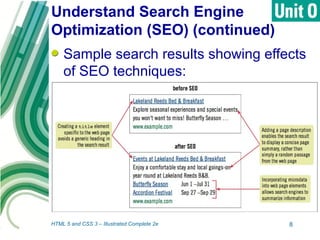
Sample search results showing effects
of SEO techniques:
HTML 5 and CSS 3 – Illustrated Complete 2e 8
Write Indexable Content
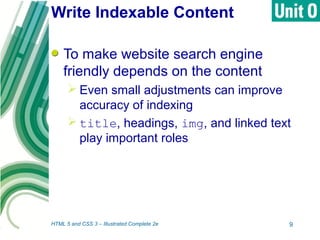
To make website search engine
friendly depends on the content
 Even small adjustments can improve
accuracy of indexing
 title, headings, img, and linked text
play important roles
HTML 5 and CSS 3 – Illustrated Complete 2e 9
Write Indexable Content
(continued)
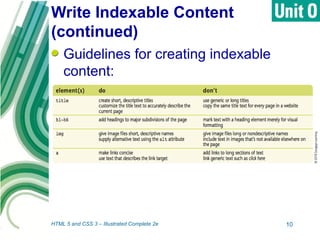
Guidelines for creating indexable
content:
HTML 5 and CSS 3 – Illustrated Complete 2e 10
Add a Description with the
meta Element
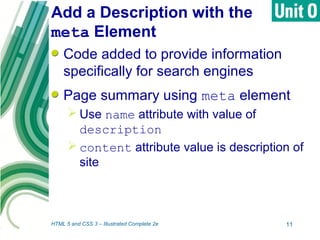
Code added to provide information
specifically for search engines
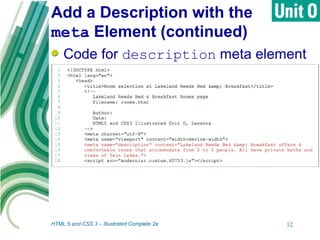
Page summary using meta element
 Use name attribute with value of
description
 content attribute value is description of
site
HTML 5 and CSS 3 – Illustrated Complete 2e 11
Add a Description with the
meta Element (continued)
Code for description meta element
HTML 5 and CSS 3 – Illustrated Complete 2e 12
Click to edit Master title
style
HTML 5 and CSS 3 – Illustrated Complete 2e 13
Vocabularies: define keyword values
for specific types of information
 Serve as common language for
referencing data
 Anyone can define and use custom
vocabulary
 Reference in code using URI
 Data-vocabulary.org contains popular,
widely used vocabularies
Incorporate Microdata
Vocabularies: sets of terms and
definitions used to indicate semantic
value of specific types of info
 Anyone can define and use custom
vocabulary
 Most widely supported is schema.org
• Schemas: groups of terms and definitions
related to different types of information
HTML 5 and CSS 3 – Illustrated Complete 2e 14
Incorporate Microdata
(continued)
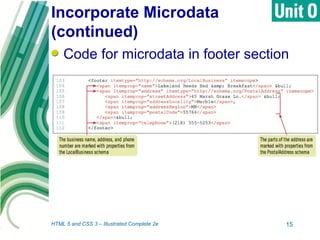
Code for microdata in footer section
HTML 5 and CSS 3 – Illustrated Complete 2e 15
Create a Sitemap File
HTML 5 and CSS 3 – Illustrated Complete 2e 16
Making relationships between pages on
site understandable is important
 Site should be navigable
 Search indexes should search all pages
on the site
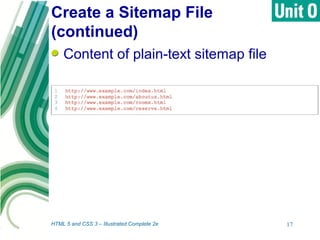
Sitemap: file in a specific format that
lists all the pages available to users in a
web site
 May include information about content
Create a Sitemap File
(continued)
HTML 5 and CSS 3 – Illustrated Complete 2e 17
Content of plain-text sitemap file
Create a robots.txt File
HTML 5 and CSS 3 – Illustrated Complete 2e 18
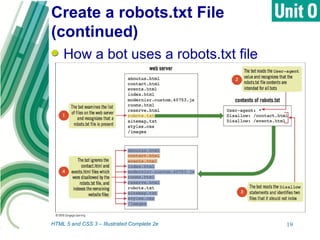
Bots (crawlers): programs that search
engines use to index web pages
 Look for files named robots.txt
 Cannot rely on this file to keep a
document hidden
• May use password-based system
 Influences which pages are indexed
Create a robots.txt File
(continued)
HTML 5 and CSS 3 – Illustrated Complete 2e 19
How a bot uses a robots.txt file
Preview and Finalize
Your Site
HTML 5 and CSS 3 – Illustrated Complete 2e 20
Useful to give documents final check
from bot point of view
 Helps identify missing or hidden content
 Ensures that pages are ready for
indexing
 Can install free programs to view only
text
 Can approximate view by changing
browser settings
Previewing and Finalizing
Your Site (continued)
HTML 5 and CSS 3 – Illustrated Complete 2e 21
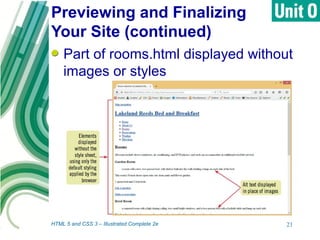
Part of rooms.html displayed without
images or styles
Submit Your Site
HTML 5 and CSS 3 – Illustrated Complete 2e 22
Webmasters: people in charge of
websites
Web site can be simply published to
make it available to potential users
and bots
Other measures can be taken to
increase page popularity
 Submit page directly to search engines
Submitting Your Site
(continued)
HTML 5 and CSS 3 – Illustrated Complete 2e 23
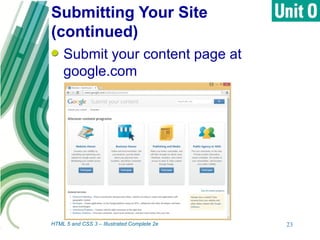
Submit your content page at
google.com
Summary
SEO tailors your website with search
engines in mind to increase site
popularity and give applications useful
information about your site
It does not take much to make a site
more SEO friendly
 Indexable content element changes are
easy
HTML 5 and CSS 3 – Illustrated Complete 2e 24
Summary (continued)
Vocabularies define keyword values
for specific types of information
Sitemap file contains list of all pages
of a website
Bots are used by search engines to
target indexable information
robots.txt file influences which website
pages are indexed by search engines
HTML 5 and CSS 3 – Illustrated Complete 2e 25
Summary (continued)
View site from bot point of view to
finalize
Submit site directly to search engines
HTML 5 and CSS 3 – Illustrated Complete 2e 26

Optimizing a website for search engines

  • 1.
  • 2.
    Objectives Understand search engine optimization(SEO) Write indexable content Add a description with the meta element Incorporate microdata HTML 5 and CSS 3 – Illustrated Complete 2e 2
  • 3.
    Objectives (continued) Create asitemap file Create a robots.txt file Preview and finalize your site Submit your site HTML 5 and CSS 3 – Illustrated Complete 2e 3
  • 4.
    Understand Search Engine Optimization(SEO) Search engine optimization: process of tailoring the structure and content of a web page with search engines in mind Two main benefits:  Increasing site’s priority in search results  Giving web applications useful semantic information about your site HTML 5 and CSS 3 – Illustrated Complete 2e 4
  • 5.
    Understand Search Engine Optimization(SEO) (continued) Algorithm: set of instructions through which search engines balance factors to decide priority of search results Search rank: A site's position in list of search results returned for relevant queries HTML 5 and CSS 3 – Illustrated Complete 2e 5
  • 6.
    Understand Search Engine Optimization(SEO) (continued) Microdata: standard for using attributes to add more types of semantic data to web page content HTML 5 and CSS 3 – Illustrated Complete 2e 6
  • 7.
    Understand Search Engine Optimization(SEO) (continued) Microdata: standard for using attributes to add more types of semantic data to web page content HTML 5 and CSS 3 – Illustrated Complete 2e 7
  • 8.
    Understand Search Engine Optimization(SEO) (continued) Sample search results showing effects of SEO techniques: HTML 5 and CSS 3 – Illustrated Complete 2e 8
  • 9.
    Write Indexable Content Tomake website search engine friendly depends on the content  Even small adjustments can improve accuracy of indexing  title, headings, img, and linked text play important roles HTML 5 and CSS 3 – Illustrated Complete 2e 9
  • 10.
    Write Indexable Content (continued) Guidelinesfor creating indexable content: HTML 5 and CSS 3 – Illustrated Complete 2e 10
  • 11.
    Add a Descriptionwith the meta Element Code added to provide information specifically for search engines Page summary using meta element  Use name attribute with value of description  content attribute value is description of site HTML 5 and CSS 3 – Illustrated Complete 2e 11
  • 12.
    Add a Descriptionwith the meta Element (continued) Code for description meta element HTML 5 and CSS 3 – Illustrated Complete 2e 12
  • 13.
    Click to editMaster title style HTML 5 and CSS 3 – Illustrated Complete 2e 13 Vocabularies: define keyword values for specific types of information  Serve as common language for referencing data  Anyone can define and use custom vocabulary  Reference in code using URI  Data-vocabulary.org contains popular, widely used vocabularies
  • 14.
    Incorporate Microdata Vocabularies: setsof terms and definitions used to indicate semantic value of specific types of info  Anyone can define and use custom vocabulary  Most widely supported is schema.org • Schemas: groups of terms and definitions related to different types of information HTML 5 and CSS 3 – Illustrated Complete 2e 14
  • 15.
    Incorporate Microdata (continued) Code formicrodata in footer section HTML 5 and CSS 3 – Illustrated Complete 2e 15
  • 16.
    Create a SitemapFile HTML 5 and CSS 3 – Illustrated Complete 2e 16 Making relationships between pages on site understandable is important  Site should be navigable  Search indexes should search all pages on the site Sitemap: file in a specific format that lists all the pages available to users in a web site  May include information about content
  • 17.
    Create a SitemapFile (continued) HTML 5 and CSS 3 – Illustrated Complete 2e 17 Content of plain-text sitemap file
  • 18.
    Create a robots.txtFile HTML 5 and CSS 3 – Illustrated Complete 2e 18 Bots (crawlers): programs that search engines use to index web pages  Look for files named robots.txt  Cannot rely on this file to keep a document hidden • May use password-based system  Influences which pages are indexed
  • 19.
    Create a robots.txtFile (continued) HTML 5 and CSS 3 – Illustrated Complete 2e 19 How a bot uses a robots.txt file
  • 20.
    Preview and Finalize YourSite HTML 5 and CSS 3 – Illustrated Complete 2e 20 Useful to give documents final check from bot point of view  Helps identify missing or hidden content  Ensures that pages are ready for indexing  Can install free programs to view only text  Can approximate view by changing browser settings
  • 21.
    Previewing and Finalizing YourSite (continued) HTML 5 and CSS 3 – Illustrated Complete 2e 21 Part of rooms.html displayed without images or styles
  • 22.
    Submit Your Site HTML5 and CSS 3 – Illustrated Complete 2e 22 Webmasters: people in charge of websites Web site can be simply published to make it available to potential users and bots Other measures can be taken to increase page popularity  Submit page directly to search engines
  • 23.
    Submitting Your Site (continued) HTML5 and CSS 3 – Illustrated Complete 2e 23 Submit your content page at google.com
  • 24.
    Summary SEO tailors yourwebsite with search engines in mind to increase site popularity and give applications useful information about your site It does not take much to make a site more SEO friendly  Indexable content element changes are easy HTML 5 and CSS 3 – Illustrated Complete 2e 24
  • 25.
    Summary (continued) Vocabularies definekeyword values for specific types of information Sitemap file contains list of all pages of a website Bots are used by search engines to target indexable information robots.txt file influences which website pages are indexed by search engines HTML 5 and CSS 3 – Illustrated Complete 2e 25
  • 26.
    Summary (continued) View sitefrom bot point of view to finalize Submit site directly to search engines HTML 5 and CSS 3 – Illustrated Complete 2e 26