




Create Your Own Serverless PKI with
.NET & Azure Key Vault
Eran Stiller
Chief Technology Officer
erans@codevalue.net
@eranstiller
https://stiller.blog
https://codevalue.net
2
3
4
5
Agenda
 IoT Data Ingestion
 PKIs, CAs & Certificates
 Building a Serverless CA using .NET
 Authoring Certificate Subscribers using .NET
 Using the Generated Certificates
 Device Provisioning Service & IoT Hub
6
About Eran
Eran Stiller
 @eranstiller
 CTO & Founder at CodeValue
 Software architect, consultant and instructor
 Microsoft Regional Director & Azure MVP
 Founder of Azure Israel Meetup
7
IoT Data Ingestion
9
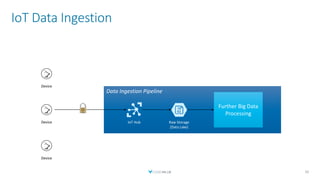
IoT Data Ingestion
10
Data Ingestion Pipeline
Further Big Data
Processing
IoT Hub Raw Storage
(Data Lake)
Device
Device
Device
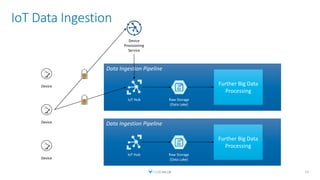
IoT Data Ingestion
11
Device
Device
Device
Data Ingestion Pipeline
Further Big Data
Processing
IoT Hub Raw Storage
(Data Lake)
Data Ingestion Pipeline
Further Big Data
Processing
IoT Hub Raw Storage
(Data Lake)
Device
Provisioning
Service
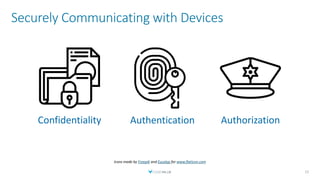
Securely Communicating with Devices
12
Confidentiality Authentication Authorization
Icons made by Freepik and Eucalyp for www.flaticon.com
Keep It Simple
13
PKIs, CAs & Certs
14
Public Key Infrastructure (PKI)
 An umbrella term for the stuff we need in order to:
 Issue
 Distribute
 Store
 Use
 Verify
 Revoke
 and otherwise manage and interact with certificates and keys
 Don’t build from scratch
 Can use an off-the-shelf solution
 Can build some parts and rely on others
15
Certificates
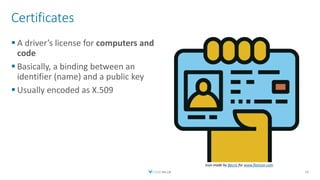
 A driver’s license for computers and
code
 Basically, a binding between an
identifier (name) and a public key
 Usually encoded as X.509
16
Icon made by Becris for www.flaticon.com
Certificate Authority
 The entity which issues certificates
 Trusted by the Relying Parties
 Public trusted root certificates are pre-populated
 Various methods to verify identity
17
Demo
Certificate Content
18
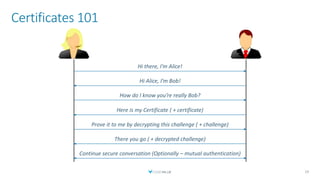
Certificates 101
19
Hi there, I’m Alice!
Hi Alice, I’m Bob!
How do I know you’re really Bob?
Here is my Certificate ( + certificate)
Prove it to me by decrypting this challenge ( + challenge)
There you go ( + decrypted challenge)
Continue secure conversation (Optionally – mutual authentication)
Building a Serverless CA
using .NET
20
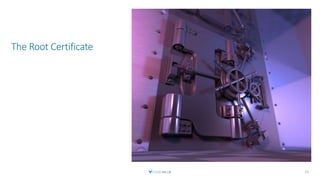
The Root Certificate
21
Azure Key Vault
 Safeguard cryptographic keys and other secrets
 Hardware Security Modules (HSM) as a service
 Can be replaced with AWS Certificate Manager
 Principles will remain unchanged
 Implementation details will defer
22
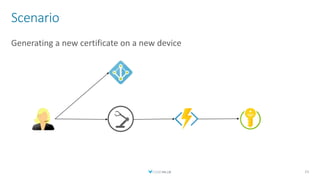
Scenario
Generating a new certificate on a new device
23
Demo
Setup Azure
Key Vault & Other
Resources
24
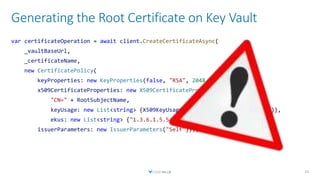
Generating the Root Certificate on Key Vault
25
var certificateOperation = await client.CreateCertificateAsync(
_vaultBaseUrl,
_certificateName,
new CertificatePolicy(
keyProperties: new KeyProperties(false, "RSA", 2048, false),
x509CertificateProperties: new X509CertificateProperties(
"CN=" + RootSubjectName,
keyUsage: new List<string> {X509KeyUsageFlags.KeyCertSign.ToString()},
ekus: new List<string> {"1.3.6.1.5.5.7.3.2", "1.3.6.1.5.5.7.3.1"}),
issuerParameters: new IssuerParameters("Self")));
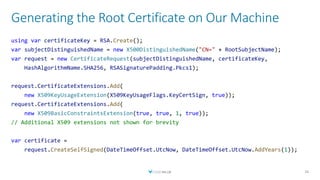
Generating the Root Certificate on Our Machine
26
using var certificateKey = RSA.Create();
var subjectDistinguishedName = new X500DistinguishedName("CN=" + RootSubjectName);
var request = new CertificateRequest(subjectDistinguishedName, certificateKey,
HashAlgorithmName.SHA256, RSASignaturePadding.Pkcs1);
request.CertificateExtensions.Add(
new X509KeyUsageExtension(X509KeyUsageFlags.KeyCertSign, true));
request.CertificateExtensions.Add(
new X509BasicConstraintsExtension(true, true, 1, true));
// Additional X509 extensions not shown for brevity
var certificate =
request.CreateSelfSigned(DateTimeOffset.UtcNow, DateTimeOffset.UtcNow.AddYears(1));
Demo
Generating the
Root Certificate
27
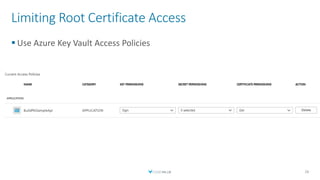
Limiting Root Certificate Access
 Use Azure Key Vault Access Policies
28
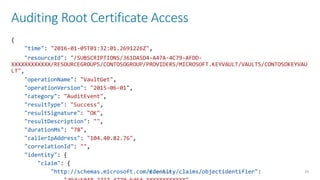
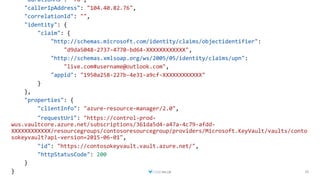
Auditing Root Certificate Access
29
{
"time": "2016-01-05T01:32:01.2691226Z",
"resourceId": "/SUBSCRIPTIONS/361DA5D4-A47A-4C79-AFDD-
XXXXXXXXXXXX/RESOURCEGROUPS/CONTOSOGROUP/PROVIDERS/MICROSOFT.KEYVAULT/VAULTS/CONTOSOKEYVAU
LT",
"operationName": "VaultGet",
"operationVersion": "2015-06-01",
"category": "AuditEvent",
"resultType": "Success",
"resultSignature": "OK",
"resultDescription": "",
"durationMs": "78",
"callerIpAddress": "104.40.82.76",
"correlationId": "",
"identity": {
"claim": {
"http://schemas.microsoft.com/identity/claims/objectidentifier":
30
"durationMs": "78",
"callerIpAddress": "104.40.82.76",
"correlationId": "",
"identity": {
"claim": {
"http://schemas.microsoft.com/identity/claims/objectidentifier":
"d9da5048-2737-4770-bd64-XXXXXXXXXXXX",
"http://schemas.xmlsoap.org/ws/2005/05/identity/claims/upn":
"live.com#username@outlook.com",
"appid": "1950a258-227b-4e31-a9cf-XXXXXXXXXXXX"
}
},
"properties": {
"clientInfo": "azure-resource-manager/2.0",
"requestUri": "https://control-prod-
wus.vaultcore.azure.net/subscriptions/361da5d4-a47a-4c79-afdd-
XXXXXXXXXXXX/resourcegroups/contosoresourcegroup/providers/Microsoft.KeyVault/vaults/conto
sokeyvault?api-version=2015-06-01",
"id": "https://contosokeyvault.vault.azure.net/",
"httpStatusCode": 200
}
}
Sign a Request Using the Root Certificate
31
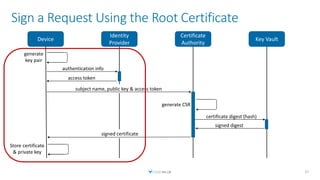
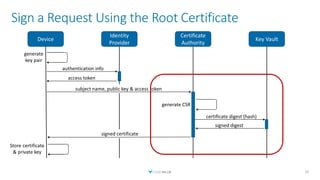
subject name, public key & access token
Sign a Request Using the Root Certificate
32
Device
Identity
Provider
Certificate
Authority
Key Vault
authentication info
access token
generate CSR
generate
key pair
certificate digest (hash)
signed digest
signed certificate
Store certificate
& private key
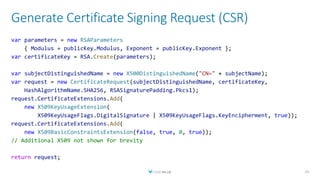
Generate Certificate Signing Request (CSR)
33
var parameters = new RSAParameters
{ Modulus = publicKey.Modulus, Exponent = publicKey.Exponent };
var certificateKey = RSA.Create(parameters);
var subjectDistinguishedName = new X500DistinguishedName("CN=" + subjectName);
var request = new CertificateRequest(subjectDistinguishedName, certificateKey,
HashAlgorithmName.SHA256, RSASignaturePadding.Pkcs1);
request.CertificateExtensions.Add(
new X509KeyUsageExtension(
X509KeyUsageFlags.DigitalSignature | X509KeyUsageFlags.KeyEncipherment, true));
request.CertificateExtensions.Add(
new X509BasicConstraintsExtension(false, true, 0, true));
// Additional X509 not shown for brevity
return request;
Sign Certificate with Root Key
34
CertificateRequest request = CreateCertificateRequest(subjectName, certificateKey);
byte[] certificateSerialNumber = await _serialNumberGenerator.GenerateSerialAsync();
RSA rsaKeyVault = _keyVaultClient.ToRSA(
certificateBundle.KeyIdentifier, issuerCertificate);
var generator = X509SignatureGenerator.CreateForRSA(
rsaKeyVault, RSASignaturePadding.Pkcs1);
var certificate = request.Create(
issuerCertificate.SubjectName, generator,
DateTime.Today, DateTime.Today.AddYears(1),
certificateSerialNumber);
Demo
Serverless CA using
.NET & Azure Functions
35
Authoring Certificate
Subscribers using .NET
36
subject name, public key & access token
Sign a Request Using the Root Certificate
37
Device
Identity
Provider
Certificate
Authority
Key Vault
generate CSR
certificate digest (hash)
signed digest
signed certificate
Store certificate
& private key
authentication info
access token
generate
key pair
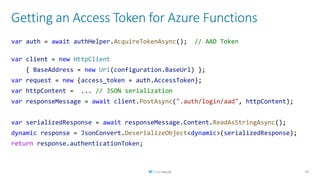
Getting an Access Token for Azure Functions
39
var auth = await authHelper.AcquireTokenAsync(); // AAD Token
var client = new HttpClient
{ BaseAddress = new Uri(configuration.BaseUrl) };
var request = new {access_token = auth.AccessToken};
var httpContent = ... // JSON serialization
var responseMessage = await client.PostAsync(".auth/login/aad", httpContent);
var serializedResponse = await responseMessage.Content.ReadAsStringAsync();
dynamic response = JsonConvert.DeserializeObject<dynamic>(serializedResponse);
return response.authenticationToken;
Issue Certificate
40
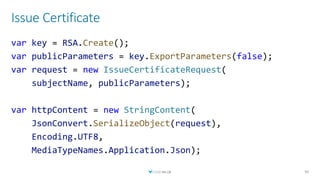
var key = RSA.Create();
var publicParameters = key.ExportParameters(false);
var request = new IssueCertificateRequest(
subjectName, publicParameters);
var httpContent = new StringContent(
JsonConvert.SerializeObject(request),
Encoding.UTF8,
MediaTypeNames.Application.Json);
Issue Certificate (Cont.)
41
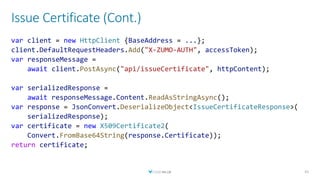
var client = new HttpClient {BaseAddress = ...};
client.DefaultRequestHeaders.Add("X-ZUMO-AUTH", accessToken);
var responseMessage =
await client.PostAsync("api/issueCertificate", httpContent);
var serializedResponse =
await responseMessage.Content.ReadAsStringAsync();
var response = JsonConvert.DeserializeObject<IssueCertificateResponse>(
serializedResponse);
var certificate = new X509Certificate2(
Convert.FromBase64String(response.Certificate));
return certificate;
Store Certificate With Private Key
42
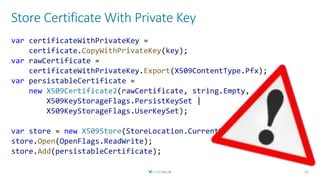
var certificateWithPrivateKey =
certificate.CopyWithPrivateKey(key);
var rawCertificate =
certificateWithPrivateKey.Export(X509ContentType.Pfx);
var persistableCertificate =
new X509Certificate2(rawCertificate, string.Empty,
X509KeyStorageFlags.PersistKeySet |
X509KeyStorageFlags.UserKeySet);
var store = new X509Store(StoreLocation.CurrentUser);
store.Open(OpenFlags.ReadWrite);
store.Add(persistableCertificate);
Demo
Certificate Subscribers
using .NET
43
Using the Generated
Certificates
44
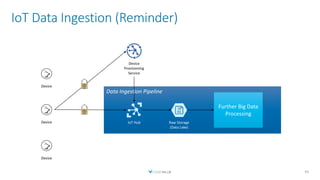
IoT Data Ingestion (Reminder)
45
Device
Device
Device
Data Ingestion Pipeline
Further Big Data
Processing
IoT Hub Raw Storage
(Data Lake)
Device
Provisioning
Service
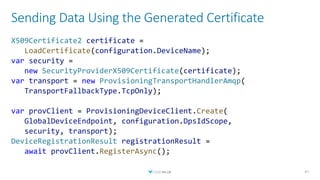
Sending Data Using the Generated Certificate
47
X509Certificate2 certificate =
LoadCertificate(configuration.DeviceName);
var security =
new SecurityProviderX509Certificate(certificate);
var transport = new ProvisioningTransportHandlerAmqp(
TransportFallbackType.TcpOnly);
var provClient = ProvisioningDeviceClient.Create(
GlobalDeviceEndpoint, configuration.DpsIdScope,
security, transport);
DeviceRegistrationResult registrationResult =
await provClient.RegisterAsync();
Demo
End-to-End Operation
48
Takeaways
50
Takeaways
 Certificates are hard, but crucial, to get right
 Don’t author an entire PKI from scratch
 Customize an existing solution where appropriate
 IoT is one scenario where I encountered a need for a custom PKI
 Handling certificates with .NET is surprisingly undocumented
 With and without Azure Key Vault
 Azure Key Vault is a great platform to base a CA on
 The sample is just a sample, but is derived from a production system
 Can base on it and form your own solution
51
Resources
 Source Code
 https://github.com/estiller/build-pki-net-azure-sample
 NuGet package to integrate Key Vault with .NET Cryptographic Keys
 https://github.com/onovotny/RSAKeyVaultProvider
 Additional resources
 https://smallstep.com/blog/everything-pki.html
 https://docs.microsoft.com/en-in/azure/key-vault/certificate-scenarios
 https://docs.microsoft.com/en-us/azure/key-vault/key-vault-logging
52
Eran Stiller
Chief Technology Officer
erans@codevalue.net
@eranstiller
https://stiller.blog
https://codevalue.net

Create Your Own Serverless PKI with .NET & Azure Key Vault

  • 1.
    Create Your OwnServerless PKI with .NET & Azure Key Vault Eran Stiller Chief Technology Officer erans@codevalue.net @eranstiller https://stiller.blog https://codevalue.net
  • 2.
  • 3.
  • 4.
  • 5.
  • 6.
    Agenda  IoT DataIngestion  PKIs, CAs & Certificates  Building a Serverless CA using .NET  Authoring Certificate Subscribers using .NET  Using the Generated Certificates  Device Provisioning Service & IoT Hub 6
  • 7.
    About Eran Eran Stiller @eranstiller  CTO & Founder at CodeValue  Software architect, consultant and instructor  Microsoft Regional Director & Azure MVP  Founder of Azure Israel Meetup 7
  • 8.
  • 9.
    IoT Data Ingestion 10 DataIngestion Pipeline Further Big Data Processing IoT Hub Raw Storage (Data Lake) Device Device Device
  • 10.
    IoT Data Ingestion 11 Device Device Device DataIngestion Pipeline Further Big Data Processing IoT Hub Raw Storage (Data Lake) Data Ingestion Pipeline Further Big Data Processing IoT Hub Raw Storage (Data Lake) Device Provisioning Service
  • 11.
    Securely Communicating withDevices 12 Confidentiality Authentication Authorization Icons made by Freepik and Eucalyp for www.flaticon.com
  • 12.
  • 13.
    PKIs, CAs &Certs 14
  • 14.
    Public Key Infrastructure(PKI)  An umbrella term for the stuff we need in order to:  Issue  Distribute  Store  Use  Verify  Revoke  and otherwise manage and interact with certificates and keys  Don’t build from scratch  Can use an off-the-shelf solution  Can build some parts and rely on others 15
  • 15.
    Certificates  A driver’slicense for computers and code  Basically, a binding between an identifier (name) and a public key  Usually encoded as X.509 16 Icon made by Becris for www.flaticon.com
  • 16.
    Certificate Authority  Theentity which issues certificates  Trusted by the Relying Parties  Public trusted root certificates are pre-populated  Various methods to verify identity 17
  • 17.
  • 18.
    Certificates 101 19 Hi there,I’m Alice! Hi Alice, I’m Bob! How do I know you’re really Bob? Here is my Certificate ( + certificate) Prove it to me by decrypting this challenge ( + challenge) There you go ( + decrypted challenge) Continue secure conversation (Optionally – mutual authentication)
  • 19.
    Building a ServerlessCA using .NET 20
  • 20.
  • 21.
    Azure Key Vault Safeguard cryptographic keys and other secrets  Hardware Security Modules (HSM) as a service  Can be replaced with AWS Certificate Manager  Principles will remain unchanged  Implementation details will defer 22
  • 22.
    Scenario Generating a newcertificate on a new device 23
  • 23.
    Demo Setup Azure Key Vault& Other Resources 24
  • 24.
    Generating the RootCertificate on Key Vault 25 var certificateOperation = await client.CreateCertificateAsync( _vaultBaseUrl, _certificateName, new CertificatePolicy( keyProperties: new KeyProperties(false, "RSA", 2048, false), x509CertificateProperties: new X509CertificateProperties( "CN=" + RootSubjectName, keyUsage: new List<string> {X509KeyUsageFlags.KeyCertSign.ToString()}, ekus: new List<string> {"1.3.6.1.5.5.7.3.2", "1.3.6.1.5.5.7.3.1"}), issuerParameters: new IssuerParameters("Self")));
  • 25.
    Generating the RootCertificate on Our Machine 26 using var certificateKey = RSA.Create(); var subjectDistinguishedName = new X500DistinguishedName("CN=" + RootSubjectName); var request = new CertificateRequest(subjectDistinguishedName, certificateKey, HashAlgorithmName.SHA256, RSASignaturePadding.Pkcs1); request.CertificateExtensions.Add( new X509KeyUsageExtension(X509KeyUsageFlags.KeyCertSign, true)); request.CertificateExtensions.Add( new X509BasicConstraintsExtension(true, true, 1, true)); // Additional X509 extensions not shown for brevity var certificate = request.CreateSelfSigned(DateTimeOffset.UtcNow, DateTimeOffset.UtcNow.AddYears(1));
  • 26.
  • 27.
    Limiting Root CertificateAccess  Use Azure Key Vault Access Policies 28
  • 28.
    Auditing Root CertificateAccess 29 { "time": "2016-01-05T01:32:01.2691226Z", "resourceId": "/SUBSCRIPTIONS/361DA5D4-A47A-4C79-AFDD- XXXXXXXXXXXX/RESOURCEGROUPS/CONTOSOGROUP/PROVIDERS/MICROSOFT.KEYVAULT/VAULTS/CONTOSOKEYVAU LT", "operationName": "VaultGet", "operationVersion": "2015-06-01", "category": "AuditEvent", "resultType": "Success", "resultSignature": "OK", "resultDescription": "", "durationMs": "78", "callerIpAddress": "104.40.82.76", "correlationId": "", "identity": { "claim": { "http://schemas.microsoft.com/identity/claims/objectidentifier":
  • 29.
    30 "durationMs": "78", "callerIpAddress": "104.40.82.76", "correlationId":"", "identity": { "claim": { "http://schemas.microsoft.com/identity/claims/objectidentifier": "d9da5048-2737-4770-bd64-XXXXXXXXXXXX", "http://schemas.xmlsoap.org/ws/2005/05/identity/claims/upn": "live.com#username@outlook.com", "appid": "1950a258-227b-4e31-a9cf-XXXXXXXXXXXX" } }, "properties": { "clientInfo": "azure-resource-manager/2.0", "requestUri": "https://control-prod- wus.vaultcore.azure.net/subscriptions/361da5d4-a47a-4c79-afdd- XXXXXXXXXXXX/resourcegroups/contosoresourcegroup/providers/Microsoft.KeyVault/vaults/conto sokeyvault?api-version=2015-06-01", "id": "https://contosokeyvault.vault.azure.net/", "httpStatusCode": 200 } }
  • 30.
    Sign a RequestUsing the Root Certificate 31
  • 31.
    subject name, publickey & access token Sign a Request Using the Root Certificate 32 Device Identity Provider Certificate Authority Key Vault authentication info access token generate CSR generate key pair certificate digest (hash) signed digest signed certificate Store certificate & private key
  • 32.
    Generate Certificate SigningRequest (CSR) 33 var parameters = new RSAParameters { Modulus = publicKey.Modulus, Exponent = publicKey.Exponent }; var certificateKey = RSA.Create(parameters); var subjectDistinguishedName = new X500DistinguishedName("CN=" + subjectName); var request = new CertificateRequest(subjectDistinguishedName, certificateKey, HashAlgorithmName.SHA256, RSASignaturePadding.Pkcs1); request.CertificateExtensions.Add( new X509KeyUsageExtension( X509KeyUsageFlags.DigitalSignature | X509KeyUsageFlags.KeyEncipherment, true)); request.CertificateExtensions.Add( new X509BasicConstraintsExtension(false, true, 0, true)); // Additional X509 not shown for brevity return request;
  • 33.
    Sign Certificate withRoot Key 34 CertificateRequest request = CreateCertificateRequest(subjectName, certificateKey); byte[] certificateSerialNumber = await _serialNumberGenerator.GenerateSerialAsync(); RSA rsaKeyVault = _keyVaultClient.ToRSA( certificateBundle.KeyIdentifier, issuerCertificate); var generator = X509SignatureGenerator.CreateForRSA( rsaKeyVault, RSASignaturePadding.Pkcs1); var certificate = request.Create( issuerCertificate.SubjectName, generator, DateTime.Today, DateTime.Today.AddYears(1), certificateSerialNumber);
  • 34.
    Demo Serverless CA using .NET& Azure Functions 35
  • 35.
  • 36.
    subject name, publickey & access token Sign a Request Using the Root Certificate 37 Device Identity Provider Certificate Authority Key Vault generate CSR certificate digest (hash) signed digest signed certificate Store certificate & private key authentication info access token generate key pair
  • 37.
    Getting an AccessToken for Azure Functions 39 var auth = await authHelper.AcquireTokenAsync(); // AAD Token var client = new HttpClient { BaseAddress = new Uri(configuration.BaseUrl) }; var request = new {access_token = auth.AccessToken}; var httpContent = ... // JSON serialization var responseMessage = await client.PostAsync(".auth/login/aad", httpContent); var serializedResponse = await responseMessage.Content.ReadAsStringAsync(); dynamic response = JsonConvert.DeserializeObject<dynamic>(serializedResponse); return response.authenticationToken;
  • 38.
    Issue Certificate 40 var key= RSA.Create(); var publicParameters = key.ExportParameters(false); var request = new IssueCertificateRequest( subjectName, publicParameters); var httpContent = new StringContent( JsonConvert.SerializeObject(request), Encoding.UTF8, MediaTypeNames.Application.Json);
  • 39.
    Issue Certificate (Cont.) 41 varclient = new HttpClient {BaseAddress = ...}; client.DefaultRequestHeaders.Add("X-ZUMO-AUTH", accessToken); var responseMessage = await client.PostAsync("api/issueCertificate", httpContent); var serializedResponse = await responseMessage.Content.ReadAsStringAsync(); var response = JsonConvert.DeserializeObject<IssueCertificateResponse>( serializedResponse); var certificate = new X509Certificate2( Convert.FromBase64String(response.Certificate)); return certificate;
  • 40.
    Store Certificate WithPrivate Key 42 var certificateWithPrivateKey = certificate.CopyWithPrivateKey(key); var rawCertificate = certificateWithPrivateKey.Export(X509ContentType.Pfx); var persistableCertificate = new X509Certificate2(rawCertificate, string.Empty, X509KeyStorageFlags.PersistKeySet | X509KeyStorageFlags.UserKeySet); var store = new X509Store(StoreLocation.CurrentUser); store.Open(OpenFlags.ReadWrite); store.Add(persistableCertificate);
  • 41.
  • 42.
  • 43.
    IoT Data Ingestion(Reminder) 45 Device Device Device Data Ingestion Pipeline Further Big Data Processing IoT Hub Raw Storage (Data Lake) Device Provisioning Service
  • 44.
    Sending Data Usingthe Generated Certificate 47 X509Certificate2 certificate = LoadCertificate(configuration.DeviceName); var security = new SecurityProviderX509Certificate(certificate); var transport = new ProvisioningTransportHandlerAmqp( TransportFallbackType.TcpOnly); var provClient = ProvisioningDeviceClient.Create( GlobalDeviceEndpoint, configuration.DpsIdScope, security, transport); DeviceRegistrationResult registrationResult = await provClient.RegisterAsync();
  • 45.
  • 46.
  • 47.
    Takeaways  Certificates arehard, but crucial, to get right  Don’t author an entire PKI from scratch  Customize an existing solution where appropriate  IoT is one scenario where I encountered a need for a custom PKI  Handling certificates with .NET is surprisingly undocumented  With and without Azure Key Vault  Azure Key Vault is a great platform to base a CA on  The sample is just a sample, but is derived from a production system  Can base on it and form your own solution 51
  • 48.
    Resources  Source Code https://github.com/estiller/build-pki-net-azure-sample  NuGet package to integrate Key Vault with .NET Cryptographic Keys  https://github.com/onovotny/RSAKeyVaultProvider  Additional resources  https://smallstep.com/blog/everything-pki.html  https://docs.microsoft.com/en-in/azure/key-vault/certificate-scenarios  https://docs.microsoft.com/en-us/azure/key-vault/key-vault-logging 52
  • 49.
    Eran Stiller Chief TechnologyOfficer erans@codevalue.net @eranstiller https://stiller.blog https://codevalue.net

Editor's Notes

  • #3 Our story opens once upon a time, at one of my customers. Free image URL: https://pixabay.com/photos/once-upon-a-time-writer-author-719174/
  • #4 This customer was not a software company. In fact, it was a hardware company selling manufacturing equipment to various manufacturers around the world. The customer had a software development division. This division was mainly focused on writing software to operate the sold equipment and was mainly a .NET shop writing code in C#. Free image URL: https://pixabay.com/photos/machine-plant-technology-4334729/
  • #5 Until one day, the customer decided to connect the manufacturing equipment to the cloud – effectively creating an IoT system – and that’s where I came in. Free image URL: https://pixabay.com/photos/nature-outdoor-sky-cloud-cloudy-3294543/
  • #6 We had many challenges with that system, and one of the main ones was Security. How do we ensure that data is securely transported from the devices to the cloud, and that proper authentication & authorization is maintained? More specifically – how do we properly encrypt all communications and manage the infrastructure for allowing it? And how do we do it in .NET? Turns out that it is definitely possible, but documentation and knowledge is scarce, and that’s why I decided to create this session. Free image URL: https://pixabay.com/photos/police-security-safety-protection-869216/
  • #11 Padlock free icon: https://pixabay.com/vectors/padlock-security-lock-metal-secret-308589/
  • #13 We want to achieve 3 main things with our secure channels: Confidentiality, Authentication & Authorization HTTPS/TLS is the de-facto standard today for secure communication Secure communication has some prerequisites – mainly certificates for communication and a secure PKI
  • #14 There are various solutions out there for this problem out there – open source, hosted, and a combination there-of No need to invent the wheel However, in our project, since the customer was not a software company and there were very few developers on the project we really wanted tro keep it simple As our solution was completely serverless and relying on Azure we decided to use Azure Key-Vault for implementing the basis for the PKI. In addition, all developers were .NET developers so all server and client code needed to be written in C# - which caused a whole lot of trouble later on as documentation is quite scarce – but that’s why you are here for.  Free image URL: https://pixabay.com/photos/desk-table-simple-mockup-1081708/
  • #16 Off-the-shelf solutions - Open source, hosted, hybrid
  • #19 Show the certificate for https://github.com from the browser address bar
  • #20 Free image URLs: https://pixabay.com/vectors/businessman-male-business-avatar-310819/ https://pixabay.com/vectors/user-avatar-female-blond-girl-310807/
  • #22 As we start building our CA we need to think about our root certificate and how to handle it. Free image URL: https://pixabay.com/illustrations/safe-vault-steel-door-banking-913452/
  • #26 One option is to create the certificate directly in Azure Key Vault. This is the best option and is the safest since the private key is created on Azure Key Vault and never leaves it. But (click and show warning) – there is currently an issue where the certificate’s “Basic Constraints” extension cannot be controlled via the API, and this all created certificates are leaf certificates and cannot be properly used for signing other certificates later. As a result, we will revert to our second option.
  • #27 The above RSA key is an ephemeral one. Once we create the certificate – we upload it to Azure Key Vault, and quickly dispose of the RSA private key.
  • #29 Emphasize the importance of using Managed Identities and reducing possible access to Key Vault in general and the Root Certificate in particular as much as possible Access policies control data plane access rights Emphasize that “Get Certificate” only allows getting the public certificate parts. Not the associated key (which cannot be obtained if you are using an HSM).
  • #30 Emphasize the importance of using auditing to know who accessed the certificate and what operations were performed against it. This slide shows usage of the built-in Key Vault logging. This can be integrated with Azure Monitor Logs to even better query and understand the resulting data.
  • #31 Emphasize the importance of using auditing to know who accessed the certificate and what operations were performed against it. This slide shows usage of the built-in Key Vault logging. This can be integrated with Azure Monitor Logs to even better query and understand the resulting data.
  • #32 Now we have a root certificate, and we want to start issuing and signing certificates for our clients. However, we want to do it in the most secure manner as possible. I.e. we don’t want the signing certificate key to ever leave its host – Azure Key Vault. Free image: https://pixabay.com/photos/business-composition-laptop-3365360/
  • #33 Emphasize that the signing key of the root certificate never leaves Key Vault
  • #36 Show the code in two stages – core business logic, and then hosting. Also show how to publish, and how authentication is handled by the App Service authentication mechanism.
  • #38 Emphasize that the signing key of the root certificate never leaves Key Vault
  • #43 Discuss the issue with persisting the private key, which only happens on Windows machines. Also note the potential security flaw in this code which leaves the unencrypted certificate with private key in-memory until the GC collects it. Mention that HSM can/should be used to store the certificate on the device.
  • #44 This is the main demo of this section, where I show how do we write the client side end-to-end. I estimate that this demo is 5-10 minutes long with mostly code.
  • #47 Show how to upload the root certificate, do a proof-of-possession and setup the enrollment group.
  • #49 Show how to upload the root certificate, do a proof-of-possession and setup the enrollment group. Show device running end-to-end.
  • #50 This is left as an exercise for the reader