Bot-Tender:
A Chat Bot Walks into a Bar
Eran Stiller
Chief Technology Officer, CodeValue
erans@codevalue.net
@eranstiller
https://stiller.blog
https://codevalue.net
2
4
5
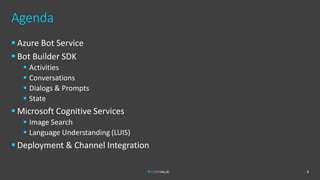
Agenda
6
▪ Azure Bot Service
▪ Bot Builder SDK
▪ Activities
▪ Conversations
▪ Dialogs & Prompts
▪ State
▪ Microsoft Cognitive Services
▪ Image Search
▪ Language Understanding (LUIS)
▪ Deployment & Channel Integration
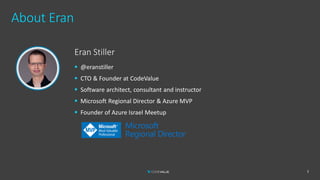
About Eran
Eran Stiller
▪ @eranstiller
▪ CTO & Founder at CodeValue
▪ Software architect, consultant and instructor
▪ Microsoft Regional Director & Azure MVP
▪ Founder of Azure Israel Meetup
7
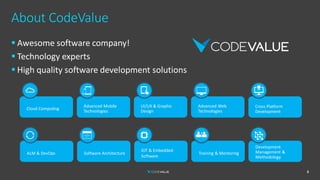
About CodeValue
▪ Awesome software company!
▪ Technology experts
▪ High quality software development solutions
Cloud Computing
Advanced Mobile
Technologies
UI/UX & Graphic
Design
Cross Platform
Development
Advanced Web
Technologies
ALM & DevOps Software Architecture
IOT & Embedded
Software
Training & Mentoring
Development
Management &
Methodology
8
Introduction to Chat Bots
9
▪ Natural Language User Interface (NLUI)
▪ Another form of User Experience (UX)
▪ Various platforms
▪ Web
▪ Mobile
▪ Social Networks
▪ Messaging Apps
▪ Personal Assistants
▪ Text and/or Speech
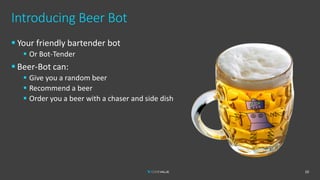
Introducing Beer Bot
10
▪ Your friendly bartender bot
▪ Or Bot-Tender
▪ Beer-Bot can:
▪ Give you a random beer
▪ Recommend a beer
▪ Order you a beer with a chaser and side dish
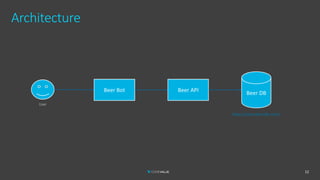
Architecture
12
Beer Bot Beer API Beer DB
User
https://openbeerdb.com/
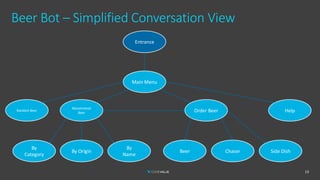
Beer Bot – Simplified Conversation View
13
Main Menu
Recommend
Beer
By
Category
By Origin
By
Name
Order Beer Help
Beer Chaser Side Dish
Entrance
Random Beer
Azure Bot Service
14
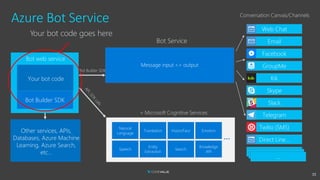
Azure Bot Service
Bot web service
Your bot code
Entity
Extraction
Speech
Vision/Face
Natural
Language
Translation
+ Microsoft Cognitive Services
Search
Emotion
Knowledge
API
…
Message input <> output
Bot Service
Conversation Canvas/Channels
………
Other services, APIs,
Databases, Azure Machine
Learning, Azure Search,
etc…
Bot Builder SDK
Web Chat
Direct Line…
Email
Facebook
GroupMe
Kik
Skype
Slack
Telegram
Twilio (SMS)
Bot Builder SDK
Your bot code goes here
15
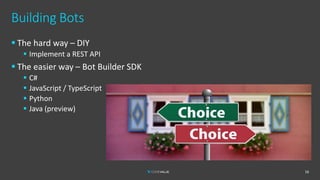
Building Bots
▪ The hard way – DIY
▪ Implement a REST API
▪ The easier way – Bot Builder SDK
▪ C#
▪ JavaScript / TypeScript
▪ Python
▪ Java (preview)
16
Bot Builder SDK
17
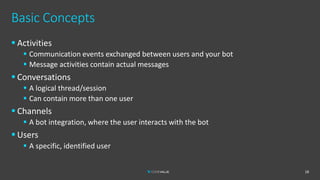
Basic Concepts
▪ Activities
▪ Communication events exchanged between users and your bot
▪ Message activities contain actual messages
▪ Conversations
▪ A logical thread/session
▪ Can contain more than one user
▪ Channels
▪ A bot integration, where the user interacts with the bot
▪ Users
▪ A specific, identified user
18
Implementing Bots
19
[Route("api/messages")]
[ApiController]
public class BotController : ControllerBase
{
private readonly IBotFrameworkHttpAdapter _adapter;
private readonly IBot _bot;
public BotController(IBotFrameworkHttpAdapter adapter, IBot bot)
{
_adapter = adapter;
_bot = bot;
}
[HttpPost, HttpGet]
public async Task PostAsync(CancellationToken cancellationToken)
{
// Delegate the processing of the HTTP POST to the adapter.
// The adapter will invoke the bot.
await _adapter.ProcessAsync(Request, Response, _bot, cancellationToken);
}
}
Implementing Bots
20
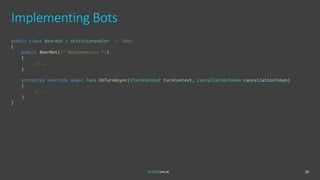
public class BeerBot : ActivityHandler // IBot
{
public BeerBot(/* Dependencies */)
{
// ...
}
protected override async Task OnTurnAsync(ITurnContext turnContext, CancellationToken cancellationToken)
{
// ...
}
}
Implementing Bots
21
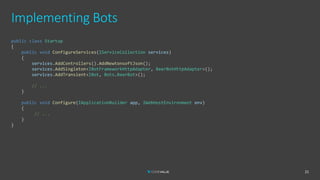
public class Startup
{
public void ConfigureServices(IServiceCollection services)
{
services.AddControllers().AddNewtonsoftJson();
services.AddSingleton<IBotFrameworkHttpAdapter, BeerBotHttpAdapter>();
services.AddTransient<IBot, Bots.BeerBot>();
// ...
}
public void Configure(IApplicationBuilder app, IWebHostEnvironment env)
{
// ...
}
}
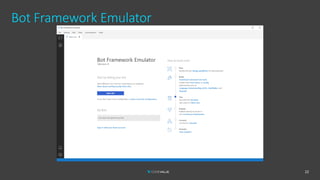
Bot Framework Emulator
22
Demo
Basic Bot
23
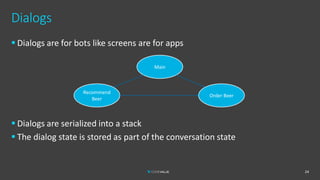
Dialogs
▪ Dialogs are for bots like screens are for apps
▪ Dialogs are serialized into a stack
▪ The dialog state is stored as part of the conversation state
24
Main
Recommend
Beer
Order Beer
Prompts
▪ Prompts are abstraction for easily acquiring user input
▪ AttachmentPrompt
▪ ChoicePrompt
▪ ConfirmPrompt
▪ DateTimePrompt
▪ NumberPrompt
▪ TextPrompt
▪ All prompts inherit Prompt<T>
▪ Which is a dialog
▪ You can write your own
25
Implementing Dialogs
26
public class MainDialog : ComponentDialog
{
public MainDialog() : base(nameof(MainDialog))
{
AddDialog(new TextPrompt(nameof(TextPrompt)));
AddDialog(new ChoicePrompt(nameof(ChoicePrompt)));
AddDialog(new WaterfallDialog(nameof(MainDialog), new WaterfallStep[]
{
IntroStepAsync,
ShowMenuAsync,
ActStepAsync,
FinalStepAsync,
}));
InitialDialogId = nameof(MainDialog);
}
private Task<DialogTurnResult> IntroStepAsync(WaterfallStepContext stepContext,
CancellationToken cancellationToken)
{
27
AddDialog(new WaterfallDialog(nameof(MainDialog), new WaterfallStep[]
{
IntroStepAsync,
ShowMenuAsync,
ActStepAsync,
FinalStepAsync,
}));
InitialDialogId = nameof(MainDialog);
}
private Task<DialogTurnResult> IntroStepAsync(WaterfallStepContext stepContext,
CancellationToken cancellationToken)
{
var message = stepContext.Options?.ToString() ??
"Welcome to your friendly neighborhood bot-tender! How can I help?";
var promptMessage = MessageFactory.Text(message, message, InputHints.ExpectingInput);
return stepContext.PromptAsync(nameof(TextPrompt), new PromptOptions { Prompt = promptMessage },
cancellationToken);
}
// ...
}
Bot State
▪ State can be managed at multiple levels
▪ Conversation State
▪ Including Dialog State
▪ User State
▪ State is persisted by a state storage service
▪ Some are provided out-of-the-box
▪ In-memory, file, Azure Blobs, Cosmos DB
▪ Can write your own
▪ State can be used to direct conversation flow
28
Demo
Basic Dialog Flow
29
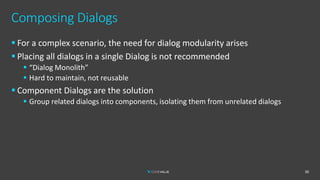
Composing Dialogs
▪ For a complex scenario, the need for dialog modularity arises
▪ Placing all dialogs in a single Dialog is not recommended
▪ “Dialog Monolith”
▪ Hard to maintain, not reusable
▪ Component Dialogs are the solution
▪ Group related dialogs into components, isolating them from unrelated dialogs
30
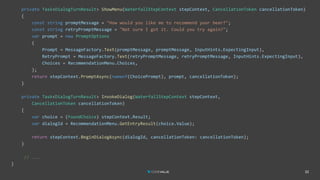
Composing Dialogs
31
public class RecommendBeerDialog : ComponentDialog
{
public RecommendBeerDialog(RecommendBeerByCategoryDialog byCategory, RecommendBeerByOriginDialog byOrigin,
RecommendBeerByNameDialog byName) : base(nameof(RecommendBeerDialog))
{
AddDialog(new ChoicePrompt(nameof(ChoicePrompt)));
AddDialog(new ConfirmPrompt(nameof(ConfirmPrompt)));
AddDialog(byCategory);
AddDialog(byOrigin);
AddDialog(byName);
AddDialog(new WaterfallDialog(nameof(WaterfallDialog), new WaterfallStep[]
{
ShowMenu,
InvokeDialog,
AskForConfirmation,
FinalConfirmation,
SetResult
}));
InitialDialogId = nameof(WaterfallDialog);
}
32
private Task<DialogTurnResult> ShowMenu(WaterfallStepContext stepContext, CancellationToken cancellationToken)
{
const string promptMessage = "How would you like me to recommend your beer?";
const string retryPromptMessage = "Not sure I got it. Could you try again?";
var prompt = new PromptOptions
{
Prompt = MessageFactory.Text(promptMessage, promptMessage, InputHints.ExpectingInput),
RetryPrompt = MessageFactory.Text(retryPromptMessage, retryPromptMessage, InputHints.ExpectingInput),
Choices = RecommendationMenu.Choices,
};
return stepContext.PromptAsync(nameof(ChoicePrompt), prompt, cancellationToken);
}
private Task<DialogTurnResult> InvokeDialog(WaterfallStepContext stepContext,
CancellationToken cancellationToken)
{
var choice = (FoundChoice) stepContext.Result;
var dialogId = RecommendationMenu.GetEntryResult(choice.Value);
return stepContext.BeginDialogAsync(dialogId, cancellationToken: cancellationToken);
}
// ...
}
Demo
Beer
Recommendation
Dialog
33
Forms
▪ Sometimes we need the user to input some predefined fields
34
Demo
Beer Order Dialog
35
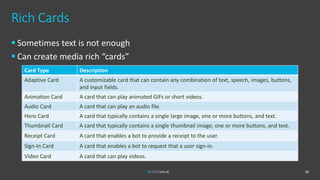
Rich Cards
36
Card Type Description
Adaptive Card A customizable card that can contain any combination of text, speech, images, buttons,
and input fields.
Animation Card A card that can play animated GIFs or short videos.
Audio Card A card that can play an audio file.
Hero Card A card that typically contains a single large image, one or more buttons, and text.
Thumbnail Card A card that typically contains a single thumbnail image, one or more buttons, and text.
Receipt Card A card that enables a bot to provide a receipt to the user.
Sign-In Card A card that enables a bot to request that a user sign-in.
Video Card A card that can play videos.
▪ Sometimes text is not enough
▪ Can create media rich “cards”
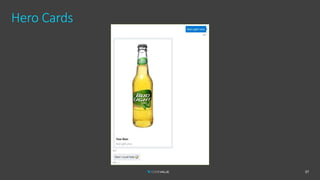
Hero Cards
37
Creating a Card
38
private async Task SendBeerCardAsync(string beerName, ITurnContext turnContext,
CancellationToken cancellationToken)
{
var imageUrl = await _imageSearch.SearchImage($"{beerName} beer");
const string title = "Your Beer";
var activity = MessageFactory.Attachment(
new HeroCard(
title,
beerName,
images: new[] {new CardImage(imageUrl.ToString())}
)
.ToAttachment(), null, title, InputHints.IgnoringInput);
await turnContext.SendActivityAsync(activity, cancellationToken);
const string messageBase = "Glad I could help";
await turnContext.SendActivityAsync($"{messageBase} {Emoji.Beer}", messageBase,
InputHints.IgnoringInput, cancellationToken);
}
Azure Cognitive Services – Image Search
39
internal class CognitiveServicesImageSearch : IImageSearch
{
private readonly HttpClient _httpClient;
public CognitiveServicesImageSearch(IOptions<CognitiveServicesImageSearchOptions> options)
{
_httpClient = new HttpClient { BaseAddress = new Uri(options.Value.EndpointUrl) };
_httpClient.DefaultRequestHeaders.Add("Ocp-Apim-Subscription-Key", options.Value.ApiKey);
}
public async Task<Uri> SearchImage(string query)
{
var response = await _httpClient.GetAsync($"?q={query}");
response.EnsureSuccessStatusCode();
var resultString = await response.Content.ReadAsStringAsync();
dynamic result = JsonConvert.DeserializeObject<JObject>(resultString);
var url = (string)result.value[0].contentUrl;
return new Uri(url);
}
}
“Typing” Indicator
▪ Your users expect you to reply quickly
41
“Typing” Indicator
42
“Typing” Indicator
43
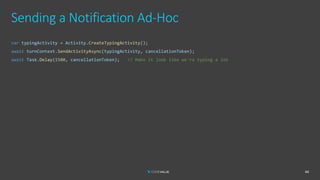
Sending a Notification Ad-Hoc
44
var typingActivity = Activity.CreateTypingActivity();
await turnContext.SendActivityAsync(typingActivity, cancellationToken);
await Task.Delay(1500, cancellationToken); // Make it look like we're typing a lot
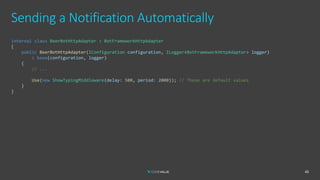
Sending a Notification Automatically
45
internal class BeerBotHttpAdapter : BotFrameworkHttpAdapter
{
public BeerBotHttpAdapter(IConfiguration configuration, ILogger<BotFrameworkHttpAdapter> logger)
: base(configuration, logger)
{
// ...
Use(new ShowTypingMiddleware(delay: 500, period: 2000)); // These are default values
}
}
Demo
Hero Card &
Typing Notification
46
User State
▪ A bot can store state that is persisted per user across conversations
47
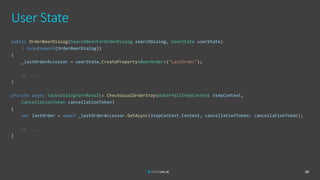
User State
48
public OrderBeerDialog(SearchBeerForOrderDialog searchDialog, UserState userState)
: base(nameof(OrderBeerDialog))
{
_lastOrderAccessor = userState.CreateProperty<BeerOrder>("LastOrder");
// ...
}
private async Task<DialogTurnResult> CheckUsualOrderStep(WaterfallStepContext stepContext,
CancellationToken cancellationToken)
{
var lastOrder = await _lastOrderAccessor.GetAsync(stepContext.Context, cancellationToken: cancellationToken);
// ...
}
Demo
User State
49
Natural Language
50
LUIS
51
LUIS & Bot Framework
52
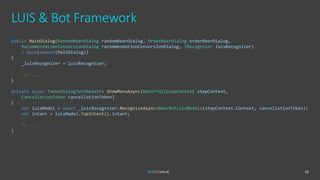
public MainDialog(RandomBeerDialog randomBeerDialog, OrderBeerDialog orderBeerDialog,
RecommendationConversionDialog recommendationConversionDialog, IRecognizer luisRecognizer)
: base(nameof(MainDialog))
{
_luisRecognizer = luisRecognizer;
// ...
}
private async Task<DialogTurnResult> ShowMenuAsync(WaterfallStepContext stepContext,
CancellationToken cancellationToken)
{
var luisModel = await _luisRecognizer.RecognizeAsync<BeerBotLuisModel>(stepContext.Context, cancellationToken);
var intent = luisModel.TopIntent().intent;
// ...
}
Demo
LUIS Integration
53
Deployment
▪ The Bot is just a REST API
▪ Can be hosted anywhere
▪ Azure App Service is an easy choice
54
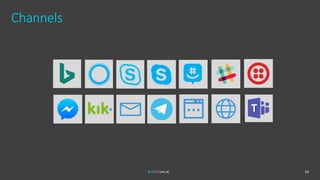
Channels
55
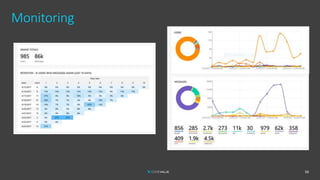
Monitoring
56
Demo
Deployment,
Channels &
Monitoring
57
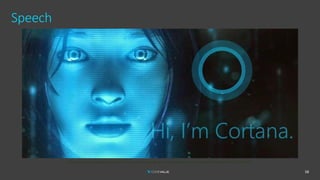
Speech
58
https://windows.gadgethacks.com/how-to/ultimate-guide-using-cortana-voice-commands-windows-10-0163095/
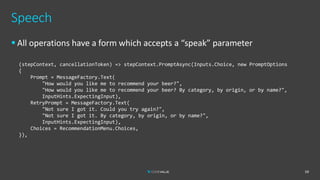
Speech
▪ All operations have a form which accepts a “speak” parameter
59
(stepContext, cancellationToken) => stepContext.PromptAsync(Inputs.Choice, new PromptOptions
{
Prompt = MessageFactory.Text(
"How would you like me to recommend your beer?",
"How would you like me to recommend your beer? By category, by origin, or by name?",
InputHints.ExpectingInput),
RetryPrompt = MessageFactory.Text(
"Not sure I got it. Could you try again?",
"Not sure I got it. By category, by origin, or by name?",
InputHints.ExpectingInput),
Choices = RecommendationMenu.Choices,
}),
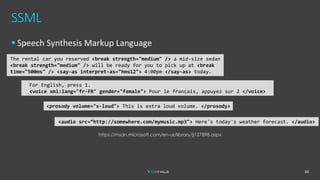
SSML
▪ Speech Synthesis Markup Language
60
The rental car you reserved <break strength="medium" /> a mid-size sedan
<break strength="medium" /> will be ready for you to pick up at <break
time="500ms" /> <say-as interpret-as="hms12"> 4:00pm </say-as> today.
For English, press 1.
<voice xml:lang="fr-FR" gender="female"> Pour le français, appuyez sur 2 </voice>
<prosody volume="x-loud"> This is extra loud volume. </prosody>
<audio src=“http://somewhere.com/mymusic.mp3"> Here's today's weather forecast. </audio>
https://msdn.microsoft.com/en-us/library/jj127898.aspx
Demo
Cortana Skill
61
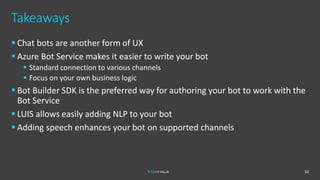
Takeaways
62
▪ Chat bots are another form of UX
▪ Azure Bot Service makes it easier to write your bot
▪ Standard connection to various channels
▪ Focus on your own business logic
▪ Bot Builder SDK is the preferred way for authoring your bot to work with the
Bot Service
▪ LUIS allows easily adding NLP to your bot
▪ Adding speech enhances your bot on supported channels
Takeaways
63
Resources
▪ Slide Deck
▪ https://www.slideshare.net/EranStiller
▪ Sample Code
▪ https://github.com/estiller/beer-bot-v4
▪ Product & Documentation
▪ https://github.com/Microsoft/botbuilder
▪ https://docs.microsoft.com/en-us/azure/bot-service/
▪ https://github.com/BotBuilderCommunity
▪ More Samples
▪ https://github.com/Microsoft/BotBuilder-Samples
64
Eran Stiller
Chief Technology Officer
erans@codevalue.net
@eranstiller
https://stiller.blog
https://codevalue.net

Bot-Tender: A Chat Bot Walks into a Bar (2020)

  • 1.
    Bot-Tender: A Chat BotWalks into a Bar Eran Stiller Chief Technology Officer, CodeValue erans@codevalue.net @eranstiller https://stiller.blog https://codevalue.net
  • 2.
  • 3.
  • 4.
  • 5.
    Agenda 6 ▪ Azure BotService ▪ Bot Builder SDK ▪ Activities ▪ Conversations ▪ Dialogs & Prompts ▪ State ▪ Microsoft Cognitive Services ▪ Image Search ▪ Language Understanding (LUIS) ▪ Deployment & Channel Integration
  • 6.
    About Eran Eran Stiller ▪@eranstiller ▪ CTO & Founder at CodeValue ▪ Software architect, consultant and instructor ▪ Microsoft Regional Director & Azure MVP ▪ Founder of Azure Israel Meetup 7
  • 7.
    About CodeValue ▪ Awesomesoftware company! ▪ Technology experts ▪ High quality software development solutions Cloud Computing Advanced Mobile Technologies UI/UX & Graphic Design Cross Platform Development Advanced Web Technologies ALM & DevOps Software Architecture IOT & Embedded Software Training & Mentoring Development Management & Methodology 8
  • 8.
    Introduction to ChatBots 9 ▪ Natural Language User Interface (NLUI) ▪ Another form of User Experience (UX) ▪ Various platforms ▪ Web ▪ Mobile ▪ Social Networks ▪ Messaging Apps ▪ Personal Assistants ▪ Text and/or Speech
  • 9.
    Introducing Beer Bot 10 ▪Your friendly bartender bot ▪ Or Bot-Tender ▪ Beer-Bot can: ▪ Give you a random beer ▪ Recommend a beer ▪ Order you a beer with a chaser and side dish
  • 10.
    Architecture 12 Beer Bot BeerAPI Beer DB User https://openbeerdb.com/
  • 11.
    Beer Bot –Simplified Conversation View 13 Main Menu Recommend Beer By Category By Origin By Name Order Beer Help Beer Chaser Side Dish Entrance Random Beer
  • 12.
  • 13.
    Azure Bot Service Botweb service Your bot code Entity Extraction Speech Vision/Face Natural Language Translation + Microsoft Cognitive Services Search Emotion Knowledge API … Message input <> output Bot Service Conversation Canvas/Channels ……… Other services, APIs, Databases, Azure Machine Learning, Azure Search, etc… Bot Builder SDK Web Chat Direct Line… Email Facebook GroupMe Kik Skype Slack Telegram Twilio (SMS) Bot Builder SDK Your bot code goes here 15
  • 14.
    Building Bots ▪ Thehard way – DIY ▪ Implement a REST API ▪ The easier way – Bot Builder SDK ▪ C# ▪ JavaScript / TypeScript ▪ Python ▪ Java (preview) 16
  • 15.
  • 16.
    Basic Concepts ▪ Activities ▪Communication events exchanged between users and your bot ▪ Message activities contain actual messages ▪ Conversations ▪ A logical thread/session ▪ Can contain more than one user ▪ Channels ▪ A bot integration, where the user interacts with the bot ▪ Users ▪ A specific, identified user 18
  • 17.
    Implementing Bots 19 [Route("api/messages")] [ApiController] public classBotController : ControllerBase { private readonly IBotFrameworkHttpAdapter _adapter; private readonly IBot _bot; public BotController(IBotFrameworkHttpAdapter adapter, IBot bot) { _adapter = adapter; _bot = bot; } [HttpPost, HttpGet] public async Task PostAsync(CancellationToken cancellationToken) { // Delegate the processing of the HTTP POST to the adapter. // The adapter will invoke the bot. await _adapter.ProcessAsync(Request, Response, _bot, cancellationToken); } }
  • 18.
    Implementing Bots 20 public classBeerBot : ActivityHandler // IBot { public BeerBot(/* Dependencies */) { // ... } protected override async Task OnTurnAsync(ITurnContext turnContext, CancellationToken cancellationToken) { // ... } }
  • 19.
    Implementing Bots 21 public classStartup { public void ConfigureServices(IServiceCollection services) { services.AddControllers().AddNewtonsoftJson(); services.AddSingleton<IBotFrameworkHttpAdapter, BeerBotHttpAdapter>(); services.AddTransient<IBot, Bots.BeerBot>(); // ... } public void Configure(IApplicationBuilder app, IWebHostEnvironment env) { // ... } }
  • 20.
  • 21.
  • 22.
    Dialogs ▪ Dialogs arefor bots like screens are for apps ▪ Dialogs are serialized into a stack ▪ The dialog state is stored as part of the conversation state 24 Main Recommend Beer Order Beer
  • 23.
    Prompts ▪ Prompts areabstraction for easily acquiring user input ▪ AttachmentPrompt ▪ ChoicePrompt ▪ ConfirmPrompt ▪ DateTimePrompt ▪ NumberPrompt ▪ TextPrompt ▪ All prompts inherit Prompt<T> ▪ Which is a dialog ▪ You can write your own 25
  • 24.
    Implementing Dialogs 26 public classMainDialog : ComponentDialog { public MainDialog() : base(nameof(MainDialog)) { AddDialog(new TextPrompt(nameof(TextPrompt))); AddDialog(new ChoicePrompt(nameof(ChoicePrompt))); AddDialog(new WaterfallDialog(nameof(MainDialog), new WaterfallStep[] { IntroStepAsync, ShowMenuAsync, ActStepAsync, FinalStepAsync, })); InitialDialogId = nameof(MainDialog); } private Task<DialogTurnResult> IntroStepAsync(WaterfallStepContext stepContext, CancellationToken cancellationToken) {
  • 25.
    27 AddDialog(new WaterfallDialog(nameof(MainDialog), newWaterfallStep[] { IntroStepAsync, ShowMenuAsync, ActStepAsync, FinalStepAsync, })); InitialDialogId = nameof(MainDialog); } private Task<DialogTurnResult> IntroStepAsync(WaterfallStepContext stepContext, CancellationToken cancellationToken) { var message = stepContext.Options?.ToString() ?? "Welcome to your friendly neighborhood bot-tender! How can I help?"; var promptMessage = MessageFactory.Text(message, message, InputHints.ExpectingInput); return stepContext.PromptAsync(nameof(TextPrompt), new PromptOptions { Prompt = promptMessage }, cancellationToken); } // ... }
  • 26.
    Bot State ▪ Statecan be managed at multiple levels ▪ Conversation State ▪ Including Dialog State ▪ User State ▪ State is persisted by a state storage service ▪ Some are provided out-of-the-box ▪ In-memory, file, Azure Blobs, Cosmos DB ▪ Can write your own ▪ State can be used to direct conversation flow 28
  • 27.
  • 28.
    Composing Dialogs ▪ Fora complex scenario, the need for dialog modularity arises ▪ Placing all dialogs in a single Dialog is not recommended ▪ “Dialog Monolith” ▪ Hard to maintain, not reusable ▪ Component Dialogs are the solution ▪ Group related dialogs into components, isolating them from unrelated dialogs 30
  • 29.
    Composing Dialogs 31 public classRecommendBeerDialog : ComponentDialog { public RecommendBeerDialog(RecommendBeerByCategoryDialog byCategory, RecommendBeerByOriginDialog byOrigin, RecommendBeerByNameDialog byName) : base(nameof(RecommendBeerDialog)) { AddDialog(new ChoicePrompt(nameof(ChoicePrompt))); AddDialog(new ConfirmPrompt(nameof(ConfirmPrompt))); AddDialog(byCategory); AddDialog(byOrigin); AddDialog(byName); AddDialog(new WaterfallDialog(nameof(WaterfallDialog), new WaterfallStep[] { ShowMenu, InvokeDialog, AskForConfirmation, FinalConfirmation, SetResult })); InitialDialogId = nameof(WaterfallDialog); }
  • 30.
    32 private Task<DialogTurnResult> ShowMenu(WaterfallStepContextstepContext, CancellationToken cancellationToken) { const string promptMessage = "How would you like me to recommend your beer?"; const string retryPromptMessage = "Not sure I got it. Could you try again?"; var prompt = new PromptOptions { Prompt = MessageFactory.Text(promptMessage, promptMessage, InputHints.ExpectingInput), RetryPrompt = MessageFactory.Text(retryPromptMessage, retryPromptMessage, InputHints.ExpectingInput), Choices = RecommendationMenu.Choices, }; return stepContext.PromptAsync(nameof(ChoicePrompt), prompt, cancellationToken); } private Task<DialogTurnResult> InvokeDialog(WaterfallStepContext stepContext, CancellationToken cancellationToken) { var choice = (FoundChoice) stepContext.Result; var dialogId = RecommendationMenu.GetEntryResult(choice.Value); return stepContext.BeginDialogAsync(dialogId, cancellationToken: cancellationToken); } // ... }
  • 31.
  • 32.
    Forms ▪ Sometimes weneed the user to input some predefined fields 34
  • 33.
  • 34.
    Rich Cards 36 Card TypeDescription Adaptive Card A customizable card that can contain any combination of text, speech, images, buttons, and input fields. Animation Card A card that can play animated GIFs or short videos. Audio Card A card that can play an audio file. Hero Card A card that typically contains a single large image, one or more buttons, and text. Thumbnail Card A card that typically contains a single thumbnail image, one or more buttons, and text. Receipt Card A card that enables a bot to provide a receipt to the user. Sign-In Card A card that enables a bot to request that a user sign-in. Video Card A card that can play videos. ▪ Sometimes text is not enough ▪ Can create media rich “cards”
  • 35.
  • 36.
    Creating a Card 38 privateasync Task SendBeerCardAsync(string beerName, ITurnContext turnContext, CancellationToken cancellationToken) { var imageUrl = await _imageSearch.SearchImage($"{beerName} beer"); const string title = "Your Beer"; var activity = MessageFactory.Attachment( new HeroCard( title, beerName, images: new[] {new CardImage(imageUrl.ToString())} ) .ToAttachment(), null, title, InputHints.IgnoringInput); await turnContext.SendActivityAsync(activity, cancellationToken); const string messageBase = "Glad I could help"; await turnContext.SendActivityAsync($"{messageBase} {Emoji.Beer}", messageBase, InputHints.IgnoringInput, cancellationToken); }
  • 37.
    Azure Cognitive Services– Image Search 39 internal class CognitiveServicesImageSearch : IImageSearch { private readonly HttpClient _httpClient; public CognitiveServicesImageSearch(IOptions<CognitiveServicesImageSearchOptions> options) { _httpClient = new HttpClient { BaseAddress = new Uri(options.Value.EndpointUrl) }; _httpClient.DefaultRequestHeaders.Add("Ocp-Apim-Subscription-Key", options.Value.ApiKey); } public async Task<Uri> SearchImage(string query) { var response = await _httpClient.GetAsync($"?q={query}"); response.EnsureSuccessStatusCode(); var resultString = await response.Content.ReadAsStringAsync(); dynamic result = JsonConvert.DeserializeObject<JObject>(resultString); var url = (string)result.value[0].contentUrl; return new Uri(url); } }
  • 38.
    “Typing” Indicator ▪ Yourusers expect you to reply quickly 41
  • 39.
  • 40.
  • 41.
    Sending a NotificationAd-Hoc 44 var typingActivity = Activity.CreateTypingActivity(); await turnContext.SendActivityAsync(typingActivity, cancellationToken); await Task.Delay(1500, cancellationToken); // Make it look like we're typing a lot
  • 42.
    Sending a NotificationAutomatically 45 internal class BeerBotHttpAdapter : BotFrameworkHttpAdapter { public BeerBotHttpAdapter(IConfiguration configuration, ILogger<BotFrameworkHttpAdapter> logger) : base(configuration, logger) { // ... Use(new ShowTypingMiddleware(delay: 500, period: 2000)); // These are default values } }
  • 43.
    Demo Hero Card & TypingNotification 46
  • 44.
    User State ▪ Abot can store state that is persisted per user across conversations 47
  • 45.
    User State 48 public OrderBeerDialog(SearchBeerForOrderDialogsearchDialog, UserState userState) : base(nameof(OrderBeerDialog)) { _lastOrderAccessor = userState.CreateProperty<BeerOrder>("LastOrder"); // ... } private async Task<DialogTurnResult> CheckUsualOrderStep(WaterfallStepContext stepContext, CancellationToken cancellationToken) { var lastOrder = await _lastOrderAccessor.GetAsync(stepContext.Context, cancellationToken: cancellationToken); // ... }
  • 46.
  • 47.
  • 48.
  • 49.
    LUIS & BotFramework 52 public MainDialog(RandomBeerDialog randomBeerDialog, OrderBeerDialog orderBeerDialog, RecommendationConversionDialog recommendationConversionDialog, IRecognizer luisRecognizer) : base(nameof(MainDialog)) { _luisRecognizer = luisRecognizer; // ... } private async Task<DialogTurnResult> ShowMenuAsync(WaterfallStepContext stepContext, CancellationToken cancellationToken) { var luisModel = await _luisRecognizer.RecognizeAsync<BeerBotLuisModel>(stepContext.Context, cancellationToken); var intent = luisModel.TopIntent().intent; // ... }
  • 50.
  • 51.
    Deployment ▪ The Botis just a REST API ▪ Can be hosted anywhere ▪ Azure App Service is an easy choice 54
  • 52.
  • 53.
  • 54.
  • 55.
  • 56.
    Speech ▪ All operationshave a form which accepts a “speak” parameter 59 (stepContext, cancellationToken) => stepContext.PromptAsync(Inputs.Choice, new PromptOptions { Prompt = MessageFactory.Text( "How would you like me to recommend your beer?", "How would you like me to recommend your beer? By category, by origin, or by name?", InputHints.ExpectingInput), RetryPrompt = MessageFactory.Text( "Not sure I got it. Could you try again?", "Not sure I got it. By category, by origin, or by name?", InputHints.ExpectingInput), Choices = RecommendationMenu.Choices, }),
  • 57.
    SSML ▪ Speech SynthesisMarkup Language 60 The rental car you reserved <break strength="medium" /> a mid-size sedan <break strength="medium" /> will be ready for you to pick up at <break time="500ms" /> <say-as interpret-as="hms12"> 4:00pm </say-as> today. For English, press 1. <voice xml:lang="fr-FR" gender="female"> Pour le français, appuyez sur 2 </voice> <prosody volume="x-loud"> This is extra loud volume. </prosody> <audio src=“http://somewhere.com/mymusic.mp3"> Here's today's weather forecast. </audio> https://msdn.microsoft.com/en-us/library/jj127898.aspx
  • 58.
  • 59.
    Takeaways 62 ▪ Chat botsare another form of UX ▪ Azure Bot Service makes it easier to write your bot ▪ Standard connection to various channels ▪ Focus on your own business logic ▪ Bot Builder SDK is the preferred way for authoring your bot to work with the Bot Service ▪ LUIS allows easily adding NLP to your bot ▪ Adding speech enhances your bot on supported channels
  • 60.
  • 61.
    Resources ▪ Slide Deck ▪https://www.slideshare.net/EranStiller ▪ Sample Code ▪ https://github.com/estiller/beer-bot-v4 ▪ Product & Documentation ▪ https://github.com/Microsoft/botbuilder ▪ https://docs.microsoft.com/en-us/azure/bot-service/ ▪ https://github.com/BotBuilderCommunity ▪ More Samples ▪ https://github.com/Microsoft/BotBuilder-Samples 64
  • 62.
    Eran Stiller Chief TechnologyOfficer erans@codevalue.net @eranstiller https://stiller.blog https://codevalue.net