Agile PLM Part Numbers

     Creating a custom
    AutoNumber source
Introduction
 Sometimes the AutoNumber facility in
  Agile PLM does not offer the level of
  sophistication needed
 Agile provides an extension point to
  create custom AutoNumber sources
Creating the AutoNumber Source
1. Create a Java class that implements the
   ICustomAutoNumber and its getAutoNumber
   method
2. Create com.agile.px.ICustomAutoNumber
   that contains the name of the new custom
   class above. This is used by Agile to load the
   relevant classes into Agile making them
   available in the dropdowns.
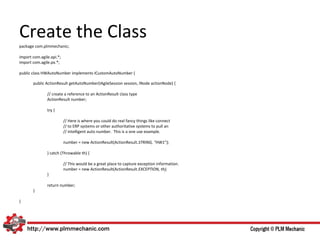
Create the Class
package com.plmmechanic;

import com.agile.api.*;
import com.agile.px.*;

public class HWAutoNumber implements ICustomAutoNumber {

       public ActionResult getAutoNumber(IAgileSession session, INode actionNode) {

               // create a reference to an ActionResult class type
               ActionResult number;

               try {

                          // Here is where you could do real fancy things like connect
                          // to ERP systems or other authoritative systems to pull an
                          // intelligent auto number. This is a one use example.

                          number = new ActionResult(ActionResult.STRING, “HW1”);

               } catch (Throwable th) {

                          // This would be a great place to capture exception information.
                          number = new ActionResult(ActionResult.EXCEPTION, th);
               }

               return number;
       }

}
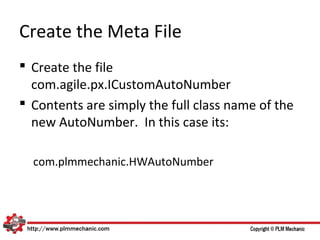
Create the Meta File
 Create the file
  com.agile.px.ICustomAutoNumber
 Contents are simply the full class name of the
  new AutoNumber. In this case its:

  com.plmmechanic.HWAutoNumber
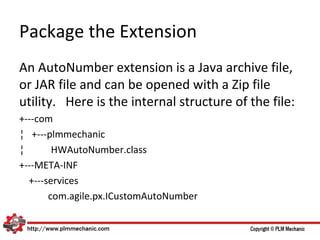
Package the Extension
An AutoNumber extension is a Java archive file,
or JAR file and can be opened with a Zip file
utility. Here is the internal structure of the file:
+---com
¦ +---plmmechanic
¦       HWAutoNumber.class
+---META-INF
  +---services
       com.agile.px.ICustomAutoNumber
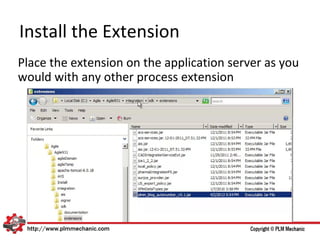
Install the Extension
Place the extension on the application server as you
would with any other process extension
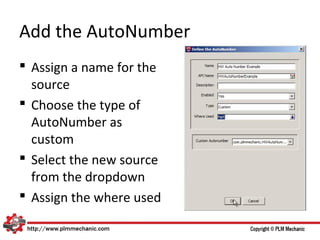
Add the AutoNumber
 Assign a name for the
  source
 Choose the type of
  AutoNumber as
  custom
 Select the new source
  from the dropdown
 Assign the where used
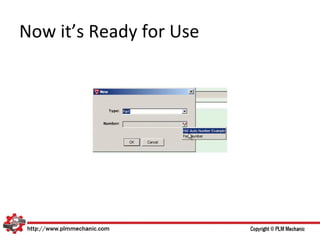
Now it’s Ready for Use
About Us
 PLM Mechanic specializes in the technical
  aspects of Oracle’s Agile PLM solution
 We offer the following service:
  – Agile PLM installations and upgrades
  – Agile PLM maintenance and help desk functions
  – Agile PLM hosting
  – Customization
 PLM Mechanic also has several product
  offerings
Contact Us
   Web: http://www.plmmechanic.com
   Blog: http://www.plmmechanic.com/blog
   Twitter: @PLMMechanic
   Email: sales@plmmechanic.com
   Phone: 512-827-2262
   Fax: 512-582-2932

Create a custom AutoNumber source

  • 1.
    Agile PLM PartNumbers Creating a custom AutoNumber source
  • 2.
    Introduction  Sometimes theAutoNumber facility in Agile PLM does not offer the level of sophistication needed  Agile provides an extension point to create custom AutoNumber sources
  • 3.
    Creating the AutoNumberSource 1. Create a Java class that implements the ICustomAutoNumber and its getAutoNumber method 2. Create com.agile.px.ICustomAutoNumber that contains the name of the new custom class above. This is used by Agile to load the relevant classes into Agile making them available in the dropdowns.
  • 4.
    Create the Class packagecom.plmmechanic; import com.agile.api.*; import com.agile.px.*; public class HWAutoNumber implements ICustomAutoNumber { public ActionResult getAutoNumber(IAgileSession session, INode actionNode) { // create a reference to an ActionResult class type ActionResult number; try { // Here is where you could do real fancy things like connect // to ERP systems or other authoritative systems to pull an // intelligent auto number. This is a one use example. number = new ActionResult(ActionResult.STRING, “HW1”); } catch (Throwable th) { // This would be a great place to capture exception information. number = new ActionResult(ActionResult.EXCEPTION, th); } return number; } }
  • 5.
    Create the MetaFile  Create the file com.agile.px.ICustomAutoNumber  Contents are simply the full class name of the new AutoNumber. In this case its: com.plmmechanic.HWAutoNumber
  • 6.
    Package the Extension AnAutoNumber extension is a Java archive file, or JAR file and can be opened with a Zip file utility. Here is the internal structure of the file: +---com ¦ +---plmmechanic ¦ HWAutoNumber.class +---META-INF +---services com.agile.px.ICustomAutoNumber
  • 7.
    Install the Extension Placethe extension on the application server as you would with any other process extension
  • 8.
    Add the AutoNumber Assign a name for the source  Choose the type of AutoNumber as custom  Select the new source from the dropdown  Assign the where used
  • 9.
  • 10.
    About Us  PLMMechanic specializes in the technical aspects of Oracle’s Agile PLM solution  We offer the following service: – Agile PLM installations and upgrades – Agile PLM maintenance and help desk functions – Agile PLM hosting – Customization  PLM Mechanic also has several product offerings
  • 11.
    Contact Us  Web: http://www.plmmechanic.com  Blog: http://www.plmmechanic.com/blog  Twitter: @PLMMechanic  Email: sales@plmmechanic.com  Phone: 512-827-2262  Fax: 512-582-2932