Portable Class Library: Tomorrow's Apps Today


                            Jeremy Likness (@JeremyLikness)
                            Principal Consultant
                            jlikness@wintellect.com
                                                                Copyright © 2012


consulting   training   design   debugging                    wintellect.com
what we do
    consulting     training    design     debugging

 who we are
   Founded by top experts on Microsoft – Jeffrey Richter, Jeff Prosise, and John Robbins –
   we pull out all the stops to help our customers achieve their goals through advanced
   software-based consulting and training solutions.

 how we do it                                           Training
                                                        •   On-site instructor-led training
   Consulting & Debugging                               •   Virtual instructor-led training
   •   Architecture, analysis, and design services      •   Devscovery conferences
   •   Full lifecycle custom software development
   •   Content creation                                 Design
   •   Project management                               •   User Experience Design
   •   Debugging & performance tuning                   •   Visual & Content Design
                                                        •   Video & Animation Production


consulting    training    design     debugging                                   wintellect.com
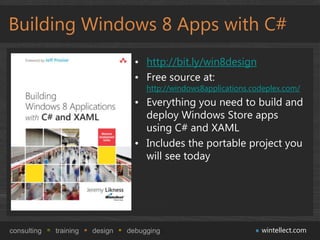
Building Windows 8 Apps with C#
                                   • http://bit.ly/win8design
                                   • Free source at:
                                      http://windows8applications.codeplex.com/
                                   • Everything you need to build and
                                     deploy Windows Store apps
                                     using C# and XAML
                                   • Includes the portable project you
                                     will see today


consulting   training   design   debugging                          wintellect.com
Agenda
 •   Introduction to the Portable Class Library
 •   Understanding Extension SDKs
 •   Portable profiles
 •   Chasing ICommand: PCL Under the Hood
 •   Porting existing code
 •   Strategies for building new applications
 •   Comprehensive Example: Wintellog
 •   PCL Futures


consulting   training   design   debugging        wintellect.com
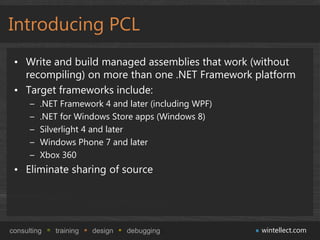
Introducing PCL
 • Write and build managed assemblies that work (without
   recompiling) on more than one .NET Framework platform
 • Target frameworks include:
      –   .NET Framework 4 and later (including WPF)
      –   .NET for Windows Store apps (Windows 8)
      –   Silverlight 4 and later
      –   Windows Phone 7 and later
      –   Xbox 360
 • Eliminate sharing of source


consulting   training   design   debugging             wintellect.com
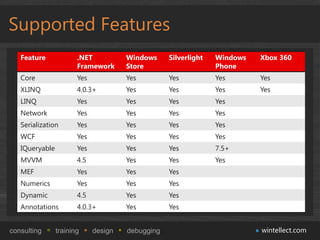
Supported Features
   Feature             .NET           Windows     Silverlight   Windows   Xbox 360
                       Framework      Store                     Phone
   Core                Yes            Yes         Yes           Yes       Yes
   XLINQ               4.0.3+         Yes         Yes           Yes       Yes
   LINQ                Yes            Yes         Yes           Yes
   Network             Yes            Yes         Yes           Yes
   Serialization       Yes            Yes         Yes           Yes
   WCF                 Yes            Yes         Yes           Yes
   IQueryable          Yes            Yes         Yes           7.5+
   MVVM                4.5            Yes         Yes           Yes
   MEF                 Yes            Yes         Yes
   Numerics            Yes            Yes         Yes
   Dynamic             4.5            Yes         Yes
   Annotations         4.0.3+         Yes         Yes


consulting      training     design   debugging                           wintellect.com
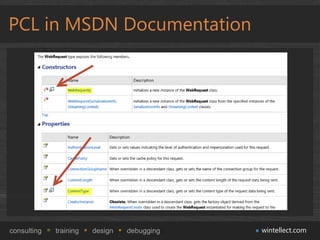
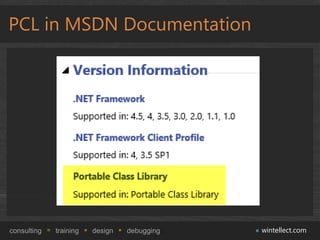
PCL in MSDN Documentation


consulting   training   design   debugging   wintellect.com
PCL in MSDN Documentation


consulting   training   design   debugging   wintellect.com
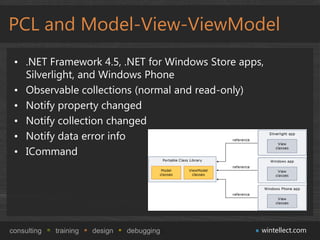
PCL and Model-View-ViewModel
 • .NET Framework 4.5, .NET for Windows Store apps,
   Silverlight, and Windows Phone
 • Observable collections (normal and read-only)
 • Notify property changed
 • Notify collection changed
 • Notify data error info
 • ICommand


consulting   training   design   debugging        wintellect.com
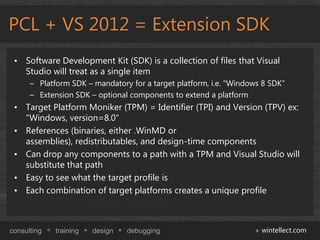
PCL + VS 2012 = Extension SDK
 • Software Development Kit (SDK) is a collection of files that Visual
   Studio will treat as a single item
      – Platform SDK – mandatory for a target platform, i.e. "Windows 8 SDK"
      – Extension SDK – optional components to extend a platform
 • Target Platform Moniker (TPM) = Identifier (TPI) and Version (TPV) ex:
   "Windows, version=8.0"
 • References (binaries, either .WinMD or
   assemblies), redistributables, and design-time components
 • Can drop any components to a path with a TPM and Visual Studio will
   substitute that path
 • Easy to see what the target profile is
 • Each combination of target platforms creates a unique profile


consulting   training   design   debugging                           wintellect.com
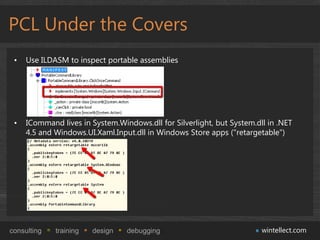
PCL Under the Covers
 •   Use ILDASM to inspect portable assemblies


 •   ICommand lives in System.Windows.dll for Silverlight, but System.dll in .NET
     4.5 and Windows.UI.Xaml.Input.dll in Windows Store apps ("retargetable")


consulting   training   design   debugging                              wintellect.com
PCL Under the Covers (cont.)
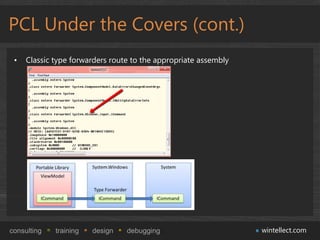
 •   Classic type forwarders route to the appropriate assembly


consulting   training   design   debugging                       wintellect.com
PCL Under the Covers (cont.)
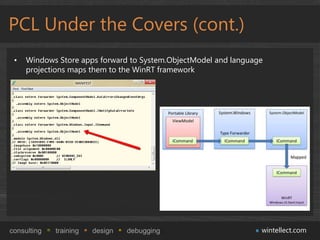
 •   Windows Store apps forward to System.ObjectModel and language
     projections maps them to the WinRT framework


consulting   training   design   debugging                       wintellect.com
demo
   Basic MVVM with PCL


consulting   training   design   debugging   wintellect.com
Porting Existing Code
 • Always easier when implementing MVVM, but are your
   ViewModels tied to views (i.e. do you include XAML
   namespaces?)
 • Decoupled code is key
 • Identify key APIs that are platform-specific and implement
   façade
 • Common areas to refactor out include UI, networking, and
   storage
 • Convert an existing class library to a PCL assembly


consulting   training   design   debugging          wintellect.com
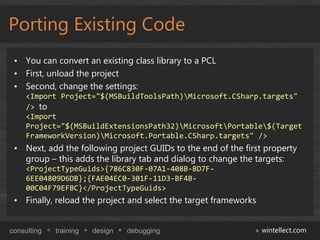
Porting Existing Code
 • You can convert an existing class library to a PCL
 • First, unload the project
 • Second, change the settings:
     <Import Project="$(MSBuildToolsPath)Microsoft.CSharp.targets"
     /> to
     <Import
     Project="$(MSBuildExtensionsPath32)MicrosoftPortable$(Target
     FrameworkVersion)Microsoft.Portable.CSharp.targets" />
 • Next, add the following project GUIDs to the end of the first property
   group – this adds the library tab and dialog to change the targets:
     <ProjectTypeGuids>{786C830F-07A1-408B-BD7F-
     6EE04809D6DB};{FAE04EC0-301F-11D3-BF4B-
     00C04F79EFBC}</ProjectTypeGuids>
 • Finally, reload the project and select the target frameworks


consulting   training   design   debugging                        wintellect.com
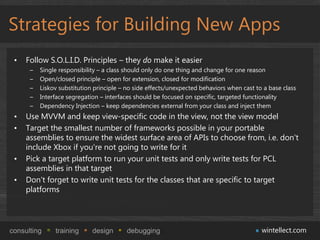
Strategies for Building New Apps
 •   Follow S.O.L.I.D. Principles – they do make it easier
      –   Single responsibility – a class should only do one thing and change for one reason
      –   Open/closed principle – open for extension, closed for modification
      –   Liskov substitution principle – no side effects/unexpected behaviors when cast to a base class
      –   Interface segregation – interfaces should be focused on specific, targeted functionality
      –   Dependency Injection – keep dependencies external from your class and inject them
 •   Use MVVM and keep view-specific code in the view, not the view model
 •   Target the smallest number of frameworks possible in your portable
     assemblies to ensure the widest surface area of APIs to choose from, i.e. don't
     include Xbox if you're not going to write for it
 •   Pick a target platform to run your unit tests and only write tests for PCL
     assemblies in that target
 •   Don't forget to write unit tests for the classes that are specific to target
     platforms


consulting     training      design      debugging                                         wintellect.com
demo
   Wintellog: Windows Store and WPF


consulting   training   design   debugging   wintellect.com
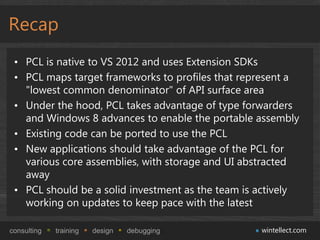
Recap
 • PCL is native to VS 2012 and uses Extension SDKs
 • PCL maps target frameworks to profiles that represent a
   "lowest common denominator" of API surface area
 • Under the hood, PCL takes advantage of type forwarders
   and Windows 8 advances to enable the portable assembly
 • Existing code can be ported to use the PCL
 • New applications should take advantage of the PCL for
   various core assemblies, with storage and UI abstracted
   away
 • PCL should be a solid investment as the team is actively
   working on updates to keep pace with the latest

consulting   training   design   debugging         wintellect.com
Questions?


                            Jeremy Likness (@JeremyLikness)
                            Principal Consultant
                            jlikness@wintellect.com


consulting   training   design   debugging                    wintellect.com

Wintellect - Devscovery - Portable Class Library

  • 1.
    Portable Class Library:Tomorrow's Apps Today Jeremy Likness (@JeremyLikness) Principal Consultant jlikness@wintellect.com Copyright © 2012 consulting training design debugging wintellect.com
  • 2.
    what we do consulting training design debugging who we are Founded by top experts on Microsoft – Jeffrey Richter, Jeff Prosise, and John Robbins – we pull out all the stops to help our customers achieve their goals through advanced software-based consulting and training solutions. how we do it Training • On-site instructor-led training Consulting & Debugging • Virtual instructor-led training • Architecture, analysis, and design services • Devscovery conferences • Full lifecycle custom software development • Content creation Design • Project management • User Experience Design • Debugging & performance tuning • Visual & Content Design • Video & Animation Production consulting training design debugging wintellect.com
  • 3.
    Building Windows 8Apps with C# • http://bit.ly/win8design • Free source at: http://windows8applications.codeplex.com/ • Everything you need to build and deploy Windows Store apps using C# and XAML • Includes the portable project you will see today consulting training design debugging wintellect.com
  • 4.
    Agenda • Introduction to the Portable Class Library • Understanding Extension SDKs • Portable profiles • Chasing ICommand: PCL Under the Hood • Porting existing code • Strategies for building new applications • Comprehensive Example: Wintellog • PCL Futures consulting training design debugging wintellect.com
  • 5.
    Introducing PCL •Write and build managed assemblies that work (without recompiling) on more than one .NET Framework platform • Target frameworks include: – .NET Framework 4 and later (including WPF) – .NET for Windows Store apps (Windows 8) – Silverlight 4 and later – Windows Phone 7 and later – Xbox 360 • Eliminate sharing of source consulting training design debugging wintellect.com
  • 6.
    Supported Features Feature .NET Windows Silverlight Windows Xbox 360 Framework Store Phone Core Yes Yes Yes Yes Yes XLINQ 4.0.3+ Yes Yes Yes Yes LINQ Yes Yes Yes Yes Network Yes Yes Yes Yes Serialization Yes Yes Yes Yes WCF Yes Yes Yes Yes IQueryable Yes Yes Yes 7.5+ MVVM 4.5 Yes Yes Yes MEF Yes Yes Yes Numerics Yes Yes Yes Dynamic 4.5 Yes Yes Annotations 4.0.3+ Yes Yes consulting training design debugging wintellect.com
  • 7.
    PCL in MSDNDocumentation consulting training design debugging wintellect.com
  • 8.
    PCL in MSDNDocumentation consulting training design debugging wintellect.com
  • 9.
    PCL and Model-View-ViewModel • .NET Framework 4.5, .NET for Windows Store apps, Silverlight, and Windows Phone • Observable collections (normal and read-only) • Notify property changed • Notify collection changed • Notify data error info • ICommand consulting training design debugging wintellect.com
  • 10.
    PCL + VS2012 = Extension SDK • Software Development Kit (SDK) is a collection of files that Visual Studio will treat as a single item – Platform SDK – mandatory for a target platform, i.e. "Windows 8 SDK" – Extension SDK – optional components to extend a platform • Target Platform Moniker (TPM) = Identifier (TPI) and Version (TPV) ex: "Windows, version=8.0" • References (binaries, either .WinMD or assemblies), redistributables, and design-time components • Can drop any components to a path with a TPM and Visual Studio will substitute that path • Easy to see what the target profile is • Each combination of target platforms creates a unique profile consulting training design debugging wintellect.com
  • 11.
    PCL Under theCovers • Use ILDASM to inspect portable assemblies • ICommand lives in System.Windows.dll for Silverlight, but System.dll in .NET 4.5 and Windows.UI.Xaml.Input.dll in Windows Store apps ("retargetable") consulting training design debugging wintellect.com
  • 12.
    PCL Under theCovers (cont.) • Classic type forwarders route to the appropriate assembly consulting training design debugging wintellect.com
  • 13.
    PCL Under theCovers (cont.) • Windows Store apps forward to System.ObjectModel and language projections maps them to the WinRT framework consulting training design debugging wintellect.com
  • 14.
    demo Basic MVVM with PCL consulting training design debugging wintellect.com
  • 15.
    Porting Existing Code • Always easier when implementing MVVM, but are your ViewModels tied to views (i.e. do you include XAML namespaces?) • Decoupled code is key • Identify key APIs that are platform-specific and implement façade • Common areas to refactor out include UI, networking, and storage • Convert an existing class library to a PCL assembly consulting training design debugging wintellect.com
  • 16.
    Porting Existing Code • You can convert an existing class library to a PCL • First, unload the project • Second, change the settings: <Import Project="$(MSBuildToolsPath)Microsoft.CSharp.targets" /> to <Import Project="$(MSBuildExtensionsPath32)MicrosoftPortable$(Target FrameworkVersion)Microsoft.Portable.CSharp.targets" /> • Next, add the following project GUIDs to the end of the first property group – this adds the library tab and dialog to change the targets: <ProjectTypeGuids>{786C830F-07A1-408B-BD7F- 6EE04809D6DB};{FAE04EC0-301F-11D3-BF4B- 00C04F79EFBC}</ProjectTypeGuids> • Finally, reload the project and select the target frameworks consulting training design debugging wintellect.com
  • 17.
    Strategies for BuildingNew Apps • Follow S.O.L.I.D. Principles – they do make it easier – Single responsibility – a class should only do one thing and change for one reason – Open/closed principle – open for extension, closed for modification – Liskov substitution principle – no side effects/unexpected behaviors when cast to a base class – Interface segregation – interfaces should be focused on specific, targeted functionality – Dependency Injection – keep dependencies external from your class and inject them • Use MVVM and keep view-specific code in the view, not the view model • Target the smallest number of frameworks possible in your portable assemblies to ensure the widest surface area of APIs to choose from, i.e. don't include Xbox if you're not going to write for it • Pick a target platform to run your unit tests and only write tests for PCL assemblies in that target • Don't forget to write unit tests for the classes that are specific to target platforms consulting training design debugging wintellect.com
  • 18.
    demo Wintellog: Windows Store and WPF consulting training design debugging wintellect.com
  • 19.
    Recap • PCLis native to VS 2012 and uses Extension SDKs • PCL maps target frameworks to profiles that represent a "lowest common denominator" of API surface area • Under the hood, PCL takes advantage of type forwarders and Windows 8 advances to enable the portable assembly • Existing code can be ported to use the PCL • New applications should take advantage of the PCL for various core assemblies, with storage and UI abstracted away • PCL should be a solid investment as the team is actively working on updates to keep pace with the latest consulting training design debugging wintellect.com
  • 20.
    Questions? Jeremy Likness (@JeremyLikness) Principal Consultant jlikness@wintellect.com consulting training design debugging wintellect.com

Editor's Notes

  • #11 var one = 1;one;typeof one;var two = &apos;2&apos;,two;typeof two;var three = one + two;three;typeof three; var three = Number(one) + Number(two);typeof three;three;var one = [1,2,3];one;typeof one;var two = [&apos;1&apos;, &apos;2&apos;, &apos;3&apos;]two;typeof two;one[0] == two[0];one[0] === two[0];var three = one + two;typeof three;three;var three = one.concat(two);three;typeof three;
  • #12 var one = 1;one;typeof one;var two = &apos;2&apos;,two;typeof two;var three = one + two;three;typeof three; var three = Number(one) + Number(two);typeof three;three;var one = [1,2,3];one;typeof one;var two = [&apos;1&apos;, &apos;2&apos;, &apos;3&apos;]two;typeof two;one[0] == two[0];one[0] === two[0];var three = one + two;typeof three;three;var three = one.concat(two);three;typeof three;
  • #13 var one = 1;one;typeof one;var two = &apos;2&apos;,two;typeof two;var three = one + two;three;typeof three; var three = Number(one) + Number(two);typeof three;three;var one = [1,2,3];one;typeof one;var two = [&apos;1&apos;, &apos;2&apos;, &apos;3&apos;]two;typeof two;one[0] == two[0];one[0] === two[0];var three = one + two;typeof three;three;var three = one.concat(two);three;typeof three;
  • #14 var one = 1;one;typeof one;var two = &apos;2&apos;,two;typeof two;var three = one + two;three;typeof three; var three = Number(one) + Number(two);typeof three;three;var one = [1,2,3];one;typeof one;var two = [&apos;1&apos;, &apos;2&apos;, &apos;3&apos;]two;typeof two;one[0] == two[0];one[0] === two[0];var three = one + two;typeof three;three;var three = one.concat(two);three;typeof three;
  • #15 Show the original first. Run in IE8 and IE9, then show crash in IE7 – find out if students can even see where the crash is coming from.Run JSLint, note it stops after a short time and you have to keep making fixes to keep it moving. Note complaints about spaces. Show that the defect was addressed.Now configure JSHint and show that experience.
  • #19 Show the original first. Run in IE8 and IE9, then show crash in IE7 – find out if students can even see where the crash is coming from.Run JSLint, note it stops after a short time and you have to keep making fixes to keep it moving. Note complaints about spaces. Show that the defect was addressed.Now configure JSHint and show that experience.